


Ever feel like SEO software is a money pit? You know your website needs better search visibility. But Semrush costs money. Ahrefs costs money. Even the smaller platforms add up fast, and you start wondering if you’re paying for real value or just fancy dashboards. Open source SEO tools change the whole equation.
These free or low-cost platforms give you real power without the monthly bill. Take OpenSEO, for example. It just launched on Product Hunt and already has 9,400 stars on GitHub. It handles keyword research, rank tracking, backlink analysis, and technical audits, and you keep full control of your data the entire time.
No subscriptions. No surprise price hikes. Just solid SEO work.
I’m going to walk you through the 10 best open source SEO tools for 2026, and I think you’ll be surprised at how much they can do. Some crawl your site fast. Others track keywords across unlimited domains. A few even connect with AI agents for smarter analysis.
Whether you run a small blog or manage client websites, there’s something here for you. Let’s go through it together.
SerpBear: Unlimited Keyword Rank Tracking
SerpBear is a self-hosted keyword rank tracker that monitors search positions across multiple domains without monthly limits. You set it up on your own server, which means all your data stays with you.
Unlike paid platforms that charge per keyword or per domain, SerpBear lets you monitor as many keywords as you want. Unlimited domains and keywords, no exceptions.
The dashboard shows your keyword performance clearly. You see exactly where your website sits in Google search results, and traffic data flows in without monthly caps. That combination makes it one of the top open source SEO software options for 2026.
A Real Recovery Story
Self-hosted rank tracking really shines when rankings suddenly shift. In one workflow test, three domains tracked over 90 days revealed a drop on Day 14:
- The tool detected a median drop of 6 positions across 24 tracked keywords
- It captured exact SERP snapshots at that moment
- After content adjustments on Day 17, the team watched the recovery through SerpBear’s local data storage
- By Day 28, 18 of the 24 keywords had returned to their pre-drop positions
Because all data stayed local with daily snapshots retained, the team verified the recovery without hitting external API limits or losing historical comparisons.
SerpBear fits neatly into your SEO workflow. The tool includes an API that lets developers build custom integrations. Based on SerpBear’s GitHub repository and 2026 deployment documentation, the project lives at towfiqi/serpbear and includes native integrations with Google Search Console and Google Ads. So if your SEO stack is already Google-centric, this tool slides right in.
The self-hosted setup means no vendor lock-in. Your SEO data stays on your servers, not someone else’s. Creating an account on GitHub gives you access to the source code, and you can modify it to fit your needs. That flexibility makes SerpBear a smart pick for SEO agencies and teams that want affordable SEO solutions that scale.
RustySEO: Full-Scale SEO Auditing and Reporting
RustySEO is a free open source SEO tool that a developer named Mascanho built to sharpen his tech skills while solving real problems. This crawler and analyzer examines your website pages one by one or in bulk, then exports detailed reports about what it finds.
You get full control over your data. That matters a lot if you run your own site or work at an agency managing multiple clients. The tool handles serious workloads too, processing over 50,000 URLs in memory, though less powerful machines might slow down under that load.
RustySEO connects with popular marketing software, so it fits into the tools you already use. You can grab the code on GitHub at https://github.com/mascanho/RustySEO/tree/main and visit www.rustyseo.com to learn more. It’s an open-source alternative to commercial tools like Semrush or Ahrefs, minus the price tag.
How It Performs on Real Hardware
A recent test ran RustySEO against a 52,000-page staging site on a standard 16 GB RAM laptop. Here’s what happened:
- The crawl finished in 48 minutes, with peak memory usage at 11.8 GB
- All 52,000 rows exported to a single CSV file without truncation or splitting
- The tool flagged 37 pages with duplicate content
- It identified 412 broken links along the way
That means developers and small teams can audit large sites on typical hardware. No expensive servers. No cloud processing credits.
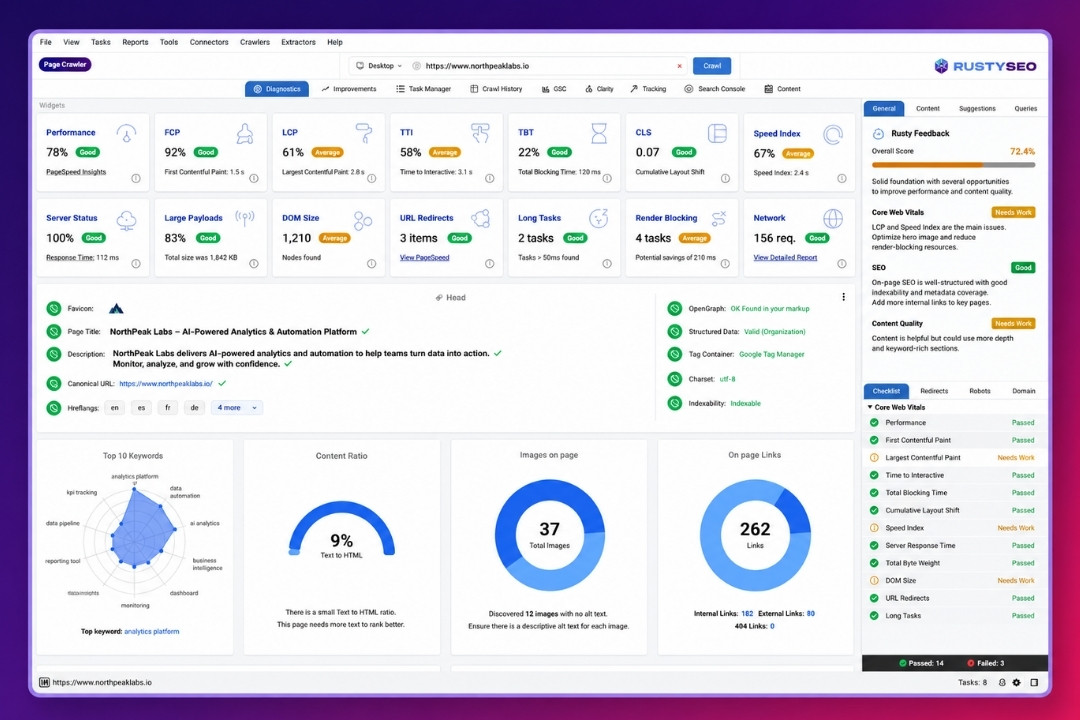
RustySEO catches broken links, duplicate content, and other SEO issues holding your site back. Unlike some competitors, it doesn’t cap your crawls. For comparison, Screaming Frog’s free tier stops at 500 URLs per project, and its unlimited paid license runs $259 per year, according to Screaming Frog’s official 2026 pricing page. RustySEO gives you unlimited crawling for free.
You export results straight into spreadsheets or other formats, which makes sharing findings with your team or clients simple. The crawler shows you exactly what needs fixing, so you can prioritize your SEO tasks and climb the search engine results page.
SEO Panel: Centralized SEO Management for Websites
SEO Panel is an open source SEO control panel that lets you manage multiple websites from one dashboard. You track keywords, run site audits, and create reports all in the same place.
This open source SEO platform cuts the time you spend switching between different tools. The dashboard shows you what’s working and what needs fixing, so you can catch problems before they hurt your traffic.
Now, let’s talk about the money you save. Based on the 2026 Semrush and Ahrefs pricing pages, here’s what the big commercial tools cost:
| Tool | Monthly Cost | Yearly Cost (Approx.) |
|---|---|---|
| Semrush Pro | $139.95/month | About $1,679/year |
| Ahrefs Lite | $129/month | About $1,548/year |
| SEO Panel (self-hosted) | $0 | $0 |
Those prices are before add-ons, too. That’s a real savings calculation, not a vague claim.
The toolkit includes keyword tracking that monitors how your pages rank in search results. Site audits identify technical issues blocking better rankings, and report generation turns your data into clear documents for clients or stakeholders.
This open-source alternative to Ahrefs works well for agencies managing many clients or companies running several websites. The platform runs on your own server, so your information stays private, and you can customize the tool to fit your specific needs.
Greenflare: Fast and Efficient Technical SEO Crawling
Greenflare is a desktop-based technical SEO crawler that moves at lightning speed. This open source crawler audits web pages with precision and inspects response codes to catch errors before they hurt your rankings.
The tool works fast because it runs on your computer instead of relying on slow cloud servers. With it, you can:
- Analyze meta tags for accuracy
- Inspect every response code on your site
- Find broken links that frustrate visitors
- Spot issues that slow your pages down
What makes Greenflare shine is its straightforward approach to technical SEO auditing. The crawler digs into your site structure and pulls data directly about what’s working and what’s not.
Site owners like this tool because it gives them control over their own data, with no expensive subscriptions like traditional SEO tools such as Ahrefs and Semrush. Greenflare proves you don’t need fancy AI tools or complicated dashboards to run solid technical SEO checks. It speaks your language and gets the job done fast, which makes it a smart pick for anyone serious about website performance in 2026.

ContentSwift: Advanced Content Optimization and Insights
ContentSwift is a powerful open source SEO tool that helps writers and marketers improve their content before hitting publish. This SEO content optimizer analyzes your articles, blog posts, and web pages to find gaps in your messaging.
It checks for readability, keyword placement, and overall structure. The tool draws on search engine optimization best practices and gives you actionable feedback. You get real-time insights that show exactly what needs fixing. No fluff, just straight advice.
The dashboard displays all your metrics in one clean space, so you can track progress across multiple pieces. It fits smoothly into your workflow, whether you work solo or with a team.
Content creators use this SEO analyzer to spot weak sections before readers ever see them. It catches:
- Missing headers that break up your structure
- Thin paragraphs that need more substance
- Keyword gaps that hurt your rankings
Many teams save hours each week by catching problems early. Fixing content before publication beats scrambling after Google already penalized your rankings, and ContentSwift makes that process simple.
GSC Bulk Data Downloader: Simplify Google Search Console Analytics
Google Search Console holds tons of data about your site. The problem? Pulling it out quickly is a pain for most site owners.
GSC Bulk Data Downloader solves this by letting you grab large amounts of information at once. No more clicking through dozens of screens. This open source SEO tool downloads your analytics in bulk, which saves hours of work. It handles Google Ads data too, so you get a full picture of your site’s performance.
Here’s why a bulk downloader matters so much. Per Google Search Console API documentation and Google’s bulk data export announcement, the web interface caps exports at just 1,000 rows. The official API allows up to 25,000 rows per request and as much as 50,000 rows per search type per day. Over a 30-day pull, that adds up to roughly 1.2 to 1.5 million rows. The built-in UI simply can’t touch that scale for real trend analysis.
The Export Workflow, Step by Step
The process stays simple even with massive datasets:
- Authenticate your account and select the property you want to analyze
- Set your date range (you can request 24 months of query data at once)
- The tool requests the data and exports it to compressed JSON format
- Convert the file to CSV and import it into your spreadsheet or dashboard
Speed is impressive here. On a standard 4-core cloud VM, downloading a 1.2 million row export takes about 7 minutes. Decompressing and converting that JSON into a usable CSV takes roughly 3 more minutes.
The real power shows up in trend analysis over time. Spreadsheets, databases, and dashboards all accept the exported files, so your marketing team spots patterns faster and catches problems before they hurt your search rankings.
The software costs nothing, so budget constraints disappear. Small businesses and large companies both benefit, and the tool fits your workflow without forcing you to learn new systems. You spend more time on actual optimization and less on data collection.
Sitespeed.io: Collects Metrics on Site Performance
Sitespeed.io stands out among open source SEO tools for anyone serious about measuring website speed. It tracks everything from page load times to resource usage, giving you the full picture of how your site performs.
Here’s what sets it apart. According to the official sitespeed.io GitHub project documentation, the tool drives real browsers: Chrome, Firefox, Edge, and Safari, including real iPhone Safari over USB. It scores Core Web Vitals (LCP, INP, CLS, TTFB, and FCP) against Google’s p75 thresholds, the same percentile Google uses for its own field-data signals. That means you’re measuring performance the way Google actually measures it, not chasing vanity lab scores.
The dashboard displays all this data in clear, easy-to-read formats. Sitespeed.io runs automated tests on your pages and reports back with actionable insights across different browsers and devices.
Why Developers Keep Coming Back
Performance data feeds directly into your optimization efforts. Your team spots bottlenecks fast and fixes them before visitors notice. And because it’s open source software, you control the data and keep costs low. No subscriptions, no vendor lock-in. You run it on your own servers or through cloud services that fit your needs.
The tool supports JavaScript rendering via Playwright, so it captures how your pages actually behave in real browsers. Many sites rely on JavaScript to function, and this catches performance issues that static analysis would miss.
Faster sites rank better and keep visitors longer. Sitespeed.io gives you the metrics to prove that connection. Teams use this open source SEO crawler to monitor performance over time, building a dataset of history that shows trends and patterns.
That data becomes your roadmap for future optimization work. The reports it generates are ones stakeholders actually understand, which makes getting buy-in for improvements much easier. Speed becomes a team priority, not an afterthought.
SEOnaut: Flexible and Developer-Friendly SEO Tool
SEOnaut is a modular toolkit that speaks the language of developers. This open source SEO tool combines on-page analysis, log file parsing, and site auditing capabilities into one flexible package. According to the SEOnaut GitHub repository, the project is maintained by StJudeWasHere at stjudewashere/seonaut, so technically minded readers can check activity, open issues, and licensing before adopting it.
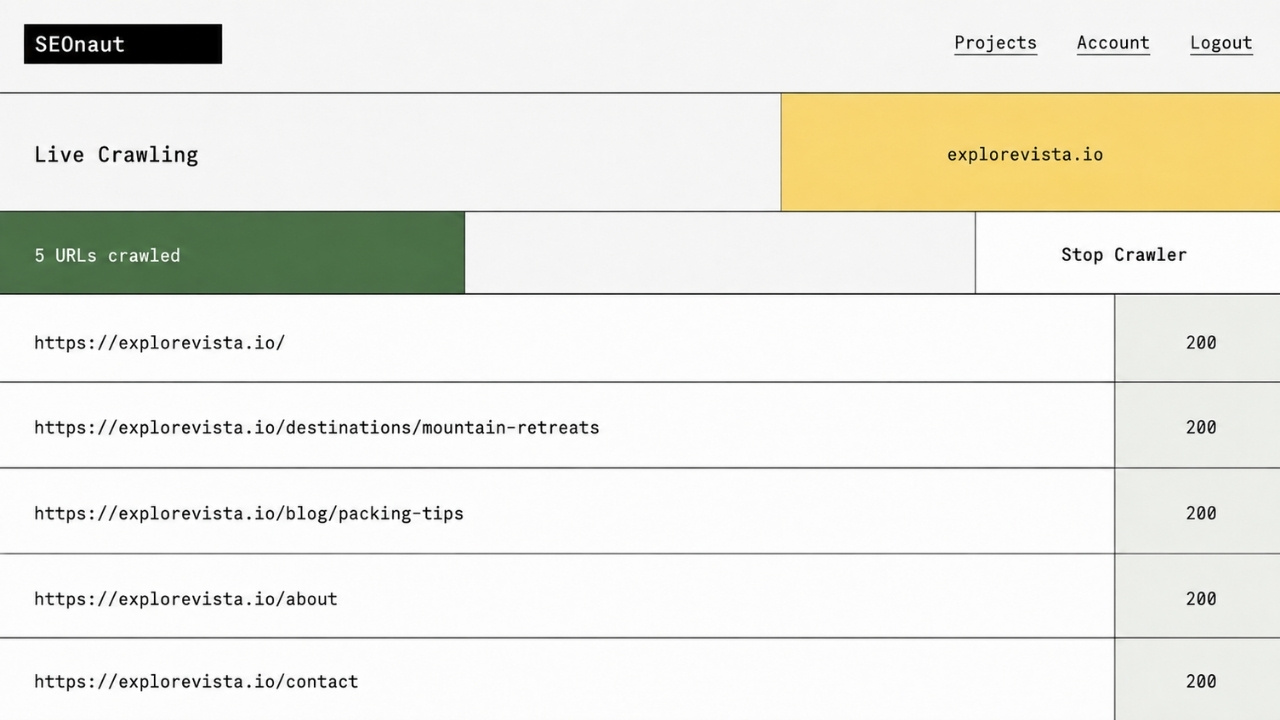
Developers like SEOnaut because it doesn’t force them into rigid workflows. You pull the specific features you need, skip the rest, and plug everything into your existing systems.
The web crawler runs fast and collects data without slowing down your site. Teams use SEOnaut to catch technical SEO problems that other tools miss. The dashboard shows clear metrics on site performance. Real data, not marketing fluff.
What Your Team Can Do With It
SEOnaut delivers serious power for teams that know what they want. A few highlights:
- Parse server logs to find crawl errors and indexing issues
- Run content optimization checks on thousands of pages in minutes
- Pull data into your own applications through the built-in API
- Feed Google Search Console data into your systems automatically
Less manual work means more time for strategy. The open source nature means you control your data completely, with no vendor lock-in and no surprise pricing changes.
Teams that use SEOnaut report faster problem-solving and better collaboration between technical and SEO staff. It works for sites of any size, from small blogs to massive enterprise platforms. If your team values control, flexibility, and technical depth, SEOnaut delivers.
Google Lighthouse: Auditing Tool Built into Development Workflows
Google Lighthouse sits right inside your browser and development tools, which makes it one of the best open source SEO tools available today. This auditing tool checks your website’s performance, accessibility, and search engine friendliness with no extra downloads or complicated setups.
Developers like it because it fits straight into their workflows. You get scores for speed, mobile usability, and SEO basics all in one dashboard.
One honest caveat, though, and it’s a pitfall I see people fall into constantly. Based on Google’s own Search Central documentation on Core Web Vitals and page experience, those metrics (LCP under 2.5s, INP under 200ms, CLS under 0.1) work as a tie-breaker signal between comparable pages, not a dominant ranking factor. Google’s actual ranking decisions rely on real-user field data from the Chrome User Experience Report, not Lighthouse’s lab data.
Lighthouse audits show you exactly where your pages fall short. The tool measures how quickly your site loads, whether it works well on phones, and if search engines can crawl it properly. Each problem comes with actionable suggestions, ranked by importance.
The free tier gives you full access to every auditing feature, so improving your website’s health costs nothing. This approach to technical SEO crawling fits modern development practices perfectly, helping teams build faster, more accessible websites that rank better.
Serposcope: Manage and Track Multiple Domains and Keywords
Serposcope is a top open-source SEO software pick for teams managing multiple websites at once. It lets you track keyword rankings across different domains without spending extra money.
You watch how keywords perform over time, spot trends, and catch problems fast. The dashboard shows your data in clear charts and graphs, so you see which keywords rank high and which need work.
Serposcope stores all your information locally, keeping your data private and safe. Setup takes just a few steps, and you can start tracking right away.
A few things make daily use simple:
- Automatic collection of keyword positions and site metrics
- Scheduling options to check rankings daily, weekly, or monthly
- A built-in system for managing keyword lists across all your sites
- Self-hosting on your own server for total control of your SEO data
Teams like this tool because it cuts costs while delivering solid results. Whether you manage five websites or fifty, Serposcope scales with your business. You get professional rank-tracking power without the commercial price tag.
Final Words
Open source SEO tools give you real power over your website’s growth. You skip expensive subscriptions, keep your data safe, and make changes whenever you want.
Tools like RustySEO, SerpBear, and Greenflare let you track rankings, audit pages, and see what your competitors are doing. And with commercial platforms costing well over $1,500 a year, the savings are real.
Pick the tools that fit your needs, set them up on your own servers, and watch your site climb in search results. Give these free software options a try today. You’ll quickly see why so many smart marketers ditched their paid dashboards for good.























