


Microlearning has become a popular way to deliver training in short, focused lessons that fit into busy schedules. Instead of asking learners to complete long courses in one sitting, it breaks information into smaller units that may take only a few minutes to finish. These lessons can include short videos, quizzes, flashcards, infographics, simulations, or step-by-step activities.
But what is microlearning, and does it actually improve learning outcomes? The answer depends on the subject, the learner’s goal, and how the content is designed. Microlearning can be highly effective for reinforcing knowledge, teaching specific procedures, supporting workplace training, and helping people review information regularly. However, it is less suitable for complex topics that require deep explanation, extended practice, or a broader understanding of how different ideas connect.
This guide explains how microlearning works, where it delivers the best results, when it may fall short, and how organizations, educators, and learners can use it effectively.
What Is Microlearning?
Microlearning breaks training into bite-sized, chunked content that tackles one clear learning outcome at a time. Think of it as help you can use in the flow of work, not a long class you have to sit through before you can act.
Definition and key characteristics
In that 2024 review, researchers found the strongest microlearning designs shared a few traits: one specific objective, a short time frame, and a direct link to action. That is why good microtraining feels precise. It answers one question, teaches one step, or helps you avoid one mistake.
- One target outcome: Each lesson should cover one task, decision, or concept, such as logging a safety incident or handling one customer objection.
- Short run time: Most useful modules last a few minutes, not because short is magic, but because the scope stays tight.
- Point-of-need access: Learners pull it up on a phone or laptop when they need support, which makes on-demand training much more practical.
- Standalone design: A learner should be able to finish the unit and do something better right away.
That last point matters more than length. If you slice a 60-minute webinar into 12 random clips, you have shorter video, not better instructional design.
Common formats, including videos, quizzes, and gamification
The format should match the job. Short videos work well for demonstrations, quizzes help with recall, and job aids shine when someone needs a fast answer in the moment.
| Format | Best use | Why it helps |
|---|---|---|
| 2 to 5 minute video | Show a task, tool, or workflow | Learners can watch the exact step before doing it themselves. |
| One-page checklist or job aid | Compliance, equipment steps, call handling | It cuts search time and supports performance improvement during work. |
| Quiz or knowledge check | Reinforcement after training | Retrieval practice helps knowledge retention better than passive review. |
| Scenario or game | Judgment, sales conversations, safety decisions | It gives people a low-risk way to practice choices and see consequences. |
Other common formats include audio snippets, infographics for timelines or processes, and short interface microcopy such as tooltips or in-app prompts. Gamification features like badges and leaderboards can help completion when the goal is repeated practice, but they are less helpful when someone needs an urgent answer fast.
Named tools make this easier. Articulate Rise 360 includes a microlearning format and ungraded knowledge check blocks for low-pressure practice, while TalentLMS supports video, tests, surveys, and SCORM, xAPI, and cmi5 packages when you need reporting inside a learning management system.
A simple five-minute onboarding video shows why the format is practical. When you keep the scope to one compliance checklist item and end with one question, the build can stay lean: about 45 minutes for the script, 30 for the storyboard, 20 for filming, 60 for editing, and 25 for captions and LMS upload. That is 3 hours and 40 minutes for one polished module, which is much faster than rebuilding a full course every time a policy changes.
Benefits of Microlearning
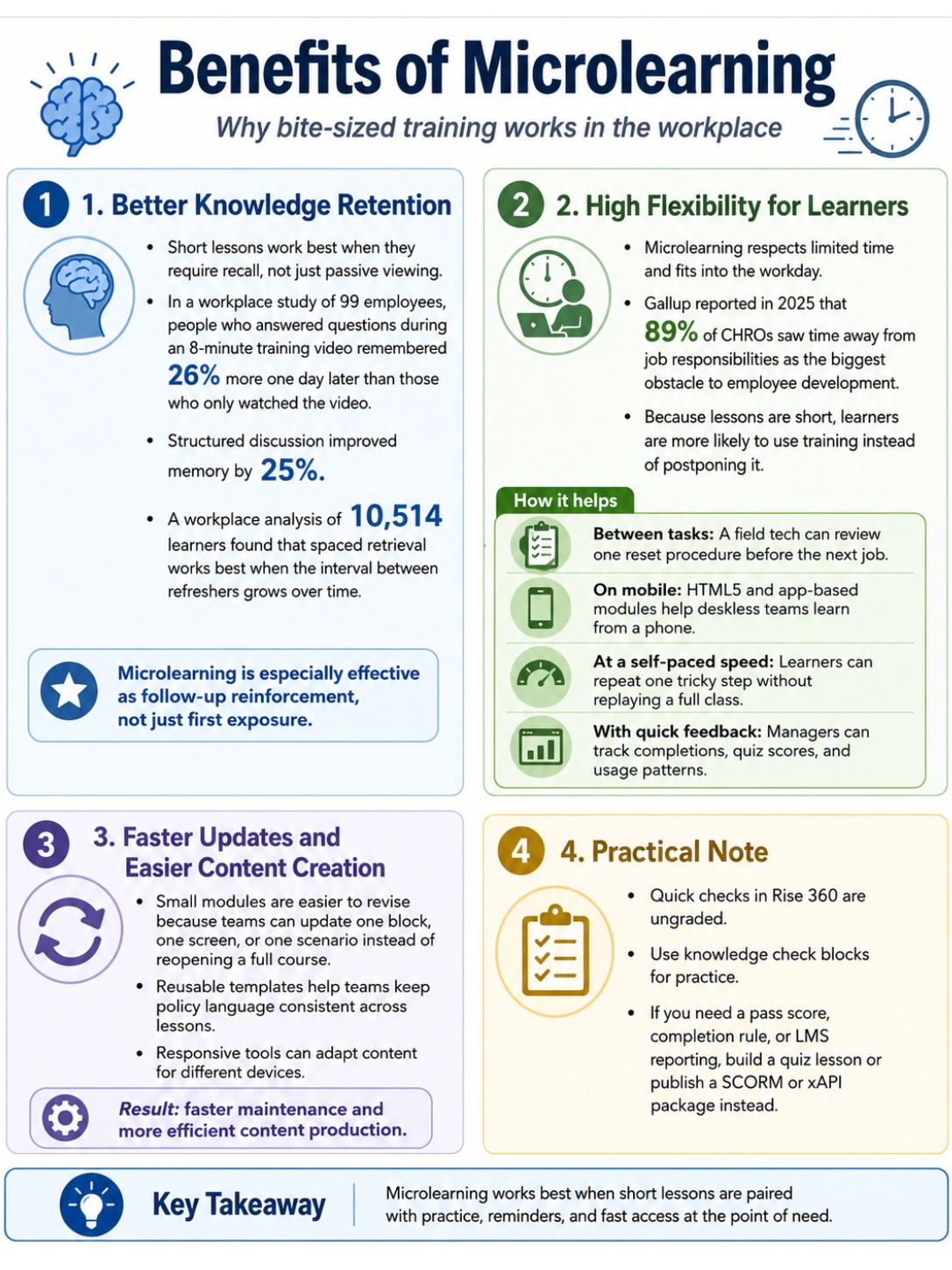
Bite-sized learning makes training easier to use because it respects time, reduces overload, and supports skill acquisition in small steps. The biggest gains usually show up when you pair short lessons with practice, reminders, and fast access at the point of need.
Better knowledge retention
Short lessons help most when they force recall, not just viewing. In a workplace study of 99 employees, people who answered questions during an 8-minute training video remembered 26% more a day later than people who simply watched the video, and structured discussion lifted memory by 25%.
The same pattern shows up at scale. A workplace analysis of 10,514 learners found that spaced retrieval works best when the gap between refreshers grows with the length of time you want people to remember the material. In plain English, microlearning works especially well as a follow-up, not just as a first exposure.
High flexibility for learners
This is where bite-sized learning solves a real workplace problem. Gallup reported in 2025 that 89% of CHROs saw time away from job responsibilities as the biggest obstacle to employee development, so training that fits into the workday has a real advantage.
- Between tasks: A field tech can review one reset procedure before walking to the next job.
- On mobile: HTML5 and app-based modules let deskless teams learn from a phone instead of waiting for desktop access.
- At a self-paced speed: Learners can repeat one tricky step without replaying a full class.
- With quick feedback: Managers can see completions, quiz scores, or usage patterns and spot where people still need help.
That flexibility also improves learning efficiency. When people can find the answer in three minutes, they are more likely to use training than postpone it.
Faster updates and easier content creation
Small modules are easier to revise because you update one block, one screen, or one scenario instead of reopening an hour-long course. Tools like Rise 360 also adapt content to different devices and let teams reuse shared block templates, which helps keep policy language consistent across lessons.
There is a practical catch. If you build a quick check in Rise 360, its knowledge check blocks are ungraded. Use those for practice. If you need a pass score, completion rule, or LMS report, build a quiz lesson or publish a SCORM or xAPI package instead.
When Is Microlearning Effective?
Microlearning is most effective when you use it for a small, time-sensitive need. It shines in on-the-job training, quick onboarding touchpoints, and reinforcement after broader training, especially when each lesson supports a clear learning outcome.
| Use case | Why microlearning fits | What to pair it with |
|---|---|---|
| Point-of-need support | Employees need one answer fast | Searchable job aids and short demos |
| Onboarding reminders | New hires forget details after day one | Manager check-ins and live practice |
| Post-training refreshers | Spacing and retrieval improve retention | Short quizzes and scenarios over time |
| Simple compliance updates | One rule or step can stand alone | A scored check for accountability |
On-the-job training and support
Point-of-need support is the sweet spot. A short clip, checklist, or decision tree can help someone do a rare task correctly without leaving the workflow for 30 minutes.
The official xAPI standard is useful here because it records learning events as statements, so teams can track more than course completions. SCORM is still a good fit for standard modules and quiz scores inside an LMS. Use xAPI when you also want data from mobile apps, simulations, or offline activity.
- Equipment use: Show one reset or setup step before the task begins.
- Sales enablement: Give reps one battle card for a specific objection.
- Safety support: Surface a short checklist before a high-risk procedure.
- Software workflows: Offer a clip on one feature instead of a full systems course.
Quick onboarding for new employees
New hires rarely need every answer on day one. They need the right answer this week, then the next one when their responsibilities widen.
Gallup has reported that only about 1 in 10 employees strongly agree their organization does a good job of onboarding, and that most roles take 12 months or more for people to get fully up to speed. That makes microlearning a strong support tool for onboarding, but a poor replacement for manager coaching, live practice, and clear expectations.
- Day 1: Three short modules on access, safety, and who to ask for help.
- Week 1: Job-specific walkthroughs and one-question checks.
- Days 30 to 90: Refreshers on systems, product knowledge, and common errors.
- Months 3 to 12: Deeper practice, coaching, and role-based performance support.
Reinforcement of key concepts after broader training
This may be the best use of microlearning. A 2014 randomized study in American Academy of Neurology annual meeting courses found that repeated quizzing led to 55% long-term retention after 5.5 months, compared with 46% for repeated study and 44% for no further exposure.
If you already run workshops, webinars, or compliance classes, add a short recap 24 hours later, a quiz a week later, and a scenario a month later. That simple sequence supports knowledge retention far better than a one-time event.
Challenges of Microlearning
Microlearning can lift training efficiency, but it also creates new management problems. The short format hides weak design fast, because every missing step and every vague objective shows up right away.
Managing content consistency
Once you have 50 or 100 tiny modules, governance matters more than creativity. SHRM’s 2026 L&D research found that more than one in three L&D leaders named skills training as their top priority, which means many teams are producing more learning assets, faster, with less room for version confusion.
- Assign an owner: Every module needs one person responsible for updates.
- Add a review date: Put a visible month and year on policy-heavy lessons so stale modules stand out.
- Reuse approved blocks: Tools such as Rise 360 block templates help teams keep the same disclaimer, terminology, and structure across courses.
- Retire duplicates: If two modules teach the same step in different ways, archive one before learners lose trust.
Consistency also affects analytics. If every author names modules differently, your learning management system reports stop telling a clear story.
Ensuring adequate depth of information
Microlearning handles simple procedures, reminders, and refreshers well. It struggles when the learner needs deep context, layered judgment, or extended practice.
A 2019 scoping review in health professions education found that 94% of microlearning studies measured learner reaction, 82% measured knowledge or skill acquisition, and only 29% measured behavior change. That is a useful warning: short lessons often prove recall first, while real job performance still needs observation, coaching, or hands-on practice.
| If the topic is… | Use microlearning for… | Add this as well |
|---|---|---|
| Policy updates or one clear rule | The full lesson | A quick scored check for accountability |
| Software steps or equipment use | Demonstration and refresher support | Live practice in the real system |
| Customer de-escalation or management judgment | Scenarios and reminders | Coaching, role-play, and feedback |
| Technical certification or complex theory | Prework and spaced review | A longer course, lab, or workshop |
The best rule is simple. If the learner must explain why, adapt to exceptions, and perform under pressure, microlearning should support the training plan, not carry the whole thing.
Final Thoughts
So, what is microlearning and when is it actually effective? It works best when you use bite-sized learning to solve a small problem fast, reinforce a skill, or guide someone through a task right when they need it.
Keep each lesson tied to one learning outcome, pair short modules with quizzes or practice, and switch to deeper training when the topic needs context. That is how microlearning improves knowledge retention, skill acquisition, and performance improvement instead of just making training shorter.
FAQs about Microlearning
1. What is microlearning?
Microlearning is short training that covers one idea at a time, in small lessons. It uses bite-sized content to boost retention and focus, like a quick brain boost.
2. When is microlearning actually effective?
Microlearning is most effective for job tasks, refreshers, and just-in-time help.
3. How long should a microlearning session be?
Keep sessions about 3 to 10 minutes. Short time helps learners stay focused, and it improves retention through repetition. Use small lessons on mobile, for quick practice.
4. Can microlearning replace full courses?
No, it cannot replace deep, complex courses, but it pairs well with them. Use microlearning to reinforce training and boost engagement, as a helpful follow-up.

























