Podcasting looks simple until you try to publish consistently. You record a conversation or solo episode. Then the real work begins: editing mistakes, cleaning audio, writing show notes, choosing clips, creating captions, preparing descriptions, and promoting the episode. One recording can easily turn into several hours of production work.
That is where AI podcast production becomes useful.
AI will not fix a weak idea, a boring host, or a show with no clear audience. But it can remove much of the repetitive work around podcasting. It can help with research, outlines, transcription, rough editing, audio cleanup, show notes, clips, captions, and repurposing.
The best use of AI is not to create a fully automated podcast with no human judgment. The better use is to build a smarter production system. AI handles the slow, mechanical parts. Humans keep control of the voice, ideas, accuracy, and final quality.
This guide explains how AI podcast production works, where AI podcast tools are most useful, and how to build a practical podcast workflow AI can support without making your show sound generic.
What Is AI Podcast Production?
AI podcast production means using artificial intelligence to support the process of creating, editing, publishing, and repurposing podcast episodes.
It can help with:
- Topic research
- Guest background summaries
- Episode outlines
- Interview questions
- Transcription
- Text-based audio editing
- Filler word and silence detection
- Noise reduction
- Voice enhancement
- Show notes
- Timestamps
- Captions
- Short clips
- Social posts
- Newsletter summaries
- Translation or dubbing when appropriate
The focus here is support.
AI should not replace the reason people listen to the podcast. Listeners usually come back for trust, personality, useful ideas, strong questions, or a specific point of view. If AI removes those things, it has not improved the show. It has only made it faster to produce.
Good AI podcast production keeps the human voice at the center and uses tools to reduce production drag.
Why AI Podcast Production Matters
Most podcasts do not fail because the creator has nothing to say. They fail because the workflow becomes too heavy.
A one-hour episode can create hours of extra work. The host may need to review the conversation. The editor has to clean the file. Someone has to write the title, description, show notes, captions, clips, and promotional copy. If the podcast is part of a brand strategy, the same episode may also need to become a blog post, newsletter section, LinkedIn post, YouTube clip, and internal content asset.
That is a lot of work from one recording.
AI podcast tools can reduce that load. They can transcribe audio, detect long pauses, help with rough edits, clean background noise, draft show notes, suggest clips, and turn the episode into smaller content assets.
But speed is not the whole point. Faster production is only useful if the podcast remains worth hearing. The goal is not to publish more average episodes. The goal is to spend less time on repetitive tasks and more time improving the actual show.
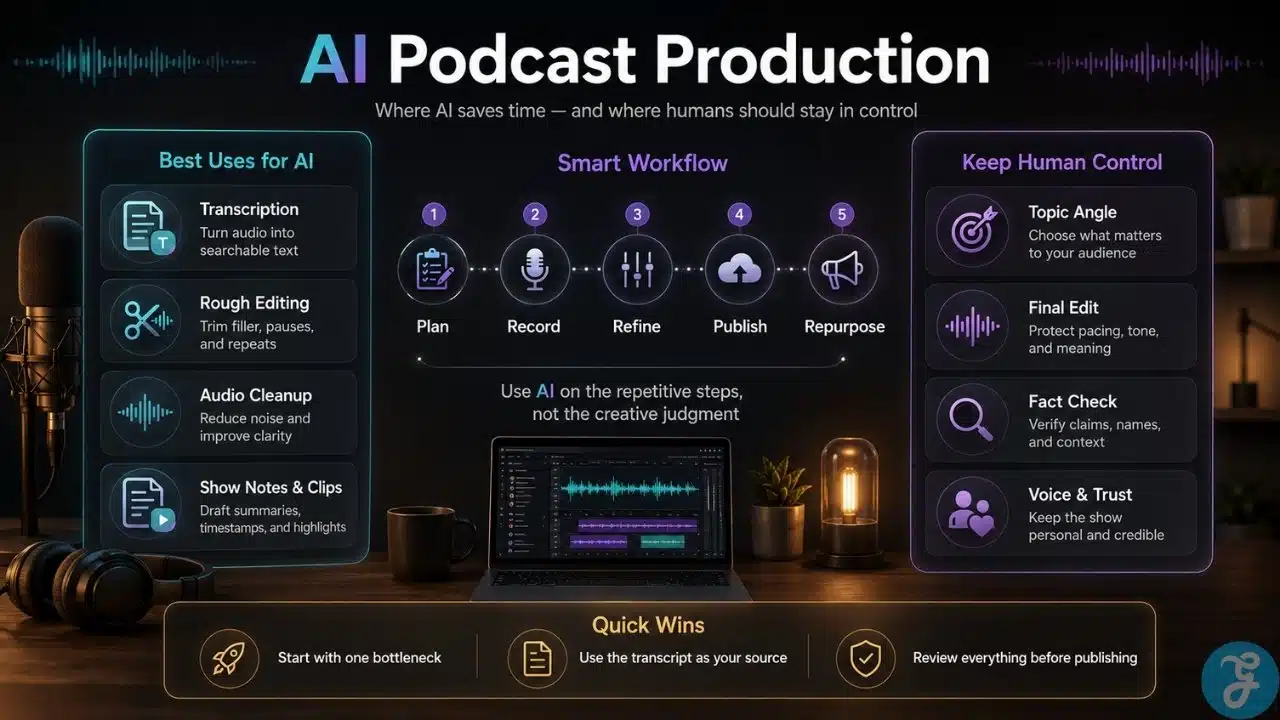
A Simple Podcast Workflow AI Can Support
A practical podcast workflow AI can support usually follows this path:
- Choose the episode topic
- Research the angle
- Build the outline or interview flow
- Prepare recording notes
- Record clean audio
- Transcribe the episode
- Edit the structure
- Clean and enhance the sound
- Create publishing assets
- Repurpose the episode
- Review performance and improve the next one
You do not need AI in every step. In fact, forcing AI into every part of production can make the process more complicated.
The best places to use AI are usually the slowest and most repetitive parts: transcription, rough editing, show notes, timestamps, captions, clip discovery, and content repurposing.
The human role should stay strongest in topic selection, guest handling, editorial judgment, final titles, accuracy checks, sensitive claims, and final approval before publishing.
Step 1: Start With a Clear Episode Idea
AI can generate topic ideas quickly, but it does not know your audience as well as you should.
Before using any tool, define the purpose of the episode:
- Who is this episode for?
- What question does it answer?
- What problem does it help solve?
- What should the listener understand by the end?
- Why should this be a podcast episode?
- What is the specific angle?
This prevents generic topics.
For example, “How AI Is Changing Marketing” is too broad. A stronger angle would be “How Small Marketing Teams Can Turn One Expert Interview Into a Month of Content With AI.” That version has a clearer audience, a clearer promise, and a stronger reason to listen.
AI can help refine your topic after you set the direction. You can ask it to suggest narrower angles, beginner-friendly versions, objections, examples, or related questions. But the final decision should come from your editorial judgment.
The best episodes are specific before they are efficient.
Step 2: Use AI for Research, but Verify Important Facts
Research is one of the strongest uses of AI podcast production, especially for interview shows, educational podcasts, expert commentary, and brand-led content.
AI can help summarize source material, organize messy notes, find themes, and suggest useful question areas. For guest interviews, it can help prepare a short host brief with the guest’s background, relevant work, possible talking points, and areas worth exploring.
For solo episodes, AI can help turn rough notes into a clearer structure. It can identify gaps, suggest examples, or organize the material into a more logical flow.
But AI research still needs verification.
AI can misunderstand a source, miss nuance, or present uncertain information too confidently. This matters even more when the episode includes health, finance, law, politics, technical claims, business performance, or named individuals.
A simple rule works well: let AI organize the research desk, but do not let it become the final authority.
Step 3: Create an Outline, Not a Lifeless Script
Many podcasts sound worse when the host reads a fully AI-written script.
The writing may be clean, but it often loses natural rhythm. It can sound polished, balanced, and completely forgettable. Podcasts need structure, but they also need personality, pauses, reactions, and the occasional imperfect sentence that sounds human.
AI is usually better for outlines than full scripts.
A good episode outline may include:
- Opening hook
- Listener problem
- Main promise
- Key talking points
- Examples or stories
- Guest questions
- Possible objections
- Closing takeaway
- Call to action
This gives the episode direction without forcing the host into robotic phrasing.
For interview podcasts, AI can also help arrange questions in a natural order. Start with context. Move into experience. Then explore examples, mistakes, lessons, and practical advice. A strong interview does not begin with the hardest question. It builds toward it.
The best podcast workflow AI supports structure while leaving room for the host to sound alive.
Step 4: Prepare a Recording Brief
A short recording brief can save a lot of editing time.
This is especially useful when more than one person works on the show. The host, producer, editor, and marketer should all understand what the episode is trying to do before recording begins.
AI can help create a one-page brief with:
- Working title
- Target listener
- Main episode promise
- Must-cover points
- Guest introduction
- Key questions
- Names or terms to pronounce correctly
- Sponsor or announcement notes
- Sensitive areas to handle carefully
- Closing call to action
This brief should not become a rigid script. It should work like a map. The host still needs to listen, react, and follow the strongest parts of the conversation.
Too much preparation makes a podcast stiff. Too little makes it rambling. A good brief sits in the middle.
Step 5: Record Better Raw Audio
AI can improve audio, but it cannot fully save bad recording habits.
Before depending on cleanup tools, record the cleanest audio you can. Use a decent microphone, choose a quiet room, wear headphones during remote interviews, and record separate tracks for each speaker when possible.
Simple habits make a big difference:
- Ask guests to avoid laptop microphones
- Turn off fans, notifications, and background noise
- Record a short test first
- Leave a pause after mistakes
- Repeat the sentence instead of restarting everything
- Keep backup recordings
- Avoid talking over guests when possible
Good raw audio gives AI cleanup tools a better starting point. Bad raw audio forces the software to work harder, and the result may sound processed or unnatural.
Listeners can forgive small imperfections. They are less forgiving when the audio is tiring to hear.
Step 6: Transcribe the Episode
Transcription is one of the clearest wins in AI podcast production.
A transcript turns the episode into a searchable production asset. It helps with editing, summaries, captions, accessibility, quotes, blog content, newsletters, and social posts. It also makes review easier because a producer or marketer can scan the conversation without listening to the entire recording.
A transcript can help you find:
- Strong quotes
- Repeated points
- Sections that need trimming
- Possible chapter breaks
- Important claims to verify
- Clip-worthy moments
- Follow-up content ideas
Transcripts are not perfect. They can struggle with names, accents, technical terms, overlapping speech, and poor audio. If the transcript will be published or used for captions, review it first.
Even with that limitation, transcription is one of the most useful AI podcast tools because it turns audio into material the whole workflow can use.
Step 7: Use AI for the Rough Edit
AI-assisted editing is best for the first pass.
Text-based editing tools can connect the transcript to the audio. Remove a sentence from the text, and the matching audio is removed too. This can save time when cutting filler words, false starts, long silences, repeated sections, and obvious mistakes.
AI can help identify:
- Long pauses
- Filler words
- Repeated phrases
- Awkward restarts
- Low-energy sections
- Potential highlights
- Sections that need tightening
But editing is not only cleanup. Editing is storytelling.
A technically clean episode can still feel slow. A messy moment can still be the most honest part of the conversation. Sometimes a pause matters. Sometimes a slightly imperfect answer feels more human than a polished one.
Use AI to make the rough edit faster. Use human judgment to decide the final shape.
Step 8: Clean and Enhance the Audio Carefully
Audio enhancement is another valuable part of AI podcast production, especially for remote interviews and small teams.
AI tools can help reduce background noise, improve voice clarity, balance volume, remove some echo, trim silence, and make speech easier to understand.
Common audio cleanup tasks include:
- Noise reduction
- Voice enhancement
- Volume leveling
- Echo reduction
- Mouth click reduction
- Silence trimming
- Speaker balancing
The goal is clarity, not artificial perfection.
Too much processing can make voices sound metallic, thin, or synthetic. That can be more distracting than the original problem. Always listen to the final export with normal headphones or speakers before publishing.
A clean voice is good. A plastic voice is not.
Step 9: Create Show Notes and Publishing Assets
Once the episode is edited, AI can help create the assets needed for publishing.
This can include:
- Episode title options
- Episode description
- Show notes
- Timestamps
- Guest bio
- Key takeaways
- Quote pulls
- Newsletter summary
- Blog outline
- YouTube description
- Social captions
- SEO-friendly summary
The best method is to work from the actual transcript. Do not ask AI to create generic show notes from a loose topic. Feed it the episode transcript and give it a clear format.
For example, ask for a short summary, five key takeaways, timestamped sections, guest links, and three title options. Then review the draft yourself.
This review matters. AI may overstate a guest’s point, simplify a nuanced answer, or include a claim that was not actually made. Show notes should make the episode attractive, but they should not misrepresent the conversation.
Step 10: Repurpose the Episode Without Losing Context
One good episode can become several useful content assets. This is where AI podcast production can help creators and teams get more value from the work they already did.
An episode can be repurposed into:
- Short video clips
- Audiograms
- Quote graphics
- LinkedIn posts
- Newsletter sections
- Blog articles
- YouTube Shorts
- TikTok clips
- Instagram Reels
- Internal learning notes
- Sales enablement content
AI can help find possible clips, draft captions, summarize sections, and reformat ideas for different platforms. That is useful, but it still needs review.
Not every moment works outside the full episode. A quote may sound strong in context but confusing on its own. A clip may become misleading if the setup is removed. A bold line may need the full explanation to stay fair.
This is where the phrase automated podcast can become misleading. Full automation sounds efficient, but content still needs editorial care. AI can speed up repurposing. It should not remove responsibility for meaning.
Where AI Podcast Tools Fit Best
The best AI podcast tools are not always the most popular ones. They are the tools that solve a clear problem without making the workflow harder.
| Production Stage | What AI Helps With | Tool Type |
|---|---|---|
| Topic planning | Angles, questions, outlines | AI writing or research assistant |
| Guest research | Background summaries and question ideas | Research assistant |
| Recording prep | Briefs and checklists | Planning assistant |
| Transcription | Speaker-labeled episode text | AI transcription tool |
| Rough editing | Text-based edits, filler detection | AI audio or video editor |
| Audio cleanup | Noise reduction and volume balance | AI audio enhancement tool |
| Publishing assets | Titles, descriptions, show notes | Content assistant |
| Clips | Highlight detection and captions | AI clip generator |
| Repurposing | Blog, social, newsletter drafts | Content repurposing tool |
You do not need one tool for every row. Too many tools can create another kind of mess.
Start with the bottleneck. If editing is slow, focus there. If show notes are the problem, solve that first. If promotion is inconsistent, use AI for repurposing.
Tools should serve the workflow, not become the workflow.
What Should You Automate in Podcast Production?
Some podcast tasks are safe to automate or semi-automate because they are repetitive and low-risk.
Good candidates include:
- Transcription
- Silence detection
- Filler word detection
- First-draft show notes
- Timestamp drafts
- Caption drafts
- Basic summaries
- Clip suggestions
- File naming
- Production checklists
- Social caption drafts
- Newsletter summaries
Be more careful with:
- Final episode titles
- Guest descriptions
- Sensitive claims
- Sponsor reads
- Medical, legal, financial, or political information
- Synthetic voices
- Voice cloning
- Translation and dubbing
- Public-facing opinions
- Final clip selection
- Final episode approval
The closer a task gets to trust, identity, accuracy, or interpretation, the more human control it needs.
That is the most practical rule for AI podcast production.
Should You Make a Fully Automated Podcast?
A fully automated podcast is possible. AI can generate a script, produce synthetic voices, add music, create show notes, and prepare publishing assets.
That does not mean it is always a good idea.
An automated podcast may work for narrow use cases, such as internal updates, private learning summaries, documentation recaps, language practice, or audio versions of written material. In those cases, the listener may care more about convenience than personality.
Public podcasts are different. They often depend on trust, taste, expertise, chemistry, and a recognizable point of view. If listeners feel the show exists only because it was easy to generate, they have little reason to stay.
There are also disclosure issues. If an episode uses synthetic voices, AI dubbing, voice cloning, or generated host segments in a meaningful way, the audience should know.
A useful position is this: automate the repetitive parts, not the relationship with the listener.
Common Mistakes in AI Podcast Production
Letting AI Remove the Host’s Personality
AI-generated writing often sounds clean but generic. That can help with structure, but it can damage the host’s voice. Keep the phrases, rhythm, and opinions that make the host recognizable.
Publishing Show Notes Without Checking Them
AI-generated show notes can look finished before they are accurate. Check names, links, claims, sponsor mentions, and summaries before publishing.
Over-Processing the Audio
Voice enhancement should make the episode easier to hear. It should not make everyone sound synthetic. Use cleanup carefully and review the final file.
Buying Tools Before Fixing the Workflow
Many creators start with software instead of process. First, identify the bottleneck. Then choose the tool.
Treating an Automated Podcast as a Strategy
Automation can help production. It cannot replace a clear audience, useful ideas, strong positioning, or a reason to return.
How to Choose the Right AI Podcast Tools
Before choosing AI podcast tools, be clear about the job you need done.
Ask:
- What part of production takes too long?
- Does this tool solve that specific problem?
- Will it work with the current setup?
- Is the transcript accurate enough?
- Can the output be edited easily?
- Does the pricing make sense long term?
- Are data and voice-use policies clear?
- Will the team actually use it?
- Does it improve quality, or only increase output?
Avoid tools that create more material than you can review. A tool that generates forty clips from one episode is not automatically useful. Someone still has to choose what is worth publishing.
The best tool usually removes one painful task cleanly.
Best Practices for AI Podcast Production
Use templates for episode briefs, interview questions, show notes, timestamps, guest bios, clip instructions, and publishing checklists. AI performs better when the structure is clear.
Use the transcript as the source material for summaries, quotes, captions, and repurposed content. This keeps the output tied to what was actually said.
Keep human review at the end. Every public-facing asset should be checked before publishing, including the episode title, description, transcript, captions, clips, and social posts.
Use AI where it saves time without reducing trust. Be more careful with anything involving judgment, identity, claims, or audience relationship.
Disclose meaningful AI use. If AI-generated voices, voice cloning, dubbing, translation, or synthetic segments are a material part of the episode, be transparent.
The Real Advantage Is a Better Production System
AI podcast production is not valuable because it helps people flood the internet with more audio. There is already enough forgettable content.
Its real value is that it helps serious creators and teams build a cleaner production system. It can reduce editing time, speed up transcripts, improve show notes, support repurposing, and make publishing more consistent.
But the quality of the podcast still depends on human choices. The topic has to matter. The questions have to be thoughtful. The editing has to respect the listener’s time. The final episode has to sound like it came from someone with a reason to speak.
Use AI to remove repetitive work around the show. Do not use it to remove the judgment that makes the show worth hearing.
That is the difference between a useful AI-supported podcast and a forgettable automated podcast.
FAQs About AI Podcast Production
What is AI podcast production?
AI podcast production is the use of AI tools to help plan, edit, clean, publish, and repurpose podcast episodes. It can include transcription, audio cleanup, show notes, captions, clip creation, and content repurposing.
What are AI podcast tools best used for?
AI podcast tools are best used for repetitive tasks such as transcription, rough editing, noise reduction, show notes, timestamps, captions, and short-form clip creation.
Can AI create an automated podcast?
Yes, AI can create an automated podcast with generated scripts, synthetic voices, music, descriptions, and publishing assets. But public shows still need human judgment, quality control, and transparency.
How can a podcast workflow AI supports save time?
A podcast workflow AI supports can save time by speeding up transcription, editing, audio cleanup, show notes, publishing assets, and content repurposing.
Should podcasters disclose AI-generated audio?
Yes. Meaningful AI-generated audio should be disclosed, especially when synthetic voices, dubbing, translation, or voice cloning are used.