
Choosing the right project management software can feel overwhelming, especially when work is scattered across endless emails. Keeping everyone on the same page is challenging, but project management software for team organize tasks, track progress, and communicate more effectively.
This guide explains the exact steps to select a platform that fits a team’s unique needs.
What is Project Management Software?
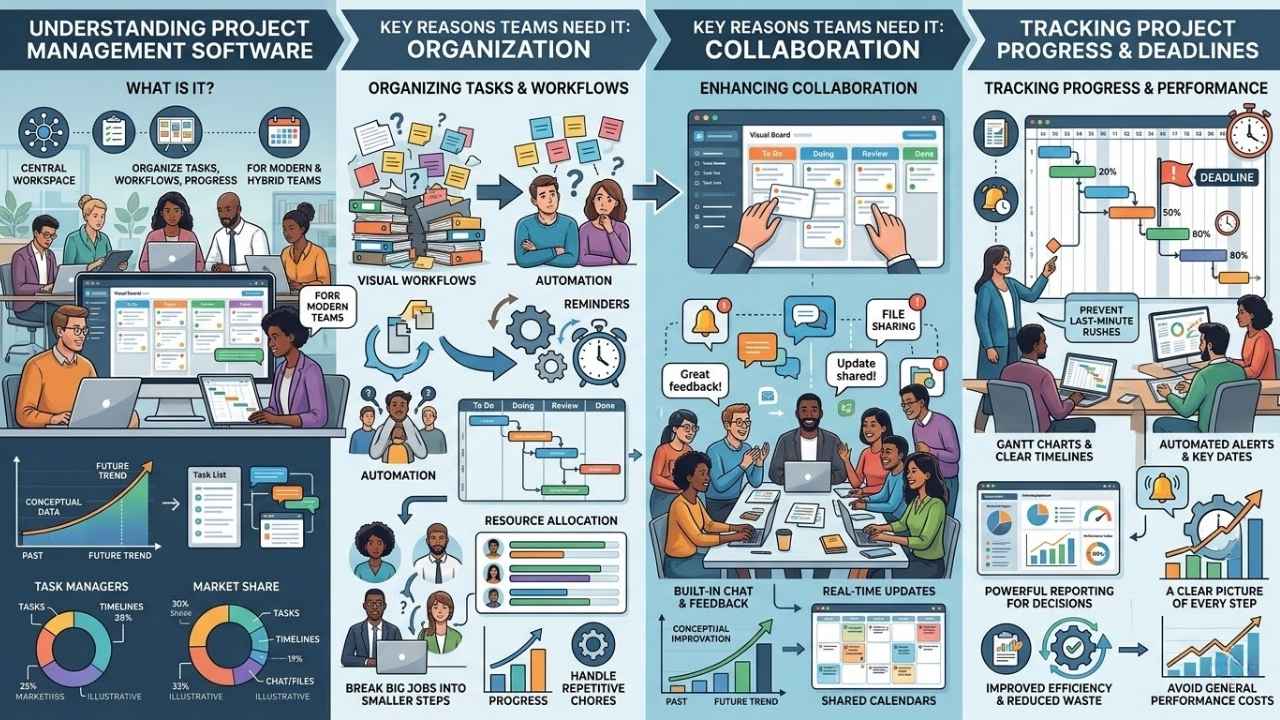
Project management tools help teams organize tasks, manage workflows, and track progress. Tools like Asana, Trello, or Microsoft Project offer a timeline view so everyone stays on the same page.
These platforms give you a central workspace. You can assign tasks, share updates in real time, and schedule meetings from one convenient place.
Find it fascinating how quickly these tools are growing in the United States. A 2025 Research Nester report estimates the US market will reach a staggering $8.02 billion in 2026.
“With hybrid work becoming the norm, a reliable digital workspace is no longer optional for growing teams.”
Jira currently leads the pack with a massive 42% market share for software development teams, but there are options built for every type of business. Customization features allow teams to build a workspace around how they work best without breaking the bank.
Why Does Your Team Need Project Management Software?
Every team juggles deadlines and updates. Things can get messy fast. The right software sorts chaos from order so your group works much smoother together.
Organizing tasks and workflows
Sticky notes on a whiteboard can only get you so far. Project management tools help break big jobs into smaller steps and sort them by priority.
For example, Trello uses a highly visual Kanban board system. You can literally drag and drop a task card from “To Do” into “Doing” with a single click.
This gives you a clear timeline view. Many teams also use workflow automation features to handle repetitive chores like sending reminders about overdue work.
Custom dashboards show who is busy or free for new jobs. This makes resource allocation much easier and saves you hours every single week.
Enhancing collaboration and communication
Keeping everyone connected is a huge challenge. Project management software fixes this with built-in chat, shared files, and live updates.
You can simply tag a teammate in a task to ask a question. This instantly eliminates endless email chains that get lost in crowded inboxes.
- Leave feedback exactly where the work happens.
- Get instant alerts so nothing urgent slips through the cracks.
- Use shared calendars to keep meeting times short and focused.
A 2026 report from Market.us found that team communication actually improves by 52% when using a dedicated project tool. That is a massive boost for any busy team!
Tracking project progress and deadlines
Timelines provide a clear picture of each step. They act just like a map for a road trip.
If you do not track progress well, the financial cost can be severe. The Project Management Institute (PMI) released a 2026 report showing that an average of 11.4% of investment is completely wasted due to poor project performance.
Features like Gantt charts show deadlines and help prevent last-minute rushes. Late tasks simply do not slip past good tracking tools.
Automated alerts remind everyone about key dates. A strong reporting feature gives leaders the exact facts they need to make smart decisions without delay.
Key Features to Look for in Project Management Software
Pick smart tools that help your team talk, manage tasks, and keep projects running smoothly. Let us look at the features that actually make a difference.
Team collaboration tools
Your software must have strong team collaboration features to keep everyone aligned. Team members need to share files and give feedback in real time.
Many platforms offer chat rooms and comment sections directly on tasks. Asana lets users assign clear responsibilities while keeping conversations organized within each specific task card.
These tools drastically reduce confusion about who does what next. Integrated calendars show deadlines so no one gets caught off guard.
With simple workflow automation, your team spends far less time chasing information across different apps.
Customization and flexibility
Every team works in its own unique way. Top tools let you adjust dashboards, create custom workflows, and add special data fields.
A marketing team might need campaign tracking, while a product group needs sprint boards. Monday.com is famous for its highly visual, color-coded customization that adapts to almost any business need.
Growing teams change their routines as projects get bigger. Software with strong flexibility gives you a few major benefits:
- You can switch workflow styles without changing apps entirely.
- You can easily plug in new widgets for budget tracking.
- You can adjust resource allocation views on the fly.
The software should mold itself to your team, never the other way around.
Reporting and analytics capabilities
Reporting tools help you spot issues early and make incredibly smart, data-driven decisions. Good project software gives you clear charts and customizable tracking features.
Without these tools, things get expensive quickly. A famous McKinsey study found that large IT projects run 45% over budget on average when tracking and execution fail.
Detailed reports let you see exactly which parts of a workflow run smoothly. You can instantly spot any team members who might be overloaded with assignments.
Most team collaboration software shows easy-to-read graphs. This keeps your work transparent and completely easy to understand for everyone involved.
Integration with existing tools
Your new software needs to play nicely with your favorite apps. Busy teams already use email, spreadsheets, and chat platforms every single day.
If the new tool does not talk with Slack, Google Drive, or Microsoft Office 365, frustration will set in incredibly fast.
- Trello links up perfectly with Dropbox and Slack.
- Asana makes task updates show up right in your email inbox.
- Monday.com offers over 200 native integrations for seamless data sharing.
According to a 2025 Capterra survey, over 70% of teams said seamless integration directly boosted productivity. Pick a solution that fits smoothly into what you already use.
Data security and privacy measures
Keeping team data safe is a top priority. Top tools use strict encryption to guard information from prying eyes.
Many platforms let you control exactly who can see or edit specific files. If your US-based business handles sensitive medical data, you need strict HIPAA compliance features built right in.
Major vendors like Asana and Trello update their systems constantly to patch weak spots. Secure login methods like two-factor authentication (2FA) stop hackers even if a password leaks online.
Always check for compliance badges when comparing task management solutions. This proves their safety is backed by real audits.
How to Choose The Right Project Management Software for Your Team: Key Factors
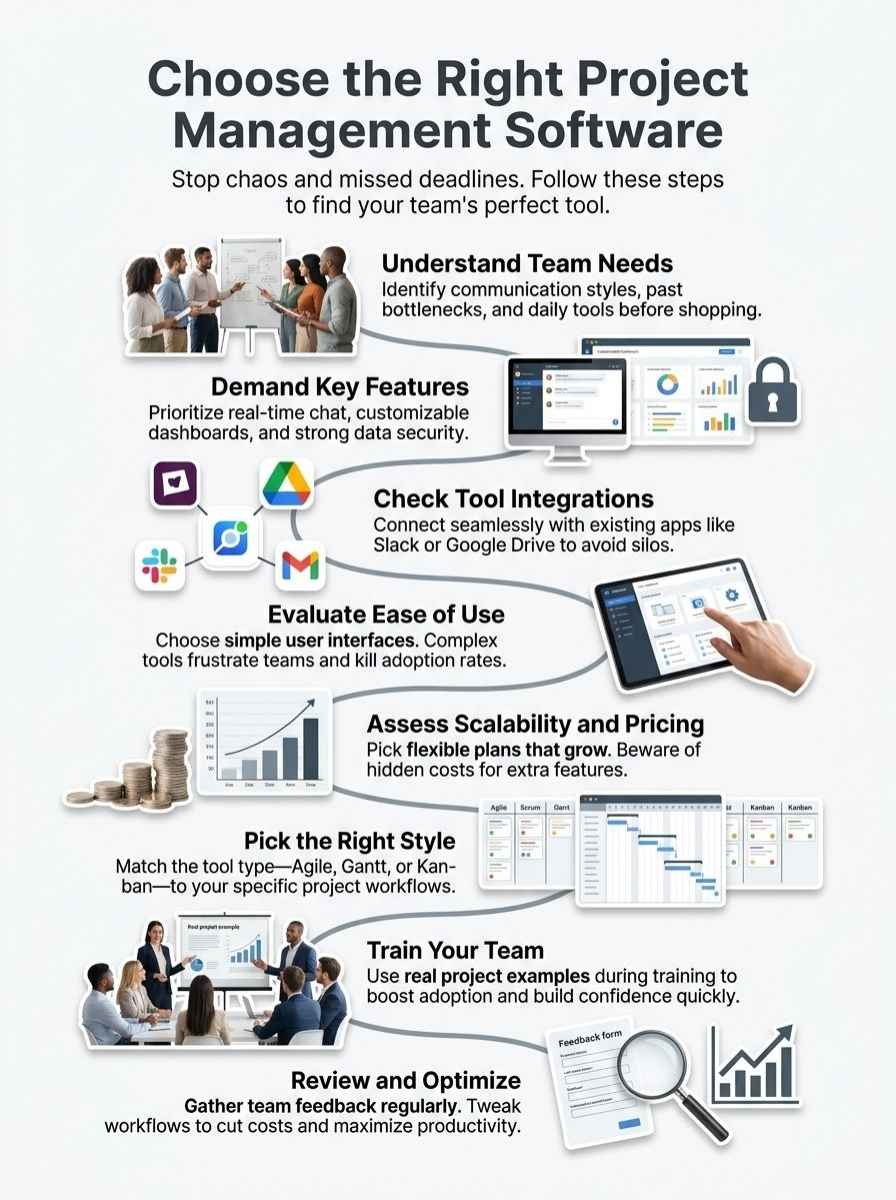
Picking the perfect software can make or break your daily workflow. Here is what really matters.
Understand your team’s needs
Every group has its own goals and roadblocks. Picking the right tool starts with understanding exactly how you work today.
- Identify how your team prefers to communicate daily.
- Look at past projects to spot recurring problems, like missed deadlines.
- Check if your projects require complex resource allocation features.
- List the daily tools your team already uses, like Google Workspace or Zoom.
- Think about how much your team might grow in the next year.
Understanding your actual workflow helps you avoid buying mismatched software that nobody wants to use.
Evaluate ease of use and adoption
Choosing a tool should not feel like solving a puzzle. Your team deserves a platform that is easy to pick up and use immediately.
A 2025 report by Dinnova AG highlighted a shocking statistic. They found that 70% of software projects fail, and ignoring basic usability is a massive contributing factor.
A cluttered workspace makes people want to give up immediately. If you need hours of training just to use basic features, the software is probably too complex.
Try free demos before making a choice. Good help resources and a clean user interface speed up adoption dramatically.
Assess scalability and pricing plans
Your software should grow effortlessly with your team. Pricing plans must fit your project size and your specific budget constraints.
You need to be very careful about hidden costs. A common mistake users mention on the r/projectmanagement Reddit community is buying a cheap tool, only to realize basic features cost extra later.
Here is a quick look at how top tools compare in 2025 for a basic paid tier in the US:
| Software Tool | 2025 Starting Price (Per User/Month) | Best Use Case |
|---|---|---|
| Trello | $5.00 | Small teams needing simple visual boards |
| Monday.com | $9.00 | Growing teams needing deep customization |
| Asana | $10.99 | Complex projects needing strict dependencies |
Always confirm that advanced features like budget tracking are included before you lock into an annual contract.
Check vendor reputation and customer support
A great track record is just as important as fancy features. You need a vendor you can count on during stressful deadlines.
Check reviews on platforms like G2, TrustRadius, or Capterra. Real users share both the good and the bad, giving you a very clear picture of what to expect.
Test their customer support before you ever hand over your credit card. Send an email or use their live chat to see how fast they answer.
If your team works on weekends, make sure help is available then too. Great support saves time and keeps collaboration running smoothly.
Types of Project Management Software
There are many kinds of tools built for different work styles. Finding the right fit makes all the difference.
Agile project management tools
Agile tools help teams work fast and adapt to rapid changes. Jira is the undisputed king here for software developers.
These tools let your group break big projects into smaller tasks called sprints. This style helps you spot problems early and keeps everyone completely focused on the deadline.
“Agile solutions allow you to customize workflows for different kinds of work, making them perfect for fast-moving digital teams.”
Clear dashboards show progress in real time so you can measure productivity effortlessly.
Gantt chart software
Gantt chart software gives you a simple way to plan using visual timelines. Each task shows up as a colored bar.
You can spot start dates, overlaps, and delays in seconds. Smartsheet and Microsoft Project are excellent examples of this highly visual style.
These tools help immensely with scheduling complex tasks. Deadlines jump right off the page, and bottlenecks shine under a bright spotlight.
Fast updates keep everyone moving together, which is a vital feature when handling overlapping workflows.
Portfolio management tools
Portfolio tools help leaders handle many different projects at once. They show a high-level timeline view of several teams.
Large companies use these to track all their ongoing initiatives in one central place. Managers can easily see which projects need more budget or extra staff.
A 2025 Magnetic report highlights that organizations ignoring structured portfolio management face a project failure rate of over 60%.
These tools allow easy integration with scheduling apps and team communication platforms. This ensures productivity stays high across the entire company.
Scrum and Kanban software
Scrum and Kanban tools use specific methods for better workflow automation.
- Scrum software uses short sprints to manage tasks and regular meetings.
- Kanban software, like Trello, shows tasks on clear visual boards.
- Cards are dragged from “To Do” to “Done” as work gets completed.
Both styles support incredibly fast team communication. Many businesses even mix parts of both systems to get the perfect balance of flexibility and structure.
Best Practices for Using Project Management Software
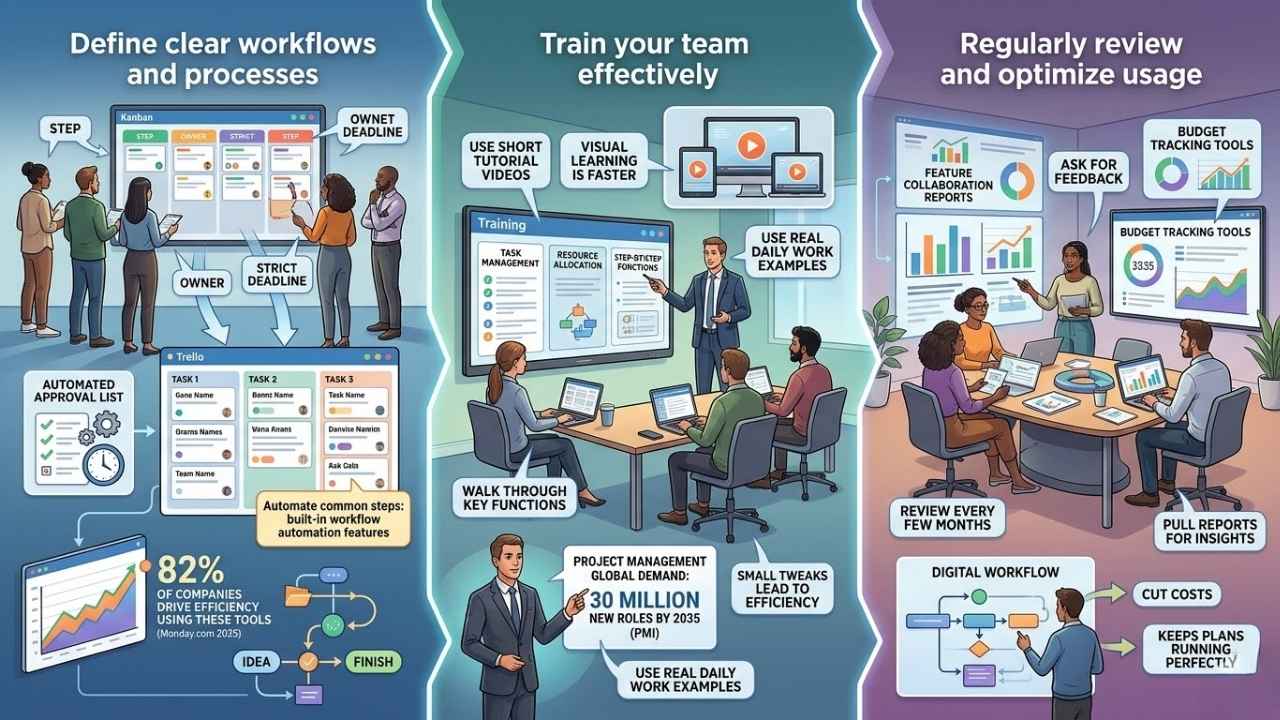
Small changes in how you use your new tool can make a massive difference. Stick with what works, and do not be afraid to adjust.
Define clear workflows and processes
Getting your team aligned starts with setting up very clear digital processes. Each step should have an owner and a strict deadline. If you use Trello or Asana, build boards that match exactly how your projects move from idea to finish. Assign tasks by name so nobody gets confused. You can easily automate common steps using built-in workflow automation features.
“Create a dedicated list for approvals, and set automated reminders so deadlines never sneak past your team.”
A 2025 Monday.com report found that 82% of companies now use these tools specifically to drive organizational efficiency. Set clear rules for status updates to keep everyone completely focused.
Train your team effectively
Show your group exactly how to use the software step by step. Walk them through key functions like task management and resource allocation. Use real examples from your actual daily work during the training sessions. This helps people connect the new tool to their specific job duties.
The Project Management Institute notes that up to 30 million new PM roles will be needed globally by 2035, making internal training a massive advantage. Use short tutorial videos instead of long manuals, as teams learn significantly faster visually.
Regularly review and optimize usage
Teams grow, and projects change shape over time. Your project management software setup should evolve right along with you. Review how your team uses the tool every few months. Pull reports to see which features genuinely help with collaboration and ask for honest feedback. Keep a close eye on budget tracking tools too. Small tweaks to your digital workflow can cut costs and keep your plans running perfectly.
Final Thoughts
Choosing a new platform is just like picking the right physical tool for a home repair. It needs to fit your team’s specific style, boost collaboration, and keep everyone completely on track. Focus heavily on the features that save you time and make daily tasks much simpler. Have you thought about how much smoother your workday could be with the perfect system in place?
The impact of a great tool changes pure chaos into absolute clarity. Figuring out how to choose the right project management software for your team is a big decision, but it pays off quickly. Take a little time to try out a few free demos today. Those small steps will lead to massive productivity wins down the road!