
AI video for social media sounds easy until the first version looks good in the editor but feels completely wrong on Instagram, TikTok, or YouTube Shorts. I have seen this happen many times in AI video workflows. The video has decent visuals, a clean voiceover, maybe even a good animation style, but once it lands inside a fast-moving feed, it feels too slow, too generic, too wide, too polished, or too obviously made from a template.
That is the real challenge with social AI video. You are not only creating a video. You are creating a video for a platform, a screen size, a viewing habit, and a scrolling behavior. A good AI-generated clip for a blog article may fail badly as a Reel. A talking avatar may work on LinkedIn, but feel too stiff for TikTok. A cinematic AI scene may look impressive, but if the first two seconds do not tell people why they should care, the swipe wins.
In my own workflow, I treat AI video for social media as a distribution-first format. Before generating scenes, I decide where the video will live, what the hook is, what the viewer should understand without sound, and what part needs human editing. AI helps with speed, variations, visual drafts, voiceovers, captions, and repurposing. But the final social video still needs human judgment, platform awareness, and editorial taste.
At Editorialge Media LLC, we build and experiment across media, SaaS, e-learning, and AI-powered creative tools, so every new technology has to make sense as part of a real content production system, not just as a flashy feature. That is exactly how I look at AI social videos: not as random moving visuals, but as content assets that need purpose, platform fit, and trust.
What Makes AI Video For Social Media Different?
AI video for social media is different from normal video production because the viewer is usually not waiting for your message. They are scrolling, half-listening, comparing, skipping, saving, sharing, or watching without sound. That changes the whole workflow.
- A traditional video can start slowly. A social video cannot.
- A blog embed can explain context. A Reel must show context fast.
- A YouTube tutorial can be built gradually. A TikTok clip must earn attention immediately.
- A polished AI animation can impress people, but only if the idea is clear.
This is why I do not start with the tool. I start with the platform and the viewer behavior.
For example, an AI video made for Instagram Reels should usually be vertical, visually clean, safe-zone aware, and caption-friendly. An AI video TikTok audience often expects faster pacing, native-feeling edits, conversational delivery, and less “brand presentation.” YouTube Shorts can work well with educational hooks, quick transformations, mini-stories, and strong retention loops.
The AI tool is only one part of that system.
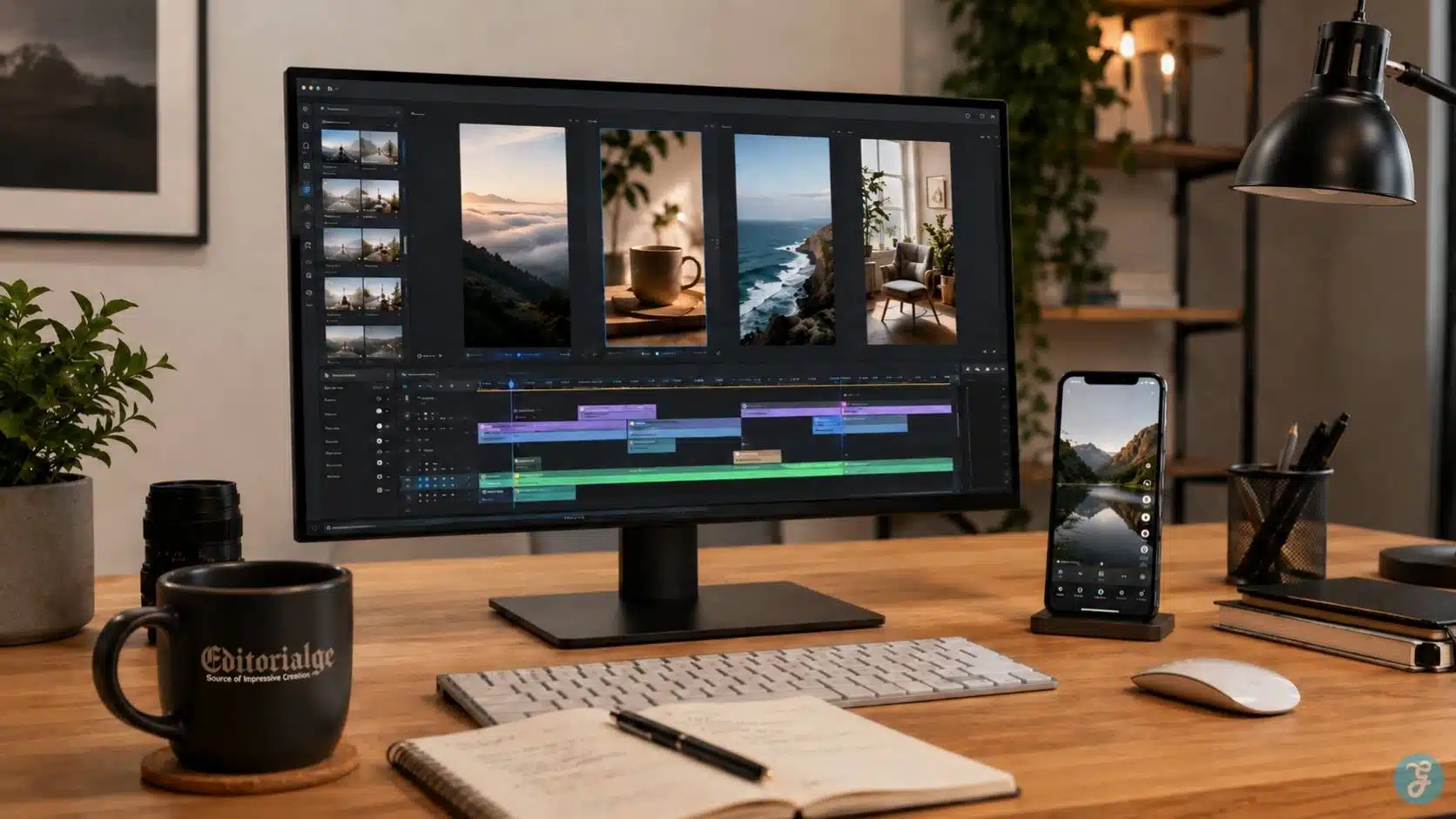
My Firsthand Rule: Plan The Social Format Before Generating
Beginners often generate a nice AI video first and then try to crop it for Instagram, TikTok, Shorts, LinkedIn, and Facebook. That is how good visuals get ruined.
I prefer to decide these things first:
| Decision | Why It Matters |
| Platform | Instagram, TikTok, Shorts, LinkedIn, and Facebook reward different viewing styles |
| Format | 9:16, 1:1, 4:5, and 16:9 change framing and safe zones |
| Hook | The first seconds decide whether viewers stay |
| Audio strategy | Some viewers watch with sound, others rely on captions |
| Caption placement | Platform buttons can cover important text |
| Visual style | Realistic, animated, talking head, or mixed media should match the topic |
| CTA | The ending should match the platform behavior |
This planning step saves time because the AI output becomes easier to edit, resize, and publish. If I am creating visuals from scratch, I usually prepare clean base assets first through ImagineLab before moving into animation, voiceover, or final video editing. That helps me control visual direction instead of accepting whatever the AI video model randomly gives me.
Best Platform Formats For AI Social Videos
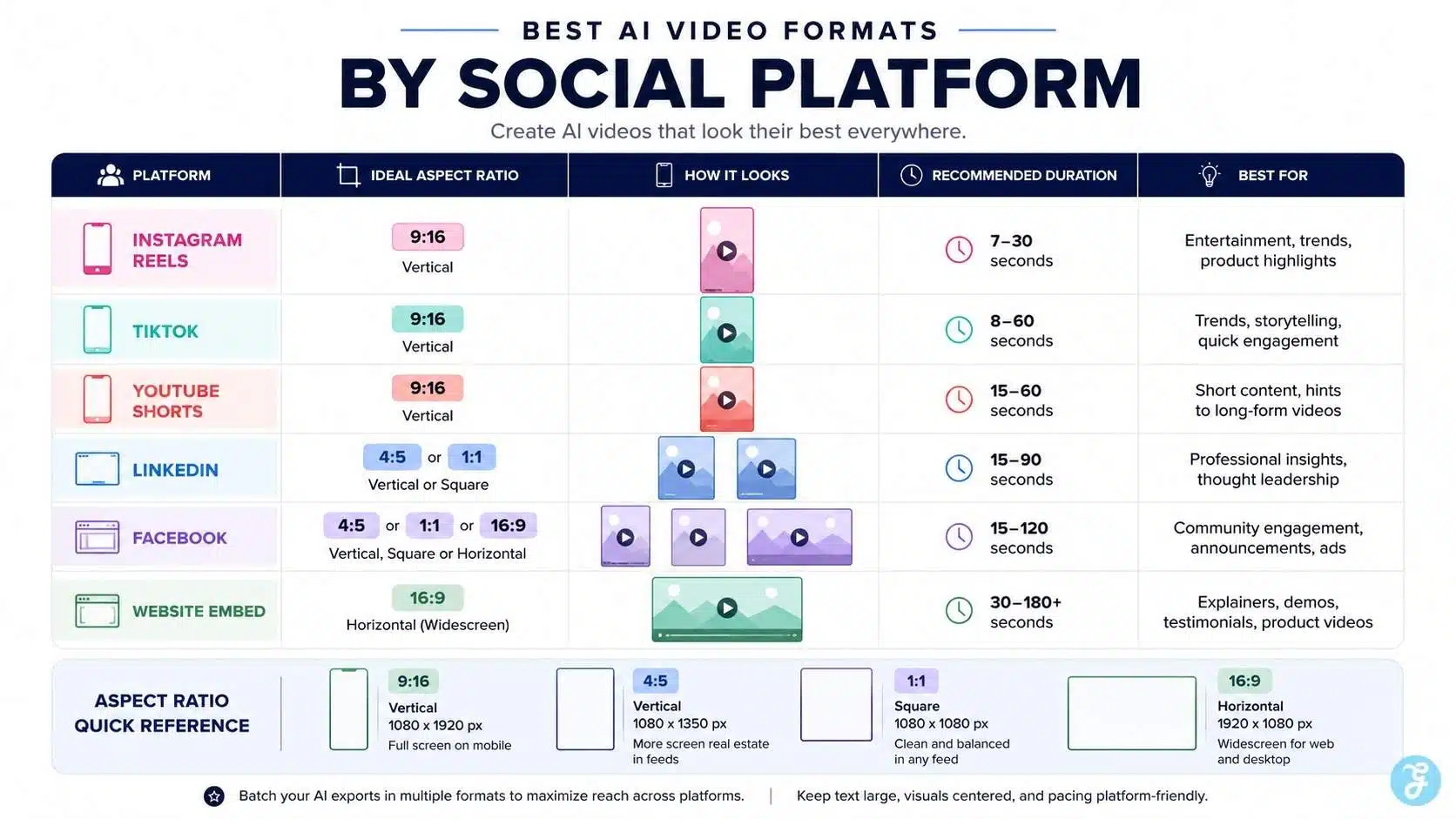
The safest beginner rule is simple: design social video vertically first unless you have a clear reason not to.
| Platform | Best Starting Format | Practical Use |
| Instagram Reels | 9:16 | Short explainers, lifestyle clips, creator-led AI videos |
| TikTok | 9:16 | Native-feeling clips, quick tips, trend-aware explainers |
| YouTube Shorts | 9:16 or square | Educational short clips, transformations, and quick tutorials |
| Facebook Reels | 9:16 | Broad audience explainers and repurposed vertical clips |
| LinkedIn Feed | 4:5, 1:1, or 9:16 | Professional explainers, B2B clips, product workflows |
| Pinterest Idea-style content | 9:16 or 2:3 | Visual tutorials, guides, and evergreen inspiration |
| Website embed | 16:9 | Article support, tutorials, product demos |
For a full AI video creation guide, I would still keep 16:9 versions for article embeds and YouTube long-form support. But for social distribution, 9:16 usually deserves the first design pass.
This is where AI image aspect ratios matter before video generation. If the base visual is not designed for the final frame, the video may crop faces, cut off text, or hide the product behind platform UI.
AI Video Instagram Best Practices
AI video Instagram content works best when it feels clean, visually attractive, and easy to understand quickly. Reels can support educational content, product teasers, article summaries, behind-the-scenes clips, and short visual explainers. For Instagram, I usually focus on three things: framing, visual polish, and save-worthy value.
Use A Clear Visual Hook
The first frame should make the viewer understand the topic before they even read the caption. If the video is about AI image mistakes, show the mistake visually. If it is about AI voice cloning ethics, show consent, waveform review, or a production checklist.
A weak opening says:
“Today, we are going to talk about AI video.”
A stronger opening shows the problem immediately:
“Your AI video looks good, but it is built for the wrong platform.”
That kind of hook works because it creates a small problem the viewer wants solved.
Keep Captions Inside The Safe Area
Instagram Reels have interface elements around the screen. If you place important text too close to the bottom, sides, or top, it can get covered by buttons, captions, profile information, or engagement icons.
In my workflow, I keep the main message near the visual center and avoid putting important text near the lower-right side. Even when the video has no text overlay, the subject should not sit too low.
Use AI For Variations, Not Final Judgment
AI can generate multiple versions of the same Reel idea. That is useful. But I still choose the final version based on platform fit, not just visual beauty.
For Instagram, I ask:
- Is the first frame clear?
- Does it look polished but not fake?
- Can the message be understood without sound?
- Is the visual safe from UI cropping?
- Does the caption add context instead of repeating the video?
- Would someone save this for later?
If the answer is no, I revise.
AI Video TikTok Best Practices
AI video TikTok content needs to feel less like a brand presentation and more like something made for the feed. TikTok viewers can detect overproduced, corporate-style AI content very quickly.
The best AI videos on TikTok usually have one of these formats:
- Quick mistake-and-fix
- Before-and-after
- “I tested this” style clip
- Mini tutorial
- Myth vs reality
- Tool workflow
- Fast visual transformation
- Reaction-style commentary
- Problem-solution breakdown
Make The First Seconds Conversational
TikTok does not need a polished intro. It needs a reason to keep watching.
Examples:
- “This is why your AI video feels fake.”
- “Do not generate your AI video before choosing the platform.”
- “I tested this prompt style, and the result changed completely.”
- “Your AI voiceover is not the problem. Your pacing is.”
These lines work because they feel direct and useful.
Avoid Generic AI Visuals
TikTok’s feed is already full of AI-generated sameness: glowing cities, cinematic robots, slow camera pushes, glossy avatars, and random surreal scenes. If the visual does not support a clear idea, it becomes noise.
For text-to-video AI workflows, I would avoid prompting only for “cinematic” results. I would specify the platform, pacing, subject framing, camera movement, and emotional tone.
Edit Faster Than You Think
TikTok pacing is usually less forgiving than article video pacing. That does not mean every clip must be chaotic. It means every second should have a job.
I usually cut:
- Slow intros
- Empty AI camera movement
- Repeated shots
- Long pauses
- Overexplained captions
- Generic transitions
- Any scene that looks good but says nothing
AI makes video creation faster. Editing makes it watchable.
YouTube Shorts Best Practices For AI Videos
YouTube Shorts can work very well for educational AI content because viewers often search, browse, and rewatch. A strong Short can also support a larger article, tutorial, or cluster page. For Shorts, I usually build around one clear takeaway.
Good Shorts topics include:
- One AI video mistake
- One prompt formula
- One before-and-after
- One platform rule
- One editing checklist
- One tool workflow
- One myth explained
- One safety or disclosure tip
A Short should not feel like a compressed long video. It should feel like one complete idea. For example, instead of making a Short called “AI video for social media best practices,” I would make:
- “Why your AI video fails on Reels”
- “3 safe-zone mistakes in AI videos”
- “AI voiceover pacing mistake beginners make”
- “TikTok vs Instagram AI video style difference”
That is more specific, and specific content usually gives the viewer a clearer reason to watch.
LinkedIn And Facebook AI Video Best Practices
Not every AI social video has to be designed like TikTok. LinkedIn and Facebook often work better when the video feels useful, practical, and less trend-dependent.
For LinkedIn, I would use AI videos for:
- B2B explainers
- Workflow breakdowns
- Product education
- Founder commentary support
- Case-study visuals
- Short professional tips
- AI tool comparisons
- SaaS feature explanations
For Facebook, I would make the content simpler, broader, and more directly useful. Facebook audiences often respond well to practical tips, relatable problems, health/lifestyle explainers, travel clips, and community-friendly formats.
The same AI video should not be posted everywhere without adjustment. A TikTok-style hook may feel too casual on LinkedIn. A LinkedIn-style explanation may feel too slow on TikTok.
The Best AI Social Video Workflow I Recommend
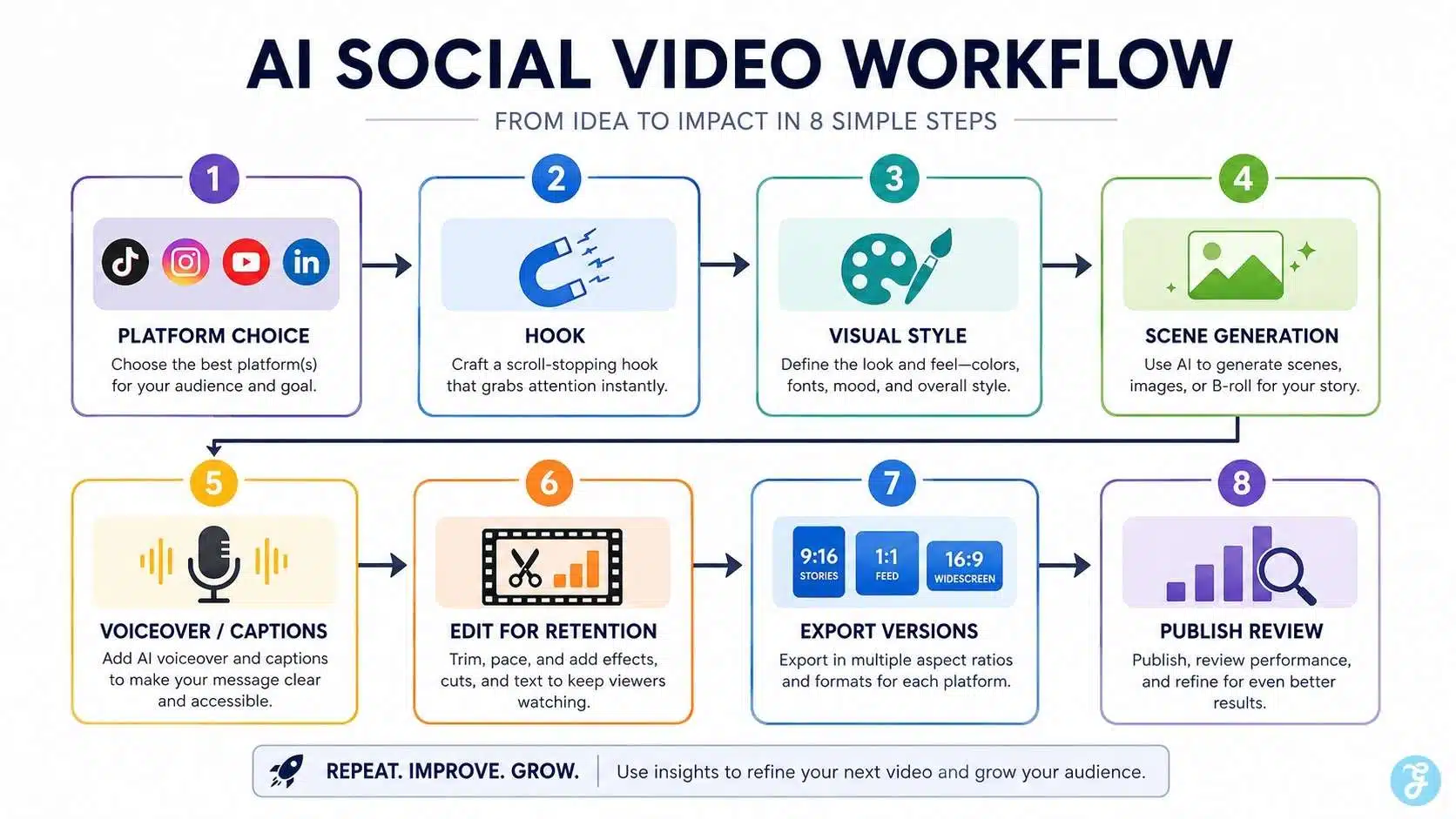
Here is the workflow I would use for creating an AI video for social media without wasting time.
Step 1: Start With One Platform
Do not start with “I need a video for all platforms.”
Start with one:
- Instagram Reel
- TikTok
- YouTube Short
- LinkedIn video
- Facebook Reel
Once the main version works, then repurpose it.
Step 2: Write The Hook Before The Prompt
The hook decides the video. The prompt only creates the visual. Before generating anything, I write the first line or first visual idea. For example:
“Most AI videos fail because they are edited like blog visuals, not social clips.”
Now the video has a direction.
Step 3: Choose The Visual Style
The style should match the topic.
| Topic Type | Better AI Video Style |
| Beginner tutorial | Clean 2D, motion graphics, or a realistic desk setup |
| AI tool workflow | Screen-style visuals, UI mockups, creator workspace |
| Ethical topic | Serious editorial setup, checklist, muted color tone |
| Product demo | Realistic product scene, simple motion, clean branding |
| Social tip | Fast mixed media, captions, before-and-after |
| E-learning clip | Calm animation, clear narration, simple visuals |
This is where AI animation styles become useful. A serious ethics video should not look like a playful cartoon unless the content is intentionally simplified for a young audience.
Step 4: Generate Scenes In Short Segments
Instead of generating one long AI video, I prefer short segments. That gives more control.
A 30-second AI social video might use:
- 0–3 sec: Hook visual
- 3–8 sec: Problem
- 8–16 sec: Example
- 16–24 sec: Fix
- 24–30 sec: Takeaway or CTA
Shorter segments make editing easier and reduce the chance of visual drift.
Step 5: Add Voiceover Or Captions Carefully
For social AI video, audio matters, but captions are still essential. Many viewers watch silently at first. If I use narration, I build it with an AI voiceover video guide style workflow: short lines, clear pacing, natural tone, and strong pronunciation checks.
If the video includes a talking avatar, I also review AI lip sync issues such as mouth timing, expression mismatch, and unnatural pauses.
Step 6: Edit For Retention
AI-generated clips often have a slow, floating quality. That can work for cinematic brand videos, but social videos usually need a tighter rhythm.
I check:
- Does something change visually every few seconds?
- Are captions readable?
- Is the first frame strong?
- Does the video loop naturally?
- Is the CTA clear but not annoying?
- Is the final second wasted?
- Can the viewer understand the video without audio?
This is where AI video editing comparison matters in practice. AI can generate scenes, but editing decides whether the video survives the feed.
Step 7: Export Platform Versions
A single video can become multiple versions, but not by lazy resizing.
I usually prepare:
| Version | Use |
| 9:16 vertical | Reels, TikTok, Shorts, Stories |
| 4:5 vertical feed | Instagram feed, Facebook feed, LinkedIn feed |
| 1:1 square | Facebook, LinkedIn, carousel-style support |
| 16:9 landscape | Blog embed, YouTube, website |
The story should remain the same, but framing, captions, and safe zones may need adjustment.
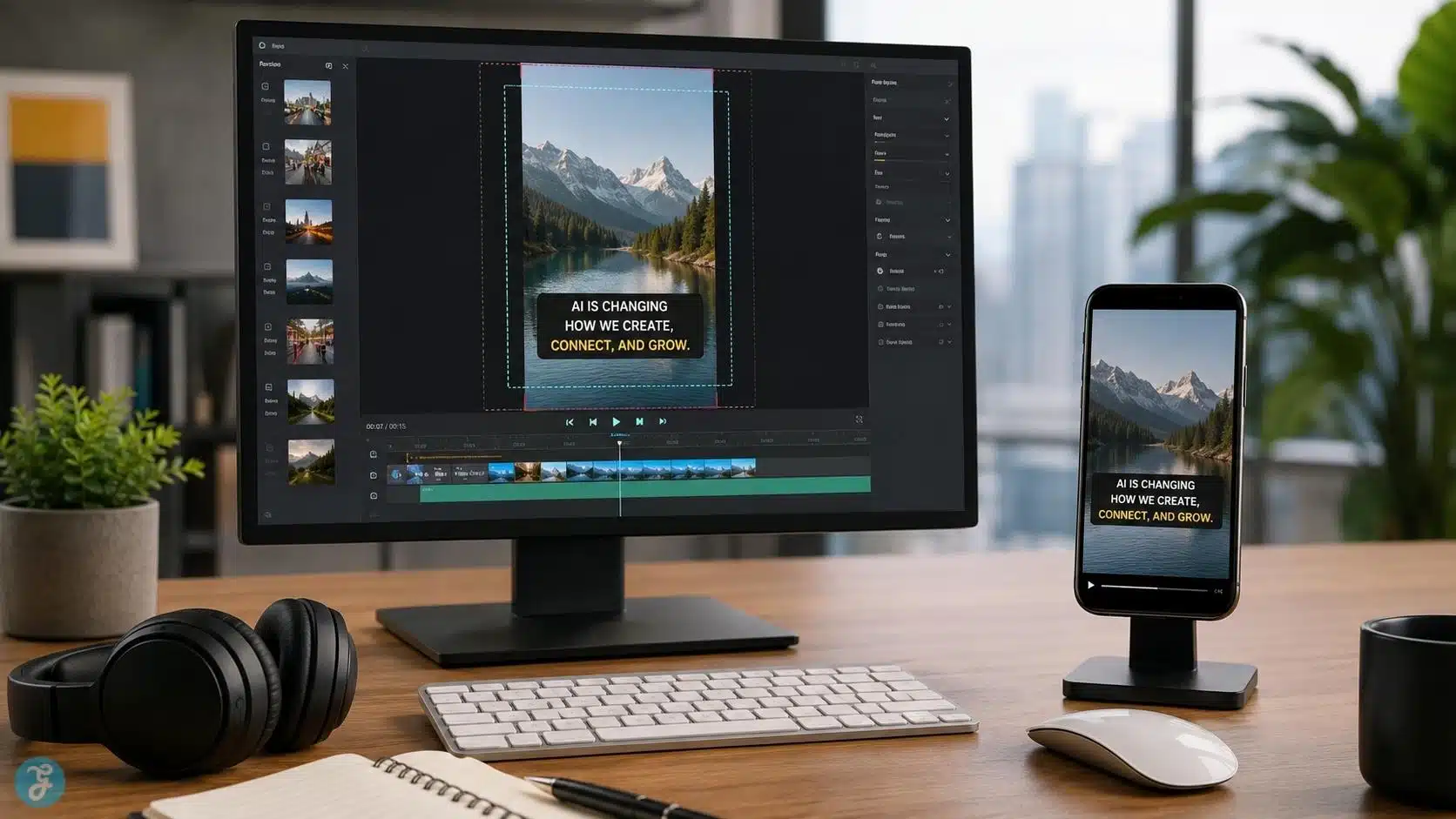
Social AI Video Tips That Actually Matter
Many social AI video tips sound obvious, but the execution is where most creators fail.
1. Do Not Make The AI Video Too Perfect
Over-polished AI video can feel fake. Social platforms often reward content that feels useful, human, and native. A slightly practical screen-style video may work better than a beautiful but empty cinematic scene.
2. Use One Idea Per Video
Trying to explain too much kills retention. One social video should answer one small question.
Bad idea: “Everything about AI video creation.”
Better idea: “Why your AI video crop fails on Instagram Reels.”
3. Make The First Frame Do Real Work
The first frame should not be random. It should show the problem, result, contrast, or promise.
For example:
- Split-screen good vs bad AI video
- Creator reviewing a failed social export
- A vertical frame with safe-zone guides
- Before-and-after AI prompt result
- Timeline showing a hook, caption, and CTA
4. Avoid Tiny Text
AI-generated infographics often create small, unreadable text. That is bad for social video. If the viewer cannot read it on a phone, remove it.
5. Add Human Review Before Publishing
AI can make mistakes in visuals, captions, voiceovers, timing, and factual claims. I never publish AI social videos without a final human check.
This matters even more for copyright issues with AI video content, because generated visuals, music, voice, likeness, and brand assets all need review.
AI Video Disclosure And Trust On Social Media
AI video transparency is becoming more important. If the content is clearly animated, stylized, or obviously fictional, the risk is lower. But if the AI video looks realistic, uses a real person’s likeness, imitates a voice, or presents synthetic events as real, disclosure matters.
For social publishing, I use this rule:
If the viewer might mistake AI-generated or AI-edited content for real footage, real speech, or a real event, add clear context.
This is especially important for:
- News-like clips
- Health content
- Financial advice
- Political content
- Public figures
- Realistic synthetic faces
- AI voice cloning
- Deepfake-style edits
- Testimonials
- Product claims
For AI voice cloning ethics, disclosure, and consent become even more important because voice carries identity. A realistic cloned voice in a social video can mislead people faster than a generic AI narrator.
Common Mistakes Beginners Make With AI Video For Social Media
Below, I have listed some common mistakes that beginners make while making an AI video for social media.
Mistake 1: Creating Before Choosing The Platform
A video made without a platform in mind usually needs heavy fixing later. Instagram, TikTok, Shorts, LinkedIn, and Facebook do not behave the same way.
Fix: Start with the destination, then generate.
Mistake 2: Using One Horizontal Video Everywhere
A 16:9 video cropped into 9:16 often cuts off faces, products, captions, and key actions. This is one of the easiest ways to make AI content look amateur.
Fix: Design vertically first for short-form platforms.
Mistake 3: Making The Hook Too Slow
Social video does not reward long warm-ups. If the viewer does not understand the value quickly, they leave.
Mistake 4: Overusing Generic AI Style
The same neon city, robot hand, glowing interface, and cinematic office can make every brand look the same. For social content, originality matters because sameness gets skipped.
Mistake 5: Forgetting Captions
Even when the audio is strong, captions help viewers follow the video quickly. They also help when people watch in silent environments.
Mistake 6: Ignoring Safe Zones
Important text, logos, and faces can get covered by platform UI. Always preview the video as it will appear on the platform.
Mistake 7: Trusting AI Captions Without Proofreading
AI captions can miss names, brand words, accents, acronyms, and technical terms. A wrong caption can make a polished video look careless.
Mistake 8: Publishing Realistic AI Content Without Context
If the video could mislead viewers, disclosure should be part of the publishing workflow.
My Practical AI Social Video Checklist
Before publishing, I check:
| Checkpoint | Done? |
| Platform chosen before creation | ☐ |
| The first frame has a clear hook | ☐ |
| Main subject fits the safe zone | ☐ |
| Captions are readable on mobile | ☐ |
| Visual style matches the topic | ☐ |
| Voiceover is clear and natural | ☐ |
| Lip sync is reviewed if used | ☐ |
| CTA matches the platform | ☐ |
| AI disclosure is considered | ☐ |
| Final export is previewed on the phone | ☐ |
| Copyright and asset rights are reviewed | ☐ |
This checklist looks simple, but it catches most of the problems that make AI social videos feel unfinished.
A Practical Example: Turning One Blog Section Into Social AI Videos
Let’s say I have a blog section about “safe zones for AI images and videos.” Instead of making one generic video, I would create three platform versions.
1. Instagram Reel
Hook: “Your AI video text may be hidden by Reels buttons.”
Visual: A vertical phone preview showing text too low, then corrected placement.
Style: Clean realistic editor setup with overlay-safe framing.
CTA: “Save this before exporting your next Reel.”
2. TikTok
Hook: “This is why your AI video looks broken after upload.”
Visual: Fast before-and-after crop mistake.
Style: More casual, quick edits, creator-style commentary.
CTA: “Check your safe zone before posting.”
3. YouTube Short
Hook: “One mistake ruins AI videos on every short-form platform.”
Visual: Show 9:16 frame, caption area, subject position, final export.
Style: Educational, concise, slightly more structured.
CTA: “Use this before you export.”
Same topic. Different platform treatment. That is how social AI video should work.
Final Thoughts: AI Makes Social Video Faster, But Strategy Makes It Work
The biggest lesson from creating AI video for social media is that speed is not the same as performance. AI can generate scenes, avatars, voiceovers, animations, captions, and variations faster than traditional production. That is useful. But social platforms still reward clarity, timing, relevance, and trust.
A good AI social video should feel made for the feed, not dumped into the feed. It should have a strong hook, platform-native framing, readable captions, safe-zone awareness, clear editing, and responsible disclosure when needed.
Use AI to speed up production. Use human judgment to make the video worth watching. That is the difference between another generic AI clip and a social video that actually earns attention.
Frequently Asked Questions About AI Video For Social Media
1. What Is AI Video For Social Media?
AI video for social media means using AI tools to create, edit, animate, narrate, resize, or repurpose videos for platforms like Instagram, TikTok, YouTube Shorts, Facebook, LinkedIn, and Pinterest. It can include text-to-video clips, image-to-video motion, AI voiceovers, talking avatars, captions, and platform-specific exports.
2. Can I Use AI Videos On Instagram?
Yes, AI videos can be used on Instagram, especially for Reels, Stories, feed videos, tutorials, and product explainers. The key is to design for mobile viewing, keep important visuals inside the safe area, add captions, and avoid making the content look like a generic AI template.
3. What Works Best For AI Video TikTok Content?
AI video TikTok content works best when it feels native, fast, and specific. Use a strong opening line, quick pacing, captions, casual delivery, and one clear idea. Avoid overly polished corporate-style AI videos unless the style itself is part of the concept.
4. Should AI Social Videos Be Vertical?
For short-form platforms, vertical 9:16 is usually the safest starting point. Instagram Reels, TikTok, YouTube Shorts, Facebook Reels, and Stories are built around mobile-first vertical viewing. Other formats like 4:5, 1:1, and 16:9 can still be useful for feeds, LinkedIn, websites, and YouTube long-form.
5. How Long Should An AI Social Video Be?
The best length depends on the platform and topic. A quick tip may work in 10–20 seconds, while a mini tutorial may need 30–60 seconds. YouTube Shorts can now support longer short-form videos, but that does not mean every Short should be long. Keep the video only as long as the idea needs.
6. How Can I Make AI Social Videos Look Less Generic?
Start with a specific idea, platform, audience, and visual direction. Avoid vague prompts like “cinematic AI video.” Use real examples, custom scenes, brand-relevant visuals, strong captions, and human editing. The goal is not just to generate a video; the goal is to make a useful social asset.
7. What Are The Biggest Mistakes In AI Video For Social Media?
The biggest mistakes are creating without a platform plan, using horizontal videos everywhere, making the hook too slow, relying on generic AI visuals, forgetting captions, ignoring safe zones, skipping proofreading, and publishing realistic AI content without proper context.