

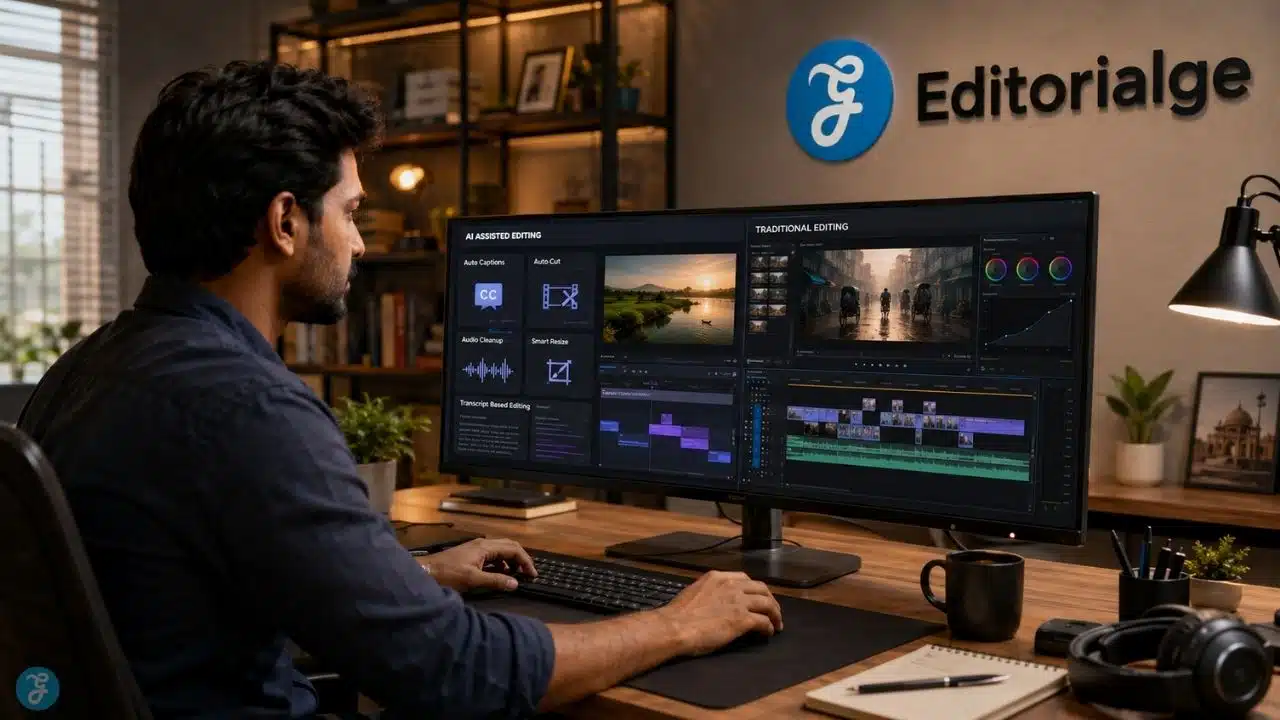
AI video editing comparison is not a simple “AI is faster, traditional editing is better” argument. I used to think about it that way, too. But after working with AI-powered content workflows, article visuals, image-to-video assets, social media videos, and publishing-focused creative systems, I see it differently now. AI video editing is not here only to replace traditional editing. It is here to remove the slow, repetitive parts of editing so creators can spend more time on story, structure, pacing, message, and quality control.
Traditional editing still matters. A lot. If I am cutting a serious brand story, polishing a documentary-style video, balancing emotion, fixing rhythm, or making sure every second feels intentional, I still trust human editing judgment. But if I need captions, rough cuts, silence removal, transcript editing, background cleanup, resize versions, quick social edits, or AI-assisted B-roll, then AI video editing saves real time.
At Editorialge Media LLC, we are no longer thinking only like a publisher. We are building around media, technology, SaaS, e-learning, and creative tools. So video editing is not just about making one video look good. It is about building a repeatable production system where articles, AI images, voiceovers, talking head clips, animations, social videos, and image-to-video workflows can all connect.
What Is AI Video Editing?
AI video editing means using artificial intelligence to speed up, automate, or assist parts of the video editing process.
It can include:
| AI Editing Feature | What It Does |
| Auto captions | Turns speech into subtitles |
| Silence removal | Cuts, pauses, and dead space |
| Transcript editing | Let’s you edit a video by editing text |
| Background removal | Removes or replaces the background |
| Object masking | Selects people or objects faster |
| Audio cleanup | Reduces noise and improves speech |
| Smart reframing | Resizes video for vertical or square formats |
| Generative extend | Adds frames or extends clips |
| AI B-roll | Suggests or generates supporting visuals |
| Text-to-speech | Adds AI voiceover |
| Voice cleanup | Improves narration quality |
| Scene detection | Splits footage into usable sections |
Adobe Premiere Pro now includes AI features like Object Mask and Generative Extend, which can help mask subjects and extend clips directly on the timeline using Adobe Firefly.
DaVinci Resolve also uses its AI Neural Engine for features such as facial recognition, object detection, smart reframing, speed warp retiming, super scale, auto color, and color matching. So, AI video editing is not one feature. It is a group of workflow accelerators.
What Is Traditional Video Editing?
Traditional video editing is the manual process of arranging, trimming, cutting, adjusting, grading, mixing, and exporting video content using human control.
It usually includes:
| Traditional Editing Task | Why It Matters |
| Manual cutting | Controls timing and story flow |
| Timeline editing | Builds scene structure |
| Color correction | Fixes visual consistency |
| Color grading | Creates mood and style |
| Audio mixing | Balances voice, music, and effects |
| Manual transitions | Controls visual flow |
| Motion graphics | Adds titles, animations, and explainers |
| Sound design | Adds emotion and rhythm |
| Final review | Catches quality and meaning issues |
Traditional editing gives more control. It also demands more time, skill, and attention. That is why professional editors still matter. AI can cut silence, but it cannot always understand why a pause feels emotional. AI can generate captions, but it cannot always know which line deserves emphasis. AI can suggest a cut, but it cannot fully understand brand tone, cultural context, or editorial responsibility.
AI Video Editing Comparison: The Simple Difference
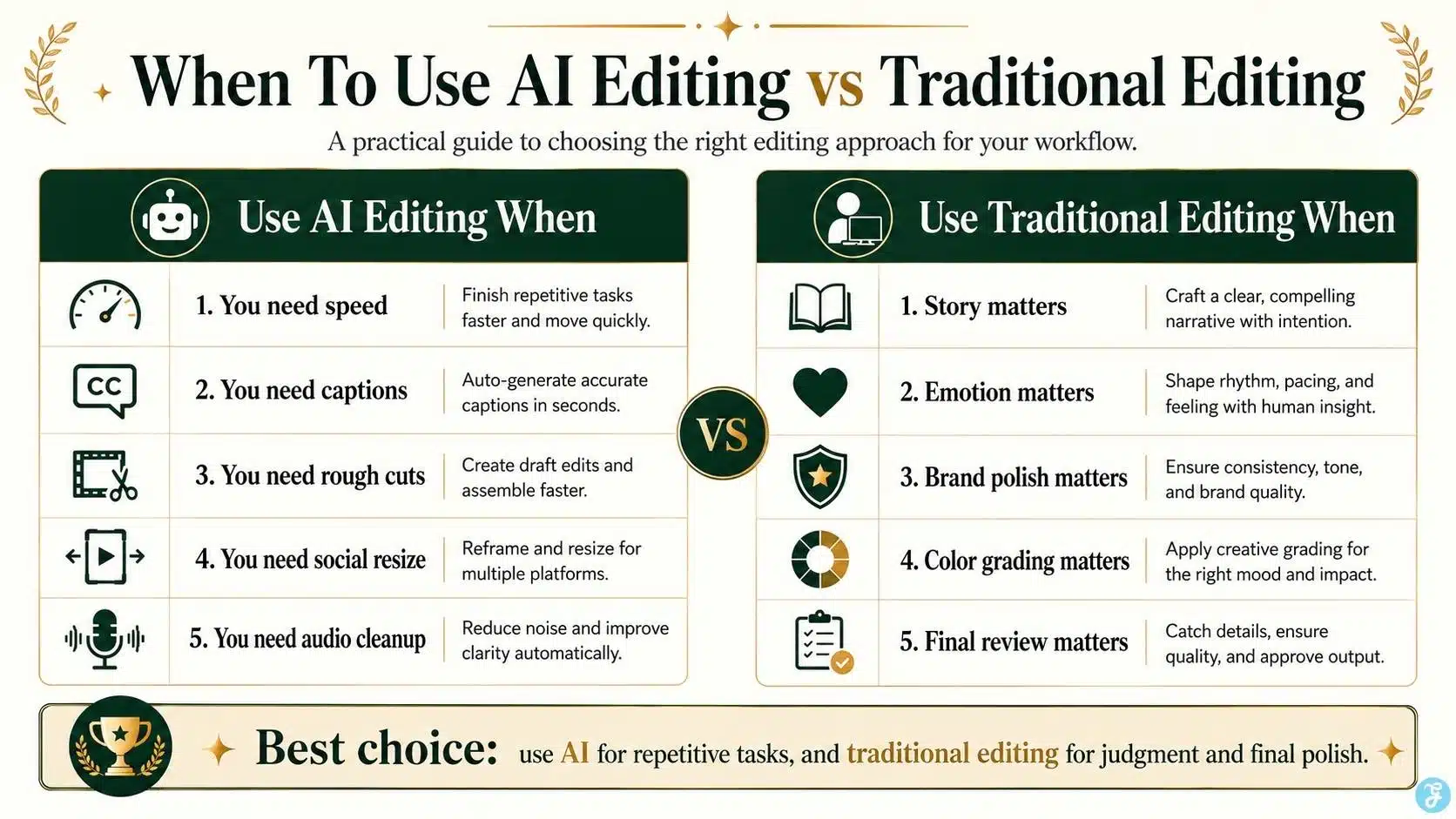
Here is the simplest way I explain it to beginners.
| Area | AI Video Editing | Traditional Editing |
| Speed | Very fast for repetitive tasks | Slower but more controlled |
| Control | Good for automation, weaker for nuance | Strong creative control |
| Learning curve | Easier for beginners | Requires more practice |
| Cost | Often lower for basic content | Higher if hiring editors |
| Quality | Good for quick content | Better for polished storytelling |
| Captions | Very fast | Manual correction may still be needed |
| Audio cleanup | Fast and useful | More precise with expert editing |
| Color grading | Quick presets and auto tools | Better artistic control |
| Social resizing | Very efficient | Manual but more intentional |
| Brand storytelling | Needs human direction | Stronger with experienced editors |
My personal workflow is not AI vs traditional. It is AI first for speed, human editing second for quality.
Where AI Video Editing Works Best
AI editing is excellent when the task is repetitive, technical, or time-consuming.
Auto Captions And Subtitles
Captions are now essential for social video. Many people watch videos without sound, especially on mobile. AI captions save time, but I still review them manually because names, brand terms, and technical words can be wrong.
CapCut offers AI-powered editing tools, including auto captions and text-to-speech features, which are useful for fast social media workflows.
Removing Silence And Filler Words
For talking head videos, podcasts, tutorials, and course lessons, AI can quickly remove long pauses, “um,” “uh,” and filler sections. This is useful for fast content production.
Descript positions its editor around AI-assisted video editing, including text-based video editing, filler word removal, studio sound, green screen, and eye contact tools.
Fast Social Media Repurposing
AI editing is strong when one long video needs to become:
- TikTok clips
- Instagram Reels
- YouTube Shorts
- LinkedIn short videos
- Facebook clips
- Captioned teaser videos
Short-form content like AI video for social media needs platform-native pacing, captions, aspect ratio, and hooks.
Background Cleanup And Masking
AI masking can save hours. Instead of manually rotoscoping every frame, AI can help isolate people, objects, and backgrounds faster.
This is useful for:
- Product demos
- Talking head videos
- Course videos
- Social clips
- Green screen-style edits
- Thumbnail and promo visuals
Quick Rough Cuts
AI can help create a rough structure. It can detect scenes, remove silence, create transcript-based cuts, and organize footage. But I would not call the rough cut “finished.” It is a starting point.
Where Traditional Editing Still Wins
Traditional editing wins when the video needs taste, judgment, emotion, precision, and accountability.
Story Rhythm
AI can cut quickly, but it does not always understand why a shot should stay longer. A human editor understands tension, pause, emotion, and audience attention.
Brand Voice
A brand video should not feel like a random template. Traditional editing lets you control transitions, pacing, text style, music, color, and emotion.
Complex Storytelling
For documentaries, editorial features, product films, founder stories, and serious explainers, manual editing still matters.
Color Grading
AI can suggest looks or auto-correct color, but professional color grading gives better control over skin tones, mood, consistency, and visual identity.
Final Quality Control
This is where I never fully trust automation.
Before publishing, I manually check:
- Caption accuracy
- Cut timing
- Audio levels
- Visual consistency
- Brand placement
- Copyright risk
- AI disclosure needs
- Export quality
- Platform fit
AI can assist. Human review protects trust.
My Personal Editing Workflow: AI First, Human Final
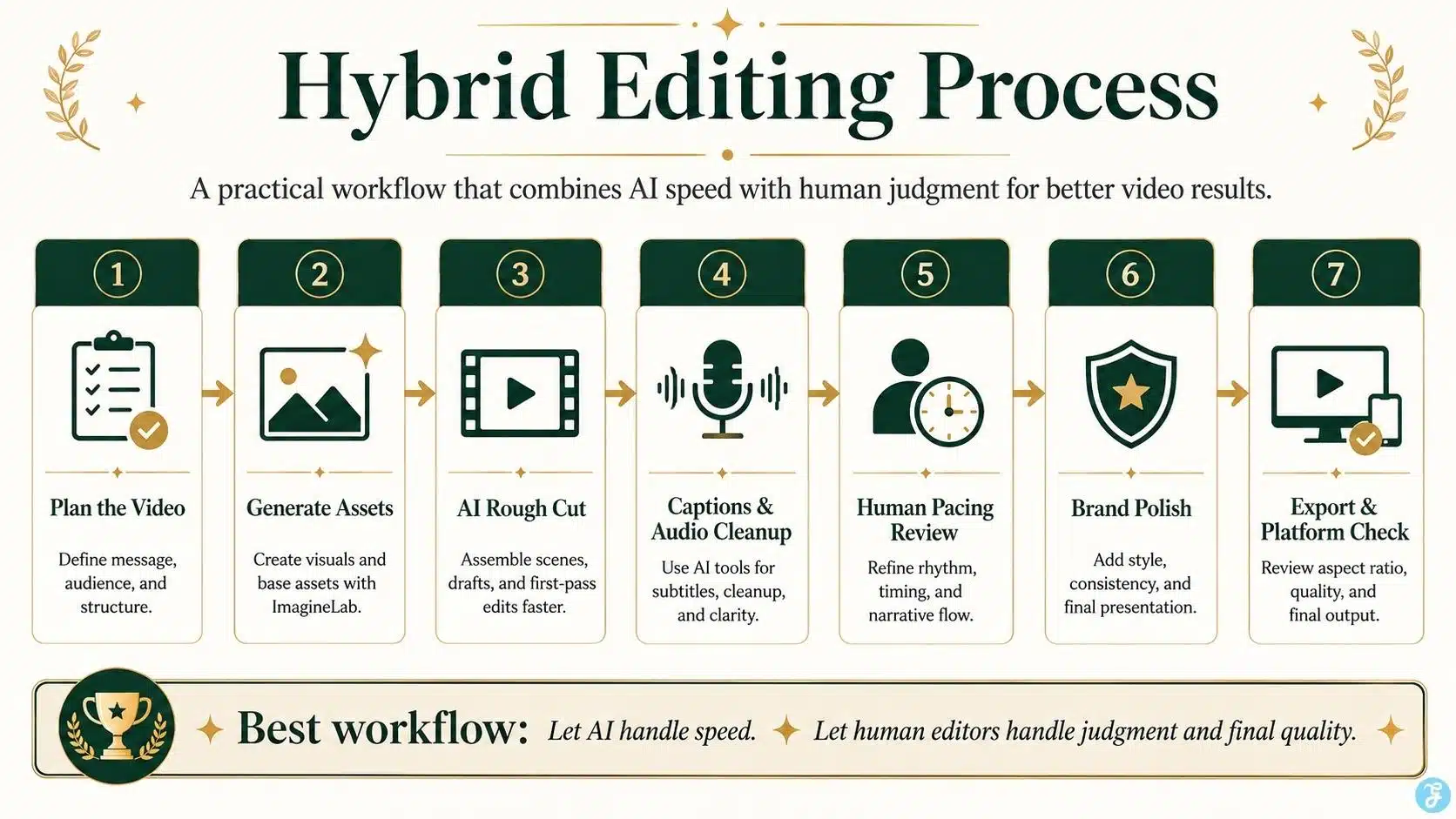
For most practical content, I use a hybrid workflow.
| Step | Tool Type | Why |
| 1. Plan the video | Human | Message, audience, hook, structure |
| 2. Create images or assets | AI + human review | Faster visual production |
| 3. Generate clips | AI | Text-to-video or image-to-video scenes |
| 4. Create rough cut | AI-assisted | Saves time |
| 5. Add captions | AI | Fast transcription |
| 6. Add voiceover | AI or human | Depends on trust and brand voice |
| 7. Refine pacing | Human | Story rhythm needs judgment |
| 8. Fix visuals | Human + AI tools | Crop, mask, clean, adjust |
| 9. Review ethics and rights | Human | Cannot skip |
| 10. Export versions | AI-assisted + manual check | Platform fit |
This is the workflow I trust most. AI helps me move faster. Traditional editing helps me finish better.
AI Editing For Text-To-Video Clips
Text-to-video outputs rarely come out publish-ready.
Even if the clip looks good, it may need:
- Trimming
- Stabilization
- Color adjustment
- Audio addition
- Captions
- Scene transitions
- Cropping
- Hook text
- Brand elements
- AI disclosure review
This is where text-to-video AI becomes important. A generated clip is not the final story. It is raw visual material.
If I create five text-to-video clips for a 30-second explainer, I still need to edit them into a proper sequence. Otherwise, the video may look like five disconnected AI experiments.
AI Editing For Image-To-Video Workflows
Image-to-video clips are usually easier to control than text-to-video clips, but they still need editing.
A still image turned into motion may need:
- Shorter duration
- Smoother transition
- Caption overlay
- Voiceover
- Music
- Motion cleanup
- Aspect ratio adjustment
- Scene sequencing
That is why image-to-video workflows and editing are connected. The image gives the scene visual stability. Editing gives it meaning and rhythm.
Before animating images, I prefer creating clean base visuals through ImagineLab, then reviewing composition, subject placement, and aspect ratio before sending the visual into motion or editing.
AI Editing And Aspect Ratios
Aspect ratio problems can ruin AI-generated and traditionally shot videos. A video created in 16:9 may not work properly as a 9:16 Reel. A vertical clip may look awkward inside a YouTube landscape frame. This is why AI image aspect ratios should be decided before production, not after editing.
| Platform | Better Editing Format |
| YouTube long-form | 16:9 |
| Blog hero video | 16:9 |
| TikTok | 9:16 |
| Instagram Reels | 9:16 |
| YouTube Shorts | 9:16 |
| LinkedIn feed | 4:5 or 1:1 |
| Facebook feed | 4:5 or 1:1 |
| Pinterest video | 2:3 or 9:16 |
AI smart reframing can help resize videos, but it does not always protect the subject perfectly. I still check every export manually.
AI Editing And Image Generation Mistakes
Bad AI images create bad AI videos. If the base image has distorted hands, messy text, bad cropping, or unclear subject placement, the editing stage becomes harder. This is why AI image generation mistakes matter even in a video editing article. Editing cannot fully rescue a weak visual foundation.
Common image mistakes that affect video editing:
| Image Mistake | Editing Problem Later |
| Wrong aspect ratio | Bad crop or wasted frame space |
| Too much text | Broken or unreadable motion |
| Distorted hands | More noticeable in the video |
| Busy background | Harder to focus the viewer’s attention |
| No safe zone | Captions or UI may cover the subject |
| Inconsistent style | Final video feels disconnected |
I prefer fixing these problems before the video stage.
AI Video Editing For Talking Head Videos
Talking head videos are one of the best use cases for AI editing.
AI can help with:
- Removing filler words
- Cleaning voice
- Adding captions
- Improving eye contact
- Removing background
- Cutting pauses
- Creating short clips
- Resizing for social platforms
This connects naturally with creating talking head videos with AI, because the raw talking head is only half the work. The edit decides whether the final video feels clear, confident, and watchable.
But I still review facial expressions, audio timing, and caption accuracy manually. Talking head content is trust-heavy. Small errors feel personal.
AI Editing For Animation And Lip Sync
AI-generated animation and lip sync videos also need editing.
For AI animation styles, editing helps keep the style consistent across scenes. If one scene looks realistic and the next looks cartoonish, the final video feels messy.
For AI lip sync technology, editing helps fix timing, cut awkward mouth movements, and avoid uncanny moments.
Lip sync clips especially need careful review because realistic synthetic speech can affect viewer trust. YouTube requires creators to disclose meaningfully altered or synthetically generated content when it appears realistic and could mislead viewers.
AI Editing For Voiceovers And Voice Cloning
Audio is where AI editing can save a lot of time.
AI can help with:
- Noise removal
- Voice leveling
- Text-to-speech
- Voiceover generation
- Dialogue cleanup
- Caption syncing
- Music ducking
- Translation workflows
Adding AI voiceovers to AI videos can make a simple video feel complete. It also connects with how AI voice cloning works and the ethics of AI voice cloning, because voice cloning needs consent, transparency, and careful use.
I never treat voice cloning as a casual shortcut. Voice is identity. If the voice is cloned, the ethical review becomes part of the editing workflow.
YouTube says it does not require disclosure for productivity uses such as generating scripts, content ideas, or automatic captions, but realistically altered or synthetic content needs disclosure when it could mislead viewers.
AI Editing Vs Traditional Editing: Cost Comparison
AI editing can reduce costs for basic content production.
| Editing Need | AI Editing Cost Advantage | Traditional Editing Advantage |
| Simple social clips | Faster and cheaper | More polished if manually refined |
| Captions | Very cost-effective | Better with manual proofreading |
| Long-form storytelling | Helps rough cuts | Human editor needed |
| Brand film | Useful support | Stronger creative direction |
| Course videos | Good for cleanup and captions | Better final review |
| Product video | Helps resize and clean | Better precision |
| Podcast clips | Very strong | Humans select the best moments better |
For small teams, AI editing can reduce production pressure. But for high-value content, I would still budget for human review.
AI Editing Vs Traditional Editing: Quality Comparison
Quality depends on the type of video.
| Video Type | Best Approach |
| Short social clips | AI-assisted editing + manual review |
| YouTube explainers | Hybrid workflow |
| Brand storytelling | Traditional editing with AI assistance |
| Course videos | AI cleanup + human structure |
| Talking head videos | AI captions/audio + human review |
| Product videos | Human precision + AI support |
| AI-generated scenes | Human sequencing and pacing |
| News-like content | Careful human editorial review |
For most modern creators, hybrid editing gives the best balance.
AI Editing Vs Traditional Editing: Speed Comparison
AI editing is faster in obvious ways.
It can:
- Generate captions in seconds or minutes
- Remove silence quickly
- Create rough cuts
- Suggest clips
- Resize for multiple platforms
- Clean audio fast
- Extend clips
- Mask subjects faster
- Create social versions
Traditional editing is slower because the editor makes each decision manually. But speed alone is not the goal. The goal is publish-ready quality. A fast, bad video is still a bad video.
When I Would Use AI Video Editing
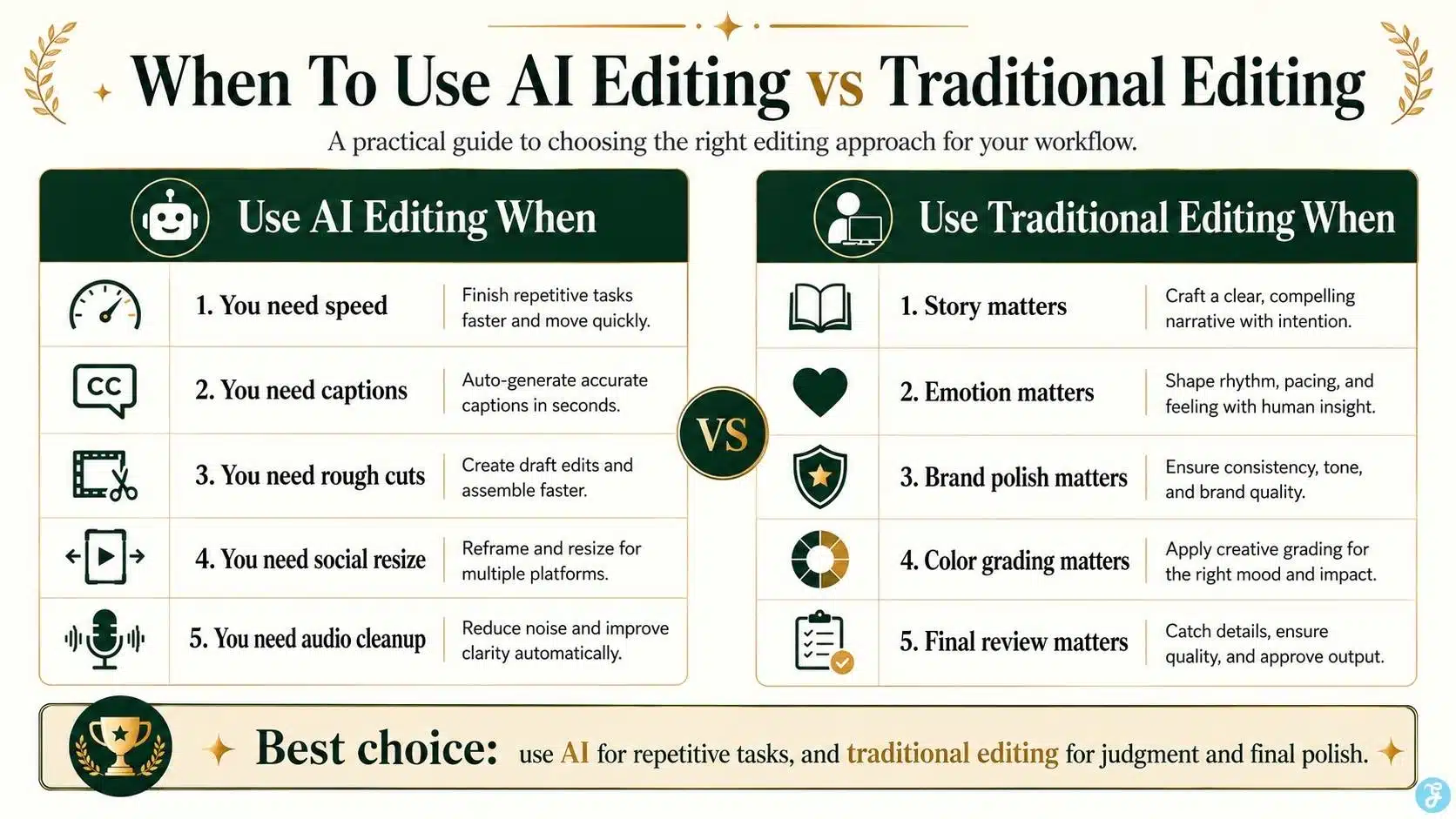
I would use AI video editing when:
- I need captions quickly
- I am editing social clips
- I need rough cuts
- I want to remove filler words
- I need audio cleanup
- I need quick video resizing
- I am making short explainers
- I am repurposing long content
- I am working with AI-generated clips
- I need fast draft versions
AI is excellent for speed and structure.
When I Would Use Traditional Editing
I would use traditional editing when:
- The video needs emotional storytelling
- The brand message is sensitive
- The pacing needs careful control
- The visuals must be precise
- The color grade matters
- The audio mix needs nuance
- The edit needs a cultural context
- The video represents a company seriously
- The content could affect trust
- The final output must feel premium
Traditional editing is still the stronger choice for final polish.
The Best Workflow For Beginners
Beginners should not start by choosing sides.
Start with this hybrid workflow:
| Stage | Best Method |
| Script and message | Human |
| Image creation | AI-assisted, using tools like ImagineLab |
| Video generation | AI |
| Rough cut | AI-assisted |
| Captions | AI-assisted |
| Voiceover | AI or human |
| Pacing | Human |
| Brand polish | Human |
| Final review | Human |
| Platform export | AI-assisted + manual check |
This approach gives beginners speed without losing control.
Ethics, Disclosure, And Trust
AI video editing creates trust questions. If AI only helps with captions, audio cleanup, or rough cuts, disclosure may not always be needed. But if the video meaningfully changes a real person, creates realistic synthetic events, uses cloned voices, alters speech, or shows someone doing something they did not do, disclosure becomes important.
YouTube requires disclosure for realistically altered or synthetic content when it is meaningfully changed and could be mistaken for real.
For my own workflow, I use this simple rule:
If AI changes reality in a way viewers could misunderstand, disclose it.
That protects the audience and the brand.
My Honest Verdict: AI Editing Is A Co-Editor, Not The Editor-In-Chief
The best way to understand this AI video editing comparison is simple: AI is a co-editor.
- It can help cut faster.
- It can clean audio.
- It can generate captions.
- It can resize videos.
- It can create rough drafts.
- It can extend clips.
- It can remove some technical friction.
But it should not be the final authority.
Human judgment still decides:
- What story matters
- What should be removed
- What feels natural
- What sounds trustworthy
- What matches the brand
- What needs disclosure
- What is ready to publish
That is why I do not see AI video editing and traditional editing as enemies. The strongest workflow uses both.
Final Thoughts: The Smart Editor Uses Both
The real answer in this AI video editing comparison is not AI video editing or traditional editing. It is knowing when to use each one.
AI editing is perfect for speed, captions, rough cuts, cleanup, resizing, and repetitive production tasks. Traditional editing is still better for story, emotion, precision, brand trust, and final polish. For beginners, the smartest path is hybrid. Use AI to move faster. Use traditional editing judgment to make the video worth watching.
That is how AI video editing becomes a serious workflow, not just a shortcut.
Frequently Asked Questions About AI Video Editing Comparison
1. Is AI Video Editing Better Than Traditional Editing?
AI video editing is better for speed, captions, rough cuts, audio cleanup, and social repurposing. Traditional editing is better for storytelling, emotion, precision, and final creative control.
2. Can AI Replace Human Video Editors?
AI can replace some repetitive editing tasks, but it cannot fully replace human judgment. A human editor is still needed for pacing, story, brand tone, ethics, and final quality review.
3. What Is The Best Use Of AI Video Editing For Beginners?
Beginners should use AI editing for captions, silence removal, rough cuts, resizing, audio cleanup, and short social clips. These tasks save time without requiring advanced editing skills.
4. When Should I Use Traditional Editing Instead Of AI?
Use traditional editing when the video needs emotional storytelling, detailed color grading, precise audio mixing, brand polish, or serious editorial review.
5. What Is The Best Workflow For AI Video Editing?
The best workflow is hybrid: plan the message yourself, use AI for repetitive editing tasks, then manually review pacing, captions, visuals, audio, ethics, and final export quality.























