

AI video no longer feels like a side experiment for people who enjoy playing with shiny tools. It has become a serious creative workflow. And honestly, that is where most beginners get confused. They do not struggle because AI video generation is impossible. They struggle because they start with the tool before they understand the process. This AI video creation guide is written from the way I actually look at modern content production: idea, workflow, and tool.
At Editorialge Media LLC, we are no longer thinking only like a publisher. We are building around media, technology, SaaS, e-learning through Edutorial, and creative products like ImagineLab. That changes how I approach video. I do not see AI video as “press a button and get a masterpiece.” I see it as a faster production layer for storytelling, education, social content, brand communication, and visual experimentation.
And that mindset matters even more in 2026. HubSpot’s 2026 marketing data says nearly 75% of marketers use AI for media creation, including video and images, while video and animation generators are now among the most used AI tool categories by marketers. At the same time, audiences are becoming more sensitive to lazy AI content. Sprout Social notes that AI-generated content is becoming mainstream, but brands still need transparency, human storytelling, and authenticity to stand out.
So, this guide is not about creating random AI clips. It is about creating video with AI in a way that looks intentional, useful, ethical, and publishable.
What Is AI Video Creation?
AI video creation is the process of using artificial intelligence to generate, animate, edit, enhance, narrate, or repurpose video content. In simple terms, you give the system an input, and the AI helps create motion, visuals, sound, voice, or edits.
That input can be:
| Input Type | What It Does | Beginner Use Case |
| Text prompt | Turns written instructions into a video | Explainer clips, concept scenes, ads |
| Image | Adds movement to a still visual | Product shots, portraits, social videos |
| Audio | Syncs voice, rhythm, or narration | Talking heads, voiceover videos |
| Existing video | Edits, extends, cleans, or transforms footage | B-roll, background replacement, stylized edits |
| Script | Builds structured scenes from an idea | Tutorials, educational videos, short-form content |
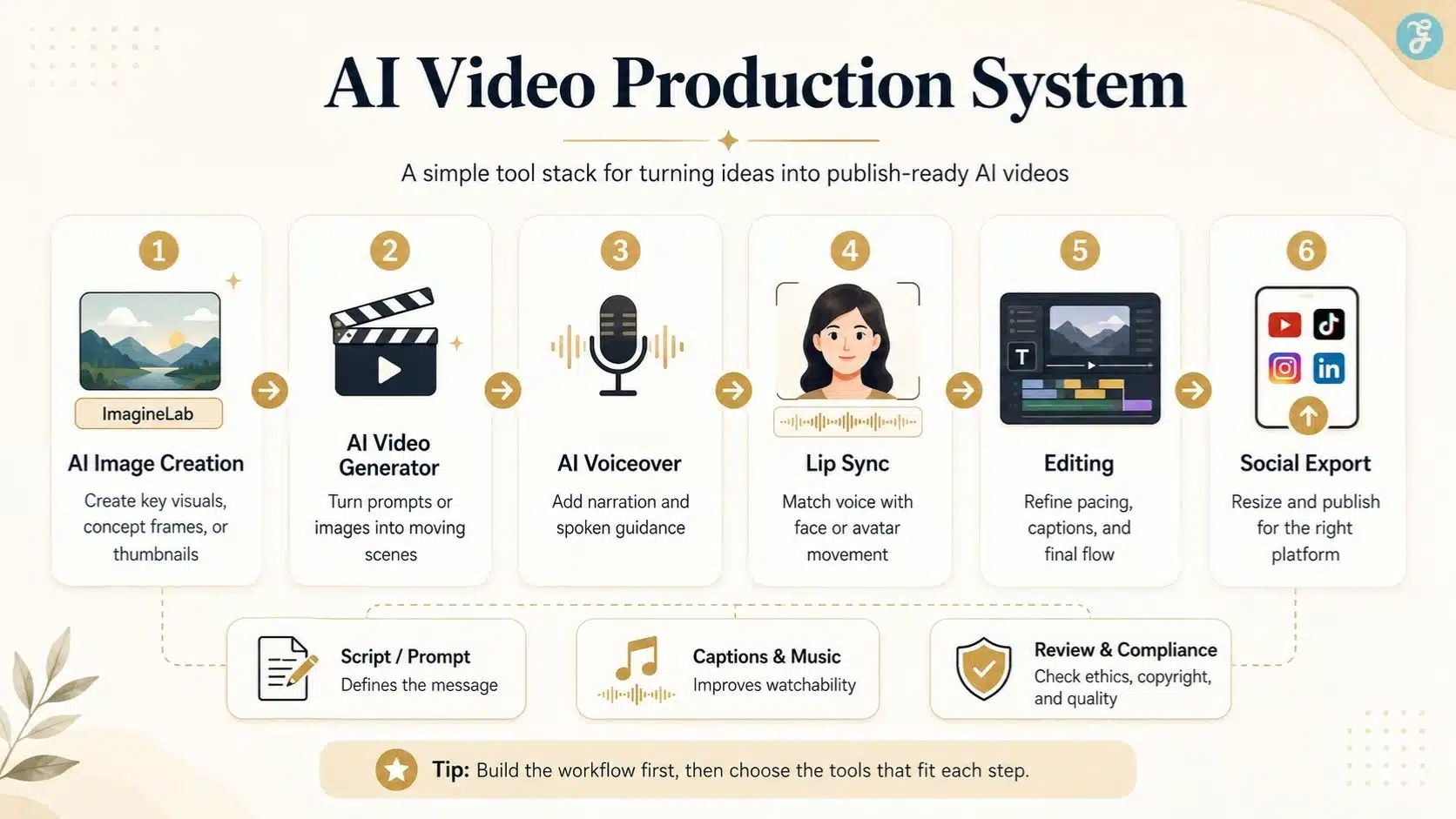
Adobe defines an AI video generator as a tool that turns text prompts, images, or reference clips into generated videos, letting creators describe a scene and produce motion, visuals, or effects without filming everything manually. That definition is useful, but I would add one practical layer: AI video creation is not one tool. It is a stack.
A beginner may use one tool for images, another for video generation, another for voiceover, another for editing, and another for subtitles. The better you understand the stack, the better your final video becomes.
Why AI Video Creation Matters in 2026
The real reason AI video matters is not that it replaces cameras, editors, animators, or creators. It matters because it lowers the entry barrier.
Before AI, a beginner needed a camera, lighting, editing software, stock footage, voice recording, animation knowledge, and a lot of patience. Now, a small creator, teacher, startup, blogger, or media company can create a rough video concept in a few hours instead of waiting days.
But there is a catch. The internet is already crowded with low-effort AI content. Sprout Social’s 2026 data shows users still prioritize human-generated and authentic content, even while AI becomes deeply embedded in content creation and distribution. That means beginners should not use AI just to produce more. They should use it to produce clearer, faster, and more useful content.
In my own workflow, I look at AI video through five practical questions:
| Question | Why It Matters |
| What is the message? | AI cannot save a weak idea. |
| Who is the viewer? | A TikTok viewer and a LinkedIn viewer need different pacing. |
| What visual style fits the topic? | Realistic, animated, cinematic, documentary, or educational? |
| What part should AI handle? | Generation, editing, voice, subtitles, B-roll, or repurposing? |
| What needs human review? | Accuracy, ethics, copyright, brand tone, and final quality. |
This is the difference between “AI slop” and useful AI-assisted media.
My 2026 AI Video Creation Guide Workflow
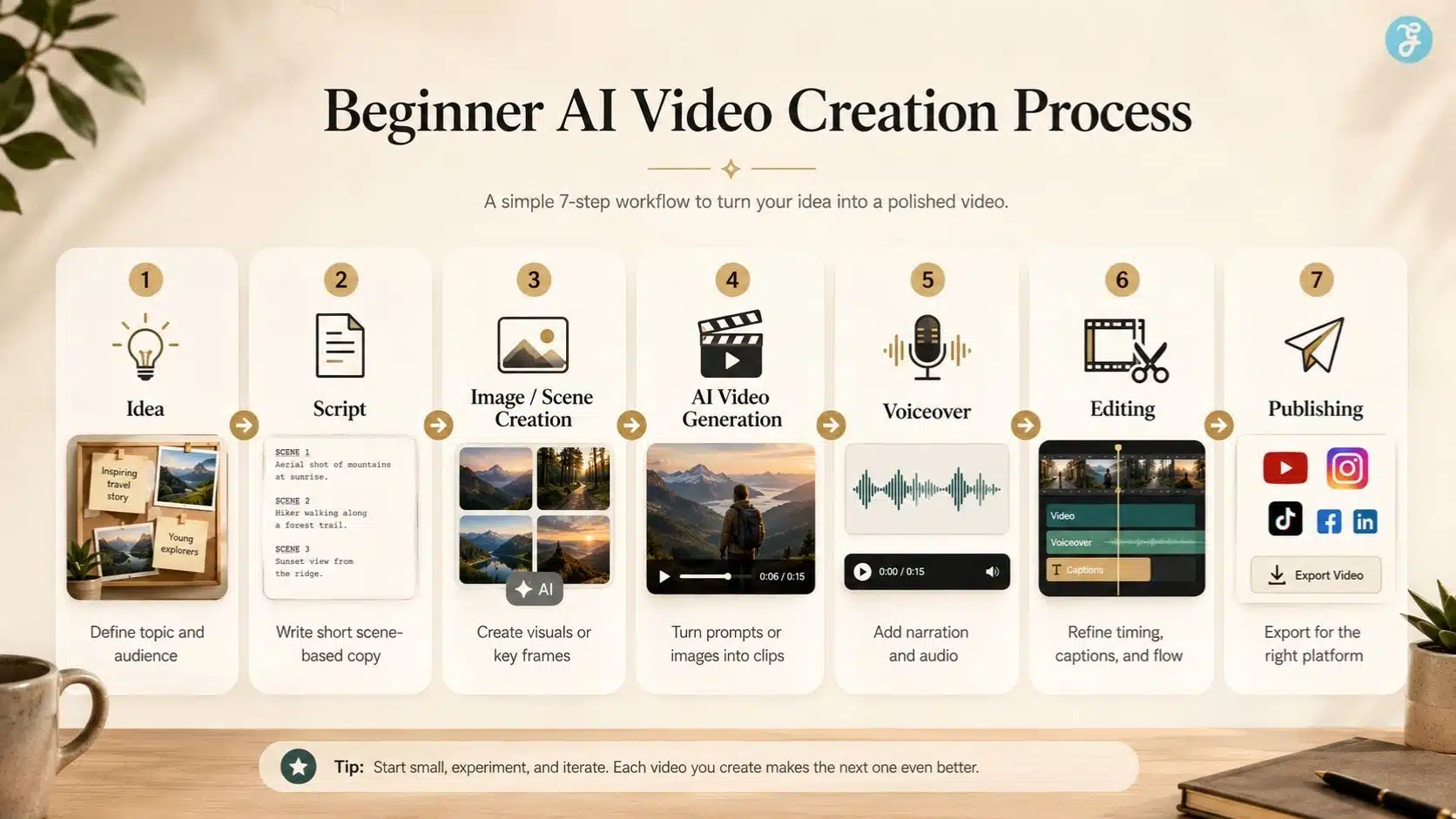
For beginners, I recommend a simple seven-step workflow.
| Step | Action | Practical Tip |
| 1 | Define the goal | Education, entertainment, product demo, social post, explainer, ad |
| 2 | Write the script | Keep it short, visual, and scene-based |
| 3 | Choose the format | 9:16, 16:9, 1:1, or 4:5 |
| 4 | Create visual assets | Use prompts, reference images, or original visuals |
| 5 | Generate video scenes | Create short clips instead of one long video |
| 6 | Add voice, music, captions | Make it watchable with or without sound |
| 7 | Edit and review | Fix pacing, errors, artifacts, rights, and disclosure |
My biggest beginner advice is this: do not generate a full video in one attempt. Generate scenes. AI is much easier to control when you work in 4–8 second blocks.
Text-To-Video AI Models Explained For Beginners
Text-to-video is the most direct form of AI video generation. You write a prompt, and the model creates a moving scene.
A basic prompt might be:
“Create a cinematic shot of a futuristic classroom where students are learning with holographic AI tutors, soft natural lighting, realistic style, and slow camera movement.”
A better prompt includes:
| Prompt Element | Example |
| Subject | A teacher explaining AI video creation |
| Setting | Modern digital studio |
| Camera | Medium shot, slow push-in |
| Style | Clean documentary style |
| Lighting | Soft natural light |
| Motion | Subtle hand movement, screen animations |
| Mood | Educational and confident |
| Duration | Short 6-second scene |
Modern models are improving quickly. Google DeepMind describes Veo 3.1 as a video generation model designed for filmmakers and storytellers, with stronger realism, prompt following, creative control, and audio capabilities. But even advanced video AI tools still need careful direction.
The beginner mistake is writing prompts like this:
“Make a good video about AI.”
That is not a direction. That is a wish.
A better beginner formula is:
Subject + Action + Setting + Style + Camera + Lighting + Emotion + Output Format
For example:
“Create a 9:16 vertical video of a beginner content creator sitting at a desk, using AI tools to plan a short educational video. Realistic style, warm studio lighting, slow camera push-in, focused and inspiring mood.”
That kind of prompt gives the model a clear job.
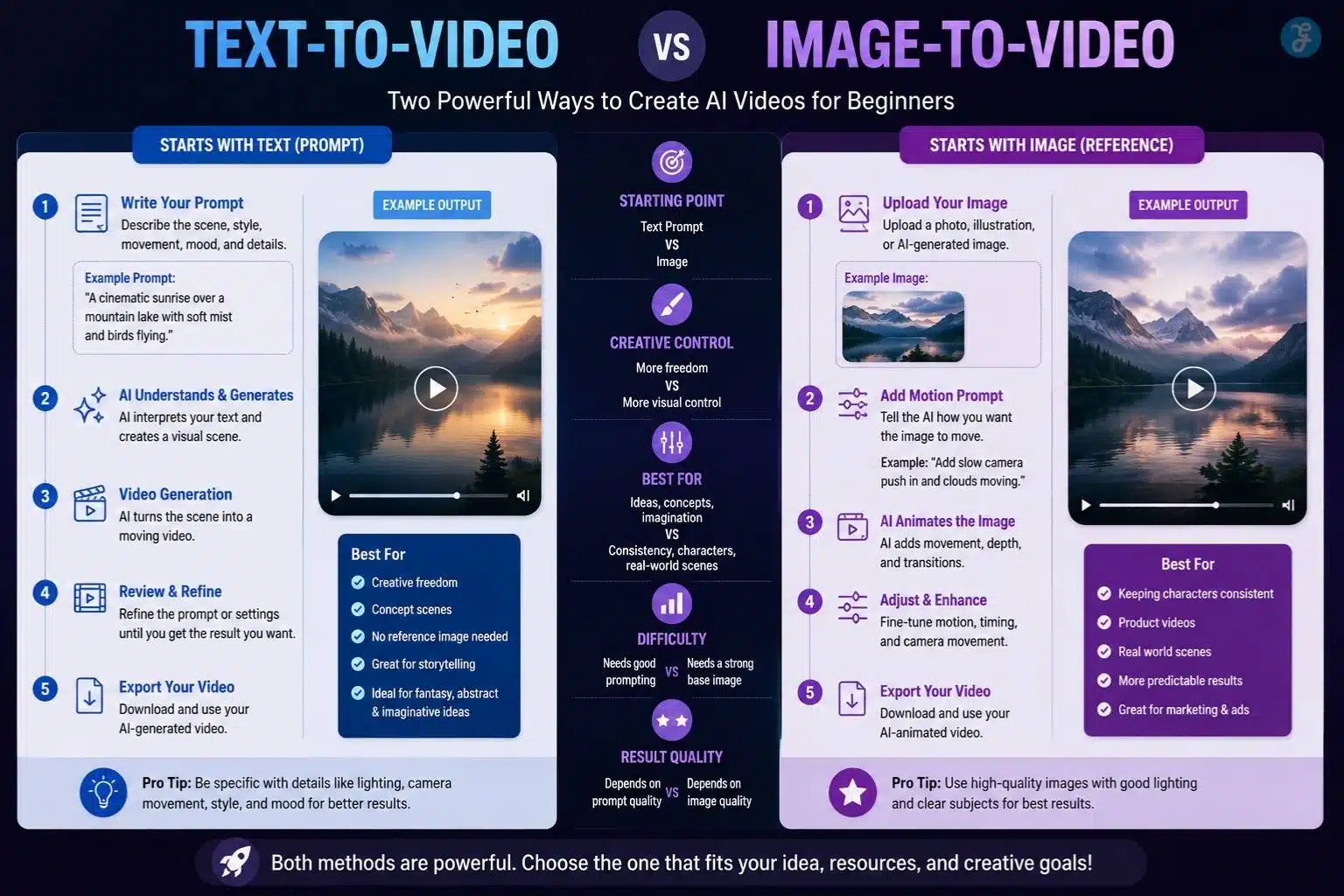
Image-To-Video Workflows For Beginners
Image-to-video is often easier than text-to-video because the visual starting point is already fixed. Instead of asking AI to invent everything, you give it a still image and ask it to create motion.
This is especially useful for:
| Use Case | Why Image-To-Video Works Well |
| Product visuals | Keeps the product consistent |
| Character videos | Maintains face, outfit, and mood better |
| Social posts | Turns static graphics into motion |
| Educational clips | Animates diagrams, scenes, or illustrations |
| Brand storytelling | Preserves a planned visual style |
This is where our in-house image workflow matters. If I want the video to look controlled, I first create or refine the base image properly. A clean image gives the AI video model better visual direction. For that kind of creative starting point, I would naturally use ImagineLab to create strong AI images before animating them into a video.
My usual image-to-video workflow looks like this:
- Create the base image.
- Check the aspect ratio.
- Fix the subject, background, and lighting.
- Upload the image into a video AI tool.
- Add motion instructions.
- Generate 2–4 variations.
- Choose the cleanest result.
- Edit manually if needed.
A good motion prompt might be:
“Animate this image with a slow cinematic camera push-in. Add subtle movement to the background lights. Keep the subject’s face stable. No distortion. Realistic movement.”
The most important line is often: Keep the subject stable. Without that, AI may distort faces, hands, logos, text, or product shapes.
AI Image Aspect Ratios For Different Platforms
Aspect ratio matters more than beginners think. A great AI video can fail simply because it was created in the wrong format.
Instagram says Reels can be uploaded between 1.91:1 and 9:16, with a minimum 30 FPS and minimum resolution requirements. LinkedIn’s official video ad specs support multiple formats, including 16:9 landscape, 1:1 square, 4:5 vertical, and 9:16 vertical.
For beginners, this is the simple version:
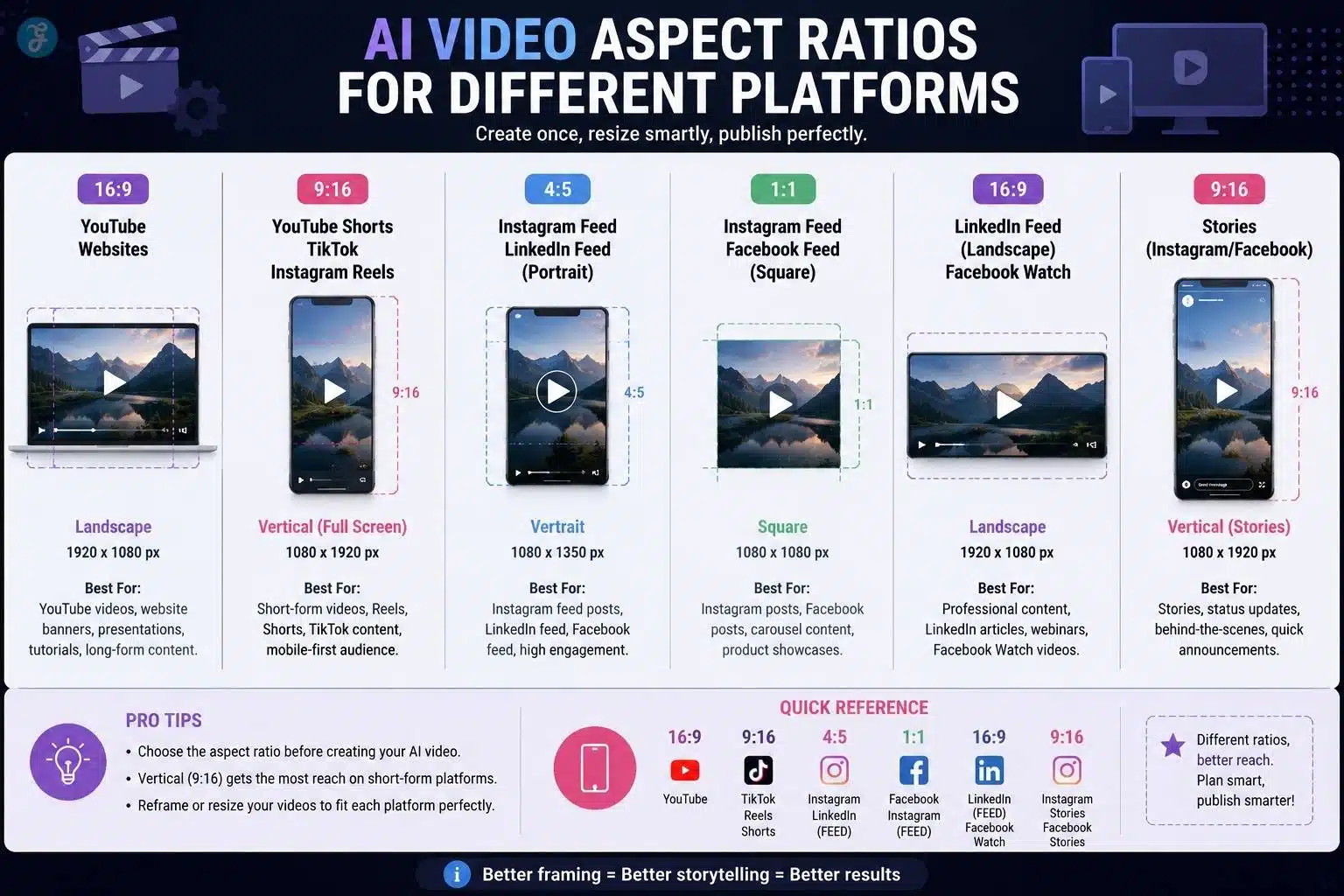
| Platform / Placement | Best Beginner Ratio | Best Use |
| YouTube video | 16:9 | Tutorials, explainers, long-form |
| YouTube Shorts | 9:16 | Short vertical clips |
| TikTok | 9:16 | Fast mobile-first videos |
| Instagram Reels | 9:16 | Short-form discovery |
| Instagram Feed | 4:5 or 1:1 | Visual posts and carousels |
| Facebook Reels | 9:16 | Short-form reach |
| LinkedIn Feed | 4:5 or 16:9 | Professional content |
| Website hero video | 16:9 | Landing pages and brand sections |
My rule is simple: decide the platform before generating the image or video. Do not create a beautiful 16:9 cinematic clip and then force it into TikTok. You will crop the important parts. For AI video, composition starts before generation.
Common AI Image Generation Mistakes To Avoid
AI video often starts with AI images. So, weak image generation leads to weak video generation.
The most common mistakes I see are:
| Mistake | Why It Hurts The Video |
| Too much text in the image | AI may distort the text during motion |
| Busy backgrounds | Motion becomes messy and distracting |
| Unclear subject | The model does not know what to preserve |
| Wrong aspect ratio | Cropping ruins the final video |
| Over-stylized prompts | The result looks impressive but unusable |
| No brand consistency | Every scene looks like a different project |
| Ignoring hands and faces | Animation makes errors more visible |
A beginner should not chase the most dramatic image. They should chase the most usable image.
For AI video, a good base image usually has:
- One clear subject
- Clean background
- Strong lighting
- Correct aspect ratio
- Minimal text
- Enough space for captions
- Consistent color style
- No tiny details that will break during motion
This is why image planning is part of video planning.
AI Video Editing Vs Traditional Editing
AI video editing and traditional editing are not enemies. They solve different problems. Traditional editing gives you full control. AI editing gives you speed. The smartest workflow uses both.
| Task | AI Video Editing | Traditional Editing |
| Removing silence | Fast and useful | Possible but slower |
| Captions | Very fast | Manual refinement is still needed |
| Color grading | Quick presets | More precise control |
| B-roll generation | Strong for concept visuals | Stronger for real-world authenticity |
| Scene timing | Helpful suggestions | Best for final pacing |
| Audio cleanup | Very useful | Advanced control needs skill |
| Story judgment | Weak | Human editor needed |
My approach is to use AI for the first 60–70% of the production workload and human editing for the final 30–40%. AI can speed up clipping, captions, rough cuts, background cleanup, and B-roll ideas. But the final rhythm still needs human taste. A video can be technically generated and still feel dead. Editing gives it pulse.
Creating Talking Head Videos With AI
Talking head videos are popular because they feel personal. They work for explainers, course content, product updates, training videos, and social media commentary.
AI talking head videos usually need three things:
| Element | Purpose |
| Avatar or face | The visual speaker |
| Script | The message |
| Voice or audio | The delivery |
For beginners, I recommend starting with short talking head videos under 60 seconds. Longer AI talking head videos can expose weaknesses in lip movement, facial expression, pacing, and emotional delivery.
A good talking head script should be written for speech, not reading. For example:
Bad:
“Artificial intelligence video creation tools are increasingly being used by creators across multiple digital ecosystems.”
Better:
“AI video tools are changing how creators work. But beginners need a workflow, not just another shiny app.”
The second version sounds like a person. That matters.
AI Animation Styles Explained
AI animation styles can make or break the tone of a video. A serious finance explainer should not look like a toy cartoon. A children’s learning video should not look like a dark cyberpunk trailer.
Common AI animation styles include:
| Style | Best For |
| 2D flat animation | Explainers, education, SaaS videos |
| 3D cartoon | Children’s content, product storytelling |
| Anime-inspired | Entertainment, fandom, dramatic scenes |
| Claymation style | Playful brand content |
| Motion graphics | Data, marketing, professional explainers |
| Cinematic realism | Ads, concept films, storytelling |
| Whiteboard style | Training and simplified education |
| Isometric animation | Tech, business, process explanation |
My beginner advice: pick one style and stay consistent. Do not mix cinematic realism, anime, 3D cartoon, and corporate motion graphics in one short video unless there is a strong creative reason.
Consistency makes AI content look intentional.
AI Lip Sync Technology Explained
AI lip sync matches mouth movement to spoken audio. It is used in dubbing, avatar videos, translations, talking head clips, and character animation.
The workflow usually looks like this:
- Upload or generate a face/character.
- Add voice audio.
- The AI detects speech sounds.
- It generates mouth movement.
- You review and export.
- You fix timing or regenerate if needed.
AI lip sync works best when:
- The face is front-facing
- The mouth is visible
- The audio is clean
- The speech is not too fast
- The video is short
- The expression is not extreme
It struggles when the face turns too much, the mouth is covered, the speaker moves heavily, or the audio has background noise.
For realistic content, lip sync also raises trust issues. If a person appears to say something they never said, platforms may require labeling. TikTok specifically says creators should label AI-generated content when realistic images, audio, or video are generated or significantly edited, including cases where primary subjects are shown saying something they did not say.
So, use lip sync carefully. It is powerful, but it should not be deceptive.
Adding AI Voiceovers To AI Videos
AI voiceovers are one of the easiest ways to improve an AI video. A silent generated clip may look interesting, but voice gives it direction.
There are four common voiceover options:
| Voice Type | Best For |
| Standard AI voice | Simple explainers and social posts |
| Human-recorded voice | Personal brand and trust-heavy content |
| AI-enhanced human voice | Cleaner audio without losing personality |
| Cloned voice | Brand consistency, dubbing, and controlled narration |
For beginners, I recommend starting with a standard AI voice or an AI-enhanced human voice. Voice cloning should come later because it carries ethical and consent responsibilities.
A good AI voiceover script should be:
- Short
- Conversational
- Easy to pronounce
- Broken into natural pauses
- Matched to the video pace
Do not write long paragraphs for AI narration. Write in short spoken lines.
Example:
“AI video looks easy from the outside.
But the real skill is not pressing generate.
The real skill is planning the scene before the tool starts working.”
That structure sounds better than one long sentence.
How AI Voice Cloning Works
AI voice cloning uses sample audio to learn the sound, tone, rhythm, and speaking style of a voice. Then the model generates new speech that sounds similar to the original speaker.
A basic voice cloning workflow includes:
- Recording or uploading voice samples.
- Cleaning the audio.
- Training or creating a voice profile.
- Typing the new script.
- Generating the cloned speech.
- Reviewing pronunciation and tone.
- Exporting the final audio.
Voice cloning is useful for:
| Use Case | Benefit |
| Course content | Consistent narration |
| Multilingual dubbing | Faster localization |
| Brand videos | Familiar voice identity |
| Accessibility | Alternative audio formats |
| Content repurposing | Turning articles into narrated videos |
But a cloned voice should never be treated casually. A voice is part of a person’s identity. If you clone someone without permission, you are not being creative. You are creating a trust problem.
Ethics Of AI Voice Cloning Explained
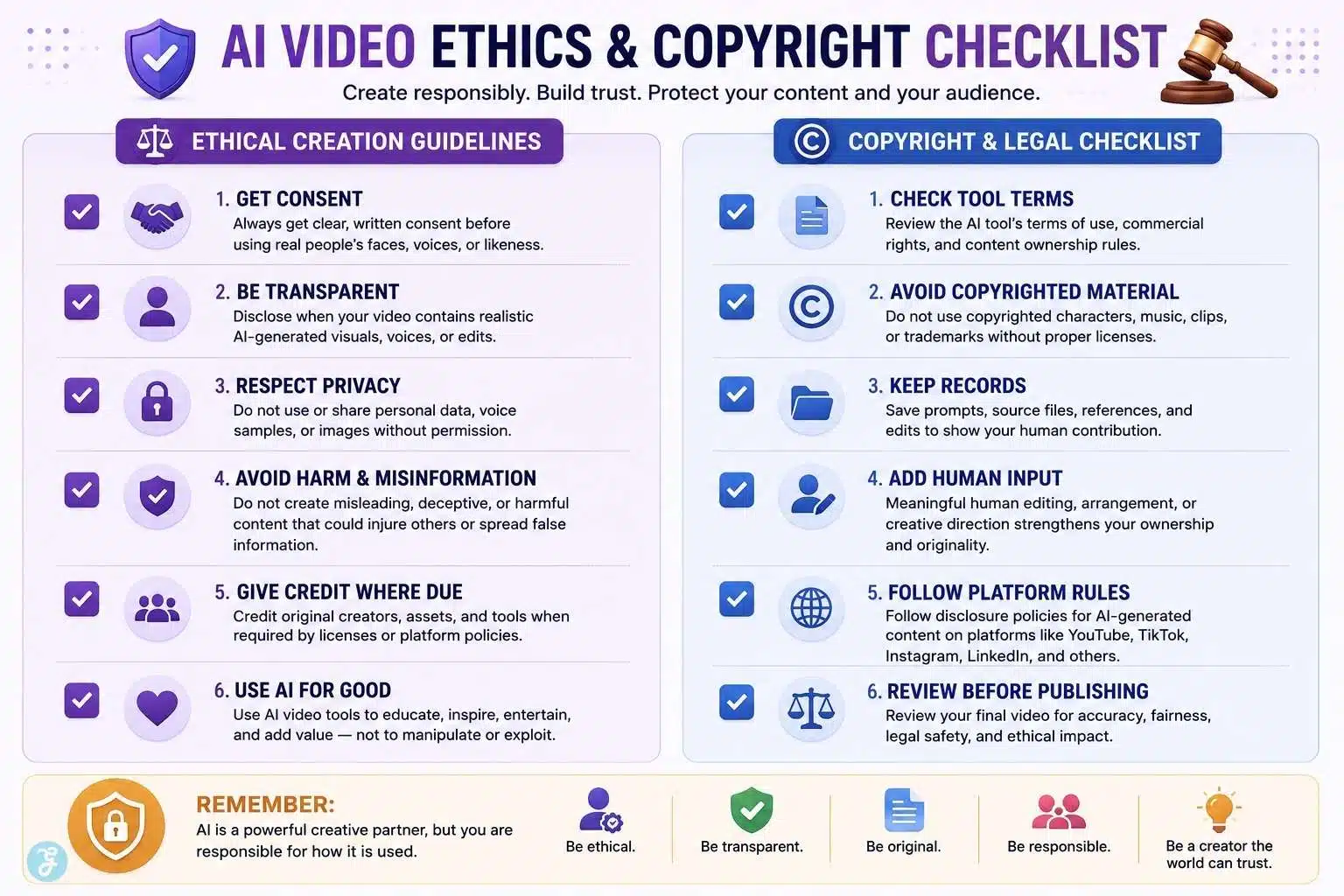
Ethics is not optional in AI video creation. It is part of the production workflow. For voice cloning, I follow a simple rule: no consent, no clone.
Ethical AI voice cloning should include:
| Rule | Why It Matters |
| Get written consent | Protects the person and the creator |
| Explain the use case | The person should know where the voice will appear |
| Avoid political or sensitive misuse | Reduces harm and misinformation |
| Label the synthetic voice when needed | Builds audience trust |
| Keep original files secure | Voice data can be misused |
| Allow withdrawal where possible | Respect long-term control |
The same applies to faces, likenesses, and realistic avatars. Just because a tool can recreate a voice or face does not mean you should use it.
YouTube requires disclosure for realistically altered or synthetic content when meaningful changes could mislead viewers, while minor or unrealistic edits may not require disclosure. TikTok also requires labeling realistic AI-generated images, audio, and video, and may automatically apply AI labels when Content Credentials are attached.
The safest beginner habit is simple: when the content is realistic, and AI meaningfully changed it, disclose it.
AI Video For Social Media: Best Practices
AI video performs best on social media when it feels native to the platform. A video that works on YouTube may feel slow on TikTok. A TikTok-style clip may feel too casual on LinkedIn.
Sprout Social’s 2026 video statistics show strong user interaction with short-form video across major platforms, including Instagram, YouTube, Facebook, TikTok, LinkedIn, and X. But the format alone is not enough. The first few seconds matter more than ever.
My social AI video checklist:
| Element | Best Practice |
| Hook | Start with motion, question, problem, or visual surprise |
| Length | Keep beginner videos short and focused |
| Captions | Add captions for sound-off viewing |
| Format | Use 9:16 for short-form platforms |
| Branding | Keep logo and colors subtle |
| Pacing | Cut dead space aggressively |
| Human layer | Add opinion, experience, or real commentary |
| Disclosure | Label realistic AI content where required |
| CTA | Keep it natural, not desperate |
A good AI social video should not feel like a machine showing off. It should feel like a useful idea delivered faster.
For example, instead of:
“Here is an AI-generated video about productivity.”
Use:
“Most people waste time choosing AI tools. Here is the workflow that actually matters.”
That is a hook. It gives the viewer a reason to stay.
Copyright Issues With AI Video Content
Copyright is one of the most misunderstood parts of AI video creation. The beginner assumption is often: “I generated it, so I own it completely.” That is not always how the law works.
The U.S. Copyright Office’s January 2025 report says copyright protects original expression created by a human author, even if the work includes AI-generated material, but it does not extend to purely AI-generated material or material where there is not enough human control over expressive elements. It also says prompts alone do not provide sufficient human control under current generally available technology.
For creators, the practical lesson is this:
| Scenario | Safer Interpretation |
| Fully AI-generated clip from a simple prompt | Copyright protection may be limited |
| AI clip edited into a human-made video | Human editing and arrangement may be protectable |
| AI used for background effects | Larger human-authored work may still be protectable |
| AI-generated character resembling a real person | Rights and likeness issues may apply |
| AI voice clone without consent | High ethical and legal risk |
| AI output based on copyrighted characters | Possible infringement risk |
The Copyright Office also notes that if AI merely assists the author, its use does not automatically change copyrightability, but entirely AI-generated content cannot be protected by copyright in the same way.
So, for AI video content, beginners should keep records:
- Prompts used
- Source images
- Voice permissions
- Stock licenses
- Editing steps
- Human-written script
- Human-made arrangement
- Tool terms of service
- AI disclosure decisions
This is boring work. But boring documentation protects creative work.
Choosing The Right Video AI Tools
There is no single “best” AI video tool for everyone. A tool that works for cinematic scenes may not be the best for talking head videos. A tool that creates great avatars may not be the best for animation.
Choose based on the job:
| Need | Tool Category |
| Generate scenes from prompts | Text-to-video tool |
| Animate still images | Image-to-video tool |
| Create avatars | Talking head AI tool |
| Add narration | AI voiceover tool |
| Clone voice | Voice cloning tool |
| Match mouth movement | Lip sync tool |
| Clean rough footage | AI video editor |
| Create source visuals | AI image generation tool |
| Add captions | Auto-captioning tool |
This is why I prefer building a workflow instead of depending on one platform. AI tools change fast. Models improve, pricing changes, features disappear, and new competitors arrive.
A beginner should learn the principles first:
- Prompting
- Scene planning
- Aspect ratio
- Audio clarity
- Editing rhythm
- Ethical disclosure
- Copyright basics
The tools will change. The workflow will keep you useful.
Beginner-Friendly AI Video Creation Example
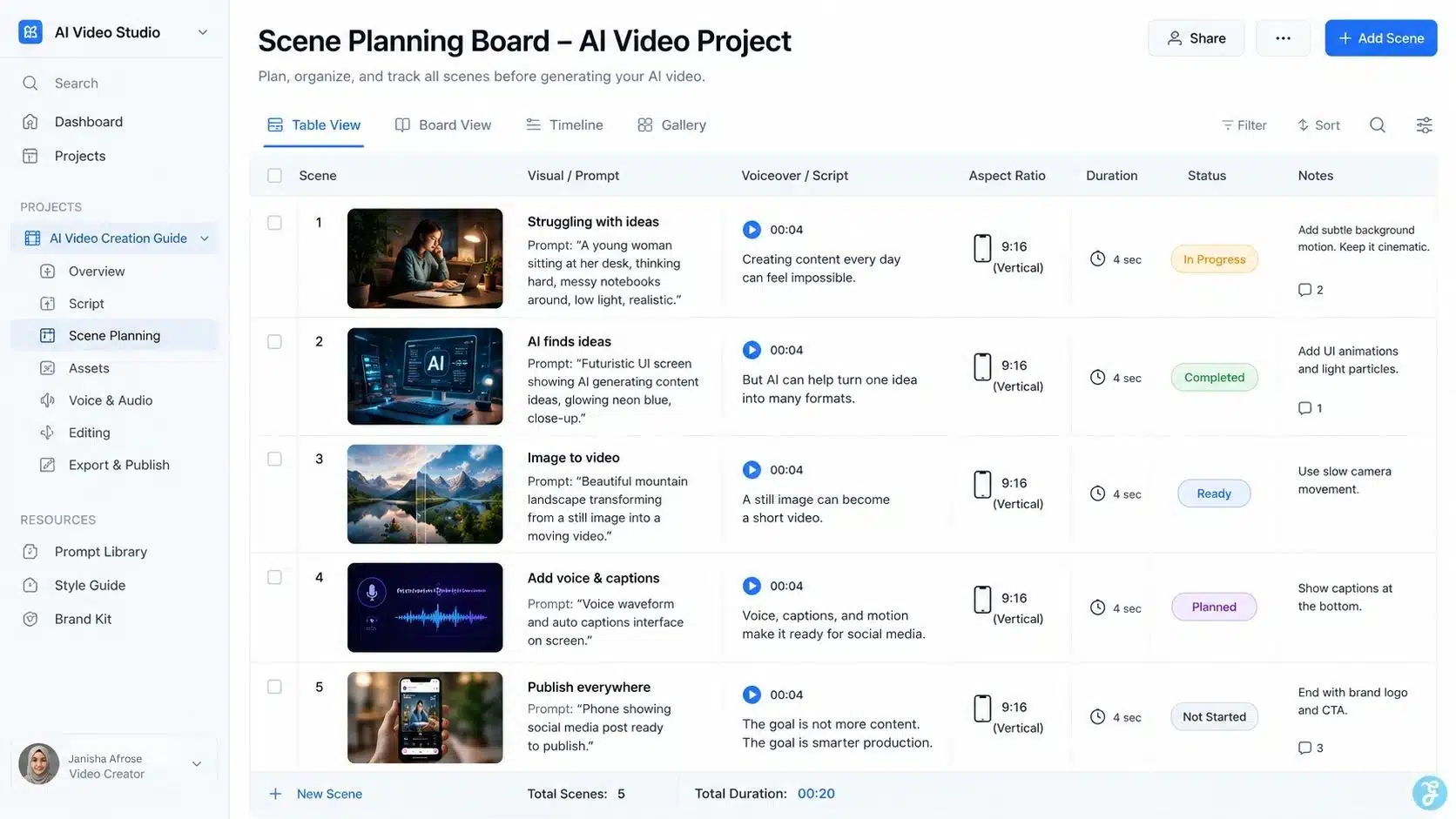
Let’s say I want to create a 30-second video explaining “how AI helps small businesses create content faster.” Here is how I would structure it.
| Scene | Visual | Voiceover |
| 1 | Founder staring at a messy content calendar | “Creating content every day can feel impossible.” |
| 2 | AI dashboard generating ideas | “But AI can help turn one idea into many formats.” |
| 3 | Image being turned into a video | “A still image can become a short video.” |
| 4 | Captions and voiceover added | “Voice, captions, and motion make it ready for social media.” |
| 5 | Final phone preview | “The goal is not more content. The goal is smarter production.” |
For this kind of video, I would create clean source visuals first, animate them scene by scene, add a short AI voiceover, edit the pacing manually, and export in 9:16 for social media. That is a beginner workflow that actually works.
Advanced Tips Beginners Should Learn Early
Once you understand the basics, these habits will improve your AI videos quickly.
Tip 01: Use Scene-Based Prompting
Do not ask for one full video. Break it into scenes. Each scene should have one visual idea.
Tip 02: Keep Characters Consistent
If the same person appears in multiple scenes, use reference images and repeat visual details like outfit, hair, lighting, and setting.
Tip 03: Avoid Text Inside Generated Video
AI still struggles with clean text in visuals. Add text later in editing software.
Tip 04: Use AI For B-Roll, Not Everything
AI is excellent for concept shots, backgrounds, stylized scenes, and abstract visuals. But real human clips still build trust.
Tip 05: Always Review Hands, Faces, Logos, And Motion
Small errors become obvious when the image moves.
Tip 06: Do Not Skip Sound Design
Voice, music, pauses, and subtle effects make an AI video feel finished.
Tip 07: Keep Human Judgment In The Loop
AI can generate. It cannot fully understand your audience, brand trust, legal risk, or editorial responsibility.
Where Beginners Usually Go Wrong
Most bad AI videos fail for predictable reasons.
| Problem | Better Approach |
| Starting with tools | Start with the message and the audience |
| Using vague prompts | Write scene-specific prompts |
| Generating long clips | Generate short scenes |
| Ignoring format | Choose the aspect ratio first |
| Overusing effects | Keep visuals clean |
| No human edit | Add pacing, captions, and review |
| No disclosure | Label realistic AI content when needed |
| No documentation | Save prompts, assets, and permissions |
The biggest mistake is thinking AI replaces creative direction. It does not. It rewards creative direction.
The Future Of AI Video Creation
AI video is moving toward more control, better realism, stronger audio, more consistent characters, and faster editing. The direction is clear: creators will spend less time fighting technical barriers and more time designing ideas.
But the winners will not be the people who generate the most clips. The winners will be the people who combine:
- Human taste
- Clear storytelling
- Ethical production
- Platform awareness
- Smart editing
- Brand consistency
- Useful information
That is especially important for a company like Editorialge Media LLC. As a digital venture studio bridging technology, media, and life, our opportunity is not just to publish AI-generated content. It is to build trustworthy media systems around AI-assisted creation.
Final Thoughts: The Real Skill Is Not Generating Video
This AI video creation guide comes down to one uncomfortable truth: AI makes video creation easier, but it does not automatically make videos better.
A beginner can now create visuals, voiceovers, animations, lip sync clips, talking heads, and social videos without a traditional production team. That is powerful. But the real quality still comes from planning, taste, ethics, editing, and understanding the audience.
So, do not treat AI video as a shortcut around creativity. Treat it as a production partner. Use video AI tools to speed up the work, use your own judgment to shape the story, and use human experience to make the final content worth watching.
That is how creating video with AI becomes more than a trend. It becomes a serious creative workflow.
Frequently Asked Questions (FAQs) About the AI Video Creation Guide
1. What Is AI Video Creation?
AI video creation is the process of using AI tools to generate, edit, animate, voice, or enhance videos. It can include text-to-video, image-to-video, AI voiceovers, lip sync, and AI editing.
2. Can Beginners Create Videos With AI?
Yes, beginners can create videos with AI if they follow a clear workflow. Start with a script, choose the right aspect ratio, create short scenes, add voice or captions, and edit the final output.
3. What Are The Best Uses Of AI Video Generation?
AI video generation is useful for social media clips, explainer videos, product visuals, educational content, ads, animated scenes, and talking head videos. It works best when paired with human planning and editing.
4. Are AI-Generated Videos Copyright-Free?
Not always. AI-generated videos may have copyright limits depending on the tool, source materials, human input, and local laws. Always check tool terms, avoid copyrighted characters, and keep records of prompts, assets, and edits.
5. Should AI Videos Be Labeled As AI-Generated?
Yes, especially when the video looks realistic or uses synthetic faces, voices, lip sync, or cloned voices. Clear labeling builds trust and helps avoid ethical or platform-related issues.























