AI lip sync explained properly is not just “make the mouth match the voice.” That is the simple version, but it misses the real production problem. When I work through AI video workflows, I do not judge lip sync only by whether the lips move. I check whether the mouth movement feels believable, whether the timing matches the audio, whether the facial expression supports the tone, whether the speaker still looks natural, and whether the final video could create trust or disclosure issues.
That matters because lip sync is one of the first things viewers notice when it goes wrong. A video may have a strong script, clean voiceover, good background, and polished editing. But if the mouth movement feels slightly delayed, frozen, exaggerated, or unnatural, the whole video starts to feel fake.
At Editorialge Media LLC, we are not looking at AI video as a toy. We are building across media, SaaS, e-learning, publishing, and creative tools. So I see AI lip sync technology as a useful production layer for explainers, translated videos, talking avatars, e-learning, product demos, and social clips. But I also see it as one of the areas where creators need serious quality control, which is discussed in detail in our AI video creation guide.
What Is AI Lip Sync Technology?
AI lip sync technology automatically matches mouth movements in a video, avatar, or animated face to spoken audio. The AI analyzes the audio, identifies speech timing and sound patterns, then creates mouth shapes that appear to match the words being spoken.
In simple terms:
AI listens to the speech and makes the face look like it is saying those words.
Lip sync AI tools can be used with:
| Input Type | What The Tool Does |
| Real video | Adjusts or regenerates mouth movement to match new audio |
| AI avatar | Makes a digital presenter speak the script |
| Still image | Animates a face into a talking portrait |
| Animated character | Syncs mouth shapes with the voiceover |
| Dubbed video | Matches translated speech to the original speaker |
| Voiceover track | Creates mouth movement from the audio |
ElevenLabs describes lip sync AI as technology that matches mouth movements in a video to audio tracks to create realistic talking animations.
HeyGen also explains that AI lip sync technology automatically matches speech with lip movements in videos, and its tool analyzes audio to generate realistic mouth movement synced to video frames.
So, AI lip sync is not only a novelty feature. It is now part of practical AI video production.
Why AI Lip Sync Matters
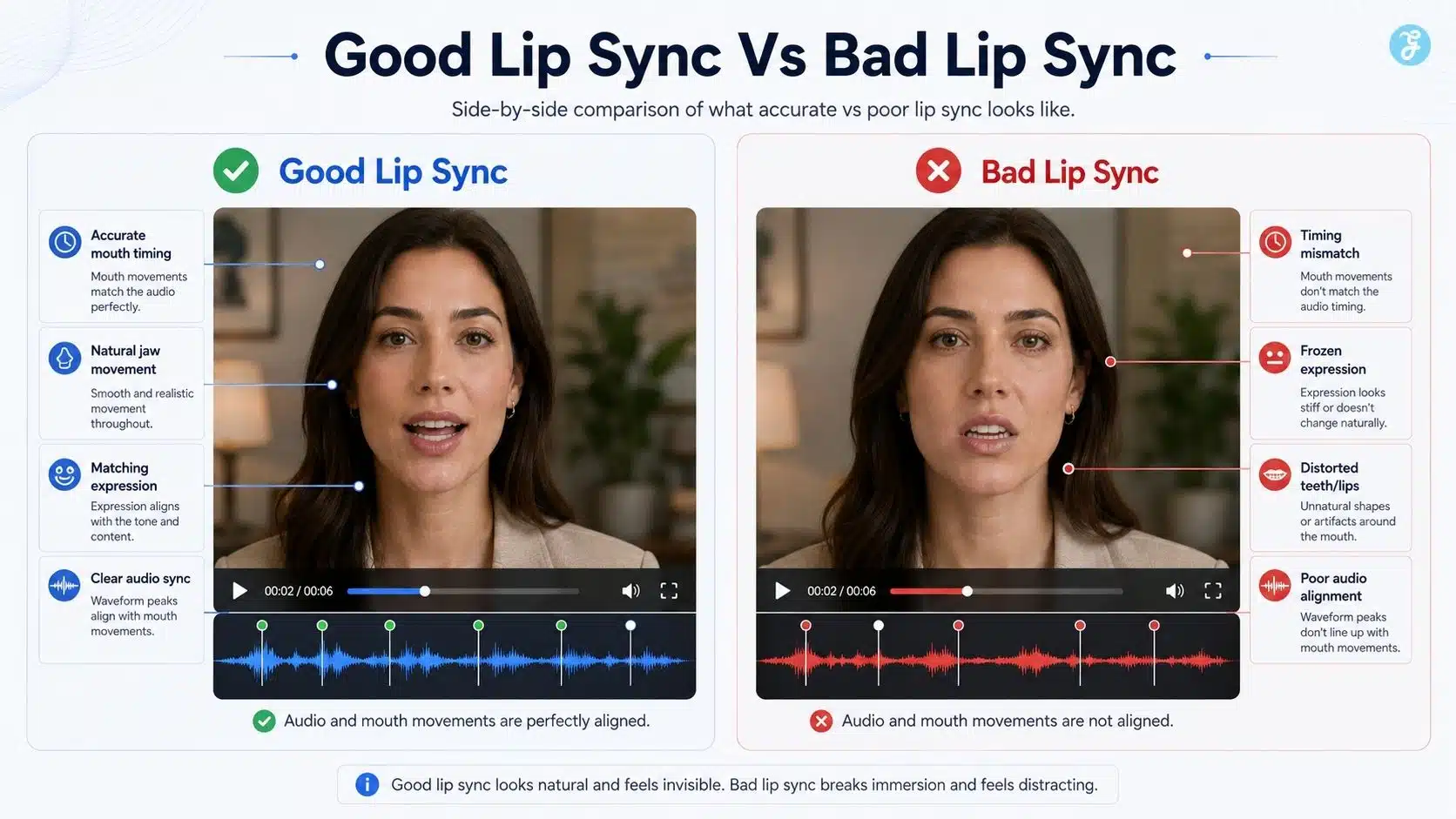
Lip sync matters because viewers are very sensitive to faces. If the audio and mouth movement are out of sync, the viewer may feel:
- The video is fake
- The speaker is unnatural
- The content is of low quality
- The brand is careless
- The message is less trustworthy
This is especially important for:
| Video Type | Why Lip Sync Matters |
| AI talking head videos | The avatar’s mouth is the focus |
| E-learning videos | Poor sync distracts from learning |
| Product explainers | Trust and clarity matter |
| Translated videos | The new language must feel natural |
| Social clips | Viewers judge quality quickly |
| Brand videos | Small errors affect credibility |
| Deepfake-style edits | Ethics and consent become serious |
In my workflow, I treat lip sync like captions: AI can generate it, but humans must review it.
How AI Lip Sync Works
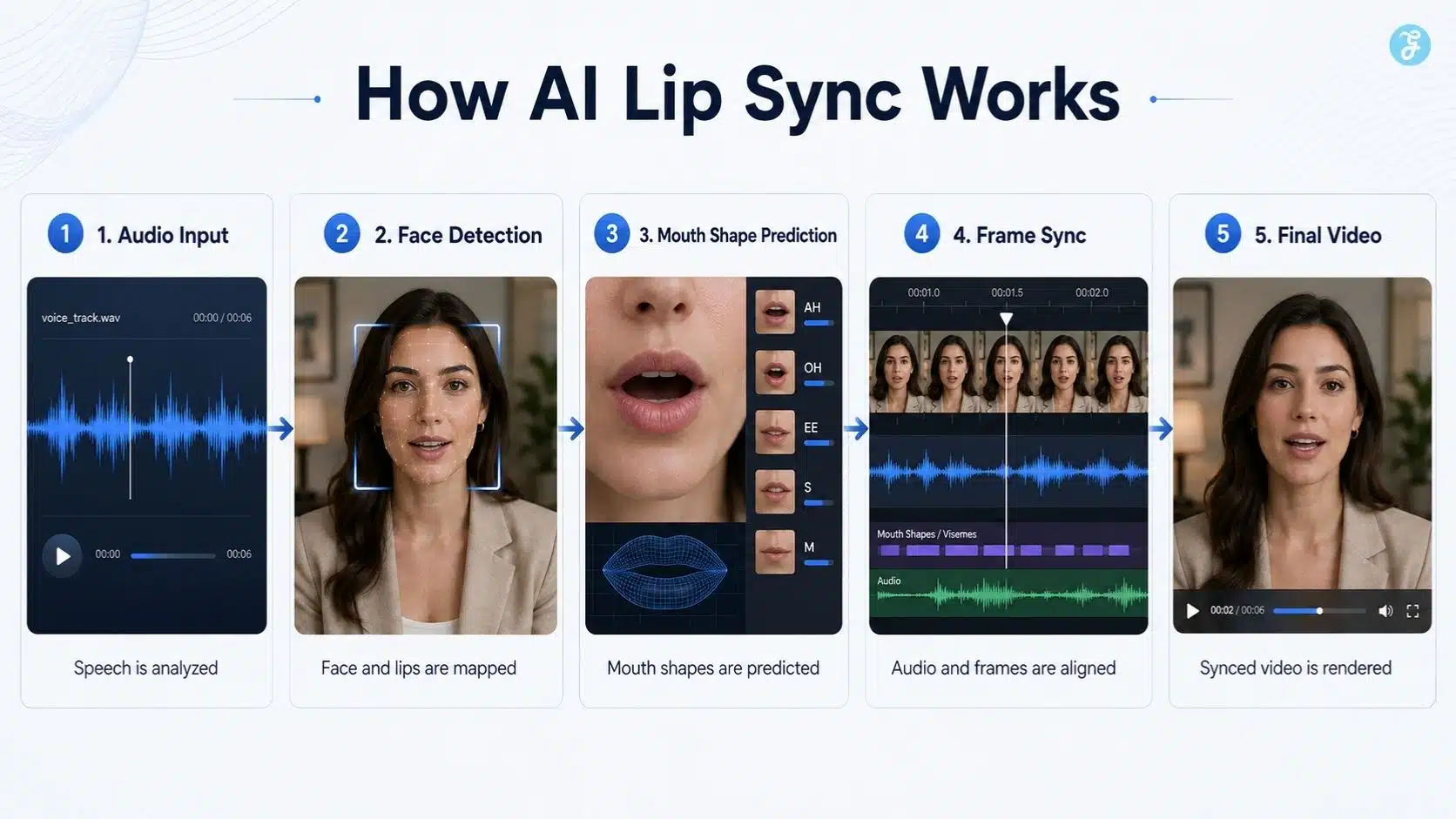
At a beginner level, AI lip sync usually works in five steps.
| Step | What Happens |
| 1. Audio analysis | The tool analyzes the speech timing, rhythm, and sounds |
| 2. Face detection | The system identifies the mouth, lips, jaw, and facial area |
| 3. Mouth shape prediction | AI predicts what mouth shapes should appear for each sound |
| 4. Frame generation | The tool creates or modifies frames so the mouth matches the audio |
| 5. Final rendering | The synced video is exported for editing or publishing |
The technical term often used here is visemes. A viseme is the visual mouth shape that represents one or more speech sounds. For example, sounds like “p,” “b,” and “m” often require the lips to close. AI lip sync systems try to generate those visual mouth shapes at the right moments.
A well-known research project in this area is Wav2Lip. The Wav2Lip paper describes the task as lip-syncing a talking face video of an arbitrary identity to match a target speech segment, and it proposes a lip-sync discriminator to improve synchronization in unconstrained videos.
The authors also released code, models, and evaluation benchmarks to support future research, according to the project page from CVIT, IIIT Hyderabad. For beginners, the important lesson is this: lip sync AI is not only moving lips randomly. It is trying to align speech sounds, timing, mouth shapes, and facial frames.
AI Mouth Animation vs Traditional Lip Sync Animation
Traditional lip sync animation is usually manual or semi-manual. An animator listens to dialogue, marks phonemes or visemes, and adjusts mouth shapes frame by frame. AI mouth animation automates much of that process.
| Area | AI Mouth Animation | Traditional Lip Sync Animation |
| Speed | Much faster | Slower |
| Skill needed | Beginner-friendly | Requires animation skill |
| Control | Good but limited | High creative control |
| Style consistency | Depends on the model and input | Stronger with a skilled animator |
| Realistic faces | Can be impressive but risky | Harder but more controlled |
| Cartoon characters | Works well with review | Very strong manually |
| Emotional nuance | Still limited | Better human control |
| Best use | Fast avatars, dubbing, explainers | Premium animation and precise storytelling |
My honest view: AI mouth animation is excellent for speed and scale, but traditional lip sync still wins when emotion, character acting, and expressive nuance matter.
Where AI Lip Sync Works Best
AI lip sync works best when the content is structured and controlled.
1. AI Talking Head Videos
This is the most obvious use case. An avatar reads a script, and AI lip sync makes the mouth movement match the voice. This connects directly with AI talking head videos, because a talking head video without accurate lip sync feels unfinished.
2. E-Learning And Training Videos
For e-learning, AI lip sync helps create lesson presenters without filming every update. It can also support multilingual versions. For Edutorial-style content, this can reduce production time for short lessons and tutorials.
3. Product Explainers
AI lip sync can make product walkthroughs more human by adding a digital presenter. But the script must stay clear and natural.
4. Translated And Dubbed Videos
This is one of the strongest use cases. A video can be translated into another language and lip-synced to the new audio. HeyGen says its AI video translator can translate videos into many languages and dialects with natural lip sync, subtitles, and preservation of voice, tone, and pacing.
5. Social Media Clips
Short-form videos often benefit from a face speaking directly to the viewer. AI lip sync can help create fast explainers, but the first three seconds still need a strong hook.
6. Animated Characters
For stylized content, lip sync can work well because viewers are more forgiving of cartoons or 2D characters than of realistic human faces.
Where AI Lip Sync Still Struggles
AI lip sync is useful, but beginners should not expect perfection.
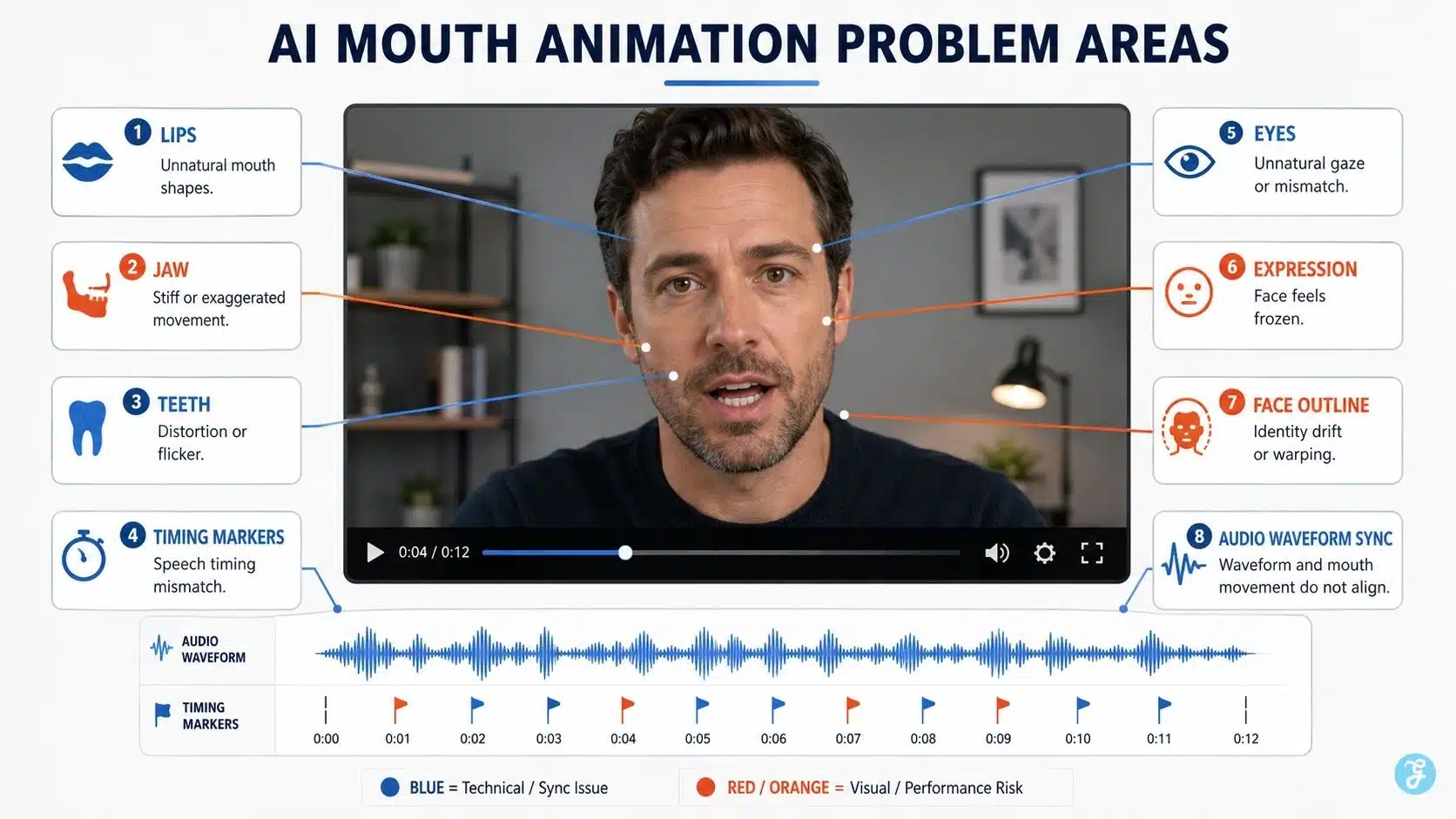
Common issues include:
| Problem | What It Looks Like |
| Timing mismatch | Mouth opens slightly before or after the audio |
| Frozen expression | Lips move, but the face feels lifeless |
| Overactive mouth | Mouth movement is too exaggerated |
| Wrong mouth shapes | Sounds do not visually match lips |
| Jaw distortion | Lower face bends strangely |
| Teeth artifacts | Teeth appear, disappear, or shift |
| Face drift | Identity changes slightly across frames |
| Emotion mismatch | Voice sounds excited, face looks neutral |
| Side-angle problems | Profile or angled faces sync less cleanly |
| Low-quality input | Blurry faces create weaker results |
In my workflow, I always review the lip sync at normal speed and then replay problem moments slowly. Small timing errors can be easy to miss on the first watch.
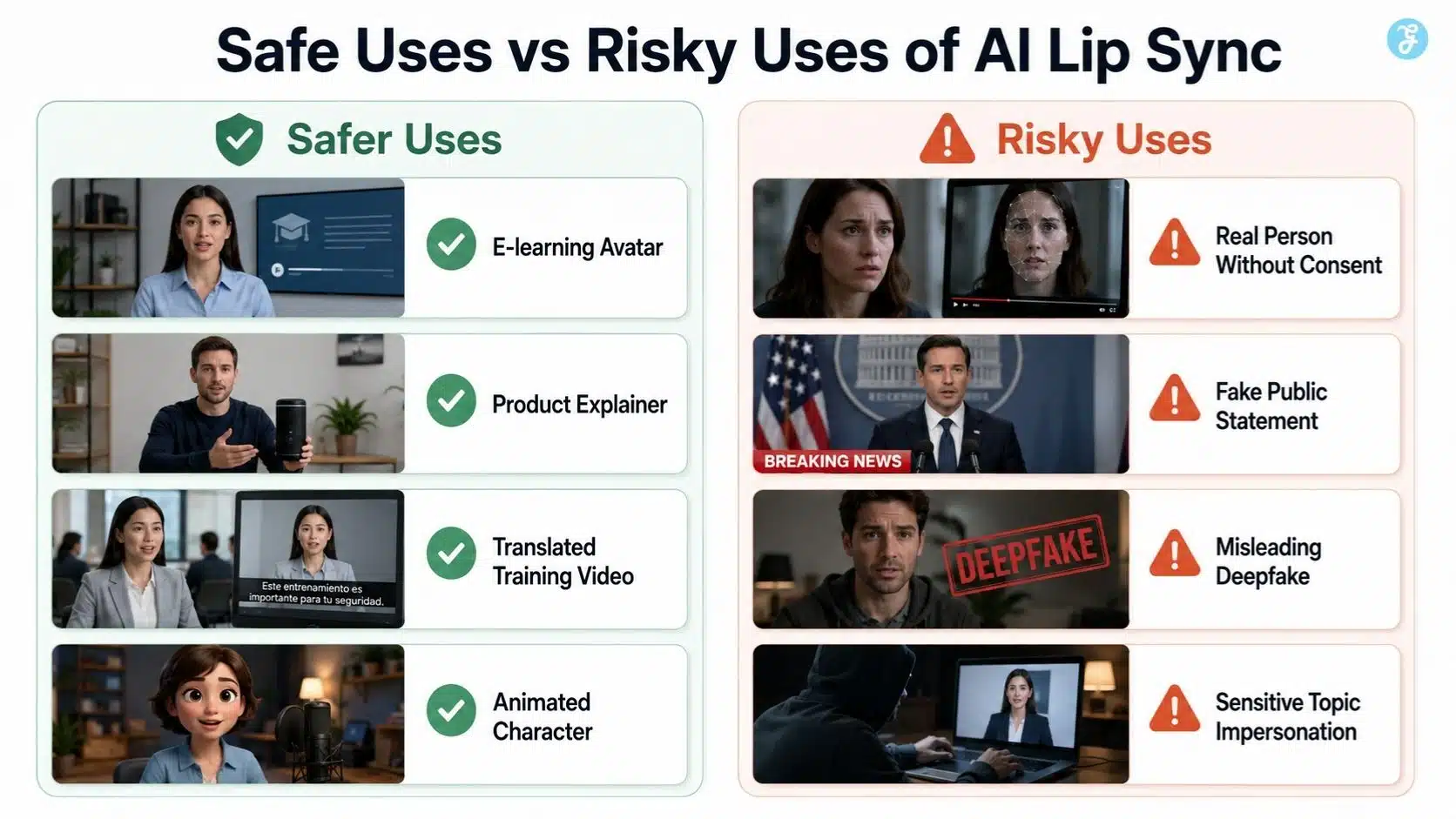
Deepfake Lip Sync: Useful Technology With Serious Risks
The deepfake lip sync matters because lip sync technology can be used responsibly or irresponsibly. Deepfake lip sync usually means altering a real person’s mouth movement, so they appear to say words they did not actually say. This can be used for dubbing, parody, localization, education, or creative production. But it can also be used to mislead people. That is why consent and disclosure are critical.
YouTube requires creators to disclose content that is meaningfully altered or synthetically generated when it seems realistic. YouTube’s disclosure guidance says this applies when viewers could mistake the content for a real person, place, scene, or event.
YouTube’s announcement also says disclosure is not required for clearly unrealistic content, animation, special effects, or ordinary production assistance, but realistic altered or synthetic media must be disclosed.
My rule is simple:
If the lip sync makes a real or realistic person appear to say something they did not actually say, treat it as sensitive synthetic media.
AI Lip Sync Explained Through A Real Workflow
Here is how I would create a short AI lip sync video responsibly.
Step 1: Decide The Purpose
First, I ask what the video is for.
| Purpose | Better Approach |
| Course lesson | Clean avatar, calm voice, clear captions |
| Product explainer | Professional presenter, brand-safe script |
| Social clip | Short script, strong hook, captions |
| Translation | Match voice tone and review sync carefully |
| Character animation | Use stylized animation and expressive voice |
| Internal training | Keep it simple, clear, and consistent |
The goal decides the avatar, voice, style, and disclosure needs.
Step 2: Create Or Choose The Face
You can use:
- Stock avatar
- Custom avatar
- Still portrait
- Animated character
- Real recorded video
- AI-generated character
If I need a base character or visual asset, I would create or refine it through ImagineLab before moving into AI mouth animation. This helps me control the face, lighting, background, and style before lip sync begins.
Step 3: Prepare The Voice Track
Lip sync quality depends heavily on audio quality.
Good voice audio should be:
- Clear
- Clean
- Not too fast
- Not too noisy
- Properly paced
- Emotionally matched
- Free from heavy background music
- Recorded or generated at a good quality
This links directly with adding AI voiceovers to AI videos. A bad voice track creates bad lip sync.
Step 4: Generate The Lip Sync
The lip sync tool analyzes the audio and generates mouth movement. Some tools work with videos. Some work with still images-to-video workflows. Some are built into avatar platforms. Tools such as HeyGen and ElevenLabs describe lip sync workflows where media and audio are used to create synced talking videos.
Step 5: Review The Output Like An Editor
I check:
- Does the mouth match the words?
- Does the jaw move naturally?
- Do teeth or lips distort?
- Does the face keep identity?
- Does expression match the voice?
- Is the timing accurate?
- Are captions correct?
- Does the video need disclosure?
This is where AI video editing becomes important. AI creates the synced output, but human editing decides if it is publish-ready.
Step 6: Add Captions And Final Editing
Even with lip sync, captions matter. Many viewers watch without sound.
Final editing should include:
- Captions
- Intro hook
- B-roll
- Brand elements
- Audio cleanup
- Platform resize
- Disclosure review
- Export check
Best Inputs For Better AI Lip Sync
AI lip sync improves when the input is clean.
| Input Factor | Recommendation |
| Face angle | Front-facing works best |
| Lighting | Even lighting helps face detection |
| Resolution | Higher quality gives better mouth detail |
| Mouth visibility | Avoid blocked lips, masks, hands, or microphones |
| Audio quality | Use clean speech without background noise |
| Speaking speed | Moderate speed works better |
| Expression | Natural expression helps believability |
| Background | A simple background reduces distractions |
| Style | Keep animation style consistent |
| Consent | Use only permitted faces and voices |
For beginners, front-facing input is the safest choice.
Prompting And Direction For AI Mouth Animation
If the tool accepts prompts or creative direction, keep instructions clear.
Useful direction phrases include:
- Natural mouth movement
- Subtle facial expression
- Keep identity stable
- Match the mouth to the audio accurately
- No exaggerated jaw movement
- No face distortion
- Keep teeth natural
- Preserve original lighting
- Maintain eye direction
- Professional presenter style
For animated characters, use:
- Expressive but controlled lip sync
- Friendly teaching tone
- Clear mouth shapes
- Smooth facial movement
- Natural pauses
Avoid asking for too much facial motion if you only need a clean explainer.
AI Lip Sync And Voice Cloning
AI lip sync often overlaps with voice cloning. It creates or imitates a voice. Lip sync makes the face appear to speak that voice. Together, they can be powerful and risky.
In my workflow, I separate the questions:
| Question | Why It Matters |
| Do I have permission to use this face? | Likeness rights |
| Do I have permission to use this voice? | Voice identity |
| Could viewers misunderstand this as real? | Disclosure |
| Is the content sensitive? | Higher risk |
| Is the script truthful? | Editorial trust |
Voice plus face equals identity. That deserves careful handling.
AI Lip Sync And Animation Styles
The chosen animation style changes how strict the viewer will be.
| Style | Viewer Expectation |
| Realistic human | Very high accuracy expected |
| AI avatar | High but slightly more forgiving |
| 3D character | Moderate to high |
| 2D character | More forgiving |
| Cartoon | More expressive freedom |
| Minimal character | Lowest realism pressure |
If I want fewer uncanny-valley problems, I may choose a stylized avatar instead of a hyper-realistic face. That is why AI animation styles matter in lip sync planning.
AI Lip Sync And Social Media
For social platforms, lip sync needs to be quick, clear, and caption-supported.
| Platform | Practical Advice |
| TikTok | Use 9:16, strong hook, captions, fast pacing |
| Instagram Reels | Keep face centered and captions readable |
| YouTube Shorts | Keep the message short and punchy |
| Use professional tone and clean framing | |
| Use clear captions and a simple message | |
| YouTube long-form | Use better pacing and supporting visuals |
This links with AI video for social media. Lip sync alone does not make a video work. The platform format still matters.
Common AI Lip Sync Mistakes Beginners Make
Mistake 1: Using Poor Audio
Noisy, fast, or unclear audio creates weaker mouth animation. Clean audio first.
Mistake 2: Using A Bad Face Angle
Side profiles, blocked mouths, or low-resolution faces can cause unstable sync.
Mistake 3: Expecting Perfect Emotion
Many tools can sync lips, but emotion is harder. The mouth may move correctly while the face feels flat.
Mistake 4: Forgetting Captions
Lip sync helps, but captions make the video easier to understand.
Mistake 5: Ignoring Disclosure
Realistic synthetic lip sync may need disclosure, especially if viewers could think the person really said those words.
Mistake 6: Using Someone’s Face Or Voice Without Consent
This is the biggest ethical problem. Do not treat likeness as a free asset.
Mistake 7: Not Reviewing Frame Details
Teeth, lips, jaw, and face shape can distort. Always inspect the output before publishing.
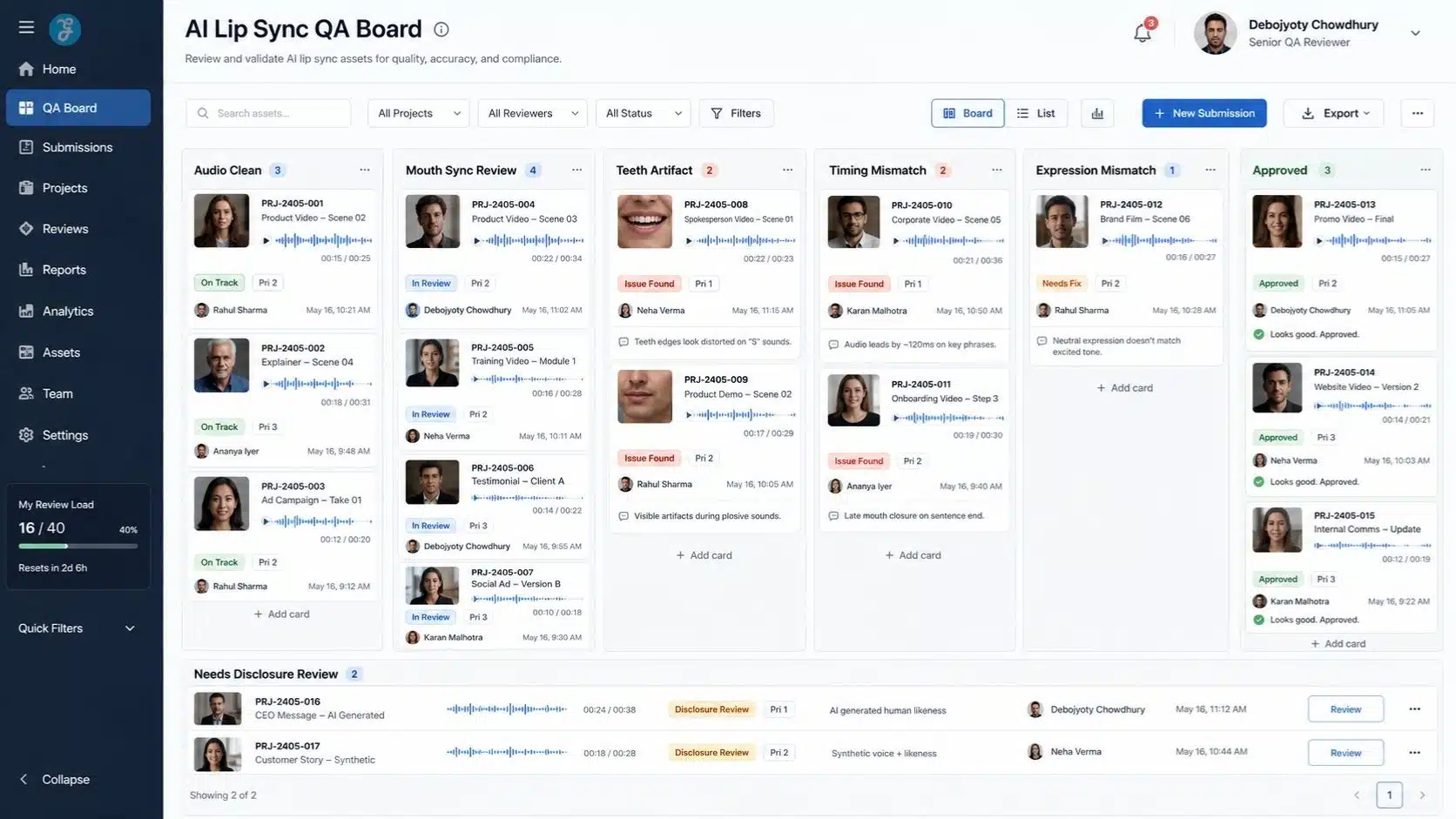
My Practical Quality Checklist
Before approving an AI lip sync video, I check:
| Checkpoint | Done? |
| Audio is clean and clear | ☐ |
| Face is visible and well-lit | ☐ |
| Mouth movement matches speech | ☐ |
| Jaw movement looks natural | ☐ |
| Teeth and lips are not distorted | ☐ |
| Expression matches the voice tone | ☐ |
| Identity stays stable | ☐ |
| Captions are proofread | ☐ |
| Aspect ratio matches platform | ☐ |
| Consent is confirmed | ☐ |
| Disclosure is considered | ☐ |
| The final video is manually reviewed | ☐ |
This checklist is simple, but it prevents most amateur-looking lip sync videos.
A Practical Example: 30-Second AI Lip Sync Explainer
Let’s say I want to create a 30-second AI lip sync explainer about “why aspect ratio matters.”
My workflow would be:
| Step | Action |
| 1 | Write a 70-word script |
| 2 | Choose a clean avatar or create a base face |
| 3 | Generate or record a clear voiceover |
| 4 | Use lip sync AI to match mouth movement |
| 5 | Add 16:9 and 9:16 visual examples |
| 6 | Add captions |
| 7 | Review mouth timing |
| 8 | Check disclosure needs |
| 9 | Export for article embed and social platforms |
Sample script:
Aspect ratio is not just a size setting. It controls how your AI image or video fits each platform. A blog needs a wide frame. Reels need vertical framing. Pinterest needs tall visuals. If you choose the wrong ratio at the start, you may lose the face, product, or message later.
This is short enough for a talking avatar and clear enough for beginners.
Best Beginner Tool Stack For AI Lip Sync
A beginner-friendly stack could look like this:
| Need | Tool Category |
| Base image or avatar visual | ImagineLab |
| Voiceover | AI voiceover or recorded voice |
| Lip sync | Lip sync AI tool |
| Editing | AI-assisted video editor |
| Captions | Auto captions + manual proofread |
| Export | Platform-specific video editor |
| Review | Human quality control checklist |
Do not overcomplicate the stack. A clean workflow is better than using ten tools badly.
Final Thoughts: AI Lip Sync Needs More Than Moving Lips
The most important lesson from this AI lip sync explained guide is simple: good lip sync is not only about mouth movement. It is about timing, expression, voice quality, identity, ethics, editing, and trust. AI can make a face speak. Human judgment decides whether it should speak, how it should speak, and whether the final video is safe to publish.
For beginners, AI lip sync technology can be incredibly useful for talking avatars, translated videos, e-learning, product explainers, and social clips. But the best results come from clean audio, good face input, careful editing, and responsible disclosure.
Use AI to speed up production. Use human review to protect quality and trust.
Frequently Asked Questions About AI Lip Sync
1. What Is AI Lip Sync?
AI lip sync is technology that matches mouth movements in a video, avatar, or animated face to spoken audio. It helps create talking avatars, dubbed videos, and AI mouth animation.
2. How Does AI Lip Sync Work?
AI lip sync tools analyze speech timing and sound patterns, detect the face and mouth area, then generate or adjust mouth shapes so they match the audio.
3. What Are Lip Sync AI Tools Used For?
Lip sync AI tools are used for AI talking head videos, translated videos, e-learning lessons, product explainers, animated characters, and social media clips.
4. Is Deepfake Lip Sync Legal?
It depends on consent, use case, local laws, and platform rules. Using someone’s face or voice without permission can create serious ethical and legal risks, especially if viewers may be misled.
5. How Can I Make AI Mouth Animation Look Better?
Use clean audio, a front-facing, well-lit face, moderate speaking speed, a consistent animation style, captions, and manual review before publishing.