

AI animation styles can make or break an AI video before the viewer even understands the message. I have seen this happen many times while planning AI visuals, article graphics, image-to-video clips, and short social videos. The idea may be strong, the script may be clear, and the tool may be powerful, but if the animation style does not match the topic, the final video feels off.
A serious explainer should not look like a chaotic cartoon.
A kid-friendly learning video should not feel like a corporate SaaS demo.
A product teaser should not use a random fantasy style unless that mood supports the brand.
An AI avatar video should not suddenly switch from realistic to anime halfway through.
That is why I do not treat animation style as decoration. I treat it as creative direction. This is discussed in detail in the AI video creation guide.
At Editorialge Media LLC, we are building across media, technology, SaaS, e-learning, and creative tools. So AI animation is not only about making something look “cool.” It is about choosing the right visual language for the right content goal.
What Are AI Animation Styles?
AI animation styles are the visual looks or artistic directions used when creating animated images, clips, or videos with AI tools. In simple terms, the style tells the AI what kind of animated world to create.
Examples include:
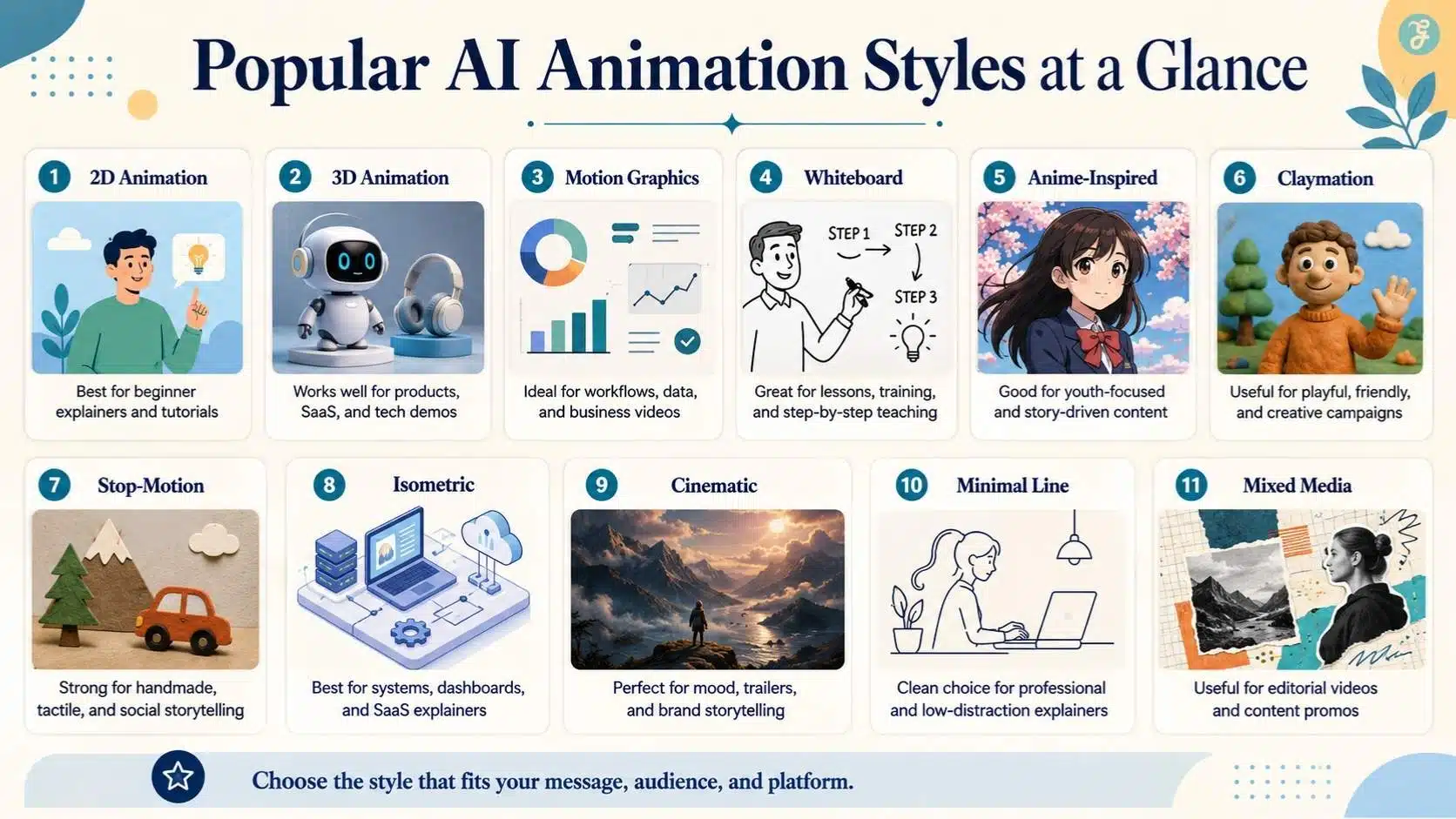
| AI Animation Style | Simple Meaning |
| 2D animation | Flat illustrated animation, often simple and clean |
| 3D animation | Depth-based animated visuals with realistic or stylized forms |
| Whiteboard animation | Hand-drawn explainer-style visuals |
| Motion graphics | Text, icons, shapes, and UI elements in motion |
| Anime-inspired animation | Stylized character-driven animation |
| Claymation style | Handmade, clay-like, animated look |
| Stop-motion style | Frame-by-frame handmade movement effect |
| Isometric animation | Angled 3D-like illustrations are often used in tech explainers |
| Cartoon animation | Fun, expressive, simplified characters and scenes |
| Cinematic animation | More dramatic lighting, camera movement, and mood |
| Minimal line animation | Simple outlines, clean shapes, and soft movement |
| Mixed-media animation | Combines photos, illustrations, UI, textures, and motion |
Google’s Veo prompt guide recommends defining the visual style and tone early in the prompt, including whether the video should be realistic, animated, stop-motion, or another format. That matters because AI video tools respond better when the style is clearly directed instead of assumed.
Why AI Animation Style Matters
Animation style affects how viewers interpret the content.
A style can make a topic feel:
- Serious
- Friendly
- Educational
- Premium
- Playful
- Futuristic
- Trustworthy
- Technical
- Emotional
- Beginner-friendly
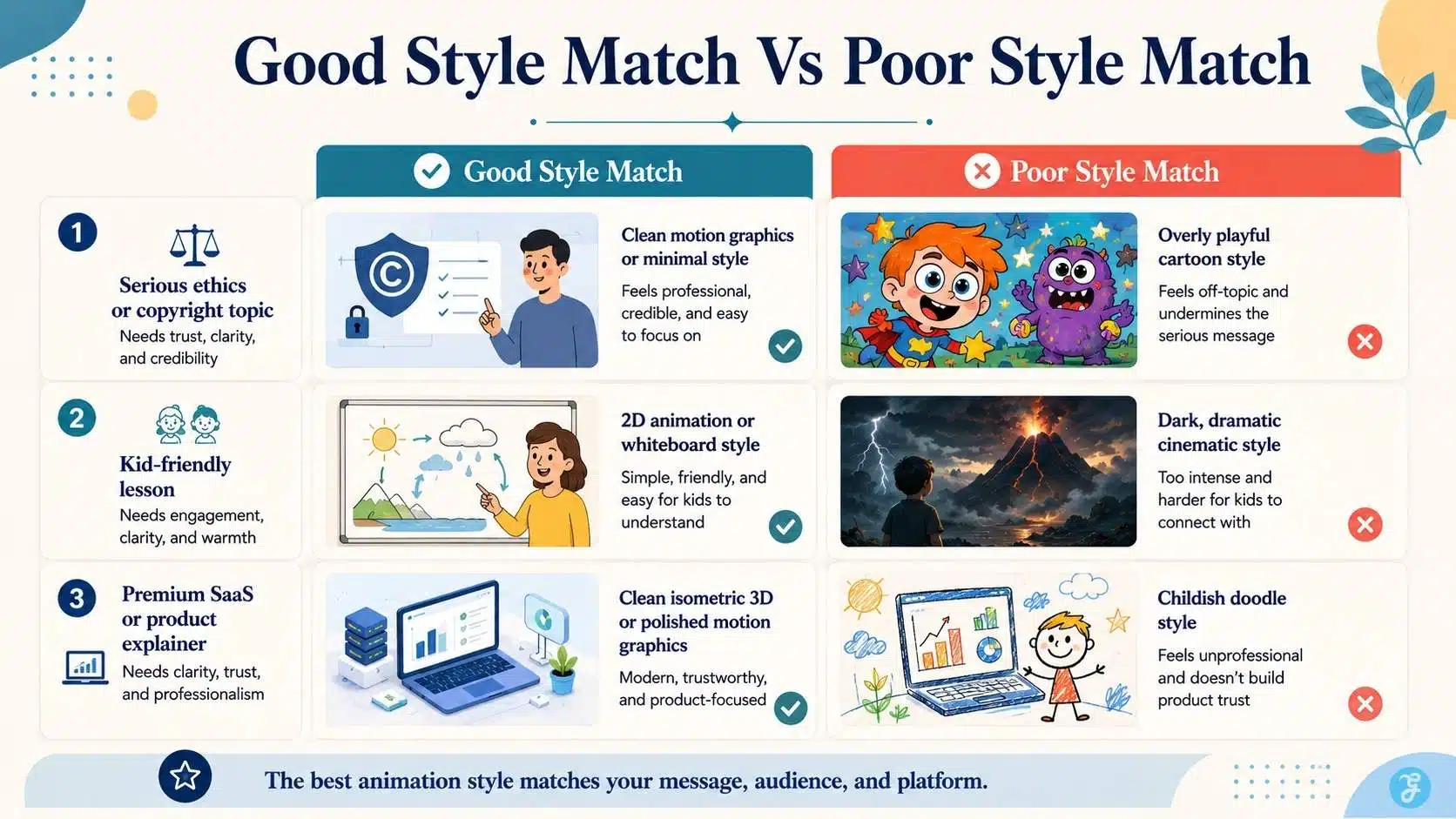
For example, if I am creating a video about the ethics of AI voice cloning, I would avoid a playful cartoon style because the topic needs trust and seriousness.
But if I am creating a short beginner explainer for AI talking head videos, a clean 2D or motion-graphic style may work well because it simplifies the process. The same message can feel completely different depending on the animation style.
My Personal Rule: Choose Style Before Generation
Beginners often write a prompt first and think about style later. I think that is the wrong order.
Before generating an AI animation, I decide:
| Question | Why It Matters |
| Who is the audience? | Beginners, professionals, students, or social viewers need different visuals |
| What is the topic? | Technical, ethical, creative, or promotional content needs a different tone |
| Where will it be published? | YouTube, Reels, courses, blogs, and LinkedIn need different pacing |
| Should it feel realistic or illustrated? | This affects trust and emotional tone |
| Will this become a series? | Style consistency matters across multiple videos |
| Does the content need disclosure? | Realistic synthetic content may require labeling |
Only after that do I write the prompt. This habit saves time because the AI does not have to guess the visual direction.
Popular AI Animation Styles Explained
1. 2D Animation Style
2D animation is one of the safest choices for beginner-friendly explainers. It uses flat characters, icons, shapes, and scenes.
It works well for:
- Educational videos
- Step-by-step tutorials
- Social explainers
- Blog summaries
- Simple product explainers
- FAQ videos
| Best For | Why It Works |
| Beginner content | Easy to understand |
| Explainers | Clean visual storytelling |
| Social videos | Fast and lightweight |
| E-learning | Clear and friendly |
| Process videos | Good for showing steps |
I would use 2D animation when the message matters more than visual realism.
2. 3D Animation Style
3D animation gives more depth and polish. It can look modern, premium, and product-friendly.
It works well for:
- SaaS explainers
- Product demos
- Tech visuals
- Startup videos
- Futuristic concepts
- App walkthroughs
| Strength | Limitation |
| Looks modern and polished | Can feel generic if overused |
| Good for product and SaaS content | Needs consistent lighting and style |
| Works well with tech topics | Can take more refinement |
| Strong for premium branding | Poor 3D can look cheap quickly |
For Editorialge’s technology and SaaS-related content, 3D animation can work well when it is clean and not overly glossy.
3. Motion Graphics Style
Motion graphics use animated text, icons, shapes, charts, UI panels, and transitions. This is one of the most useful styles for serious content.
It works well for:
- Data explainers
- SEO guides
- SaaS tutorials
- Social media clips
- Platform comparisons
- Workflow breakdowns
- Business content
| Use Case | Why Motion Graphics Help |
| AI video editing comparison | Shows workflow differences clearly |
| AI image aspect ratios | Displays formats visually |
| AI video for social media best practices | Works well for platform rules |
| Copyright issues with AI video content | Helps simplify complex ideas |
| AI voiceover workflow | Shows audio/video steps clearly |
Motion graphics are practical because they explain ideas without relying on characters.
4. Whiteboard Animation Style
Whiteboard animation looks like ideas are being drawn on a board. It is simple, educational, and familiar.
It works well for:
- Beginner tutorials
- Course lessons
- Process explanations
- Business training
- Step-by-step guides
| Best Use | Why |
| E-learning | Feels instructional |
| Concept breakdowns | Easy to follow |
| Training videos | Simple and direct |
| Long explanations | Reduces visual overwhelm |
For Edutorial-style educational content, whiteboard animation can be useful when the goal is clarity over spectacle.
5. Anime-Inspired Animation Style
Anime-inspired animation uses expressive characters, stylized faces, dramatic lighting, and strong emotion.
It works well for:
- Storytelling
- Youth-focused content
- Entertainment topics
- Character-driven videos
- Gaming or pop culture visuals
But I would use it carefully for professional or trust-heavy topics.
| Works Well For | Avoid For |
| Entertainment | Serious legal topics |
| Youth content | Corporate compliance videos |
| Story scenes | Medical or sensitive explainers |
| Gaming content | Realistic news-like visuals |
Anime style can be powerful, but only when it fits the audience.
6. Claymation Style
Claymation gives a handmade, soft, tactile look. It feels warm and creative.
It works well for:
- Children’s learning
- Friendly brand videos
- Social explainers
- Creative campaigns
- Light storytelling
| Strength | Limitation |
| Warm and approachable | Not ideal for serious topics |
| Visually memorable | It can look childish if overused |
| Good for friendly education | Less suitable for technical detail |
Claymation-style AI animation can help a brand feel human, but it should not be used just because it looks cute.
7. Stop-Motion Style
Stop-motion style imitates frame-by-frame handmade animation. It may use paper, objects, toys, clay, or cutouts.
It works well for:
- Craft-style videos
- Product explainers
- Social clips
- Educational visuals
- Creative brand storytelling
Google’s Veo guide specifically mentions stop-motion as one possible visual style direction when prompting video generation, which shows that style labels can help the model understand the intended look.
| Best For | Why |
| Social content | Feels different and memorable |
| Product scenes | Gives tactile movement |
| Learning content | Friendly and simple |
| Creative storytelling | Adds charm |
Stop-motion is great when you want the video to feel handmade rather than overly digital.
8. Isometric Animation Style
Isometric animation uses angled 3D-like visuals, often seen in tech, SaaS, finance, and workflow explainers.
It works well for:
- Systems
- Dashboards
- SaaS products
- Workflow maps
- Business explainers
- AI tool stack visuals
| Best For | Why |
| SaaS workflows | Shows systems clearly |
| AI production pipelines | Explains connected steps |
| Business content | Feels professional |
| Tech explainers | Looks modern and structured |
For AI video creation, isometric animation can be used to show tools, pipelines, and production stages.
9. Cinematic Animation Style
Cinematic animation uses dramatic camera movement, lighting, depth, and atmosphere. It can look polished and emotional.
It works well for:
- Brand stories
- Concept trailers
- Product teasers
- YouTube intros
- Futuristic AI visuals
- Dramatic explainers
| Strength | Risk |
| Looks premium | Can overpower simple topics |
| Good for storytelling | May feel too dramatic |
| Strong for mood | Needs careful pacing |
| Works for hero visuals | Not always best for instruction |
I would use cinematic animation when the mood matters, not when the viewer needs a quick, practical explanation.
10. Minimal Line Animation Style
Minimal line animation uses simple outlines, small motion, and clean visual flow.
It works well for:
- Professional explainers
- Website visuals
- B2B content
- Healthcare-style explainers
- Educational clips
- UI tutorials
| Why It Works | Best Use |
| Clean and calm | Professional content |
| Low distraction | Complex topics |
| Easy to follow | Step-by-step tutorials |
| Lightweight feel | Web and social content |
This is one of the safest styles for trust-focused content.
11. Mixed-Media Animation Style
Mixed-media animation combines photography, illustration, text, UI elements, textures, and motion.
It works well for:
- Editorial videos
- Social promos
- Explainer shorts
- Article summaries
- Brand storytelling
- AI content workflows
This style can feel very firsthand because it can include screenshots, article visuals, human workspace shots, and animated overlays. For Editorialge, mixed-media animation can work well when turning articles into social-ready videos.
How To Choose The Right AI Animation Style
Here is my practical selection framework.
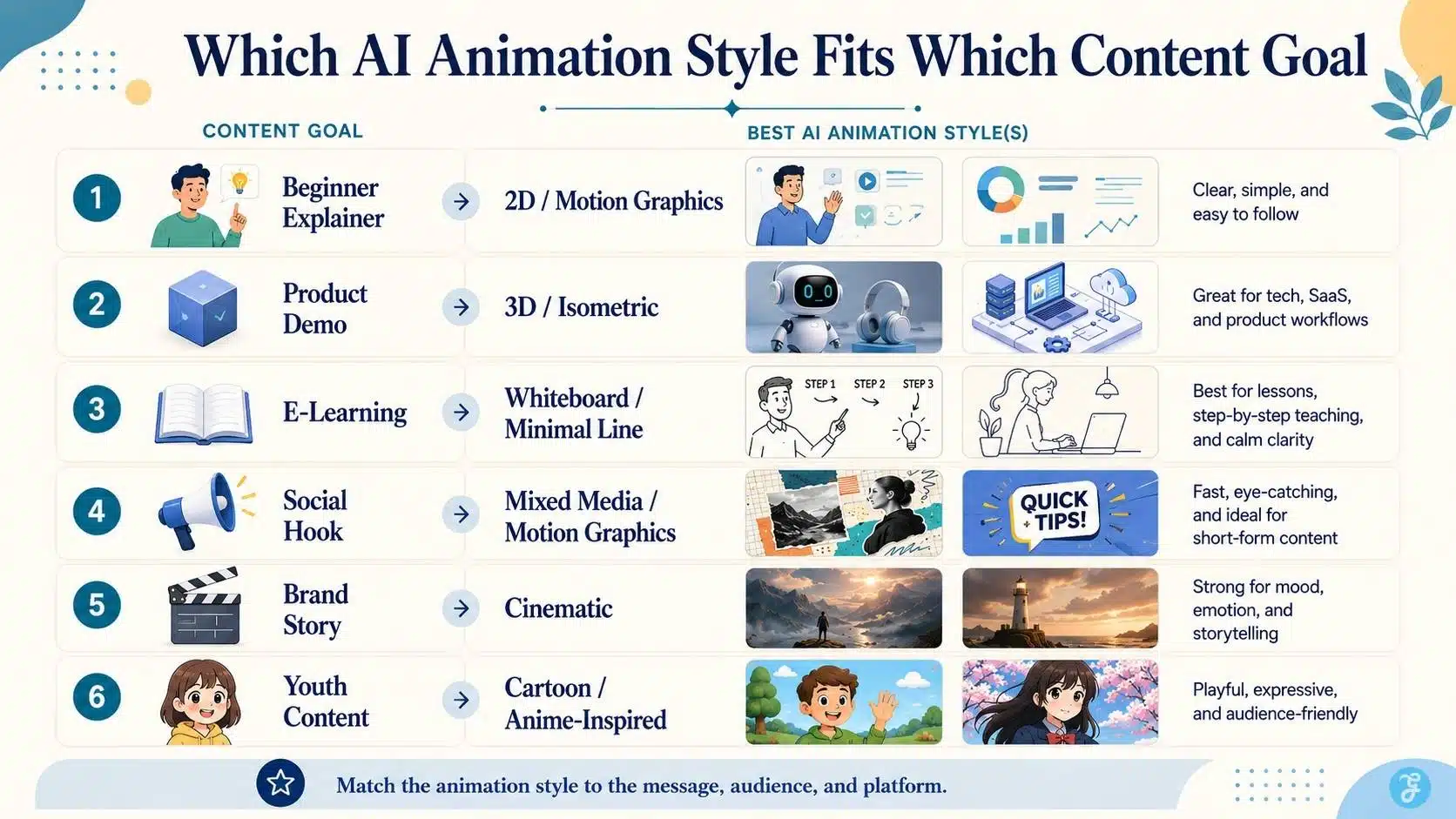
| Content Goal | Best Animation Style |
| Explain a beginner concept | 2D animation or motion graphics |
| Teach a course lesson | Whiteboard, 2D, or minimal line |
| Show a product workflow | 3D, isometric, or motion graphics |
| Create a social hook | Motion graphics, mixed media, or stop-motion |
| Build a brand story | Cinematic or mixed media |
| Explain ethics or copyright | Minimal line, motion graphics, or realistic editorial |
| Make a fun youth-focused video | Cartoon or anime-inspired |
| Create a SaaS tutorial | Isometric, UI motion, or 3D |
| Support a talking head video | Light motion graphics and B-roll |
| Animate a still image | Cinematic, subtle motion, or 2.5D style |
The best style is not the fanciest one. It is the one that helps the viewer understand the message.
AI Animation Styles And Text-To-Video Prompts
When using text-to-video tools, the style must be included clearly.
Weak prompt:
Create an animated video about AI video editing.
Better prompt:
Create a clean 2D motion-graphics explainer showing a video timeline, caption icons, audio cleanup, and platform export steps. Use a modern editorial color palette, smooth transitions, simple icons, and beginner-friendly pacing.
The better prompt gives:
- Style
- Subject
- Motion
- Visual elements
- Tone
- Audience level
Google’s Veo 3.1 prompting guide recommends directing scenes with consistent characters and styles and using professional cinematic techniques for scene control. That is exactly how beginners should think. Do not only describe the topic. Describe the style system.
AI Animation Styles And Image-To-Video Workflows
Image-to-video workflows depend heavily on style consistency. If your base image is realistic, but your animation prompt asks for cartoon-style motion, the result may feel strange. If your base image is 2D, but you ask for cinematic realism, the tool may distort the visual identity.
For clean image-to-video animation, I use this rule: Keep the animation style close to the base image style. If I create a 2D educational illustration with ImagineLab, I should animate it as a 2D explainer. If I create a realistic creator workspace, I should use subtle, realistic camera movement rather than cartoon motion.
Adobe Firefly describes image-to-video workflows as turning still images into dynamic video clips with smooth camera movement, consistent lighting, and lifelike animation. That supports the idea that the base image and motion direction should work together.
AI Animation Styles For Talking Head Videos
Talking head videos do not always need full animation, but they often need supporting animated elements.
For AI talking head videos, good supporting animation styles include:
| Supporting Style | Use |
| Motion graphics | Show key points beside the presenter |
| Minimal line animation | Explain concepts without distraction |
| UI animation | Show tool steps |
| 2D icons | Support beginner learning |
| Lower-thirds | Add names, topics, or labels |
| Animated captions | Improve social viewing |
| B-roll animation | Break visual monotony |
The talking head should stay on focus. Animation should support the message, not compete with the presenter.
AI Animation Styles And Lip Sync
If your video uses a speaking character, the animation style affects lip sync quality. For AI lip sync technology, this matters because different styles handle mouth movement differently.
| Style | Lip Sync Difficulty |
| Realistic human avatar | High scrutiny |
| 3D character | Moderate to high |
| 2D character | Easier to stylize |
| Cartoon character | More forgiving |
| Anime-inspired character | Needs careful mouth timing |
| Minimal character | Less realistic pressure |
Realistic lip sync is harder because viewers notice unnatural mouth movement quickly. Stylized animation can be more forgiving because viewers do not expect full realism.
AI Animation Styles And Voiceovers
Animation style should match the voice. For adding AI voiceovers to AI videos, I would match style and voice like this:
| Animation Style | Voice Direction |
| 2D explainer | Friendly and clear |
| Motion graphics | Confident and concise |
| Whiteboard | Teacher-like and patient |
| Cinematic | Deeper, slower, dramatic |
| Cartoon | Energetic and expressive |
| Minimal line | Calm and professional |
| Isometric SaaS | Clear, polished, business-like |
A mismatch creates friction. A playful cartoon with a serious corporate voice feels odd. A dramatic voice-over a simple tutorial may feel exaggerated.
AI Animation Styles And Social Media
For AI video for social media best practices, the style must support fast attention.
Social videos need:
- Strong first frame
- Clear subject
- Fast visual understanding
- Captions
- Mobile-safe composition
- Platform-native aspect ratio
- Style consistency
- Short scene duration
| Platform | Good Animation Style |
| TikTok | Fast motion graphics, cartoon, mixed media |
| Instagram Reels | 2D, cinematic, motion graphics |
| YouTube Shorts | Strong visual hook, animated captions |
| Clean motion graphics, isometric, minimal line | |
| Vertical illustrated explainers | |
| Simple educational motion visuals |
For social media, the style should be clear in the first second.
Common Mistakes Beginners Make With AI Animation Styles
Mistake 1: Mixing Too Many Styles
A video that starts as 2D, shifts into 3D, and then becomes cinematic realism can feel messy unless it is intentionally designed that way.
Mistake 2: Choosing Style Only Because It Looks Cool
The best style is the one that supports the message. A beautiful style can still be wrong for the topic.
Mistake 3: Ignoring Audience Expectations
Business viewers may prefer clean visuals. Kids may respond better to colorful characters. Social viewers may need faster motion.
Mistake 4: Forgetting Brand Consistency
If every cluster video uses a different animation style, the content hub feels disconnected.
Mistake 5: Using Realistic Style For Sensitive Synthetic Scenes
If realistic AI content could confuse viewers, disclosure and caution matter. YouTube requires disclosure when content is meaningfully altered or synthetically generated and seems realistic. YouTube says disclosure is not required for clearly unrealistic content, animation, special effects, or production assistance, but realistic synthetic content may require it.
Mistake 6: Not Planning the Aspect Ratio
A 16:9 animation may not work as a 9:16 Reel without redesign. Style and format should be planned together.
Mistake 7: Not Reviewing Motion Quality
AI animation can create strange movement, warped objects, flickering details, or inconsistent characters. Review before publishing.
Best Prompt Formula For AI Animation Styles
Here is the prompt formula I use:
Style + Subject + Action + Setting + Motion + Mood + Format + Restrictions
Example:
Create a clean 2D motion-graphics animation showing a beginner AI video workflow. Use simple icons, smooth transitions, soft blue and cream colors, professional editorial style, 16:9 format, no unreadable text, no clutter, beginner-friendly pacing.
For image-to-video:
Animate this image in a subtle cinematic style. Add slow camera push-in, soft background motion, consistent lighting, stable subject, no face distortion, no extra objects, 16:9 format.
For social:
Create a vertical 9:16 animated social video in clean motion-graphics style. Use bold visual hierarchy, fast but smooth transitions, a centered subject, a safe space for captions, and no small, unreadable text.
My Practical AI Animation Style Checklist
Before generating an AI animation, I check:
| Question | Check |
| Does the style match the topic? | ☐ |
| Does the style match the audience? | ☐ |
| Is the style suitable for the platform? | ☐ |
| Is the aspect ratio planned? | ☐ |
| Is the base image style consistent? | ☐ |
| Will this style work across a series? | ☐ |
| Does the voice match the visual tone? | ☐ |
| Will lip sync be realistic or stylized? | ☐ |
| Is there any disclosure risk? | ☐ |
| Is the final output reviewed manually? | ☐ |
This checklist keeps the animation from becoming random.
How I Would Use AI Animation Styles In A Real Workflow
Let’s say I am creating a 45-second video about “AI video editing comparison.”
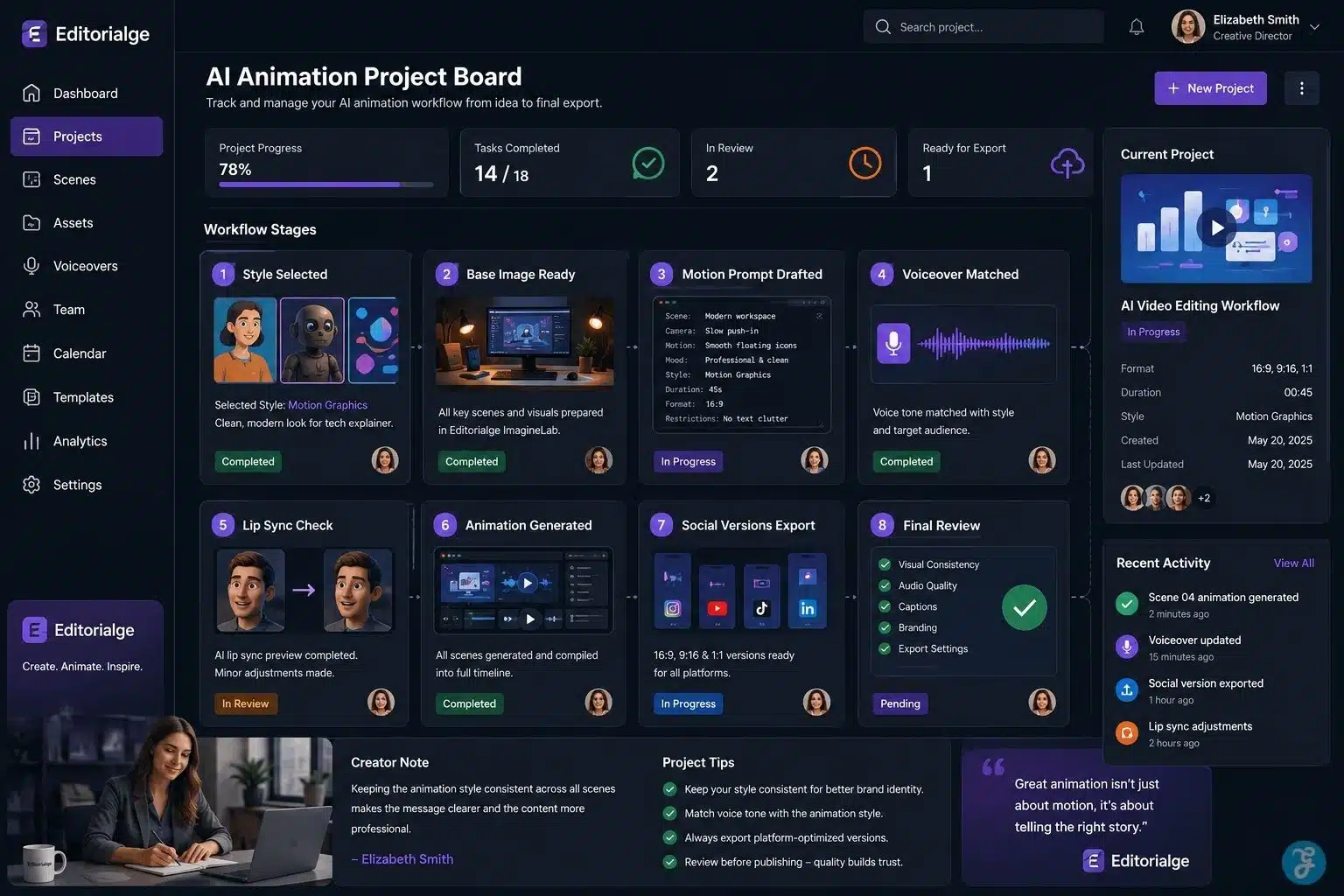
My workflow would be:
| Step | Action |
| 1 | Choose motion graphics as the main style |
| 2 | Create clean visual assets in ImagineLab |
| 3 | Use 16:9 for article embed and 9:16 for social |
| 4 | Animate icons for captions, cuts, audio cleanup, and final review |
| 5 | Add an AI voiceover or recorded narration |
| 6 | Edit pacing manually |
| 7 | Add captions |
| 8 | Export platform versions |
| 9 | Review for clarity, branding, and rights |
| 10 | Publish with a consistent style across the cluster |
This gives me speed without losing control.
Copyright, Ethics, And Style Imitation
AI animation style also raises copyright and ethics questions.
Creators should be careful with:
- Copying a specific living artist’s style too closely
- Using copyrighted characters
- Creating brand-like visuals without permission
- Generating recognizable public figures
- Using realistic synthetic scenes that may mislead viewers
- Creating animation that looks like real footage when it is not
Adobe positions Firefly as supporting commercially safe creative workflows for animation generation, while YouTube focuses on disclosure when realistic synthetic content could be mistaken as real.
My practical rule is simple:
Use broad style language, not someone else’s exact creative identity.
Say “clean 2D educational animation” instead of copying a specific artist or studio style.
Final Thoughts: AI Animation Style Is Creative Strategy
The biggest lesson from this AI animation styles guide is simple: style is not an afterthought.
It controls how the viewer feels.
It affects trust.
It shapes clarity.
It influences pacing.
It decides whether the video feels professional, playful, serious, or confusing.
AI can generate animation faster than ever, but the creator still has to choose the right visual language. A good animation style should fit the topic, audience, platform, brand, voice, and editing workflow. That is how AI animation becomes useful content, not just moving decoration.
Frequently Asked Questions About AI Animation Styles
1. What Are AI Animation Styles?
AI animation styles are the visual looks used in AI-generated animated videos, such as 2D animation, 3D animation, motion graphics, whiteboard, anime-inspired, claymation, stop-motion, and cinematic animation.
2. Which AI Animation Style Is Best For Beginners?
For beginners, 2D animation, motion graphics, and whiteboard animation are usually easiest. They are clear, flexible, and work well for explainer videos, tutorials, and social content.
3. How Do I Choose The Right AI Animation Style?
Choose the style based on your topic, audience, platform, and message. Use clean motion graphics for business explainers, 2D animation for beginner education, and cinematic animation for emotional or brand-focused videos.
4. Can I Mix Different AI Animation Styles In One Video?
You can, but beginners should avoid mixing too many styles. A video usually feels more professional when it follows one consistent visual direction.
5. Do AI-Animated Videos Need Disclosure?
Clearly, unrealistic animation usually may not need the same disclosure as realistic synthetic content. But if the video looks realistic and could make viewers believe a real person, place, or event is being shown, disclosure may be required on platforms like YouTube.
























