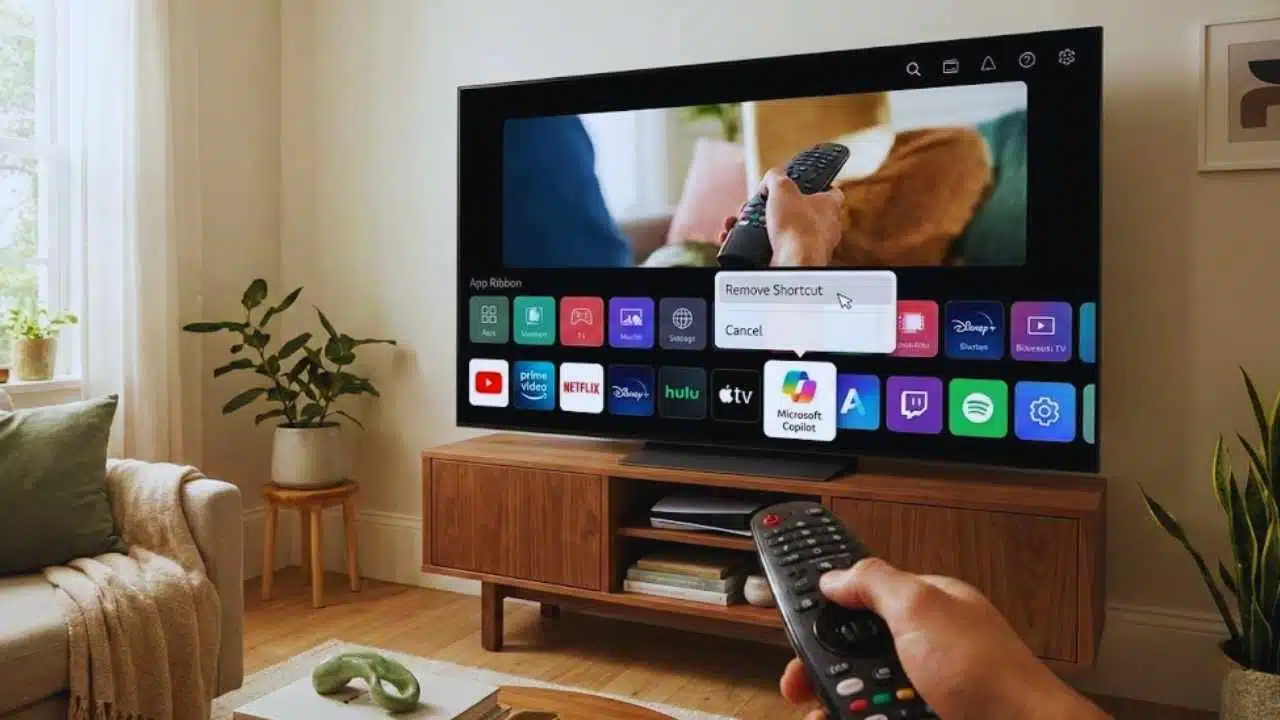
LG to let users remove Copilot from TVs after customers complained that a Microsoft Copilot shortcut appeared on some webOS televisions following a recent software update, with no clear way to delete it. LG now says it will add an option to remove the shortcut, but has not shared a release date.
What happened: Copilot shortcut appears after a webOS update
Owners of certain LG smart TVs reported seeing a new Microsoft Copilot icon/tile on the home screen after a webOS update. Many said the shortcut arrived without prior notice and behaved like a system-level item—meaning it could not be uninstalled the way most downloaded apps can.
The complaints quickly spread across social media and forums, where customers criticized the change as unwanted “bloat” and argued that new AI features should be opt-in, not forced onto a paid product in the living room.
LG’s response: removal option is coming, but no timeline yet
LG has acknowledged the backlash and says it will introduce measures that allow users to remove the Copilot shortcut if they want to. However, the company has not provided a specific timeline for when the setting will appear, indicating it will likely arrive in a future webOS software update.
That lack of a date matters for consumers: over-the-air TV updates can roll out gradually by model, region, and software branch, leaving some owners waiting longer than others.
“Web shortcut, not a native TV app”: why that distinction matters
LG has indicated the Copilot icon is a shortcut that launches the Copilot web experience in the TV’s browser, rather than a deeply integrated application baked into the television’s operating system.
Practically, that can reduce the level of device integration people fear (for example, tighter access to TV controls or persistent background behavior). But it does not address the core complaint: customers say they weren’t given a choice to have the shortcut placed on the home screen in the first place.
Microphone and permissions
LG has also emphasized that voice/microphone features require user permission. Even so, the controversy shows how sensitive consumers have become to anything AI-related appearing on screens that already have microphones, cameras (on some models), and extensive tracking/advertising ecosystems.
Why some users couldn’t delete it: LG’s long-standing system app rules
LG’s own TV user guidance notes that certain preinstalled or system apps can’t be deleted like ordinary apps, and may only be moved or hidden depending on the model and software version.
Users who tried to remove Copilot reported they ran into these restrictions—fueling the sense that the shortcut was “pinned” as a system component. That is a key reason the backlash gained traction: people were not only upset about seeing Copilot, but about being prevented from fully removing it.
The bigger picture: smart TVs are becoming “platforms,” and consumers are pushing back
This Copilot dispute fits a broader pattern in the smart TV market:
- More software-driven experiences: TV makers increasingly treat televisions like ongoing software platforms, adding features after purchase.
- More AI surfaces: AI tools are being placed into search, recommendations, settings assistants, and content discovery.
- More frustration about control: Consumers often accept updates for security and bug fixes, but react strongly to interface changes and new default features—especially when they can’t be removed.
For many buyers, a television is still expected to behave like an appliance. When the home screen changes overnight, or an AI shortcut appears without consent, it can feel like the product is no longer fully “owned” by the customer.
How Copilot on LG TVs connects to earlier AI TV plans
LG and other TV brands have spent the past year highlighting AI-driven personalization and conversational search. LG has publicly discussed AI search improvements and Microsoft-related AI collaboration in its CES-era communications, framing AI as a major pillar of future webOS and TV experiences.
But the Copilot shortcut backlash shows a risk with that strategy: even if an AI feature is optional to use, placing it prominently by default can be interpreted as forcing adoption.
What users can do right now (until LG ships the removal option)
While exact options vary by TV model and webOS version, users commonly report a few practical workarounds:
- Hide or move the tile (when the interface allows rearranging the home screen).
- Disable auto-updates (to reduce surprise UI changes—though this can delay security patches).
- Limit network access (disconnect the TV or restrict certain domains at the router level). This can reduce web-based features but may also break streaming apps and updates.
These are compromises—not true solutions—which is why LG’s promised “remove shortcut” option is significant.
Timeline of key events
| Date (2025) | What happened | Why it mattered |
| Jan 5–7 | LG promoted AI-driven TV personalization and referenced access to Microsoft Copilot as part of its AI search story around CES | Set expectations that Copilot would be part of the TV experience in some form |
| Mid-Dec | Users reported Copilot appearing after a webOS update with no uninstall option | Sparked backlash over consent and control |
| This week | LG said it will allow users to remove the Copilot shortcut | Indicates the company is responding to user feedback, but timing is unclear |
What changes once LG enables removal?
| Issue users raised | Current situation reported by users | What LG says will change |
| No choice/forced tile | Copilot shortcut appears after update | Users will be able to remove the shortcut |
| Uninstall not available | Behaves like a system/preinstalled item | A removal method will be added |
| AI concerns in the living room | Users worry about privacy and unwanted AI presence | LG emphasizes permissions for mic features, and offers removal choice |
Final Thoughts
LG’s decision to add a removal option is a clear sign that consumer backlash still shapes smart TV software decisions—especially when changes affect the home screen and can’t be undone. The unresolved question is timing: until the update arrives, affected users remain stuck with workarounds.
Longer term, this episode underlines a simple lesson for TV makers: if AI is meant to be helpful, it must also be optional, reversible, and clearly explained—not silently placed in front of viewers after a routine update.