Has a meeting ever ended, and you walked out wondering what exactly got decided? Learning how to run effective team meetings that don’t waste time is one of the most valuable skills you can develop as a leader. You blocked off an hour, everyone showed up, and somehow you still left confused about the next steps. Tasks fell through the cracks. People checked their phones. Frustration built. Sound familiar?
Here’s the thing: the problem isn’t meetings themselves. It’s how most teams run them. Without a solid plan, meetings become time-wasting traps. With the right approach, they become powerful moments where your team aligns, decides, and moves forward together.
This guide shows you how to set clear objectives, build focused agendas, and keep discussions on track. You’ll also discover what to do after the meeting ends so nothing gets lost. I’ll walk you through the exact steps that real teams use every day. Grab a cup of coffee, and let’s go through it together.
The Purpose of Team Meetings
Team meetings are the backbone of workplace collaboration. They bring people together to share ideas, solve problems, and push projects forward. Without a clear purpose, though, meetings turn into time-wasting exercises that drain energy and frustrate everyone in the room. A strong meeting has a defined goal that every participant understands before they even sit down, or log in.

When meetings have structure and focus, they produce real outcomes, not just empty discussions. Here’s what a well-run meeting actually does for your team:
- Drives communication across departments and breaks down silos that block good work.
- Gives each person a chance to contribute their thoughts and expertise.
- Produces concrete decisions, not just conversations.
- Sends everyone home knowing their exact next steps.
The agenda acts as your roadmap. It keeps everyone on track and stops conversations from wandering off course. When you share that agenda in advance, participants show up prepared and ready to contribute actively.
When to Hold a Team Meeting
You need to decide when a meeting actually makes sense, and when it doesn’t. Calling people together wastes time if you can solve the problem with a quick email or chat message instead.
According to 2025 data from the London School of Economics and modern calendar analysis, unproductive meetings cost U.S. professionals an estimated $259 billion every year, with the average employee spending over 11 hours per week in them. That’s a staggering number. Every unnecessary meeting adds to that pile.
Situations That Call for a Meeting
Your team faces moments when talking face-to-face beats sending emails back and forth. Knowing which situations call for a meeting saves time and boosts productivity across your organization.
- Major decision-making that requires your team’s input and real collaboration to move forward effectively.
- Brainstorming sessions where people benefit from bouncing ideas off each other in real time.
- Project kickoffs that need all stakeholders present to align on goals and timelines from day one.
- Crisis situations that demand immediate communication so your team responds as one unit.
- Conflict resolution between team members, which benefits from direct, face-to-face dialogue.
- Cross-department coordination problems are solved faster when the right people gather to troubleshoot together.
Limit attendees to those directly involved in the agenda topics. Extra people drain engagement and waste everyone’s time.
When to Skip a Meeting
Meetings drain time and energy, so skip them when a better alternative exists. Before you schedule anything, ask yourself if the meeting is truly necessary.
- An email or memo solves the problem faster than a call, so send a written message instead of gathering the team.
- Information only flows in one direction, meaning participants don’t need to discuss or collaborate on the topic.
- The discussion can wait until your next scheduled session without causing delays or problems.
- One person can handle the task alone, so gathering the group wastes everyone’s time and attention.
- The agenda lacks clear objectives, which signals the meeting shouldn’t happen until you define concrete goals.
- A decision has already been made, so the meeting only informs people rather than gathering real input.
Preparing for an Effective Team Meeting
You need to lay the groundwork before your team sits down together. Getting your preparation right makes the difference between a meeting that moves things forward and one that wastes everyone’s time.
Define a Clear Purpose and Objectives
Start your meeting with a crystal-clear purpose. This single focus acts like a compass for everyone in the room. Your team members need to know exactly why they gathered and what problems you plan to solve. Vague meetings waste time fast. When you state your goals upfront, people stay engaged and productive. They know what outcomes matter and can contribute ideas that actually move things forward.
A meeting without clear objectives is like a ship without a rudder, drifting aimlessly through the ocean.
Action items emerge naturally when objectives guide the conversation. Set clear outcomes to achieve by the end of the meeting, so your team leaves with real tasks to tackle. Participants should walk out knowing exactly what they need to do next, who owns each task, and when things are due. This approach transforms meetings from talk sessions into launching pads for real work.
Once you nail down your meeting’s purpose, the next critical step is to structure how you’ll actually spend that time. A solid time-boxed agenda keeps everyone focused, prevents tangents, and shows real respect for people’s schedules.
Here’s a number worth knowing: according to a 2025 workplace analytics report by Flowtrace, only 37% of workplace meetings use an agenda, and not coincidentally, only 37% of meetings result in a clear decision. Having an agenda isn’t just an administrative chore. It directly determines whether your meeting actually accomplishes anything.
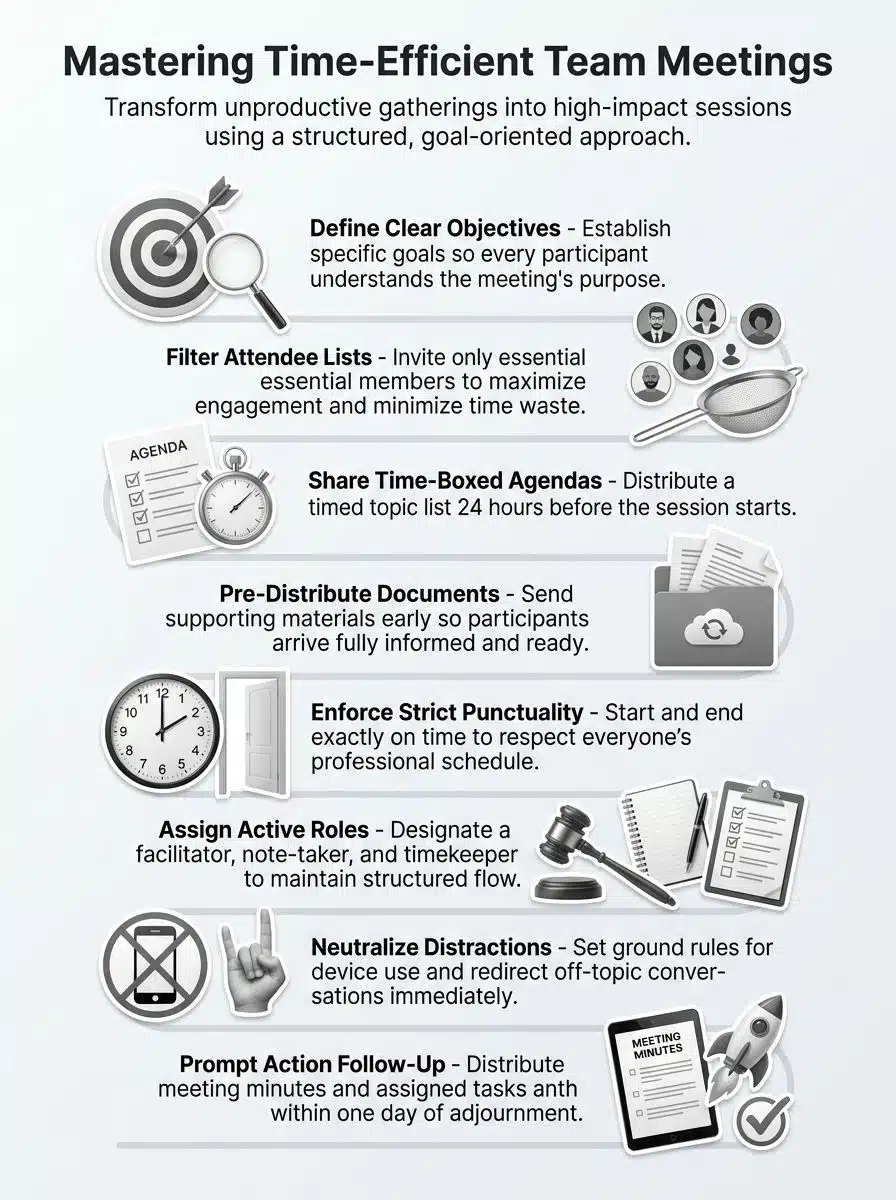
- Draft your agenda with specific time blocks for each topic, like “Budget Review: 15 minutes.”
- List discussion topics in order of priority, placing urgent matters first so they get full attention.
- Share the agenda with participants at least one day before the meeting so they can prepare.
- Build in a small buffer at the end for unexpected questions or discussions that run slightly over.
- Use the agenda throughout the meeting to redirect conversations that drift off course.
Distribute Supporting Documents in Advance
Your agenda sets the stage, but supporting documents seal the deal. Send out relevant materials before the meeting starts, and your team walks in prepared. Pre-meeting distribution allows participants to come informed and ready to discuss, not scramble to catch up. This simple step transforms passive listeners into active contributors who bring real ideas to the table.
Sharing documents ahead of time also cuts meeting time down significantly. Participants read background information, review data, and think through problems before you all gather. They spot questions early. They arrive with their brains already engaged in the conversation. Your team communicates better when everyone enters the room on the same page.
Strategies for Running Efficient Team Meetings
You’ll transform your team collaboration by mastering a few practical strategies. The goal is to keep discussions focused, participants engaged, and your meeting time protected.
Start and End on Time
Starting and ending meetings on time shows respect for everyone in the room. Your team members have packed schedules, and punctuality proves you value their time.
When you begin at the scheduled hour, you set the tone for focus and organization. Participants arrive prepared, settle in quickly, and get straight into the agenda. Ending on time sends the same message: you respect their other commitments and priorities.
People who know meetings start and end promptly tend to pay better attention and contribute more actively. This efficiency gives your team time to tackle real work instead of sitting in endless conversations.
Minimize Distractions and Off-Topic Discussions
Distractions kill productivity faster than anything else in a meeting room. According to 2025 meeting engagement data from Flowtrace, 73% of professionals admit to multitasking during meetings, especially in virtual formats. Without ground rules and a dedicated timekeeper, nearly three-quarters of your room won’t be fully paying attention.
Establish ground rules at the start of every meeting. These rules should cover phone use, side conversations, and email checking. A designated timekeeper keeps everyone on track and prevents the meeting from drifting into unrelated territory. This person watches the clock, signals when time runs short, and gently steers conversations back to the agenda.
When someone wanders off course, speak up calmly. You might say, “That’s interesting, but let’s table that for later and focus on our agenda.” This keeps things professional without making anyone feel shut down.
Encourage Active Participation from All Members
Getting everyone to speak up takes real work, but it pays off. Quiet team members often hold great ideas that never surface in a group setting. Set ground rules early so people know their contributions matter and respect flows both ways. Ask quieter folks direct questions about their thoughts on specific topics. This simple move pulls them into the conversation without putting them on the spot too hard.
Tools like polls and breakout sessions spark interaction in fresh ways. Polls let people vote on ideas without speaking first, which helps shy voices gain confidence. Breakout sessions split large groups into smaller teams where communication feels less intimidating and more personal. Inclusive meetings produce better outcomes, stronger buy-in, and teams that actually want to show up next time.
Assign Roles for Better Organization
Getting everyone talking is great, but you need structure to turn those voices into action. Assigning clear roles transforms your meeting from a free-for-all into a well-organized session.
- Facilitator: Guides the discussion and keeps everyone focused on the agenda topics.
- Note-taker: Captures key points, decisions, and action items for the official meeting minutes.
- Timekeeper: Monitors the clock and alerts the group when time runs short on each item.
- Presenter: Takes responsibility for each agenda topic to streamline information sharing.
- Follow-up coordinator: Tracks action items after the meeting ends and holds people accountable.
Communicate all roles clearly in advance, so team members know what to expect and can prepare accordingly. Rotating roles across different meetings builds skills and prevents any single person from burning out.
Tools for Enhancing Team Meetings
The right technology can transform how your team collaborates during meetings. Smart tools help you stay focused, organized, and connected, whether your team is in the office or spread across different time zones.
Using Collaboration Software
Collaboration software changes how teams work together, making communication clearer and faster. These platforms keep everyone on the same page, both literally and figuratively.
- Real-time document editing: It lets multiple people work on the same file at once, eliminating endless email chains and version confusion.
- Note-taking applications: It helps to capture important points instantly, so participants stay focused on the discussion rather than scrambling to write everything down.
- Built-in feedback tools: These allow team members to share thoughts right away, creating active participation without waiting for the meeting to end.
- Screen sharing and chat features: It helps keep remote participants fully connected and reduce misunderstandings about what was discussed.
- Engagement features: For example, polls and breakout rooms make meetings feel like actual conversations, not lectures.
Post-meeting features in these platforms, like automatic reminders and task tracking, also help you lock in the value you created during your discussion.
Incorporating Meeting Templates
Collaboration tools lay the groundwork for smooth meetings. Templates provide the structure that keeps everything on track.
Meeting templates act like blueprints for your team. They outline specific roles, responsibilities, and time allocations for each agenda item so everyone knows what to expect before the first word is spoken. They also include dedicated sections for capturing decisions, action items, and follow-up tasks, which means your team records important information the same way every single time. A template for meeting minutes helps standardize how discussions, decisions, and action items are documented across meetings.
Your team benefits most when you share templates with all members and update them based on feedback and changing needs. Start by designing a basic template for your most common meeting type, then refine it over time as your team provides input.
This approach transforms meetings from chaotic discussions into organized, productive sessions where people complete work instead of just talking about it.
Post-Meeting Best Practices
After your meeting wraps up, your work isn’t done. You need to capture what happened, assign who does what next, and send it all out while people still remember the conversation.
Summarize Key Decisions and Next Steps
Your team needs clarity on what happened and what comes next. Summarizing key decisions and next steps right after your meeting prevents confusion and keeps everyone moving forward.
- Write down every major decision your team made, listed clearly so nothing gets lost or forgotten.
- Identify specific action items from the discussion, assigning each one to a person with a deadline attached.
- Capture the reasoning behind each key decision so team members understand the “why” if they weren’t present.
- Distribute a summary document within one hour of your meeting ending to maximize clarity while the conversation is fresh.
- Post the summary in a shared location where your team regularly accesses documents throughout the week.
Assign and Track Action Items
Action items form the backbone of productive meetings. They turn talk into real work. Assigning clear responsibilities keeps everyone accountable and moving toward shared goals. Before the meeting ends, designate a specific person for each task so accountability is crystal clear to all participants.
- State the deadline for every action item so people know exactly when they need to deliver.
- Write down who owns what task, the expected outcome, and the due date in a shared document everyone can access.
- Review all assigned tasks at the meeting’s conclusion so no confusion exists about responsibilities.
- Create a simple tracking system, like a shared spreadsheet or project tool, to monitor which tasks are done and which need attention.
- Ask for updates on assigned work at the start of your next meeting to keep everyone accountable.
These practices transform meetings from information dumps into engines that drive real progress and results.
Distribute Meeting Minutes Promptly
Once you assign action items, the real work begins. Your team needs documentation that captures everything discussed, decided, and delegated. Distributing meeting minutes promptly keeps everyone on the same page and holds people accountable for their tasks. Minutes should summarize key points, list every action item with owners’ names, and include deadlines. Send these out within 24 hours while the conversation is still fresh in people’s minds.
Quick distribution also builds trust across your team. People see that you took their input seriously and recorded it accurately. Your documentation becomes the source of truth for what happened, who committed to what, and when things are due.
This prevents the “I thought you said something different” conversations that can derail progress later. Strong meeting minutes keep coordination smooth and your team moving forward with confidence.
Common Challenges in Team Meetings and How to Address Them
Every meeting faces real obstacles, from people who derail conversations to internet glitches that kill your flow. Learning how to tackle these problems keeps your team on track and your agenda moving.
Handling Disruptive Participants
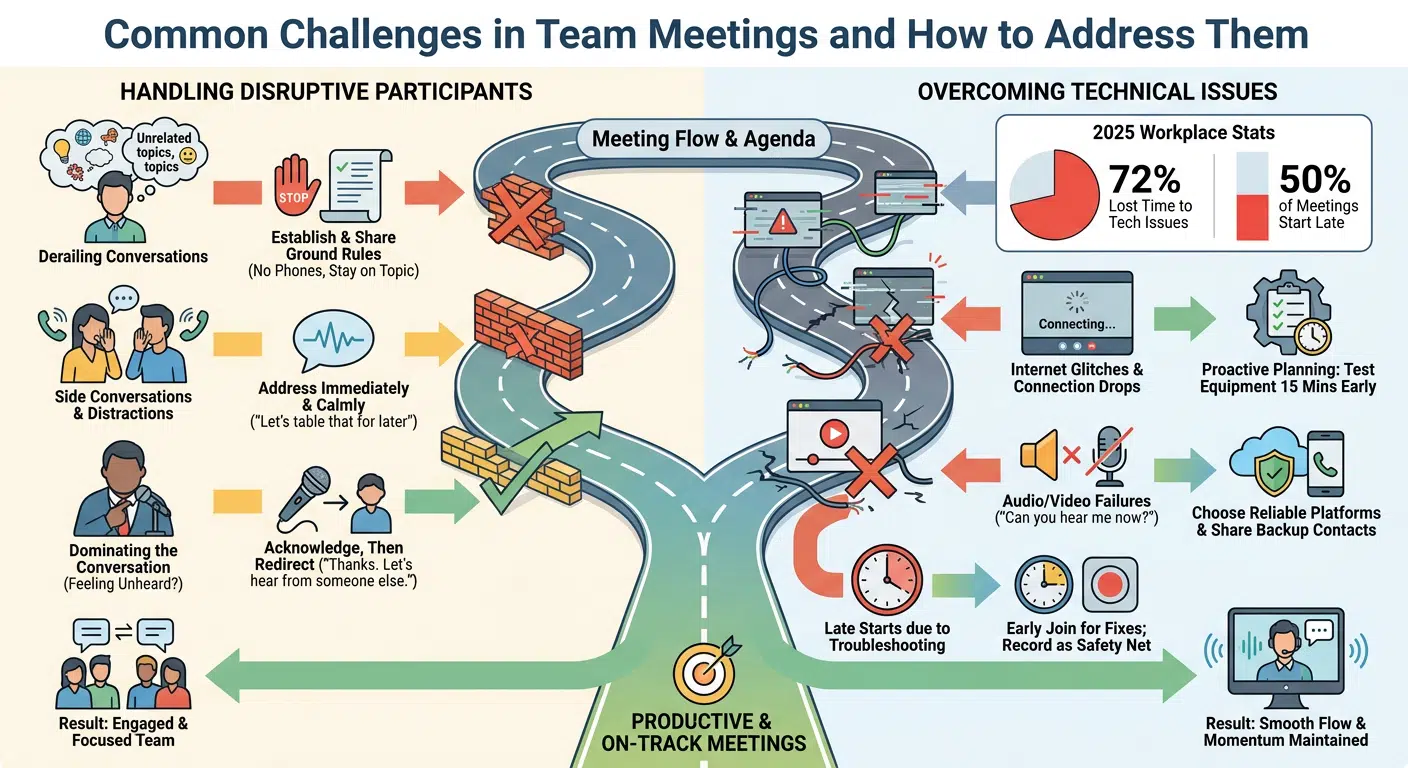
Disruptive participants can derail your team meetings and waste valuable time. Ground rules set the foundation for productive collaboration. Establish these rules at the start of your meeting series and share them with all attendees. Make expectations clear about phone use, side conversations, and staying on topic. Participants who understand the boundaries tend to respect them.
Address disruptive behavior the moment it happens, rather than letting it fester. A quick, calm comment works better than ignoring the problem. You might say, “Let’s table that discussion for later so we stay focused on our agenda.”
Sometimes people interrupt because they feel unheard, not because they want to cause trouble. Acknowledge their point, then move forward. If someone dominates the conversation, try saying, “Thanks for that input. Let’s hear from someone who hasn’t spoken yet.” This keeps high engagement across all team members and prevents one voice from taking over.
Overcoming Technical Issues
Technical problems can tank your meeting faster than you can say “Can you hear me now?” Proactive planning and the right software tools stop these issues before they derail your team.
According to 2025 workplace statistics compiled by Archie and Flowtrace, 72% of employees report losing meeting time specifically to technical issues, and 50% of meetings start late. That makes testing your equipment well in advance a statistical necessity, not just a cautious suggestion.
- Test all audiovisual equipment at least 15 minutes before your meeting starts so you catch problems early and fix them fast.
- Choose reliable virtual platforms with strong connectivity features, as this prevents most communication breakdowns from happening.
- Share backup contact numbers with all participants in case your primary software fails or drops unexpectedly.
- Ask team members to join 5 minutes early so everyone has time to troubleshoot audio or video issues quietly before things kick off.
- Record your meeting as a safety net so missed participants can catch up later if connectivity issues force them to drop off.
Address any audiovisual problems immediately by acknowledging them calmly, then move forward with your agenda to maintain engagement and momentum.
Transforming Collaboration Into Momentum
Transforming team meetings from energy-draining obligations into powerful productivity engines doesn’t require a radical shift in how your organization operates; it simply demands intention, a solid plan, and the commitment to a few consistent habits. Exceptional meetings generate true momentum, while poor ones stifle progress and waste valuable resources.
To ensure every gathering counts, you need to establish a definitive purpose before sending the calendar invite and distribute a structured, time-boxed agenda to all participants beforehand. During the session, foster active engagement by assigning distinct roles, establishing clear ground rules, and honoring the clock by starting and ending precisely on time, every single time.
However, your accountability doesn’t end when participants leave the room; it lives in the follow-through. It requires you to summarize decisions, assign clear action items, and share the meeting minutes within twenty-four hours. Ultimately, the choice to make meetings effective lies in this consistent execution, giving you the exact blueprint needed to stop wasting time and start driving real results.
Frequently Asked Questions (FAQs) on Effective Team Meetings
1. How do you start a team meeting the right way?
Start with a clear agenda and share it at least a day in advance. This gives everyone time to prepare and shows up ready to contribute. Studies from Atlassian found that teams using pre-shared agendas cut their meeting time by nearly a third.
2. How long should a team meeting last?
Keep it to 30 minutes or less. Microsoft research shows that attention drops off significantly after the half-hour mark, so shorter is usually better.
3. How do you stop people from going off topic during a meeting?
Assign a meeting leader to guide the conversation and gently steer things back on track. A helpful trick is the “parking lot” technique, where you jot down off-topic ideas to discuss later so the current topic stays in focus.
4. How do you make sure meetings lead to real action?
End every meeting with clear next steps, where each task has a specific owner and a deadline. According to Fellow’s 2024 research, meetings with documented action items are 44% more likely to lead to completed work.