


Does app growth suddenly feel like a liability the moment you finally gain traction? Slow loading times, rising crash rates, and mounting tech debt can quickly destroy your user experience before you even hit your stride. The good news is the fix is usually much simpler than founders anticipate. It all comes down to building a solid scalable app architecture from the start, focusing on clean module boundaries, a flexible data layer, and a system your engineering team can actually manage without burning out.
The most reliable path for growing teams is starting with a modular monolith and planning a clear route to microservices later. Pair that with a cloud native design and observability from day one using platforms like AWS or Google Cloud, along with monitoring tools like AppDynamics, Prometheus, and Grafana. Whether you are building in Flutter, React Native, Swift, or Kotlin, keeping your foundation practical means you can protect user retention and speed up development rather than getting bogged down in complexity. Let’s make growth feel exciting again ~ not risky.
What Does App Scalability Mean in App Development?
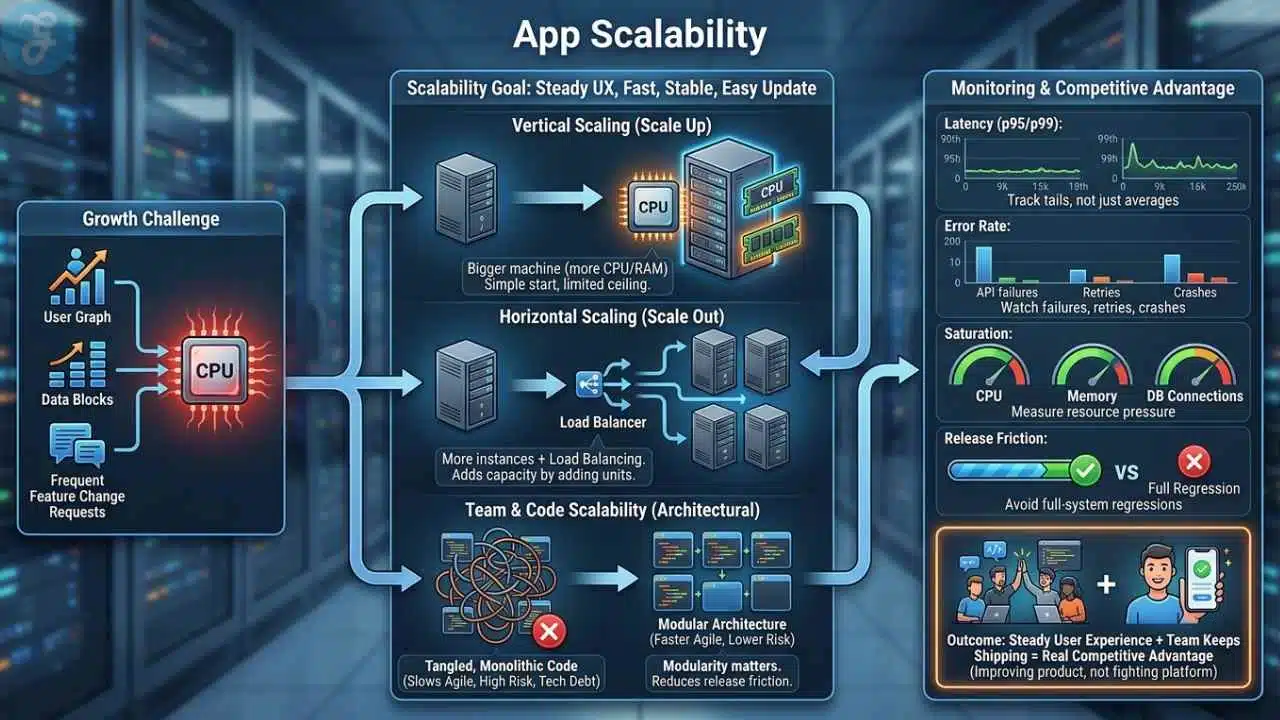
App scalability means your product can handle more users, more data, and more change without falling apart or forcing a rewrite every few months. If traffic doubles after a launch, your mobile app should still feel fast, stable, and easy to update.
That usually comes down to two levers. Vertical scaling gives a machine more CPU or memory. Horizontal scaling adds more app instances, then uses load balancing to spread traffic across them. Most teams start with vertical scaling because it is simple, then add horizontal scaling when one machine stops being enough.
Scalability also affects the team, not just the servers. If every feature touches every file, agile development slows down, release risk rises, and technical debt starts shaping the roadmap. That is why modularity matters well before you hit huge traffic numbers.
- Latency: Track p95 and p99 response times, not just averages.
- Error rate: Watch API failures, background job retries, and mobile crashes.
- Saturation: Measure CPU, memory, queue depth, and database connection pressure.
- Release friction: If one small change needs a full-system regression, the architecture is already straining.
A scalable app keeps user experience steady while your team keeps shipping. That combination becomes a real competitive advantage because you are improving the product instead of fighting the platform.
Key Principles of Scalable App Architecture
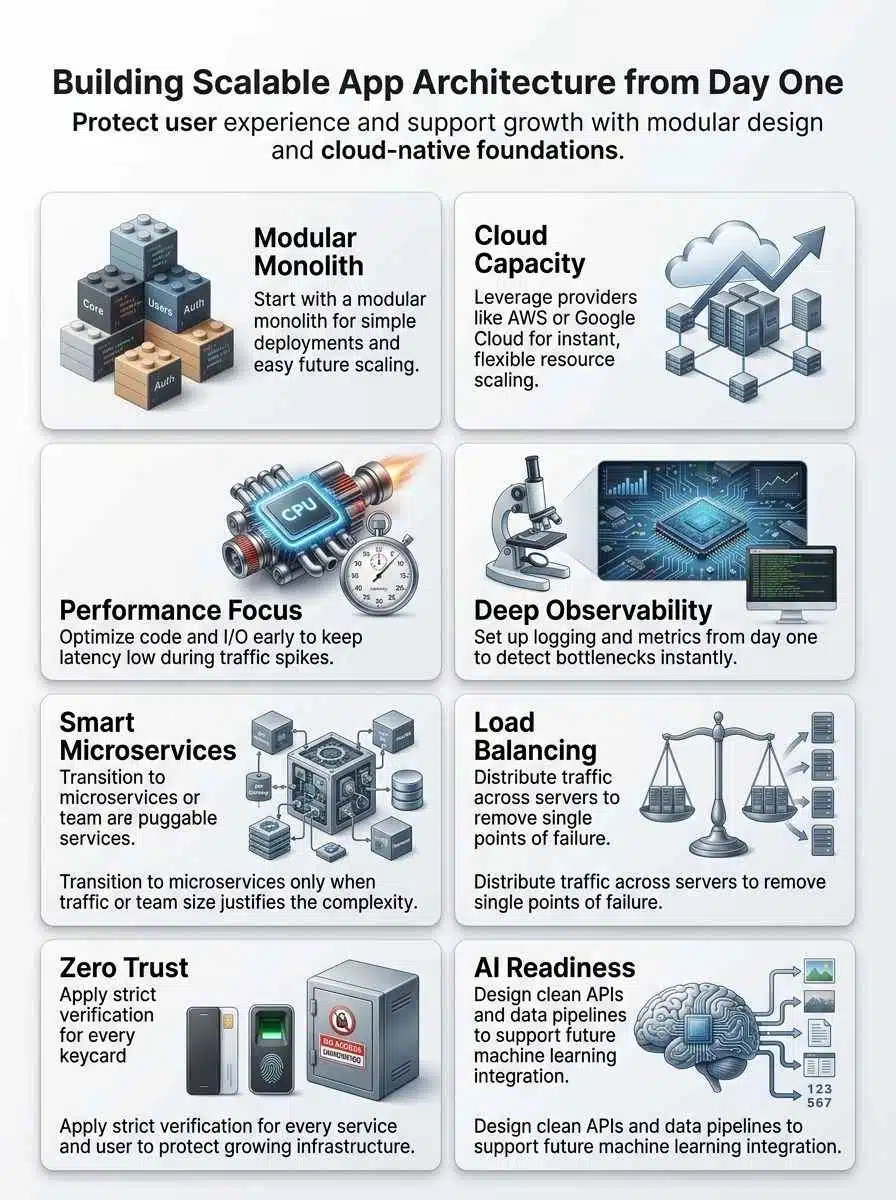
Good architecture is less about trendy tooling and more about good rules. If you get modularity, performance optimization, and observability right, scaling feels like a controlled upgrade instead of a rescue mission.
Modularity and Flexibility
Break the app into business modules, not technical folders. Good early boundaries usually look like auth, billing, catalog, feed, search, notifications, and reporting because each one maps to a real part of the product and can later become its own service if needed.
Keep those modules loosely coupled. Each module should own its data access rules, expose clear interfaces, and avoid reaching directly into another module’s internals. That is how a modular monolith stays clean instead of turning into a hidden big ball of code.
- Define API boundaries early: Even if calls stay in-process for now, write them like future service contracts.
- Assign data ownership: One module should be the source of truth for one business concept.
- Control dependencies: Shared utilities are fine, shared business logic is where trouble starts.
- Design for extraction: If a module needs its own release cycle later, the boundary is already there.
This is the sweet spot for custom software at the startup stage. You keep deployment simple, but you also keep a far reach for later growth.
Performance Optimization
Start with the paths users touch most: login, onboarding, search, checkout, feed load, and upload. A small Redis cache, smarter queries, or one read replica often improves user retention faster than a full rewrite.
Load test your minimum viable product before launch, not after your first outage. Tools like k6, Locust, and AppDynamics help you see whether the bottleneck is CPU, database I/O, a noisy external API, or bad application code.
If one feature gets most of the traffic, scale that path first. You do not need to split the whole app just because one endpoint is hot.
As of May 2026, Google Cloud Run defaults to 80 concurrent requests per instance and can be raised to 1,000. That makes concurrency a real tuning knob: keep it low for CPU-heavy work, raise it for I/O-heavy workloads to reduce cost without hurting responsiveness.
Observability and Monitoring
Observability should tell you why a request failed, not just that it failed. That means logs, traces, and metrics need shared request context from day one.
Use OpenTelemetry or a similar standard to capture request paths across services, workers, and databases. When logs include trace IDs and span IDs, your team can jump from a slow mobile screen to the exact query, queue consumer, or third-party call causing trouble.
- Metrics: Response time, throughput, error rate, and resource saturation.
- Tracing: Full request flow across APIs, workers, and integrations.
- Logs: Structured, searchable, and tied to request context.
- Alerts: Connected to runbooks and ownership, not just noisy channels.
If you already use AppDynamics, focus it on business-critical flows like signup, payment, or content delivery. If you prefer open tooling, Prometheus and Grafana remain a strong default for application development teams that want control and automation.
Choosing the Right Architecture Pattern
There is no single best pattern for every team. The right choice depends on your release cadence, traffic shape, team size, and how much operational work you can absorb right now.
| Pattern | Best fit | Main strength | Main risk |
|---|---|---|---|
| Modular monolith | One team moving fast | Simple deploys and easier debugging | Weak boundaries can become technical debt |
| Microservices | Multiple teams with different release cycles | Independent scaling and ownership | Higher ops, tracing, and testing overhead |
| Event-driven | Async workflows and bursty background work | Smoother traffic handling and loose coupling | Retries, ordering, and duplicate handling |
| Serverless | Bursty APIs, jobs, and webhooks | Low ops load and fast elasticity | Quotas, cold starts, and vendor-specific limits |
Microservices Architecture
Choose microservices architecture when parts of the system truly need independent deployments, different scaling rules, or separate ownership by multiple teams. If your feed service needs 20 replicas while billing needs two, service-level scaling starts to make sense.
A 2021 IEEE Software case study on Istio is a useful warning: the project moved away from an early microservices design after the operational cost outweighed the gains. That is the real danger of premature microservices, you can pay the debugging, tracing, and coordination tax long before the business gets the benefit.
If you do split, add an API gateway, contract testing, and clear data ownership right away. Without those guardrails, you end up with a distributed monolith that is harder to change than the original system.
Event-Driven Architecture
Event-driven systems work best when jobs do not need to finish inside the original request. That makes them a great fit for notifications, report generation, fraud checks, analytics pipelines, recommendation feeds, and a prompt management system that reacts to user events.
Kafka, RabbitMQ, Amazon SQS, and SNS all help smooth spikes because work moves through queues or streams instead of forcing every task through a synchronous API path. That protects the app during traffic bursts and gives you better failure isolation.
- Use idempotent consumers: The same event may arrive more than once.
- Add dead-letter handling: Poison messages should not block the whole pipeline.
- Use an outbox pattern: Keep database writes and event publishing consistent.
- Track lag: Queue depth and consumer delay are early warning signs for scale problems.
Serverless Architecture
Serverless is a strong choice for bursty traffic, scheduled tasks, lightweight APIs, and background jobs. You avoid managing idle servers, and you can scale fast without running a full cluster from day one.
AWS sets new Lambda accounts to a default regional concurrency quota of 1,000, with request limits tied to that quota, so bursty jobs belong behind queues and full-stack load tests matter. Serverless works best when your functions stay stateless, short-lived, and easy to retry.
Azure Functions and Cloud Run are also excellent when you want cloud-native design with less platform work. Use them for uneven traffic, then keep long-running stateful services in containers or managed databases.
Building on Scalable Technologies
Your technology stack should reduce operational work in the early stage, not create a platform team before you need one. Managed services usually beat self-hosting when the main goal is shipping features and protecting reliability.
Cloud Infrastructure and Services
Pick infrastructure based on the amount of control you really need. If your team is small, AWS Fargate, Cloud Run, and similar managed runtimes let you focus on the product while still supporting solid app scalability.
Kubernetes is powerful, but it is not free in team attention. You need image pipelines, secrets management, autoscaling setup, policy controls, and a healthy monitoring stack before the cluster becomes an asset instead of a distraction.
| Option | Good for | What you get fast | What to watch |
|---|---|---|---|
| AWS Fargate or ECS | API services with predictable container workflows | Managed compute without running servers | Task sizing, network costs, and IAM hygiene |
| Google Cloud Run | Containerized APIs and event-driven jobs | Fast deployments and simple autoscaling | Concurrency tuning for CPU-heavy code |
| Kubernetes | Multiple services with complex scaling needs | Fine-grained control and mature ecosystem | Higher ops overhead and more moving parts |
| Azure Functions or Container Apps | Bursty jobs and lean teams already using Azure | Managed scaling and easier ops | Cold-start behavior and service limits |
If you choose Kubernetes later, make sure autoscaling has real metrics behind it. HorizontalPodAutoscaler depends on metrics plumbing, so install Metrics Server or custom metrics early instead of assuming scale rules will work by magic.
Scalable Databases
Your database choice locks in more future cost than most compute decisions, so choose it based on access patterns instead of hype. For a lot of products, PostgreSQL plus Redis is still the best first answer because it gives you transactions, mature tooling, and excellent caching.
Current Firebase and Microsoft guidance makes two important scaling points clear: Firestore benefits from the 500/50/5 ramp-up rule for new hot collections, and Azure Cosmos DB autoscale runs between 10% of your configured max RU/s and the full max. That means you should ramp mobile app traffic gradually on Firestore, while Cosmos DB is a strong fit for unpredictable read and write spikes.
| Database option | Best fit | Why teams choose it | Watch out for |
|---|---|---|---|
| PostgreSQL plus Redis | Transactional SaaS and most business apps | Strong SQL support, clear schema control, fast caching | Bad queries and missing indexes can get expensive fast |
| Google Firebase and Firestore | Fast mobile app development | Strong SDK support for Flutter, React Native, Swift, and Kotlin | Hotspotting, sequential writes, and index-heavy patterns |
| Azure Cosmos DB | Global apps with uneven traffic | Flexible distribution and autoscale throughput | Partition-key mistakes and RU modeling |
| Azure SQL Hyperscale | SQL-heavy products that may grow large | Familiar SQL model, read scale-out, and up to 128 TB | Cost discipline and service-tier fit |
Azure SQL Database serverless is also useful when workloads go quiet at night because it can auto-pause during inactivity and resume when traffic returns. That can be a smart cost move for internal tools, admin systems, or products with uneven usage.
Load Balancing Solutions
Load balancing is not just traffic splitting. It is where you enforce health checks, TLS termination, rate limits, and sane failover behavior.
- Managed cloud load balancers: A strong default on AWS or Google Cloud because they reduce operational drift.
- NGINX: Great when you want reverse proxying, caching, and simple routing in one layer.
- HAProxy: Excellent for high connection volumes and precise traffic control.
- Kong or Ambassador: Useful when API authentication, quotas, and gateway policy matter as much as throughput.
Keep one rule in mind: fail fast. Short health checks, clear timeouts, and circuit breakers protect user experience better than sending traffic to a half-dead service for too long.
Best Practices for Long-term Scalability
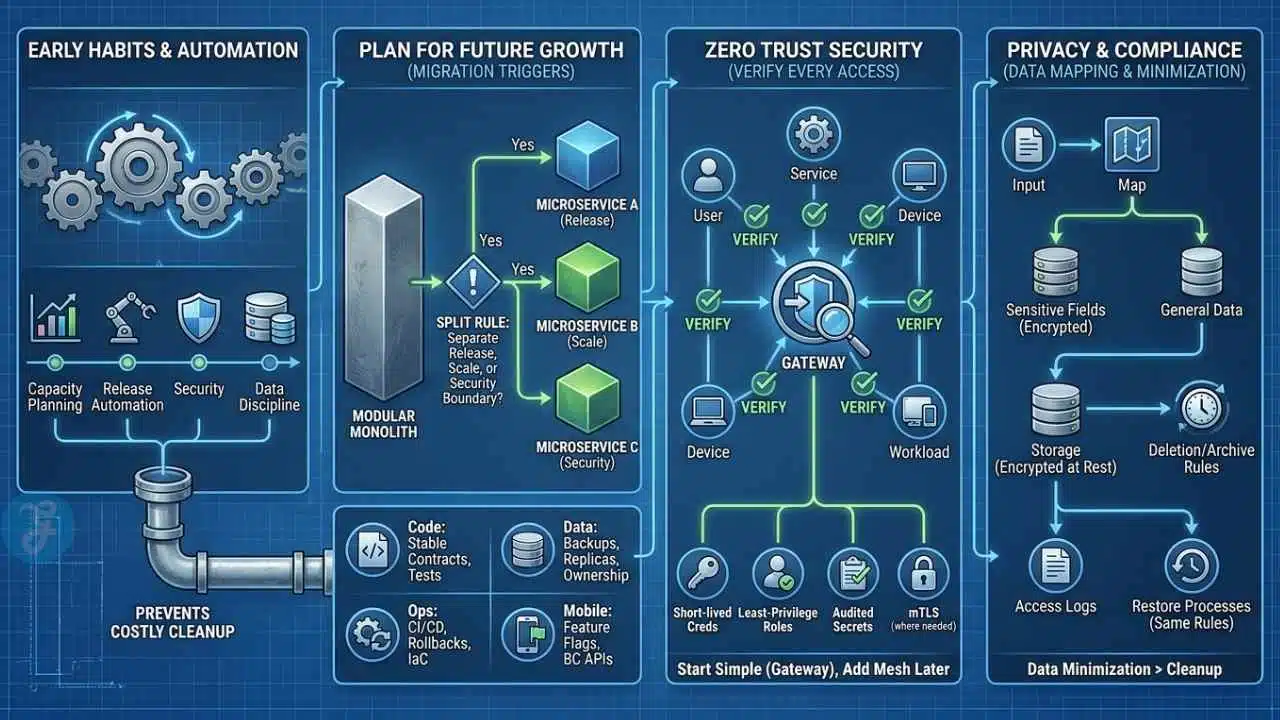
Long-term scale comes from boring habits done early. Capacity planning, release automation, security, and data discipline save you from the costly cleanup projects that usually arrive right after growth.
Plan for Future Growth
Write down your migration triggers before you need them. A simple decision rule works well: split a module out of the modular monolith only when it needs a separate release cadence, a separate scaling profile, or a separate security boundary.
That one rule keeps microservices architecture tied to evidence instead of fashion. It also keeps the development process calmer, because every new service has to solve a measured problem.
- Code: Stable module contracts and tests around boundaries.
- Data: Backups, read replicas where they matter, and clear ownership rules.
- Ops: CI/CD, rollback plans, infrastructure as code, and repeatable load tests.
- Mobile clients: Feature flags and backward-compatible APIs for scalable mobile apps.
Use automation anywhere it removes repeated manual work. Preview environments, schema migrations, canary deploys, and release checks do more for application scalability than a flashy new stack ever will.
Adopt a Zero Trust Security Mindset
Zero trust means every user, service, device, and workload has to prove it should have access. That approach fits modern cloud systems because your app no longer lives inside one trusted network perimeter.
NIST’s current zero trust guidance keeps pushing teams away from broad network trust and toward identity, policy, and explicit authorization for each request. In practice, that means short-lived credentials, least-privilege roles, service identities, audited secrets, and mutual TLS where it actually solves a real problem.
Keep the first version simple: central identity, scoped tokens, gateway-level enforcement, and reliable secrets management. Add service mesh later if east-west traffic becomes complex enough to justify it.
Design for Privacy and Compliance
Privacy planning starts with the data you collect, not the form you promise to build later. Map where personal data enters the system, where it is stored, who can access it, and how you will delete or archive it.
Separate sensitive fields from general application data whenever you can. Encrypt data in transit and at rest, keep access logs, and make sure restore processes follow the same retention and deletion rules as the live system.
The cheapest compliance work happens before the first production incident. Data minimization beats cleanup every time.
Common Pitfalls to Avoid When Designing for Scalability
Most scaling problems show up first as design shortcuts, not record-breaking traffic. These are the mistakes that cost teams the most time later.
- Starting with microservices too early. A modular monolith usually ships faster and creates far less operational drag at the minimum viable product stage.
- Ignoring the data model. Bad partition keys, weak indexing, and hot write paths can cap performance before compute becomes the issue.
- Trusting averages. Average latency can look healthy while p95 and p99 are already hurting user experience.
- Skipping observability. If logs, metrics, and traces are disconnected, every outage becomes a guessing game.
- Scaling compute before fixing queries. One slow join or N+1 pattern can waste more money than a larger server can save.
- Adding Kubernetes because it feels advanced. Clusters add power, but they also add policy work, image pipelines, autoscaling setup, and more on-call surface area.
- Forgetting mobile release realities. Backend changes are easy to roll back, but mobile applications in app stores linger, so version APIs and keep backward compatibility.
How to Future-Proof Your App for AI Integration
You do not need to rebuild your product around artificial intelligence on day one. You do need a data layer that captures clean events, stable identifiers, and enough context to support future models without a painful rewrite.
Designing AI-Ready Systems
Keep raw events in an append-only stream or warehouse, then build curated feature tables from there. That gives you one reliable source for analytics, recommendations, search, and machine learning instead of scattering logic across services.
MLflow is useful for tracking experiments, datasets, and model versions, while Feast gives teams a practical feature-store pattern for serving the same features during training and inference. That helps avoid one of the most common AI rollout mistakes, a model that behaves one way offline and another way in production.
- Version events: Never change event meaning silently.
- Separate online and offline paths: Fast reads for inference, cheaper storage for training.
- Isolate model endpoints: Treat them like any other service with quotas, retries, and tracing.
- Log decisions: Prediction, model version, and key inputs should be auditable.
Leveraging Real-Time Machine Learning
Real-time machine learning works best when the action window is small and the value is obvious, like fraud checks, personalized ranking, support triage, or smart notifications. If a prediction does not change the user experience in seconds, start with batch scoring first.
Kafka remains a strong backbone for streaming events, Redis is excellent for low-latency feature lookups, and PostgreSQL with a vector extension can cover early semantic search needs before you add a dedicated vector database. That gives you a practical path from simple rules to live inference without blowing up the software architecture.
For mobile app development, keep the client thin. Run inference, retrieval, and prompt assembly on the server, then send back only the decision or content, which keeps Flutter and React Native apps smaller and much easier to update safely.
Final Thoughts
Good app scalability does not start with the most complicated stack. It starts with clear module boundaries, useful observability, thoughtful database choices, and a software architecture your team can operate with confidence.
Begin with a modular monolith, load test the paths that matter most, and let real traffic decide when to add microservices architecture, heavier load balancing, or more aggressive horizontal scaling. If you need them later, tools like Kubernetes, AWS Lambda, PostgreSQL, Kafka, Prometheus, and Grafana can support the next stage without forcing it too early.
Start simple, measure everything, and grow with confidence.
Frequently Asked Questions (FAQs) About Scalable App Architecture
1. What does it mean to build a scalable app architecture from day one?
It means designing your app to grow, without major rework. Think of it like building a house, you lay a strong foundation before you add floors. Start with microservices, stateless services, containerization, an API gateway, and load balancing to keep performance and resilience.
2. Which architecture choices matter most at the start?
Pick small services rather than one giant block, this lets you scale parts on demand. Plan for horizontal scaling, caching, and database sharding to handle spikes.
3. How should I handle data so it can scale?
Partition data early, use database sharding and caches, and separate read and write paths to protect performance.
4. What tools and practices help keep the app scalable over time?
Use a cloud provider, container orchestration, automated CI/CD pipelines, and monitoring to catch problems fast. Add load balancing, health checks, and capacity testing to keep steady performance and resilience.





















