

Listen to the Podcast:
This article is all about WiFi 6 vs WiFi 6E. All their major and minor differences are explained with benefits.
WiFi may not be the most riveting conversation starter, but billions of people use it daily. WiFi, which debuted in the late 1990s, has profoundly impacted society in just two decades.
The Institute of Electrical and Electronics Engineers developed the 802.11 wireless networking standard in 1997, the first WiFi standard available to the public (IEEE). Since then, there have been MANY updates that have made many changes.
WiFi 6 is the newest WiFi standard and is starting to appear in smartphones. WiFi 6E is a slightly more performance-focused version of WiFi 6 that promises even faster and more consistent speeds.
The iPhone 15 and the iPhone 15 Pro will use the new WiFi 6 standard. But base models will have WiFi 6, while iPhone 15 Pro and Pro Max models will have WiFi 6E.
So, should you choose WiFi 6 or WiFi 6E? Here is all the information you need.
WiFi 6 vs WiFi 6E: Major Differences

WiFi 6 and WiFi 6E are both based on the 802.11ax wireless standard. However, they work in different frequency bands and have different features.
Here is a comparison of the main differences between WiFi 6 and WiFi 6E :
Frequency Bands:
WiFi 6: It works on the 2.4 GHz and 5 GHz frequency bands already in place.
Wi-Fi 6E: It works on both the 2.4 GHz and 5 GHz frequency bands and the newer 6 GHz band.
Available Channels and Bandwidth Information:
WiFi 6: The 2.4 GHz and 5 GHz bands have limited channels and bandwidth because other devices and technologies already use them. In crowded places, this can slow things down and make traffic worse.
Wi-Fi 6E: The 6 GHz band adds more channels and bandwidth, making the network less crowded and speeding up. The 6 GHz band has up to 1,200 MHz spectrum, split into either 14 channels of 80 MHz or 7 channels of 160 MHz. This extra capacity lets WiFi 6E devices send and receive data faster and with less delay.
Supported Device
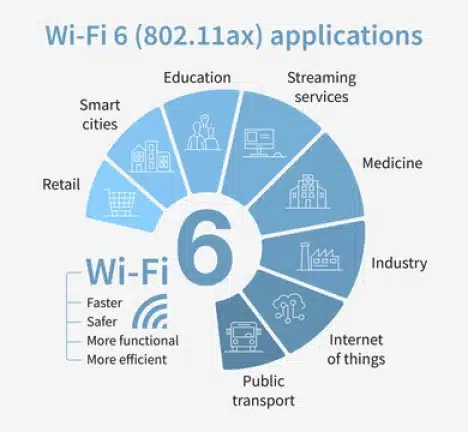
WiFi 6: WiFi 6 is already supported by various devices, such as smartphones, laptops, routers, and the Internet of Things.
WiFi 6E: As of the end of my research in September 2021, very few devices and routers support Wi-Fi 6E. However, as more companies adopt WiFi 6E, its popularity is bound to increase.
Coverage and Range:
WiFi 6: With WiFi 6, you can choose between the 2.4 and 5 GHz bands, both of which provide adequate coverage, but the 2.4 GHz band provides a slightly better range but slower data rates.
Wi-Fi 6E: Due to its higher frequency, the 6 GHz band typically has a smaller range than the 2.4 GHz and 5 GHz bands. WiFi 6E devices, however, can still use the more widely available 5 GHz and 2.4 GHz bands.
Signal Quality:
WiFi 6: WiFi 6 operates on the 2.4 and 5 GHz bands, so older WiFi standards, Bluetooth devices, and microwave ovens may cause interference.
Wi-Fi 6E: Because fewer devices use it, the 6 GHz band has lower interference and higher signal quality. As a result, WiFi 6E devices may function more efficiently and reliably.
WiFi 6 vs WiFi 6E: Minor Differences
Check out the minor differences between wifi 6 and wifi 6E
WiFi 6 vs. WiFi 6E: Latency
Latency, or the delay between sending and receiving data, is another key difference between WiFi 6 and WiFi 6E. Both standards reduce latency, resulting in less lag during online activities. However, WiFi 6E has lower latency than WiFi 6, making it ideal for applications requiring real-time communication, such as gaming or video conferencing.
WiFi 6 vs. WiFi 6E: Cost
Another factor to consider when choosing between WiFi 6 and WiFi 6E is cost. Since WiFi 6E is a newer technology, it’s generally more expensive than WiFi 6. However, as more devices support WiFi 6E, the cost will decrease. If you’re on a budget, WiFi 6 may be a better choice for you, but if you need the additional benefits of WiFi 6E, it may be worth the extra cost.
WiFi 6 vs. WiFi 6E: Security
Security is a critical factor for wireless networks, and both WiFi 6 and WiFi 6E include several security enhancements compared to previous WiFi standards. WiFi 6 and WiFi 6E both use WPA3 encryption, providing better security than the previous WPA2 encryption. Additionally, both standards include improved authentication protocols, making it more difficult for unauthorized users to access your network.
Benefits of WiFi 6
WiFi 6 offers several benefits over previous WiFi standards, including:
- Faster speeds: WiFi 6 can deliver up to 9.6 Gbps, almost three times faster than WiFi 5.
- Increased capacity: WiFi 6 can support more devices simultaneously, making it ideal for homes and businesses with multiple devices.
- Improved range: WiFi 6 can penetrate walls and other obstacles more effectively, providing better coverage throughout your home or office.
- Lower latency: WiFi 6 reduces latency, so you’ll experience less lag when streaming video or playing online games.
- Improved security: WiFi 6 includes several security enhancements, including WPA3 encryption and improved authentication protocols.
Benefits of WiFi 6E
WiFi 6E offers even more benefits compared to WiFi 6, such as:
- Faster speeds: WiFi 6E can deliver up to 11 Gbps, almost twice as fast as WiFi 6.
- Increased capacity: WiFi 6E provides even more capacity than WiFi 6, making it ideal for crowded areas like stadiums or airports.
- Reduced interference: WiFi 6E operates in the 6 GHz frequency band, so it has less interference from other wireless devices than WiFi 6.
- Lower latency: Like WiFi 6, WiFi 6E reduces latency, resulting in less lag during online activities.
- Improved security: WiFi 6E includes the same security enhancements as WiFi 6, including WPA3 encryption and improved authentication protocols.
Which one to choose: WiFi 6 or WiFi 6E?
Choosing between WiFi 6 and WiFi 6E depends on your specific needs. If you have many devices that need to connect to your network, WiFi 6 may be sufficient. However, if you need faster speeds, lower latency, and increased capacity, WiFi 6E is the better choice. WiFi 6 may be a better choice if you’re on a budget since it’s generally less expensive than WiFi 6E.
Final Words
WiFi 6 and WiFi 6E are two of the latest WiFi technologies that offer significant improvements compared to previous WiFi standards. While WiFi 6 is suitable for most users, WiFi 6E provides even faster speeds, lower latency, and increased capacity. However, since WiFi 6E is a newer technology, it’s generally more expensive and has limited device support. Ultimately, your choice between WiFi 6 and WiFi 6E depends on your specific needs and budget.





























