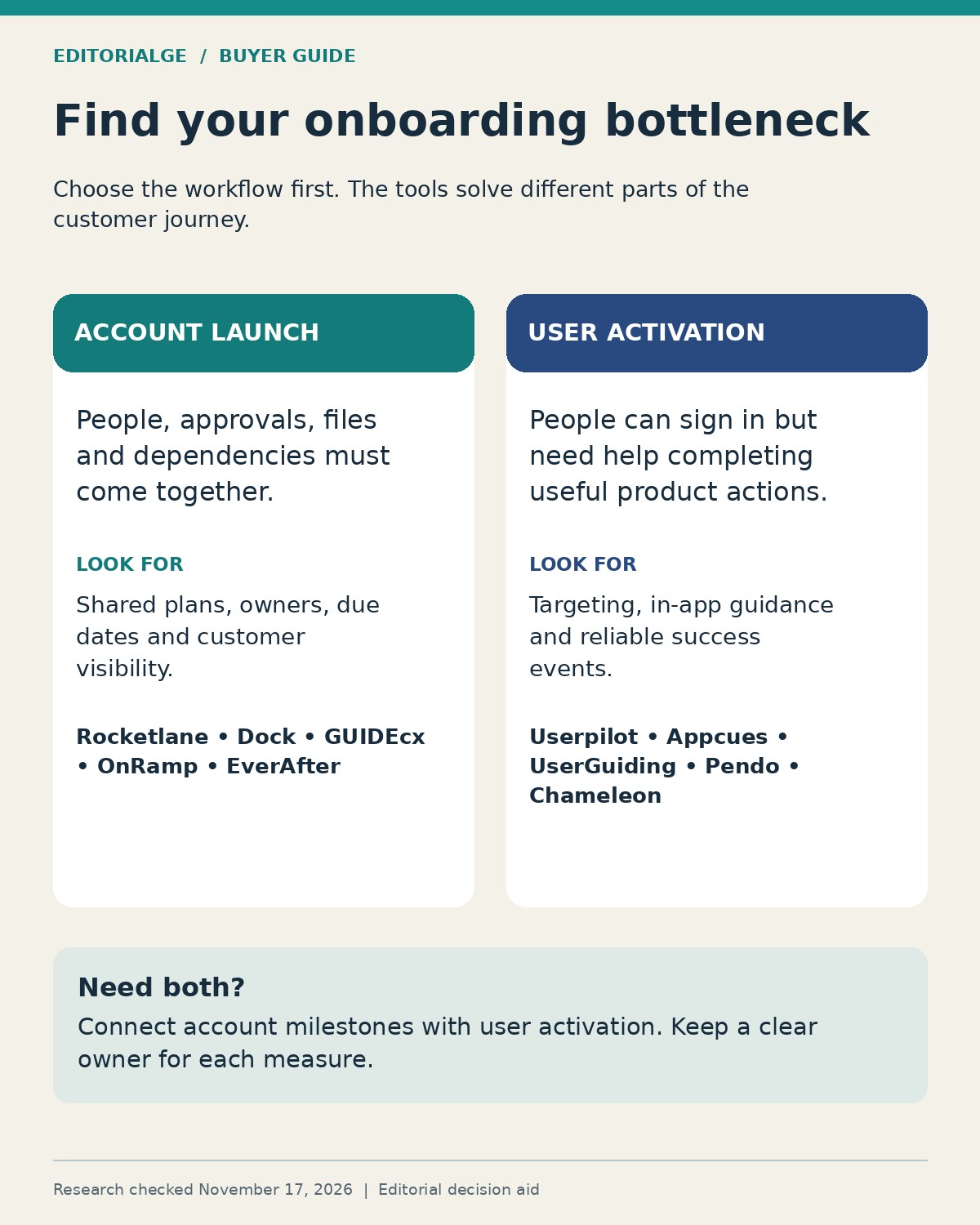
Customer Onboarding Software for B2B SaaS Companies should match the work that stands between a signed contract and a useful outcome. If customers are waiting on data, approvals and configuration, start with an implementation platform such as Rocketlane, Dock or GUIDEcx. If users can enter the product but struggle to complete their first meaningful task, examine in-app tools such as Userpilot, Appcues or UserGuiding.
That distinction prevents an expensive mismatch. A product tour can explain where to click. It cannot, by itself, get a customer’s IT administrator to approve a connection. A shared project portal can make that approval visible, but it does not necessarily provide contextual guidance inside your application.
The ten options below cover both needs. “Best” means a strong fit for the stated scenario, not a measured overall winner. The first five focus on account-level implementation and collaboration; the next five focus on adoption inside the product.
What We Checked: Three First-Hand Observations
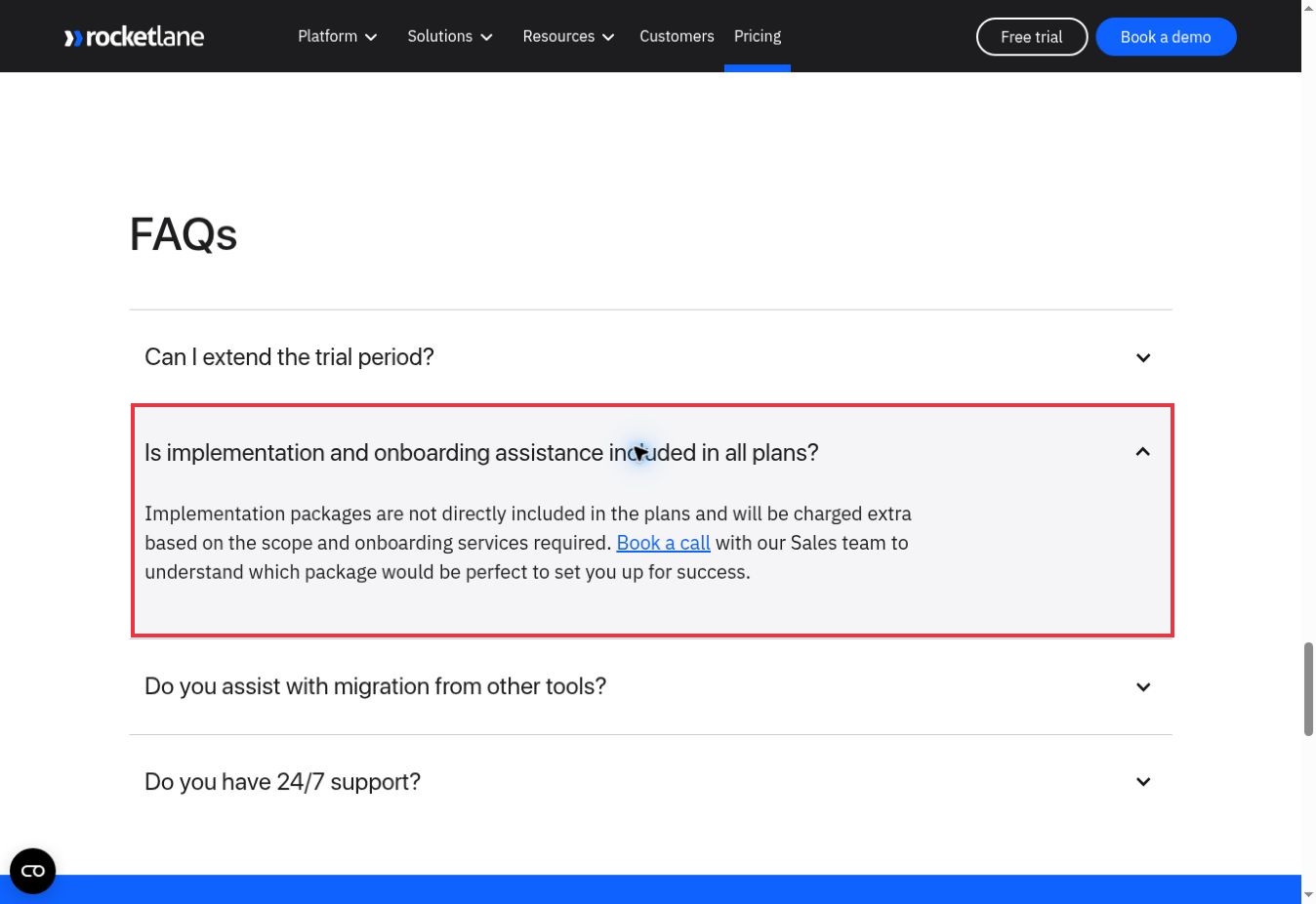
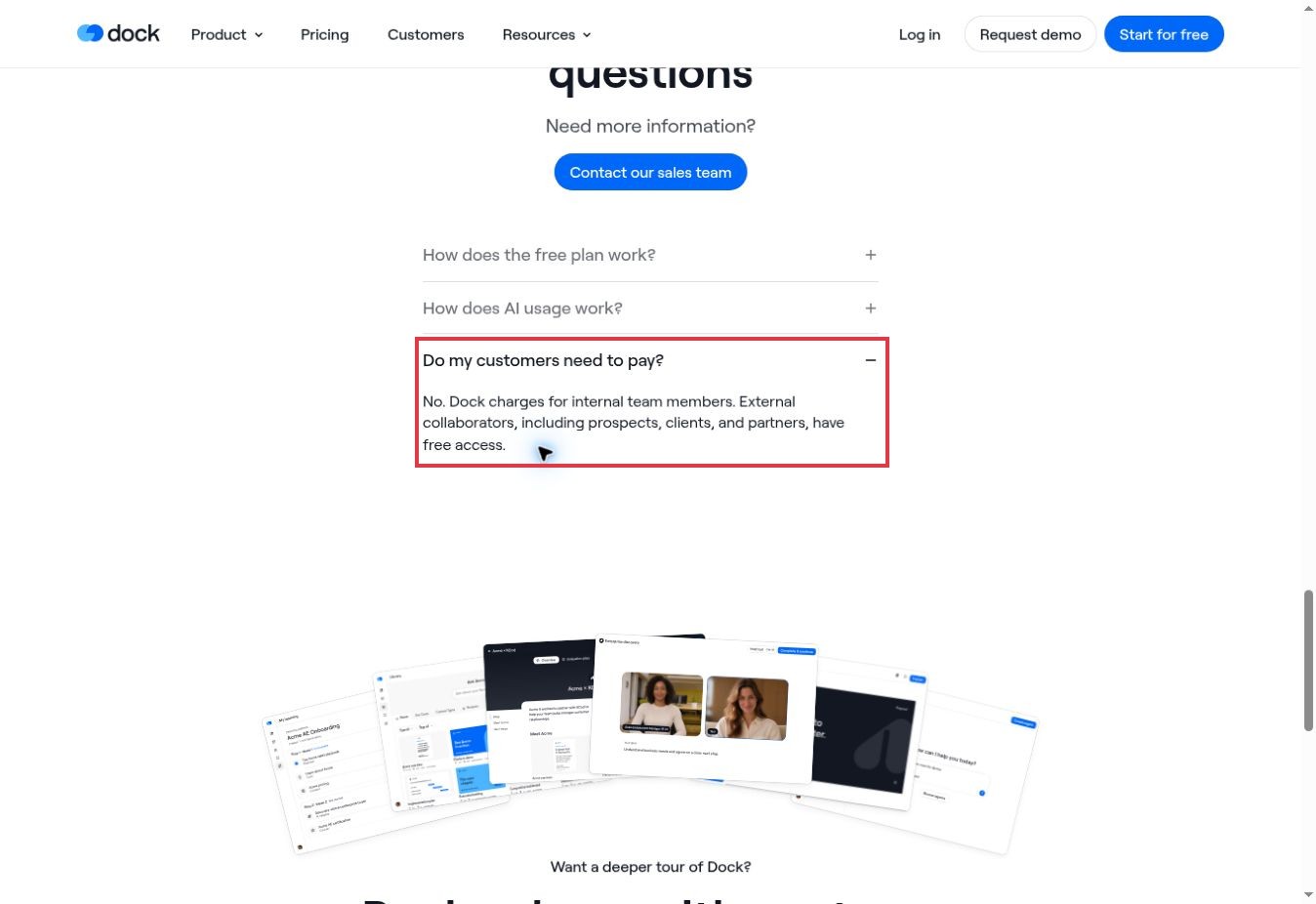
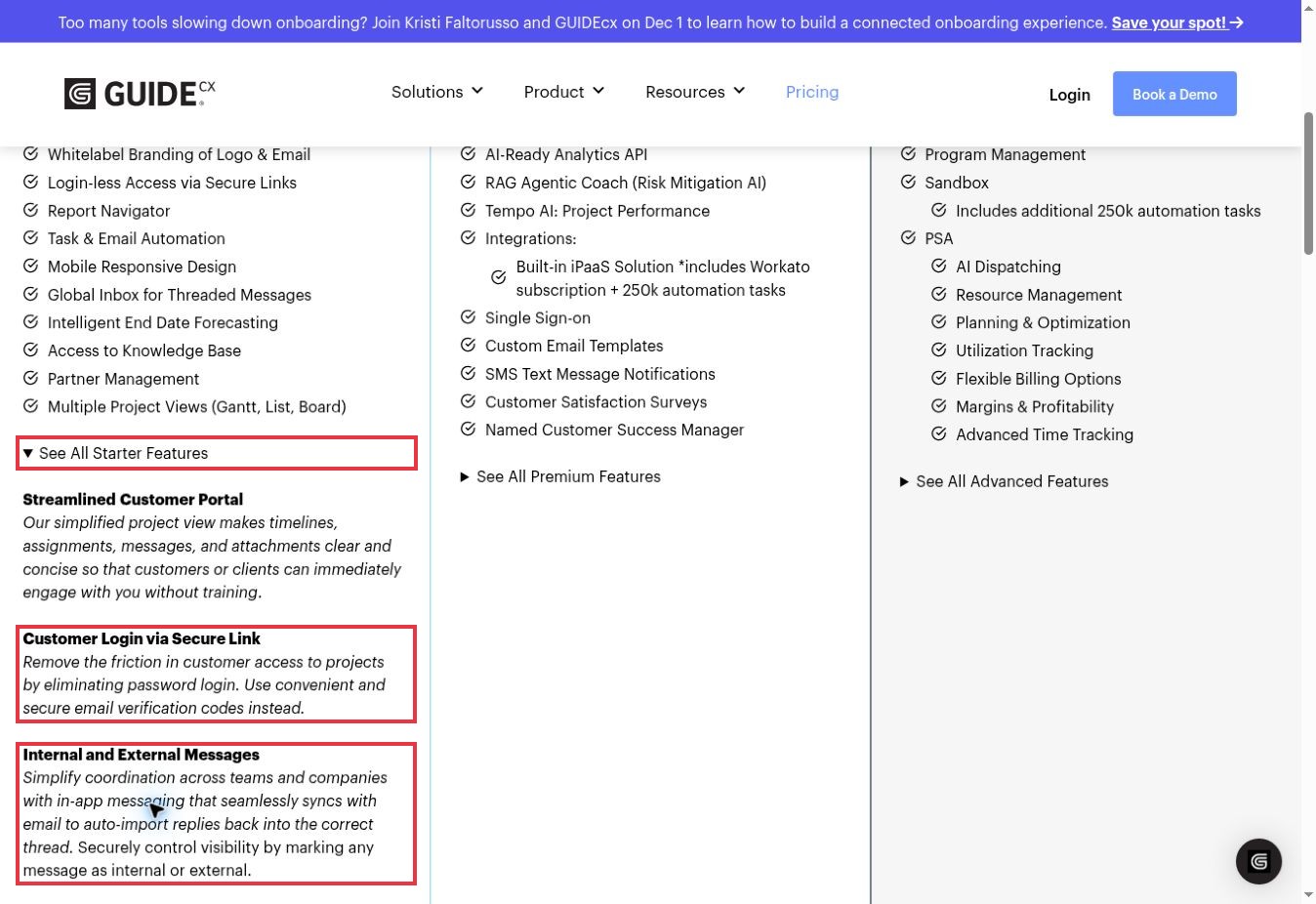
On November 17, 2026, we opened and operated public pricing-page controls for Rocketlane, Dock and GUIDEcx. Rocketlane’s expanded FAQ disclosed a separate implementation-services charge. Dock’s customer-access answer distinguished paid internal seats from free external collaboration. GUIDEcx’s expanded Starter panel explained secure-link access and internal versus external messaging.
These observations matter because they expose costs and participation requirements that a feature headline can hide. Marked screenshots appear beside the relevant entries. The checks did not include paid accounts, customer invitations, CRM connections or completed implementations. Features and pricing for the full shortlist were researched in official product and plan documentation on the same date.
How to Compare Customer Onboarding Software for B2B SaaS Companies
Start with the unit of success. For an implementation team, it might be an account importing approved data and going live. For a product team, it might be an individual user creating a first report. Track those separately when both matter.
The selection criteria here are customer participation, reusable workflows, visibility into progress, integration requirements and the limits that change the purchase. Prices below are the public dollar amounts displayed when checked, not negotiated quotes. Annual commitments, minimum seats and usage definitions are stated where verified. A missing amount means a sales quote is required; it does not mean the tool is free.
| Software | Best-fit scenario | Pricing basis or key limit |
|---|---|---|
| Rocketlane | Implementation teams managing delivery and resources | Standard: $49 per team member/month, billed annually; five-seat minimum |
| Dock | A shared customer hub from sales handoff onward | Standard: $350/month, five users; Free allows ten workspaces |
| GUIDEcx | Projects with dependencies and many customer participants | Quote-based; all packages list unlimited projects and customers |
| OnRamp | Repeatable, account-level onboarding workflows | Quote-based; playbooks, active accounts and user types affect scope |
| EverAfter | Personalized customer hubs that continue beyond launch | Custom pricing; customer-interface and workflow requirements matter |
| Userpilot | In-app engagement connected to product analytics | Starter: $299/month displayed, up to 2,000 MAU; confirm contract term |
| Appcues | Lifecycle engagement with guides and checklists | Grow from $9,000/year; 25 published experiences |
| UserGuiding | Teams comparing a published entry price for adoption tools | Starter from $249/month, $2,988/year, at 2,000 MAU |
| Pendo | Analytics-led product teams adding in-app guidance | Paid plans require quotes for custom MAU volume |
| Chameleon | Targeted, customized in-app experiences | Startup starts at $279 for 2,000 MTUs; ten live experiences |
MAU means monthly active users; MTU means monthly tracked users. Ask each supplier exactly which people count. Neither is interchangeable with internal staff seats, customer accounts or active projects.
1. Rocketlane: Best for Implementation Teams With Delivery Responsibilities
Rocketlane fits onboarding that resembles a real delivery project: several people, customer dependencies, reusable documents and a deadline that matters. Its Standard plan combines a branded customer portal, project templates, approvals and time tracking. That gives implementation leads a place to coordinate customer work alongside their own team’s responsibilities.
The buying decision becomes more specific when resource planning and financial control enter the picture. Those capabilities appear in Premium, alongside Salesforce integration. Standard lists HubSpot and several other integrations. A team whose handoff depends on Salesforce should compare the relevant tier from the start.
The $49 Standard headline has a five-member minimum and annual billing. At that floor, the published rate works out to $245 per month equivalent, or $2,940 per year, before services or other applicable charges. A two-person onboarding team still needs to evaluate that minimum commitment.
First-Hand Observation: Budget for Getting the Platform Running
We expanded the pricing FAQ about implementation assistance. It stated that implementation packages are charged separately according to scope. The practical question is therefore what your team can configure itself and what belongs in a services quote. This check confirmed the disclosure, not the quality or duration of implementation support.
Dock is a useful candidate when the onboarding problem is scattered information: a plan in one document, training in another and requests buried in email. Its customer-onboarding workspace brings milestones, assigned tasks, resources, forms and conversations together. The same hub can continue into adoption and renewal instead of being discarded after launch.
That continuity is its strongest fit. For a comparatively straightforward B2B deployment, the customer may need one clear place to find the next action more than a sophisticated resource-management system. Dock also documents workspace engagement signals, including visitors and page activity. Treat those as clues for follow-up, rather than proof that a customer has achieved value.
Standard lists five users at $350 per month. The comparison places unlimited workspaces on paid plans, while Free allows ten. Premium adds capabilities including custom fields and removal of Dock branding; API access and automations are listed under Enterprise. A polished portal requirement can therefore move the purchase above the entry tier.
First-Hand Observation: Separate Staff Seats From Customer Access
We opened “Do my customers need to pay?” The answer said external collaborators have free access while internal team members are charged. That is useful for accounts with several stakeholders. It does not remove workspace limits or establish which paid features their portal will include.
3. GUIDEcx: Best for Customer Projects With Dependencies
GUIDEcx is aimed at the coordination problem: tasks depend on other tasks, customer participants need a focused view, and the implementation manager needs to know which delay threatens the end date. Starter lists project views, task and email automation, a customer portal and end-date forecasting.
Its plan structure is worth reading by operational requirement. Premium adds integrations, single sign-on and customer satisfaction surveys. Advanced lists an embedded portal, sandbox and resource-management capabilities. A requirement to place onboarding inside your own software is therefore different from simply needing customers to access a hosted portal.
Current package pricing is quote-based. The official pricing page says all packages include unlimited projects and customers. Ask for the internal-user model and required integrations in the same proposal so the quote describes the workflow you will actually run.
First-Hand Observation: Read Beyond “Login-Less”
We expanded the Starter feature panel. It described email verification codes for customer access and separate visibility for internal and external messages. That is more informative than the short login-less label: customers still need an access flow, and teams still need to manage what they share. No invitation or permission boundary was tested in an account.
4. OnRamp: Best for Repeatable Account-Level Playbooks
OnRamp deserves a look when each new customer follows a recognizable process but the assignments and dependencies vary. Its documentation describes playbooks, conditional logic, automated task assignment and CRM-triggered project creation. A guided customer portal gives external participants instructions and progress visibility.
Think of a SaaS implementation with different paths for a standard connection and a custom integration. The value to investigate is whether the system can route the account into the appropriate work without losing the common milestones. That is a proposed evaluation scenario, not a workflow completed for this review.
OnRamp’s pricing considers playbooks, active customer accounts and user types. Its FAQ states a $15,000 starting amount, but the retrieved answer does not specify the billing period; it should not be converted into a monthly comparison. There is no self-serve free trial. The company says a sandbox is typically available during evaluation.
Choose this route when repeatability and account coordination justify a structured evaluation. If you only need a short welcome tour inside the product, the implementation layer may be more than your team needs.
5. EverAfter: Best for Customer Hubs That Continue After Onboarding
EverAfter focuses on configurable customer interfaces. Its widget-based builder, visibility rules and task management make it relevant when onboarding is one stage in a longer relationship involving success plans, training or business reviews.
The useful distinction is personalization within an account. A customer administrator, executive sponsor and day-to-day user may need different information. EverAfter documents rules for deciding which content each user sees, along with engagement tracking and integrations. This makes it a candidate for a customer-success team building a persistent hub rather than a temporary launch checklist.
Pricing is customized. That prevents a defensible entry-price comparison from the public page alone. Scope the proposal around the interfaces, integrations and audiences you intend to support.
The flexibility also creates an ownership question: who maintains the hub when a process, customer segment or source system changes? Before choosing a configurable interface, assign someone to keep it useful. A simpler shared plan may be sufficient when every customer follows almost the same short sequence.
6. Userpilot: Best for Connecting In-App Guidance With Usage Analysis
Userpilot belongs on the shortlist when the onboarding question is about behavior inside your application. Its plans combine in-app engagement, user segmentation and usage analysis, with more advanced analytics and engagement capabilities in higher tiers.
For a SaaS team, that can support a focused investigation: which users reach a key action, which segment stalls and what guidance should appear next? The event and identity model must be dependable before the resulting reports can guide decisions. A visually completed checklist is not automatically the same as a successful business action.
The current pricing page displays Starter at $299 per month for up to 2,000 monthly active users. Growth starts at $849 per month and adds advanced analytics, a resource center and other capabilities. Enterprise lists bulk data export/import and warehouse sync. Confirm billing term and required data access in the proposal; a monthly display is not proof of a cancel-anytime contract.
Userpilot is a stronger fit for activation work than for coordinating an external legal approval or data migration. Keep those account-level dependencies in an implementation process.
7. Appcues: Best for Lifecycle Guidance Beyond the Welcome Tour
Appcues offers guides, checklists, announcements and surveys with targeting. It is relevant when the same product team wants to introduce new users, explain a feature later and respond to different stages of adoption.
The current pricing is materially different from older low-entry-price comparisons. Grow starts at $9,000 per year, scales with monthly active users and includes 25 published experiences. Enterprise uses custom pricing and lists 100 published experiences. The page also describes unlimited seats and included integrations.
Count the experiences you will need before comparing the headline. Separate roles, language requirements and different parts of a product can increase the number of live experiences you maintain. Ask how the supplier counts them and what happens when you retire or replace one.
Appcues is worth evaluating when engagement is an ongoing program with someone responsible for it. If the immediate task is merely to publish one short checklist, compare that commitment with a smaller scope. No claim here establishes that an Appcues campaign improves activation for your particular users; that requires a measured pilot.
8. UserGuiding: Best for Teams Wanting a Published Adoption-Tool Starting Point
UserGuiding gives teams a visible entry point for tours, onboarding checklists, surveys, reporting and segmentation. Its pricing page displayed Starter from $249 per month, equivalent to $2,988 per year, at the 2,000-MAU setting when checked.
The cost is only part of the comparison. Starter’s feature table lists 15 active guides, while Growth lists 40 and Enterprise lists unlimited guides. A team with several user roles should map its required flows before assuming the entry tier is enough.
The company describes MAU in terms of people using the product within the preceding 30 days. Reconcile that definition with your own user data, especially when customers have large numbers of occasional users. Ask how account switching and returning users are identified in your implementation.
UserGuiding is a practical candidate for a team replacing scattered onboarding messages with a managed in-app program. It does not remove the need to maintain targeting, review changes after product releases or define what a completed onboarding action means.
9. Pendo: Best for Analytics-Led Teams Adding Guidance
Pendo makes sense when the product team wants to understand usage and act on those findings within a broader platform. The current Base package includes product analytics and in-app guides. Core adds session replay, while Ultimate extends into additional feedback, orchestration and data capabilities.
That packaging supports a different buying conversation from “How quickly can we build a tooltip?” Start with the questions the team needs to answer: which features are being used, where a journey breaks and which audience should receive guidance. Then decide which plan contains the evidence and action tools required.
Paid plans use custom monthly-active-user volume and require a quote. The pricing page also promotes Novus as a free beta, but that is not evidence that the full paid Pendo onboarding stack is free. Keep the product and package names explicit in procurement notes.
Pendo is less compelling as a narrow replacement for a customer project tracker. For a product organization already budgeting for analytics and in-app engagement, however, evaluating them together may avoid buying overlapping capabilities without a clear owner.
10. Chameleon: Best for Targeted, Customized In-App Experiences
Chameleon is a candidate when the design and targeting of onboarding experiences matter as much as getting a guide onto the screen. Its offering includes tours, tooltips, surveys and launchers, with customization and segmentation capabilities.
The public plan page lists Startup from $279 for 2,000 monthly tracked users and ten live experiences. Pro starts at $750 per month for 5,000 MTUs and includes up to 20 live experiences, themes, custom CSS and A/B testing. Growth starts at $1,250 per month for 5,000 MTUs, billed annually, with unlimited live experiences.
For a B2B application with distinct administrators and end users, test whether the correct guidance follows the correct person and account. Also budget for maintaining the experience when navigation or page elements change. Customization only helps while the guidance remains accurate.
Choose Chameleon when someone can own that refinement and use it to solve a specific activation problem. If your delays happen before anyone can access the application, start with one of the implementation platforms instead.
Run the Same Evaluation Scenario Across Your Shortlist
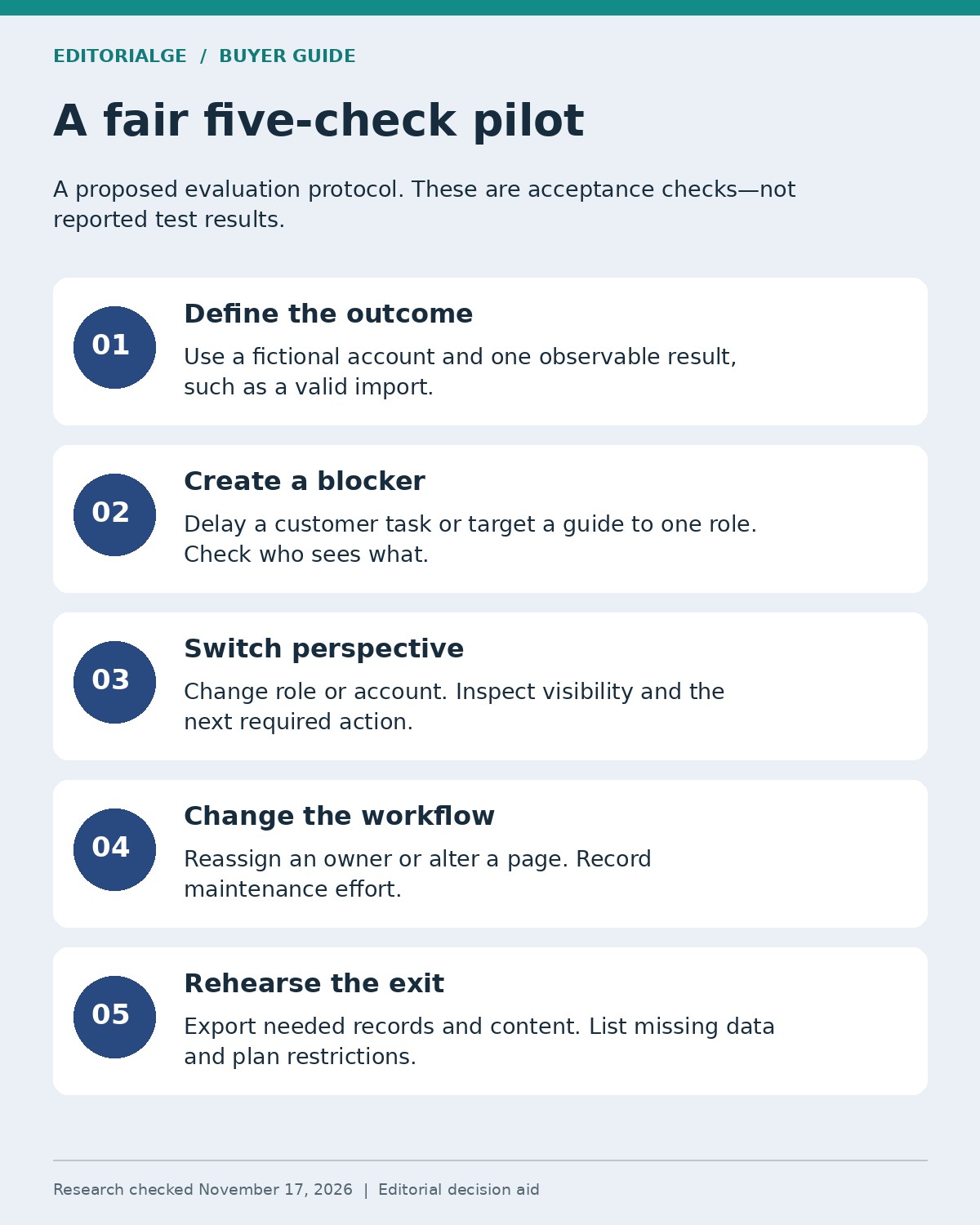
A useful demo begins with your work, not the vendor’s preferred tour. The following is a proposed evaluation protocol, not a set of completed tests.
Use a fictional customer account with an administrator, a project owner and an executive sponsor. Define one outcome—for example, importing sample records and producing a first report. Write a short project charter stating scope, owners and acceptance criteria.
- For an implementation platform, create the plan and assign a customer-owned dependency. Delay that task deliberately. Check who sees the delay, who receives a reminder and whether the milestone forecast changes.
- For an in-app tool, target a guide to the administrator. Confirm that a different role does not receive it. Complete the underlying product action and check whether the success event is recorded correctly.
- Switch accounts or roles. Inspect visibility, comments and attachments. A successful login alone does not prove that account boundaries work.
- Change a task owner or a product page. Record the effort needed to keep the onboarding experience accurate.
- Export the records and content you would need if you left. Inspect what is included, what is missing and which tier permits it.
Keep a pass/fail record with screenshots and unresolved questions. Do not combine project completion and user activation into one unexplained score. If you do not yet know where customers struggle, begin with focused SaaS customer research before adding more prompts and reminders.
Compare the Full Cost of the Workflow
A fair budget includes the subscription, minimum commitment, setup, required integrations, usage growth and maintenance. Ask for the same scenario in each proposal: internal team size, customer-account volume, active users, required workflows and expected growth.
For example, Rocketlane’s five-seat Standard minimum yields a $2,940 annual subscription equivalent at the displayed rate. That arithmetic does not include the separately disclosed implementation package. Dock’s Standard price includes five users, while its comparison lists additional seats at $50 per month. Neither calculation should be treated as a complete quote for another platform.
For usage-priced tools, compare today’s volume with a realistic growth case. Include the features you will actually use—exports, identity controls, localization or advanced analytics—rather than assuming every feature belongs to the lowest tier.
Make Security and Ownership Part of Acceptance
Onboarding often gathers documents, account details and product-usage data. Keep the collection proportionate. The FTC’s business guidance on protecting personal information recommends retaining only necessary information and limiting access to people who need it.
Translate that into concrete checks: what customers can upload, who can see it, how long it remains and how it can be deleted or exported. For session replay or behavioral tracking, have the relevant team review capture settings and sensitive fields before rollout. A vendor’s security badge does not establish that your own configuration is appropriate.
Assign an owner for templates, event definitions and reminders. A new tool can centralize a broken process just as efficiently as a good one. Review what customers actually complete, not only how many messages the system sends.
Choose the Tool That Removes Your Current Bottleneck
For complex delivery, begin with Rocketlane or GUIDEcx. For a shared hub that carries the relationship forward, compare Dock and EverAfter. For repeatable account workflows, investigate OnRamp. If the obstacle is inside the application, compare Userpilot, Appcues, UserGuiding, Pendo and Chameleon against the exact guidance and measurement you need.
The best Customer Onboarding Software for B2B SaaS Companies is the one that makes the next necessary action clear, gives it an owner and lets you verify the customer reached value. Shortlist two or three, run the same scenario and buy the scope your team can maintain.
Frequently Asked Questions
Is customer onboarding software the same as customer success software?
No. Onboarding focuses on getting a new account or user to an initial useful outcome. Customer success can continue through adoption, account health, renewal and expansion. Some platforms span both, but check the specific workflow rather than relying on the category name.
Can a B2B SaaS company need both a portal and an in-app tool?
Yes. An enterprise customer may need a shared implementation plan before launch and role-specific guidance afterward. Keep a clear system of record for account milestones and separate measures for individual user activation.
Which metric should define successful onboarding?
Choose an observable customer outcome: a valid import, a first useful report or a working integration. Measure elapsed time and completion for comparable cohorts. Tour views, email opens and checklist clicks can explain progress, but they are not automatically the outcome.
Can a free plan validate the purchase?
It can validate the features and volume it actually includes. It cannot demonstrate a paid integration, permission control or scale limit that is unavailable in the trial. Record those gaps and request a scoped demonstration before treating them as resolved.