
Automation can make a sound process faster, more consistent, and easier to measure. It can also repeat bad decisions, duplicate faulty records, and move incomplete work through a company before anyone notices. The difference is rarely the sophistication of the software. It is the quality of the process underneath it.
Before buying a platform or connecting applications, follow several real cases from beginning to end. Record what starts the work, what information people need, where decisions happen, how exceptions are handled, and who owns the result. The US government’s Rapid Process Transformation Handbook similarly recommends mapping processes, adding performance data, re-engineering where necessary, and standardizing work before automation.
This preparation does not require a perfect operation. It requires a process stable enough to describe, measure, test, and stop safely. A practical explanation of workflow automation shows why triggers and actions are only part of the design; human checkpoints, exception paths, logs, and ownership determine whether a workflow survives real work.
The following ten business processes should be repaired before software begins executing them at scale.
Business Processes to Fix Before Automation: A Quick View
| Process | Fix before automating | Evidence that it is ready |
|---|---|---|
| Request intake | Standardize channels, fields, and identifiers | Routine requests arrive complete and can be distinguished from duplicates |
| Ownership and handoffs | Assign owners and define completion criteria | Every stage has one accountable role and a visible next step |
| Approvals | Clarify decision rights, thresholds, and deputies | Similar cases follow the same risk-based approval path |
| Data management | Establish authoritative records and validation rules | Important fields are consistent, current, and traceable |
| Exceptions and escalation | Define stop, retry, review, and recovery routes | Unusual cases reach the right person with enough context |
| Customer communication | Control promises, templates, and conversation history | Staff can see what was said, approved, and promised |
| Billing and purchasing | Repair validation and financial controls | Amounts, suppliers, and approvals can be checked before action |
| Reporting and metrics | Agree on definitions and baselines | Two reviewers can reproduce the same result from the same records |
| Access and integrations | Limit permissions and document connections | Credentials, owners, limits, and failure behavior are known |
| Maintenance and recovery | Assign support, logging, and rollback duties | The team can detect, pause, repair, and restart a failed workflow |
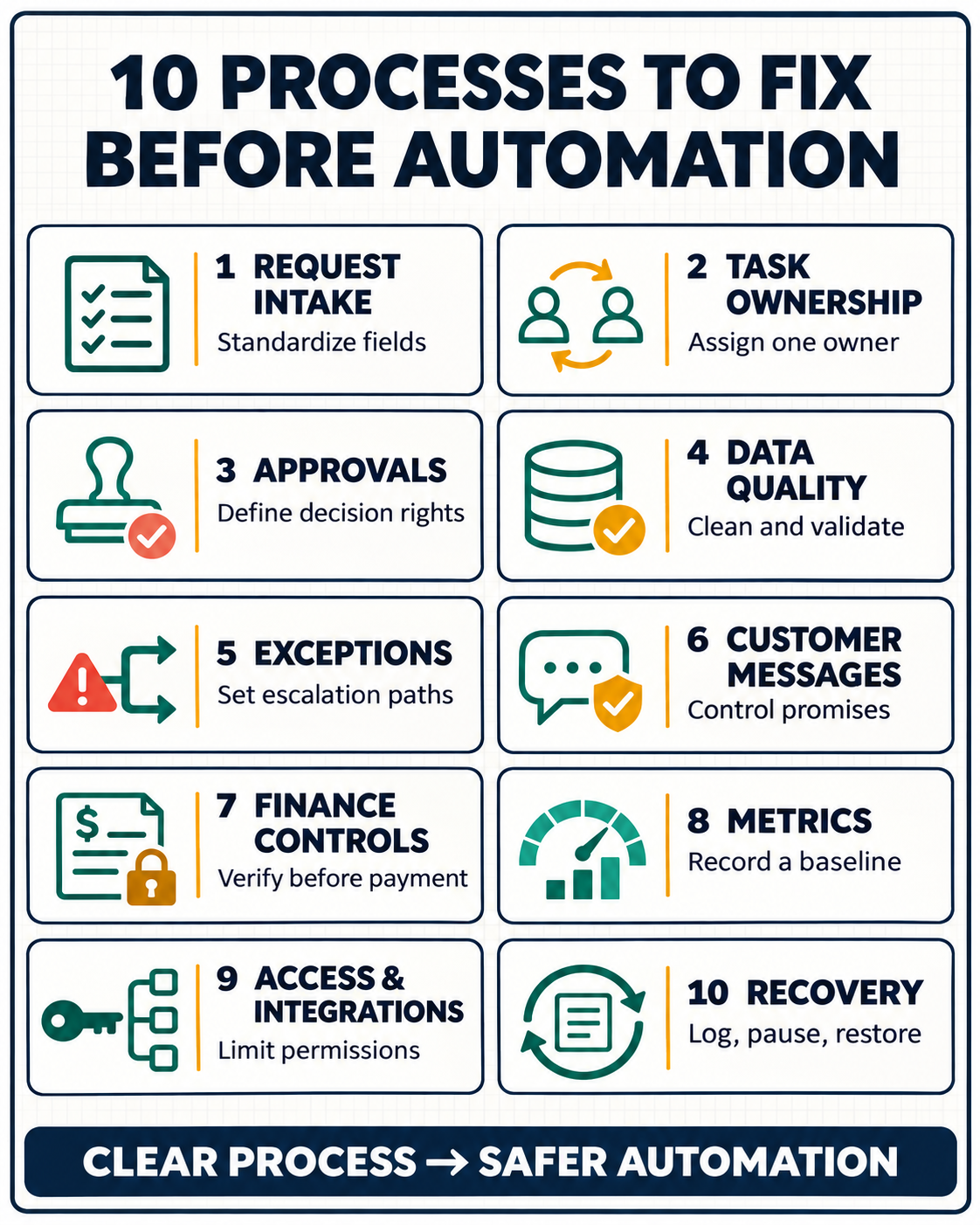
1. Request Intake and Data Capture
Many workflows fail before the first automated action. A request arrives through email, chat, a form, and a spreadsheet, with different information in each channel. Employees fill the gaps from memory, so the apparent process depends on who receives the request.
Start by defining the smallest set of information needed to act. Replace avoidable free-text entries with clear choices, use a consistent date format, distinguish required and optional fields, and assign a stable request or customer identifier. Decide what happens when a submission is incomplete instead of letting the next person guess.
Suppose a client-onboarding workflow can begin from an email or a signed agreement. If neither source consistently identifies the purchased service, account owner, start date, and required access, automation may create the wrong project or create it twice. Fix the intake rule first: one qualifying event starts the workflow, and duplicate checks run before a new record is created.
The same discipline appears in the process for automating repetitive work tasks: structured inputs and stable identifiers are usually more dependable than building complicated branches to repair inconsistent collection.
The intake process is ready when routine requests arrive with enough information to proceed and incomplete cases move to a visible review queue.
2. Task Ownership and Handoffs
Automation cannot resolve work that has no owner. It can assign a task or send a notification, but it cannot decide which department is accountable when sales, operations, finance, and support each assume someone else will act.
Map every handoff using roles rather than individual names. Define who owns the process overall, who performs each stage, who may approve it, and who receives the completed output. Then write the entry and exit conditions for each stage.
“Finance reviews the invoice” is vague. “Finance confirms the supplier ID, purchase order, amount, and tax treatment before changing the status to approved” is actionable.
Time limits also need an owner. If a task remains untouched for two days, decide whether the system should remind the same person, reassign it, notify a manager, or stop. An automated reminder without an escalation rule merely produces more messages.
A useful method for documenting team processes is to record the purpose, scope, roles, inputs, steps, exceptions, completion criteria, owner, and review date in one current location.
This process is ready when any employee can look at a case and identify its current owner, required next action, deadline, and definition of done.
3. Approval and Decision Rights
A slow approval process is not automatically a good candidate for automation. The delay may come from unclear authority, unnecessary reviewers, late feedback, or a policy that changes depending on who asks.
Separate visibility from decision-making. Ten stakeholders may need access to a request, but only one role should normally give final approval. Define thresholds for routine and higher-risk cases, specify when legal, finance, security, or senior management must participate, and name a deputy for absences. Record which version or set of facts the approver reviewed.
Risk should determine the path. A low-value internal purchase may need one manager. A contract, payment-detail change, public claim, employee decision, or access grant may require stronger verification.
Sending every case to every executive preserves the bottleneck. Removing all review transfers authority to software without clarifying accountability.
The lessons from content approval workflows apply beyond publishing: reviews work better when roles are functional, sign-off is explicit, and specialist checks happen where the risk first appears.
Approval is ready to automate when representative cases consistently reach the correct decision-maker and the required evidence, deadline, fallback approver, and final status are defined.
4. Customer and Operational Data Management
An automated workflow is only as reliable as the records it reads. Duplicate customers, conflicting status fields, inconsistent names, missing identifiers, and outdated contact details can turn a simple automation into a source of repeated errors.
Choose an authoritative system for each important entity: customer, order, invoice, employee, supplier, subscription, or project. Define the identifier that connects records across systems. Agree on allowed status values, required fields, date and currency formats, update frequency, retention rules, and who may correct a record.
Do not begin with a mass cleanup alone. Find the behavior creating bad data. If two forms create separate customer records because they use different matching rules, merging today’s duplicates will not prevent tomorrow’s. Correct the source, then clean and reconcile existing records with a recoverable method.
The same foundation supports a trustworthy SaaS analytics stack: source owners, stable identifiers, consistent definitions, and tests for missing or duplicate data must exist before records drive operational actions.
Data is ready for automation when the workflow can locate the correct record, validate critical fields, preserve necessary history, and route conflicts for review rather than selecting a value silently.
5. Exception Handling and Escalation
Teams often document the ideal path and treat everything else as an edge case. In production, missing information, duplicate submissions, rejected approvals, unavailable systems, expired credentials, customer changes, and policy exceptions are normal operating conditions.
List the most common reasons a case stops. For each one, decide whether the automation should reject the input, retry once, wait, create a review task, notify an owner, or reverse an earlier action.
A failure message should tell the reviewer what happened, which record is affected, what has already been completed, and what decision is required.
Retries need special care. If a system times out after receiving a request, repeating the action may create a second order, invoice, or customer record. The recovery process should check whether the first action succeeded before trying again.
Escalation should preserve context. Research on AI support handoff records illustrates the operational question: when automated handling reaches its limit, can the person receiving the case see the identity, conversation, actions already taken, handoff reason, and promised next step?
Exception handling is ready when staff can deliberately test a missing field, duplicate request, rejection, timeout, unavailable approver, and system outage—and know exactly where each case will go.
6. Customer Communication and Commitments
Messages are easy to automate and expensive to get wrong. A workflow can acknowledge a request, send a status update, remind a customer, or prepare a reply. It should not invent delivery dates, discounts, refund decisions, contract terms, or security assurances.
Define which facts messages may use and where those facts come from. Separate approved templates from variable fields. Decide which messages can be sent automatically, which should remain drafts, and which require an authorized reviewer.
Keep the outgoing message with the customer or case record so the next employee can see what the company said.
Also define the meaning of each status. If “resolved” means closed to support but “resolved” means refunded to finance, an automated update may make a false promise. Use distinct statuses or translate them explicitly at the handoff.
The controls recommended for AI productivity agents are useful here: begin with narrow access, keep external communication behind appropriate review, and evaluate the full process rather than judging only the fluency of the final message.
Customer communication is ready when every automated statement can be traced to an approved template, reliable record, or authorized decision—and sensitive or uncertain cases stop before sending.
7. Billing, Purchasing, and Expense Controls
Financial workflows contain repetitive work, but repetition does not make every step safe to automate. Invoice capture, coding suggestions, duplicate checks, approval routing, reminders, and draft entries may be suitable.
Changing supplier bank details, approving exceptions, releasing payment, or resolving a disputed charge usually needs stronger authority.
Before automation, define how the business verifies the supplier, purchase order, invoice number, amount, currency, tax, cost center, and payment details. Set tolerance rules for mismatches. Separate the person who requests or enters a transaction from the person authorized to approve it when the risk requires that control.
Decide what the system should do with a duplicate invoice, an unknown supplier, an amount above the purchase order, or changed bank information. These cases should not disappear into a generic error queue. Each needs a reason, an owner, and a documented resolution.
When selecting a business automation approach, compare a built-in rule, connector, API integration, screen-based bot, or AI-assisted step against the actual control requirements—not against the most impressive demonstration.
The process is ready when normal transactions pass defined validation checks, and every material exception stops before money moves.
8. Reporting, Metrics, and Baselines
Automation projects are difficult to evaluate when nobody knows how the manual process performs. A team may report that it saved hundreds of hours without having measured the original workload, correction time, exception rate, or ongoing maintenance.
Establish a baseline before implementation. Record transaction volume, cycle time, waiting time, error and rework counts, missed deadlines, staff effort, customer impact, and direct costs where relevant.
Define each metric precisely: its source, unit, time period, denominator, exclusions, owner, and update schedule.
Measure the result that matters, not only activity. Processing more tickets is not an improvement if more are reopened. Sending invoices faster is not useful if disputes rise. A dashboard should help someone make a decision; otherwise, it is another output to maintain.
When estimating value, include setup, integration, training, subscription, monitoring, correction, and maintenance costs. This framework for calculating digital transformation ROI explains why a baseline, net savings, and ongoing run costs matter.
Reporting is ready when another reviewer can reproduce the baseline from the same records and the team has agreed what improvement would justify continued investment.
9. Access, Permissions, and System Connections
A workflow often fails because the process design ignores how systems actually connect. A vendor may advertise an integration, but the connector may not support the required record, trigger, field, or action.
Permissions can also expire when the employee who created the workflow changes roles or leaves.
Document every system the process touches, the exact action required, the account or service identity used, its owner, minimum permissions, authentication method, usage limits, and renewal procedure.
Decide what happens when access expires, a field is renamed, an application is unavailable, or one step succeeds while the next fails.
Prefer the simplest supported connection that meets the need. A native feature may be easier to operate than another platform. A supported connector or API is generally more stable than automating mouse clicks.
When work must remain inside an older interface, examine which office tasks fit robotic process automation and test changed screens, missing fields, duplicates, and interrupted runs.
Access and integration are ready when credentials do not depend on one employee, permissions are no broader than necessary, connection limits are understood, and the team can disable the workflow without losing the underlying records.
10. Documentation, Maintenance, and Failure Recovery
An automation is not finished when its first successful run appears. Applications change, credentials expire, fields are renamed, business rules evolve, and transaction volume grows. Without an operating owner, the workflow gradually becomes an undocumented dependency.
Keep a concise record of the purpose, trigger, inputs, rules, connected systems, credentials owner, approvals, exception routes, outputs, alerts, logs, known limitations, change history, and shutdown procedure.
Assign someone to review failures and someone who can cover that responsibility. Set alerts that require an action rather than sending vague notifications to a crowded channel.
Test recovery before launch. Pause the workflow, simulate an interrupted step, confirm whether completed actions remain valid, and restart without producing duplicates.
Preserve a manual fallback for important work until the automated path is dependable. Review the process after major system or policy changes and retire automations that no longer serve a useful result.
Only after these responsibilities are clear should the team compare business process automation software by the approvals, exception handling, logs, permissions, integrations, and recovery controls the process actually needs.
Maintenance is ready when the team can detect a failure, identify the affected cases, pause further actions, correct the cause, recover safely, and explain who is responsible for the next review.
How to Prioritize the Repairs
Do not try to repair every process at once. Choose one with a recognizable beginning and end, frequent enough use to justify improvement, visible rework or delay, manageable exceptions, and an outcome that can be measured.
Start with the failure that causes the most downstream work. If incomplete intake creates bad records, repeated clarification, delayed approval, and inaccurate reporting, fixing the form may deliver more value than automating four later stages.
If the policy itself is disputed, resolve the policy before choosing software.
A process is a stronger automation candidate when:
- Its purpose and boundaries are clear.
- One role owns the result.
- Required inputs and authoritative records are defined.
- Routine decisions follow agreed rules.
- Exceptions have safe destinations.
- Consequential actions retain appropriate human authority.
- Current performance has a usable baseline.
- Success, failure, and completion are visible.
- The workflow can be paused and reversed where necessary.
- Maintenance has an owner and budget.
Fix the Work Before You Scale It
The best business processes to fix before automation are not always the most visibly frustrating ones. They are the processes where clearer inputs, ownership, decisions, data, and recovery rules remove the uncertainty that software would otherwise reproduce.
Repair one bounded process, measure its manual performance, and test ordinary cases as well as failures. Then automate only the stable steps, keep people responsible for judgment and high-impact decisions, and expand after production evidence shows that the new process is genuinely better.