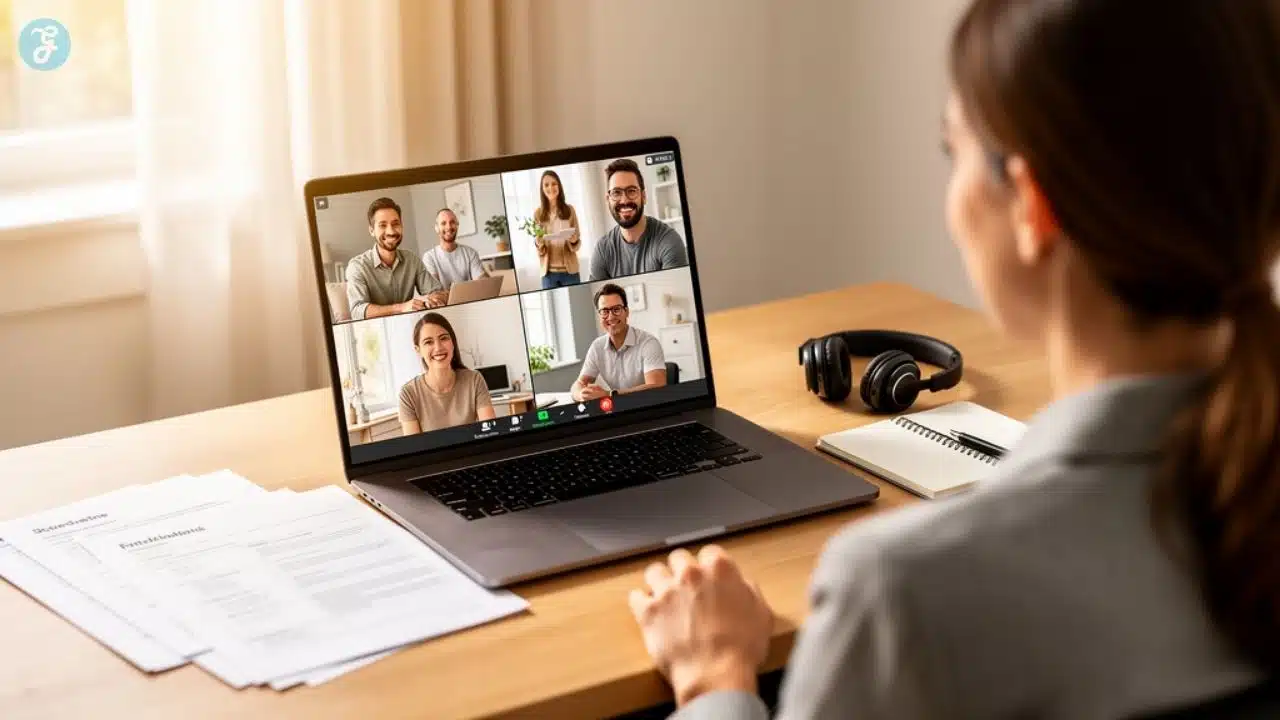
Remote Onboarding Strategy is no longer just an HR checklist. It is one of the most important ways to help new employees feel confident, connected, and ready to perform from day one. When someone joins a company remotely or in a hybrid setup, they do not get the usual office experience. They cannot simply walk over to a coworker’s desk, observe how the team works, or ask small questions during lunch.
Instead, they often start their first day in front of a screen, waiting for instructions, links, meetings, and access. That is why remote onboarding needs to be intentional. A good onboarding process gives new hires clarity. It tells them what to do, where to find information, who to contact, and how success will be measured. More importantly, it helps them feel that they are not alone.
In my view, the best remote onboarding is built on three things: clear communication, human connection, and early confidence. When these areas are handled properly, new employees settle faster, learn better, and become productive with less stress. This guide explains how to build a practical, people-first remote onboarding process that supports both employees and managers.
What Is Remote Onboarding?
Remote onboarding is the process of welcoming, training, and integrating new employees into a company without requiring them to be physically present in an office every day.
It usually includes digital paperwork, online meetings, virtual team introductions, tool setup, training materials, manager check-ins, and role-specific guidance. But remote onboarding is more than sending login details and asking someone to attend a few video calls.
A strong remote onboarding process helps new employees understand how the company works, what their role requires, who they will work with, and how they can succeed.
| Key Area | What New Hires Need to Learn |
| Company culture | How people communicate, collaborate, and make decisions |
| Role expectations | What success looks like in their position |
| Tools and systems | Where to find files, tasks, updates, and passwords |
| Team structure | Who does what, and who can help |
| Work priorities | What they should focus on first |
| Communication rules | Which channels to use and when to respond |
| Performance goals | How their work will be reviewed and supported |
In an office, new hires often learn by watching others. In remote or hybrid work, that natural learning does not happen as easily. So companies must make the process more structured and visible. That means creating clear documents, assigning mentors, scheduling useful meetings, and making sure new employees know exactly how to begin.

My Personal Experience With Remote Onboarding
I also work at Editorialge, a company that functions in a hybrid office model, so I have seen how much a smooth onboarding process can shape a new employee’s confidence. In my experience, the process started even before the actual joining day. The team shared the right information in advance, explained what to expect, and made sure the basic setup was ready before I officially began.
That early preparation made the transition much easier. I did not have to waste time wondering where to find files, who to contact, or what task to start with. Every step felt planned, from tool access to team introductions and work expectations. It helped me focus on learning the role instead of struggling with confusion.
This is why I believe a strong remote onboarding strategy is not just about completing HR formalities. It is about creating a clear path for new hires so they can settle in faster, communicate better, and become productive with less stress. When the process is smooth from the beginning, employees feel trusted, supported, and ready to perform.
Why a Remote Onboarding Strategy Matters
A strong start shapes how an employee feels about the company from the very first day. If the onboarding process is organized, the employee feels welcomed and prepared. If it is confusing, they may feel disconnected before they even begin their real work.
Remote employees face a few unique challenges. They may not know who to ask for help. They may feel isolated. They may struggle to understand company culture through video calls and chat messages alone. They may also feel unsure about how quickly they should respond, where to find important resources, or how their work will be measured.
This is why a proper Remote Onboarding Strategy is so important. It helps companies improve retention, increase productivity, reduce confusion, build trust, and strengthen culture. It also reduces the hidden cost of poor onboarding, such as repeated hiring, low engagement, delayed performance, and unnecessary manager involvement.
Remote onboarding is not only an HR responsibility. It is also a business strategy. When employees understand their role, connect with the team, and receive the right training, they are more likely to perform well. That benefits both the employee and the company.
Remote Onboarding vs. Remote Orientation
Many companies confuse onboarding with orientation. They are connected, but they are not the same. Orientation is usually short. It covers basic information like company policies, benefits, HR forms, login details, and security rules. Onboarding is a longer process. It helps the employee fully adjust to the company, understand their role, build relationships, and become productive.
| Area | Remote Orientation | Remote Onboarding |
| Timeline | Usually 1 day to 1 week | Usually 30 to 90 days or longer |
| Focus | Policies, tools, paperwork, introductions | Role clarity, training, culture, relationships, performance |
| Main Goal | Help the employee start | Help the employee succeed |
| Owner | Mostly HR | HR, manager, mentor, IT, and team members |
| Result | Employee knows the basics | Employee feels confident and productive |
A company that only provides orientation may complete the necessary formalities. But a company that invests in full onboarding creates a better employee experience. Remote employees need more than a welcome email. They need a guided path.
Start Before Day One With Preboarding
A successful remote onboarding process begins before the employee’s official first day. The period between offer acceptance and joining day is very important. The new hire may feel excited, but they may also feel nervous. They may wonder what their first day will look like, who they will meet, and what tools they need.
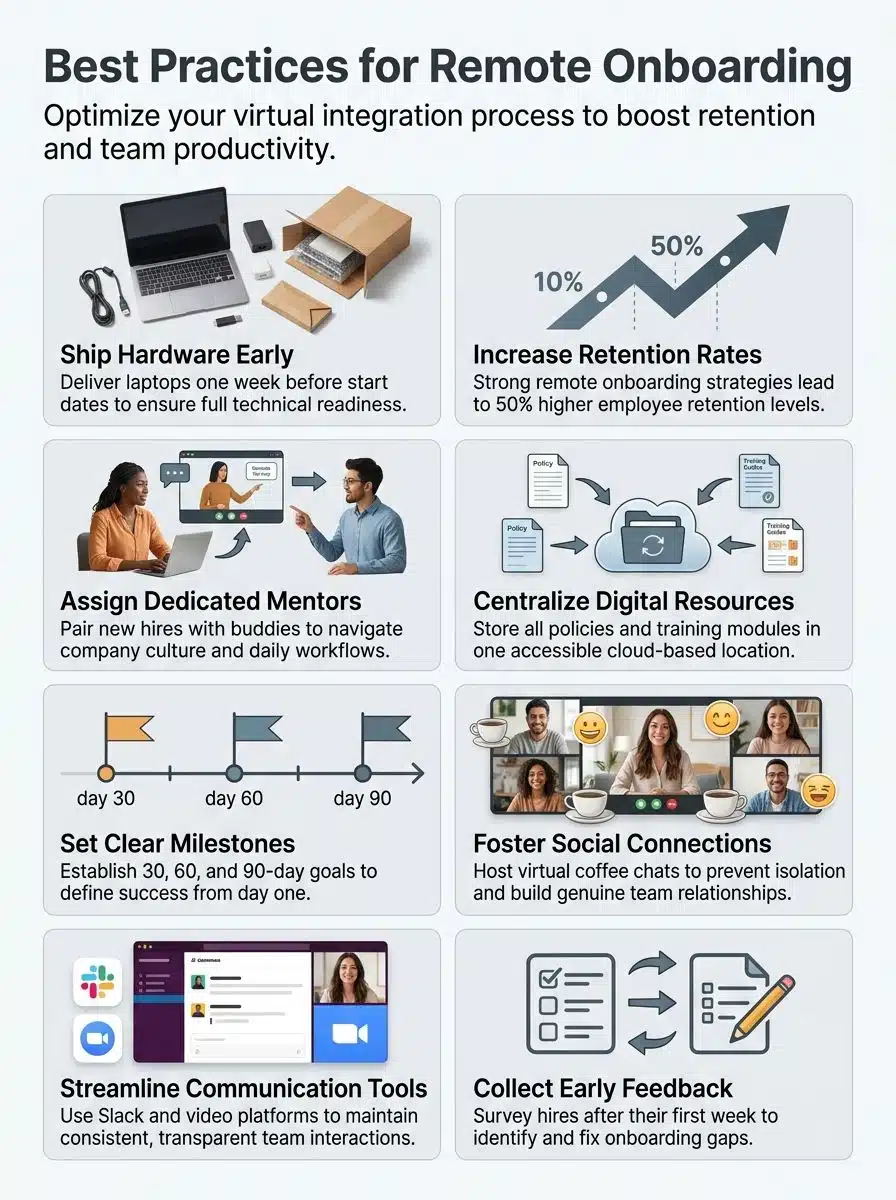
Preboarding removes this uncertainty. Before day one, companies should send a welcome email, share the first-week schedule, prepare equipment, create login access, introduce the onboarding buddy, and provide basic company information. These steps may seem small, but they make the employee feel expected and valued. Try to make the first message warm and simple. Do not overwhelm the employee with too much information at once.
A short welcome note can say:
“Welcome to the team. We are excited to have you with us. Here is what your first week will look like, and here are the people who will help you get started.”
For remote and hybrid teams, equipment and access should be ready before the first day. If a new employee cannot log in, open files, or join meetings, the process starts with frustration. A good preboarding process creates confidence before the employee even begins working.
Create a Clear First-Day Experience
The first day should feel organized, friendly, and calm. Remote employees should not spend their first day alone reading long documents or waiting for someone to message them. They should have a clear schedule and a few meaningful interactions. A good first day may include a welcome call with the manager, a short HR session, a team introduction, a basic tool walkthrough, and a final check-in at the end of the day.
The first day should answer three simple questions:
- Am I welcome here?
- Do I know what to do next?
- Do I know who can help me?
If the answer is yes, the onboarding process is already moving in the right direction. A good first day does not need to be packed with meetings. In fact, too many meetings can make the employee tired. The goal is to create balance. Give them enough information to feel guided, but enough space to absorb it.
Use a 30-60-90 Day Remote Onboarding Plan
A 30-60-90 day plan is one of the most effective ways to guide remote employees. It gives new hires a roadmap. It also helps managers set fair expectations. Instead of expecting instant performance, the company can divide the first three months into clear stages.
| Timeline | Main Goal | What Should Happen |
| First 30 days | Learn | Understand company culture, tools, workflows, and role expectations |
| Days 31–60 | Contribute | Start handling small tasks and apply training to real work |
| Days 61–90 | Own | Take responsibility for regular tasks and manage deadlines independently |
This plan should be practical, not stressful. For example, a content writer may spend the first 30 days learning the brand voice, editorial process, SEO rules, CMS, and content calendar. During the next 30 days, they may write or update articles with guidance. By 90 days, they may manage their own assignments with more independence.
A good 30-60-90 day plan helps employees understand what progress looks like. It also makes performance discussions easier because both the manager and employee know what was expected from the beginning.
Avoid Information Overload
One common mistake in remote onboarding is giving too much information too quickly. New hires often receive long PDFs, dozens of links, several video recordings, HR documents, tool guides, and training tasks all at once. Instead of feeling prepared, they feel overwhelmed.
Remote employees may find this even harder because they are usually processing all this information alone. The better approach is to break onboarding into small steps. Start with the basics. Then gradually introduce deeper training, team processes, and performance expectations.
Instead of sending one huge document, create short and searchable guides. Instead of long training calls, use shorter sessions with breaks. Instead of sharing random links, build one central onboarding hub. Think of onboarding as a learning journey. A new employee does not need to know everything on the first day. They need to know what matters first.
Build a Central Onboarding Hub
A central onboarding hub is one of the most useful tools for remote teams. It prevents confusion by putting all important information in one place. This could be created in Notion, Confluence, Google Drive, SharePoint, Trainual, ClickUp, Asana, or any other tool your company already uses.
The goal is simple: the new hire should not have to search through emails, chat messages, and random folders to find basic information.
| Section | What to Include |
| Start Here | First-day steps and welcome message |
| Company Overview | Mission, values, leadership, and departments |
| People Directory | Key contacts and responsibilities |
| Tool Guides | Login links, tutorials, and best practices |
| Role Training | SOPs, templates, examples, and workflows |
| 30-60-90 Plan | Milestones and expectations |
| FAQ | Common questions new hires ask |
| Feedback Form | A simple way to report confusion |
The onboarding hub should be easy to search and easy to update. If multiple employees ask the same question, add the answer to the hub. This improves the process for future hires and saves managers time.
Assign an Onboarding Buddy or Mentor
A buddy system makes remote onboarding feel more human. A buddy is usually a peer, not a manager. Their job is to answer informal questions, explain team habits, and help the new hire understand how things really work. This is important because new employees may hesitate to ask their manager small questions. They may worry about looking unprepared.
A buddy gives them a safe person to contact. An onboarding buddy can help with tool navigation, communication norms, team habits, small questions, and confidence. For example, they can explain where tasks are updated, how meetings usually work, or who approves certain documents.
Choose buddies carefully. The best onboarding buddy is patient, friendly, responsible, and familiar with the company culture. They should also have enough time to support the new employee properly. Moreover, a buddy does not replace the manager. But they make the onboarding journey much easier.
Make Human Connection a Priority
Remote onboarding should never feel like a mechanical process. A new hire may complete every checklist item and still feel disconnected from the company. That is why human connection must be part of the plan.
In remote and hybrid teams, relationships do not always happen naturally. Companies need to create opportunities for connection. Virtual coffee chats, team welcome messages, buddy meetings, manager check-ins, and small group introductions can help new hires feel included. These interactions do not need to be long. They just need to be thoughtful.
Do not introduce the new hire to too many people in one big meeting. They may forget names and feel uncomfortable. Instead, spread introductions over the first two weeks. Let them meet the people they will work with most often first. Then introduce other departments gradually. Human connection builds trust. And trust helps remote employees ask questions, share ideas, and perform better.
Set Clear Communication Rules
Communication is one of the biggest challenges in remote work. In an office, people can often understand urgency through body language or quick conversations. In remote work, messages can easily be misunderstood or missed.
That is why new hires need clear communication rules. Explain what should go in chat, what should go in email, what needs a meeting, how quickly people should respond, and where decisions are documented.
For example, quick updates may go in Slack or Microsoft Teams. Formal approvals may go through email. Project decisions may be recorded in Asana, ClickUp, Google Docs, or another shared system. This helps new employees understand how to behave in the digital workplace.
It also prevents overcommunication. Remote employees should not feel like they must reply instantly to every message. At the same time, they should understand when something is urgent. Clear rules reduce stress for everyone.
Use Time Tracking and Work Update Tools Transparently
A strong Remote Onboarding Strategy should also explain how employees will track work hours, share progress, and report necessary updates. This is especially important for remote and hybrid teams because managers cannot always see when someone is working, where they are stuck, or how much time a task actually takes.
However, tracking should never feel like hidden surveillance. It should be used to create clarity, improve productivity, support fair workload distribution, and help new hires understand how their time is being used. For remote employees, this can be very helpful during the first few weeks. A new hire may spend extra time learning tools, reviewing documents, attending training calls, or completing small tasks.
Time tracking helps managers see whether the employee needs more support, fewer meetings, or better instructions.
| Tool | Best For | Key Use |
| Toggl Track | Simple time tracking for teams | Tracks work hours, project time, and reports |
| Clockify | Budget-friendly time tracking | Tracks hours across projects and tasks |
| Time Doctor | Distributed teams | Tracks time, attendance, and productivity trends |
| Hubstaff | Remote teams and agencies | Tracks work hours, projects, costs, and activity |
| Harvest | Client work and billable hours | Tracks time, expenses, reports, and invoices |
| DeskTime | Automatic time tracking | Tracks work time and productivity patterns |
| ActivTrak | Workforce analytics | Helps understand app usage and work trends |
The right tool depends on the company’s work style. A creative content team may need simple time tracking and weekly updates. A client-service agency may need billable hour tracking. A software team may rely more on project management tools and sprint updates. Companies should clearly explain what is tracked, why it is tracked, who can see the reports, and how the data will be used.
The goal is not to watch every click. The goal is to understand whether the employee has enough clarity, support, and time to do good work. For hybrid companies like Editorialge, this approach can be very useful. Employees may work from home on some days and from the office on others. A clear tracking and update system helps everyone stay aligned, no matter where they are working.
The best approach is to combine time tracking software, project management tools, weekly check-ins, clear task deadlines, and honest feedback conversations. This gives managers visibility while still giving employees the trust and space they need to perform well.
Train Employees on Tools, Not Just Tasks
Remote employees depend heavily on tools. If they do not understand the tools, they cannot work confidently. So onboarding should include tool training, not just task training. This includes communication tools, project management platforms, file storage systems, password managers, HR software, time tracking tools, reporting tools, and role-specific platforms.
Do not just say, “We use Asana,” or “We use Google Drive.” Show the new employee where tasks are assigned, how deadlines are tracked, how to update task status, how to tag teammates, how to find old project notes, how to name files properly, and what should not be done inside the tool.
Short screen-recorded videos can be very useful here. A five-minute walkthrough can save hours of confusion. The goal is not only to give access. The goal is to teach the employee how the company actually uses each tool.
Give New Hires a Meaningful First Project
The first week should not be only about reading documents and attending meetings. Give the new hire a small but meaningful task they can complete with support. This builds confidence and creates early momentum. The project should be low-risk but real. It should help the employee understand the work and feel useful.
| Role | First Meaningful Project |
| Content writer | Update an old blog intro using brand guidelines |
| Designer | Create a simple social media variation from an existing template |
| Developer | Fix a small bug or update documentation |
| HR executive | Prepare a draft welcome checklist |
| Sales associate | Research 10 target accounts |
| Customer support agent | Review past tickets and write response drafts |
The goal is not perfection. The goal is to help the employee move from observing to contributing. A small win in the first week can make a new hire feel more confident and motivated.
Build Culture Into the Onboarding Process
Company culture is harder to feel in remote and hybrid work. In an office, culture appears through conversations, meetings, shared spaces, and daily behavior. In remote work, culture must be explained and practiced more intentionally.
Culture should not be hidden inside a handbook. It should show up in how people communicate, how managers give feedback, how meetings are run, and how wins are celebrated. For example, if a company says it values openness, new hires should see managers answering questions honestly. If a company says it values learning, new hires should feel safe asking basic questions.
Remote culture is built through repeated actions. A company can show culture by inviting new hires into real team discussions, explaining why decisions are made, celebrating small wins publicly, encouraging questions, and giving everyone space to speak in meetings. Culture is not what a company claims. It is what employees experience.
Use AI Carefully in Remote Onboarding
AI can make remote onboarding easier, but it should not replace human support. AI tools can help new hires search internal documents, summarize policies, find training content, draft updates, or answer basic process questions. But sensitive questions, performance expectations, emotional support, and role clarity still need human involvement.
Companies should clearly explain how AI can and cannot be used during onboarding. New hires should understand which AI tools are approved, what information should never be shared with AI tools, how to check AI-generated answers, when to ask a manager or buddy instead, and how AI fits into daily workflows.
This is especially important for companies that handle client data, legal information, financial records, or confidential internal plans. AI can support the onboarding process. But the human connection should remain at the center.
Measure Remote Onboarding Success
A remote onboarding process should not be based on guesswork. Companies need to measure what is working and what is not. This does not require a complicated system. Simple check-ins and feedback forms can reveal a lot.
| Metric | What It Shows |
| Time to productivity | How quickly the employee can complete real work |
| First-week confidence | Whether the employee feels clear or lost |
| Tool readiness | Whether access and equipment worked properly |
| Training completion | Whether key learning steps were completed |
| Manager check-ins | Whether support happened consistently |
| Buddy engagement | Whether the new hire received peer support |
| 30/60/90-day feedback | Whether expectations matched reality |
| Early retention | Whether employees stay beyond the first few months |
Managers should ask direct questions at different stages. During the first week, ask whether the employee felt welcomed, had access to the tools they needed, and knew who to ask for help. After 30 days, ask whether the training materials were useful, whether the role expectations were clear, and what could be improved.
After 90 days, ask whether the job matched expectations, what helped most, and what slowed them down. These answers should not just be collected. They should be used. If several new hires mention the same problem, fix the process. If people feel overwhelmed during week one, reduce the information load. If they struggle with tool access, improve IT preparation. A good onboarding process keeps improving.
Common Remote Onboarding Mistakes to Avoid
Even good companies can make onboarding mistakes. The most common problem is assuming that remote employees will figure things out on their own. Some may manage, but many will lose time, confidence, and connection.
Common mistakes include waiting until day one to prepare, sending too much information, failing to assign a clear onboarding owner, skipping the buddy system, offering weak manager support, ignoring role-specific training, and having no feedback loop.
Another big mistake is treating remote onboarding like office onboarding. Remote workers have different needs. They need more documentation, clearer communication, and more intentional connections. The best way to avoid these mistakes is to think from the employee’s point of view.
Ask yourself:
“What would I need to feel comfortable, prepared, and confident if I were joining this company remotely?”
That question alone can improve the whole process.
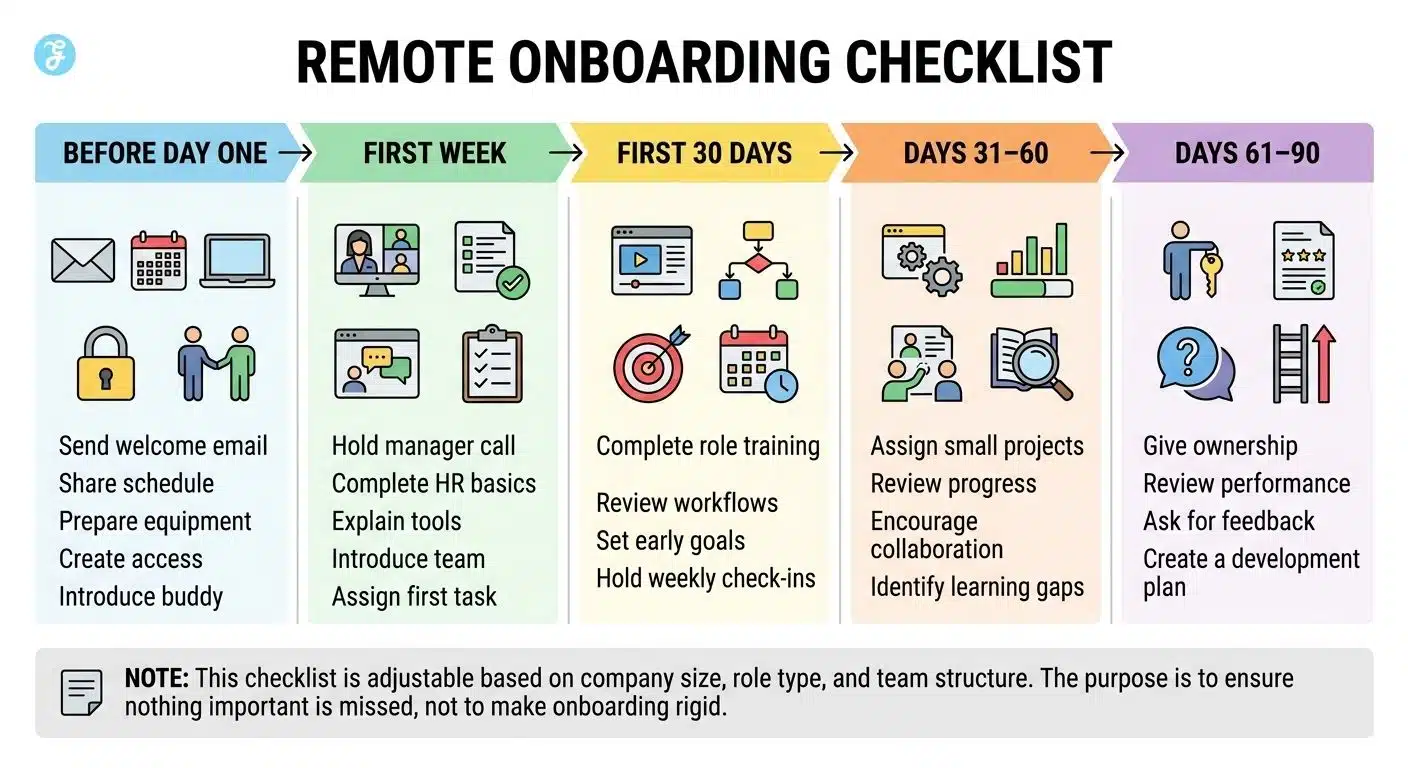
Remote Onboarding Checklist
Here is a simple checklist companies can use to build a better onboarding process.
| Stage | Key Actions |
| Before Day One | Send welcome email, share schedule, prepare equipment, create access, introduce buddy |
| First Week | Hold manager call, complete HR basics, explain tools, introduce team, assign first task |
| First 30 Days | Complete role training, review workflows, set early goals, and hold weekly check-ins |
| Days 31–60 | Assign small projects, review progress, encourage collaboration, and identify learning gaps |
| Days 61–90 | Give ownership, review performance, ask for feedback, and create a development plan |
This checklist can be adjusted based on company size, role type, and team structure. The purpose is not to make onboarding rigid. The purpose is to make sure nothing important is missed.
Best Tools for Remote Onboarding
The best onboarding tools depend on how your company works. But most remote and hybrid teams need a few important categories.
| Tool Category | Examples | Purpose |
| Video meetings | Zoom, Google Meet, Microsoft Teams | Live calls, training, and introductions |
| Team chat | Slack, Microsoft Teams | Daily communication |
| Project management | Asana, Trello, ClickUp, Monday.com | Tasks, deadlines, and progress tracking |
| Knowledge base | Notion, Confluence, Google Drive | Guides, documents, and SOPs |
| HR software | BambooHR, Deel, Rippling, Gusto | HR forms and employee records |
| Training platform | TalentLMS, Trainual, Docebo | Structured learning |
| Password manager | 1Password, LastPass, Dashlane | Secure access |
| Screen recording | Loom, Vidyard | Tool walkthroughs and tutorials |
| Time tracking | Toggl Track, Clockify, Time Doctor, Hubstaff | Work hours, project time, and productivity insights |
The goal is not to use too many tools. The goal is to make the right tools easy to understand. Too many platforms can confuse new hires. Keep the system simple and explain why each tool is used.
How Managers Can Support Remote New Hires
Managers play one of the biggest roles in remote onboarding. Even if HR creates the process, the manager shapes the employee’s daily experience. A supportive manager can make a new hire feel confident. A distant manager can make them feel lost.
Managers should set clear expectations, schedule regular check-ins, explain context, give early feedback, recognize progress, and watch for signs of overload. They should not wait until the employee makes a mistake.
A simple message like “How are things going today?” can help a remote worker feel supported. Regular check-ins also give employees a safe space to discuss blockers before they become bigger problems. Good managers do not just assign tasks. They help new hires understand why the work matters and how to succeed.
Final Thoughts
A strong Remote Onboarding Strategy helps new employees feel welcomed, guided, and ready to contribute, even when they are not sitting inside a traditional office. The best onboarding process starts before day one. It gives employees the right tools, clear expectations, useful training, human support, and a simple way to share progress.
Remote onboarding should never feel like a folder full of links. It should feel like a guided journey. Companies that get this right do more than train employees. They build trust. They help new hires feel that they belong, that their work matters, and that support is available when they need it.
Whether a company is fully remote or works in a hybrid model, the goal should be the same: create a smooth, clear, and human onboarding experience that helps people perform with confidence.
Frequently Asked Questions (FAQs) About Remote Onboarding Strategy
1. What is a remote onboarding strategy?
A remote onboarding strategy is a planned process for welcoming, training, and supporting new employees who work remotely or in a hybrid setup. It includes tool setup, communication rules, training materials, team introductions, manager check-ins, and performance goals.
2. Why is remote onboarding important?
Remote onboarding is important because new hires need clear guidance when they are not physically present in an office. A strong process helps them feel welcomed, understand their role, connect with the team, and become productive faster.
3. How long should remote onboarding last?
Remote onboarding should usually last at least 30 to 90 days. The first week helps the employee get started, while the first three months help them build confidence, understand expectations, and take ownership of their work.
4. Should companies use time tracking tools for remote employees?
Yes, companies can use time tracking tools for remote employees, but they should do it transparently. Employees should know what is being tracked, why it matters, and how the data will be used. The goal should be clarity and support, not surveillance.
5. What is the biggest mistake in remote onboarding?
The biggest mistake is assuming new hires will figure everything out on their own. Remote employees need structure, communication, training, support, and regular feedback to succeed.