

Buying a gaming monitor sounds simple until you actually start looking. Then suddenly, every brand is screaming about OLED, mini-LED, 240Hz, 480Hz, HDR, response time, VRR, HDMI 2.1, and other terms that make a normal buyer feel like they accidentally opened a NASA settings menu.
That is why this Best Gaming Monitors Compared guide is built for real buyers, not spec-sheet worshippers. Some gamers need a budget-friendly 1440p monitor. Some want the cleanest 4K OLED image possible. Some play competitive shooters and care more about refresh rate than cinematic beauty. Some use both PC and console. Some just want one monitor that does not make them regret spending money.
I have kept the list balanced. No single monitor is perfect for everyone. That is the uncomfortable truth. But the right monitor for your games, your desk, your GPU, and your budget can feel like a massive upgrade.
Our Selection Criteria
A good gaming monitor should not only look impressive in marketing photos. It should make sense after months of real use.
For this list, I looked at the things that actually matter when choosing a monitor:
- Resolution: 1440p is still the sweet spot for many PC gamers, while 4K is best for high-end GPUs and consoles.
- Refresh Rate: 165Hz to 240Hz is enough for most players, while 360Hz+ or 480Hz is for serious competitive gaming.
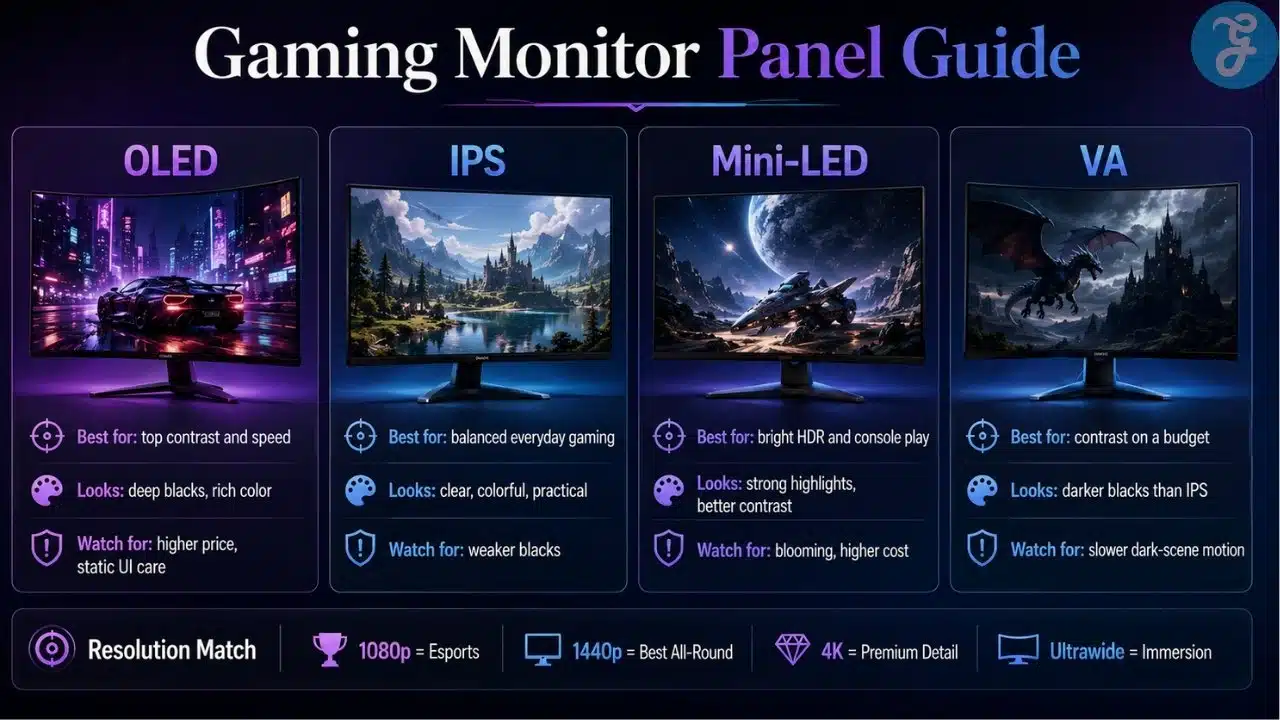
- Panel Type: OLED gives deep blacks and fast response. IPS is safer and practical. Mini-LED gives strong HDR without OLED burn-in worry.
- Response Time: Fast pixel response matters for shooters, racing games, and esports titles.
- HDR Performance: Real HDR needs strong contrast, brightness, and local dimming or OLED-level black control.
- Connectivity: HDMI 2.1 matters for PS5, Xbox Series X, and high-refresh 4K gaming.
- Value: The most expensive monitor is not always the smartest buy. Shocking, I know.
The picks below cover premium OLED, budget IPS, mini-LED HDR, ultrawide immersion, console gaming, competitive gaming, and everyday PC use.
This guide is for almost every type of gamer who is confused by monitor choices.
It is useful if you are:
- Building your first gaming PC
- Upgrading from an old 1080p screen
- Choosing between 1440p and 4K
- Buying a monitor for PS5 or Xbox Series X
- Looking for a competitive esports display
- Wanting OLED without blindly overspending
- Trying to balance gaming, work, and content watching
The goal is simple: choose the monitor that fits your actual gaming life, not the one with the loudest RGB badge.
9 Best Gaming Monitors Compared for Every Type of Gamer
Below are the 9 monitors worth comparing seriously. Some are premium. Some are practical. Some are built for speed. Some are built for beautiful image quality.
1. ASUS ROG Swift OLED PG27UCDM — Best Overall Premium 4K OLED Monitor
The ASUS ROG Swift OLED PG27UCDM is the kind of monitor that makes people suddenly notice how dull their old screen looked. It is a 27-inch 4K QD-OLED gaming monitor with a 240Hz refresh rate, 0.03ms response time, DisplayPort 2.1, HDMI 2.1, and USB-C with 90W power delivery. ASUS also includes OLED Care Pro features to reduce burn-in risk.
This is not a budget monitor. It is for gamers who want sharp 4K detail, OLED contrast, fast motion, and a cleaner desk setup. The 27-inch size also gives it very high pixel density, which helps with text clarity and detailed visuals.
Best for: High-end PC gamers, 4K gamers, content creators, and players who want one premium monitor for gaming and daily work.
Why We Chose It:
- 4K resolution looks extremely sharp at 27 inches.
- 240Hz is fast enough for most serious gamers.
- QD-OLED gives deep blacks and rich contrast.
- DisplayPort 2.1 and HDMI 2.1 make it more future-ready.
- USB-C with 90W power delivery is useful for laptop users too.
Things to consider:
- It is expensive.
- OLED still needs sensible care if you leave static windows open all day.
2. LG UltraGear 32GS95UE-B — Best Dual-Mode 32-Inch OLED Monitor
The LG UltraGear 32GS95UE-B is one of the most flexible premium gaming monitors available. It gives you 4K at 240Hz for detailed, cinematic gaming and Full HD at 480Hz when you want maximum speed. LG lists it as a 32-inch OLED monitor with dual-mode support, 0.03ms response time, and G-Sync compatibility.
This monitor makes sense if you play different types of games. For single-player titles, 4K OLED at 240Hz looks fantastic. For competitive shooters, the 480Hz mode gives you an extra speed option. It is not a cheap trick; it is genuinely useful if you switch between story games and esports.
Best for: Gamers who want both cinematic 4K and competitive high-refresh gameplay.
Why We Chose It:
- Dual-mode design makes it more versatile than a normal 4K monitor.
- 32 inches feels immersive for racing, RPGs, open-world games, and console use.
- OLED response time keeps motion clean.
- Great fit for high-end GPUs.
- Strong option for people who do not want separate monitors for different games.
Things to consider:
- Full HD mode on a 32-inch screen will not look as sharp as native 4K.
- You need a powerful GPU to properly enjoy 4K high-refresh gaming.
3. ASUS ROG Swift OLED PG27AQDP — Best Competitive OLED Monitor
The ASUS ROG Swift OLED PG27AQDP is for gamers who want speed but do not want to sacrifice image quality. ASUS calls it the world’s first 1440p 480Hz OLED gaming monitor, with a 26.5-inch QHD panel, 0.03ms response time, and 99% DCI-P3 coverage.
This is not the monitor I would recommend to someone who mostly plays slow RPGs and watches Netflix. That would be overkill wearing a gaming headset. But for competitive shooters, fast action games, and serious PC players, this thing is a monster.
The big advantage is simple: 1440p still looks sharp, but it is easier to drive than 4K. So you get more realistic high-frame-rate gaming without needing an absurd GPU upgrade every year.
Best for: Competitive gamers, esports players, FPS fans, and high-refresh 1440p buyers.
Why We Chose It:
- 480Hz refresh rate is built for serious speed.
- OLED response time gives excellent motion clarity.
- 1440p is easier to push than 4K.
- Great for shooters, battle royale, racing, and fast action games.
- Better image quality than many traditional esports monitors.
Things to consider:
- Most casual gamers do not need 480Hz.
- The price makes sense only if you can actually push high FPS.
4. Alienware AW2726DM — Best Affordable OLED Gaming Monitor
The Alienware AW2726DM is one of the most interesting gaming monitors because it brings QD-OLED closer to mainstream buyers. Dell lists it as a 27-inch QHD QD-OLED gaming monitor with 240Hz refresh rate. Recent coverage also highlighted its lower-cost approach compared with many OLED monitors.
This monitor is exciting because OLED has spent years acting like a luxury club with a bouncer at the door. The AW2726DM lowers the entry cost while keeping the important parts: strong contrast, fast response, smooth refresh rate, and proper gaming performance.
It skips some premium extras, but that is not always bad. A monitor does not need to glow like a spaceship to be good.
Best for: Gamers who want OLED performance without paying flagship OLED prices.
Why We Chose It:
- QD-OLED at a more approachable price point.
- 1440p and 240Hz is a strong gaming combination.
- Great upgrade from older IPS or VA monitors.
- Good for both single-player and competitive games.
- Alienware’s OLED warranty support adds confidence.
Things to consider:
- It cuts some extras to keep the price down.
- Not as sharp as a 4K OLED monitor.
5. Dell G2724D — Best Budget 1440p Gaming Monitor
The Dell G2724D is the monitor I would suggest to many normal buyers who just want a smart, clean upgrade. It is a 27-inch QHD IPS gaming monitor with up to 165Hz over DisplayPort, 144Hz over HDMI, 1ms gray-to-gray response time, 400 nits brightness, DisplayHDR 400, 99% sRGB coverage, and support for Adaptive-Sync, G-Sync Compatible, and AMD FreeSync Premium.
This is not the flashiest monitor on the list. It will not make OLED fans cry happy tears. But it nails the basics. A 27-inch 1440p 165Hz IPS panel is still one of the best choices for budget-conscious PC gaming.
For many gamers, this is where the sensible money goes.
Best for: Budget buyers, first-time PC builders, students, and gamers upgrading from 1080p.
Why We Chose It:
- 1440p looks much sharper than 1080p.
- 165Hz is smooth enough for most gamers.
- IPS panel gives good viewing angles and color.
- Adaptive sync support helps reduce tearing.
- Good practical value when available at a fair price.
Things to consider:
- HDR is basic, not cinematic.
- It does not have OLED-level contrast.
6. AOC Q27G3XMN — Best Budget HDR Mini-LED Monitor
The AOC Q27G3XMN is a rare budget monitor that actually gives gamers something close to real HDR value. AOC lists it as a 27-inch QHD Mini-LED gaming monitor with a Fast VA panel, 336 dimming zones, 180Hz refresh rate, 1ms GtG response time, and HDR1000 certification.
This monitor stands out because most cheap “HDR” monitors are basically lying with a straight face. They accept an HDR signal, then show you something that looks like regular SDR with a marketing sticker. The Q27G3XMN is different because Mini-LED local dimming gives it stronger contrast and brightness control.
It is not perfect. VA panels can show some dark smearing in fast scenes. But for the price, this is one of the more interesting 1440p monitors for gamers who care about contrast and HDR.
Best for: Budget HDR buyers, story-game players, movie watchers, and gamers who want better contrast without OLED pricing.
Why We Chose It:
- Mini-LED local dimming gives it stronger HDR potential.
- 1440p and 180Hz is a good gaming mix.
- Better contrast than typical budget IPS monitors.
- Great for darker games and cinematic titles.
- Strong value if you want HDR without OLED.
Things to consider:
- VA motion handling may not please hardcore esports players.
- Viewing angles are not as forgiving as IPS or OLED.
7. BenQ MOBIUZ EX321UX — Best 4K Mini-LED Monitor for Console and HDR Gaming
The BenQ MOBIUZ EX321UX is a strong choice for gamers who want 4K, HDR, and console-friendly features without going OLED. BenQ lists it as a 31.5-inch 4K IPS Mini-LED monitor with 1,152 local dimming zones, 144Hz refresh rate, 1ms GtG response time, DisplayHDR 1000, 99% Adobe RGB, 99% P3, HDMI 2.1, DisplayPort 2.1, USB-C, and KVM support.
This is one of the better picks for PS5 and Xbox Series X players because 4K 120Hz is the console sweet spot. The extra 144Hz ceiling also makes it useful for PC gaming. Mini-LED gives strong brightness and HDR punch without the same static-image concern OLED users think about.
It is also a good monitor for people who game and create content. That wide color coverage matters if you edit photos or videos.
Best for: Console gamers, 4K HDR fans, hybrid PC-console users, and creators who also game.
Why We Chose It:
- 4K resolution is ideal for PS5, Xbox Series X, and high-end PCs.
- Mini-LED with 1,152 zones gives stronger HDR control.
- HDMI 2.1 support is important for modern consoles.
- Strong color coverage helps creative work.
- KVM and USB-C make it useful beyond gaming.
Things to consider:
- 144Hz is great for console and cinematic gaming, but not the fastest for esports.
- It will cost more than basic 4K IPS monitors.
8. MSI MPG 341CQPX QD-OLED — Best Ultrawide OLED Gaming Monitor
The MSI MPG 341CQPX QD-OLED is built for gamers who want immersion. MSI lists it as a 34-inch 3440×1440 UWQHD curved QD-OLED monitor with 1800R curvature, 240Hz refresh rate, 0.03ms GtG response time, DisplayHDR True Black 400, and HDMI 2.1 support.
A good ultrawide monitor changes how games feel. Racing games, flight sims, RPGs, strategy games, open-world titles, and cinematic single-player games all benefit from the wider field of view. It feels less like looking through a window and more like sitting inside the game.
Of course, not every game handles ultrawide perfectly. Some cutscenes still use black bars. Some competitive games limit ultrawide support. Because apparently, we cannot have nice things without a compatibility warning.
Best for: Immersive gaming, racing games, RPGs, simulators, and cinematic PC setups.
Why We Chose It:
- Ultrawide OLED creates a highly immersive gaming experience.
- 240Hz is very fast for a 34-inch ultrawide.
- QD-OLED contrast makes dark scenes look excellent.
- HDMI 2.1 adds console flexibility.
- Great for multitasking and gaming on the same desk.
Things to consider:
- Not every game supports ultrawide properly.
- It needs more desk space than a normal 27-inch monitor.
9. Gigabyte M27Q X — Best Midrange 1440p 240Hz IPS Monitor
The Gigabyte M27Q X is a strong option for gamers who want 1440p, 240Hz, and IPS practicality without jumping into OLED pricing. Gigabyte lists it as a QHD 240Hz monitor with 1ms GtG response time, Adaptive-Sync support, 10-bit color, 92% DCI-P3 coverage, and a built-in KVM feature.
This is a good middle-ground monitor. It is faster than typical 1440p 165Hz displays, but it avoids OLED burn-in concerns and usually costs less than premium OLED options. The KVM feature is also useful if you switch between a gaming PC and work laptop.
It is not the newest shiny object in the gaming monitor world. But useful tech does not need to be dramatic. Sometimes, a monitor that simply does the job well is the smarter buy.
Best for: Midrange PC gamers, fast-paced players, work-and-gaming setups, and buyers who want 240Hz without OLED.
Why We Chose It:
- 1440p and 240Hz is a strong performance balance.
- IPS panel is practical for mixed use.
- KVM feature helps with multiple devices.
- Good option for people avoiding OLED.
- Easier to drive than 4K high-refresh monitors.
Things to consider:
- Contrast is weaker than OLED or Mini-LED.
- HDR is not the main reason to buy it.
An Overview of the Best Gaming Monitors Compared
The easiest way to choose is to stop asking, “Which monitor is best?” and start asking, “Best for what?”
A competitive FPS player and a console RPG player do not need the same monitor. A budget buyer should not chase a $1,000 OLED just because YouTube thumbnails look excited. A 4K monitor also makes no sense if your GPU struggles at 1440p.
Overview Comparison Table
| Monitor | Resolution | Refresh Rate | Panel Type | Best Match |
|---|---|---|---|---|
| ASUS ROG Swift OLED PG27UCDM | 4K | 240Hz | QD-OLED | Best premium all-round 4K OLED |
| LG UltraGear 32GS95UE-B | 4K / FHD dual mode | 240Hz / 480Hz | OLED | Best flexible premium monitor |
| ASUS ROG Swift OLED PG27AQDP | 1440p | 480Hz | OLED | Best competitive OLED |
| Alienware AW2726DM | 1440p | 240Hz | QD-OLED | Best affordable OLED |
| Dell G2724D | 1440p | 165Hz | IPS | Best budget 1440p pick |
| AOC Q27G3XMN | 1440p | 180Hz | Mini-LED VA | Best budget HDR option |
| BenQ MOBIUZ EX321UX | 4K | 144Hz | Mini-LED IPS | Best console and HDR monitor |
| MSI MPG 341CQPX QD-OLED | 3440×1440 | 240Hz | QD-OLED | Best ultrawide OLED |
| Gigabyte M27Q X | 1440p | 240Hz | IPS | Best midrange 240Hz IPS |
Our Top 3 Picks and Why?
Not everyone wants to read nine product sections and then still feel confused. So here is the cleaner version.
Best Overall: ASUS ROG Swift OLED PG27UCDM
This is the best pick if you want a premium 4K OLED monitor that can handle gaming, content, and daily use. It is expensive, but the feature set is complete.
Best Value Pick: Dell G2724D
For most budget-conscious gamers, 1440p at 165Hz still hits the sweet spot. It is not fancy, but it is sensible, and sensible is underrated.
Best Competitive Pick: ASUS ROG Swift OLED PG27AQDP
If your games are fast and your FPS is high, the 480Hz OLED panel is hard to ignore. Casual gamers do not need it. Serious competitive players will understand it immediately.
How to Choose the Right Gaming Monitors For Yourself?
Before buying, be honest about your setup. Not your dream setup. Your actual setup.
A 4K 240Hz OLED sounds amazing, but if your GPU cannot push modern games anywhere near that, you are paying for performance you will rarely use. At the same time, buying a cheap 1080p monitor for a powerful gaming PC is like putting bicycle tires on a sports car.
The Selection Framework
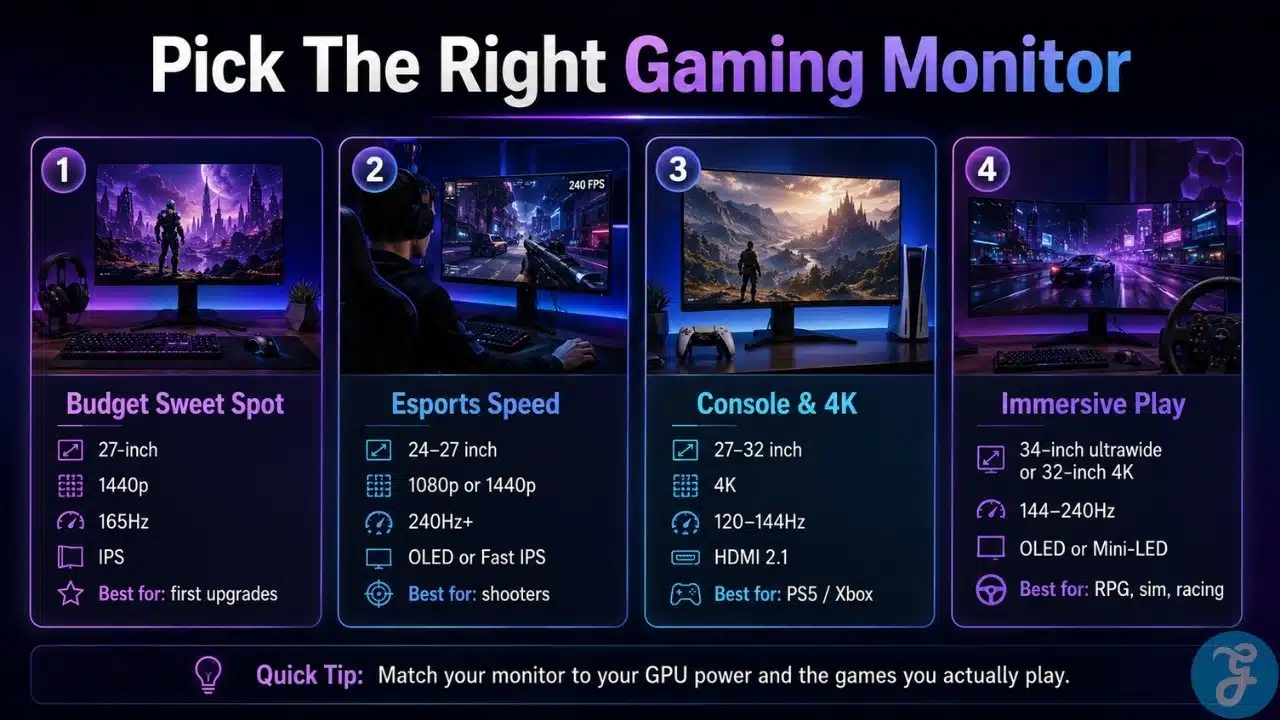
- Choose 1440p for balance: It gives sharper visuals than 1080p and does not punish your GPU like 4K.
- Choose 4K for premium visuals: Best for high-end PCs, PS5, Xbox Series X, and cinematic games.
- Choose OLED for contrast and speed: Best image quality, but be mindful of static desktop use.
- Choose Mini-LED for HDR without OLED worry: Great brightness and contrast, especially for console and movie-style gaming.
- Choose IPS for safe everyday use: Good color, decent speed, no burn-in concern, and usually better pricing.
- Choose ultrawide for immersion: Great for single-player and simulation games, but not always ideal for esports.
- Choose 240Hz+ only if you can use it: High refresh rates need high FPS. Otherwise, it is mostly bragging rights.
The Final Checklist
Before you buy, check these five things:
- Can your GPU handle the resolution and refresh rate?
- Do your games benefit more from speed or visual quality?
- Do you need HDMI 2.1 for console gaming?
- Will OLED fit your daily use habits?
- Does the stand, desk size, and port selection work for your setup?
The Smart Monitor Upgrade Is the One You Will Actually Feel
The best gaming monitor is not always the most expensive one. It is the one that fits your games, your hardware, your desk, and your patience level.
For most PC gamers, a good 1440p high-refresh monitor still makes the most sense. For premium buyers, 4K OLED is finally becoming the dream upgrade it promised to be. For console players, 4K 120Hz or 144Hz with HDMI 2.1 is the safe target. For esports players, refresh rate and response time matter more than cinematic HDR.
That is the real lesson from this Best Gaming Monitors Compared guide: do not buy specs just because they look powerful. Buy the monitor that improves the way you actually play.
Your monitor is the part of the PC you stare at every single day. Choose badly, and every game looks slightly disappointing. Choose well, and even your old games suddenly feel new again.
Frequently Asked Questions (FAQs) About Best Gaming Monitors Compared
What Is the Best Gaming Monitor Size for Most Gamers?
For most PC gamers, 27 inches is the safest size. It works well with 1440p and 4K, fits most desks, and does not force you to move your head too much while playing.
Is 1440p Better Than 4K for Gaming?
1440p is better for many PC gamers because it balances sharp image quality and strong FPS. 4K looks sharper, but it needs a much stronger GPU, especially if you want high refresh rates.
Is OLED Worth It for Gaming Monitors?
OLED is worth it if you care about contrast, deep blacks, fast response, and premium image quality. It is less ideal if you leave static windows, spreadsheets, or browser layouts on screen for long hours every day.
Do Console Gamers Need a 240Hz Monitor?
No, most console gamers do not need 240Hz. PS5 and Xbox Series X are best matched with a 4K monitor that supports 120Hz through HDMI 2.1.
Is 165Hz Enough for Gaming?
Yes, 165Hz is enough for most gamers. Competitive players may prefer 240Hz or higher, but casual and mixed-genre gamers will already feel a big jump from 60Hz to 165Hz.
























