
We reach for our phones out of habit, not necessity. When you feel a sudden moment of boredom or anxiety, the automatic reflex is to open an app and scroll until the feeling passes. Breaking this cycle requires more than just willpower; it requires having a ready list of screen-free activities to fill that void.
If you simply try to “sit quietly” without your device, you will likely fail. You have to actively replace the digital habit with a physical one that occupies your hands and your attention.
The Importance of Removing Analog Friction
If you want to read more, but your book is upstairs in a drawer and your phone is already in your pocket, the phone will win every single time. To successfully adopt these habits, you must reduce the friction of the analog activity. Leave the physical puzzle out on the coffee table. Put the notepad and pen directly on your nightstand. Make the physical alternative more accessible than the digital one.
12 Screen-Free Activities to Swap for Mindless Scrolling
1. Start a Micro-Journaling Routine
Sitting down to write a diary entry feels overwhelming for most people. Instead of staring at a blank page, use a micro-journaling approach. Write down just one sentence about your day, or list three things you need to accomplish tomorrow. The friction of starting is low, but it successfully pulls your focus away from a screen and onto a piece of paper.
2. Organize a Single “Junk” Drawer
Do not attempt to clean your entire house when you want to avoid your phone. Choose one finite, highly contained area, like the kitchen junk drawer or your desk organizer. Dumping it out, throwing away the trash, and categorizing the remaining items provides the exact type of instant gratification that our brains usually seek from social media apps.
3. Read a Physical Book (Not an E-Reader)
The modern attention span is incredibly short. If you try to read a dense novel after months of scrolling short-form videos, you will get frustrated. Start small. Commit to reading just five pages of a physical paperback. Using a real book removes the temptation to quickly switch over to a browser tab or check a notification.
4. Prep Tomorrow’s Ingredients
If you find yourself doomscrolling on the couch at 7:00 PM, take that energy into the kitchen. Chop the vegetables for tomorrow’s dinner, portion out your breakfast oats, or simply load the dishwasher. It is a tactical, hands-on task that makes your next day significantly easier while keeping your hands too busy to hold a device.
5. Build a Physical Puzzle
Puzzles are highly effective because they offer tangible, visual progress. You can leave a 500-piece puzzle on a side table and spend ten minutes working on it whenever you feel the urge to check your phone. It requires spatial reasoning and forces you to slow down.
6. Take an Observation Walk (Without Podcasts)
Most people consider a walk “screen-free” even if they are staring at their phone to change songs or listening to a hyper-stimulating podcast. Try leaving the device entirely at home. Walk for 15 minutes and force yourself to actually observe your neighborhood. It is surprisingly difficult at first, but it acts as a hard reset for an overstimulated brain.
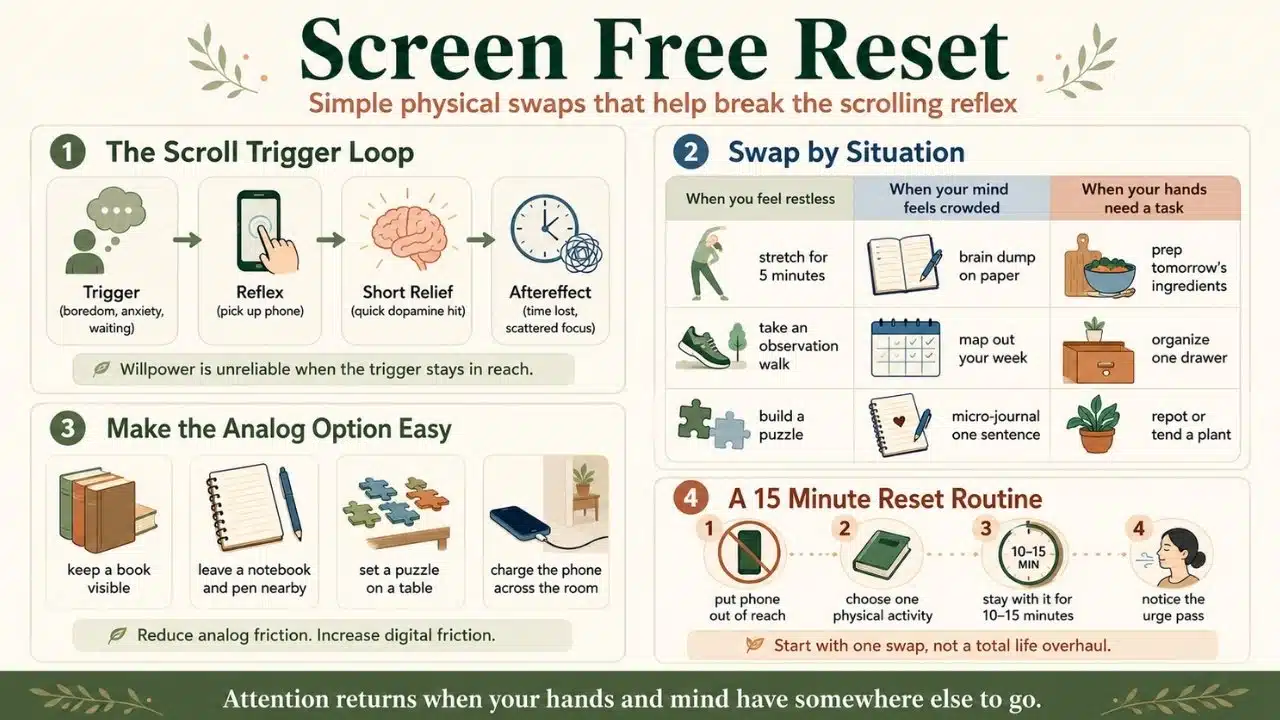
7. Cultivate Outdoor Screen-Free Activities Like Container Gardening
Gardening is the ultimate analog hobby because it physically prevents you from using tech. When your hands are covered in potting soil, you cannot unlock a touchscreen. Even if you live in an apartment, repotting a small indoor plant or setting up a balcony container garden grounds you in the physical world.
8. Bake Something From Scratch
Cooking can sometimes be done on autopilot, but baking requires exact measurements, timing, and focus. If you lose your place in a recipe because you were distracted, the bread will fail. This forced concentration makes it an excellent swap for app time.
9. Map Out Your Week on Paper
Digital calendars are great for reminders, but they lack the tactile satisfaction of crossing something off a list. Spend twenty minutes on a Sunday afternoon mapping out your weekly goals, meal plans, and workouts on a physical notepad or whiteboard.
10. Do a Brain Dump of Pending Tasks
When your mind is racing with unpaid bills, unread emails, and household chores, the instinct is to numb the anxiety with social media. Instead, grab a pen and write every single pending task down on paper. Getting the chaos out of your head and onto a physical page instantly reduces mental fatigue.
11. Try Tension-Relief Stretching
Hours of staring at a smartphone ruin your posture, leading to “tech neck” and tight shoulders. When you feel the urge to scroll, drop to the floor and do five minutes of basic stretching instead. Focus on opening up your chest and stretching your hamstrings to counteract the physical toll of your digital habits.
12. Sketch Your Surroundings
You do not need to be an artist to draw. Grab a pencil and try to sketch the coffee mug on your desk or the lamp in your living room. The goal is not to create a masterpiece; the goal is to force your eyes to study the geometry and shadows of a real object instead of a glowing interface.
Why Willpower Fails When Breaking Screen Habits
You cannot rely on pure discipline to lower your screen time. Tech companies spend billions of dollars engineering their apps to be as addictive as possible. If your phone is sitting face-up on the desk next to you, relying on willpower not to check it is a losing battle. You have to design an environment where making the right choice is easy and making the wrong choice requires effort.
Review this breakdown of common digital triggers and how to intercept them before you start scrolling:
| Digital Trigger | The Automatic Reflex | The Physical Swap |
| The morning alarm | Checking email in bed | Drinking a full glass of water |
| Waiting in a line | Opening a social feed | People-watching or deep breathing |
| Evening fatigue | Doomscrolling on the couch | Stretching on the living room floor |
The First Step to Reclaiming Your Attention
You do not need to attempt all of these at once. Trying to implement twelve new hobbies in a single weekend will just lead to burnout. Pick just one of these screen-free activities that fits naturally into your current lifestyle. The next time you find yourself reaching for your phone out of pure boredom, pause for three seconds and choose the physical task instead. Over time, incorporating screen-free activities into your daily routine will stop feeling like a chore and start feeling like a relief.
Frequently Asked Questions (FAQs) About Screen-Free Activities
Do I need to lock my phone away completely?
No, extreme digital detoxes usually fail because they are not sustainable. Start by placing your phone in another room while it charges for just one hour an evening, and use that specific hour for an analog hobby.
What if I need my phone for emergencies?
If you are worried about missing an urgent call, change your settings so that only your favorite contacts ring through out loud. Leave the phone plugged in across the room; you will hear it if it rings, but you will not be tempted to pick it up just to scroll.
How long does it take to lower my average screen time?
It usually takes about two weeks of consistent habit swapping to see a permanent drop in your weekly screen time reports. The first few days will feel uncomfortable as your brain adjusts to the lack of instant digital dopamine.