


The internet is evolving, and Web3 is at the forefront of this digital transformation. Unlike Web2, where centralized entities control data and services, Web3 is decentralized, providing users with greater privacy, security, and control over their digital identities.
Web3 leverages blockchain technology, cryptocurrencies, and smart contracts to build a more open and user-centric internet.
If you’ve been wondering how to get started with Web3, this guide will walk you through everything you need to know—from setting up a Web3 wallet to exploring decentralized applications (dApps) and ensuring security in the Web3 ecosystem.
By following this step-by-step guide, you’ll gain the knowledge and confidence needed to navigate the decentralized web and take advantage of its vast opportunities.
Whether you’re an investor, developer, or everyday internet user, Web3 is the future, and getting in early will help you maximize its potential.
What is Web3 and Why Does It Matter?
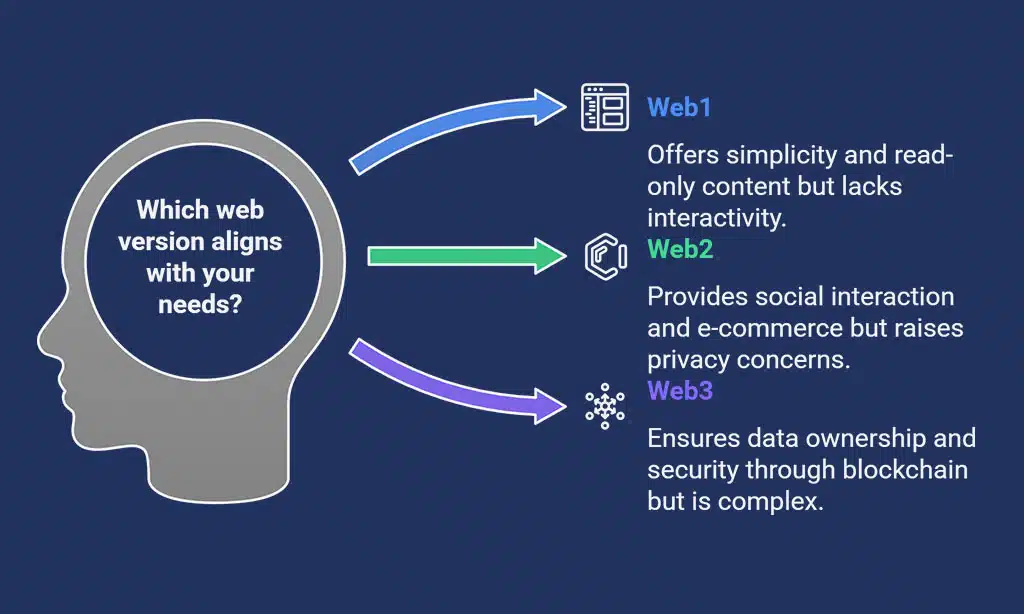
| Web Version | Features | Limitations |
| Web1 (Static Web) | Read-only content, minimal user interaction | Limited engagement, no user-generated content |
| Web2 (Interactive Web) | Social media, e-commerce, cloud computing | Centralized control, privacy concerns |
| Web3 (Decentralized Web) | Blockchain-based, user-owned data, smart contracts | Complex to understand, evolving infrastructure |
- Web1 (Static Web): The first iteration of the internet, where users could only consume content without interactivity or dynamic features.
- Web2 (Interactive Web): The rise of social media, cloud computing, and centralized platforms, enabling user interaction and content creation but also raising concerns about data privacy and control.
- Web3 (Decentralized Web): Built on blockchain technology, Web3 enables users to own digital assets, interact securely, and access decentralized finance (DeFi) services without intermediaries.
Key Features of Web3 and Its Benefits
| Feature | Benefit |
| Decentralization | No single entity controls data; users have ownership. |
| Transparency | Transactions and interactions are recorded on public blockchains, ensuring trust. |
| Security | Cryptographic protocols enhance data protection and integrity. |
| User Empowerment | Individuals have direct access to financial and digital services without intermediaries. |
Why You Should Get Started With Web3 Today
Web3 is reshaping industries, from finance to gaming, and early adoption provides a competitive edge. Whether you want to invest in crypto, engage with DeFi, or explore NFTs, understanding how to get started with Web3 will open new doors for you.
The sooner you familiarize yourself with Web3, the better positioned you’ll be in a rapidly growing ecosystem that offers financial opportunities, digital ownership, and enhanced privacy.
Prerequisites for Getting Started With Web3
Before diving into Web3, it’s crucial to have a foundational understanding of blockchain technology and its applications.
Web3 introduces new concepts like decentralization, smart contracts, and digital assets that require a shift in how we interact with the internet.
To get the most out of Web3, ensure you understand its core components and the necessary tools needed for a seamless experience.
Basic Knowledge You Need About Blockchain & Cryptography
| Concept | Explanation |
| Blockchain | A decentralized ledger that records transactions securely and transparently. |
| Smart Contracts | Self-executing contracts with predefined conditions that operate autonomously. |
| Cryptocurrency | Digital assets used within the Web3 ecosystem for transactions and governance. |
| Decentralized Finance (DeFi) | Financial services like lending, borrowing, and trading without banks. |
Essential Web3 Tools and Platforms
| Wallet | Features | Best For |
| MetaMask | Browser extension, mobile app, widely used | Beginners & experienced users |
| Trust Wallet | Mobile-friendly, supports multiple chains | Mobile-first users |
| Coinbase Wallet | Easy integration with Coinbase exchange | Secure transactions |
Selecting a Secure and Reliable Crypto Exchange
| Exchange | Security Level | Best Feature |
| Binance | High | Supports a vast range of cryptocurrencies |
| Coinbase | Very High | User-friendly interface for beginners |
| Kraken | High | Advanced trading tools and security measures |
Step-by-Step Guide: How to Get Started With Web3
Web3 offers a new way to interact with the internet, removing intermediaries and giving users control over their digital assets.
Getting started with Web3 requires setting up essential tools, including a Web3 wallet, and learning how to use decentralized applications securely.
Step 1: Set Up a Web3 Wallet
Before you can start using Web3, you need a digital wallet that supports blockchain transactions.
A Web3 wallet allows you to store, send, and receive cryptocurrencies and interact with dApps. Choosing the right wallet is crucial for both security and usability.
Creating a Wallet on MetaMask
- Download MetaMask from the official website or app store.
- Install it as a browser extension or mobile app.
- Follow the setup instructions, including setting up a strong password.
- Secure your seed phrase by writing it down offline and storing it in a safe location.
- Complete the verification process and ensure your wallet is backed up.
- Enable two-factor authentication (2FA) for added security where possible.
- Adjust gas fee settings based on network activity to optimize transactions.
Securing Your Private Keys and Seed Phrase
| Security Measure | Description |
| Never share your seed phrase | It gives full access to your funds and should be kept private. |
| Store in multiple secure locations | Use hardware vaults, encrypted USBs, or paper backups. |
| Use a hardware wallet | Protects against online threats and phishing attacks. |
| Enable wallet password protection | Use a strong and unique password to secure access. |
| Be cautious of phishing scams | Always verify URLs and avoid suspicious emails. |
Step 2: Buy Your First Cryptocurrency
Before engaging with Web3 applications, you need cryptocurrency to pay for transactions, interact with smart contracts, and participate in decentralized finance (DeFi).
Purchasing cryptocurrency involves selecting a reputable exchange, verifying your identity, and making a secure transaction.
Best Platforms to Buy Crypto for Web3 Transactions
| Platform | Features | Payment Methods |
| Binance | High liquidity, multiple fiat payment methods | Credit card, bank transfer, P2P |
| Coinbase | Beginner-friendly interface and insured funds | Bank transfer, PayPal, debit card |
| KuCoin | Wide range of crypto assets with low fees | Crypto deposits, P2P, credit card |
Transferring Crypto to Your Web3 Wallet
- Copy your wallet’s public address from MetaMask or Trust Wallet.
- Log into your exchange account (e.g., Binance, Coinbase) and navigate to the withdrawal section.
- Select the cryptocurrency you want to transfer (e.g., ETH, MATIC, USDT).
- Enter your wallet address and choose the correct blockchain network.
- Review transaction fees before confirming the transfer.
- Wait for network confirmation, which may take a few minutes.
- Verify the transaction on a blockchain explorer like Etherscan.
Takeaways
Understanding how to get started with Web3 is essential for anyone looking to embrace the decentralized internet.
By following this step-by-step guide, setting up a Web3 wallet, exploring dApps, and securing your assets, you’ll be well-prepared to navigate the Web3 ecosystem confidently.
Now is the perfect time to dive into Web3 and explore its limitless potential. Take your first step today and be part of the future of the internet!




























