

Ever try to set up a smart home and end up scratching your head? You’re not alone. It’s easy to feel lost with all the wires, apps, and voice assistants like Google Home or Amazon Echo calling for attention.
Did you know most smart devices work right from your smartphone or by simple voice commands? This makes turning lights on or locking doors as quick as flipping a switch. In this post, you’ll learn how to choose gadgets like smart plugs and Philips Hue bulbs, plan your setup step by step, avoid wasting money, and make everything talk nicely together.
Ready to cut the confusion and enjoy a smarter house? Stick around for tips that fit any budget!
Key Takeaways
- Start small with one device, like a smart plug or Amazon Echo. Build slowly as you learn what works best for your home.
- Plan before buying gadgets. Write down goals and budget. Focus on top needs such as security, comfort, or saving energy.
- Use tools like Google Home or Apple HomeKit to connect everything in one app. Always check if new devices work together before buying.
- Watch out for extra costs from monthly fees on things like Nest Cam video storage or Philips Hue bulbs features.
- Look for sales events—like Black Friday—to buy devices cheaper. Open-source platforms (for example, Home Assistant with Raspberry Pi) can save money too.
Plan Your Smart Home Setup
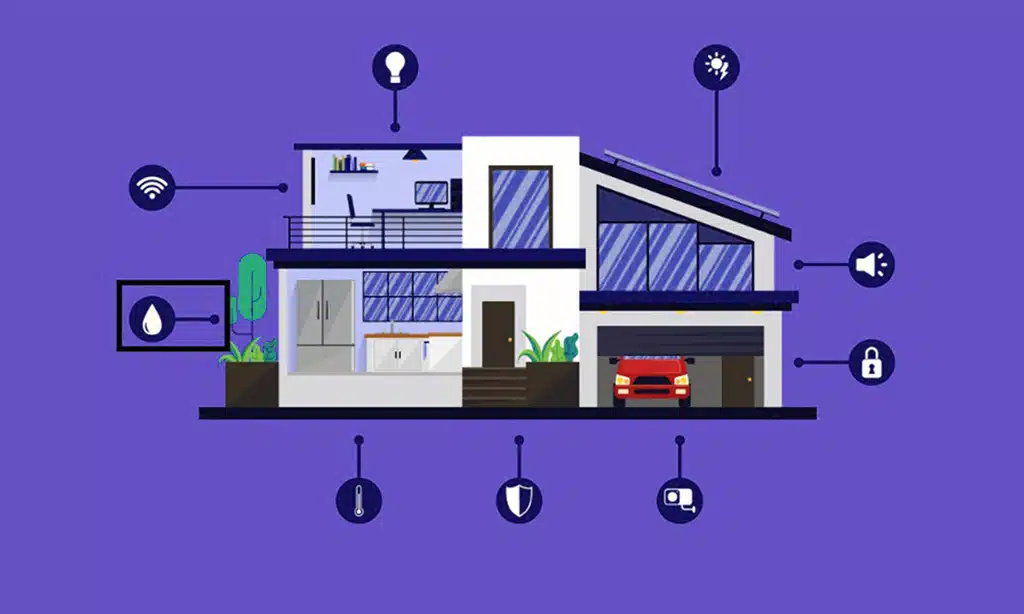
Think about how you want your smart house to work with gadgets like Google Home or Amazon Echo. Grab a notepad, sketch your ideas, and let cool tech—like home automation apps—help shape your setup.
Define your goals and priorities
Decide if you want basic home automation or a full smart house setup. Some folks love using voice control with Amazon Echo, Apple HomePod, or Google Home to turn on smart lights or play radio.
Others prefer setting up motion sensors and smart plugs for daily chores. Picture arriving home as your smart thermostat kicks in, the Philips Hue bulbs glow just right, and Nest Cam keeps watch.
Pick what matters most to you—security, comfort, saving energy—or maybe all three. Is your focus on ringing in guests with the Ring Doorbell? Do you need Google Assistant to remind kids about homework? A clear plan saves money and stops gadget overload.
Start simple so your checklist fits real life instead of looking like a sci-fi movie script gone wild.
Set a budget and timeline
Smart homes can cost as little as $100 for a basic setup, or several hundred dollars with more smart devices. Planning to use Google Home, Amazon Alexa, or Apple Homekit? Count the price of each gadget—like smart speakers, plugs, lights, and locks.
Full upgrades with things like Philips Hue bulbs or Nest Cam may run into thousands. Write down your max spend before you buy that shiny new gadget from the app store.
Pick a timeline so you do not rush—or stall forever in drywall dust. Mark small goals on your calendar: maybe start with a Google Home Mini next week or connect those smart switches after payday rolls around.
Spreading out purchases gives your wallet—and mind—a break while you get used to voice control and automating lights or home security cameras one step at a time.
Start Small and Build Gradually
You don’t need a full-blown setup on day one. Start with something simple like an Amazon Echo or smart plugs, and let your comfort level grow from there.
Begin with a smart speaker or hub
A smart speaker or hub acts like the brain of your setup. Google Home, Amazon Echo, and Apple HomePod Mini are popular picks. These devices help you control lights, locks, fans, and more with just your voice.
“Alexa,” “Hey Siri,” or “Okay Google” quickly become part of daily life—no magic wand needed!
Choosing a hub linked to a wide range of gadgets keeps things simple down the line. For example, Google Home supports over 1,000 smart home devices from 150+ brands. Even something small like a Nest Hub Max can let you play music on demand or ask questions out loud.
Start here; everything else plugs in around it later—like building blocks for an easier life with your home automation dreams.
Use smart plugs for basic automation
Smart plugs make home automation easy. Plug one in, connect it to your Wi-Fi, and you can control lamps or fans with Google Home or Amazon Alexa. Voice commands work fast for turning things off at bedtime or during movie night on Prime Video.
Belkin Wemo Mini Smart Plug is a good pick for basic lighting control.
You don’t need fancy gear—these small devices work with many brands like Philips Hue bulbs or Nest Cam if you want them to turn on lights when motion is detected. Want the coffee maker ready before you wake up? Set a timer in your smart home app on your iPhone or Android phone.
Simple tricks like this save energy while making your space feel smarter without much stress.
Choose the Right Smart Devices
Picking gadgets like smart bulbs, motion sensors, or a Google Home can really make daily life easier. Don’t just grab any gear; think about what fits your home, your needs, and your Wi-Fi setup.
Smart lighting for convenience and energy savings
Smart lighting makes life easier. Use your voice to tell Google Home or Amazon Alexa to turn on the lights—no more hunting for a switch at night! Smart bulbs and Philips Hue let you set schedules, so lights come on when you get home or wake up in the morning.
You can even use motion sensors with smart plugs. Lights pop on as you walk in, then turn off after you leave.
These smart devices help cut energy costs too. Program your smart switches to shut off lights during the day or if no one is around. It saves money and helps the planet, all without lifting a finger.
Set up scenes using apps like Apple HomeKit, making it simple to control each room from anywhere—even while away from home theater systems or chasing kids down the hall!
Smart thermostats for better temperature control
Devices like the Nest Learning Thermostat and Nest Thermostat E know your habits. They adjust the heat or cool air automatically, saving energy without you lifting a finger. These smart devices keep your home comfy—no more cold mornings or stuffy afternoons.
Many work with Google Home, Amazon Alexa, and Apple HomeKit for easy voice control.
You can set schedules from your phone while sitting on the couch or cooking dinner. Some models even sense if a room is empty and turn down heating to cut costs. With Wi-Fi connections, you get updates straight to your phone about temperature changes or when it’s time to change filters.
Saving money and having steady comfort feels good—a win for any smart home setup!
Smart security systems for enhanced safety
Smart locks let you open your door from your phone, so you never fumble for keys. Video doorbells like Nest Hello and Ring Video Doorbell 2 show visitors right on your phone or Google Home Hub.
Smart indoor cameras, such as Nest Cam Indoor, help parents watch kids at home with just a tap on the Amazon Echo Show screen. Baby monitors can send alerts if a newborn makes noise or moves.
Nest Cam Outdoor lets you see what’s happening outside—even in the dark—right from your living room couch. Digital security now means peace of mind, without old-fashioned keys or peeking out windows.
Many smart home platforms like Amazon Alexa and Apple HomeKit work with these devices using simple voice control commands. A safer home does not need to cost a fortune or eat up all weekend setting it up; most of these smart devices connect fast over Wi-Fi or Bluetooth.
Avoid Common Pitfalls
Too many gadgets can turn your home into a circus, not a castle. Watch out for fees that sneak up on you, like a cat under the couch, waiting to pounce when you least expect it.
Don’t overspend on unnecessary devices
Many folks grab every flashy gadget, but that hits your wallet hard. Google Home, smart plugs, and voice control gadgets tempt you with big promises. Ask yourself—do you really need three different smart speakers or fancy lights for each room? Stick to the basics: start with a Philips Hue bulb in your living room or install one Nest Cam by the front door.
Set a budget before shopping for smart home items like Amazon Echo or Apple HomePods. If a device does not fit your goals or daily routine, skip it. You do not need both physical switches and dozens of smart bulbs to automate lighting controls.
A single motion sensor from Raspberry Pi can cover most needs without breaking the bank. Make sure each item helps you save time, energy, or builds real security at home—not just dust on the shelf!
Be cautious of subscription-based services
Smart locks, smart cameras like Nest Cam, or even Philips Hue bulbs can require monthly fees. These subscriptions often unlock extra features or longer video storage. Costs add up fast—sometimes $5 to $20 every month for one device.
Before you click “subscribe,” pause and think if you really need those paid perks.
Some home automation setups run fine with free options, such as Google Home or Amazon Alexa voice control. Not all controls must drain your wallet each month like a leaky faucet. If the benefits do not measure up to the cost, skip it and use basic tools instead.
That way, you build a smarter home without wringing out your bank account every 30 days.
Explore Cost-Effective Options
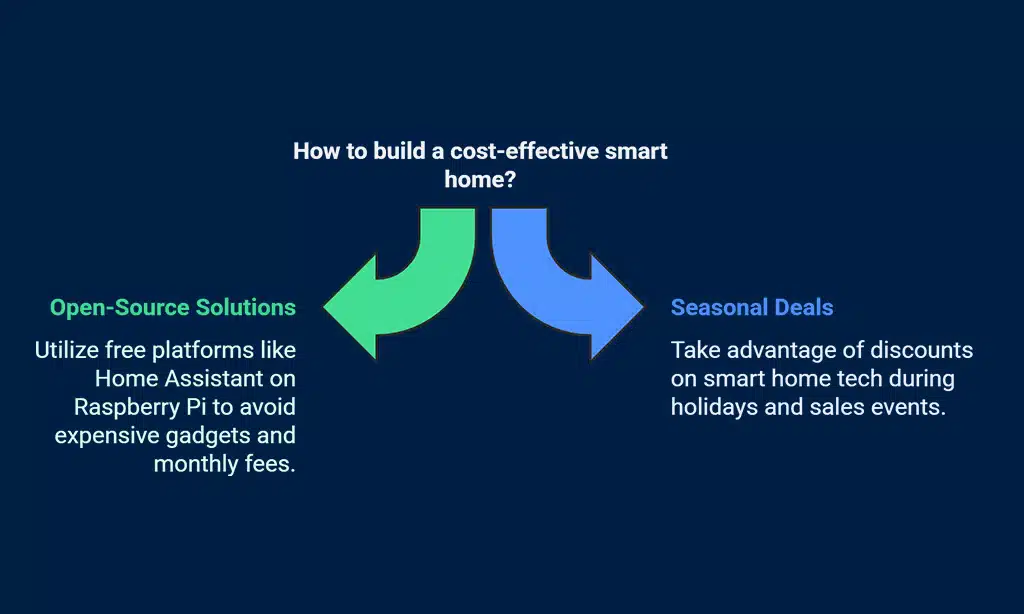
Some folks save big bucks by using a raspberry pi and Home Assistant to link their gadgets. Watch for sales on smart bulbs, like Philips Hue, or motion sensors—you might snag them for less than a pizza!
Open-source and DIY solutions
Home Assistant (HA) is a free, open-source smart home platform that works on many devices. You can run it on a Raspberry Pi and avoid expensive gadgets. With Home Assistant, you control smart plugs, smart lights like Philips Hue, or even Nest Cam with one app—or even voice commands using Google Home or Alexa.
Instead of paying for pricey monthly plans or new hardware every time you want to try something different, go DIY.
Building your setup gives power back to you. Tinker with motion sensors or humidity sensors and make them trigger routines across your house without extra fees. Plenty of guides online explain how to use cheap physical switches and integrate them into the system too.
Friends might say it sounds “techy,” but honestly, anyone who can screw in a lightbulb can follow step-by-step videos—no need for an engineering degree. Your wallet will thank you each month because these solutions keep costs low while giving more freedom than big-name brands offer out of the box.
Take advantage of seasonal deals and discounts
Black Friday, Cyber Monday, and Prime Day often slash prices on smart home tech. Amazon Echo, Google Home speakers, Philips Hue bulbs—these deals pop up fast. Smart plugs and Nest Cam drop in price during holidays like Christmas or the Fourth of July.
People save a lot by waiting for big sales at Target or Best Buy. Watch out for bundles too; sometimes you get an extra smart light free.
Even Google’s own store gives heavy discounts near Memorial Day or Labor Day. Look out for back-to-school sales if you want cheap smart switches or motion sensors to try at home with less risk to your wallet.
These offers can make building a smart home easier than pie without breaking your bank account.
Connect and Optimize Your Devices
Smart gadgets, like Philips Hue lights or Nest Cam cameras, should play nicely together—think of them as a friendly team instead of rivals. A good smart home platform, say Home Assistant (HA) on a Raspberry Pi or Apple HomeKit, helps you run the show with fewer headaches and more fun.
Ensure compatibility across devices
Mixing brands like Google Home, Amazon Echo with Alexa, and Apple HomeKit in one house can get messy fast. Each system plays well with certain gadgets but not all. For example, Google’s hub connects over 1,000 devices from 150-plus brands—a lot better odds you’ll find home automation that just works.
Check your new smart bulbs or smart plugs before buying them. Look for badges like “Works with Alexa” or “Google Assistant.” Skipping this step is like buying shoes before knowing your size—nobody wants that back-and-forth to the store.
Try using a dedicated app or smart home platform so everything talks together without fuss. A quick compatibility check saves headaches—and keeps those voice control commands flowing smooth as butter on hot toast.
Use a dedicated app or platform for integration
Download the manufacturer’s app for each of your smart devices. Use Google Home, Amazon Alexa, or Apple HomeKit to bring everything under one roof. Power on and connect your gadgets through the app step by step.
This can be Philips Hue bulbs, a Nest Cam, or even smart locks—no need to juggle dozens of different apps.
Link smart plugs, motion sensors, and lights using one main platform like Home Assistant. Add devices to a hub if you have one—Logitech Harmony is great for remote control too. Fewer taps mean less hassle later.
These platforms help things run together smoothly so you can adjust settings from your phone or tablet with ease. Voice control also gets easier when all devices are connected this way; just ask Google’s voice assistant or Alexa Plus what you want done next!
Test and Adjust for Efficiency
Try out your smart lights and motion sensors, see if they actually make life smoother or just blink for fun. With tools like Home Assistant or a Raspberry Pi, fine-tune your new home setup until it feels like it’s working for you, not the other way around.
Monitor device performance
Check your smart home gadgets often. See if your smart lights, Google Home, or Amazon Echo react as they should. Sometimes, a smart plug may stop working out of the blue or a Nest Cam might freeze like it’s stuck in molasses.
Don’t let little hiccups become big headaches—catch them early.
Adjust things for better performance. Tweak settings on your Philips Hue bulbs or Alexa voice assistant to save energy and cut frustration. Look at app dashboards for warnings about slow WiFi or offline tools; don’t ignore those red flags—they’re waving at you for a reason! If your motion sensors act cranky, move them around until they work right.
Keep an eye out and keep life simple; happy devices mean fewer “why isn’t this working?” moments for you.
Refine your setup based on your needs
Tweak your home automation as life changes. Swap out a smart bulb for a Philips Hue if you want brighter rooms. Maybe switch to Google Nest for stronger security alerts, or add motion sensors where the kids play.
Watch your smart plugs and thermostats—track how much energy they use, trim waste where you can.
If Google Home does not fit well with your daily routine, try Amazon Alexa or Apple HomeKit instead. Expand with extra smart locks on new doors or set up voice control in more spaces using a cheap Raspberry Pi.
Do quick checks on devices through one app to spot which settings drain power or send too many messages at night. Tiny steps make big improvements fast—just like patching small holes in sheetrock before painting the whole wall!
Takeaways
Building a smart home does not need to be stressful. Start with strong basics like reliable wifi and one or two key gadgets, say an Amazon Echo or smart bulbs from Philips Hue. Add more gear, like Nest Cams or smart plugs, at your pace.
Before you know it, your space feels smarter—and life runs a bit smoother. Stay curious, test things out, and soon you’ll run the show with just your voice or phone!
For more tips on enhancing your living space, check out our guide on how to make the most of natural materials in your home.
FAQs
1. How do I start building a smart home without feeling lost?
Start with one or two smart devices, like smart plugs or bulbs. Try a Google Home speaker or an Amazon Echo for voice control. Add more as you get comfortable.
2. Which platform should I choose—Google’s system, Apple HomeKit, or Amazon Alexa?
Pick the system that works best with your phone and other gadgets. If you use iPhones, HomeKit makes sense. Android fans might lean toward Google Home. Alexa is flexible and fits lots of brands.
3. Can I keep my old switches if I add smart lights?
Yes, you can keep physical switches along with Philips Hue bulbs or smart switches. Just remember: turning off the switch cuts power to the light—even if your app says it’s on.
4. What helps make home security smarter?
Try adding Nest Cam cameras, motion sensors, and even smart locks at doors for better safety at home—all connected through your main smart home platform.
5. Will my Wi-Fi handle all these new gadgets?
A strong wireless network matters here—a lot! Fiber-optic internet helps too if you have it available in your area.
6. Can I automate blinds and control them by voice?
Yes! Smart blinds work well with most platforms like Google Home Max or Amazon Echo speakers for easy open-close commands using just your voice—or set routines so they move on their own when sunlight changes throughout the day.

























