


Are you staring at hosting plans like they are a big puzzle? You might hear claims that hosting costs skyrocket or that you need deep tech skills. These wrong ideas become Hosting Myths That Beginners Still Believe.
Shared hosting gives small sites solid performance at a low price. Many providers promise a 99.9% uptime guarantee. This guide will clear up the myths and point you to the right plan.
Keep reading.
Key Takeaways
- You can start shared hosting at $1.49 per month and get a 99.9% uptime guarantee, free SSL, CDN options, and easy file managers.
- Free hosts limit you to 1 GB storage and 10 GB bandwidth, force ads on your site, skip live support, and offer no uptime guarantee.
- “Unlimited” plans use fair-use caps on CPU, storage, and bandwidth. Hosts also differ in SSD vs. HDD storage, DDoS protection, dedicated IPs, backups, and support—always read SLA terms and reviews.
- You don’t need deep tech skills. Hosts offer cPanel dashboards, one-click installers, live chat, and free migration services to move files, databases, SSL certificates, and DNS records.
- Hosts add firewalls, malware scans, SSL, and DDoS shields, but you must set strong passwords, update your CMS, enable two-factor login, and back up files weekly.
Myth 1: Hosting Is Too Expensive for Beginners

Affordable hosting plans can start at just $1.49 per month. Shared hosting splits server costs among many sites. This form of web hosting costs far less than top-end dedicated servers.
Shared packages often promise 99.9% uptime guarantee and reliable performance. A simple file manager makes setup a snap. Your domain name registrar links DNS records in seconds. You can add an SSL certificate and a CDN for extra speed and security.
Many beginners think they must sell a kidney to afford hosting. That myth scares away new projects. Cloud hosting and managed hosting sit ready for easy upgrades. You launch a site on a shoestring budget.
You add more server resources as the site grows. This lets you keep hosting costs in check. Budget-friendly hosting leaves you free of big upfront bills.
Myth 2: Free Hosting Is Just as Good as Paid Hosting
Free web hosting comes with big limits. Beginners lose domain control, and sites fill with ads. Sites suffer no uptime guarantee and slow pages under high website traffic. Service caps storage at 1 GB and limits bandwidth at 10 GB a month.
Providers skip live customer support, they never patch servers. They skip network monitoring, leaving sites open to DDoS attacks.
Paid shared web hosting services add real value. It gives you full domain control, a free SSL certificate, and 99.9% uptime guarantee. You also get more server resources and an optional content delivery network.
WHOIS lookup and live help desk come with every plan. You pay a small fee, but your site runs fast and stays secure.
Myth 3: All Hosting Providers Offer the Same Features
Cheap plans may cut features. Some providers sell shared hosting with minimal storage and no DDoS protection. Others include SSD storage, a free SSL certificate from Let’s Encrypt, and a 99.9% uptime guarantee.
One host boosts load speeds with a global network of data centers and a content delivery network. Another keeps costs low by offering only basic databases and no dedicated IP addresses.
Quality matters more than plan names. Research customer reviews to gauge live chat support, knowledgebase depth, phone access, and BBB accreditation. A top managed hosting service may include automatic software updates, real-time vulnerability scans, and cloud hosting options.
A budget-friendly hosting provider might skip multilingual guides or advanced backups. Choose your plan based on website traffic needs, security demands, and SLA terms.
Myth 4: You Need to Be Tech-Savvy to Manage Hosting
Modern web hosts add user-friendly dashboards, like cPanel, to help beginners. Softaculous one-click installers launch WordPress hosting in seconds. Shared hosting and budget-friendly hosting plans include managed hosting features.
Many hosting providers offer migration help, cutting the need for coding.
Customer support teams answer live chat any hour. Step-by-step guides show domain setup and SSL certificate installs. New users upload files, change passwords, update software in a browser.
Cloud hosting or virtual dedicated server tasks need few clicks. This ease protects website security, adds a CDN, and boosts uptime guarantee.
Myth 5: Unlimited Hosting Plans Offer Endless Resources
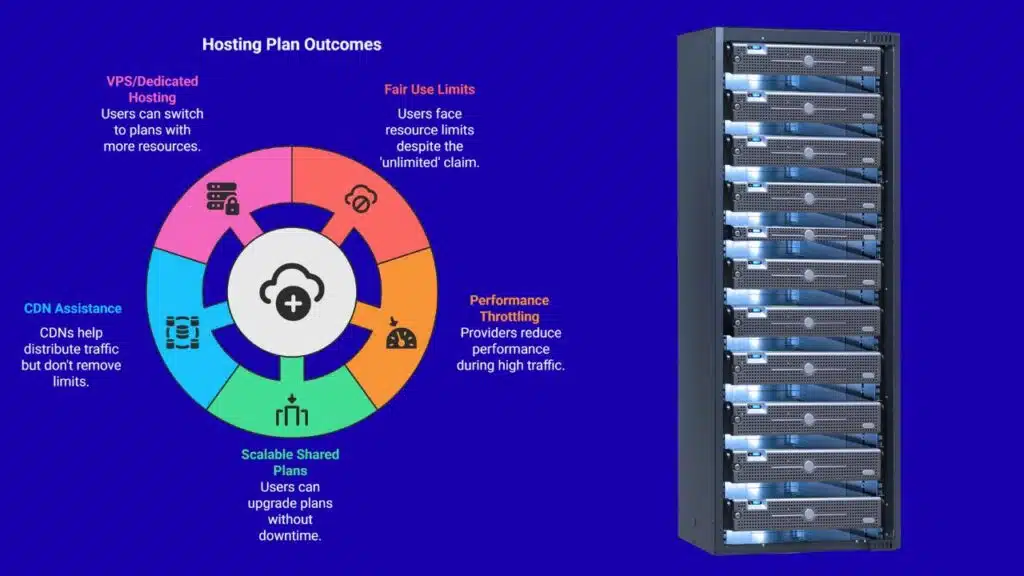
Unlimited hosting plans promise endless resources, but they use fair use policies that limit server resources for each user. Shared hosting keeps multiple sites on one server and spreads bandwidth, storage, and processing power among users.
Providers throttle performance if your traffic spikes or you cross limits in a service level agreement. BigRock labels shared plans as starter, advanced, pro, and ultimate to let you scale up without downtime.
A content delivery network, cdn, can help distribute traffic spikes but does not lift those fair use caps. Sites that outgrow shared hosting can move to a VPS or dedicated hosting plan with more headroom.
Myth 6: Switching Hosting Providers Is Complicated
Most web hosting providers offer free site migration services. These services move site files, databases, and email accounts. The control panel shows step-by-step guides. File transfer protocol, secure shell tools, and a database manager copy each file.
You back up your site first, pick a new web hosting plan, then let them handle the process. They update DNS records and migrate your SSL certificate and CDN settings. This action keeps server resources stable and software updated.
You hardly break a sweat.
Support teams work around the clock. Support staff test your website on a staging server and fix any broken links or CSS errors. They aim for minimal downtime and meet uptime guarantees.
You review a test site before you update your DNS settings. After you confirm, your online presence goes live at the new provider. This step keeps the site secure and blocks vulnerabilities with a fresh backup and a valid SSL certificate.
Myth 7: Hosting Providers Are Fully Responsible for Website Security
Hosting providers block hackers with firewalls, scanner programs, data encryption, intrusion alarms, and DDoS shields. They install secure sockets layers certificates like Let’s Encrypt SSL at no extra charge.
You must pick strong passwords, update your CMS, add a SiteLock scanner plugin, and back up files each week. All web hosting plans carry some risk if admins skip these steps. Even public cloud, VPS hosting, and dedicated servers fall prey to old software flaws.
Many managed shared plans already include enterprise-grade malware scans and intrusion detection. Owners drive security by updating code, setting up two-factor login, and renewing SSL ahead of expiry.
Tools like SiteLock scan directories for malware each day. Free SSL solutions from Let’s Encrypt defend payment forms and logins. Optional content delivery networks speed pages and block shady bots.
You can tweak firewall settings from your control panel to block brute force attempts.
Takeaways
Myths can scare new site owners, but you can cut through the fog. Shared hosting fits tight budgets and still offers good speed and a 99.9% uptime guarantee. A solid SLA and reliable customer support keep your pages running.
Adding a content delivery network can speed up content delivery. Migrating to VPS or cloud hosting works for traffic spikes. Managing passwords, updates, and a secure sockets layer certificate makes your site safe.
Break these myths, pick the right plan, and watch your project grow.
FAQs
1. Does free hosting cost zero and give all features?
Free hosting can feel like a free lunch, but it comes with catches. It may lack customer support or a good uptime guarantee, and lock you into a long subscription. It may not include an SSL certificate or strong security. It may cap server resources and slow your site.
Shared hosting puts many sites on one server. It shares server resources, so a big traffic spike can slow or crash your site. It works for small blogs or new sites with low website traffic. If you need more speed, try VPS hosting or a dedicated hosting plan.
3. Do I need a dedicated hosting plan to rank on the web?
You do not need dedicated hosting to show up on the web. Good content and SEO do the heavy lifting. A managed hosting or WordPress hosting plan can serve you well. Add a content delivery network (cdn) to boost speed and uptime.
4. Does every hosting provider give a 100% uptime guarantee?
No hosting provider can promise perfect uptime, even if they claim it. Most plans offer 99.9% uptime guarantees, but brief outages still happen. Cloud hosting and virtualized servers help cut downtime. Use caching and a CDN to boost hosting performance.
5. Is an SSL certificate optional?
A secure sockets layers (ssl) certificate is not optional for a secure website. Browsers warn users if you skip it. You can get budget-friendly hosting plans with SSL included. It locks down data at checkout, login, or when changing passwords.
6. Do I need a content delivery network only if I use cloud hosting?
You do not need a CDN only when you use cloud hosting. You can add a content delivery network (cdn) to any web hosting plan. A CDN moves data to many spots across the internet. It speeds up uploading, images, and javascript. It also cuts hosting costs and eases server load.






















