

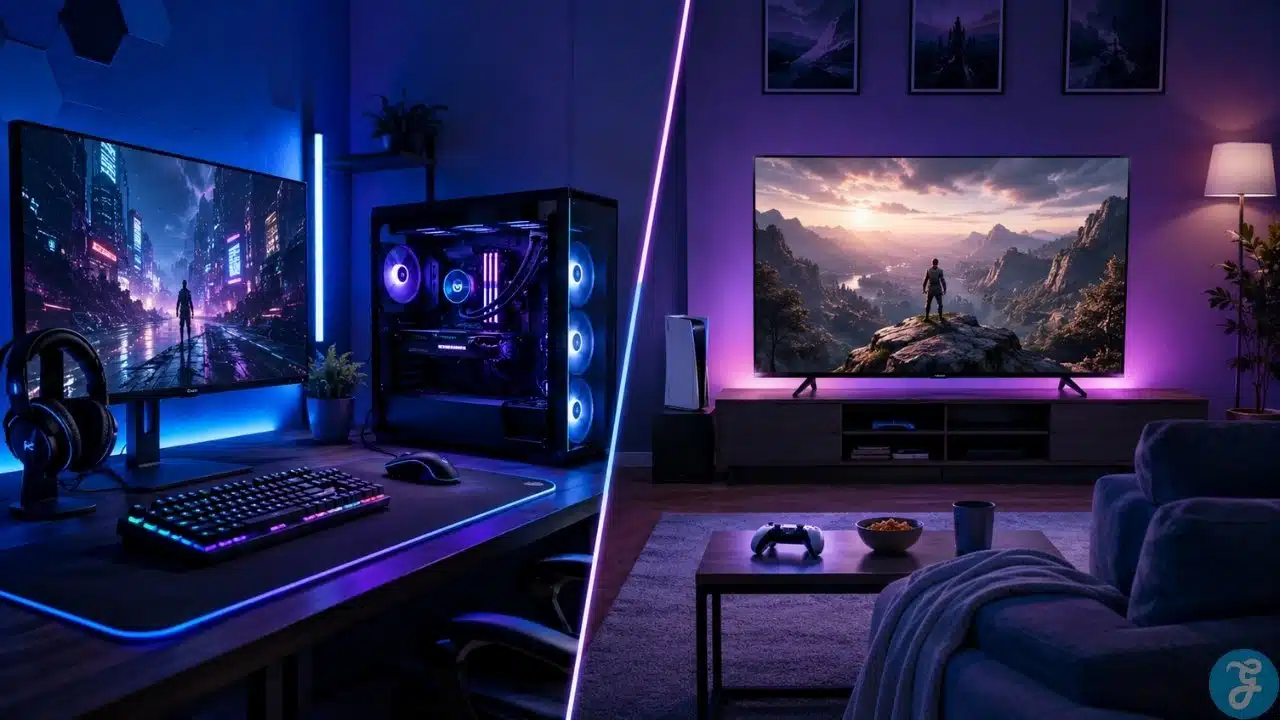
The gaming PC vs console debate gets stupid very quickly. One side acts like a console is a toy. The other side acts like PC gamers spend more time fixing drivers than playing games. I get the jokes, but when someone is actually spending money, the fanboy war does not help.
I am a PC guy. I enjoy building PCs, upgrading parts, adjusting settings, comparing hardware, and helping people avoid bad buying decisions. But I am not going to pretend every gamer needs a PC. Some people are genuinely better off with a console. Some people will be happier with a gaming PC. The trick is knowing which one fits your habits, not which one sounds cooler online.
When I help someone choose, I do not start with “PC is better” or “console is cheaper.” I ask how they play. Do they want couch gaming? Do they want upgrades? Do they need the machine for work too? Do they like tweaking settings? Do they hate troubleshooting? Those answers matter more than any platform argument.
Gaming PC Vs Console: The Real Difference
The real difference is control versus convenience. That is the simplest way I can explain it.
A gaming PC gives me control. I can choose the parts, change the monitor, upgrade the GPU later, add storage, install mods, tweak graphics settings, use different game stores, and use the same machine for gaming, work, browsing, writing, editing, or streaming.
A console gives convenience. You buy the device, connect it to a TV or monitor, install the game, grab the controller, and play. You do not need to think about CPUs, GPUs, RAM, airflow, power supplies, driver updates, or whether your display is holding the system back.
That is why I never tell people to pick blindly. The right choice depends on what kind of user you are.
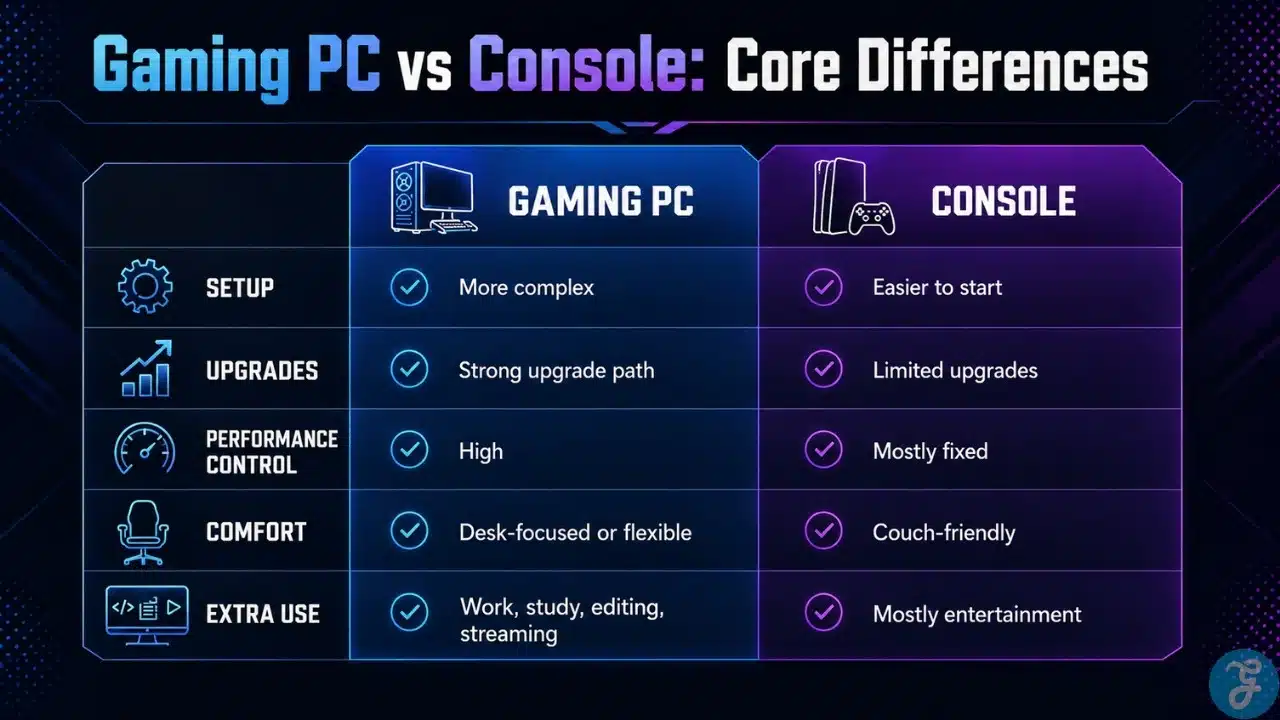
Here is the cleaner way to compare both options.
| Category | Gaming PC | Console |
|---|---|---|
| Setup | Needs more planning | Easier to start |
| Upgrade Options | Strong | Limited |
| Performance Control | High | Mostly fixed |
| Game Library | Very broad | Platform-based |
| Comfort | Desk-focused or flexible | Couch-friendly |
| Maintenance | Higher | Lower |
| Extra Use | Gaming, work, editing, streaming | Mostly gaming and entertainment |
| Best For | Control and long-term flexibility | Simplicity and convenience |
Why I Usually Prefer A Gaming PC
I usually prefer a gaming PC because I like having options. I like being able to decide what matters more in a game: smoother FPS, better visuals, sharper resolution, lower temperatures, quieter fans, or better response.
That is the part of PC gaming I enjoy most. I am not stuck with one fixed experience. If a game is demanding, I can lower a few heavy settings. If a game is older, I can push it harder. If I want to try mods, I can. If I need more storage later, I can add it. If my GPU starts feeling weak, I can plan an upgrade instead of replacing the entire setup.
When people ask me why I still prefer PC, this is usually my answer: I do not like being locked in. I want the machine to grow with my needs.
This is also why a wider PC gaming guide matters for beginners. PC gaming is not just about buying a tower. It is about understanding how the whole setup works together.
Why I Still Respect Consoles
Even as a PC guy, I respect consoles. I do not think every gamer wants hardware to become a hobby. Some people just want to sit down and play, and there is nothing wrong with that.
I have seen people overthink PC builds when all they really wanted was a simple living-room gaming setup. They did not care about upgrade paths. They did not care about graphics settings. They did not care about mods. They wanted a controller, a couch, a big screen, and a game that just works.
For that kind of person, a console makes complete sense.
Consoles are also easier for shared spaces. If you have family members, siblings, friends, or casual players using the same setup, a console is usually simpler. Nobody needs to understand refresh rates, settings menus, or why one game suddenly wants a driver update.
I still prefer PC for myself, but I would never call console gaming pointless. It solves a different problem.
Cost: Where Most Buyers Get Confused
A console is usually cheaper upfront. That is the easy part.
You buy the console, maybe an extra controller, maybe a subscription, and then your games. The total starting cost is usually easier to understand.
A gaming PC can get expensive quickly. The tower is only one part. You may also need a monitor, keyboard, mouse, headset, desk space, chair, speakers, extra storage, and future upgrades. I have seen people budget only for the PC and then realize they forgot everything that makes the setup usable.
But the long-term cost is not always that simple.
A gaming PC can also be your work machine, writing machine, editing machine, study machine, browsing machine, and entertainment machine. If someone already needs a proper computer, I often find it easier to justify a gaming PC.
PC also gives more upgrade flexibility. You can improve one part at a time instead of replacing the entire system.
Here is how I look at the cost difference.
| Cost Area | Gaming PC | Console |
|---|---|---|
| Upfront Cost | Usually higher | Usually lower |
| Accessories | More flexible but can add up | Simpler overall |
| Game Deals | Often strong across stores | Depends on platform sales |
| Online Cost | Depends on games and services | Often needs subscription |
| Upgrade Cost | Flexible over time | Mostly fixed hardware |
| Productivity Value | Strong | Limited |
| Long-Term Flexibility | High | Lower |
A console is easier if you only want a gaming box. A gaming PC makes more sense if you want one machine to do more than gaming.
Performance: I Care About The Experience, Not Just The Numbers
Performance is where people start throwing numbers around. FPS. Resolution. Ray tracing. Upscaling. Quality mode. Performance mode. Benchmarks everywhere.
I care about those things, but I care more about how the game actually feels.
A high-end gaming PC can absolutely outperform a console. Better frame rates, higher settings, better monitor support, more customization, and stronger multitasking are all possible. But that does not mean every PC is automatically better than every console.
A badly planned PC can disappoint you. If the GPU is weak, the CPU is mismatched, the storage is slow, the cooling is bad, or the monitor is poor, the experience will suffer.
A console gives more predictable performance. Developers know the hardware and optimize around it. You may not get full control, but you usually get a clean enough experience without needing to touch much.
This is why I do not judge performance by platform alone. I judge the full setup.
Graphics And Frame Rates: My Practical Approach
I do not worship ultra settings. I know that sounds illegal coming from a PC guy, but it is true.
Ultra settings are not always worth it. Sometimes one or two settings eat performance while barely changing how the game looks. I would rather have a smooth, stable experience than force every setting to max just for ego.
That is where PC gaming gives me more control. In a competitive game, I may lower settings for higher FPS and better visibility. In a story-heavy game, I may push visuals higher. In a badly optimized game, I adjust whatever I need to make it run properly.
Console makes this simpler. You usually pick quality mode or performance mode, and that is it. For many players, that is enough.
For me, the PC approach wins because I like tuning the experience myself.
Game Library: PC Has More Range, Console Has Less Noise
PC has a massive game library. That is one of its biggest strengths.
You get AAA games, indie games, old classics, strategy games, simulation games, competitive shooters, MMOs, early access titles, modded games, and multiple storefronts. If you like variety, PC is hard to beat.
I also like that PC keeps older games more accessible. Sometimes I want to play something from years ago without waiting for a remaster, remake, subscription tier, or platform decision.
Consoles still have strong libraries. Some exclusives are excellent. Sports games, racing games, platformers, story games, and controller-first titles can feel great on console. For many people, the smaller and more curated experience is actually better.
The best platform is not always the one with the biggest library. It is the one that has the games you actually care about.
Mods And Customization Are A Big PC Advantage
Mods are one of the reasons I love PC gaming. They can improve visuals, add content, fix annoying issues, change gameplay, expand old games, or make a familiar game feel new again.
Of course, mods can also become a disaster if you go too far. Anyone who has spent an evening fixing mod conflicts knows the pain. One minute you are improving a game. The next minute you are reading forum comments from six years ago because the game refuses to launch.
Still, I like having that option.
Consoles have improved in some cases, but PC still gives much more freedom. If you enjoy customizing games and shaping the experience, PC is the better platform.
If you do not want that extra layer of control, console keeps things cleaner.
Controls: Keyboard, Mouse, Controller, Or All Of Them
This is one area where I think PC has a clear advantage because I can use whatever fits the game.
For shooters, strategy games, MOBAs, MMOs, and many survival games, keyboard and mouse feel better to me. The precision, keybinds, and quick movement just make sense.
For racing games, platformers, sports games, fighting games, and relaxed single-player games, I often understand why a controller feels better. Some games are simply built around that style.
The nice thing about PC is that I can use both. I am not locked into one control method.
Console keeps things simpler. The controller is the main experience, and for couch gaming that works beautifully.
So again, it depends on the games you play most.
Desk Gaming Vs Couch Gaming
This is not just a hardware debate. It is a lifestyle debate.
A gaming PC usually lives at a desk. That means a monitor, keyboard, mouse, headset, chair, desk space, cable management, and a setup that can also support work or productivity.
A console usually lives in the living room. That means a TV, couch, controller, and a more relaxed experience.
Personally, I like desk gaming because my PC is not only for games. I use the same setup for work, browsing, writing, researching, and general daily use. A proper PC setup feels like a command center when it is done right.
But I also understand the appeal of couch gaming. After a long day, not everyone wants to sit upright at a desk and think about settings. Some people want to lean back and play. Console wins that mood easily.
Upgrades: The Reason I Keep Coming Back To PC
Upgrades are one of the biggest reasons I prefer PC gaming.
A console mostly stays the same until the next generation or a refreshed model comes out. You can add storage, but you cannot meaningfully replace the GPU, CPU, memory, or cooling.
A gaming PC can evolve. That is the fun part.
If the graphics card becomes the weak point, I can upgrade the GPU. If storage becomes annoying, I can add another drive. If the system runs hot, I can improve airflow. If the monitor is holding the PC back, I can upgrade the display.
I like that. It means I can solve the actual problem instead of replacing the whole machine.
The key is not upgrading randomly. I always tell people to upgrade based on weakness. Do not buy a new part just because it exists. Buy it because it fixes a real limitation in your setup.
Maintenance: PC Gives More Control, But Also More Responsibility
PC gaming does need more maintenance. I am not going to sugarcoat that.
You may need to update drivers, clean dust, manage storage, check temperatures, adjust game settings, fix random software issues, or troubleshoot something that makes absolutely no sense until you find one tiny setting buried somewhere.
That is part of PC ownership.
I do not mind it because I like understanding my system. But not everyone enjoys that. Some people see troubleshooting as a waste of time, not a hobby.
A console is easier. It reduces the number of things that can go wrong. Updates are simpler. Hardware is fixed. Settings are limited.
If you hate maintenance, console is the better choice. If you enjoy control and do not mind learning, PC is more rewarding.
Online Play And Subscriptions
Online play is another area where the platforms feel different.
On consoles, online multiplayer often requires a paid subscription. Those services can include free monthly games, cloud saves, discounts, or game libraries, but you still need to consider the ongoing cost.
On PC, online multiplayer usually depends on the game or platform. Many online games do not require a separate system-level subscription. PC also has frequent sales, bundles, free-to-play games, and multiple stores competing for attention.
That does not mean PC is automatically cheaper. It just means the cost structure is different.
I always look at what someone actually plays. A subscription is only valuable if you use it. Otherwise, it is just another quiet monthly payment draining money in the background.
Who Should Choose A Gaming PC?
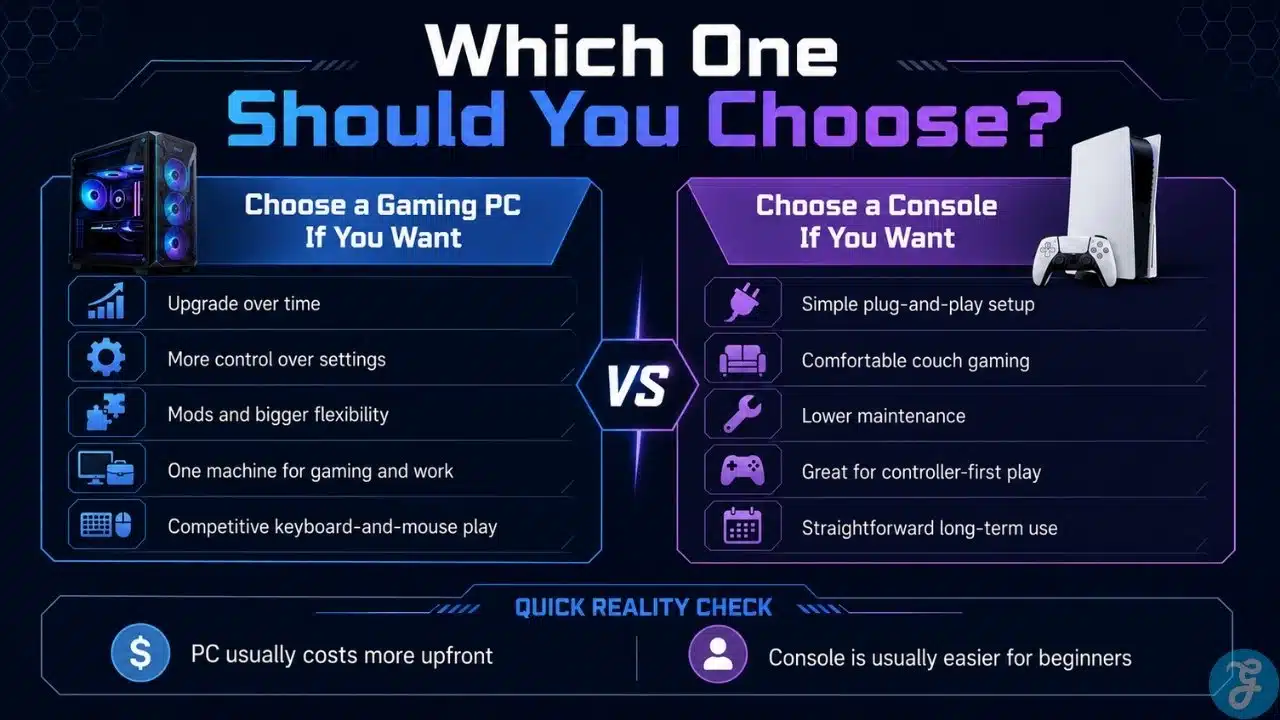
A gaming PC is the better choice if you want control, flexibility, upgrades, mods, performance tuning, and one machine that can do more than gaming.
It is also the better choice if you enjoy learning how your setup works. You do not need to become obsessed with hardware, but a little knowledge goes a long way.
Best for: players who want flexibility, upgrades, customization, and long-term control.
Why We Chose It: gaming PC gives you room to build, tune, improve, and use the same machine for gaming and productivity.
Things to consider: higher upfront cost, more maintenance, and more technical choices.
Who Should Choose A Console?
A console is the better choice if you want simple setup, couch comfort, controller-first gaming, and predictable performance without much maintenance.
It is also a good choice if most of your friends are already on the same console network or your favorite games are tied to that platform.
Best for: players who want plug-and-play gaming, couch comfort, and fewer setup decisions.
Why We Chose It: console gaming keeps the experience simple, relaxed, and easy to share.
Things to consider: limited upgrades, less customization, and less control over performance.
Gaming PC Vs Console Decision Framework
When someone asks me which one to buy, I do not answer immediately. I mentally run through a few questions first.
Do they like tweaking settings? Do they care about upgrades? Do they need the machine for work? Do they prefer a desk or couch? Do they hate troubleshooting? Do they care about mods? Do they want the easiest setup?
Those answers usually reveal the right choice.
Use this decision framework.
| Question | Choose Gaming PC If | Choose Console If |
|---|---|---|
| Do you like tweaking settings? | Yes | No |
| Do you want future upgrades? | Yes | Not really |
| Do you need the device for work too? | Yes | No |
| Do you prefer couch gaming? | Sometimes | Mostly |
| Do you hate troubleshooting? | Not really | Yes |
| Do you care about mods? | Yes | No |
| Do you want the easiest setup? | Not the priority | Yes |
| Do you want one flexible machine? | Yes | No |
The right platform should fit your habits, not your ego.
Common Mistakes I See Buyers Make
The first mistake is buying based on identity. Some people buy a PC because they want to feel like a “serious gamer,” even though they would be happier on a couch with a console. Others dismiss PC because it sounds complicated, even though they would benefit from the flexibility.
The second mistake is ignoring hidden costs. A PC may need a monitor, keyboard, mouse, headset, desk, chair, and future upgrades. A console may need subscriptions, extra controllers, extra storage, and full-price games.
The third mistake is chasing power without thinking about the display. A strong PC with a weak monitor can feel wasted. A console connected to a poor TV can also feel underwhelming.
The fourth mistake is copying someone else’s setup. I see this all the time. A setup that works perfectly for one person can be wrong for another person’s budget, room, games, or patience level.
Pick The Setup You Will Actually Enjoy Using
The gaming PC vs console choice becomes much easier when you remove the ego. I love PC gaming because I like control, upgrades, flexibility, and the ability to shape the experience myself. That is my style.
But I would never tell everyone to buy a gaming PC. If someone wants simple couch gaming, fewer decisions, and a cleaner plug-and-play experience, a console may be the smarter choice.
Pick a gaming PC if you want freedom. Pick a console if you want convenience. The best setup is not the one that wins arguments online. It is the one you still enjoy using after the new-device excitement wears off.
Frequently Asked Questions About Gaming PC Vs Console
These quick answers cover the common questions buyers usually ask before choosing.
Is A Gaming PC Better Than A Console?
A gaming PC is better for upgrades, customization, mods, multitasking, and performance control. A console is better for simplicity, couch gaming, and fewer technical decisions.
Is Console Gaming Cheaper Than PC Gaming?
Console gaming is usually cheaper upfront. PC gaming usually costs more at the start, but it can offer stronger long-term value if you upgrade carefully and use the machine for work or productivity.
Do Gaming PCs Last Longer Than Consoles?
A gaming PC can last longer if you upgrade it properly. A console usually stays fixed until a new generation or upgraded version arrives.
Is PC Gaming Hard For Beginners?
PC gaming has more learning involved, but it is not impossible. Once you understand the basic parts, settings, and maintenance, it becomes much easier.
Should I Buy A Gaming PC Or Console First?
Buy a console first if you want simple gaming with less setup. Buy a gaming PC first if you want flexibility, upgrade options, and a device that can handle more than gaming.






















