Not every app with cartoon animals, badges, cheerful sounds, and the word “learning” on the store page is actually good for children. That is the uncomfortable truth parents face now. Educational apps are everywhere. Some help children practice reading, build number sense, explore coding, learn languages, create stories, or review school subjects.
Others are mostly entertainment with a thin layer of learning language on top. They may keep a child busy, but busy is not the same as learning. That is why evaluating educational apps has become an important parenting skill in 2026. Parents do not need to become app developers, teachers, or child psychologists to make better choices. But they do need a simple way to look beyond star ratings, screenshots, and marketing claims.
A good educational app should have a clear learning purpose. It should match the child’s age and ability. It should encourage active thinking, not endless tapping. It should give useful feedback. It should respect privacy. It should avoid aggressive ads and manipulative reward loops. Most importantly, it should fit into a healthy family routine instead of taking over it.
This guide gives parents a practical framework for judging app quality before downloading, during the first week of use, and after the novelty fades.
What Evaluating Educational Apps Really Means
Evaluating an educational app means checking whether the app is genuinely useful, safe, maintain age-appropriate tech guidelines, and worth keeping. It is not only about asking, “Does my child like it?”
Children may like an app because it is colorful, fast, noisy, rewarding, or easy. That does not automatically mean it supports learning. A child may also dislike a strong learning app at first because it asks them to think, slow down, or work through mistakes.
A better evaluation asks:
- What skill does this app support?
- Is the learning goal clear?
- Is the app right for the child’s age?
- Does it encourage thinking or just tapping?
- Does it give useful feedback?
- Are ads, purchases, and rewards handled responsibly?
- What data does it collect?
- Can parents control settings?
- Does the child behave well after using it?
- Is the app still useful after the first few days?
This is where many parents need better kids’ app review criteria. App stores can show ratings, downloads, reviews, and screenshots, but those do not tell the whole story. A five-star app can still be a poor fit for a specific child. A popular app can still collect too much data. A beautiful app can still teach very little.
Good evaluation starts with the child’s learning need, not the app’s marketing.
Why App Quality Matters More Than App Quantity
Many families do not have a screen shortage. They have an app clutter problem. A tablet may hold ten “educational” apps, but only one or two may actually help. The rest may create distraction, choice overload, subscription waste, and conflict when screen time ends. More apps do not mean more learning.
Good app quality matters because children have limited attention, limited time, and different developmental needs. A weak app can crowd out stronger activities like reading, drawing, playing outside, talking with family, building with blocks, doing homework, or practicing a skill with adult support.
A high-quality app can help when it is used with purpose. It may give a child extra phonics practice, help a struggling student review math facts, support vocabulary building, introduce coding logic, or make language learning more interactive. But it works best when it solves a real problem.
Before downloading another app, parents should ask one simple question: What will this app help my child do better? If the answer is unclear, the app probably does not need to be added.
Start With the Learning Need, Not the App Store
The first mistake many parents make is starting inside the app store. That is where the decision gets messy. Every app looks polished. Every description sounds impressive. Every screenshot shows happy children and bright progress charts.
Start somewhere else. Start with the learning need. A child may need help with:
- Letter sounds
- Reading fluency
- Vocabulary
- Number sense
- Multiplication facts
- Problem-solving
- Handwriting practice
- Language learning
- Coding logic
- Science concepts
- Creativity
- Study habits
- School support
- Special learning needs
Once the need is clear, the app search becomes easier.
For example, “I need a good math app” is too broad. “My seven-year-old needs short, guided practice with addition and subtraction facts” is much clearer.
The second version helps parents judge the app more carefully. If the app is mostly flashy games, it may not fit. If it gives short practice, clear feedback, and gradual difficulty, it may be worth testing. A useful edtech app evaluation always begins with purpose.
The Core Kids App Review Criteria Parents Should Use
Parents need a review framework that is simple enough to use but serious enough to catch weak apps.
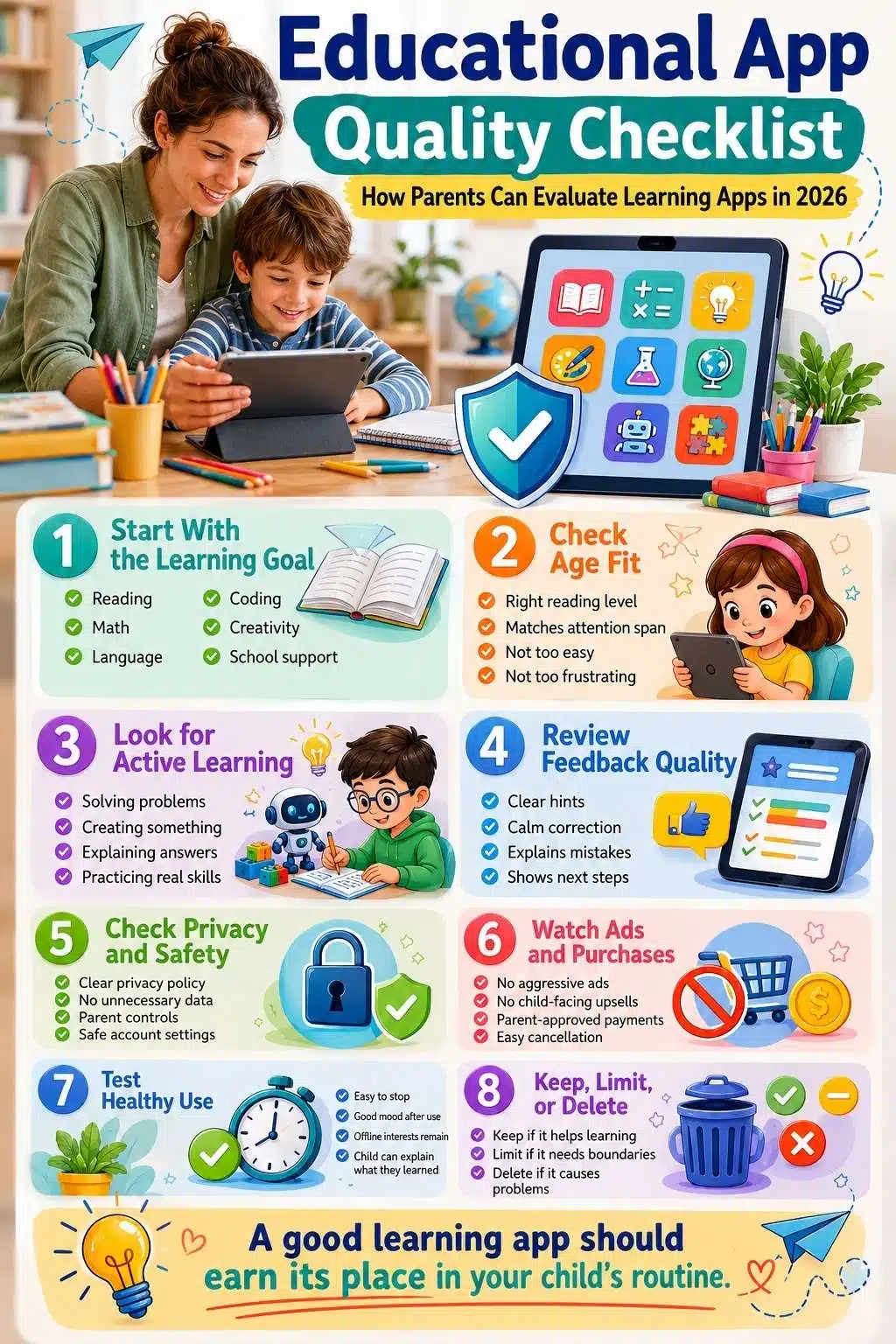
The following criteria work well for most educational apps:
| Review Area | What Parents Should Check |
| Learning goal | Does the app teach or practice a clear skill? |
| Age fit | Is it right for the child’s age, reading level, and maturity? |
| Active learning | Does the child think, choose, solve, create, or explain? |
| Feedback | Does the app help the child understand mistakes? |
| Progress | Can parents see meaningful improvement? |
| Privacy | Is data collection limited and clearly explained? |
| Ads and purchases | Are ads, upsells, and in-app purchases controlled? |
| Engagement design | Are rewards helpful or manipulative? |
| Accessibility | Can different learners use it comfortably? |
| Family fit | Does it work inside the family routine? |
This checklist is not about finding a perfect app. Perfect apps are rare. The goal is to avoid poor fits and choose tools that genuinely support learning.
Learning Goal: The App Should Teach Something Specific
A strong educational app should make its learning goal obvious. Parents should be able to describe the app’s purpose in one sentence.
Examples:
- This app helps children practice phonics.
- This app builds multiplication fluency.
- This app teaches basic coding logic.
- This app supports Spanish vocabulary.
- This app helps children create digital stories.
- This app reviews science concepts through interactive questions.
Weak apps often use vague promises.
Watch for phrases like:
- Boost brain power
- Make your child smarter
- Fun learning for all ages
- Best educational game
- Smart kids training
- Complete learning app
These claims may sound appealing, but they are not enough. A clear learning goal matters because it tells parents what to look for. If the goal is reading fluency, the app should involve reading, decoding, pronunciation, comprehension, or vocabulary. If the goal is math reasoning, the child should do more than tap the biggest number on the screen.
An app that cannot explain what it teaches may not teach much.
Age Fit: Good Apps Respect Developmental Readiness
Age fit is not only about the number on the app store listing. A “4+” rating may mean the content is not obviously inappropriate. It does not always mean the app is educationally right for every four-year-old.
Parents should check whether the app matches:
- Reading level
- Attention span
- Motor skills
- Emotional maturity
- Subject knowledge
- Ability to follow instructions
- Ability to stop when time is over
- Need for adult support
A preschool child usually needs short, shared, guided experiences. A seven-year-old may handle short independent practice. A ten-year-old may use apps for projects and research. A teenager may use more advanced study tools, productivity apps, or AI-supported learning with guidance. The same app can be helpful for one child and frustrating for another.
Age fit should also include emotional fit. Some children become anxious when an app uses timers, streaks, scores, or competitive ranking. Others become too attached to rewards. A tool that creates stress, arguments, or shame is not a good learning tool for that child. The app should stretch the child, not overwhelm them.
Active Learning: The Child Should Do More Than Tap
A good educational app should make the child mentally active. That does not mean every app needs complex projects. For younger children, active learning can be simple. They may choose a sound, match a shape, trace a letter, repeat a word, solve a puzzle, or explain what happened.
What matters is that the child is thinking. Low-value app use often looks like this:
- Tapping randomly until something happens
- Watching autoplay videos
- Repeating easy levels for rewards
- Clicking bright objects without a learning goal
- Chasing badges without understanding
- Guessing answers with no explanation
Better app use looks like this:
- Solving a problem
- Choosing between options
- Building something
- Practicing a skill
- Listening and responding
- Explaining an answer
- Fixing a mistake
- Creating a story, picture, code block, or project
A simple test helps. After five minutes, ask the child: “What did this app ask you to do?” If they can explain the task, the app may have a clear learning design.
If they only say, “I got coins,” “I won,” or “I unlocked a character,” the reward system may be louder than the learning.
Feedback Quality: Good Apps Teach Through Mistakes
Mistakes are part of learning. A strong educational app should help children understand them.
Weak feedback says:
- Wrong.
- Try again.
- Oops.
- No.
- Incorrect.
Better feedback gives a clue, explanation, model, or next step. For example, in a math app, better feedback might show how to break a problem into smaller parts. In a reading app, it may repeat the sound, highlight the letter pattern, or let the child hear the word again. In a coding app, it may show where the sequence broke.
Useful feedback should be:
- Calm
- Clear
- Age-appropriate
- Specific
- Encouraging without being fake
- Connected to the mistake
- Helpful for the next attempt
Parents should be careful with apps that punish mistakes harshly, rush children, or bury the explanation behind animations. Children learn more when mistakes feel safe. An app that only celebrates correct answers is not enough. The real quality shows when the child gets something wrong.
App Quality Check: Ads, Purchases, and Reward Loops
A proper app quality check must look at the business model. Many children’s apps are designed to keep attention. Some do this responsibly. Others rely on pressure, reward loops, limited-time offers, emotional triggers, or constant upgrade prompts.
Parents should check for:
- Ads between activities
- Ads that look like game buttons
- In-app purchases
- Subscription traps
- Locked content that frustrates the child
- Streak pressure
- Countdown timers
- Random rewards
- Loot-box style mechanics
- “Just one more level” design
- Characters that pressure children to keep playing
- Notifications that pull the child back repeatedly
A small amount of motivation is not automatically bad. Badges, levels, and progress charts can help some children stay engaged. The problem starts when the reward system becomes the main reason the child returns.
A learning app should not feel like a reward machine in a cartoon costume. If the child is more interested in coins, prizes, streaks, or avatars than the skill itself, parents should pause and reassess.
Privacy and Data Safety: Cute Design Does Not Mean Safe Design
Parents should treat privacy as part of app quality. Children’s apps may collect names, emails, school details, location data, device identifiers, usage behavior, voice recordings, images, progress data, or other personal information. Some data may be needed for the app to work. Some may not be necessary.
Before using an app, parents should check:
- Does it have a clear privacy policy?
- Does it explain what data is collected?
- Does it collect location data?
- Does it allow public profiles?
- Does it include chat features?
- Does it share data with third parties?
- Does it use targeted advertising?
- Can the account be deleted?
- Can parents control privacy settings?
- Is parental consent required where appropriate?
If the privacy policy is missing, vague, or impossible to understand, that is a red flag. For children under 13 in the United States, child-directed online services and services that knowingly collect personal data from children must follow COPPA requirements. Parents outside the United States should also check local child privacy rules and school policies.
Privacy rules vary by country, so parents should also check local child data protection laws, school policies, and app-specific privacy settings before allowing children to use a new educational tool.
A simple rule works well: The younger the child, the less data the app should need.
Progress Tracking: Helpful Data Without Pressure
Many educational apps show progress dashboards. That can be useful. Parents may see which lessons were completed, which skills need practice, how often the child uses the app, or whether accuracy is improving. But progress tracking can also become misleading.
A child completing many levels does not always mean the child has mastered the skill. Some apps reward speed more than understanding. Some make early progress look impressive to keep families subscribed. Some dashboards show activity, not learning.
Parents should look for meaningful progress signals:
- Accuracy improves over time
- Mistakes decrease
- Difficulty increases gradually
- The child can explain the concept offline
- School confidence improves
- The skill transfers outside the app
- The app identifies specific weak areas
- The parent can understand the progress report
Weak progress signals include:
- Coins earned
- Time spent
- Levels unlocked
- Streak days
- Characters collected
- Generic “great job” badges
Those may show engagement. They do not prove learning. Progress data should inform parents, not pressure children.
Content Quality: Accuracy, Representation, and Tone
Educational apps should be accurate. That sounds obvious, but parents should still check. Some apps contain weak explanations, outdated facts, poor translations, confusing instructions, or low-quality generated content. AI-powered tools make this even more important because they can produce confident but incorrect answers.
Parents should review a few lessons before letting a child use the app independently.
Check for:
- Correct answers
- Clear explanations
- Age-appropriate examples
- Respectful tone
- Inclusive characters and situations
- No stereotypes
- No fear-based messaging
- No overly commercial language
- Clear instructions
- Good audio quality if listening is involved
- Proper grammar and spelling
For younger children, tone matters a lot. An app should not shame a child for mistakes or make them feel rushed. For older children, accuracy and depth matter more. A science app should explain concepts properly. A writing tool should not encourage plagiarism. A history app should not oversimplify sensitive topics.
Learning quality is not only about skills. It is also about trust.
Accessibility and Inclusion: Can Different Children Use It Well?
A strong educational app should work for more than one type of learner.
Parents should look for accessibility features such as:
- Clear audio
- Captions
- Adjustable text size
- High contrast options
- Simple navigation
- No unnecessary flashing effects
- Keyboard or switch compatibility, where relevant
- Dyslexia-friendly design features
- Multiple language support when needed
- Calm mode or reduced stimulation settings
- Flexible pacing
Children learn differently. Some need audio support. Some need visual clarity. Some need fewer distractions. Some need more time. Some need instructions repeated. An app that looks exciting but overwhelms the child may not be a good fit.
Parents should also check representation. Do children see different cultures, family types, skin tones, abilities, and names in a respectful way? This does not need to be forced, but it does matter. Children notice who appears in learning materials and who does not. Good design helps more children participate.
School Alignment: Does the App Support or Compete With Learning?
Some apps are useful because they connect well with school learning. Others create confusion.
For example, a math app may teach a method that does not match how the child is learning at school. That is not always bad, but it can confuse younger children. A reading app may use a phonics approach that supports school instruction. A language app may provide practice, but not match classroom vocabulary.
Parents can ask:
- Does this app support what the child is learning now?
- Does it fill a real gap?
- Does it use methods that confuse the child?
- Does the teacher recommend it?
- Does it help with homework or independent practice?
- Is it too easy or too advanced?
- Does it duplicate another tool the school already provides?
Parents do not need every app to match school perfectly. Some apps are for curiosity, creativity, or independent interests. But if the app is meant to support school progress, alignment matters. When in doubt, ask the teacher what kind of practice would help most.
The One-Week EdTech App Evaluation Test
Parents do not need to decide everything on day one. A one-week test works better. Use the app for a short trial period and watch what happens.
Day 1: Parent Review
Before the child uses it, check privacy, ads, purchases, age fit, and learning goal.
Day 2: Co-Use Session
Sit with the child. Watch how they use the app. Ask what they are doing and why.
Day 3: Independent Short Session
Let the child use it briefly. Watch whether they can navigate without frustration.
Day 4: Offline Check
Ask the child to explain or use the skill away from the app.
Day 5: Behavior Check
Notice the mood after use. Is the child calm, curious, frustrated, or demanding more?
Day 6: Progress Review
Look at the app’s dashboard, but do not trust it blindly. Compare it with what the child can actually do.
Day 7: Keep, Limit, or Delete
Make a decision. Keep the app if it supports learning and fits the routine. Limit it if it has value but needs stronger boundaries. Delete it if it creates more problems than benefits.
This simple test prevents app clutter. It also gives parents confidence to remove tools that are not working.
EdTech App Evaluation Scorecard
This scorecard helps parents judge an app quickly.
| Criteria | Strong App | Weak App |
| Learning goal | Clear skill or concept | Vague “brain boost” claims |
| Age fit | Matches ability and maturity | Too easy, too hard, or overstimulating |
| Active learning | Child solves, creates, explains | Child mostly taps or watches |
| Feedback | Explains mistakes | Only says right or wrong |
| Privacy | Clear, limited data use | Vague policy or excessive tracking |
| Ads | No ads or clearly controlled | Ads interrupt learning |
| Purchases | Parent-controlled | Child-facing upsells |
| Progress | Meaningful skill data | Mostly streaks and rewards |
| Accessibility | Adjustable and inclusive | Hard to use for different learners |
| Routine fit | Easy to stop and manage | Causes conflict or obsession |
A good app does not need to be perfect in every row. But if it lands in the weak column too often, it is probably not worth keeping.
Red Flags Parents Should Not Ignore
Some warning signs are serious enough to stop using an app.
Red flags include:
- No privacy policy
- Open chat with strangers
- Location tracking without a clear reason
- Public child profiles
- Heavy advertising
- Ads disguised as gameplay
- Frequent purchase pressure
- Inappropriate content
- Confusing cancellation process
- No parent settings
- No way to delete data
- The child becomes upset every time the app ends
- App rewards time spent more than learning
- App asks for unnecessary permissions
- The learning goal is unclear after several sessions
One red flag may be enough depending on the issue. Privacy, stranger contact, and inappropriate content should be taken seriously. Parents should not feel guilty about deleting an app. Removing a poor tool is part of good digital parenting.
When a Free App Is Not Really Free
Free educational apps can be helpful, but parents should ask how the app makes money.
Common models include:
- Ads
- In-app purchases
- Subscriptions
- Data monetization
- School or district licensing
- Freemium upgrades
- Brand partnerships
A free app is not automatically bad. Some free apps are excellent. But parents should be more careful when the app targets young children and relies on advertising, tracking, or constant upgrades.
Ask:
- Does the app show ads?
- Are purchases locked behind a parent gate?
- Does the app collect unnecessary data?
- Does the free version frustrate the child into upgrading?
- Is the subscription price clear?
- Is cancellation easy?
- Does the app still work well without payment?
If the app creates pressure inside the child-parent relationship, the cost is not only financial.
How AI Changes Educational App Evaluation
AI features are appearing in more learning tools. Some can be useful. AI may help generate practice questions, explain a concept in another way, support language learning, or provide feedback on writing. But AI also brings risks.
AI can be wrong. It can collect sensitive information. It can encourage shortcuts. It can give answers without helping the child understand the process.
Parents should check:
- Is AI clearly disclosed?
- Can parents turn AI features off?
- Does the app explain how AI is used?
- Does it store child prompts or responses?
- Does it prevent unsafe or inappropriate responses?
- Does it encourage learning, or simply give answers?
- Does it align with school rules?
- Is it suitable for the child’s age?
For younger children, AI tools should be used with close adult guidance.
For older children, parents should teach AI literacy. Children should understand that AI is a tool, not an authority. They should not enter private details, copy answers blindly, or trust AI responses without checking. A good AI learning feature should support thinking. It should not replace it.
Common Mistakes Parents Make When Reviewing Apps
Even careful parents can make weak app decisions. Most mistakes are easy to fix once they are noticed.
1. Trusting App Store Ratings Too Much
High ratings may reflect entertainment value, not learning quality. Reviews can also be vague, outdated, or influenced by short-term excitement.
2. Assuming Paid Means Better
Some paid apps are excellent. Some are not. A subscription does not automatically mean stronger teaching.
3. Keeping Apps Because the Child Likes Them
Enjoyment matters, but it is not enough. The app should also support a real learning goal.
4. Ignoring Privacy Settings
Parents often check content and age rating but skip privacy. That can be a costly mistake.
5. Adding Too Many Apps at Once
Too many tools reduce consistency. One useful app used well is better than five ignored apps.
6. Not Testing Offline Transfer
If the child cannot use the skill outside the app, the learning may be shallow.
7. Confusing Engagement With Learning
Time spent, levels completed, and badges earned are not the same as understanding.
8. Forgetting to Review Subscriptions
Apps that were useful three months ago may no longer be needed.
A good review process keeps the family from drifting into digital clutter.
How to Compare Two Educational Apps
Sometimes the problem is not whether one app is good. It is choosing between two similar apps.
Use this simple comparison method:
| Question | App A | App B |
| What skill does it teach? | ||
| Is the age fit strong? | ||
| Does it give useful feedback? | ||
| Are ads removed or controlled? | ||
| Is privacy clear? | ||
| Can parents monitor progress? | ||
| Does the child stay calm after use? | ||
| Does it fit the routine? | ||
| Is the cost worth it? |
Choose the app that solves the learning need with fewer risks and less family friction.
The best app is not always the most advanced one. Sometimes the simpler app works better because the child can use it calmly and consistently.
Frequently Asked Questions About Evaluating Educational Apps
1. What Is the Best Way to Start Evaluating Educational Apps?
Start with the learning need. Decide what skill the child needs help with before looking at apps. Then check age fit, learning quality, feedback, privacy, ads, and whether the app fits the family routine.
2. What Are Good Kids App Review Criteria?
Good kids app review criteria include a clear learning goal, age-appropriate design, active learning, useful feedback, safe privacy settings, limited ads, parent controls, meaningful progress tracking, and healthy child behavior after use.
3. How Can Parents Tell If an App Is Actually Educational?
An app is more likely to be educational if the child practices a real skill, receives useful feedback, can explain what they learned, and can use the skill outside the app. Rewards and badges alone do not prove learning.
4. What Should Parents Check in an App Quality Check?
An app quality check should include learning value, age fit, privacy policy, ads, in-app purchases, feedback quality, accessibility, progress tracking, and whether the child can stop using the app without major conflict.
5. Are Free Educational Apps Safe for Kids?
Some free apps are safe and useful, but parents should check how the app makes money. Ads, tracking, in-app purchases, and unclear privacy policies can create risks, especially for younger children.
6. How Important Is Privacy in EdTech App Evaluation?
Privacy is very important. Children’s apps may collect personal data, usage behavior, location, voice, or progress information. Parents should choose apps with clear privacy policies, limited data collection, and strong parent controls.
Choose Apps That Earn a Place in the Routine
The best educational apps do not need to shout for attention. They help a child practice, think, create, understand, or grow in a clear way. They respect privacy. They match the child’s age. They avoid manipulative design. They fit into family life without creating constant battles.
That is the real goal of evaluating educational apps. Parents do not need to download every popular tool or follow every app store trend. They need to choose fewer tools with better judgment. A strong app should earn its place.
It should support a real learning need. It should make sense after the first week, not just the first five minutes. It should leave room for books, outdoor play, conversation, homework, creativity, and sleep.
In 2026, children will keep using digital learning tools. That part is not going away. The parenting challenge is to separate useful learning technology from digital clutter. A simple framework makes that possible: check the learning goal, watch the child, review privacy, test the feedback, control the settings, and keep only what genuinely helps.
That is how app choice becomes part of a healthier family learning system.