Parents are not just deciding how many minutes a child can spend on a screen. They are deciding what kind of screen use belongs in the child’s day — and what it quietly replaces.
A toddler watching videos during every meal, a 7-year-old using a reading app after school, an 11-year-old joining a game chat, and a 15-year-old scrolling in bed after midnight are not the same problem. A single screen-time rule cannot handle all of them.
That is why Age-Appropriate Tech Use Guidelines for Kids should go beyond a timer. Time matters, but so do the child’s age, the content, the setting, the device, the timing, and the child’s reaction when the screen stops.
Screens can support learning, creativity, reading, accessibility, schoolwork, and video calls with relatives. They can also crowd out sleep, outdoor play, family conversation, homework, privacy, and emotional regulation. Parents do not need panic. They need a plan that is firm enough to work and flexible enough to grow with the child.
Start With What the Screen Is Replacing
A screen becomes more concerning when it pushes out the basics children need every day: sleep, movement, reading, face-to-face conversation, schoolwork, independent play, and quiet downtime.
Quiet downtime matters more than many families realize. Children need small stretches of boredom because boredom gives them a reason to imagine, build, draw, ask questions, help around the house, or simply rest. A device that fills every pause can make ordinary waiting feel unbearable.
Before setting strict limits, look at the routine:
| What to Check | Why It Matters | Practical Warning Sign |
|---|---|---|
| Sleep | Evening screens can delay bedtime and keep children mentally alert | Bedtime keeps moving later |
| Movement | Children need active play and physical activity | Screens become the default after school every day |
| Meals | Meal screens reduce conversation and make limits harder | The child refuses to eat without a video |
| Schoolwork | Devices can help or distract, depending on setup | Homework takes twice as long with notifications on |
| Mood | Some games and feeds are hard to stop | The child becomes angry or distressed after most sessions |
| Safety | Older children may face strangers, scams, bullying, or harmful content | Secret accounts, hidden chats, or unexplained purchases appear |
This kind of check is more useful than asking only, “How many hours?” A short video can be a problem if it happens every night in bed. A longer video call with grandparents may be healthy and meaningful.
Age-Appropriate Tech Use Guidelines for Kids by Stage
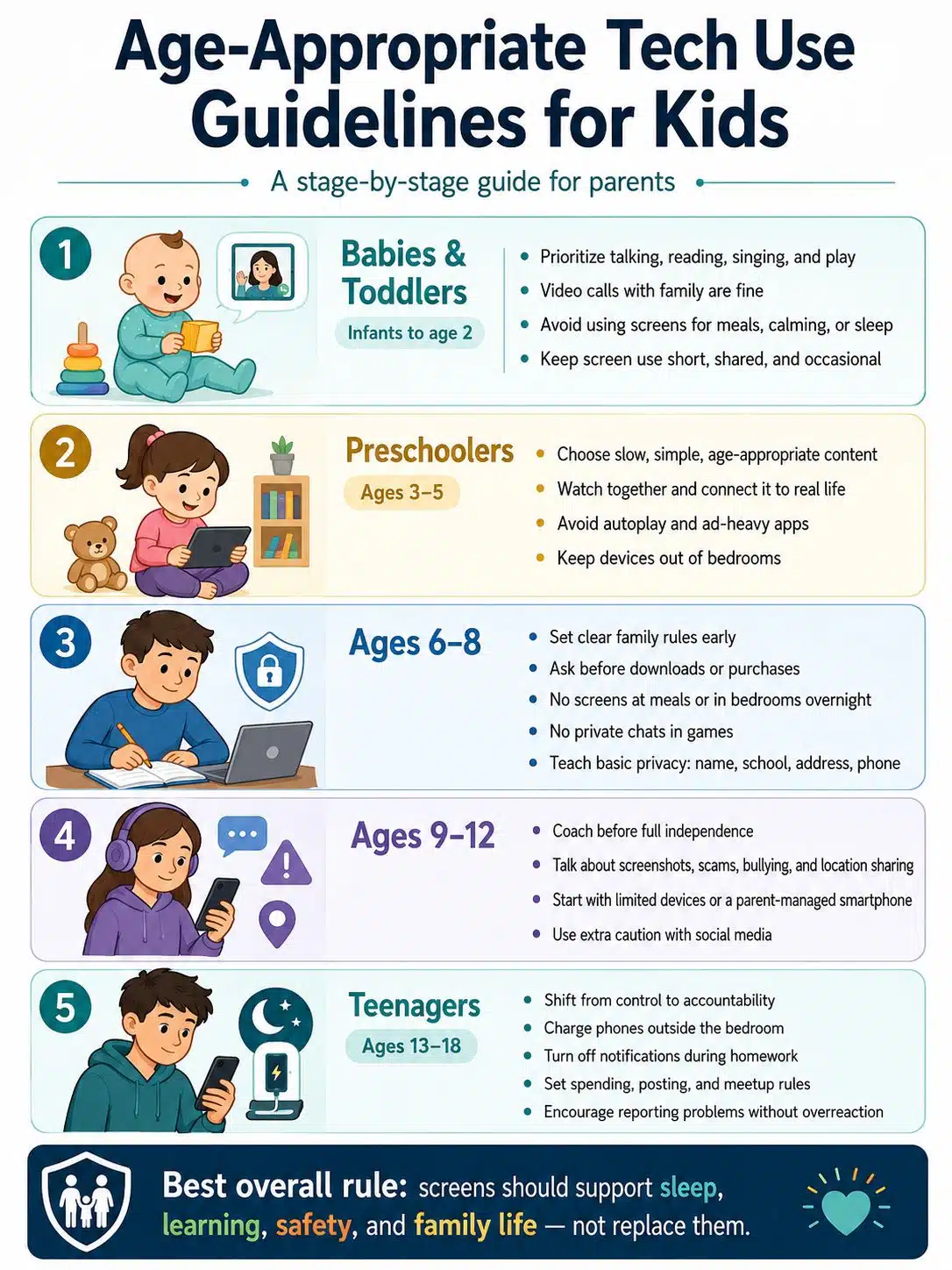
Children do not mature at the same pace, but age still matters. A preschooler needs protection from overstimulation. A school-age child needs structure and repeated explanation. A teenager needs more independence, but not unlimited access.
For babies, real interaction matters more than any app. Talking, singing, reading, floor play, naming objects, and responding to sounds do far more for early development than solo screen use.
Video calls with family are the clearest exception for infants because they involve real people and social connection. Routine cartoons, nursery-rhyme videos, or autoplay clips are different. They may look harmless, but they are not a replacement for responsive adult interaction.
For toddlers, occasional short screen use may happen. Most parents will use a phone or tablet during travel, illness, long waiting times, or a difficult day. The issue is not one imperfect moment. The issue is when a screen becomes the default tool for eating, calming down, waiting, and falling asleep.
A practical toddler rule is simple: screens stay shared, short, and away from meals and bedtime. If a video is used during a hard moment, keep it as the exception rather than the household routine.
Preschoolers: Choose Slower Content and Watch Some of It With Them
Preschoolers can learn from some media, especially when an adult watches with them and connects the content to real life. A counting video becomes more useful when the child later counts spoons, blocks, fruit, or steps.
Good preschool content usually has simple language, slower pacing, age-appropriate stories, and limited commercial pressure. A noisy app full of rewards and pop-ups is not automatically better because it says “educational” in the app store.
The biggest friction at this age is stopping. Autoplay can turn one episode into six. A child who does not understand time will not feel that “five more minutes” means much. A routine works better: one episode, then snack; one drawing activity, then bath; one video call, then pajamas.
Avoid giving a preschooler a private device in a bedroom. A shared family tablet used in a common space is easier to supervise, easier to put away, and less likely to become part of bedtime battles.
Ages 6 to 8: Build the Rules Before the Child Gets More Freedom
Early school years are a good time to teach digital rules while parents still control most access.
Children this age may use screens for school platforms, reading apps, drawing, music, video calls, and beginner games. They still need adults to manage downloads, purchases, ads, passwords, and chat features. Many children at this stage cannot clearly separate a game reward, a purchase prompt, a sponsored message, and a real instruction.
Useful rules are short and concrete:
- Ask before downloading anything.
- No device during meals.
- No screens in bedrooms overnight.
- No private chats in games.
- Do not share your full name, school, address, phone number, or location.
- Tell an adult if anything online feels scary, embarrassing, confusing, or secretive.
This is also the age to explain ads. Children should know that many apps and videos are designed to keep attention, sell things, or push another click. That does not make every app bad, but it does mean children need an adult beside them while their judgment is still developing.
Ages 9 to 12: Treat This as the Training Period
The tween years are when technology pressure often gets louder. Classmates may have phones. Group chats may begin. Online games become social spaces. Children ask for more privacy before they have adult-level judgment.
This stage needs coaching, not only blocking.
Talk about screenshots, usernames, location sharing, fake accounts, in-game purchases, scams, bullying, and the difference between a real friend and someone met only through a game or app. Explain that a “private” message can still be copied, forwarded, recorded, or shown to someone else.
A first phone does not have to be a full smartphone with every app. Some families start with a basic phone, a smartwatch, or a parent-managed smartphone with limited contacts and restricted downloads. If a smartphone is needed for transport or school coordination, keep the first setup boring: calls, family messaging, maps if needed, school apps, and a few approved tools.
Social media deserves extra caution. Meeting a platform’s minimum age does not automatically mean a child is ready for algorithmic feeds, public posting, private messaging, beauty filters, social comparison, or stranger contact.
Teenagers: Shift From Control to Accountability
Teenagers need more privacy than younger children. They also still need boundaries.
The biggest issues for teens are often sleep, distraction, social pressure, cyberbullying, sexual content, harmful communities, scams, body-image pressure, and compulsive scrolling. Rules should focus on the areas where harm is most likely, rather than treating every digital activity as equally dangerous.
A workable teen plan may include:
- Phone charges outside the bedroom overnight.
- Notifications stay off during homework.
- Spending limits are clear for games, apps, and subscriptions.
- Photos of other people are not posted without permission.
- Online-only contacts do not become private meetups without parent involvement.
- Mistakes, threats, or uncomfortable messages can be reported without an automatic overreaction.
Teenagers are more likely to respect rules when they understand the reason. “Because I said so” may stop one argument, but it does not teach judgment. A better conversation is: “You can use this app, but we need to check who can message you, what information is public, and what you should do if someone sends something inappropriate.”
Screen-Time Limits Still Matter, But They Are Not Enough
A timer is useful. It is not the whole plan.
One hour of video chatting with relatives is different from one hour of short videos selected by an endless feed. A drawing app is different from a game built around purchases. A documentary watched with a parent is different from a child watching random recommendations alone.
Use time limits as guardrails, then judge the activity.
Ask these questions:
- Is the content suitable for the child’s age?
- Is the child using it alone or with support?
- Does it interfere with sleep, meals, school, movement, or family time?
- How does the child behave when it is time to stop?
- Is the platform using autoplay, streaks, rewards, notifications, or recommendations to keep the child there?
The last two questions often reveal the real issue. Some children can stop after a game with little conflict. Others become angry, anxious, or unable to shift attention. That does not mean the child is “bad.” It may mean the app is too stimulating, the timing is wrong, or the rule needs to be clearer.
Protect Sleep More Firmly Than Anything Else
If a family fixes only one tech habit, start with bedtime.
Children and teens need sleep for learning, mood regulation, memory, growth, and daily functioning. Phones, tablets, games, and social feeds make bedtime harder because they bring entertainment, social pressure, and notifications into the quietest part of the day.
The cleanest rule is a device parking place outside bedrooms. It can be a charging shelf in the kitchen, living room, hallway, or parents’ room. Younger children should not sleep beside tablets. Teens may argue that they need the phone as an alarm, but a basic alarm clock is usually a better solution than leaving a smartphone beside the pillow.
For families that cannot remove every device immediately, start with a narrower rule: no games, social media, video platforms, or group chats in the final 30 to 60 minutes before bed. Keep school reading or calming music separate from endless-scroll apps.
Parental Controls Help, But They Are Not a Parenting Plan
Parental controls are worth using, especially for younger children. Apple Screen Time, Google Family Link, and Microsoft Family Safety can help families manage app limits, content restrictions, purchases, downloads, activity reports, and device schedules, depending on the device, account setup, country, and current software version.
That last part matters. These tools do not work the same way across iPhone, iPad, Android, Chromebook, Windows, Xbox, school-managed devices, and third-party apps. Some web filters work best inside a specific browser. Some features require child accounts or family groups. Some settings pause or fail if devices are not updated. A school device may also have separate controls managed by the school, not the parent.
Use parental controls for three jobs:
- Reduce easy access to inappropriate content.
- Prevent accidental downloads, purchases, and privacy changes.
- Support family rules with less daily arguing.
Do not treat controls as a substitute for conversation. A child who understands why a rule exists is safer than a child who only learns where the settings menu is hidden.
Online Safety Talks Should Start Before Something Goes Wrong
Many parents delay online safety conversations because the topics feel uncomfortable. Children may see rude comments, adult content, scams, edited images, or strange messages before they know how to describe what happened.
Start with simple language for younger children:
- Tell an adult if anything online feels scary, confusing, embarrassing, or secret.
- Do not share your full name, school, address, phone number, or location.
- Do not send photos without asking.
- Do not click “free prize,” “free coins,” or strange links.
- Do not keep an online friendship secret from family.
Older children need more detail. Talk about screenshots, digital footprints, fake accounts, influencer marketing, AI-generated images, deepfakes, private messages, and pressure to respond quickly.
The tone matters. If a child thinks reporting a problem will automatically mean losing the device for a month, they may hide it. Make the family rule clear: asking for help after something uncomfortable happens is not the same as getting in trouble.
Be Careful With AI Chatbots and Companion Apps
AI tools are now part of homework, search, games, writing, and entertainment. Some can be useful. Some are not designed for children.
Children and teens may treat chatbots like tutors, friends, therapists, romantic companions, or secret advisers. That can create risk. AI systems can give wrong answers, unsafe suggestions, age-inappropriate responses, or emotionally confusing feedback. They do not know the child, cannot provide real care, and should not replace trusted adults.
For younger children, avoid open-ended chatbot access unless the tool is clearly designed for children and supervised. For teens, set clear rules:
- Do not share private family, school, health, or identity information.
- Do not use AI as a substitute for medical, mental health, legal, or safety help.
- Do not use companion-style bots for secret emotional or romantic relationships.
- Do not submit AI-written work as original schoolwork.
- Check important answers against trusted sources.
AI literacy now belongs inside family tech rules. Children should know that a confident answer can still be wrong.
Common Mistakes Parents Can Avoid
Most tech mistakes are ordinary. They happen because families are busy, tired, or trying to avoid another fight.
One mistake is setting rules only after a crisis. It is much harder to remove a phone from a bedroom after a year than to keep phones out of bedrooms from the beginning.
Another mistake is treating every screen activity as equally harmful. A child reading, drawing, coding, making music, or calling a cousin is not doing the same thing as watching random short videos for two hours.
A third mistake is handing over an adult device and trying to add child rules later. It is better to start with a child account, purchase approval, age ratings, app limits, safe search, and privacy restrictions from day one.
The hardest mistake is adult modeling. Children notice when parents ban phones at dinner but answer messages at the table. Family rules should apply to adults too, with reasonable exceptions for urgent work, caregiving, or emergencies.
A Practical Family Tech Plan
A useful plan should fit on one page. If it is too complicated, it will not survive a normal school week.
Start with five decisions:
- Where devices can be used.
- Where devices charge overnight.
- Which apps are allowed.
- When screens are not allowed.
- What happens when a rule is broken.
For younger children, keep the plan visible. A simple chart on the fridge is more useful than a long lecture. For older children and teens, discuss the plan before enforcing it. Ask what they use, why they use it, and which rules feel hardest.
Consequences should be predictable and related to the problem. If a child uses the tablet after bedtime, the next step might be charging it in the kitchen and turning off evening entertainment apps. If a teen hides an account, the response may include reviewing privacy settings together and limiting that app until trust is rebuilt.
Review the plan every few months. A rule that worked at age 7 will not be enough at age 12. A school year with heavy online homework may need different boundaries from a holiday break.
When Parents Should Pay Closer Attention
Not every tech argument is a crisis. Still, some patterns deserve action.
Watch for:
- Regular sleep loss because of devices.
- Panic, rage, or distress when screens stop.
- Declining schoolwork linked to gaming, social media, or videos.
- Secret accounts, hidden devices, or unexplained passwords.
- Withdrawal from offline friends and hobbies.
- Exposure to sexual, violent, self-harm, gambling, or extremist content.
- Online contact from adults or strangers asking for secrecy.
- Spending money without permission.
- A child saying they feel unable to stop.
Start with a calm conversation, then check devices, accounts, privacy settings, purchases, and recent activity where appropriate. Reduce access to the highest-risk apps first rather than banning every useful tool.
If a child seems depressed, anxious, threatened, exploited, or unable to function without screens, involve a pediatrician, counselor, school safeguarding lead, or local child-safety service. A family tech plan helps, but it is not a replacement for professional support when safety or mental health is at risk.
Final Thoughts
The best Age-Appropriate Tech Use Guidelines for Kids are not built around fear. They are built around childhood needs: sleep, play, learning, safety, friendship, creativity, and family connection.
Younger children need less solo screen time, more co-viewing, and stronger boundaries. School-age children need clear rules and repeated lessons about ads, privacy, downloads, and online behavior. Tweens need practice before independence. Teenagers need trust, accountability, and firm protection around sleep, safety, and harmful online spaces.
Technology will keep changing. The strongest family rule stays steady: screens should support a child’s life, not quietly take it over.
FAQs on Age-Appropriate Tech Use Guidelines for Kids: Parent Guide
What is a healthy amount of screen time for children?
For younger children, less solo screen use is usually better, especially when screens replace play, sleep, caregiver interaction, or outdoor movement. For older children, balance matters more than a single number. A child who sleeps well, moves daily, keeps up with school, talks with family, and has offline interests is in a healthier position than one whose screen use disrupts those basics.
Should children have screens in their bedroom?
For most children, no. Bedrooms make supervision harder and sleep problems more likely. A shared charging place outside the bedroom is one of the simplest and most effective family tech rules.
Are educational apps always better than cartoons or games?
No. Some “educational” apps are mostly reward loops, ads, or repetitive tapping. A slower program watched with a parent may be more useful than a noisy app full of prompts. Judge what the child is actually doing, not the label.
What age is right for a first smartphone?
There is no universal age. Readiness depends on maturity, school needs, transport needs, honesty, peer pressure, and whether the child can follow rules. Many families do better by starting with limited communication tools before giving full smartphone access.