The best screen time apps do more than report how many hours you spent on your phone last week. They interrupt the habit while it is happening: before you open a distracting app, after you have been scrolling for too long, or when you try to ignore a limit you set for yourself.
For most people, one sec is the best overall choice because it adds a brief pause without turning the phone into a locked box. ScreenZen is the strongest free option, while Opal and AppBlock are better suited to people who need firmer restrictions. If the habit moves between a phone and computer, Freedom is the more practical answer.
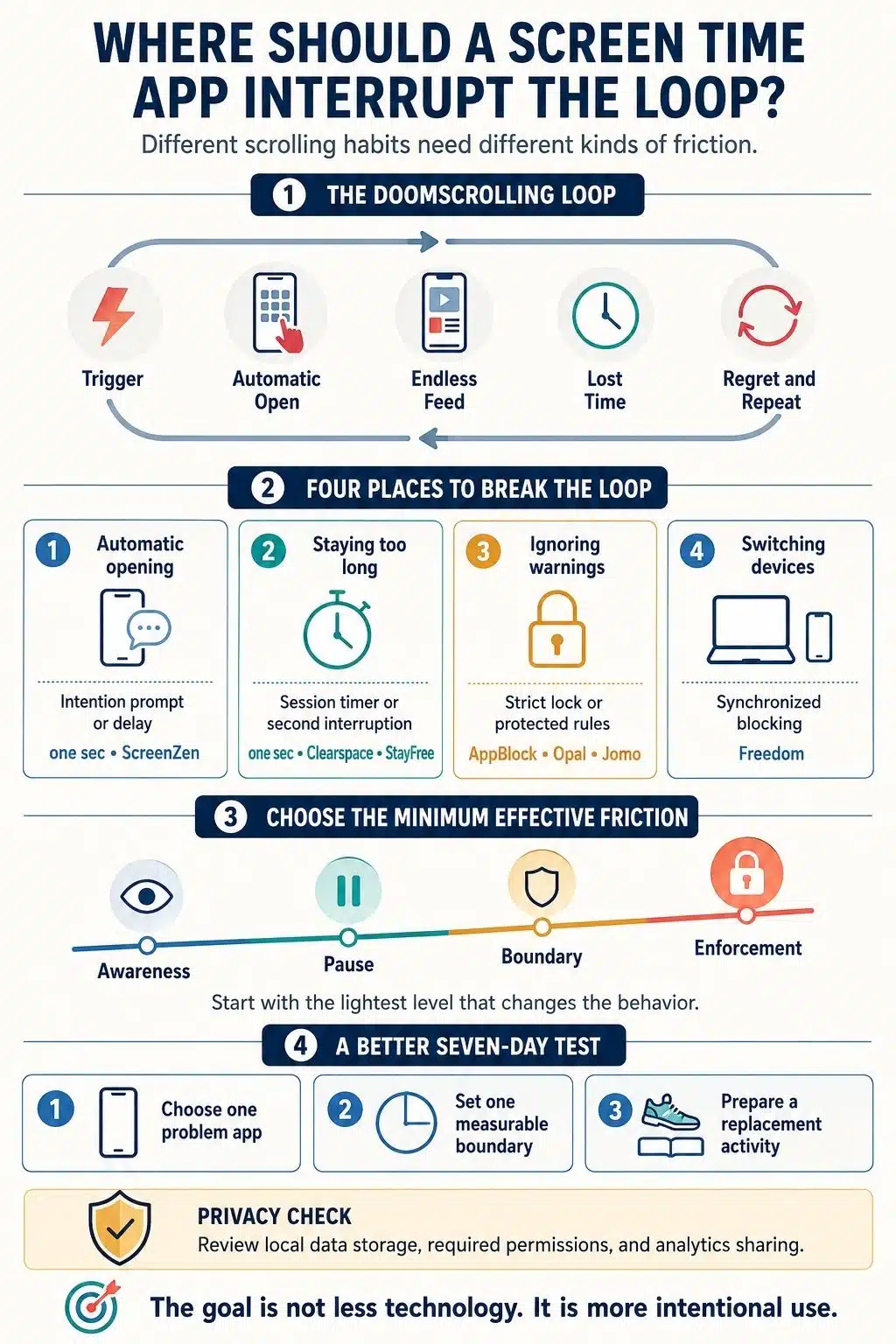
The right app depends on how your scrolling starts and why it continues. A gentle reminder will not help much if you dismiss every warning. A strict blocker may be excessive if the real problem is opening Instagram without thinking.
What Doomscrolling Means in This Comparison
Doomscrolling originally described compulsively consuming distressing news. The word is now also used more broadly for getting trapped in social feeds, forums, and short-form video. That wider behavior is the focus here.
Not all screen time is a problem. A useful app targets the behavior that feels automatic instead of treating reading, navigation, communication, and work as time that must be reduced.
For this ranking, I looked for tools that create at least one meaningful interruption:
- A pause before a distracting app opens
- A limit that ends or interrupts a scrolling session
- A schedule that protects sleep, work, or study time
- A restriction that is difficult to dismiss impulsively
- Blocking that follows the user across devices
Apps that only display charts may improve awareness, but they intervene after the time has already been lost.
The Best Screen Time Apps for Different Scrolling Habits
No single app handles every form of compulsive scrolling equally well. The nine options below range from gentle intention prompts to strict blocks that are deliberately inconvenient to remove. The best choice is the one that matches the point where your own limit usually fails.
1. one sec: Best Overall
one sec addresses a familiar part of doomscrolling: opening an app before consciously deciding to use it. It inserts a short intervention that may involve breathing, stating an intention, completing a small task, or deciding whether to continue.
Its Re-Intervention feature is just as important. A pause at the beginning can stop an automatic check, but it does not help if a planned two-minute visit becomes a 40-minute session. one sec can interrupt again after a chosen period, giving the user another chance to leave.
The free version covers one app or website. It works on iOS, Android, and desktop browsers, although the versions do not have complete feature parity.
It also has stronger research support than most apps in this category. A six-week field experiment with 280 participants found a substantial reduction in completed target-app openings. The result is promising, though one of the app’s developers co-authored the study.
I would start here if the main problem is reflexively opening one social or news app. It adds friction without demanding a complete digital lockdown.
2. ScreenZen: Best Free Screen Time App
ScreenZen offers an unusually deep set of controls without a subscription. Its donation-supported core app is free across iOS, Android, macOS, and Windows.
It can delay access, increase the wait after repeated openings, limit app launches, permit short sessions, schedule blocks, and set daily goals. This covers both opening an app too often and staying inside it too long.
Its flexibility takes time to configure. Finding rules that are firm without becoming annoying may require a few attempts, and softer limits can still be bypassed.
ScreenZen says its core blocking data remains on the device. Optional accountability and Halo hardware features require additional account and sharing data.
For someone who wants a capable free tool and is willing to spend time configuring it, ScreenZen is the clearest recommendation in this list.
3. Opal: Best Polished Hard Blocker
Opal combines a polished interface with progressively firmer restrictions. It supports recurring blocks, time and opening limits, immediate sessions, and progress reports.
The free version allows one rule. Pro adds unlimited rules, historical reporting, an allow-only mode, and settings that remove the option to unblock a restricted app.
The drawback is price. Opal costs considerably more than several strong alternatives, and its iPhone, Android, and Mac products do not offer an identical experience or one unified screen-time record.
Opal makes sense for someone who wants a refined app, clear progress feedback, and hard limits in the same place. It is difficult to justify if one sec or ScreenZen already provides enough friction.
4. Freedom: Best for Blocking Across Multiple Devices
A phone restriction is easy to defeat if the same feed is waiting on a laptop. Freedom is built for that problem.
It blocks apps, websites, custom lists, or the entire internet across iOS, Android, Windows, macOS, and Chrome. Sessions can run on a schedule and across several devices at once. Locked Mode makes an active session harder to change.
Freedom is more distraction blocker than phone-habit coach. It offers fewer intention prompts and less granular mobile guidance, while its main synchronized features require payment.
I would choose Freedom for someone who blocks Reddit on a phone and then opens it in a browser. It closes the obvious escape route without adding another complicated habit system.
5. Jomo: Best for Flexible Rules on Apple Devices
Jomo is one of the more imaginative options in the Apple ecosystem. Its rules can use openings, schedules, screen-time budgets, and conditions.
A user can require time in a useful app before opening a distracting one, exchange exercise for access, protect a wind-down period, or simplify an iPhone into something closer to a basic phone. Strict Mode is available when ordinary limits are too easy to change.
The free plan includes one session, one action or limit, one budget, and reports. The paid plan is priced below some close premium competitors.
The decision is simple for Android users: Jomo is not available to them. For iPhone, iPad, and Mac users who want conditional rules rather than a blunt timer, it is one of the best-value choices.
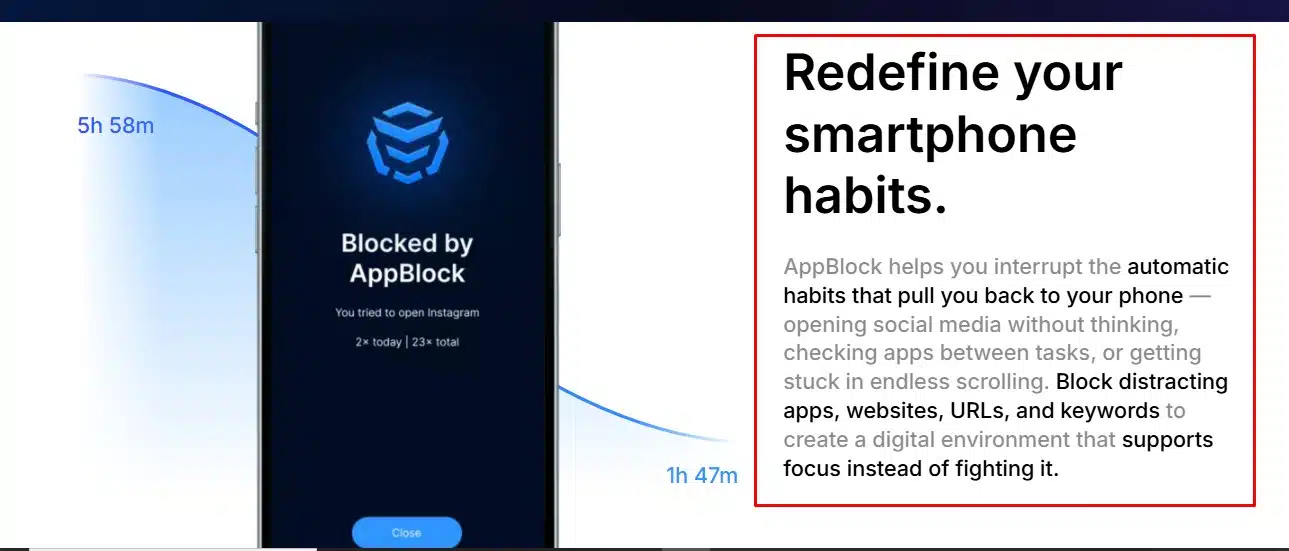
6. AppBlock: Best for Strict Enforcement
AppBlock is for people who already know what happens after a limit appears: they turn it off.
Strict Mode can protect schedules and blocklists from impulsive editing. Unlocking may require a cooldown, PIN, charger connection, or another person’s approval. Profiles can activate by time, day, location, or Wi-Fi.
On supported setups, AppBlock can target distracting parts of an app or site. That helps when YouTube is needed for tutorials but Shorts is the real problem.
Test a short restriction before making it strict. A badly planned rule can lock someone out of a necessary app at the wrong time.
AppBlock is the strongest choice here for people who repeatedly dismantle softer controls and want that escape to become inconvenient.
7. Roots: Best for Replacing the Scrolling Habit
Blocking creates empty time. Roots pay more attention to what should fill it. Its Scroll Replacements encourage users to name activities they would rather do. The app also combines opening limits, downtime, goals, streaks, and a stricter Monk Mode.
Removing a feed does not remove boredom or the urge for stimulation. A prepared alternative makes it less likely that another low-value app will take its place.
Its Balance Score and “Digital Dopamine” ratings are product metrics, not clinical measures of addiction or brain chemistry.
The free plan includes insights, replacement activities, and two blockings. Roots remains iPhone-only, but it is a thoughtful option for behavior change that means more than reducing a number.
8. Clearspace: Best for Accountability
Clearspace adds a breathing or physical pause before selected apps. A user can also set the intended session length and have the app end it automatically.
Its distinguishing feature is accountability. A trusted person can be notified when the user breaks a budget or removes Clearspace. That small social cost may work better than a rule controlled alone.
One app can be restricted for free. The iOS version is the stronger product; Clearspace’s own materials note that Android does not yet include all of the same data-visualization features.
Accountability should be voluntary. This is for someone who has asked a trusted person to help protect a specific boundary, not for quietly monitoring another adult.
9. StayFree: Best for Analytics and Feed-Level Controls
StayFree offers usage reports, instant blocks, schedules, daily limits, and session limits across phones, computers, and browsers.
Its most useful feature is selective in-app blocking. It can hide distracting areas while preserving direct messages or intentional searches.
StayFree ranks ninth because of privacy, not capability. It is part of Sensor Tower’s digital wellbeing suite. The current policy describes consent-based collection of app and website usage information and says anonymized information may be used in commercial products and AI training. It also provides controls and states that personal information is not sold, but the data model remains broader than some readers will want.
StayFree is powerful for detailed analytics and precise feed control. Privacy-conscious users should read the current policy before granting usage and accessibility permissions.
When Built-In Screen Time Controls Are Enough
Before installing another app, try the controls already on the phone. Apple Screen Time and Google’s Digital Wellbeing can set app limits, schedule downtime or Focus Mode, and show where time goes.
Built-in tools are enough when the problem is mild and reminders are usually respected. They also avoid another subscription and another company receiving usage access.
If the limit is extended every day, information is not the problem. That is the point to consider an opening delay, forced session ending, accountability, or stricter enforcement.
A Blocker Cannot Decide What Replaces Scrolling
Blocking five apps on the first day often makes the phone so inconvenient that every rule is soon removed. A smaller experiment produces better information.
Choose one high-risk app and one measurable boundary: no social media before 9 a.m., two planned openings per day, or a 15-minute session. Then prepare an easy replacement, such as a book, a short walk, or one specific task.
If the rule is ignored, add friction. If it blocks something useful, narrow it. The aim is to interrupt the behavior often enough that using the phone becomes a decision again.
Which Screen Time App Should You Choose?
one sec is the best screen time app for most people trying to curb doomscrolling because it interrupts automatic behavior without immediately imposing a hard lock. ScreenZen is the better first choice when cost matters, and Opal offers a more polished experience for people willing to pay for strict controls.
AppBlock is the strongest option when every softer limit gets disabled. Freedom handles the habit that moves across devices, Jomo offers excellent rule flexibility for Apple users, and Roots gives more attention to replacing the behavior. Clearspace is built around accountability, while StayFree offers valuable analytics with a privacy trade-off that deserves careful consideration.
Start with the least restrictive tool that can solve the actual problem. The purpose of a screen time app is not to make a smartphone unusable. It is to create enough space between impulse and action for choice to return.
Frequently Asked Questions on the Best Screen Time Apps
1. What is the best free screen time app?
ScreenZen is the best free option because its donation-supported core app includes opening delays, short sessions, daily limits, schedules, and website blocking. Apple Screen Time and Google Digital Wellbeing are also sensible for basic limits.
2. Do screen time apps actually stop doomscrolling?
They can reduce it when the intervention matches the habit. Opening delays help with automatic taps, session limits help after scrolling begins, and strict blocks help when reminders are dismissed. A replacement activity still matters.
3. Is one sec better than Opal?
One sec is better for a mindful pause and low-cost habit change. Opal suits people who want a polished interface, progress feedback, and harder restrictions. I would try one sec before paying for Opal.
4. Can screen time apps be bypassed?
Most can be bypassed somehow. AppBlock, Opal, and Jomo make overrides harder, while Clearspace adds accountability. Test strict restrictions before using them for long periods.
5. Are screen time apps safe and private?
Privacy varies. These tools may need screen-time data, app usage, accessibility services, or web filtering. Read the current policy, check required permissions, and avoid enabling features you do not need.