
Have you ever built a beautiful frontend, deployed it, and watched it immediately break? Your code works perfectly on your local machine. Then, the browser console flashes angry red text about “Cross-Origin Resource Sharing”. Resolving CORS Errors in Web Applications is a common hurdle, and you are completely normal for feeling stuck.
A recent December 2025 review showed developers have asked over 14,600 questions about this exact issue on Stack Overflow alone. Browsers block requests from different domains to protect users from hackers. This security measure is crucial, but it often stops your own legitimate code from working.
I will walk you through the entire process step by step. We will decode the confusing error messages together. You will learn practical steps to fix these issues right now.
Ready to fix this?
Exploring CORS and the Same-Origin Policy (SOP)
Your browser blocks requests that cross domain boundaries to protect your personal data. This critical security feature is called the Same-Origin Policy.
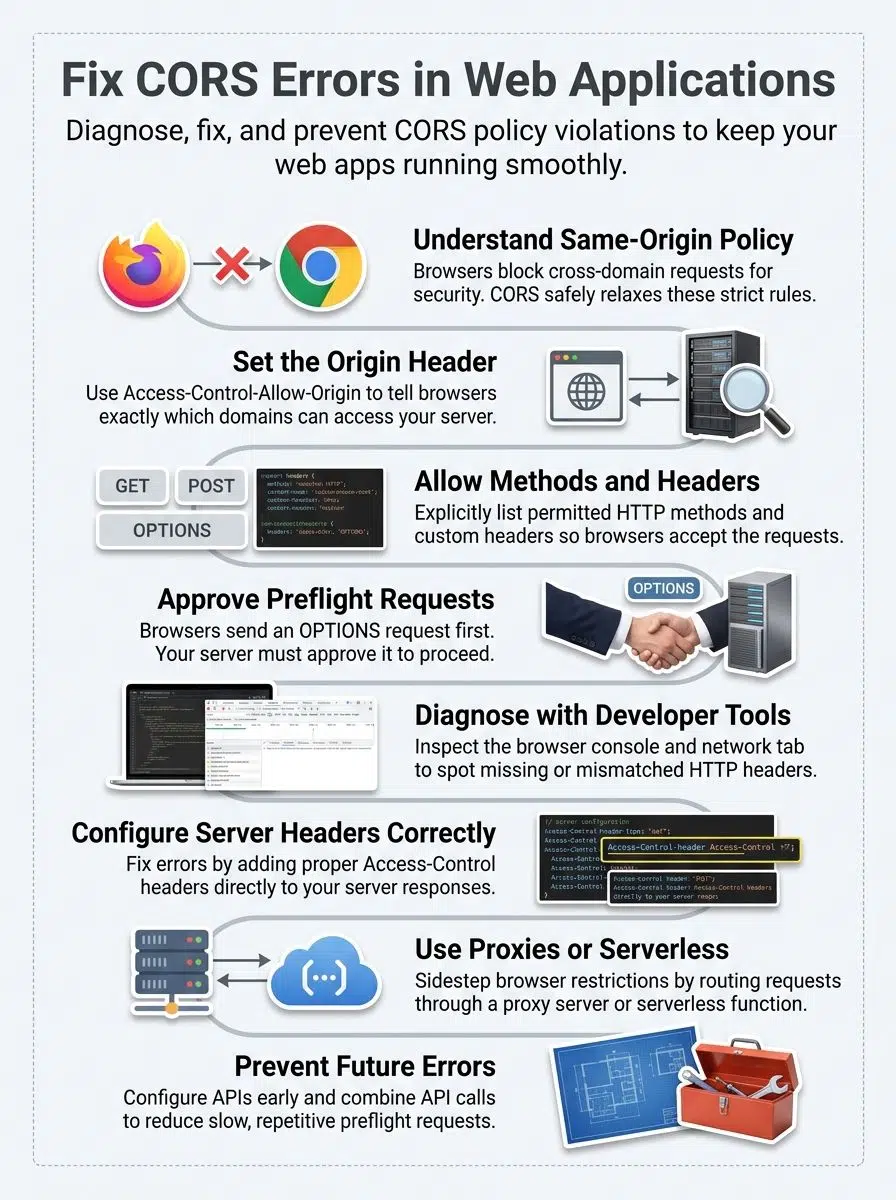
CORS simply gives servers a safe way to relax this strict restriction. It allows developers to permit specific cross-origin requests while keeping attackers out.
What causes CORS errors?
CORS errors pop up when a web browser, like Google Chrome or Mozilla Firefox, blocks a request from one website to another. Your browser actively enforces the Same-Origin Policy, or SOP for short.
This policy acts exactly like a security guard. It stops scripts running on one domain from accessing sensitive data on a completely different domain.
The browser compares the protocol, domain name, and port number of the request. If any of these three pieces differ, the browser flags it as a cross-origin request. Without the correct HTTP headers from the server, the browser instantly rejects the request.
Server configuration plays a massive role in triggering these frustrating errors. Your backend might simply lack the correct Access-Control-Allow-Origin header in its response. Preflight requests fail immediately when the server rejects them before your actual API request even gets sent.
Common scenarios for CORS errors
CORS errors pop up frequently during standard Web Development tasks. Your application hits a wall when the browser blocks requests that cross domain boundaries.
Here are the most typical situations you will encounter:
- Differing Local Ports: Your frontend on localhost:5173 requests data from an API on localhost:3000. The browser treats different ports as completely different origins.
- Unlisted Mobile Apps: A mobile app built with a frontend framework sends API requests to a backend server. The server only permits requests from specific web domains, so it blocks your app.
- Failed Preflight Checks: Your JavaScript code makes a preflight request using the OPTIONS method to check permissions. The server rejects this check because it lacks proper CORS configuration.
- Restricted HTTP Methods: Your web security settings restrict requests to specific actions like GET and POST. Your application attempts to use a DELETE method, and the server refuses it.
- Misconfigured CDNs: A single-page application loads resources from a content delivery network. The CDN server forgets to include proper CORS headers, causing the browser to block the load.
Key HTTP Headers for CORS
Your server talks to browsers through special HTTP headers. These headers control exactly what requests go through and what requests get blocked.
They act like strict bouncers at an exclusive club. They decide who gets past the door and who gets turned away.
Access-Control-Allow-Origin
“CORS errors happen because servers and browsers speak different languages about who gets to talk to whom.”
The Access-Control-Allow-Origin header acts as the main bouncer at your web application’s door. This HTTP header tells the browser exactly which domains can make requests to your server.
Your server sends this header back in its HTTP response. The browser checks it before allowing the actual data through to your frontend code.
If the header says your domain is welcome, the request succeeds perfectly. If it is missing or specifies a different domain, the browser blocks everything. Setting this header correctly makes all the difference in fixing CORS policy violations.
Access-Control-Allow-Methods
Your server uses the Access-Control-Allow-Methods header to tell browsers which HTTP actions it happily accepts. Browsers always check this header before sending requests across different origins.
If your API only allows GET requests but a frontend app sends a POST, the browser blocks it immediately. Misconfiguring this specific header causes massive headaches for frontend developers.
Here is a quick breakdown of common methods you might need to allow:
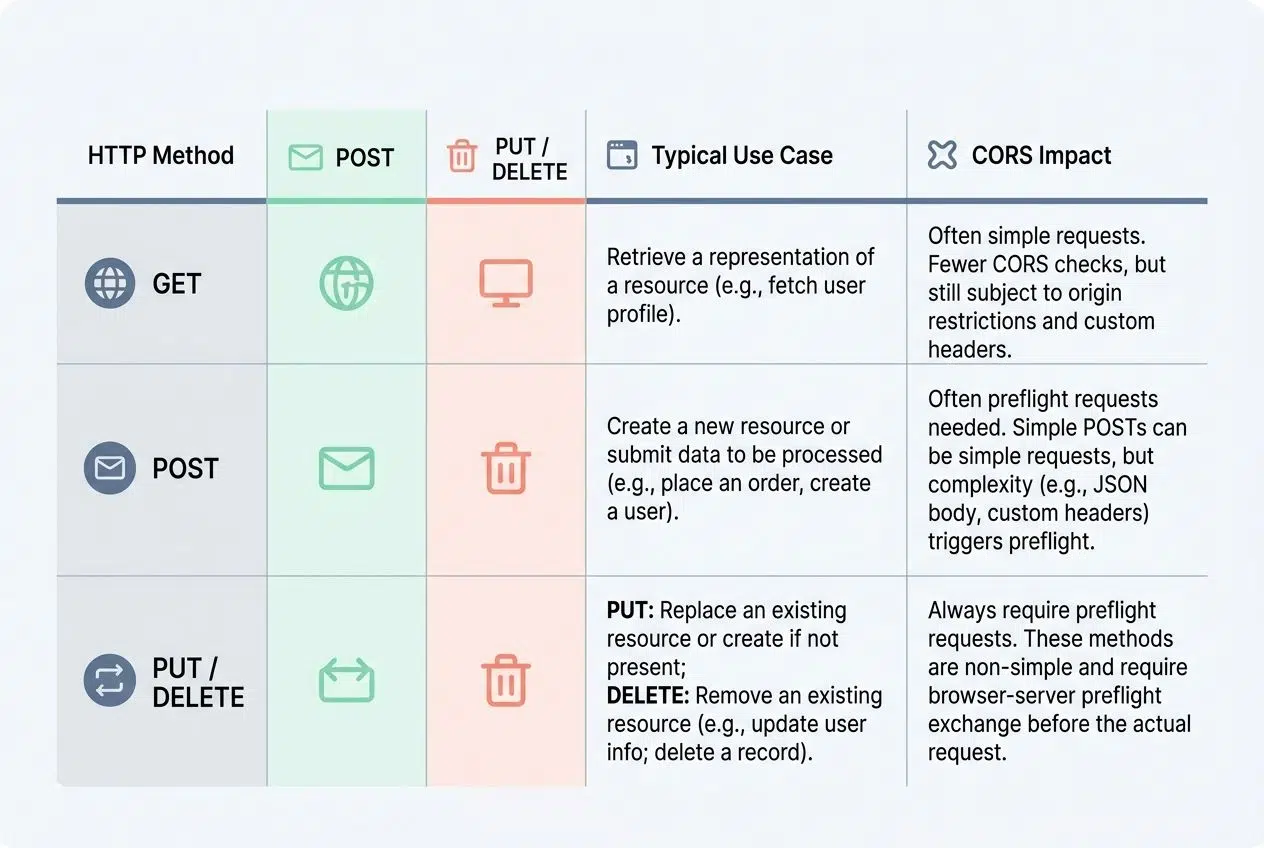
| HTTP Method | Typical Use Case | CORS Impact |
|---|---|---|
| GET | Fetching data from the server. | Often allowed by default as a simple request. |
| POST | Sending new data to the server. | Requires explicit permission if sending JSON data. |
| PUT / DELETE | Updating or removing existing data. | Always triggers a preflight request first. |
This simple server configuration step saves you from mysterious failures during ClientServer Communication.
Access-Control-Allow-Headers
The Access-Control-Allow-Headers HTTP header tells your browser which custom headers the server accepts during cross-origin requests. Your API often needs special headers to work properly.
For instance, developers frequently use the “Authorization” header to pass JSON Web Tokens for secure login. The server sends this header back to confirm it officially accepts those specific custom items.
Without it, browsers block your requests immediately. This header matters deeply because browsers send a preflight request first to ask permission. The server must explicitly list every custom header it allows, or the entire operation fails.
Key Reasons for CORS Errors
CORS errors pop up when your server and browser disagree on who gets to talk to whom. Missing headers, rejected preflight checks, and strict server settings all throw wrenches into your application.
Incorrect or Absent HTTP Headers
Your server talks to browsers strictly through HTTP headers. Missing or incorrect headers break that conversation instantly.
Think of headers like clear shipping instructions on a package. They tell the browser exactly what it can and cannot do with the response data.
Missing headers usually happen because of these common developer mistakes:
- Forgetting Endpoint Configurations: Leaving headers off when building brand new API endpoints in backend frameworks like Express.js.
- Faulty Middleware: Creating custom middleware that simply fails to attach Access-Control-Allow-Methods to outgoing responses.
- Server Crash Responses: Letting the backend return a 500 server error without attaching CORS headers to the error message itself.
If your server rejects preflight requests because headers are missing, the actual API request never happens.
Inadequate Configuration for Cross-Origin Requests
Your server might fail to send the right CORS headers, which blocks completely legitimate requests from other domains. This happens frequently when developers forget to set up Access-Control-Allow-Origin headers properly.
The browser sees this missing information and stops the request cold. Misconfigured middleware can also cause identical problems. It might simply fail to pass CORS headers through to the client.
A common mistake involves Domain restrictions. An Access-Control-Allow-Origin header might strictly list only one specific domain. Your frontend framework might be calling from a slightly different subdomain, causing a complete failure.
An excellent tip from the web development community is to watch out for cached errors. Modern browsers like Google Chrome often cache failed preflight responses for a specific time. You might fix the server configuration, but the browser keeps blocking the request until you clear your cache.
Server’s Rejection of Preflight Requests
Preflight requests happen right before your browser sends the actual API request. Your browser first asks the server if it has explicit permission to make the cross-origin call.
The server must respond with the correct HTTP headers to approve this initial check. If the server rejects the preflight request, your actual request never gets sent.
Servers typically reject preflight requests for a few specific reasons:
- Missing Origin Header: The server completely forgets to include the Access-Control-Allow-Origin header in the preflight response.
- Unsupported Methods: The server does not explicitly list your intended HTTP action in the Access-Control-Allow-Methods header.
- Blocked Custom Headers: Your frontend sends a unique header, but the server does not whitelist it in Access-Control-Allow-Headers.
Configuring your server properly to handle OPTIONS requests prevents these frustrating rejections.
Techniques to Diagnose CORS Errors
You will spot CORS problems much faster when you know exactly where to look. Modern browsers provide excellent built-in tools to help you quickly identify the exact configuration gap.
Reviewing Browser Console Logs
Your browser’s console is your absolute best friend when CORS errors strike. Open the developer tools, click on the console tab, and look for bright red error messages.

“A CORS error in the console is a symptom, not the root cause. The actual problem always lives in your server’s header configuration.”
These crucial warnings tell you exactly what went wrong. They show which origin got blocked and exactly why the server rejected your API request.
The console displays the full error text, so read it very carefully. In Google Chrome, the console often explicitly states if the Access-Control-Allow-Origin header is missing. Firefox provides a highly specific “Reason” code right in the log.
Pinpointing the Source of the Error
Open your browser’s developer tools by pressing F12 or right-clicking on the page and selecting “Inspect”. The Console tab displays CORS error messages that reveal exactly what failed.
These messages show the blocked URL, the origin that made the request, and the specific missing HTTP headers. Cross-reference this information with your server configuration to spot any obvious gaps.
Check the Network tab to examine the actual HTTP headers sent and received. Click on the failed request and look closely at both the Request Headers and Response Headers sections.
An important pro-tip for modern development: browsers often mask underlying server crashes as CORS errors. If your backend throws a 500 Internal Server Error, it might drop the CORS headers from the crash response.
The browser sees the missing headers and reports a CORS policy violation, even though the real issue is a broken backend script. Always check the actual HTTP status code first.
Effective Strategies to Fix CORS Errors
You can tackle CORS errors through several highly practical methods. These reliable solutions work directly on your server or through clever alternative architectural approaches.
Setting Appropriate CORS Headers on the Server
Your server holds the keys to fixing CORS problems permanently. By adding the right HTTP headers to your server responses, you tell browsers that cross-origin requests are completely safe.
The Access-Control-Allow-Origin header explicitly tells the browser which specific domains can access your resources. You should follow a few clear rules when configuring this:
- Use Exact Domains: Set the header to match your specific frontend domain exactly.
- Avoid Wildcards: Do not use the “*” wildcard if your application handles sensitive user data or requires any authentication.
- Configure Methods: Always add Access-Control-Allow-Methods to specify which HTTP actions your server accepts.
In popular backend environments like Node.js with Express, developers use a dedicated CORS middleware package. This helpful middleware automatically attaches the correct headers to every single route, saving you hours of manual coding.
Utilizing a Proxy Server
A proxy server acts as a highly helpful middleman between your frontend application and your backend API. The proxy neatly intercepts cross-domain requests and forwards them on your behalf.
This approach smoothly sidesteps CORS policy restrictions. The browser simply sees all requests coming from the exact same origin.
Developers frequently use specific tools to handle proxying based on their environment:
- Vite Dev Server: Uses the server.proxy setting to forward local frontend requests to a local backend port effortlessly.
- Webpack Dev Server: Offers a nearly identical proxy configuration for React apps built with Create React App.
- Nginx: Acts as a powerful production reverse proxy that handles CORS headers before requests even touch your application code.
Vite will automatically forward any calls from your local frontend port right to your local backend. The browser never sees the cross-origin jump, completely eliminating those frustrating local development CORS errors.
Employing Serverless Functions
Serverless functions offer a smart way to dodge CORS errors without managing your own permanent server infrastructure. Cloud providers host your code, and you only pay for the exact compute time you use.
Your serverless function sits directly between your frontend and your API. It acts as a middleman that handles all the cross-origin resource sharing headaches.
Recent updates to cloud platforms have made this even easier. If you use AWS API Gateway to route requests to your Lambda functions, you can choose the newer HTTP API type. These HTTP APIs have built-in CORS support that handles the OPTIONS preflight automatically.
You no longer need to write manual header responses in your code. You simply specify your allowed origins in the cloud console, and the gateway acts like your personal bouncer.
Proactive Measures to Prevent CORS Errors
You stop CORS problems before they ever start by setting up your server correctly from day one. Smart planning effectively saves you hours of frustrating debugging later.
Ensuring Proper API Setup
Your API setup forms the complete foundation for perfectly smooth cross-origin resource sharing. Start by defining clear endpoints that your server will explicitly expose to external domains.
You should follow a few core practices when setting up a new API to avoid issues:
- Define Allowed Origins Early: Maintain an environment variable listing your allowed frontend URLs.
- Implement Global Middleware: Apply CORS configuration globally in your application framework so you never forget a route.
- Test with Real Tools: Use tools like Postman to simulate requests from different origin headers before you deploy to production.
This proactive approach guarantees that your server responds with the proper CORS headers in every single response. It effectively prevents policy violations before your users ever see them.
Reducing the Number of Preflight Requests
Preflight requests occur when your browser sends an OPTIONS request to check if the server permits your actual request. These extra checks use up valuable network time and slightly slow down your application.
You can reduce preflight requests by making smart decisions about your API requests. Simple requests, such as GET or POST calls with basic headers, avoid the preflight step entirely. Sticking strictly to these methods helps keep your Network Requests lightning fast.
You can also dramatically reduce preflight volume by caching the approvals. Servers can send an Access-Control-Max-Age header in their preflight response. This useful header instructs the browser to cache the successful permission check for a specific amount of time, often up to 24 hours.
The browser will not send another OPTIONS request to that specific URL until the time expires. These highly practical steps make your web applications run faster.
Final Thoughts
Resolving CORS Errors in Web Applications stops feeling intimidating once you truly understand how the browser and server communicate. You have learned how to spot these errors in your browser console and apply real fixes that actually work.
Setting proper HTTP headers on your server, configuring a development proxy, or deploying modern serverless functions will solve the problem quickly. These proven methods speed up your development and keep your web applications running smoothly across any domain.
Developers everywhere face CORS obstacles constantly, yet you can now resolve them within minutes by applying these straightforward techniques. Take action today, test these smart strategies in your next project, and watch your cross-origin requests flow perfectly without any friction.
Frequently Asked Questions (FAQs) on CORS Errors
1. What is a CORS error in web applications?
A CORS error happens when your browser blocks a website from accessing data from a different domain due to Cross-Origin Resource Sharing security rules. Think of it like a security guard stopping you at the door because you don’t have the right pass. Your browser is just trying to keep your data safe.
2. Why do browsers block requests with CORS errors?
Browsers enforce the Same-Origin Policy, a web security standard from the 1990s, to protect your sensitive data from malicious sites. They stop websites from grabbing information they shouldn’t have access to.
3. How can I fix a CORS error while building my app?
You can add the Access-Control-Allow-Origin header to your server response to tell the browser which sites are allowed to access your resources. This simple fix usually takes just a few lines of code in your backend configuration.
4. Are there risks if I just turn off all CORS protections?
Yes, big ones! Turning off these protections exposes your users to Cross-Site Request Forgery attacks, where malicious sites can make unauthorized requests using your users’ credentials.