Choosing SaaS tech stack is one of those decisions that looks technical on the surface but becomes business-critical very quickly. The tools you pick decide how fast you can build, how safely you can handle customer data, how expensive your infrastructure becomes, and how painful future changes will be.
I have seen early SaaS teams make this decision in two very different ways. Some overthink it for weeks and never ship. Others pick trendy tools too quickly and spend months fighting their own architecture. Both mistakes come from the same place: choosing technology before understanding the product, customer, workflow, budget, and team skill.
A SaaS tech stack is not just a frontend framework and a database. It includes your application framework, backend, database, authentication, billing, hosting, storage, analytics, observability, email, AI layer, security tools, testing setup, deployment flow, and support systems. Every piece affects the rest. In 2026, SaaS stack selection matters even more because software teams have more choices than ever. AI coding tools, managed databases, serverless platforms, edge hosting, no-code builders, API-first products, and cloud-native infrastructure have made it easier to build. But they have also made it easier to create a messy stack that becomes expensive, fragile, and hard to maintain.
This guide helps founders, product managers, indie hackers, and early SaaS teams make smarter SaaS technology choices before building too much. If your first cluster was about validating the idea, this one is about choosing the foundation that can turn that validated idea into a reliable product. The full build journey connects naturally with Building a SaaS Product from Idea to Launch.
What Choosing SaaS Tech Stack Really Means
Choosing SaaS tech stack means selecting the core technologies, platforms, services, and workflows that will power your product from MVP to growth. It is not only a developer preference. It is a product decision, a cost decision, a security decision, and a long-term maintenance decision. A good stack helps you build quickly without trapping you later. A bad stack creates hidden friction. You may ship the first version fast, but then struggle with authentication, tenant data separation, billing events, background jobs, slow dashboards, API limits, or poor observability.
The mistake many founders make is asking, “What is the best tech stack?” That question is too broad. The better question is, “What is the best stack for this product, this team, this customer, this budget, and this stage?” A simple SaaS tool for solo creators does not need the same stack as an enterprise compliance platform. An AI-heavy workflow product has different needs from a scheduling app. A data dashboard needs different database choices from a document collaboration platform.
| Stack Area | What It Covers | Why It Matters |
| Frontend | Web app interface, components, UI framework | Controls user experience and development speed |
| Backend | APIs, business logic, server-side workflows | Handles core product behavior |
| Database | Customer data, product records, tenant separation | Affects reliability, performance, and reporting |
| Authentication | Login, user roles, sessions, permissions | Protects accounts and customer access |
| Billing | Subscriptions, invoices, trials, usage pricing | Turns the product into a business |
| Hosting | Deployment, scaling, regions, uptime | Impacts speed, cost, and reliability |
| Storage | Files, uploads, documents, media | Needed for many SaaS workflows |
| Observability | Logs, metrics, traces, alerts | Helps find and fix issues quickly |
| Security | Access control, encryption, vulnerability management | Builds trust and reduces risk |
| Integrations | APIs, webhooks, third-party tools | Makes the SaaS fit existing workflows |
A SaaS stack should match the product’s risk. If the biggest risk is speed to market, choose boring and managed tools. If the biggest risk is data security, prioritize access control and isolation. If the biggest risk is AI cost, design metering and usage tracking early.
Why SaaS Technology Choices Matter More in 2026
In 2026, building SaaS has become easier, but operating SaaS has become more complex. A founder can launch a good-looking MVP with managed hosting, authentication, payments, and AI APIs faster than before. That speed is useful, but it can hide weak architecture.
Current developer trends show strong adoption of typed languages, cloud platforms, container tools, serverless workflows, and AI-assisted coding. TypeScript continues to be a major choice for SaaS teams because it gives JavaScript teams stronger structure. Python remains important for AI, automation, data workflows, and backend services. Kubernetes and cloud-native platforms are widely used in production, but they can be too heavy for a small MVP.
That is the real challenge. The modern SaaS founder has access to enterprise-grade tools from day one. But early products do not need enterprise complexity from day one. Your stack should help you answer customer needs faster. It should not become a technical museum of every tool you admire. I like to treat the early stack as a product constraint: what is the simplest reliable setup that lets the team test, ship, charge, learn, and support customers?
| 2026 Reality | What It Means for SaaS Stack Selection | Founder Takeaway |
| AI coding tools speed up development | More code can be produced faster | Code review, testing, and architecture matter more |
| Managed platforms are mature | Small teams can launch faster | Use managed tools where they reduce risk |
| Cloud costs are under pressure | Usage-based tools can surprise teams | Track cost from the beginning |
| Buyers care about security | Weak access control can kill trust | Build secure defaults early |
| SaaS products need integrations | Customers expect tools to connect | Plan APIs and webhooks carefully |
| Data workflows are growing | More products need analytics and automation | Choose database and queue systems thoughtfully |
| Multi-tenant SaaS is common | Customers share infrastructure logically | Design tenant separation before launch |
| Observability is now essential | Bugs are harder to diagnose in distributed systems | Add logs, metrics, and alerts early |
The best stack is usually not the trendiest one. It is the one your team can understand, ship, monitor, secure, and afford.
Start With Product Requirements, Not Favorite Tools
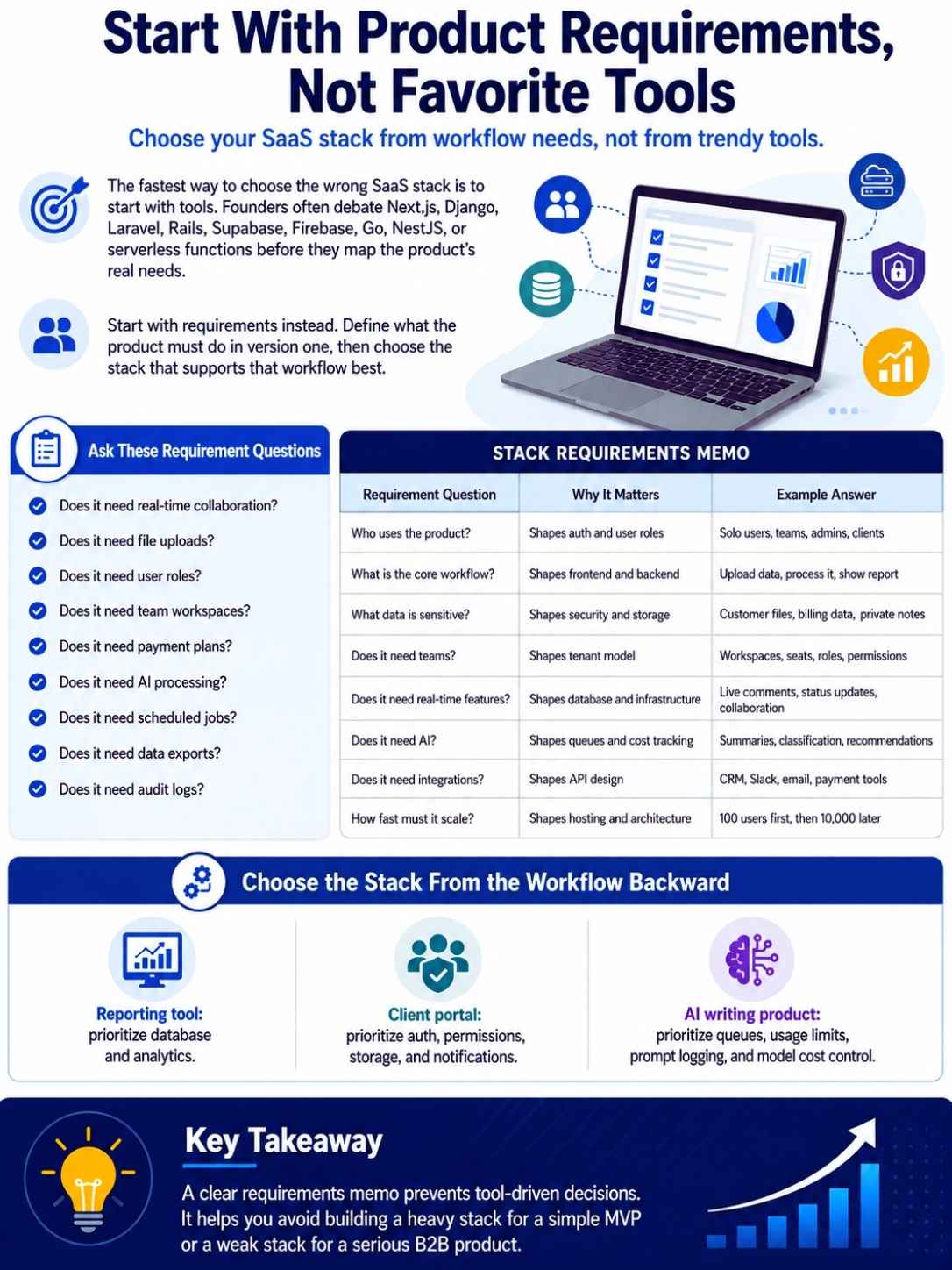
The fastest way to choose the wrong SaaS stack is to start with tools. Founders often ask whether they should use Next.js, Django, Laravel, Rails, Supabase, Firebase, Go, NestJS, or serverless functions before they have mapped the product’s real needs.
Start with requirements instead. What does the product need to do in the first version? Does it need real-time collaboration? Does it need file uploads? Does it need user roles? Does it need team workspaces? Does it need payment plans? Does it need AI processing? Does it need scheduled jobs? Does it need customer data exports? Does it need audit logs?
A stack should be chosen from the workflow backward. If your SaaS is a reporting tool, the database and analytics layer matter. If it is a client portal, authentication, permissions, file storage, and notifications matter. If it is an AI writing product, queues, usage limits, prompt logging, and model cost control matter. When I review a SaaS idea, I like to write a “stack requirements memo” before touching tool choices. It keeps the conversation grounded.
| Requirement Question | Why It Matters | Example Answer |
| Who uses the product? | Shapes auth and user roles | Solo users, teams, admins, clients |
| What is the core workflow? | Shapes frontend and backend | Upload data, process it, show report |
| What data is sensitive? | Shapes security and storage | Customer files, billing data, private notes |
| Does it need teams? | Shapes tenant model | Workspaces, seats, roles, permissions |
| Does it need real-time features? | Shapes database and infrastructure | Live comments, status updates, collaboration |
| Does it need AI? | Shapes queues and cost tracking | Summaries, classification, recommendations |
| Does it need integrations? | Shapes API design | CRM, Slack, email, payment tools |
| How fast must it scale? | Shapes hosting and architecture | 100 users first, then 10,000 later |
A clear requirements memo prevents tool-driven decisions. It helps you avoid building a heavy stack for a simple MVP or a weak stack for a serious B2B product.
Decide What Type of SaaS You Are Building
Different SaaS products need different stacks. This sounds obvious, but many early teams copy a stack from a product that has a completely different business model.
A self-serve SaaS needs fast signup, simple billing, onboarding, product analytics, and automated emails. A sales-led B2B SaaS needs admin controls, onboarding support, audit logs, CRM tracking, and sometimes stronger security documentation. An AI SaaS needs usage metering, job queues, retry logic, rate limits, model fallback, and cost monitoring. A data SaaS needs strong database design, reporting, imports, exports, and background processing. Do not choose the stack as if every SaaS product is the same.
| SaaS Type | Stack Priorities | Common Risks |
| Self-serve SaaS | Fast onboarding, billing, analytics, email | Weak activation tracking |
| B2B team SaaS | Workspaces, roles, permissions, audit logs | Poor tenant separation |
| AI SaaS | Queues, usage limits, prompt logs, model routing | High API cost and slow responses |
| Data dashboard SaaS | Database design, ETL, caching, reporting | Slow queries and messy imports |
| Marketplace SaaS | Payments, profiles, messaging, trust systems | Complex transaction logic |
| Collaboration SaaS | Real-time updates, comments, notifications | Sync bugs and permission issues |
| Compliance SaaS | Security, audit logs, access control, exports | Weak trust and documentation |
| Mobile-first SaaS | API-first backend, push notifications, offline states | Inconsistent cross-platform experience |
Your product type should influence the stack more than developer fashion. A good stack supports the product’s natural behavior.
Choose the Frontend Stack for Speed and Maintainability
The frontend is where users feel the product. It controls the dashboard, forms, onboarding, settings, reports, and product experience. A SaaS frontend must be fast enough, stable enough, and easy enough to improve. For many web-based SaaS products in 2026, React and Next.js remain common choices. React’s component model works well for dashboards and interactive interfaces. Next.js is popular because it combines frontend routing, server rendering, API routes, and full-stack patterns in one framework. The App Router and Server Components model can be powerful, but it also requires discipline.
That said, React is not the only answer. Vue, Nuxt, SvelteKit, Angular, Remix, Laravel with Livewire, and other frameworks can work well. The right choice depends on your team’s skill, hiring market, product complexity, and deployment plan. For an early SaaS team, I usually prefer frontend choices that make forms, tables, settings screens, dashboards, and permissions easy to build. A SaaS product is often less about fancy animation and more about clean workflow.
| Frontend Choice | Best For | Watch Out For |
| Next.js | Full-stack React SaaS, SEO pages, dashboards | Complexity if team misunderstands server/client boundaries |
| React SPA | App-heavy SaaS dashboards | Need separate backend and routing decisions |
| Vue or Nuxt | Teams that prefer Vue ecosystem | Smaller hiring pool in some markets |
| SvelteKit | Lightweight apps and fast development | Smaller ecosystem than React |
| Angular | Large enterprise teams and structured apps | Heavier learning curve |
| Laravel Blade or Livewire | PHP teams building SaaS fast | Less ideal for highly interactive apps |
| Mobile frontend | React Native, Flutter, native apps | API design and offline state become important |
| Component libraries | Faster UI development | Generic design if not customized carefully |
The best frontend stack is the one your team can change quickly without fear. If every UI change breaks three screens, your stack is already slowing learning.
Pick a Backend That Matches Your Team and Product Logic
The backend handles business rules. It decides who can access what, what happens when someone upgrades, how data moves between systems, when emails go out, how jobs run, and how integrations behave.
This is where SaaS stack selection becomes serious. A simple MVP may work well with a backend-as-a-service platform, serverless functions, or a full-stack framework. A more complex SaaS may need a dedicated backend with clear services, queues, workers, and APIs.
Common backend choices include Node.js with Express, NestJS, or Fastify; Python with Django, FastAPI, or Flask; Ruby on Rails; Laravel; Go; Java with Spring Boot; and .NET. All can work. The language is less important than whether the team can build, test, debug, and maintain it. I prefer boring backend choices for early SaaS unless the product has a special technical need. Boring does not mean weak. It means proven, documented, easy to hire for, and easy to debug at 2 a.m.
| Backend Option | Good Fit | Main Tradeoff |
| Node.js or TypeScript | Full-stack JS teams, APIs, SaaS dashboards | Needs discipline around structure |
| NestJS | Larger TypeScript backends | More setup than simple Express |
| Python Django | Admin-heavy SaaS, data workflows, fast backend build | Less trendy for some frontend-heavy teams |
| Python FastAPI | AI APIs, data services, modern Python backends | More decisions needed around app structure |
| Ruby on Rails | Fast CRUD SaaS, mature conventions | Smaller talent pool in some regions |
| Laravel | PHP teams, fast SaaS development | Ecosystem preference varies by market |
| Go | Performance, infrastructure tools, APIs | Slower for product-heavy CRUD MVPs |
| Java or .NET | Enterprise SaaS, large teams, strict architecture | Heavier for solo founders or tiny teams |
The backend should make the core product logic clear. If a new developer cannot understand billing, permissions, and tenant logic after reading the codebase, the stack may be too clever or too messy.
Choose the Database Carefully
Database choice is one of the hardest things to change later. You can swap UI libraries. You can change email providers. You can even move hosting. But changing your primary database after customers depend on your product can be painful.
For most SaaS products, PostgreSQL is a strong default. It supports relational data, transactions, indexing, JSON fields, full-text search features, extensions, and mature hosting options. Many SaaS products need structured data: users, teams, subscriptions, roles, projects, records, files, events, invoices, and permissions. Relational databases handle this well.
MongoDB, DynamoDB, Firestore, and other NoSQL databases can be useful when your data model fits them. But choosing NoSQL only because it feels flexible can create trouble later. Flexibility at the start can turn into messy data rules as the product grows. The key is not “SQL vs NoSQL.” The key is how your product uses data.
| Data Need | Strong Option | Why It Fits |
| Standard SaaS records | PostgreSQL | Reliable relational structure |
| Team workspaces and permissions | PostgreSQL | Joins and constraints help consistency |
| Highly flexible documents | MongoDB or document DB | Useful for document-like data |
| Real-time simple app data | Firebase or Supabase Realtime | Fast setup for live updates |
| Massive key-value access | DynamoDB or similar | Good for scale-specific workloads |
| Analytics events | ClickHouse, BigQuery, warehouse tools | Better for large event analysis |
| Search | OpenSearch, Elasticsearch, Meilisearch, Typesense | Better than forcing search into app DB |
| Vector search | pgvector, Pinecone, Weaviate, Qdrant | Useful for AI retrieval workflows |
A practical early SaaS rule: use one primary database unless you have a clear reason not to. Every extra database adds backups, monitoring, access rules, data sync issues, and developer overhead.
Plan Multi-Tenancy Before You Launch
Multi-tenancy is one of the defining parts of SaaS. It means multiple customers use the same application while their data remains logically separated. This can be simple or complex depending on your product. Early teams often delay tenant design because they want to ship fast. That creates risk. If you do not design workspaces, organizations, roles, and data boundaries early, you may end up patching permissions later. That is one of the most stressful fixes in SaaS.
There are several multi-tenant patterns. Some products use one shared database with tenant IDs on records. Some use separate schemas per tenant. Some use separate databases for enterprise customers. There is no one perfect model. For MVPs, a shared database with strict tenant IDs and access checks can work well. For enterprise or compliance-heavy SaaS, stronger isolation may be needed.
| Multi-Tenant Pattern | Best For | Tradeoff |
| Shared database, shared tables | MVPs and standard SaaS | Requires disciplined access checks |
| Shared database, separate schemas | More tenant isolation | More operational complexity |
| Separate database per tenant | Enterprise or regulated customers | Higher cost and management overhead |
| Hybrid model | Mix of SMB and enterprise customers | More architecture planning |
| Single-tenant deployment | High-security or custom enterprise deals | Harder to scale operationally |
The most important part is consistency. Every record that belongs to a customer should be clearly tied to that customer. Every query should respect that boundary. Every admin action should be auditable.
Do Not Treat Authentication as an Afterthought
Authentication looks simple until it is not. Login, password resets, sessions, OAuth, magic links, multi-factor authentication, user roles, team invites, account recovery, and admin permissions all touch user trust. For many SaaS MVPs, managed authentication is a smart choice. Supabase Auth, Clerk, Auth0, Firebase Auth, AWS Cognito, and similar tools can reduce early risk. Building authentication from scratch is rarely the best use of early founder time unless you have a strong reason.
But managed auth does not remove responsibility. You still need to design roles, permissions, account ownership, team invites, tenant boundaries, and access rules. Auth tells you who the user is. Authorization decides what they can do. That second part is where SaaS products often break.
| Auth Decision | Why It Matters | Practical Choice |
| Email/password | Basic login | Good default, but secure properly |
| Magic links | Lower password friction | Watch deliverability and session behavior |
| OAuth | Easier signup with Google or Microsoft | Useful for B2B and creator tools |
| Multi-factor auth | Stronger account security | Important for B2B and sensitive data |
| Team invites | Enables workspace growth | Must handle roles and ownership |
| Role-based access | Controls permissions | Needed for teams and admins |
| SSO | Enterprise requirement | Usually later, unless targeting enterprise early |
| Audit logs | Shows account activity | Important for trust and compliance |
A SaaS stack without strong authorization is not ready for serious customer data. Access control should be designed before customers invite teammates.
Build Billing Into the Stack Early
Billing is not a side feature. It is the business model inside the product. If your SaaS charges monthly, annually, per seat, per usage, per workspace, or by plan limits, the stack needs to understand that. Stripe Billing is a common choice for SaaS subscriptions because it supports recurring payments, pricing models, customer portals, invoices, webhooks, and usage-based patterns. Paddle, Lemon Squeezy, Chargebee, Recurly, and other tools may also fit depending on taxes, geography, complexity, and target customers.
The technical mistake is treating billing as only a checkout page. Real SaaS billing includes plan states, trial periods, failed payments, upgrades, downgrades, cancellations, refunds, seat counts, usage limits, invoices, tax handling, and webhook reliability. Webhook handling deserves special attention. If the payment provider says a subscription changed, your app must update access correctly. If that sync fails, users may get locked out or keep access without paying.
| Billing Need | Stack Requirement | Why It Matters |
| Monthly plans | Subscription management | Core SaaS revenue |
| Annual plans | Invoicing and renewals | Improves cash flow |
| Trials | Trial state and reminders | Helps conversion |
| Seat-based pricing | User and workspace limits | Common in B2B SaaS |
| Usage-based pricing | Metering and event tracking | Needed for AI or API products |
| Plan limits | Feature flags and entitlements | Controls access by tier |
| Failed payments | Dunning emails and grace periods | Protects revenue |
| Customer portal | Self-service changes | Reduces support work |
A clean billing layer saves pain later. Your product should always know what a customer paid for and what they are allowed to use.
Choose Hosting Based on Stage, Not Ego
Hosting choices can become emotional. Some developers love Kubernetes. Some love serverless. Some love Vercel. Some prefer AWS. Some want bare-metal control. The right answer depends on stage, team skill, product needs, cost, and operational maturity. For an MVP, managed hosting is often the best choice. Vercel, Render, Railway, Fly.io, Heroku-style platforms, Supabase, Firebase, and managed cloud services can help a small team ship quickly. For more complex products, AWS, Google Cloud, Azure, Kubernetes, or container platforms may make sense.
The tradeoff is control versus complexity. More control gives flexibility, but it also gives you more things to break. Early founders should be careful about taking on infrastructure work before the product proves demand. Cloud-native platforms are powerful, but power has a cost. If your first 100 customers can run on a simpler platform, do not design like you already have 100,000.
| Hosting Option | Good Fit | Watch Out For |
| Vercel | Next.js apps, fast frontend deployment | Backend complexity may need extra services |
| Render or Railway | Simple full-stack apps and workers | Cost and scaling need monitoring |
| Fly.io | Apps needing global deployment | More infrastructure knowledge needed |
| Heroku-style platforms | Fast MVP deployment | Can become expensive at scale |
| AWS | Flexible cloud architecture | Many decisions and services |
| Google Cloud | Data, AI, Kubernetes, analytics workloads | Requires cloud experience |
| Azure | Microsoft-heavy enterprise customers | Best when target customers use Microsoft ecosystem |
| Kubernetes | Complex production systems | Often overkill for early MVPs |
The hosting stack should let you deploy confidently. If deployment feels risky, slow, or mysterious, fix that early.
Add Background Jobs Before You Need Them Badly
Many SaaS products start with simple request-response logic. A user clicks a button, the app does something, and the page updates. That works until tasks become slow, unreliable, or dependent on external APIs. Background jobs handle work that should not block the user. This includes sending emails, processing files, generating reports, syncing integrations, running AI tasks, importing data, billing updates, notifications, and scheduled checks.
I have seen early teams delay queues too long. Then the app starts timing out. Users click twice. Reports fail silently. AI requests take too long. Support tickets pile up because no one knows whether the job completed. A simple queue system can prevent that.
| Background Job Use Case | Why It Should Be Async | Example Tooling |
| Email sending | External service may delay | Resend, SendGrid, Postmark with queue |
| File processing | Uploads and parsing take time | Worker process and object storage |
| AI generation | Model responses can be slow | Queue with retry and usage tracking |
| Report generation | Queries may be heavy | Scheduled worker |
| CRM sync | API limits and failures happen | Retryable integration jobs |
| Billing webhooks | Payment updates must be reliable | Idempotent webhook processor |
| Notifications | Should not block app actions | Queue and event system |
| Data imports | Large files need processing | Background import pipeline |
A SaaS MVP does not need a complex event-driven architecture. But it does need a safe way to handle slow and repeatable work.
Decide How You Will Handle Files and Storage
Many SaaS products need file storage earlier than expected. Customers upload PDFs, CSV files, profile images, documents, screenshots, contracts, exports, audio files, or support attachments. Do not store files directly in your database unless you have a very specific reason. Use object storage and keep metadata in the database. Common choices include AWS S3, Google Cloud Storage, Azure Blob Storage, Supabase Storage, Cloudflare R2, and similar services.
The real issue is not only storage. It is permissions. Who can see the file? Can clients access it? Does it expire? Can users delete it? Is it scanned? Is it tied to a tenant? Can it be exported? Does it need encryption? Does it contain personal or sensitive data?
| File Storage Need | Stack Decision | Practical Note |
| User uploads | Object storage | Store metadata in database |
| Private documents | Signed URLs and access checks | Never expose public links accidentally |
| Team files | Tenant-based permissions | Connect every file to workspace |
| Large imports | Background processing | Avoid request timeouts |
| Exports | Temporary secure links | Add expiry and audit logs |
| Media files | CDN support | Improve delivery speed |
| Sensitive files | Stronger access control | Consider encryption and retention rules |
| Deletion requests | Data lifecycle rules | Support compliance and trust |
File storage becomes harder to fix later. Design the access model early.
Build Observability From the First Real Users
Observability means understanding what your system is doing from the outside: logs, metrics, traces, errors, alerts, and user activity. It is not only for big companies. A small SaaS with paying customers needs basic observability. When something breaks, you need to know quickly. Did the user’s payment fail? Did the AI job time out? Did the database query slow down? Did an email bounce? Did a webhook retry? Did one tenant hit a bug or all tenants?
OpenTelemetry has become an important standard for collecting traces, metrics, and logs across systems. Many teams also use tools like Sentry, Datadog, New Relic, Grafana, PostHog, Logtail, Better Stack, Honeycomb, or cloud-native monitoring services. For early SaaS, keep it simple. Track errors, uptime, slow requests, failed jobs, database issues, payment webhook failures, and key product events.
| Observability Area | What to Track | Why It Matters |
| Errors | Exceptions, failed requests | Finds bugs quickly |
| Logs | Important system events | Helps debug behavior |
| Metrics | Latency, CPU, memory, job count | Shows health trends |
| Traces | Request flow across services | Useful for distributed systems |
| Alerts | Critical failures | Prevents silent outages |
| Product events | Signup, activation, usage | Helps improve retention |
| Billing events | Payment failures, upgrades | Protects revenue |
| Job status | Completed, failed, retried jobs | Improves reliability |
Do not wait until customers complain to add monitoring. By then, you are debugging blind.
Treat Security as a Product Feature
Security is part of the SaaS product experience. Customers may not praise it every day, but they will care immediately if it fails. For B2B SaaS, security can also decide whether a deal moves forward. Modern SaaS security starts with basics: secure authentication, role-based access, tenant isolation, encrypted connections, secure secrets handling, dependency updates, input validation, access logs, rate limits, backups, and incident readiness.
OWASP’s current web and API security guidance remains important because SaaS products are usually web apps with APIs. Broken access control, insecure design, authentication problems, misconfiguration, and unrestricted API resource consumption are not abstract issues. They show up in real products. NIST’s secure software development framework also reinforces the idea that security should be built into development, not added at the end.
| Security Area | What to Do Early | Why It Matters |
| Access control | Enforce tenant and role checks | Prevents data leaks |
| Secrets | Use secure environment management | Avoids exposed credentials |
| Input validation | Validate user and API input | Reduces injection and abuse risk |
| Rate limits | Protect APIs and expensive actions | Controls abuse and cost |
| Dependency updates | Monitor vulnerable packages | Reduces known risks |
| Backups | Automate and test restores | Protects customer data |
| Audit logs | Track sensitive actions | Builds B2B trust |
| Secure development | Review code and test risky paths | Catches issues before release |
A SaaS product does not need enterprise certification on day one. But it does need secure foundations.
Plan Integrations and APIs Early
Many SaaS products win because they fit into the customer’s existing workflow. That often means integrations. Users want their SaaS to connect with Slack, Google Workspace, Microsoft 365, HubSpot, Salesforce, Notion, Stripe, Zapier, Make, email tools, or internal systems.
Integrations create value, but they also create complexity. APIs fail. Tokens expire. Rate limits happen. Webhook payloads change. Customers disconnect accounts. Sync jobs break. Data mapping gets messy. Before adding integrations, decide which ones are core to the product and which ones can wait. The first integration should support the core use case, not just look good on a landing page.
| Integration Question | Why It Matters | Example |
| Is this integration core? | Prevents feature bloat | CRM sync for sales SaaS |
| Who authorizes it? | Affects permissions | Admin connects workspace account |
| What data moves? | Affects privacy and mapping | Contacts, deals, messages, files |
| How often does it sync? | Affects infrastructure | Real-time, hourly, daily |
| What happens if it fails? | Affects support | Retry, alert, notify user |
| Are there rate limits? | Affects reliability | Queue and backoff strategy |
| Can users disconnect? | Affects data handling | Revoke tokens safely |
| Is audit needed? | Affects B2B trust | Log sync events and changes |
Integrations should be treated as product systems, not just API calls.
Decide When to Use AI in the Stack
AI can make a SaaS product more useful, but it can also make the stack more expensive and harder to control. In 2026, adding AI is technically easier than ever. The hard part is making AI reliable, measurable, secure, and worth the cost. An AI SaaS stack needs more than an API call to a model. It may need prompt templates, model routing, usage tracking, caching, retries, evaluation, human review, vector search, data privacy rules, content moderation, and cost controls.
Do not add AI just because it is fashionable. Add AI where it improves a customer outcome. For example, AI can summarize sales calls, classify support tickets, draft reports, extract data from documents, suggest next actions, or find patterns in customer feedback. But the product must still handle errors, edge cases, and customer trust.
| AI Stack Area | Why It Matters | Practical Choice |
| Model provider | Controls output quality and cost | Choose based on use case |
| Prompt management | Keeps outputs consistent | Version prompts like product logic |
| Usage tracking | Prevents runaway cost | Track tokens, jobs, and limits |
| Queues | Handles slow AI tasks | Process in background |
| Human review | Improves trust for sensitive outputs | Add review steps where needed |
| Vector database | Supports retrieval workflows | Use only if needed |
| Evaluation | Measures output quality | Test with real examples |
| Data privacy | Protects customer information | Avoid unnecessary data sharing |
AI is powerful, but it should not hide weak product thinking. Customers pay for outcomes, not model names.
Think About Cost Before Scale
Cloud and SaaS costs can grow quietly. A stack that feels cheap during MVP can become expensive when users upload files, run AI jobs, trigger background tasks, send emails, generate reports, or use real-time features. Cost planning does not mean premature optimization. It means knowing which parts of the stack are usage-based and which actions create cost.
AI API calls, database reads, file storage, bandwidth, serverless function execution, observability ingestion, emails, SMS, image processing, and search indexing can all create variable cost. I like to create a simple unit economics sheet during stack selection. It does not need to be perfect. It should answer: what does one active customer cost us per month?
| Cost Area | What Drives Cost | What to Watch |
| Hosting | Compute, regions, memory | Idle resources and traffic spikes |
| Database | Size, queries, backups | Slow queries and overprovisioning |
| Storage | Files, media, backups | Large uploads and retention |
| AI | Tokens, requests, model choice | Expensive prompts and retries |
| Volume and provider tier | Product notifications and campaigns | |
| Observability | Logs and traces volume | Over-logging can get expensive |
| Search | Index size and queries | Rebuilds and duplicate indexing |
| Integrations | API calls and sync frequency | Wasteful polling |
If a customer pays $29 per month but costs $18 in AI and infrastructure, the business has a problem. Stack choices shape margins.
Do Not Over-Engineer the MVP
Over-engineering is one of the most common SaaS stack mistakes. Founders build microservices, event buses, Kubernetes clusters, custom auth, complex permission engines, and multi-region deployments before they have ten paying customers. This usually feels responsible. It is often fear wearing a technical costume.
A good MVP stack should be simple enough to change quickly. It should be reliable enough for early customers. It should not pretend to be a mature enterprise platform before the product has market proof. You can design for future growth without building every future layer now. That means using clean boundaries, good naming, simple data models, tested core flows, and managed services where helpful.
| Over-Engineered Choice | Simpler MVP Alternative | Why Simpler Helps |
| Microservices from day one | Modular monolith | Easier debugging and deployment |
| Kubernetes for tiny team | Managed app hosting | Less operational burden |
| Custom auth | Managed authentication | Faster and safer |
| Custom billing | Stripe or billing platform | Reduces revenue logic risk |
| Multiple databases | One primary database | Simpler backups and queries |
| Complex event system | Simple queue | Enough for early async jobs |
| Full data warehouse | Basic analytics first | Avoids unused complexity |
| Enterprise SSO early | Add later if needed | Keeps MVP focused |
The MVP stack should help you learn. It should not become the product.
A Practical SaaS Tech Stack Blueprint for 2026
There is no universal stack, but many early SaaS products can start with a practical blueprint. The goal is not to prescribe one perfect setup. The goal is to show how a balanced stack can look.
For a typical B2B SaaS MVP, I would usually choose a stack that prioritizes speed, reliability, team familiarity, and clean upgrade paths. That often means a modern frontend, a simple backend, PostgreSQL, managed auth, Stripe Billing, object storage, background jobs, basic observability, and automated deployment. This is not the only way. But it is a sane starting point.
| Layer | Practical MVP Choice | Why It Works |
| Frontend | Next.js, React, Vue, or similar | Fast UI development and strong ecosystem |
| Backend | TypeScript, Django, Rails, Laravel, or FastAPI | Depends on team skill and product needs |
| Database | PostgreSQL | Strong default for SaaS data |
| Auth | Managed auth provider | Saves time and improves security |
| Billing | Stripe Billing or similar | Handles subscriptions and invoices |
| File storage | Object storage | Better for uploads and documents |
| Background jobs | Queue and worker | Handles async tasks safely |
| Transactional email provider | Reliable onboarding and notifications | |
| Analytics | Product analytics tool | Tracks activation and usage |
| Observability | Error tracking and logs | Speeds debugging |
| Deployment | Managed hosting or cloud platform | Keeps shipping simple |
| AI layer | API provider with usage tracking | Adds AI without uncontrolled cost |
This kind of stack lets a team ship without ignoring the serious parts of SaaS.
Example Stack Options by Founder Type
Your team matters. A solo technical founder should not choose the same stack as a funded team with five engineers. An agency building client SaaS may choose differently from an AI startup. A non-technical founder with a small budget may need a no-code or low-code path first.
The best stack is the one you can actually operate.
| Founder or Team Type | Sensible Stack Direction | Reason |
| Solo technical founder | Next.js plus managed database and auth | Fast shipping with fewer moving parts |
| Non-technical founder | No-code or low-code MVP first | Tests workflow before custom build |
| Small JS team | TypeScript full-stack | Shared language across app |
| Python-heavy team | FastAPI or Django with PostgreSQL | Strong for AI and data workflows |
| Agency team | Laravel, Rails, or Next.js stack | Fast delivery with known patterns |
| Enterprise-focused startup | Strong auth, audit logs, cloud controls | Buyer trust matters early |
| AI SaaS founder | Python or TypeScript backend with queues | Better AI workflow control |
| Data dashboard SaaS | PostgreSQL plus analytics warehouse later | Start simple, scale reporting later |
Choose for your team, not for Twitter debates. A stack no one on the team understands is expensive even if the tools are free.
Use a SaaS Stack Selection Scorecard
A scorecard makes the decision less emotional. Without one, teams often choose based on hype, personal preference, or the loudest developer in the room. Score each stack option from 1 to 5. A score of 1 means weak fit. A score of 5 means strong fit. Compare options honestly.
The goal is not to pick the tool with the highest total in every category. The goal is to expose tradeoffs.
| Stack Criteria | What to Ask | Score 1 Means | Score 5 Means |
| Team familiarity | Can we build with this quickly? | No experience | Strong experience |
| Speed to MVP | Can we ship fast? | Slow setup | Fast build path |
| Maintainability | Will code stay understandable? | Messy patterns | Clear structure |
| Hiring market | Can we find help later? | Hard to hire | Easy to hire |
| Security fit | Can we protect customer data? | Weak defaults | Strong controls |
| Cost control | Can we predict spend? | Unclear usage cost | Trackable and manageable |
| Scalability | Can it grow with us? | Major limits | Clear growth path |
| Integration support | Can it connect to needed tools? | Weak API ecosystem | Strong ecosystem |
| Observability | Can we debug issues? | Hard to monitor | Good tooling |
| Exit flexibility | Can we move later? | High lock-in | Reasonable portability |
This scorecard is especially useful when comparing two realistic stacks. For example, Next.js plus Supabase versus Django plus PostgreSQL, or Firebase versus PostgreSQL, or managed hosting versus AWS.
A 30-Day Plan for Picking Tech Stack
You do not need months to choose a SaaS stack. But you should not decide in one excited afternoon either. A focused 30-day process works well for early teams. The first week should clarify product needs. The second week should compare stack options. The third week should build small technical spikes. The fourth week should finalize the MVP architecture and delivery plan.
A technical spike is a small experiment. It tests one risky part of the stack without building the whole product. For example, test auth plus workspace roles, Stripe webhooks, file uploads, AI job queues, or a slow report query.
| Timeline | Task | Output |
| Days 1 to 3 | Write stack requirements memo | Product needs, users, data, workflows |
| Days 4 to 6 | Define core risks | Auth, billing, AI, data, integrations |
| Days 7 to 10 | Shortlist stack options | 2 to 3 serious choices |
| Days 11 to 16 | Build technical spikes | Test risky flows |
| Days 17 to 20 | Estimate cost and complexity | Unit cost and maintenance notes |
| Days 21 to 23 | Review security and tenant model | Access control plan |
| Days 24 to 26 | Choose deployment and monitoring | CI/CD, logs, alerts |
| Days 27 to 30 | Finalize MVP stack | Architecture decision record |
Do not skip the technical spike. It often reveals hidden problems that tool comparison articles miss.
Example: Choosing SaaS Tech Stack for a Client Approval Tool
Let’s say the SaaS idea is a client approval workspace for small design and marketing agencies. The validated problem is clear: agencies lose time collecting client feedback across email, Slack, PDFs, and Google Docs. Now the stack should support that workflow.
The product needs team workspaces, client access, comments, file uploads, approval status, email notifications, billing, and maybe simple integrations later. It does not need Kubernetes, custom authentication, or a complex microservice setup in version one. A practical MVP stack could look like this:
| Product Need | Stack Choice | Reason |
| Web dashboard | Next.js or similar frontend | Fast dashboard and portal development |
| Backend logic | TypeScript backend or full-stack Next.js | Keeps stack simple |
| Database | PostgreSQL | Good for users, teams, projects, comments |
| Auth | Managed auth | Handles login and invites faster |
| Billing | Stripe Billing | Supports agency subscriptions |
| File uploads | Object storage | Handles PDFs and design files |
| Notifications | Transactional email provider | Sends approval reminders |
| Background jobs | Simple queue | Handles emails and file processing |
| Observability | Error tracking and logs | Helps support early customers |
| Future integrations | API-ready structure | Leaves room for Slack or CRM later |
This stack fits the stage. It helps the team build the approval workflow quickly without overbuilding infrastructure. After MVP traction, the team can improve permissions, add audit logs, deepen integrations, optimize file storage, and expand analytics. That journey belongs inside the larger build process covered in Building a SaaS Product from Idea to Launch.
Common Mistakes When Picking Tech Stack
Most stack mistakes are not caused by bad tools. They are caused by mismatched tools. A tool can be excellent and still wrong for your product, team, or stage. The most common mistake is choosing based on hype. A founder sees a tool trending and assumes it must be the right choice. Another mistake is copying a big company’s architecture. Big companies have teams, budgets, and problems that early SaaS startups do not have.
The opposite mistake is choosing tools that are too weak for the product. For example, building a B2B team SaaS without proper roles and tenant separation creates real risk.
| Mistake | Why It Hurts | Better Move |
| Choosing trendy tools blindly | Hype fades, maintenance stays | Match tools to requirements |
| Over-engineering MVP | Slows shipping | Use simple reliable architecture |
| Ignoring auth complexity | Creates security risk | Plan roles and permissions early |
| Weak tenant design | Can leak customer data | Add tenant boundaries from day one |
| No billing design | Revenue logic becomes messy | Build plan states and webhooks early |
| No background jobs | Slow tasks break UX | Add queues for async work |
| No observability | Debugging becomes guesswork | Add logs and error tracking |
| Ignoring cost | Margins suffer later | Track usage-based costs early |
A good stack feels slightly boring. That is often a strength.
Red Flags That Mean the Stack Is Wrong
Sometimes the wrong stack becomes obvious before launch. Pay attention to early warning signs. If simple features require complex workarounds, the stack may not fit. If no one understands deployment, the stack may be too heavy. If every tool has a separate dashboard, billing model, and data copy, the stack may be too fragmented.
A stack should reduce friction, not add it.
| Red Flag | What It May Mean | What to Do |
| Simple features take too long | Stack is too complex | Revisit framework choice |
| Team avoids deployments | CI/CD is weak or scary | Simplify deployment flow |
| Auth logic is scattered | Permissions are poorly designed | Centralize access control |
| Costs are hard to explain | Too many usage-based tools | Build cost dashboard |
| Debugging takes hours | Observability is missing | Add logs, traces, and alerts |
| Data appears in many places | Stack is fragmented | Reduce tools or improve sync |
| Scaling plan is unclear | Architecture has hidden limits | Test bottlenecks early |
| Vendor lock-in feels dangerous | Exit path is weak | Document migration options |
The earlier you catch stack mismatch, the cheaper it is to fix.
What to Do After Choosing the Stack
After choosing the stack, document the decision. This does not need to be a long technical paper. A simple architecture decision record is enough. Write what you chose, why you chose it, what alternatives you considered, what tradeoffs you accept, and what would cause you to revisit the decision. This keeps the team aligned and prevents the same debate from reopening every week.
Then build the MVP around the core workflow. Do not let the stack become the center of attention. Customers do not care whether you use Next.js, Django, Supabase, or AWS. They care whether the product solves their problem.
| After Stack Selection | What to Create | Why It Helps |
| Architecture decision record | Chosen stack and tradeoffs | Keeps decisions clear |
| MVP architecture diagram | Main app, database, services | Helps team understand system |
| Security checklist | Auth, roles, tenant boundaries | Reduces early risk |
| Billing flow | Plans, webhooks, access states | Protects revenue logic |
| Deployment pipeline | Build, test, deploy process | Makes shipping routine |
| Monitoring setup | Errors, logs, alerts | Helps support users |
| Cost tracking sheet | Monthly cost by service | Protects margins |
| Technical roadmap | What comes now and later | Prevents overbuilding |
Once the stack is chosen, execution matters. The stack is only the foundation. The product still needs validation, onboarding, UX, pricing, support, and distribution.
Final Thoughts
Choosing SaaS tech stack is not about finding the most impressive technology. It is about choosing the tools that help you build the right product at the right stage without creating unnecessary risk. In 2026, founders have more power than ever. You can launch faster with managed platforms, AI coding tools, no-code workflows, payment APIs, authentication providers, and cloud infrastructure. But more tools do not automatically mean better decisions.
Start with the product requirements. Define the SaaS type. Understand the customer workflow. Choose boring defaults where possible. Use managed tools when they reduce risk. Add complexity only when the product truly needs it.
A good SaaS stack should help you ship, learn, charge, support, secure, and scale. If it does that, it is doing its job. The smartest founders do not pick technology to look advanced. They pick technology to serve customers better. That is the real goal of SaaS stack selection.
Frequently Asked Questions (FAQs) About Choosing SaaS Tech Stack
What does choosing SaaS tech stack mean?
Choosing SaaS tech stack means selecting the frontend, backend, database, authentication, billing, hosting, storage, observability, security, and integration tools that power your SaaS product. It is the technical foundation for building, launching, and scaling the product.
What is the best tech stack for a SaaS MVP?
There is no single best stack for every SaaS MVP. A practical early stack often includes a modern web framework, PostgreSQL, managed authentication, Stripe Billing or similar, object storage, background jobs, transactional email, basic analytics, and managed hosting. The best choice depends on your product and team.
Is Next.js good for SaaS products?
Yes, Next.js can be a strong choice for many SaaS products, especially dashboards, portals, marketing pages, and full-stack React apps. It works best when the team understands server and client components, routing, deployment, and backend boundaries.
Should I use PostgreSQL for SaaS?
PostgreSQL is a strong default for many SaaS products because most SaaS data is relational. It works well for users, teams, roles, subscriptions, projects, records, and permissions. Other databases can fit specific cases, but PostgreSQL is a safe starting point for many products.
Should I build authentication myself?
Most early SaaS teams should not build authentication from scratch. Managed auth providers can save time and reduce security risk. However, you still need to design authorization, roles, permissions, tenant boundaries, and team access carefully.
Authentication confirms who the user is. Authorization decides what the user can access or do. For SaaS products, authorization is especially important because users may belong to teams, workspaces, organizations, or different permission levels.
Should a SaaS MVP use Kubernetes?
Usually not. Kubernetes is powerful, but it can be too complex for an early MVP. Most early SaaS products are better served by managed hosting, simple containers, or platform services until scale and operational needs justify Kubernetes.