


An OST (Offline Storage Table) file is the replica of your mailbox data on the server. This data file is created automatically when you configure your email account with Microsoft 365, Exchange Server, or IMAP. It allows you to read, draft, edit, and organize emails, even without internet or server connectivity. The changes that are done offline are then synchronized with the server mailbox when Outlook is again connected to the network.
However, there are situations where you need to convert your OST file to PST. Common scenarios include:
- When you want to migrate mailbox items to another Outlook profile.
- When you want to back up your mail items.
- When you need to recover data from orphaned OST file.
- When your Outlook profile is deleted.
- When your mail server is down due to maintenance or any other reason.
Whatever be your situation, you can use an online OST to PST converter as it eliminates the need to install any software and allows quick conversion of the file from a web browser. In this article, we will explain about a reliable online OST converter that can convert OST to PST online for free.
How to Convert OST to PST for Free Online?
You can convert your OST file to PST using an online OST to PST converter. Though there are various OST converters available on the internet, finding the one that is secure and reliable is not easy. Therefore, before selecting any tool, make sure to check what features it is providing. You should look for the following features when selecting an online OST converter:
- No Outlook installation required
- Fast and efficient conversion process
- Secure file upload and conversion
- Free conversion option available
- Maintains the original folder hierarchy
- No Exchange Server connection required
- Real-time conversion progress tracking
- HTML preview before saving
- Simple and intuitive interface
Best Reliable Online OST to PST Converter
Stellar Online OST Converter is one of the most trusted and recommended converters. It has a user-friendly interface that makes it easy to use even for non-technical users. It allows you to convert up to 500 MB of OST file to PST for free. With its Premium version, you can convert OST file of up to 5 GB.
With the help of this online service, you can easily convert your orphaned and inaccessible OST file into PST in a few simple steps. Also, this tool maintains the structure of your mailbox data during conversion.
Additionally, it allows you to track real-time conversion progress. It ensures complete data security and privacy as the uploaded OST file and converted PST file are deleted from the company’s server within 24 hours.
Here’s how you can use Stellar’s online OST converter:
- Open any web browser on your system, such as Chrome or Firefox.
- Now, visit the official website of Stellar Online OST Converter.
- Sign up for an account to get started.

- Then, click on Upload OST File.
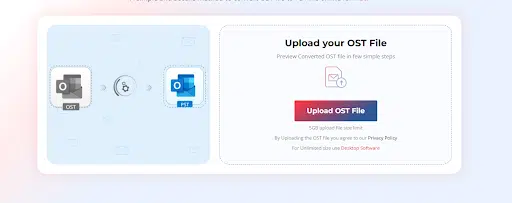
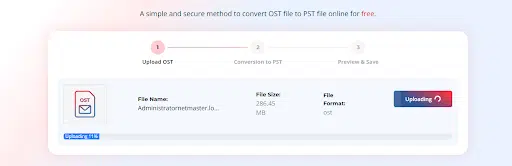
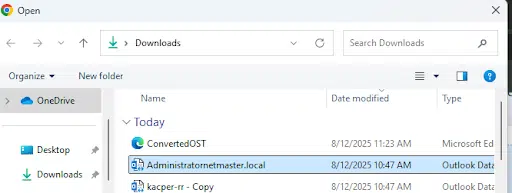
- Locate and select the OST.
- Then, click on Open to upload the file.
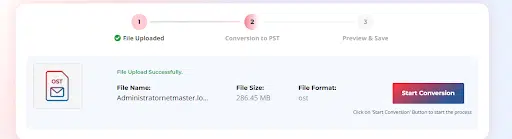
- Click on Start Conversion.
- Once the process is complete, select Save PST file.

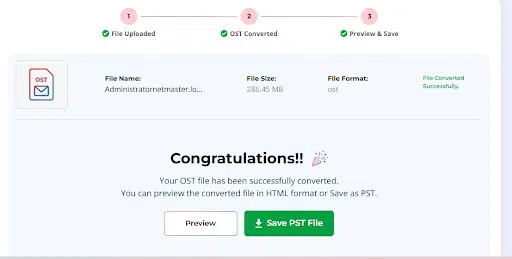
After conversion, you can import the converted PST file into any Outlook profile by using the Import/Export Wizard and access your mailbox data.
Note: If you need to convert unlimited OST files without any size limitations, then you can use Stellar Converter for OST – a desktop-based OST to PST converter tool. This tool allows you to convert your data file into multiple file format such as PDF, HTML, EML, RTF, etc.
Note: If you need to convert unlimited OST files without any size limitations, then you can use Stellar Converter for OST – a desktop-based OST to PST converter tool.
Final Thoughts
There are several reasons why you need to convert your OST file into PST. A convenient option to convert your OST file into PST is by using an online OST converter, especially when you don’t want to install a software. Though there are several online OST converters available, selecting the right and secure one is not easy. Above, we have outlined the key factors that you should consider when selecting the online OST to PST converter. Stellar Online OST Converter is one of the most secure and reliable services that can convert your OST file to PST in a few simple steps.






















