
Website speed is one of the most critical factors affecting user experience, search engine rankings, and conversion rates. A slow-loading website frustrates visitors, leading to higher bounce rates and lower engagement.
One of the most effective ways to enhance website performance is by implementing caching techniques. Caching reduces redundant data retrieval, optimizing resource utilization and improving loading times significantly.
In this article, we will explore the 10 Best Caching Techniques to Speed Up Your Website and how they can optimize your site’s loading time. Whether you run a small blog or a high-traffic eCommerce site, these caching methods will significantly improve performance and user experience.
1. Understanding Website Caching
Website caching is a process that stores copies of files or data temporarily to reduce loading time and server requests. Instead of retrieving resources from the database or server each time a user visits, caching allows for quicker access to frequently used data. This enhances website performance, reduces server load, and ensures a seamless browsing experience for users.
Types of Caching
| Type of Caching | Description |
| Browser Caching | Stores static files like images, CSS, and JavaScript on a user’s device for faster retrieval. |
| Server-Side Caching | Reduces the processing time on the server by storing dynamically generated content. |
| CDN Caching | Uses distributed servers to cache content close to the user’s location, reducing latency. |
| Object Caching | Caches database queries to reduce load times, improving efficiency. |
2. Browser Caching: Storing Static Resources Locally
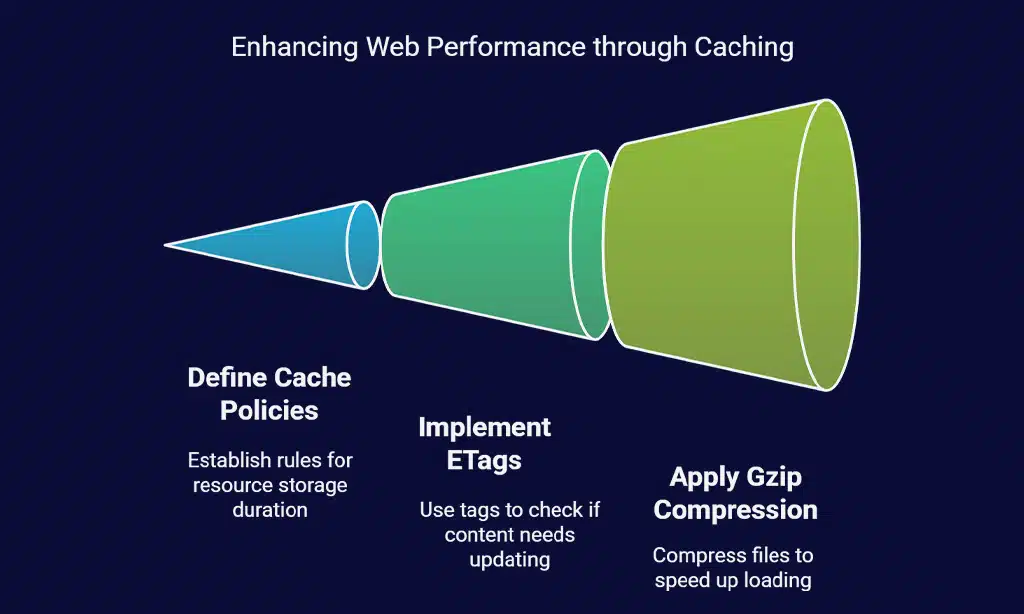
Browser caching allows users’ browsers to store static resources (CSS, JavaScript, images, fonts) locally on their device. This reduces the number of requests sent to the server, improving website performance and reducing bandwidth usage.
When a user revisits the website, the browser loads the cached resources instead of downloading them again, significantly reducing load times and enhancing the user experience. Effective browser caching helps minimize server load, leading to better scalability and improved performance for high-traffic websites.
Setting Up Browser Caching
| Method | Description |
| .htaccess Configuration | Defines cache expiration headers to store resources efficiently. |
| Cache-Control Headers | Sets cache expiration policies for different resource types. |
| Expires Headers | Specifies the duration for which resources should be stored in cache. |
| ETags (Entity Tags) | Helps browsers determine whether cached content needs to be refreshed. |
| Gzip Compression | Compresses static files to improve caching efficiency and load speed. |
By implementing these configurations, website owners can ensure that frequently accessed assets are efficiently cached, reducing unnecessary server requests and improving overall page load speed.
3. Server-Side Caching: Reducing Load on Your Server
Opcode caching stores compiled PHP scripts in memory, reducing the need to recompile them on every request. This is highly beneficial for dynamic websites with frequent PHP execution. By storing precompiled bytecode, opcode caching helps to bypass the overhead associated with interpreting and compiling scripts each time they are executed.
- Solution: Enable OPcache in PHP settings.
- Configuration: Adjust OPcache settings in php.ini to optimize performance, such as increasing opcache.memory_consumption and enabling opcache.enable.
- Example: Enabling OPcache in PHP improves execution time by up to 50%, reducing CPU load and enhancing response times.
- Best Practices: Regularly clear OPcache to prevent outdated script execution and monitor cache usage to ensure optimal performance.
Object Caching
Object caching helps reduce database query execution times, significantly improving performance. By storing frequently accessed database results in memory, object caching minimizes the need for repeated queries, leading to faster page loads and reduced server strain.
- Popular Tools: Redis, Memcached
- Implementation: Use plugins like W3 Total Cache (WordPress) or configure Redis/Memcached directly in your application for maximum efficiency.
- Performance Impact: Object caching significantly reduces time spent fetching data from the database, especially for applications with complex queries or high traffic.
- Considerations: Ensure proper eviction policies to manage cache storage efficiently and avoid memory overflows.
| Server-Side Caching Type | Benefits |
| Opcode Caching | Speeds up PHP execution by caching compiled code. |
| Object Caching | Reduces database query load by storing retrieved data. |
| Full-Page Caching | Stores fully rendered pages to eliminate processing time. |
| Fragment Caching | Caches reusable components, reducing dynamic rendering time. |
By leveraging server-side caching techniques, websites can achieve substantial improvements in load times, enhance scalability, and provide a better user experience.
4. Content Delivery Network (CDN) Caching
A CDN caches website content across multiple geographically distributed servers, reducing latency and speeding up access for global users. This technique is particularly effective for websites with an international audience, ensuring that content is delivered from the closest possible server.
By leveraging a CDN, websites can minimize server load, decrease bandwidth consumption, and significantly improve page load times. Additionally, CDNs provide enhanced security by mitigating DDoS attacks and shielding the origin server from excessive requests.
Benefits of CDN Caching:
- Improved Load Speed: Content is served from the closest node, reducing latency.
- Reduced Bandwidth Costs: Cached content lowers data transfer between the server and users.
- Enhanced Security: CDNs offer DDoS protection, Web Application Firewalls (WAF), and secure traffic routing.
- Global Scalability: Ensures consistent performance regardless of geographic location.
Best CDNs for Caching
| CDN Provider | Features |
| Cloudflare | Free and premium plans, DDoS protection, global caching, built-in firewall, and analytics. |
| Akamai | Enterprise-level CDN with robust security features, adaptive acceleration, and real-time monitoring. |
| StackPath | Fast global network with advanced caching controls, edge computing, and SSL/TLS optimization. |
| Fastly | Real-time caching purges, flexible configurations, and support for dynamic content acceleration. |
| Amazon CloudFront | Deep AWS integration, pay-as-you-go pricing, and extensive global coverage. |
When selecting a CDN, consider factors such as pricing, geographic coverage, security features, and ease of integration with your existing infrastructure. Many CDNs offer free trials, allowing you to test their effectiveness before committing to a long-term plan.
5. Page Caching: Speeding Up Dynamic Content
Page caching is a technique that stores fully rendered HTML versions of a webpage, eliminating the need to dynamically generate the page upon every user request. Instead of executing database queries and processing scripts repeatedly, cached versions are delivered instantly to users.
This significantly reduces server load, improves page speed, and enhances the overall browsing experience. Page caching is particularly useful for high-traffic websites, blogs, and eCommerce platforms where loading speed plays a crucial role in user retention and SEO performance.
Implementing Page Caching
| Method | Best For | Benefits |
| WordPress Plugins | WP Rocket, W3 Total Cache for easy caching. | Simple setup, automated caching policies |
| Server-Side Caching | NGINX FastCGI Cache for high-traffic websites. | Reduces server processing load, improves performance |
| Static HTML Caching | Generating and serving static HTML pages. | Minimizes execution time for repeat visits |
| Reverse Proxy Caching | Using tools like Varnish Cache for HTTP acceleration. | Handles high-traffic loads effectively |
To implement page caching effectively, consider combining multiple caching methods to optimize performance. Additionally, monitoring cache expiration settings and ensuring that updates reflect accurately on cached pages are essential for maintaining a seamless user experience.
6. Database Caching: Optimizing Query Performance
Every time a dynamic website loads, it sends multiple queries to the database to fetch necessary data, which can lead to slower performance and increased server load. Database caching helps minimize repeated queries by storing frequently accessed query results in memory, thereby improving load times and reducing the strain on the database.
This is especially critical for high-traffic websites, eCommerce platforms, and content-heavy portals where database requests are frequent. Implementing effective database caching can result in faster response times, lower latency, and a smoother user experience. Additionally, caching reduces database overhead, allowing resources to be allocated to other critical functions such as security and scalability.
Implementing Database Caching
| Method | Benefits |
| MySQL Query Caching | Stores query results in memory for faster retrieval. |
| Redis for Caching | Efficient key-value store reducing repeated database calls. |
7. Mobile Caching: Optimizing Speed for Mobile Users
With mobile users making up the majority of internet traffic, optimizing caching for mobile devices ensures a seamless user experience. Mobile users often access websites through networks with varying speeds, making caching a crucial technique to enhance performance.
Proper mobile caching can lead to reduced load times, lower bandwidth consumption, and improved overall browsing experience. Implementing mobile-specific caching strategies helps ensure that content is delivered quickly and efficiently, regardless of the user’s connection quality.
Implementing Mobile Caching
| Technique | Benefit |
| AMP (Accelerated Mobile Pages) | Loads mobile pages faster by reducing unnecessary elements and prioritizing essential content. |
| Adaptive Image Caching | Delivers different image sizes based on device resolution, optimizing load speed and reducing data usage. |
| Service Workers | Enables background caching of content, allowing offline access and faster repeat visits. |
| Mobile-Specific CDN Rules | Customizes caching policies for mobile users to optimize performance and reduce unnecessary data transfer. |
| Lazy Loading for Mobile | Loads images and videos only when they appear in the user’s viewport, conserving bandwidth and speeding up page rendering. |
By implementing these mobile caching techniques, websites can ensure faster load times, improved user engagement, and a more seamless experience for mobile visitors.
8. Fragment Caching: Caching Specific Parts of a Page
Instead of caching entire pages, fragment caching stores parts of a page, such as sidebar widgets, navigation menus, or frequently used components. This is particularly useful for dynamic websites that contain elements that change frequently but also have sections that remain static.
By implementing fragment caching, developers can ensure that only necessary parts of a page are regenerated while reducing server load and improving response times.
Implementing Fragment Caching
- Identify Cacheable Components: Determine which sections of the website do not need frequent updates, such as headers, footers, or sidebars.
- Use Framework-Specific Caching Mechanisms: Leverage built-in fragment caching techniques provided by frameworks like Django, Laravel, or WordPress.
- Set Expiry Rules: Configure caching durations and purge policies to ensure content remains relevant while optimizing speed.
- Monitor Performance: Use caching analytics tools to track cache hit/miss ratios and adjust strategies for better efficiency.
9. Edge Caching: Leveraging Network Edge for Faster Delivery
Edge caching is a method where frequently accessed content is stored on edge servers located closer to end-users. This reduces latency, speeds up content delivery, and decreases the load on the origin server.
By minimizing the distance data travels, edge caching significantly enhances website performance, especially for users accessing content from different geographical locations.
Best Practices
- Deploy Edge Servers Strategically: Position edge servers in key locations to serve users efficiently based on regional demand.
- Leverage CDN Edge Caching: Use content delivery networks (CDNs) to distribute and cache content dynamically across multiple edge locations.
- Optimize Cache Invalidation: Implement proper cache purging techniques to ensure content updates are reflected instantly without unnecessary delays.
- Monitor Edge Performance: Use analytics tools to track cache hit rates, response times, and optimize edge delivery mechanisms accordingly.
10. Advanced Caching Techniques for Maximum Performance
Modern web protocols like HTTP/2 and HTTP/3 improve caching efficiency by reducing latency and improving load times. HTTP/2 allows multiplexing, enabling multiple requests to be sent over a single connection, while HTTP/3, built on QUIC, further enhances security and speed.
| Feature | HTTP/2 | HTTP/3 |
| Multiplexing | Yes | Yes |
| Connection Speed | Faster than HTTP/1.1 | Even faster due to QUIC |
| Security | Uses TLS 1.2/1.3 | Uses QUIC with built-in encryption |
Lazy Loading and Preloading
Lazy loading defers loading of non-essential images and content until needed, improving initial page load speeds. Preloading, on the other hand, loads critical resources ahead of time to reduce wait time for important elements.
Best Practices:
- Lazy Loading: Implement for images and iframes using the loading=”lazy” attribute.
- Preloading: Use <link rel=”preload”> for essential resources like fonts and scripts.
Implementing Varnish Cache
Varnish Cache is a reverse proxy caching tool that accelerates web applications by caching HTTP responses. It is highly configurable and commonly used for high-traffic websites.
Key Benefits of Varnish Cache:
- Reduces backend load by up to 90%.
- Delivers cached content in milliseconds.
- Supports custom caching rules for specific website needs.
Implementation Steps:
- Install Varnish on your server.
- Configure caching policies in the VCL file.
- Test and monitor caching efficiency using Varnish logs and statistics.
Wrap Up
Implementing website caching is one of the most effective strategies to improve site speed, enhance user experience, and optimize server performance. Whether through browser caching, server-side caching, or advanced techniques like edge and fragment caching, reducing redundant requests and optimizing content delivery is crucial for maintaining a high-performing website.
With search engines prioritizing page speed as a ranking factor, effective caching can directly impact a website’s visibility and SEO performance.
Faster websites result in higher engagement, lower bounce rates, and improved conversion rates. Businesses, developers, and website owners should consistently monitor and fine-tune caching settings to ensure the right balance between performance and content freshness.
By strategically implementing different caching mechanisms and leveraging modern content delivery networks (CDNs), websites can significantly reduce latency and load times, providing users with a seamless browsing experience.
As web technologies evolve, staying updated on the latest caching techniques and best practices will continue to be essential for delivering high-speed, scalable, and reliable web experiences.