The Best Android Smartwatches should feel effortless: notifications that are actually useful, health tracking you trust, and battery life that fits your routine. Samsung still offers the most complete experience for Galaxy owners, but Android users now have strong alternatives from Google, OnePlus, Garmin, Amazfit, and Withings, depending on whether you prioritize apps, fitness metrics, or multi-day endurance.
Comparison Table
| Watch | OS | Battery Style | Standout Feature | Key Specs |
|---|---|---|---|---|
| Samsung Galaxy Watch 8 | Wear OS 6 | Daily-to-2-day typical | Best mainstream Samsung pick | Exynos W1000; 40/44mm with 325/445mAh batteries. |
| Samsung Galaxy Watch 8 Classic | Wear OS 6 | Daily-to-2-day typical | Rotating bezel + premium feel | Classic model returns with physical bezel. |
| Samsung Galaxy Watch Ultra (2025) | Wear OS 6 | Multi-day focus | Rugged + big battery | 590mAh battery; titanium build; dual-band GPS listed in specs. |
| Google Pixel Watch 3 | Wear OS 5 | 24h (36h saver) | Best Google-first experience | 41/45mm, 2,000-nit display, 24h AOD / 36h saver (reported). |
| OnePlus Watch 2 | Wear OS 4 | Up to ~100h claim | Best Wear OS battery value | Dual-Engine architecture; Wear OS apps + Google services. |
| Mobvoi TicWatch Pro 5 Enduro | Wear OS (varies) | Long battery focus | Dual-display endurance | Snapdragon W5+ Gen 1; dual-display design highlighted in reviews. |
| Garmin Venu 3 | Garmin OS | Up to 14 days | Best “fitness-first, still smart” | Garmin lists up to 14 days + calling support. |
| Garmin Forerunner 265 | Garmin OS | Up to 13 days | Best for runners | AMOLED + training metrics; Garmin lists up to 13 days smartwatch mode. |
| Amazfit Balance | Zepp OS | Up to 14 days | Best budget all-rounder | Amazfit positions it around long battery + broad fitness features. |
| Withings ScanWatch 2 | Hybrid | ~30 days (or more with updates) | Best classic-watch look | Withings notes ~30 days typical; later updates discussed in news coverage. |
10 Best Android Smartwatches For Android Users and Why?
Here they are:
1) Samsung Galaxy Watch 8
A clean, modern Wear OS 6 daily driver with Samsung’s latest platform and dual-frequency GPS, sold in 40mm and 44mm sizes with 325mAh/445mAh batteries. It’s the safest pick if you want strong notifications, calling, and health tracking without going “Ultra.”
-
Best For: Most Android users (especially Samsung phone owners) who want a balanced smartwatch
-
Pros: Latest Wear OS generation, strong ecosystem integration, two sizes
-
Cons: Battery is typically “daily smartwatch” territory, not week-long
2) Samsung Galaxy Watch 8 Classic
The Classic brings back the physical rotating bezel and adds a more premium vibe while keeping the core Watch 8 experience on Wear OS 6. Choose it if you love tactile navigation and a dressier look without giving up modern smart features.
-
Best For: People who want a premium look + rotating bezel control
-
Pros: Bezel navigation, flagship Samsung features, polished design
-
Cons: Usually pricier than the standard Watch 8
3) Samsung Galaxy Watch Ultra (2025)
A rugged, titanium-heavy Samsung flagship with a big 590mAh battery, advanced GPS (including dual-band listed), and a durability-first build for outdoors. This is the pick when you want Samsung’s ecosystem but in a tougher, adventure-ready body.
-
Best For: Hikers, travelers, and durability-first Android users
-
Pros: Big battery, rugged materials, advanced GPS stack
-
Cons: Bulky and expensive compared to standard models
4) Google Pixel Watch 3
The cleanest Google-first Wear OS option, with strong Fitbit health integration, a bright display (reported up to 2,000 nits), and 41mm/45mm sizing; battery is commonly framed as 24 hours with AOD or up to 36 hours in saver mode. It’s the best choice if you want Pixel-level cohesion across Google apps and services.
-
Best For: Pixel owners and anyone who prefers Google’s ecosystem
-
Pros: Smooth Wear OS experience, Fitbit features, great display
-
Cons: Battery still isn’t “multi-day” in typical use
5) OnePlus Watch 2
A battery-first Wear OS watch built around OnePlus’ Dual-Engine approach, with official spec pages highlighting Wear OS 4 support and Google apps like Wallet/Maps plus deep smartwatch features. It’s ideal if you want Wear OS apps, but you’re tired of charging nightly.
-
Best For: Wear OS buyers who prioritize battery per dollar
-
Pros: Strong battery claims, full Wear OS app support, premium feel
-
Cons: Software updates can be uneven (some users reported battery issues after Wear OS 5 rollout).
6) Mobvoi TicWatch Pro 5 Enduro
A niche but compelling option for endurance, pairing the Snapdragon W5+ Gen 1 platform with Mobvoi’s signature dual-display concept (a low-power screen for essentials plus a full smart display). Reviews praise durability and responsiveness, but also note tradeoffs depending on Wear OS version and features like charging.
-
Best For: Battery-focused Wear OS users who like rugged utility
-
Pros: Dual-display stamina, fast performance, outdoor-friendly design
-
Cons: Software version/support can lag behind rivals; feature compromises vary by model/release
7) Garmin Venu 3
A “fitness-first but still smart” watch that pairs well with Android for notifications and calls, while delivering Garmin’s health and training depth and up to 14 days of battery life (per Garmin). Pick it if your workouts matter more than having every Wear OS app.
-
Best For: People who want serious health/fitness tracking with long battery
-
Pros: Excellent battery, strong health insights, reliable fitness platform
-
Cons: Smaller app ecosystem than Wear OS
8) Garmin Forerunner 265
A runner’s watch with an AMOLED display, training metrics, music support, and up to 13 days in smartwatch mode (per Garmin). This is the move if you want structured training support and performance insights more than smartwatch “apps.”
-
Best For: Runners who want training readiness-style metrics and strong GPS
-
Pros: Training tools, AMOLED clarity, strong battery for a sports watch
-
Cons: Overkill if you only want basic notifications and step counting
9) Amazfit Balance
A value-focused round smartwatch that leans into long battery life (often cited around 14 days) and broad fitness features via Zepp OS, without the “charge every day” reality of many Wear OS watches. It’s a smart buy if you want lots of features and endurance at a lower price point.
-
Best For: Budget buyers who want multi-day battery + strong fitness basics
-
Pros: Long battery, feature-rich, usually priced well
-
Cons: App ecosystem and smartwatch “polish” can feel less premium than Samsung/Google
10) Withings ScanWatch 2
A hybrid that looks like a classic analog watch but tracks key health metrics and can run around 30 days between charges in typical use (per Withings). Choose it if you want subtle smart features, strong battery, and a watch that fits formal settings easily.
-
Best For: Style-first buyers who still want health tracking and huge battery
-
Pros: Long battery, classic look, low-maintenance daily wear
-
Cons: Not a full smartwatch experience (limited apps and interactions vs Wear OS)
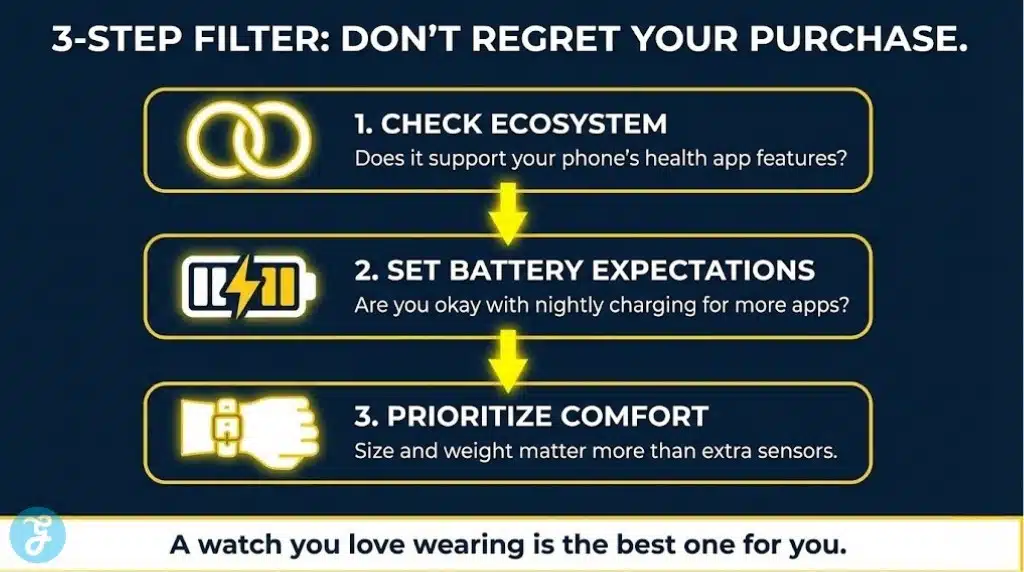
How To Choose The Best Android Smartwatch Without Regretting It
Most buyer regret comes from one of these: the watch doesn’t play nicely with your phone, the battery doesn’t match your habits, or it’s uncomfortable enough that you stop wearing it.
Start With This 3-Step Filter
-
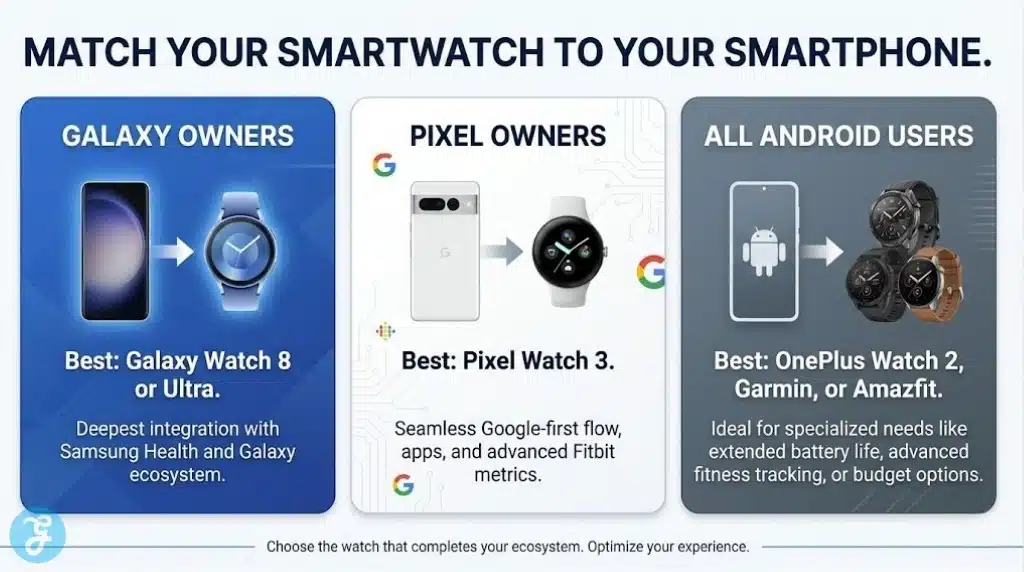
Ecosystem fit: Samsung phone → Galaxy Watch usually feels the most complete; Pixel users often prefer Pixel Watch for Google-first flow.
-
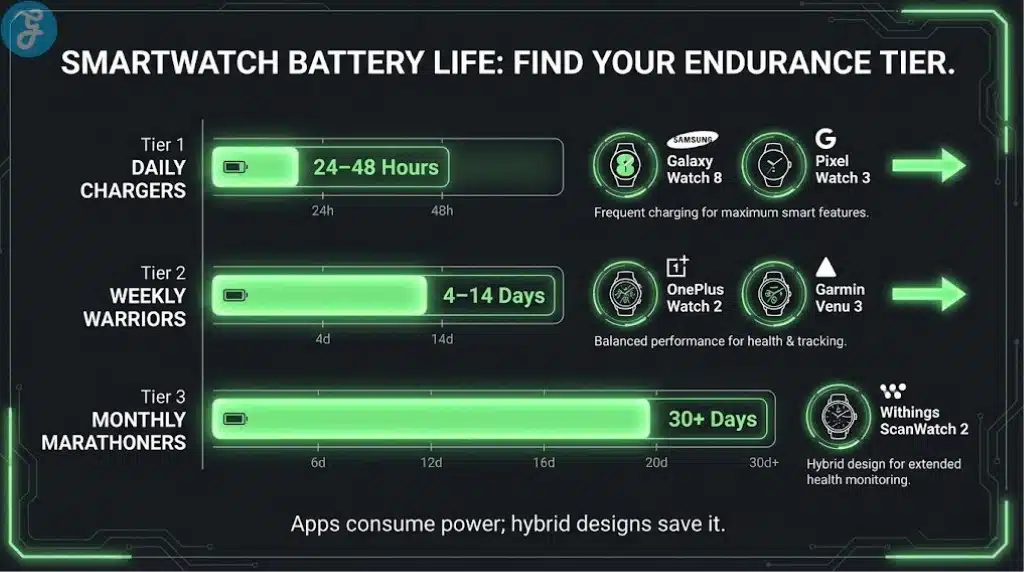
Battery reality: Always-on display + GPS workouts = more charging; if that annoys you, lean Garmin/Withings/Amazfit or a battery-first Wear OS option like OnePlus.
-
Comfort: Size, weight, and strap matter more than “one extra feature” you won’t use daily.
Quick Decision Table
| Your Priority | Best Direction | Why It Works |
|---|---|---|
| Apps, replies, payments, rich notifications | Wear OS (Samsung/Pixel/OnePlus) | Most “phone-like” smartwatch experience |
| Multi-day battery + training depth | Garmin | Better workout metrics, less charging |
| Budget + long battery + solid fitness basics | Amazfit | Strong value without daily charging |
| Classic watch look + low maintenance | Withings | Hybrid style with very long battery |
Wrap-Up: The Best Android Smartwatch For Your Needs
The Best Android Smartwatches aren’t won by one “best” model. They’re won by matching your phone, your charging tolerance, and how you actually use a watch day-to-day.
If you want the smoothest all-around experience with Android apps, replies, payments, and tight notifications, a Wear OS watch is still the safest lane. In that category, Samsung leads for Galaxy owners and Pixel Watch leads for people who want Google-first simplicity.
If you care more about battery life and training depth than app stores, Garmin is the easiest upgrade. You trade some smartwatch “apps” for better sports metrics and far fewer charging cycles, which many people end up preferring long-term.
And if you want something that looks like a traditional watch but still tracks health, Withings is the cleanest style-first pick. It won’t replace a full smartwatch, but it’s the most “wear it anywhere” option with the lowest maintenance.
When in doubt, choose based on this order: fit/comfort first, then battery, then the ecosystem. A watch you love wearing will always beat the one with extra features you never use.