
To track image rights and source files in a publishing team without slowing down daily production, assign every visual asset a single persistent ID at intake, pair its editable master file with its flattened web export in a shared folder structure, and log license terms, permitted channels, and expiration dates in one central ledger before the asset enters editorial layout.
Most visual compliance problems in newsrooms, content studios, and brand publishing teams do not come from deliberate misuse. They happen when a designer downloads a stock photograph or commissions an illustration, saves an edited JPEG to a local desktop, and leaves the original layered file and license receipt buried in a private chat thread or email inbox.
Six months later, another editor reuses that cropped JPEG in a paid social campaign or syndicated newsletter without knowing the original license covered editorial web use only.
Why Image Rights and Source Files Break Down in Publishing Teams
Publishing workflows separate the people who acquire visuals from the people who edit, repurpose, and republish them. A photo editor or illustrator handles initial licensing, a writer drops an image into a CMS draft, and a social media coordinator later pulls the featured graphic for a promotional post.
Without a unified system connecting the flattened web file (such as a JPEG or WebP) back to its editable source file (such as a PSD, AI, Figma frame, or RAW camera file) and its legal terms, three operational failures occur repeatedly:
-
Orphaned derivatives: Editors find a published image in the CMS media library, download it, and re-edit it because they cannot locate the original high-resolution master or vector source.
-
Scope creep across channels: A visual licensed strictly for an editorial blog post gets reused in paid ads, print brochures, or third-party syndication feeds where the original agreement does not apply.
-
Silent license expirations: Time-limited press kit photos, talent releases, or subscription stock assets remain live on evergreen articles or scheduled social queues long after their permitted window closes.
Teams evaluating dedicated software to solve these gaps can compare how image rights tracking tools handle approval states and expiry alerts, though software alone cannot fix missing intake habits or unlinked source files.
Step-by-Step Workflow to Track Image Rights and Source Files
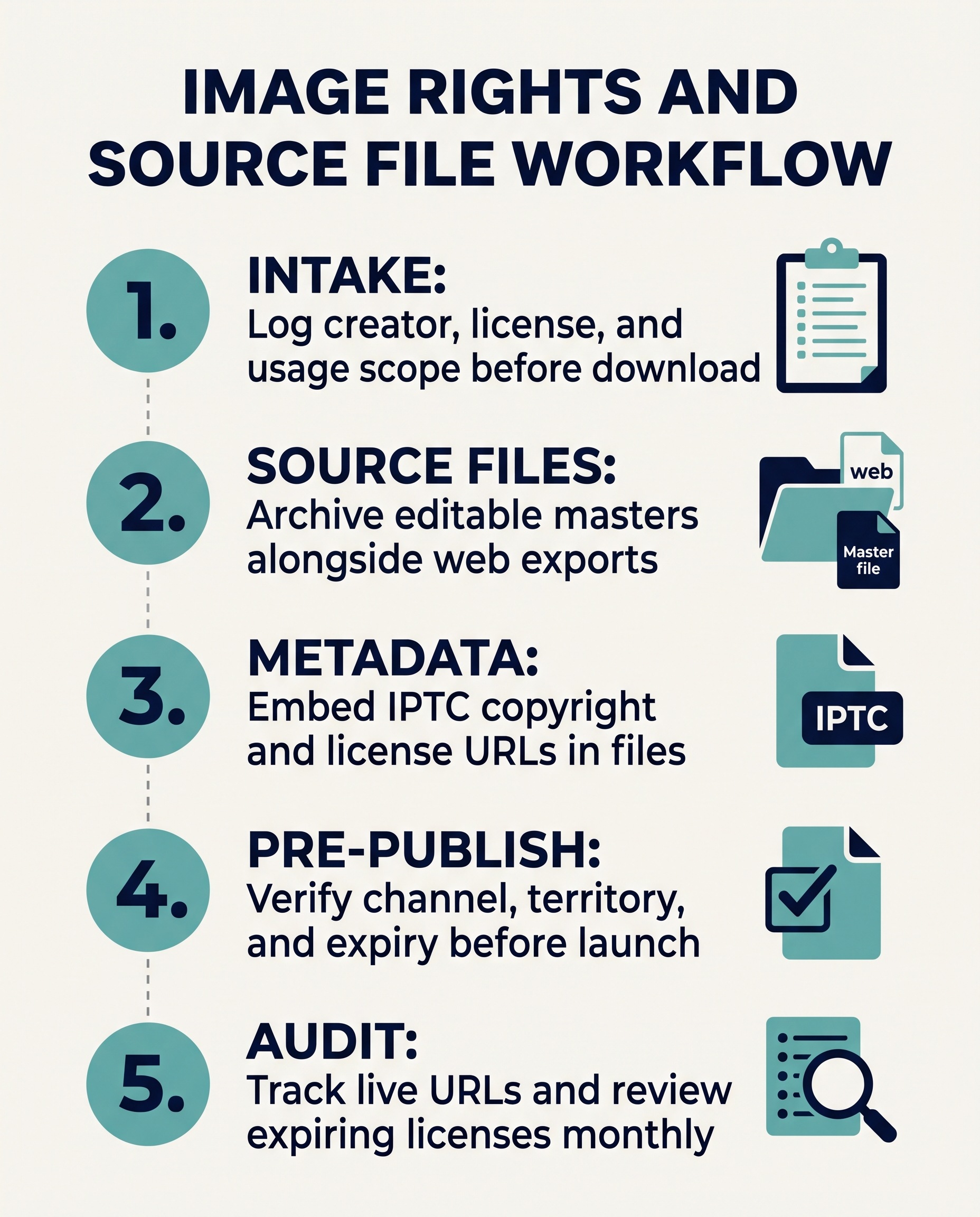
A reliable tracking system works whether your team uses a dedicated digital asset management (DAM) platform or a structured cloud drive paired with a relational database such as Airtable, Notion, or a shared spreadsheet. Follow these five sequential steps for every visual asset entering your pipeline.
1. Standardize Asset Naming and Intake Before Editing Begins
Require every contributor, designer, and editor to log an asset before placing it into a layout or CMS draft. Assign a unique, immutable Asset ID using a predictable pattern such as YYYY-MM-PROJECT-001 (for example, 2026-11-FINTECH-014).
Keep the Asset ID identical across the license receipt, the editable source file, and all exported web derivatives. When an editor inspects a file named 2026-11-FINTECH-014-featured-16x9.jpg in WordPress, they can immediately trace it back to 2026-11-FINTECH-014-master.psd its corresponding rights record without guessing.
2. Pair Editable Source Files with Flattened Exports
Never store source files on individual workstations. Create a standardized directory structure in your team’s shared repository with dedicated subfolders for each asset package:
-
01_RAW_AND_LICENSES/: Store original unedited camera files, downloaded stock originals, signed model or property releases, and PDF invoices or license receipts. -
02_EDITABLE_MASTERS/: Store working layered files (PSD, AI, INDD, Affinity, or exported Figma and SVG masters) along with linked fonts or custom vector components. -
03_PUBLISHED_EXPORTS/: Store compressed, color-profiled delivery files (JPEG, WebP, or PNG) sized for specific CMS slots, social ratios, or newsletter headers.
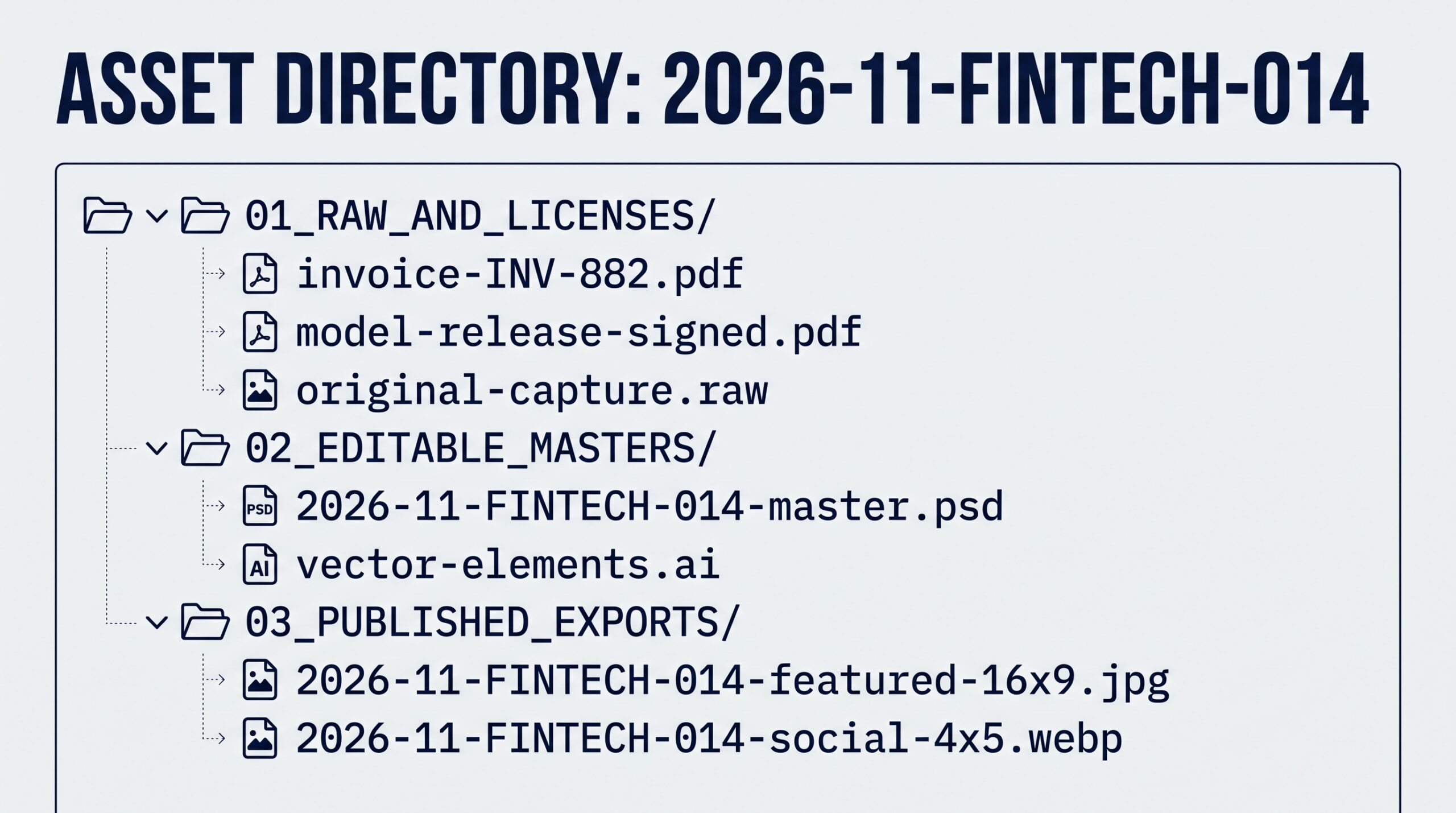
If your team works in cloud-native design tools like Figma or Canva, where files do not live as local folders, paste the exact shareable frame URL directly into the asset’s rights ledger row and lock the master frame once approved.
3. Embed IPTC Photo Metadata and Structured License Links
Filenames can be renamed during CMS uploads, and spreadsheets can become separated from files when assets move between agencies or freelancers. Embedding standardized metadata directly into the image file header keeps ownership and usage rules attached to the pixels.
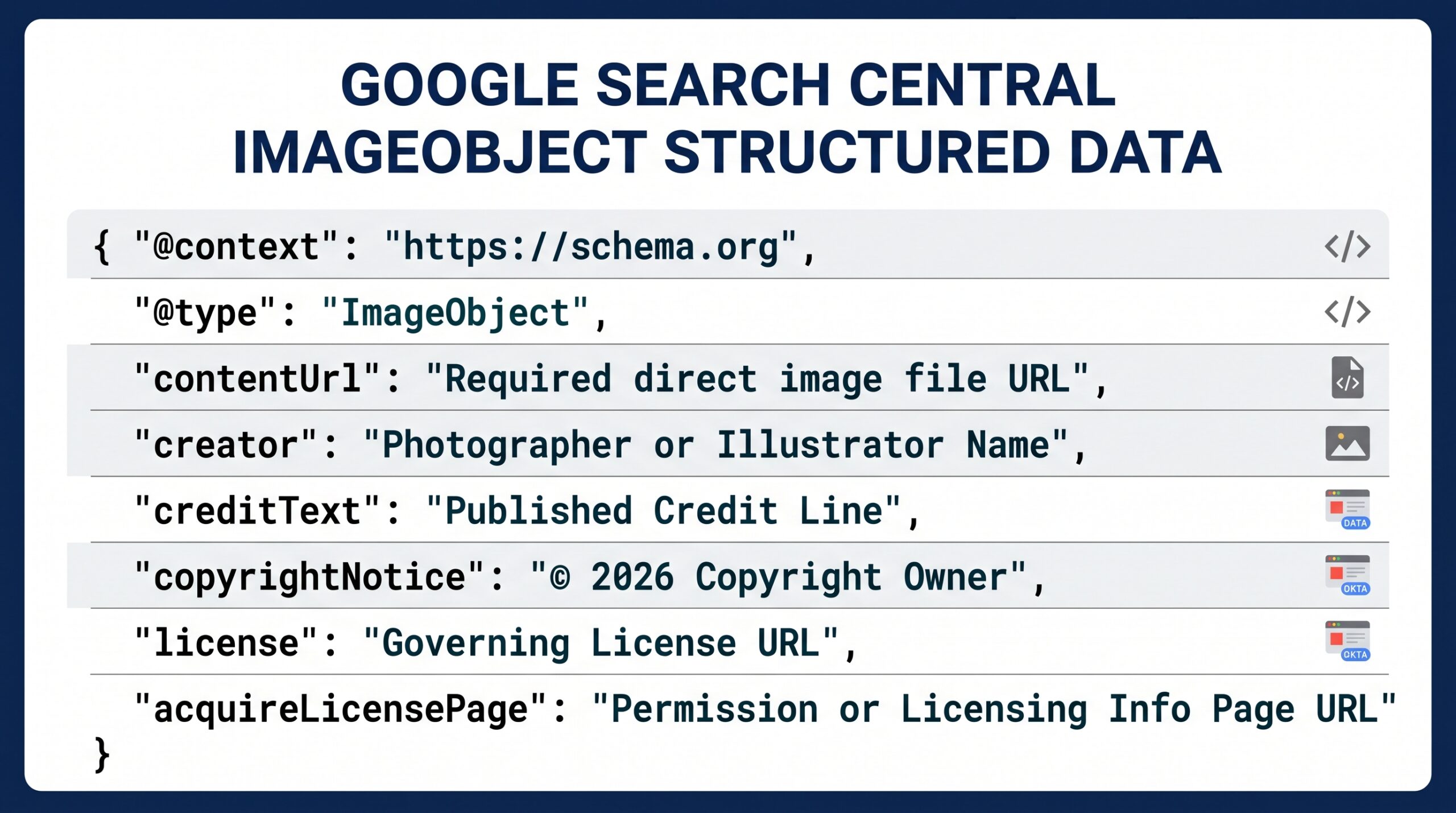
The IPTC Photo Metadata Standard defines interoperable fields supported by Adobe Bridge, Lightroom, Capture One, and most enterprise DAM platforms. At minimum, populate four core fields before exporting web derivatives: Creator, Credit Line, Copyright Notice, and Web Statement of Rights (a URL pointing to the governing license terms).
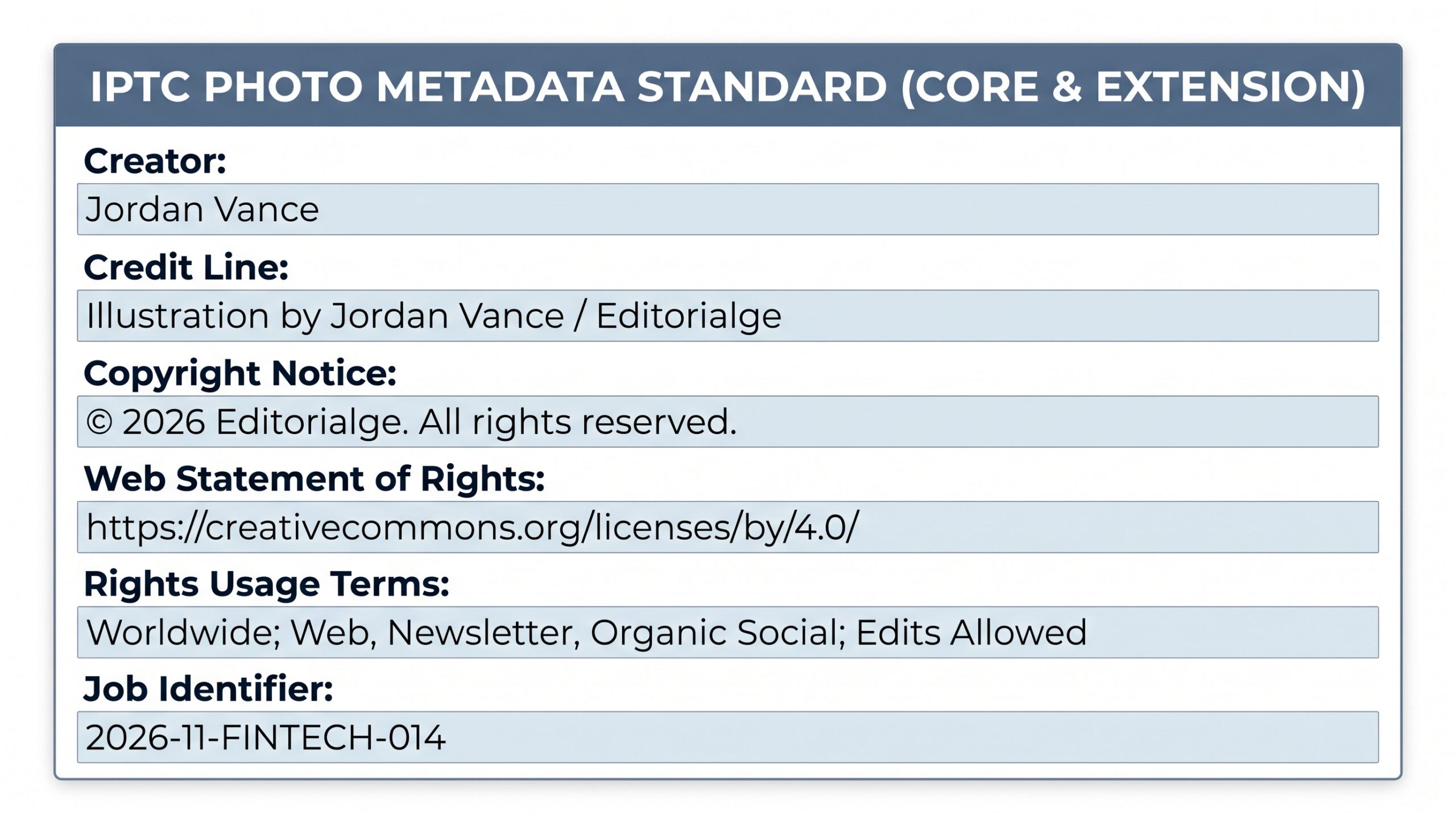
For original photography or commissioned illustrations that your publication owns or licenses for public display, you can also expose machine-readable licensing details on the web page itself. According to Google Search Central image metadata documentation, pairing embedded IPTC metadata with ImageObject schema properties such as license and acquireLicensePage helps search engines display accurate creator credits and licensing links in Google Images.
4. Enforce a Pre-Publish Rights Gate in the Editorial Checklist
Make rights verification a mandatory sign-off step in your editorial project management board before any article or campaign moves from draft to scheduled status. The reviewing editor should check four items against the central rights ledger:
-
Channel match: Does the license cover web editorial, email newsletters, social media promotion, and syndication feeds if your site distributes via RSS or partner networks?
-
Territory and duration: Is the license worldwide and perpetual, or does it expire on a fixed date or restrict use to a specific country?
-
Modification rights: If a designer cropped, color-graded, or composited a third-party image into a collage, does the agreement permit derivative adaptations?
-
Attribution format: Does the source require a visible caption credit (such as Creative Commons BY licenses or specific wire-service phrasing) rather than metadata alone?
5. Log Live Placements and Schedule Expiry Audits
Tracking ends in failure if you know a license expires next month but cannot tell which articles or social posts actually use the file. Whenever an image is published, record the live article URL, CMS media ID, and publication date back in that asset’s ledger row.
Set automated calendar or database reminders 30 days before any time-limited license expires. Publishing teams can connect their asset database to Slack or email notifications using task automation tools so an assigned editor receives an alert with the exact list of live URLs that need a license renewal or image replacement.
Essential Fields for Your Central Rights and Source Ledger
Whether you configure custom metadata schemas in a DAM or build a lightweight tracking table, keep the schema focused on fields editors will actually maintain. Overly complex forms lead to skipped entries.
| Field Name | Purpose | Example Entry |
| Asset ID | Immutable key linking source files, exports, and receipts | 2026-11-FINTECH-014 |
| Source File Location | Direct path or URL to the editable master file | /Assets/2026/11/FINTECH-014/02_EDITABLE_MASTERS/ |
| Origin Type | Distinguishes original, commissioned, stock, press, or AI-assisted visuals | Commissioned Illustration (Work Made for Hire) |
| Creator and Owner | Legal copyright holder and required public credit line | Illustration by Jordan Vance / Editorialge |
| License Type and Proof | Governing terms plus link to signed contract, invoice, or CC deed | Exclusive Editorial + Social; Contract PDF #INV-882 |
| Permitted Scope | Approved channels, geographic territory, and derivative permissions | Worldwide; Web, Newsletter, Organic Social; Edits Allowed |
| Expiration Date | Hard stop date or Perpetual status for automated alerts |
2027-11-15 (30-day review alert set) |
| Live Placement URLs | Published pages or social posts where the derivative appears | [editorialge.com/fintech-compliance-guide/](https://editorialge.com/fintech-compliance-guide/) |
Governance Rules for AI-Generated, Stock, and Commissioned Visuals
Different visual sources carry distinct legal and archival requirements, so your tracking rules should reflect how each asset was created:
-
Commissioned and in-house visuals: Require contributors to deliver both the flattened export and the native layered source file before final invoice approval. Confirm in writing whether the agreement is a work made for hire or a limited license, and archive the signed agreement alongside the master layers.
-
Royalty-free and editorial stock photos: Download the largest available original file even if you only need a 1200-pixel web crop today. Save a screenshot or PDF of the exact license page on the download date, because stock agencies periodically update their standard terms.
-
Press kits and PR handouts: Treat vendor-supplied product images as restricted to editorial coverage of that specific announcement unless the press portal explicitly grants broader reuse. Never assume a PR image can be repurposed into a general evergreen guide or commercial comparison banner.
-
AI-generated editorial illustrations: Record the tool name, model version, prompt text, generation date, and whether any human-created reference inputs were uploaded. The IPTC Photo Metadata Standard includes dedicated properties for AI system and prompt provenance, which helps editorial teams maintain transparency and separate synthetic illustrations from documentary photography.
Building a Repeatable Asset Habit Across Your Team
A consistent workflow to track image rights and source files protects your publication from copyright disputes while saving designers hours of rework every month. Start by enforcing a single Asset ID across new projects this week, then gradually backfill your highest-traffic evergreen articles so every live visual links back to a verified license and an editable master file.
Frequently Asked Questions (FAQs) About Tracking Image Rights and Source Files
What is the difference between tracking image rights and storing source files?
Tracking image rights records the legal permissions, creator credits, channel restrictions, and expiration dates governing how a visual may be used. Storing source files preserves the editable master layers, RAW captures, or vector components needed to resize, localize, or update that visual later without rebuilding it from scratch.
How should small publishing teams track image rights and source files without enterprise DAM software?
Small teams can combine a structured cloud storage folder hierarchy (separating raw licenses, editable masters, and web exports) with a shared relational database in Airtable, Notion, or Google Sheets. Using a consistent Asset ID across both the folder name and the database row provides reliable traceability without high licensing overhead.
Does deleting an expired image from a DAM remove it from published articles?
No. Removing or expiring an asset inside a digital asset management system rarely deletes copies already uploaded to a WordPress media library, CDN cache, or social media network. Teams must record live placement URLs in their rights ledger so an editor can manually replace or unpublish the image across every live channel before the license expires.
Should teams embed copyright metadata directly into web image exports?
Yes, preserving core IPTC fields such as Creator, Credit Line, Copyright Notice, and Web Statement of Rights ensures attribution stays attached when files are downloaded or shared. Configure your image compression pipeline or CMS upload settings to retain IPTC and XMP rights tags while stripping unnecessary camera GPS or EXIF bloat.