

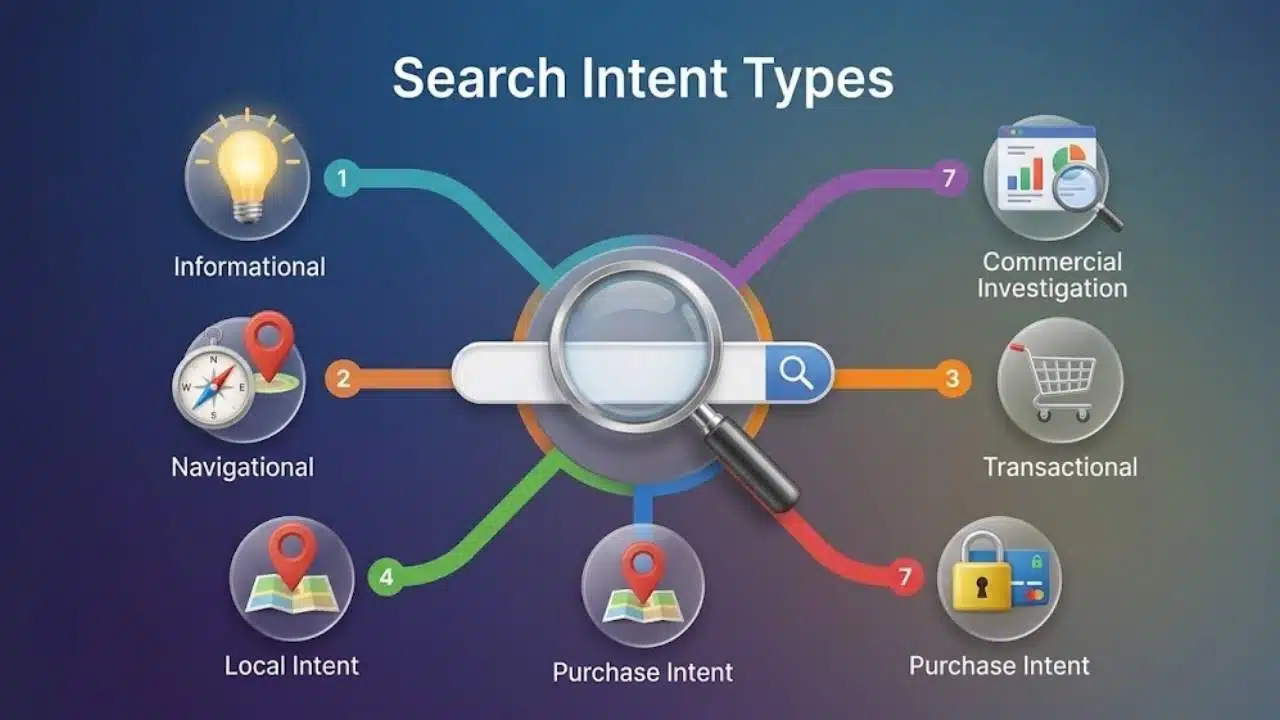
Search engines don’t rank keywords—they rank solutions. Matching search intent types ensures your content delivers the precise answer, format, and depth a user expects, preventing high bounce rates from mismatched intent.
While Google’s Search Quality Rater Guidelines outline four foundational user needs—Know, Do, Website, and Visit-in-Person—SEO teams rely on expanded frameworks to map content to the buyer’s journey. By categorizing queries into actionable search intent types (like informational, commercial, direct comparison, or transactional), you can structure pages for featured snippets and Google AI Overviews while guiding users seamlessly toward their next step.
How the Seven Search Intent Types Fit Together
Search intent describes the task behind a query. It does not reliably reveal where the person sits in a marketing funnel.
Someone searching “how does payroll software handle contractors” may be close to making a purchase. Another person searching “best payroll software” may have only started exploring the category.
Use intent to decide what the page must help someone do. Treating every informational query as early-stage awareness and every commercial query as an immediate sales opportunity is too simplistic.
The following types are not ranked from strongest to weakest. Each requires a different response.
1. Informational Intent
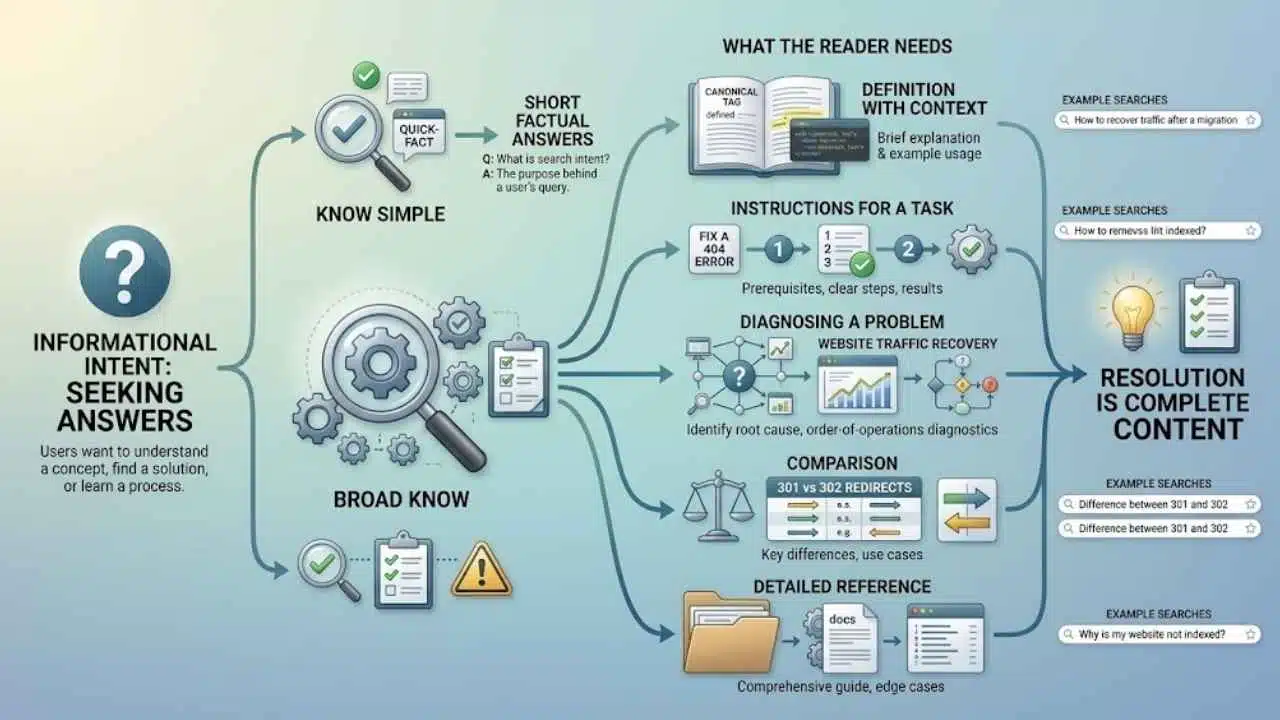
Informational searches come from people who want an answer, explanation, process, or better understanding of a subject.
Examples include:
- “What is search intent?”
- “How to fix a canonical tag”
- “Why is my website not indexed?”
- “Difference between 301 and 302 redirects”
The required depth can vary dramatically. “What does a 404 error mean?” has a short, factual answer. “How to recover traffic after a website migration” may require diagnostic steps, examples, technical checks, and warnings about changes that could make the problem worse.
Google’s guidelines make a similar distinction between broad Know queries and Know Simple queries that can be answered correctly in a small amount of space.
This is where publishers often confuse length with usefulness. A straightforward question gets stretched into a 2,000-word article, while a complicated problem receives a definition followed by generic advice.
Before drafting, identify whether the reader needs:
- A short factual answer
- A definition with context
- Instructions for completing a task
- Help diagnosing a problem
- A comparison between concepts
- A detailed reference page
For procedural content, include prerequisites, ordered steps, expected results, and common failure points. For conceptual content, explain the term, show where it applies, and address the misunderstanding most likely to cause trouble.
A page is complete when it resolves the likely need. Word count alone says very little about that.
A navigational query is an attempt to reach a particular website, account, company, or webpage.
Typical examples include “Canva login,” “YouTube Studio,” “Google Search Console,” and “Nike returns policy.”
The destination is usually obvious. A third-party article about logging in to Canva offers little value unless it addresses a specific access problem. For the ordinary query, Canva’s login page is the more suitable result.
Navigational keywords are therefore not always meaningful content opportunities. Site owners should concentrate on making their own important destinations easy to identify. Pricing, support, login, contact, returns, and documentation pages need clear titles, sensible URLs, and direct internal links.
A brand name alone does not make a query navigational:
- “Notion login” points to a specific destination.
- “Notion alternatives” asks for comparison.
- “Notion pricing” seeks commercial information.
- “How to create a database in Notion” needs instruction.
The words surrounding the brand determine the task.
3. Commercial Investigation Intent
Commercial investigation happens when someone is considering a purchase but still needs to compare options, confirm suitability, or reduce risk.
These searches often include terms such as “best,” “reviews,” “alternatives,” “versus,” or “for small businesses.” A query like “best email marketing software for nonprofits” suggests that the person understands the product category but has not chosen a provider.
This is where generic listicles fail most visibly. They gather a familiar group of products, repeat company claims, and give every option a positive verdict. The reader leaves with more names but no clearer decision.
Useful commercial content explains how the recommendations were assessed. Relevant criteria might include:
- Total cost, not only the advertised entry price
- Features available on the plan being discussed
- Contract and cancellation terms
- Geographic availability
- Integrations or device compatibility
- Setup difficulty
- Customer support
- Limits that affect the intended user
The article should also identify poor fits. A complex enterprise platform may be capable but excessive for a five-person company. A free plan may look generous until an essential export, automation, or collaboration feature requires an upgrade.
Prices, plans, availability, and software features can change. Verify those details before publication and make clear when a recommendation depends on country, plan, team size, or platform.
A comparison page that recommends everything has avoided making a useful judgment.
4. Transactional Intent
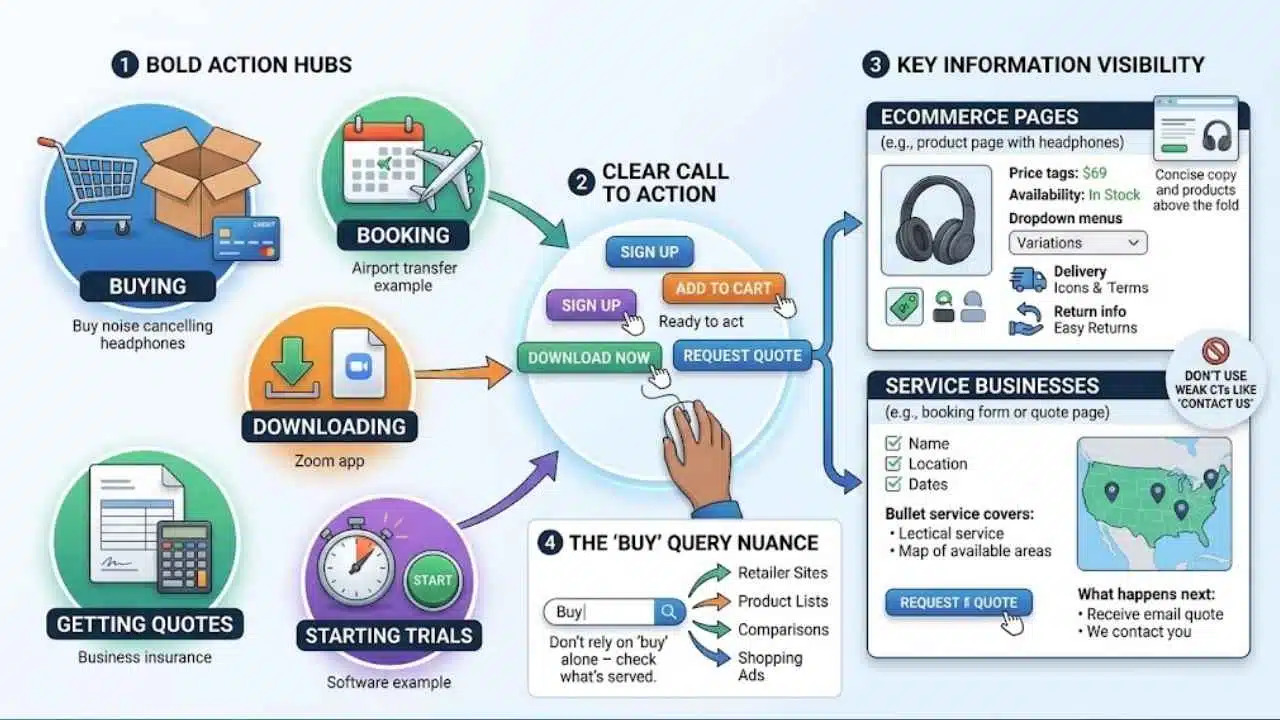
Transactional searches indicate that the user wants to complete an action. That action may involve buying, booking, downloading, subscribing, applying, requesting a quote, or starting a trial.
Examples include:
- “Buy noise cancelling headphones”
- “Book airport transfer in Rome”
- “Download Zoom”
- “Get business insurance quote”
- “Start project management software trial”
Commercial and transactional intent are close, but they often need different pages. Someone searching “best accounting software for freelancers” needs help comparing products. A person searching for a named platform’s signup page has probably finished that comparison.
For ecommerce searches, category and product pages should make price, availability, variations, delivery conditions, and return information easy to find. Lengthy introductory copy should not push the products below several screens of text.
Service businesses have the same responsibility. State what the service covers, where it is available, what information the customer must provide, and what will happen after the enquiry. “Contact us to learn more” is weak when the visitor is already prepared to act.
Do not rely on the word “buy” alone. A broad buying query may produce retailers, product categories, comparisons, and shopping results. Check what is currently being served before deciding which page type to build.
5. Local or Visit-in-Person Intent
Someone searching “emergency dentist,” “coffee shop open now,” or simply “car repair” may need a nearby result even without adding a city or the phrase “near me.”
Google can use a shared or estimated location when local context would make the results more useful. A strong business page from another country will not help someone looking for a pharmacy that is open nearby.
Local pages should answer the practical questions that determine whether a visit can happen:
- What is the correct address?
- Is the business open?
- Is an appointment required?
- Does that location provide the needed service?
- How can the visitor call, book, or get directions?
- Does the business serve the customer’s area?
Depending on the business, parking, accessibility, public transport, emergency availability, or temporary closures may also matter.
Maintenance is the unglamorous part of local SEO. Incorrect holiday hours or an outdated phone number can make an otherwise polished page useless.
Avoid producing dozens of location pages with little more than the city name changed. A page should contain details specific to that branch or service area. If nothing changes except the keyword, the page is unlikely to help a local customer.
6. Visual or Media-Led Intent
Some searches are broadly informational or action-oriented, but text is not the best primary format.
“Small balcony design ideas” calls for images. “How to tie a bow tie” is easier to follow through pictures or video. Someone looking for beginner guitar chord shapes may need a diagram before any detailed explanation.
Visual intent is best treated as a format requirement rather than a separate point in the customer journey. Image blocks, video results, galleries, and visually led pages can indicate that searchers need to see the answer rather than merely read about it.
One generic stock photo does not meet that need. The media must carry useful information.
Google recommends relevant, high-quality images supported by descriptive filenames, useful alt text, captions where appropriate, and nearby explanatory copy. For video-led pages, written steps, materials lists, timestamps, or transcripts can help visitors find a detail without replaying the entire recording.
The written content should support the visual explanation, not bury it.
7. Freshness-Sensitive Intent
Some answers lose value quickly. Searchers looking for breaking news, live scores, changing prices, travel disruption, approaching deadlines, or recent software versions usually need current information.
Examples include “Champions League score,” “latest Android security update,” “train strike tomorrow,” and “current mortgage rates.”
Google’s guidelines identify several kinds of searches that may demand recent results, including breaking events, recurring events, current facts, prices, schedules, and recent product versions.
Freshness requirements depend on the subject. Traffic conditions can become outdated within minutes. A software guide may remain accurate until a major version changes. An explanation of compound interest can stay useful for years.
When time affects the answer, check more than the visible date. Review figures, deadlines, screenshots, availability, external links, and instructions. Separate stable background information from details that change frequently so the page is easier to maintain.
Changing the publication date without substantially reviewing the content is not a credible update. Google explicitly warns against making pages appear fresh when the information has not meaningfully changed.
What Search Intent Labels Often Miss
Keyword modifiers are useful clues, but they are not dependable rules. “Best” often suggests comparison, “how to” usually signals information or action, and “near me” points toward a local need. Real searches remain messier.
A hotel name, for example, could represent several reasonable tasks: visit the official site, compare prices, read reviews, find directions, or call the front desk.
When reviewing a keyword, look at four things:
- Page type: Are the prominent results guides, product pages, categories, tools, videos, local listings, or official brand pages?
- Format: Does the query favor a list, tutorial, comparison, calculator, gallery, video, or short answer?
- Angle: Are the results written for beginners, buyers, local visitors, budget-conscious users, or people seeking current information?
- Competing interpretations: Is one need dominant, or is the results page split between several plausible tasks?
The current results page is evidence, not an instruction to copy whatever already ranks. It can show what Google is serving, but the editorial work still lies in deciding what useful contribution the page can make.
Check the query in the audience’s intended country and on the relevant device where possible. Location, language, and device can affect which results are useful or displayed.
After publication, Search Console can reveal the queries associated with a page and support analysis by country, device, date, and available search-appearance types. Its query data is not exhaustive: some searches are omitted for privacy, and not every term appears in the table.
Use that information to spot mismatches. If a page earns impressions for a need it barely addresses, it may require a clearer revision or a separate page. Do not force unrelated intents into one increasingly unfocused article.
The Practical Takeaway
Apply search intent types while mapping keywords and preparing the brief. For each target query, write down the dominant task, suitable page type, preferred format, and information the visitor needs before leaving.
That short check may reveal that the right answer is not another blog post. It could be a product category, location page, comparison, calculator, video, image gallery, or direct support page. Intent analysis cannot promise rankings. It can stop a team from spending time on polished content that answers the wrong question.

























