Unlock the Full Potential of Gboard: Top 5 Hidden Features

Gboard

Google’s Gboard is an incredibly popular keyboard app that’s widely used across both Android and iOS devices. It’s jam-packed with features, some of which you might not even be aware of! Here’s a quick rundown of our top 5 favorite Gboard features that will boost your typing efficiency and make texting a breeze. Ready to unlock your keyboard’s full potential? Let’s jump right in!

Instant language translation

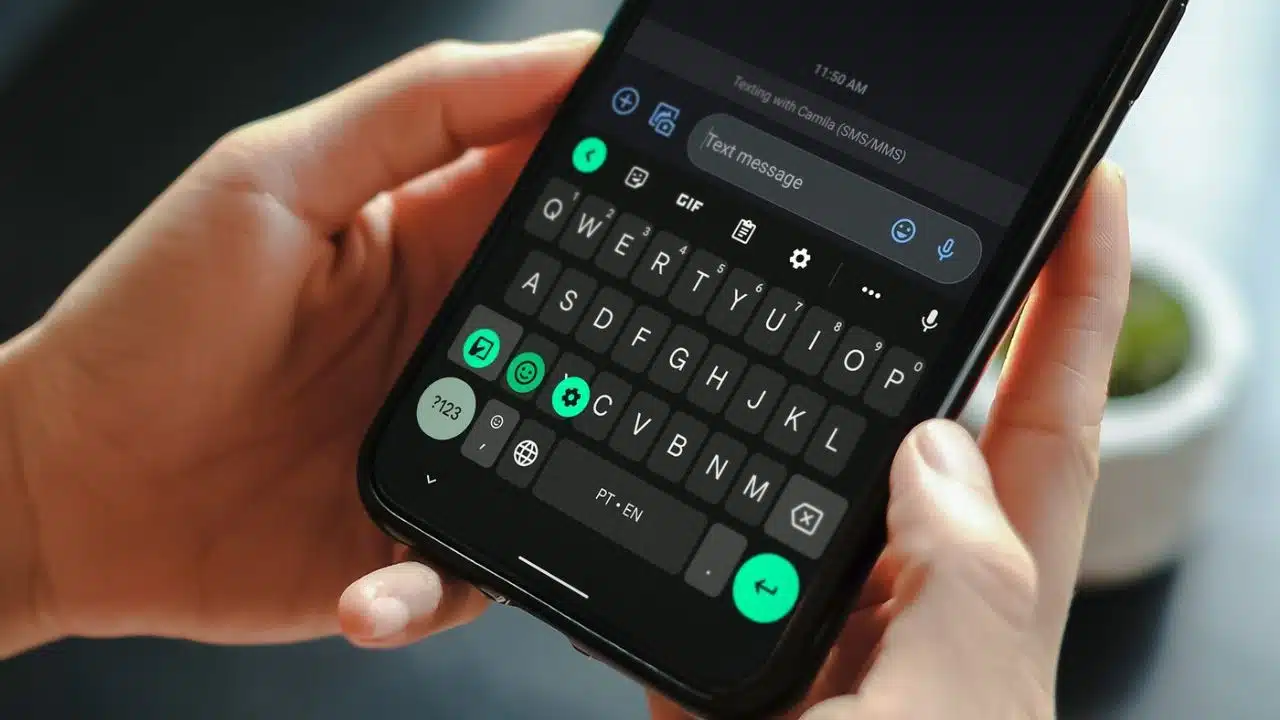
First off, the in-built translation feature is a real gem. Perfect for when you’re chatting with a friend who speaks a different language or maybe trying to impress someone with your linguistic prowess. Just tap on the Google icon and then the Translate icon (which looks like a folded piece of paper), pick the language you want to translate to, and you’re all set! Got a message in a language you don’t understand? Just paste it into the Gboard text box and select your language from the dropdown menu for an instant translation. It’s as simple as that!

Cursor control via the spacebar

Next up, say goodbye to the frustration of trying to tap your phone screen to get the cursor exactly where you want it. With Gboard, you can simply glide your finger along the spacebar, and your cursor will follow suit, landing precisely where you intended. This spacebar trick makes text editing a cinch, so go ahead and enjoy a smoother, frustration-free typing experience.

Custom phrase shortcuts

Gboard also lets you set up shortcuts for commonly used phrases. Instead of typing out the same thing over and over, just use a shortcut to insert your phrase, emojis, and special characters included. You can set this up by long-pressing the comma key, sliding up to the Gear icon, and tapping on Dictionary. Select your language, hit the + icon, and enter your phrase and the corresponding shortcut. Now, your custom phrase is only a shortcut away!

Swift line deletion

With Gboard, you can also say goodbye to deleting text character by character. A quick tap and slide gesture on the delete button can remove an entire line of text in one go. It’s super convenient and a real time-saver!

Floating keyboard and one-handed mode

Lastly, Gboard’s Floating keyboard and One-handed mode features significantly improve accessibility and personalization. The Floating keyboard lets you move the keyboard anywhere on your screen and resize it to your liking. Just tap the three horizontal dots on the top right of the shortcuts tray and select the Floating shortcut. The One-handed mode, as the name suggests, makes typing with one hand easier. To access it, press and hold the Comma key, then slide up to the One-Handed icon next to the Gear icon.

So there you have it! These are our top 5 Gboard features that can transform your typing experience. Give them a try and watch your texting productivity soar!

Read Also: Pros and Cons of Using Wireless Keyboard and Mouse

Subscribe to Our Newsletter

Related Articles

Top Trending

Iran revolutionary moments
1979 vs. 2026: Parallels and Differences in Iran’s Revolutionary Moments
Golden Visa Rules 2026
“Nomad Capitalist” Alert: Portugal & Greece Tighten Golden Visa Rules
ces 2026 agentic ai analysis
CES 2026 Recap: The "Agentic AI" Era Has Officially Begun
trump iran tariff impact analysis 2026
Trump Announces 25% Tariff on All Nations Trading with Iran
The End of the Physical Branch Digital Banking in 2026
The End of the Physical Branch: Digital Banking in 2026

LIFESTYLE

Recycled Couture Golden Globes 2026
Golden Globes 2026 Fashion: The Return of "Recycled Couture" on the Red Carpet
Zero-Waste Kitchen For Families: A Realistic 2026 Guide
The Zero-Waste Kitchen: A Realistic Guide for 2026 Families
Why Table Reservations Are Becoming the New Norm
India’s Dining Shift Uncovered: Why Table Reservations Are Becoming the New Norm
Travel Sustainably Without Spending Extra featured image
How Can You Travel Sustainably Without Spending Extra? Save On Your Next Trip!
Benefits of Living in an Eco-Friendly Community featured image
Go Green Together: 12 Benefits of Living in an Eco-Friendly Community!

Entertainment

How TV Series Will Shape the Next Decade
How TV Series Will Shape the Next Decade?
A Thousand Blows Season 2 Analysis
A Thousand Blows Season 2: Reviewing the Disney+ Boxing Hit
Recycled Couture Golden Globes 2026
Golden Globes 2026 Fashion: The Return of "Recycled Couture" on the Red Carpet
The Golden Globes’ International Pivot, Explained Through Wagner Moura’s Victory
Sophie Turner Lara Croft
Sophie Turner as Lara Croft: A Bold New Adventure Awaits!

GAMING

Game Evebiohaztech PC Guide
Game Evebiohaztech PC Guide: Survival Horror Gameplay Tips
Tommy Jacobs Gaming Eyexcon
Tommy Jacobs Gaming Eyexcon: Future of Eye-Tracking Consoles
10 Most Anticipated Indie Games Dropping in January 2026
The Best Gaming Platforms for Online Gaming in 2026
Roblox Error Code 524
Troubleshooting Roblox Error Code 524: Join Bug Fix for Developers

BUSINESS

AWS vs Azure Salary Freelance
AWS vs. Azure for Freelancers: Which Cloud Certification Pays More? Everything You Need to Know!
Google Project Management Certificate vs PMP
Google Project Management Certificate vs. PMP: Which Certification Boosts Your Freelance Rate in 2026?
How to Pass Fiverr Skill Tests
How to Pass Fiverr Skill Tests in 2026: The Ultimate Cheat Sheet [English, SEO and More]
Commercial Properties in Dubai Why DIFC Sets the Benchmark for Modern Workspaces
Commercial Properties in Dubai: Why DIFC Sets the Benchmark for Modern Workspaces
Quiet Hiring Returns
"Quiet Hiring" Returns: Why Companies Are Promoting Internally in Q1 2026

TECHNOLOGY

ces 2026 agentic ai analysis
CES 2026 Recap: The "Agentic AI" Era Has Officially Begun
india smartphone security source code mandate analysis
Cybersecurity Overhaul: India Mandates Source Code Sharing for Smartphone Makers
OpenAI & SpaceX IPO Rumors The Trillion-Dollar Valuation Race
OpenAI & SpaceX IPO Rumors: The Trillion-Dollar Valuation Race
Apple Google Gemini Deal
Alphabet Beats OpenAI: Apple Inks “Gemini Deal” for Next-Gen Siri
Best Certifications For Freelancers
Best Certifications For Freelancers in 2026: The Rate-Boosting Credential Playbook

HEALTH

The Analogue January Trend Why Gen Z is Ditching Screens for 30 Days
The "Analogue January" Trend: Why Gen Z is Ditching Screens for 30 Days
Gut Health Revolution The Smart Probiotic Tech Winning CES
Gut Health Revolution: The "Smart Probiotic" Tech Winning CES
Apple Watch Anxiety Vs Arrhythmia
Anxiety or Arrhythmia? The New Apple Watch X Algorithm Knows the Difference
Polylaminin Breakthrough
Polylaminin Breakthrough: Can This Brazilian Discovery Finally Reverse Spinal Cord Injury?
Bio Wearables For Stress
Post-Holiday Wellness: The Rise of "Bio-Wearables" for Stress