
What you look up on your computer is none of anyone else’s business, whether you’re trying to locate the best medical specialist in your region or the ideal Anniversary present for a loved one who lives far away.
On the other hand, the autofill feature built into our smartphones is intended to make the search experience on our devices more productive.
Read More: How do I Customize My Firefox Theme?
Even having autofill entries can make a search go more quickly, they can also put you in embarrassing circumstances. This is especially true if you don’t want anyone else to know what it is that you are looking for.
Because of this, I’m going to walk you through the actions that you can take to erase autofill and clear up any autofill that already exists on your own computer and the browsers that run on Windows.
Before we get into the specifics of the advice that I have compiled below, I would first like to explain the distinction between disabling autofill and deleting autofill.
Read Also: How to Delete Reddit Account?
Clearing out vs. Deleting Autofill
Clearing out autofill is the process of deleting the suggestions that display in the address bar or search bar of a web browser as you enter. This is referred to as clearing autofill. Alternatively phrased as “removing autocomplete recommendations,” this action may also be taken
Delete autofill, on the other hand, is the act of erasing information that is kept in the autofill settings of the browser, such as names, addresses, and credit card numbers. This can be done by selecting the “Autofill” tab in the browser’s settings. If you delete this information, the browser won’t be able to pre-populate the fields on web forms in the future. This feature is frequently used to save users time when filling out forms on websites.
Google Chrome Browser
How to Delete Autofill in Google Chrome Browser?
When you are sure that your Chrome browser has the most recent update, delete autofill by following these instructions:
- Open Chrome
- Click the three vertical dots in the upper-right corner of the screen (should be next to your profile picture)
- Click Settings
- On the left side, choose Autofill.
- A list of goods that use Autofill (i.e. Password Manager, Payment Methods, etc.). Click on each item for which you do not want autofill to be used and uncheck everything.
To Know More: How to Block a Website on Chrome?
How to Clear out Existing Autofill Data in Chrome?
- Open Chrome
- Click the three vertical dots in the upper-right corner of the screen (should be next to your profile picture)
- Select History, then History again from the resulting menu.
- In the left panel, click Clear browsing data.
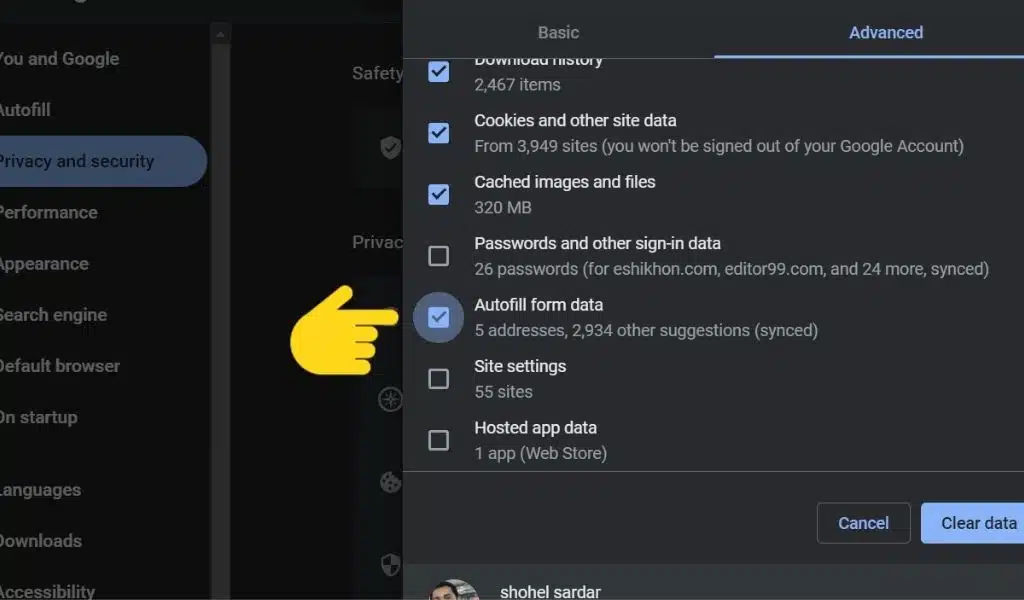
- Select the Advanced option
- Select All time in the Time range menu (this step may depend on what version of Chrome you have)
- Ensure that Autofill form data is selected. Mark off any more options you wish to eliminate.
- Select Clear data
Microsoft Edge
How to Delete Autofill in Microsoft Edge?
- Open Microsoft Edge.
- Click the three dots located in the upper right-hand corner of the display.
- Select Settings
- The menu default should be set to Profiles. If it does not, choose this option from the left-hand menu.
- Toggle off Passwords, Payment info, and any other auto-fill settings in the Your Profile section.
How to Clear out Existing Autofill Data in Microsoft Edge?
- Open Microsoft’s Edge
- Click the three dots on the upper right of the display.
- Select Settings
- Select Privacy, Services, and Search
- Select Choose What to Clear under Clear Browsing Data.
- Select All Time in the Time Range menu.
- Select the Autofill Form Data box (Includes Forms and Cards). Select any more options you wish to be eliminated.
- Click Clear Now
Firefox
How to Delete Autofill in Firefox?
- Open Firefox
- Click the three lines shown at the upper right of the screen
- Choose settings
- Choose Security & Privacy
- Uncheck the settings under Forms and Autofill for which Autofill should be disabled.
You Can Read: How to Use the Windows 11 Widget Panel?
How to Clear out Existing Autofill Data in Firefox?
- Open Firefox
- Click the three dots in the upper right corner of the screen.
- Click the Settings
- Click Privacy and Safety
- Under Logins and Passwords, uncheck Ask websites to save your logins and passwords.
- Click Saved Logins to get rid of any saved logins and passwords.
- Take away any logins you don’t want to be saved