Is your site doing all the hard work, while traffic still feels stuck?
That usually means the problem is deeper than content alone. Slow pages, indexing issues, weak internal links, and missing Schema Markup can quietly drag down search visibility even when your pages look fine on the surface.
This guide on 7 Technical SEO Fixes With High ROI walks you through the fixes that tend to move results fastest. I’ll keep it practical, simple, and focused on the technical improvements that help Google crawl, understand, and rank your pages more efficiently.
Enhance Page Speed Optimization
Page speed is one of the fastest Technical SEO Fixes With High ROI because it helps both users and crawlers. Google’s guidance still points teams to Core Web Vitals and PageSpeed Insights, so speed work pays off in website performance, user experience, and crawlability.
Compress Images for Faster Load Times
Images often create the biggest speed drag on commercial pages. If your hero image or product gallery is oversized, it can slow your Largest Contentful Paint, which web.dev says should stay at 2.5 seconds or less for a good experience.
- Convert heavy JPEG and PNG files to WebP or AVIF. Google’s web performance docs note that both formats usually compress better than older formats, which means less data to download.
- Keep your largest above-the-fold image sharp, but avoid oversized exports. For many business pages, a clean hero image under a few hundred kilobytes is a better target than full-resolution uploads.
- Use lazy loading for below-the-fold visuals, but do not lazy-load the primary content in a way that requires a tap or swipe to appear on mobile.
- Serve responsive image sizes so phones do not download desktop-sized assets.
- Review your worst pages in PageSpeed Insights first. Fixing the top ten slowest templates usually gives a better ROI than editing every image by hand.
Minimize CSS, JavaScript, and HTML Files
Heavy code slows rendering and weakens Performance Metrics. It also hurts responsiveness, and web.dev now uses Interaction to Next Paint as a Core Web Vital, with 200 milliseconds or less considered a strong target.
- Remove unused CSS and JavaScript before you minify. Dead code is common on sites that have changed themes, plugins, or tracking tools several times.
- Inline critical CSS for the first screen, then defer nonessential scripts so the browser can render sooner.
- Use Brotli or gzip compression for HTML, CSS, and JavaScript assets.
- Set long cache lifetimes for static files that rarely change, then version them when you deploy updates.
- Audit third-party scripts such as chat widgets, heatmaps, and tag managers. Those tools often create bigger delays than your own code.
| Metric | Good Target | What It Usually Means |
|---|---|---|
| LCP | 2.5 seconds or less | Main content appears quickly |
| INP | 200 ms or less | Buttons, forms, and menus respond fast |
| CLS | 0.1 or less | Layout stays stable while loading |
Resolve Indexing Challenges
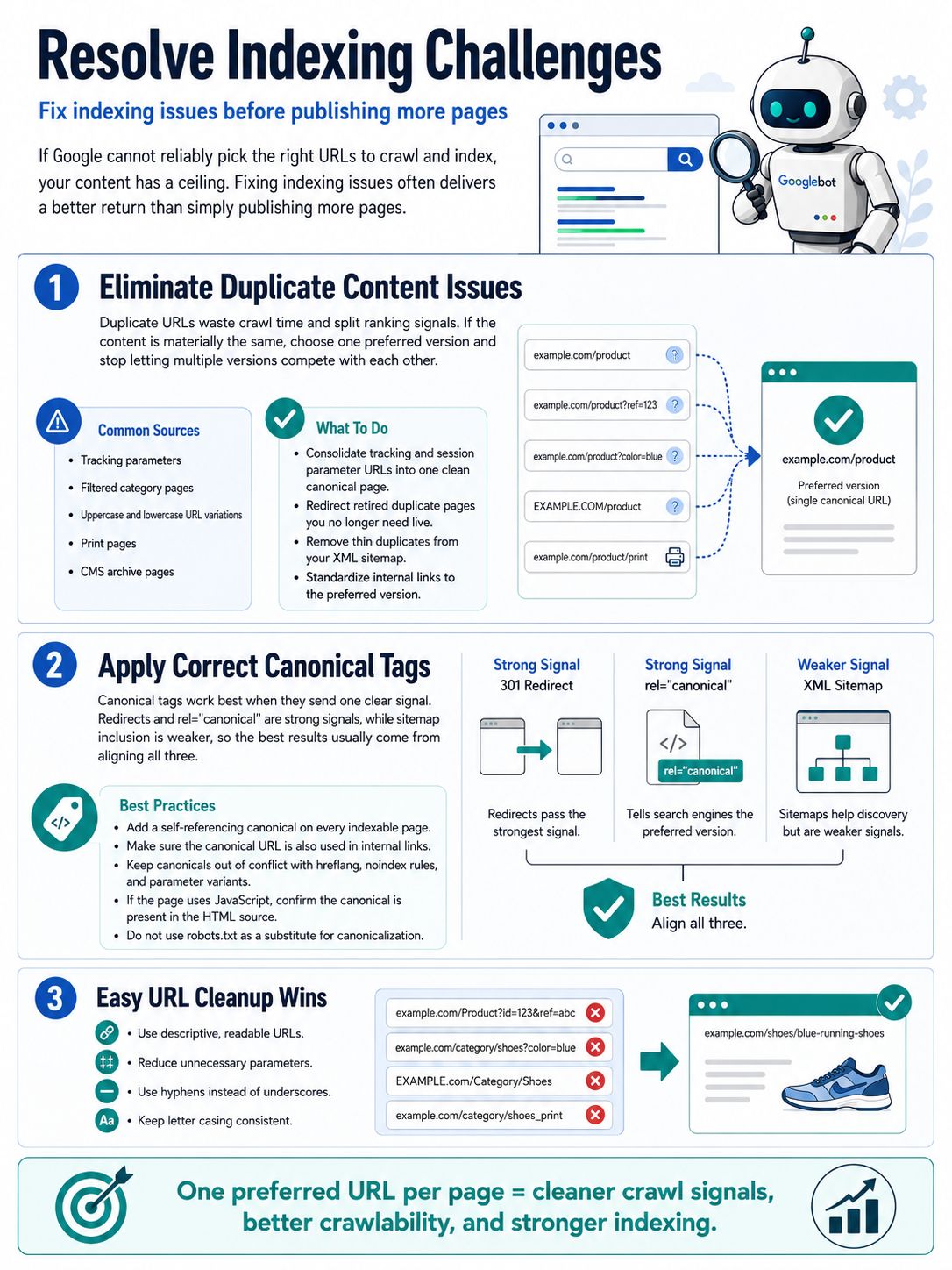
If Google cannot reliably pick the right URLs to crawl and index, your content has a ceiling. This is why fixing Indexing Issues often creates a better return than publishing more pages.
Eliminate Duplicate Content Issues
Duplicate URLs waste crawl time and split ranking signals. Google’s canonical documentation explains that duplicate versions can keep crawlers busy on pages you do not actually want to rank.
Common sources include tracking parameters, filtered category pages, uppercase and lowercase URL variations, print pages, and CMS archive pages. If the content is materially the same, choose one preferred version and stop letting five versions compete with each other.
- Consolidate tracking and session parameter URLs into one clean canonical page.
- Redirect retired duplicate pages when you no longer need them live.
- Remove thin duplicates from your XML Sitemap so Google sees a cleaner set of priority URLs.
- Standardize internal links so teams always link to the preferred version.
Apply Correct Canonical Tags
Canonical tags work best when they send one clear signal. In Google’s latest documentation, redirects and rel canonical tags are strong signals, while sitemap inclusion is weaker, so the best results usually come from aligning all three.
- Add a self-referencing canonical on each indexable page.
- Make sure the canonical URL is also the version used in internal links.
- Keep canonicals out of conflict with hreflang, noindex rules, and parameter variants.
- If the page is rendered with JavaScript, confirm the canonical is present in the HTML source and is not rewritten incorrectly after render.
- Do not use robots.txt as a substitute for canonicalization. Google specifically advises against that approach.
One easy win is cleaning up URL patterns. Google also recommends descriptive, readable URLs, fewer unnecessary parameters, hyphens instead of underscores, and consistent letter casing, all of which reduce duplicate paths and strengthen crawlability.
Optimize for Mobile Users
Mobile SEO is no longer a side task. Google uses the mobile version of your site for indexing and ranking, so weak mobile pages can limit Search Engine Ranking even if your desktop experience looks polished.
Ensure Responsive Web Design
Responsive design remains the safest setup for most business sites because it serves the same HTML across devices while adapting the layout to screen size. That keeps content parity simpler and lowers the risk of mobile-first indexing problems.
- Keep the same core content on mobile and desktop pages.
- Use the same title tags, meta descriptions, and structured data on both versions.
- Make sure robots rules do not block key mobile resources like CSS, JavaScript, or image files.
- Test important templates on real phones, not just browser resizing tools.
Improve Mobile Site Navigation and Speed
Mobile users need fast pages and short paths to important content. In practice, the highest ROI often comes from simpler menus, fewer intrusive pop-ups, and faster tap response.
- Keep navigation shallow so priority pages are reachable in a few taps.
- Use buttons and tap targets that are easy to hit with a thumb.
- Delay noncritical scripts that slow opening menus, search bars, and product filters.
- Fix broken links and soft 404s in mobile navigation first, because they waste both user attention and crawl budget.
- Do not hide key text or product details behind interactions that Google may not trigger during rendering.
- Check that mobile image URLs, alt text, and videos match the desktop experience.
Implement High-Impact Structured Data
Schema Markup helps search engines understand page meaning faster, and it can make eligible pages appear with richer search features. That makes it one of the clearest Technical SEO Fixes With High ROI for sites with products, articles, services, and local pages.
Integrate Essential Schema Types
Google’s supported structured data list is very specific, so focus on the schema types that match your real page intent. For most business sites, the strongest starting set includes Organization, Breadcrumb, Article, Product, LocalBusiness, and Video where relevant.
- Organization helps define your brand identity and core business details.
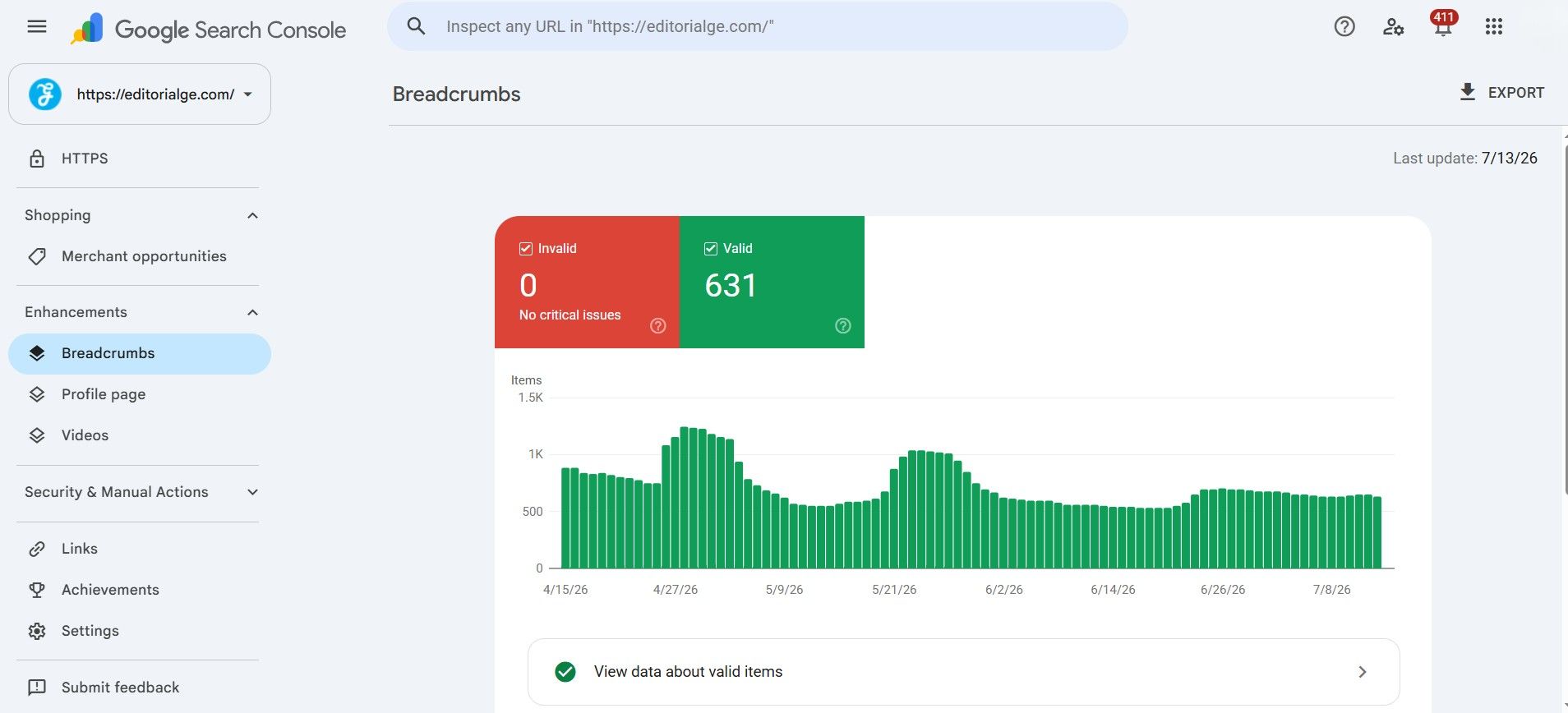
- Breadcrumb reinforces site structure and helps users understand where a page sits in the hierarchy.
- Product can surface price, availability, and review information on eligible pages.
- LocalBusiness supports local relevance for companies with physical locations or defined service areas.
- Article helps Google interpret blog and editorial content more clearly.
One detail many pages miss is matching the schema to visible content. If your page does not clearly display the data you mark up, you create confusion instead of clarity.
Verify Structured Data Implementation
Validation matters because markup that looks correct in a plugin can still fail after rendering. As of June 2026, Google still recommends checking eligibility with the Rich Results Test and reviewing warnings in Search Console.
- Test your highest-value pages first, such as service pages, top blog posts, category pages, and product templates.
- Fix syntax errors, missing required fields, and mismatched values before expanding site-wide.
- Check rendered HTML to confirm your JSON-LD actually appears after scripts load.
- Revalidate after deployment and track click-through changes over the next few weeks.
There is one important caution here. FAQ rich results are now heavily limited in Google Search, mainly to authoritative government and health sites, so FAQ schema is no longer a reliable visibility play for most businesses. Put your effort into schema types Google still broadly supports.
Strengthen Internal Linking Practices
Internal linking is one of the cheapest SEO optimization moves you can make. It improves crawl paths, surfaces priority pages, and gives users a clearer route through your content strategy.
Repair Broken Links and Enhance Site Navigation
Broken Links interrupt both user flow and crawler flow. They also create unnecessary Technical Debt, especially on older sites with deleted blog posts, renamed service pages, or product URLs that changed during a redesign.
- Run monthly Technical Audits with a crawler such as Screaming Frog Site Audit or Ahrefs Site Audit to find 404s, redirect chains, and orphan pages.
- Fix links on revenue-driving pages first, including service pages, category pages, and top-converting blog posts.
- Use 301 redirects for removed pages when a close replacement exists.
- Update navigation, footer, and sidebar links after migrations so old URLs stop circulating internally.
- Keep your XML Sitemap clean and submit updated versions after major URL changes.
Google’s sitemap guidance still sets a limit of 50,000 URLs or 50 MB uncompressed per sitemap file. Large sites should split sitemaps by content type or section, which also makes indexing problems easier to diagnose in Search Console.
Strategically Position Anchor Texts
Google’s link documentation says anchor text helps both people and search engines understand linked pages. That is why vague phrases like “read more” and “click here” are weak choices for important internal links.
- Use natural anchor text that describes the destination page clearly.
- Link to pages that matter for revenue, lead generation, or brand authority.
- Make sure every priority page has at least one crawlable HTML link pointing to it.
- Place links in context, inside relevant copy, instead of stuffing them into random blocks.
- Check that your links are standard HTML anchor elements with an href attribute, since Google may not parse scripted pseudo-links reliably.
| Weak Internal Link | Better Internal Link | Why It Wins |
|---|---|---|
| Click here | technical SEO audit checklist | Clearer topic signal |
| Learn more | page speed optimization tips | Improves relevance |
| Read this page | Schema Markup setup guide | Helps users predict the destination |
Final Thoughts
7 Technical SEO Fixes With High ROI work because they remove friction. Faster pages, cleaner canonicals, stronger mobile UX, valid Schema Markup, better internal links, and a healthier XML Sitemap all help Google crawl and understand your site with less guesswork.
Start with the pages that already matter most to your business. Run regular Technical Audits, track Performance Metrics, and fix the issues that improve website performance, search visibility, and user experience first.
Small technical improvements can create a real lift in organic traffic, conversion rate, and Search Engine Ranking when you apply them in the right order.
FAQs about Technical SEO Fixes With High ROI
1. What are the top technical SEO fixes that give high ROI?
Focus on site speed, crawlability, canonical links, structured data, redirect fixes, mobile optimization, and a clean site map file. These technical SEO fixes often deliver high ROI quickly.
2. How does improving site speed and page speed help SEO and ROI?
Faster pages keep users, they rank better, and they convert more, so you see gains in traffic and sales. Fixing page speed and page experience metrics is a fast way to boost ROI.
3. How do I check crawlability and indexing problems?
Look at server logs, run a site crawler, and check search console reports to spot blocked or orphan pages. Also review your crawl rules file, site map file, and canonical links, then fix what stops bots from indexing.
4. Will structured data and mobile optimization really move the needle?
Yes, structured data can win rich results and raise click rates, while mobile optimization keeps visitors from bouncing. Both are practical technical SEO moves that show clear, measurable ROI.