A page can pass a quick visual check and still feel poor to use.
The headline appears, but the main image drags in late. A menu opens after just enough delay to make the visitor tap again. The page looks stable, then an ad or banner pushes the paragraph down. None of these issues always look dramatic in a screenshot, but users feel them immediately.
Core Web Vitals exist to measure those moments.
For developers, site owners, SEO teams, and technical agencies, core web vitals optimization should not mean chasing a perfect Lighthouse score. It means finding the part of the page that makes real users wait, hesitate, or lose their place.
The current Core Web Vitals are:
- Largest Contentful Paint: measures when the main visible content appears. A good result is 2.5 seconds or faster.
- Interaction to Next Paint: measures how quickly the page responds visually after user interaction. A good result is 200 milliseconds or faster.
- Cumulative Layout Shift: measures unexpected page movement. A good result is 0.1 or lower.
Google evaluates these metrics using the 75th percentile of page visits, across mobile and desktop. That is where many teams get surprised. A page may feel fast on a developer’s laptop and still fail for mobile users on slower devices, weaker connections, or script-heavy pages.
What Core Web Vitals Actually Tell You
Core Web Vitals do not measure everything about a good website. They do not tell you whether the content is useful, whether the layout is persuasive, whether the checkout is clear, or whether the page answers the search query well.
They measure three narrower but important parts of user experience: loading, responsiveness, and visual stability.
Largest Contentful Paint, usually shortened to LCP, focuses on the first meaningful view. On a blog post, that may be the featured image or the headline area. On an ecommerce product page, it may be the main product image. On a SaaS landing page, it may be a large hero section, dashboard preview, or text block.
Interaction to Next Paint, or INP, is about what happens after the page looks ready. A visitor clicks a menu, types into search, opens a filter, taps a cart button, or expands an accordion. If the page waits too long before showing a visible response, INP suffers.
Cumulative Layout Shift, or CLS, catches movement that feels accidental. Ads, embeds, late-loading fonts, image containers without dimensions, and injected banners are regular offenders.
A useful way to read these metrics is this: LCP asks, “Can users see the main thing soon?” INP asks, “Does the page respond when users touch it?” CLS asks, “Does the layout stay where users expect it to stay?”
The SEO Impact Is Worth Caring About, but Easy to Oversell
Core Web Vitals matter for search, but they are not a ranking cheat code.
Google recommends good Core Web Vitals as part of a broader page experience approach. It also makes clear that site owners should not focus on one or two signals while ignoring the overall quality of the page.
That distinction matters. A weak article does not become strong because its LCP improves. A thin product page does not become competitive because its CLS is clean. Search still depends on relevance, helpfulness, crawlability, internal linking, structured data, authority signals, and how well the page satisfies intent.
Performance still matters. It matters because poor experience gives users reasons to leave. In competitive search results, where several pages answer the query reasonably well, a faster and steadier page has fewer disadvantages. For ecommerce and lead-generation pages, the value is often even clearer: users can browse, compare, click, and convert with less friction.
For agencies, this is the honest pitch. Core Web Vitals are not magic. They are technical quality work that can support search visibility, engagement, and revenue.
Start With the Failing Metric
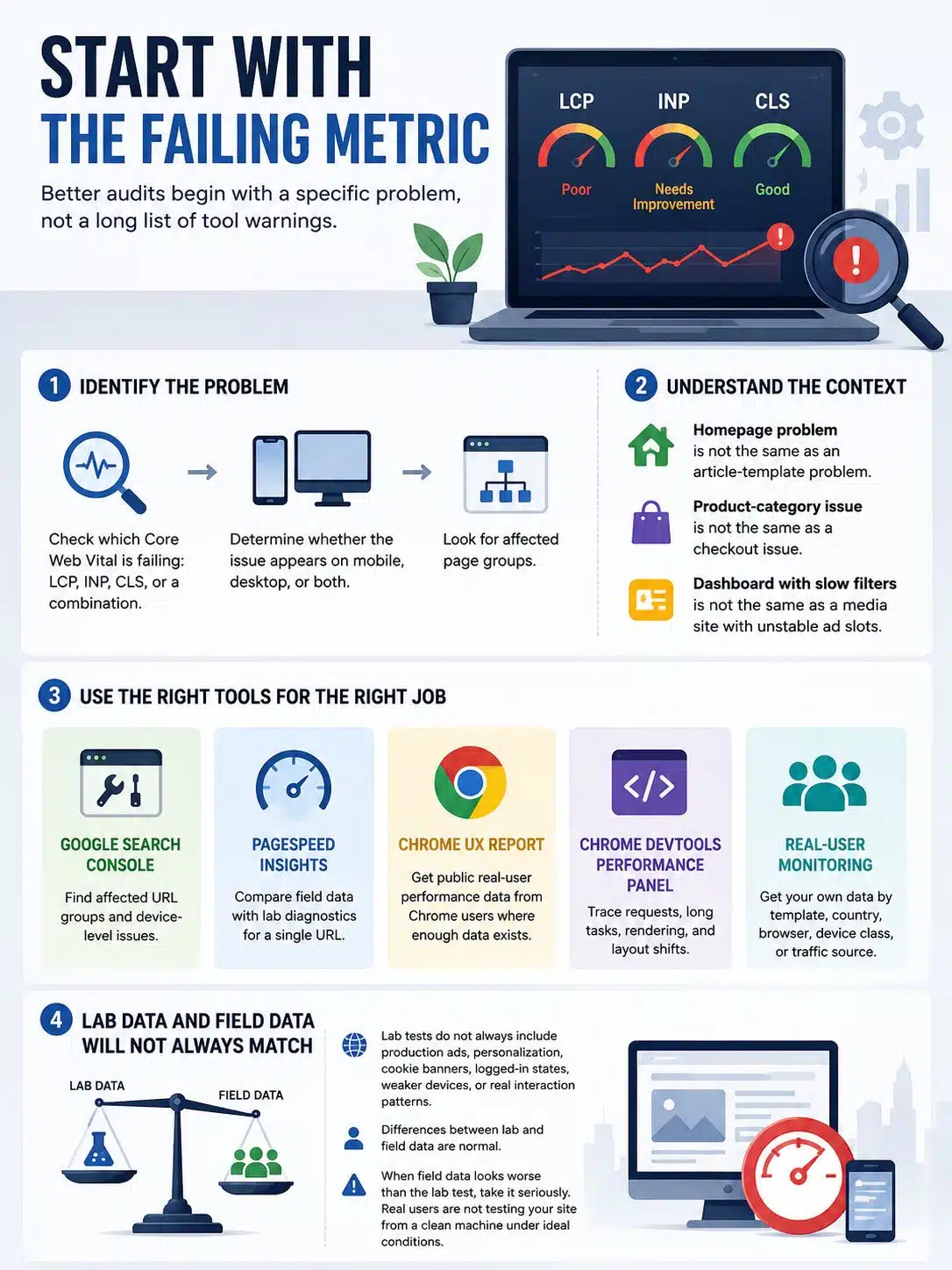
The weakest performance audits usually begin with a long list of tool warnings. The better ones begin with a specific problem.
Check whether the site is failing LCP, INP, CLS, or a combination of them. Then check whether the issue appears on mobile, desktop, or both. After that, look for affected page groups.
A homepage problem is not the same as an article-template problem. A product-category issue is not the same as a checkout issue. A dashboard with slow filters is not failing for the same reason as a media site with unstable ad slots.
Use the tools for what they are good at:
- Google Search Console is useful for finding affected URL groups and device-level issues.
- PageSpeed Insights helps compare field data with lab diagnostics for a single URL.
- Chrome UX Report gives public real-user performance data from Chrome users where enough data is available.
- Chrome DevTools Performance panel is better for tracing requests, long tasks, rendering, and layout shifts.
- Real-user monitoring is valuable when you need your own data by template, country, browser, device class, or traffic source.
Lab data and field data will not always match. That is normal. Lab tests do not always include production ads, personalization, cookie banners, logged-in states, weaker devices, or real interaction patterns.
When field data looks worse than the lab test, take it seriously. Real users are not testing your site from a clean machine under ideal conditions.
LCP: The Main Content Needs a Clear Path
LCP problems often look like image problems, but the image is not always the full story.
A late LCP can come from a slow server, a hidden resource, a heavy file, blocking CSS, blocking JavaScript, web fonts, or third-party scripts. Before changing code, identify the LCP element. It might be a hero image. It might be a heading. It might be a background image. It might even be a video poster.
If the initial HTML arrives slowly, everything else starts late. This is common on CMS-heavy sites with weak caching, overloaded plugins, expensive database queries, or too many redirects. On modern frontend stacks, the delay may come from slow server-side rendering, API calls that block HTML generation, or a page that relies too heavily on client-side rendering before the main content is useful.
For WordPress publishers, start with boring checks before advanced tuning: page caching, CDN behavior, plugin overhead, image handling, and whether ads or tag managers are loading too early. For headless or framework-based sites, check whether critical content is available in the initial HTML or waits behind JavaScript.
The LCP resource also needs to be easy for the browser to discover. A hero image buried inside a JavaScript carousel or loaded as a CSS background may arrive later than expected. For important above-the-fold images, plain HTML is often safer.
Example:
<link rel="preload" as="image" href="https://cdn1.editorialge.com/images/hero.webp" fetchpriority="high">

<img
  src="https://cdn1.editorialge.com/images/hero.webp"
  width="1200"
  height="675"
  alt="Dashboard preview"
  fetchpriority="high"
>
Use priority hints with restraint. The main above-the-fold asset may deserve higher priority. Every image on the page does not.
Oversized images remain one of the most preventable LCP problems. A mobile visitor should not download a full desktop hero image. An ecommerce category page should not push dozens of large product images before the user scrolls. Responsive images, WebP or AVIF where appropriate, automatic image variants, and sensible CMS upload limits can prevent many problems before they reach production.
A useful editorial rule for content teams: if the CMS allows a 4 MB featured image to become the live hero image without resizing, the workflow is broken.
INP: The Page Must Respond After It Looks Ready
INP is where modern frontend weight becomes visible.
The page may appear loaded. The user clicks. Nothing happens for a moment. That delay may come from JavaScript execution, layout work, rendering, hydration, analytics, ads, or a third-party widget competing for the main thread.
Do not test only the first load. Test the actions users actually take.
On content sites, try the menu, search box, cookie banner, newsletter prompt, comments, and embedded videos.
On ecommerce sites, test filters, sorting, product variants, cart buttons, size selectors, review widgets, and recommendation blocks.
On dashboards, test tables, date pickers, charts, modal windows, search fields, bulk actions, and export buttons.
The problem is often not one terrible script. It is too much work happening at the wrong time.
Heavy JavaScript should be split, delayed, or removed where possible. Large tasks should be broken into smaller chunks so the browser gets chances to respond between them. Search suggestions should not rebuild a large interface after every keystroke. Product filters should not re-render more of the grid than necessary. A dashboard table should not block the interface while processing data that could be paginated, virtualized, cached, or moved off the main thread.
Frameworks are not automatically guilty. React, Vue, Angular, Svelte, and Next.js can all perform well. Problems usually come from broad hydration, oversized bundles, unnecessary dependencies, expensive event handlers, or components that re-render too much of the page.
Third-party scripts deserve special attention. Analytics, heatmaps, chat widgets, consent managers, social embeds, A/B testing tools, and ad scripts all run in the user’s browser. They are not free just because they come from another vendor.
A practical script review should ask:
- Does this script still serve a current business purpose?
- Does it need to load on every page?
- Can it wait until after the main content is usable?
- Can it load only after consent or interaction?
- Who owns it internally?
This is where performance work becomes organizational, not just technical. Marketing, product, revenue, analytics, and SEO teams may all want different scripts. The solution is not to remove every tool. The solution is to stop treating the browser as an unlimited container.
CLS: The Page Should Not Move After Users Begin Reading
CLS often feels less like a speed issue and more like sloppy layout.
A visitor starts reading. An ad loads. The paragraph jumps. A newsletter bar appears. A button moves. A font swaps and the text reflows. The page may still be “fast,” but it feels unreliable.
Images and videos need reserved space. Width and height attributes are a simple start:
<img
  src="https://cdn1.editorialge.com/images/article-cover.webp"
  width="1200"
  height="675"
  alt="Server rack in a data center"
>
Ads need the same discipline. If a page may load an ad slot, reserve space for it before the ad arrives. This is especially important for publishers, where a staging page without live ads may look stable while the production page shifts for real visitors.
Embeds can cause similar trouble. YouTube videos, social posts, maps, forms, review widgets, and iframes should not suddenly expand after the user begins reading.
Banners need careful placement too. Cookie notices, newsletter prompts, app-install banners, and promotional bars can all create layout shifts when they are injected above existing content. Overlay patterns or pre-reserved areas are usually safer than pushing the whole page down.
Fonts are another quiet source of movement. Too many font weights, late-loading font files, or aggressive font swapping can change text dimensions. Keep first-view typography simple. Preload only the fonts that matter early.
Animation is safer when it uses transform or opacity. Animating width, height, margin, top, or left can trigger layout movement and make CLS harder to control.
CLS is often fixed through design discipline as much as engineering.
Where Core Web Vitals Optimization Usually Pays Off First
Different sites fail in different ways.
A news or blog site should usually begin with featured images, ad slots, embeds, web fonts, and third-party scripts. The editorial workflow matters here. If writers and editors can upload oversized images without automatic resizing, LCP problems will keep returning.
An ecommerce site should look closely at product media and interactive category pages. Filters, sort menus, image galleries, review widgets, recommendation engines, and cart actions can all hurt INP. Category pages are especially risky because they combine many images with interaction-heavy controls.
A SaaS marketing site may look lightweight but still ship large animation libraries, chat widgets, form tools, analytics tags, and experiment scripts. The hero section is often the first place to inspect for LCP.
A logged-in dashboard has a different profile. Search visibility may matter less after login, but responsiveness matters more during use. Tables, filters, charts, modals, and search fields should stay responsive over long sessions.
This is why generic “speed optimization” packages can disappoint. A publisher with unstable ads does not need the same fix as a Shopify store with oversized product images or a React dashboard with expensive table rendering.
A Better Debugging Sequence
A clean debugging sequence saves hours.
Start in Search Console if the site has enough data. Check whether the issue is mobile, desktop, or both. Then identify affected URL groups. If a whole template is failing, fix the template before polishing individual pages.
Next, run representative URLs through PageSpeed Insights. Look at both field data and lab diagnostics. Field data tells you what real users experienced. Lab data helps you reproduce and debug likely causes.
Then open Chrome DevTools and record traces.
For LCP, find the LCP element and check when it is discovered, requested, downloaded, and painted.
For INP, interact with the page during recording. Open menus. Type in search. Apply filters. Use the cart. Watch for long tasks and expensive rendering after input.
For CLS, inspect layout shift records and identify which elements moved. Test production-like pages, not sanitized staging pages.
After changes ship, give field data time to update. Lab tests can improve immediately. Search Console and CrUX-based reporting need enough new real-user data before the improvement becomes visible.
Mistakes That Make the Work Look Better Than It Is
A perfect Lighthouse score can still mislead. Lighthouse is useful, but it is a lab test. It does not fully represent production traffic, ads, consent flows, personalization, weaker devices, or every meaningful interaction.
Lazy-loading the LCP image is another easy mistake. Lazy loading helps below-the-fold images. It usually hurts the main above-the-fold image.
Staging environments can hide real issues. If staging does not include production ads, tag managers, cookie banners, personalization, or embeds, it may not show the actual page experience.
Plugins can help, especially on CMS platforms. They can improve caching, image optimization, script loading, and CSS delivery. But they cannot fully understand business logic, ad behavior, component architecture, or which third-party scripts matter.
There is also a softer mistake: treating Core Web Vitals as an SEO-only task. Developers may then focus on the report instead of the user flow. The report is a map, not the destination.
Make Performance Harder to Break Again
Core Web Vitals work should not be a one-off cleanup.
Sites change. Editors upload new images. Developers add components. Marketing adds scripts. Ad partners change behavior. A redesign can undo careful performance work in a week.
Useful guardrails include:
- Automatic image resizing and compression
- Required dimensions for image and video components
- Reserved layout space for ads and embeds
- A review process for new third-party scripts
- Bundle-size checks before deployment
- Template-level performance testing
- Real-user monitoring for important pages
- Clear ownership when metrics regress
For agencies, this belongs in ongoing technical maintenance, not only in an emergency project after Search Console turns red. For site owners, Core Web Vitals should be reviewed after redesigns, CMS changes, plugin updates, ad stack changes, frontend releases, and hosting moves.
Performance does not stay fixed by itself.
Final Thoughts
Core web vitals optimization is most useful when it starts with evidence instead of panic.
Find the failing metric. Check whether it affects mobile, desktop, or both. Identify the template. Reproduce the issue with the right tool. Fix the cause before polishing secondary warnings.
For LCP, clear the path to the main content. For INP, reduce main-thread pressure and test real interactions. For CLS, reserve space before late content arrives.
Core Web Vitals will not rescue weak content or guarantee rankings. They will make useful pages easier to load, read, click, and trust. That is a practical advantage, and for many sites, a commercial one too.