


Slow websites don’t crash. They bleed out through tiny delays. Effective Page Speed Optimization stops this silent conversion killer dead in its tracks.
Over the last decade, I have audited hundreds of platforms, and the story is always the same. A hero image hangs in digital limbo while the headline loads. A user taps the mobile menu and waits just long enough to wonder if their browser crashed. A programmatic ad banner injects late, violently shoving the paragraph down right as they start reading.
Internally, these glitches look incredibly minor on a staging link. You test the new feature on a high-end MacBook over a gigabit fiber-optic connection in the office, and everything seems perfectly fine. But out there in the wild? Users feel the friction instantly. They are browsing on overcrowded mobile networks, struggling with battery-saving modes, or commuting on a spotty 3G connection with a dozen tabs already open.
I constantly tell my clients to stop treating page speed as a purely engineering problem. It’s a design, product, and SEO issue. How fast your site loads fundamentally dictates whether visitors keep reading, actually buy something, or bounce completely to a competitor. Google’s Core Web Vitals measure this exact real-world friction—loading performance, responsiveness, and layout stability. But passing a generic test is absolutely not the endgame here.
Stop obsessing over a flawless 100/100 Lighthouse score. If the page feels fast and stable to the person actually holding the phone on a train, you’re winning. Achieving a noticeably faster website means looking past a single lab test and aggressively pruning what actually chokes the page: sluggish servers, bloated images, heavy JavaScript bundles, poorly managed templates, and legacy third-party tags that nobody in the marketing department even remembers installing.
I’m going to walk you through the exact strategies I use to fix these issues. Because let’s be honest: no premium caching plugin is going to magically fix a fundamentally broken foundation. Real speed comes from ruthless operational discipline across your entire organization.
Why Page Speed Matters Far More Than a Vanity Score
Nobody praises your site’s complex backend engineering when it loads instantly. They just complete their checkout, fill out the lead form, or finish reading the article. But the very second it lags? Trust evaporates entirely.
I’ve seen sluggish checkouts feel so incredibly sketchy that buyers double-guess handing over their credit cards. I’ve audited digital publications covered in so many late-loading scripts they feel like spam farms. A complex SaaS dashboard or a fintech portfolio screen feels completely broken when the data takes four seconds to populate.
For search teams, Core Web Vitals (Largest Contentful Paint, Interaction to Next Paint, and Cumulative Layout Shift) form the absolute baseline for the page experience conversation. Google has drawn lines in the sand: they want Largest Contentful Paint under 2.5 seconds, Interaction to Next Paint under 200 milliseconds, and Cumulative Layout Shift below 0.1.
Those thresholds are a solid technical benchmark, but in my experience, they don’t capture every real-world bottleneck. A site can easily ace a lab test and still crawl for real users if heavy ad auctions, regional server latency, or aggressive GDPR cookie banners drag it down. That’s why delays are business killers. Every millisecond of friction is another invitation for a user to abandon ship.
When you frame performance optimization SEO strictly around pleasing Google’s algorithms, you lose the plot entirely. Site speed SEO is fundamentally about protecting your conversion funnel and respecting the user’s time.
Designers must treat performance as a core interface feature. I regularly remind UX teams that a stunning, immersive layout that takes four seconds to become interactive is a failed design, no matter how many awards it wins on Dribbble. For product managers, the silent killer is performance debt. A heavy scroll animation library here, a tracking pixel there, an oversized stock photo uploaded by a rushed editor—individually, they seem harmless. Collectively, they hijack the browser.
Prioritize whatever the user actually came to see. If it’s a deep-dive editorial piece, get the text on screen immediately. If it’s an interactive learning module on an EdTech platform, load the core video and the “Next Lesson” button before anything else. Secondary scripts, recommendation engines, and flashy visuals can wait their turn.
Start With Measurement Before You Touch the Code
Optimizing blindly is a massive waste of time and budget. Before I let my engineering teams touch a single line of code or install a new optimization tool, we find out exactly where the bleeding is coming from. Far too many organizations panic over a generalized tool warning without knowing which templates, or which users, are actually suffering.
Testing just your homepage is a rookie mistake I see almost weekly. Homepages are often heavily cached and highly optimized. Speed issues are almost always baked into reusable interior templates. If your standard article layout relies on a massively unoptimized image component, your entire media archive is compromised. If your ecommerce application’s primary product page loads a heavy review-rendering library before the user even sees the “Add to Cart” button, your entire inventory feels sluggish.
Don’t treat PageSpeed Insights, Lighthouse, and CrUX as interchangeable. They measure entirely different realities.
CrUX (Chrome User Experience Report) gives you the brutal reality of what real Chrome users actually experience in the field over a 28-day rolling period. Lighthouse gives you a controlled, isolated lab environment to diagnose the specific bug. You need both, layered heavily with your own business context, to know which templates actually drive revenue.
I tell stakeholders to stop treating “performance” as a vague, terrifying monolith. Break the backlog down into ruthlessly specific, assignable engineering and content tickets. You cannot assign a ticket that just says “make the site faster.” It will sit in your Jira backlog forever.
Instead, write actionable tasks based on the data:
- Reserve explicit pixel heights for mid-content programmatic ad slots on the evergreen template.
- Defer parsing of the Marketo tracking script until after the first user scroll interaction.
- Force CMS image uploads to crop to a maximum 1200px width and automatically convert to WebP.
Own the task. Fix the actual bottleneck.
Advanced Architecture: SSR, SSG, and the Headless Illusion
A lot of the performance issues I get hired to fix aren’t actually front-end bugs; they are architectural flaws. You cannot optimize a payload if the fundamental way your server delivers the page is broken.
Over the past few years, the industry moved heavily toward Single Page Applications (SPAs) built on React, Vue, or Angular. The promise was a faster, app-like experience. But in practice, many teams defaulted to Client-Side Rendering (CSR).
If you are using CSR, you are sending a blank HTML document to the user’s mobile phone, followed by a massive JavaScript bundle. You are essentially asking a three-year-old Android device on a 3G network to do the heavy lifting of constructing your website from scratch. It destroys your TTFB and murders your Largest Contentful Paint. I’ve watched teams try to cache their way out of a CSR mess for months before realizing the architecture is the enemy.
If you want a truly fast foundation, you need to shift the workload back to the server:
- Server-Side Rendering (SSR): Frameworks like Next.js or Nuxt allow you to render the HTML on your server and send a fully formed page to the user. The browser can paint the content immediately, and then “hydrate” the page with interactive JavaScript afterward.
- Static Site Generation (SSG): If your content doesn’t change by the second (like a blog or a corporate site), generate the HTML at build time. Serving static HTML from an Edge CDN is the absolute fastest way to deliver a page.
- Edge Computing: I highly recommend pushing your logic to the edge. Using Cloudflare Workers or Vercel Edge Functions allows you to execute redirects, A/B testing, and personalization at the CDN level—closer to the user—so you don’t incur a heavy round-trip to your origin server.
Fix the First Screen (LCP) Before Optimizing the Rest
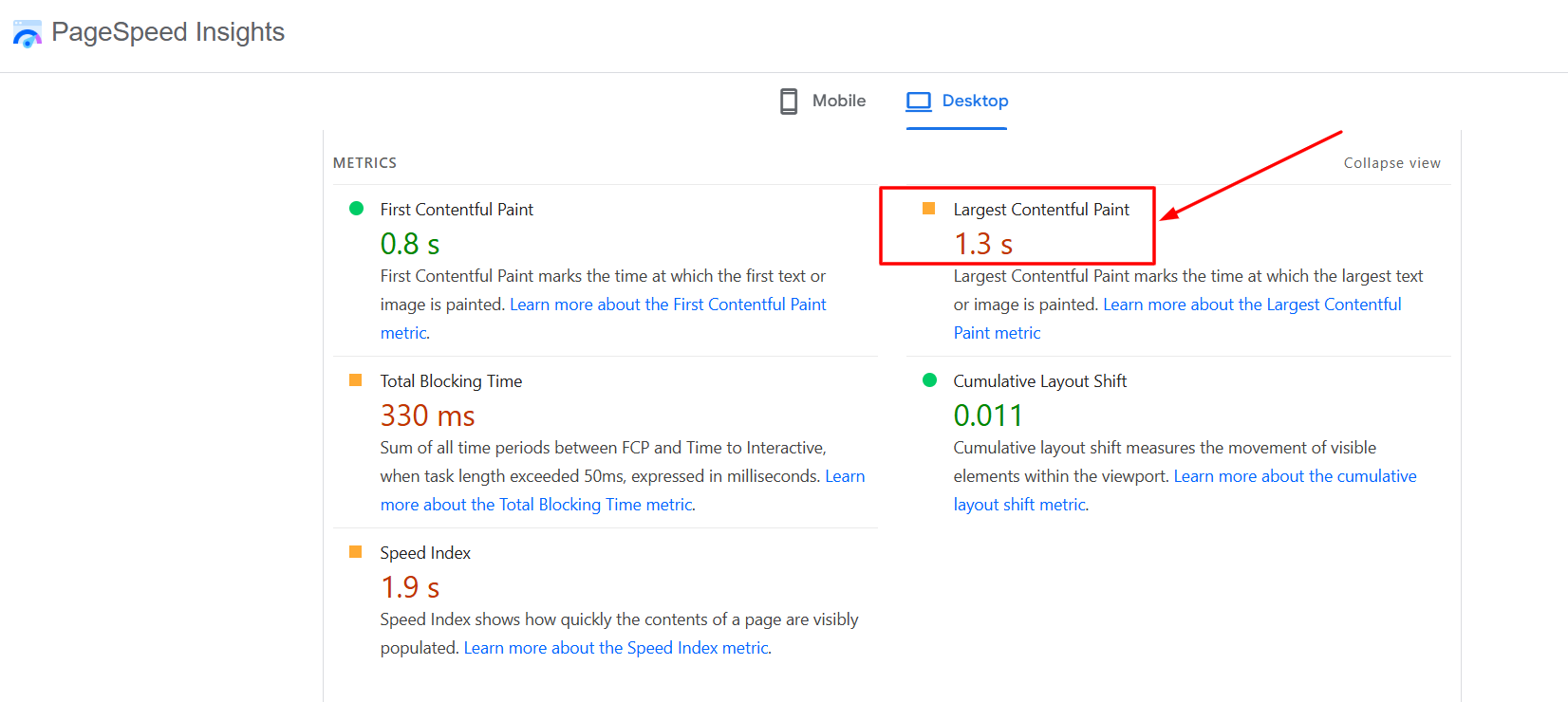
The first viewport dictates the user’s entire perception of speed. If the hero image or primary headline lags, the user feels the pain immediately. This is the absolute essence of Largest Contentful Paint (LCP).
Server response time (Time to First Byte, or TTFB) is the bedrock foundation. If your HTML document is late to arrive, everything else is stuck waiting in a traffic jam. The browser cannot fetch the CSS, it cannot request the hero image, and it cannot execute the interactive scripts if the server is still thinking. But server upgrades and premium CDNs won’t save you if you sabotage yourself right after the HTML arrives.
Here are the most common ways I see teams destroy their LCP:
- Lazy-loading the critical above-the-fold image. Never do this. The browser needs to find and fetch the hero image immediately, not wait until it finishes calculating the page layout. I always add a <link rel=”preload”> tag for the hero image in the document head.
- Render-blocking CSS. Loading massive, site-wide stylesheets before the browser is allowed to paint the critical text on the screen. Extract your critical CSS and inline it, then defer the rest.
- Client-side rendering of primary content. As mentioned earlier, forcing the mobile browser to download, parse, and execute a massive JavaScript bundle just to render a basic H1 headline is a disaster.
Editorial workflows are frequently the real culprit here. Developers usually take the blame for poor speed, but they aren’t the ones uploading 4MB raw stock photos or injecting heavy marketing scripts without a code review.
Your Content Management System (CMS) should automatically force proper image compression, exact dimensions, and modern formats (like AVIF or WebP). Performance needs to be an enforced editorial habit, not an engineering cleanup job. If a content strategist can upload an uncompressed 5000px image into a 600px container on a blog post, your publishing system is failing them.
Designers need to exercise restraint as well. A background video, a bespoke web font with five different heavy weights, and a complex scroll-triggered animation library might look incredible on a Figma board. On a weaker mobile device over a struggling network, it’s a sluggish nightmare. I always ask design teams one simple question: Can the user understand the core value proposition before the heavy visual assets finish loading?
Industry-Specific Speed Hurdles
In my consulting work, I’ve noticed that “page speed” means wildly different things depending on your business model. You cannot apply a SaaS optimization playbook to a news publisher and expect it to work. Let’s break down the real-world constraints by industry.
1. E-Commerce: The Heavy Cost of Facets and Carts
For online retailers, speed directly correlates to gross merchandise value. The biggest bottleneck I see in e-commerce is faceted navigation (the sidebars where you filter by size, color, brand). Many stores reload the entire page or execute incredibly heavy DOM manipulations every time a user clicks a filter, causing the browser to lock up. You need to handle state changes cleanly without forcing massive re-renders. Furthermore, third-party payment gateways and review widgets (like Yotpo or Trustpilot) often block the “Add to Cart” button from becoming interactive. Defer everything that isn’t the core product image, price, and buy button.
2. Digital Publishing: The Ad-Tech Nightmare
Publishers have the hardest job on the internet. You are trying to deliver a fast reading experience while loading 15 different header bidding partners via Prebid.js, an infinite scroll module, a sticky video player, and a paywall check. The secret for publishers is aggressive prioritization. Your article text must render first. Delay the initialization of your ad slots until the user actually begins to scroll. Furthermore, be incredibly careful with infinite scroll—if you don’t destroy the DOM nodes of the previous articles as the user scrolls down, the browser will eventually run out of memory and crash the tab.
3. B2B SaaS: Dashboard Hydration
For SaaS platforms, the public marketing pages are usually fast, but the logged-in application is a sluggish disaster. This happens because developers send massive JSON payloads from the API to the client, forcing the browser to parse megabytes of data before rendering the dashboard. Pagination is not enough. You need to implement virtualization (only rendering the rows currently visible on the screen) and ensure your authentication checks aren’t causing double-redirect loops that ruin TTFB.
Cut the JavaScript Choking Your Interactivity (INP)
A page can look visually complete but still be totally frozen. You tap a category filter or try to close a newsletter pop-up, and the browser just hangs. You tap it again. Nothing. Then, three seconds later, both taps register at once, sending you to the wrong page.
That is the exact friction Interaction to Next Paint (INP) measures, and it is the bane of modern web development.
The browser’s main thread can only juggle so much at one time. If it’s bogged down parsing a massive JavaScript bundle, executing complex mathematical calculations, or running heavy third-party tracking code, the user’s click has to wait in line.
I don’t expect you to eradicate JS entirely. Modern digital experiences demand interactivity. But you absolutely need a strict script budget. Test the page like an angry, impatient user: mash the mobile hamburger menu, frantically close the GDPR cookie banner, rapidly toggle product filters. Which click hangs? Is a customer support chat widget holding the main thread hostage?
Product managers must be intellectually honest here. A deep personalization tool might yield interesting behavioral data, but if it degrades the INP for 100% of your traffic by locking up the main thread, it’s actively hurting the business.
Reducing INP requires breaking up what developers call “long tasks.” If a script takes 150 milliseconds to execute, the browser cannot respond to a user’s tap during that window. Developers need to use setTimeout or the scheduler.yield() API to yield to the main thread, allowing the browser to handle the user’s input before returning to the background script.
Audit your tag manager relentlessly. Marketing teams love to inject A/B testing scripts like VWO or Optimizely. These tools fundamentally manipulate the Document Object Model (DOM), which requires incredibly heavy JavaScript execution. If an experiment ends, kill the script immediately. Do not leave it running in the background for six months, silently eating up your users’ processing power.
The Speculation Rules API & Prefetching (The Future of Speed)
If you want a faster website that competes in 2026 and beyond, you have to stop thinking about how fast a page loads after a click, and start thinking about loading it before the click.
In my recent projects, we have moved beyond standard caching and embraced predictive prefetching. When a user hovers over a link, or when their mouse trajectory indicates they are about to click a product, you can tell the browser to quietly fetch the HTML of that next page in the background.
The absolute game-changer here is the Speculation Rules API. This modern browser feature allows developers to write JSON rules telling the browser to dynamically pre-render entire pages based on probability. If a user is on an article, the API can pre-render the “Next Article” link in a hidden background tab. When the user clicks, the page loads in literally zero milliseconds. It feels like magic.
While you shouldn’t use this recklessly (it consumes background bandwidth), intelligently pre-rendering the highest-probability next steps in your conversion funnel is the ultimate performance optimization SEO tactic for the modern web.
Stop the Page from Violently Shifting (CLS)
There is nothing I hate more as a user than a shifting layout. You go to tap a link, an ad suddenly renders, the page drops, and you click the wrong button. Or you start reading an article, and a late-loading embedded video shoves the paragraph you were reading halfway down the screen. It is infuriating.
Cumulative Layout Shift (CLS) measures this visual instability. It is the most jarring, user-hostile metric of the Core Web Vitals, and ironically, it is usually the easiest to fix if you have organizational discipline.
The fixes are boring but mandatory:
- Reserve static space for ads. Do not wait for the header bidding auction to finish before carving out the space. Define a minimum CSS height for the ad container. If the slot collapses because it goes unfilled, control how that reflow affects the surrounding text.
- Explicitly define width and height attributes. Every single image and iframe needs aspect ratio definitions in the HTML so the browser knows exactly how much space to leave for it before it even downloads.
- Manage web fonts. Don’t let late-loading custom web fonts drastically alter your line heights. Use font-display: optional or swap intelligently, and match your fallback system font metrics to your primary font so the text doesn’t magically resize when the custom font finally loads.
For publishers, CLS usually stems from aggressive monetization tactics. For e-commerce, it comes from dynamic promotional bars or recommendation carousels popping in. Before a layout goes live, I ask teams one simple question: Can a user read this paragraph without the text violently shifting under their eyes?
If the answer is no, the design is broken. Fix it.
The “Green Web”: Sustainability and Page Speed
Here is a fascinating byproduct of site speed SEO I’ve noticed working with enterprise clients recently: optimizing your website actually saves the planet.
The internet is responsible for roughly 4% of global greenhouse gas emissions—more than the aviation industry. Every megabyte of data transferred requires electricity at the data center, through the transmission networks, and on the user’s device.
When you ship a 5MB JavaScript bundle and 10MB of uncompressed images to a million users a month, you are literally burning carbon for no reason.
Forward-thinking companies are now integrating “Carbon Budgets” alongside their performance budgets. By shrinking image payloads, deleting dead third-party scripts, and caching static assets at the edge, you aren’t just improving your UX and SEO—you are actively reducing your corporate carbon footprint. It is an incredibly powerful angle to use when trying to get executive buy-in for a massive performance overhaul project. Speed is green.
Make Third-Party Scripts Prove Their ROI
Third-party scripts are often the hardest part of page speed work because every department has a tool they absolutely refuse to live without. I spend half my life refereeing these arguments.
Marketing wants their retargeting pixels. Sales demands a live chat widget. Ad ops needs complex header bidding logic. Product wants session recording tools like Hotjar to watch user behavior. Individually, every team has a valid, data-backed request. Collectively, they turn the site into a bloated nightmare.
Tag managers are notorious for enabling this chaos. They allow non-technical teams to bypass engineering QA and pile on scripts that stay live years after the original campaign ended. It’s a backdoor that completely undermines any performance optimization SEO efforts the engineering team makes.
You must audit everything. Create a cross-departmental script inventory and force teams to answer the hard questions:
- Who actually owns this tag?
- What happens if we delay its execution by three seconds?
- Does it absolutely need to load before the user interacts with the page?
- If nobody can defend its current business value, delete it.
Many scripts do not need to load immediately. I regularly defer live chat widgets until the user has actually read the page, or until they actively scroll. Social media embeds can be lazy-loaded. Heatmaps do not need to run on every single page view for every single user.
Building a faster website is rarely about writing better, more elegant code; it is usually just about finding the courage to stop loading invisible garbage.
Building a Culture of Performance
The hardest part of performance optimization SEO isn’t code. It’s people.
If developers own all the performance issues, they will inevitably be blamed for decisions made elsewhere in the company. If marketing can add scripts without a code review, performance will decay. If editorial can upload anything they want, images will stay heavy.
You have to build a culture of performance, and that starts with automation and strict governance. I always help teams implement Lighthouse CI directly into their GitHub or GitLab actions. When a developer submits a pull request for a new feature, the CI pipeline automatically runs a performance test against it. If the new code drops the performance score below the agreed-upon threshold, the pull request is blocked. It cannot be merged.
This shifts the conversation from a frantic, end-of-year cleanup to a daily, continuous habit. You have to establish a hard “Performance Budget” (e.g., “Our mobile article pages cannot exceed 1.2MB of total weight”). Once that budget is codified, it forces product managers, designers, and developers to make trade-offs before the code is written, not after it’s in production.
A Practical, Battle-Tested Workflow for Performance Optimization SEO

Too many teams wait until a site is fully designed, heavily monetized, and pushed to a production environment before they even bother checking the speed. By then, the performance debt is so deeply ingrained in the architecture that fixing it requires a total, highly expensive rebuild.
Stop doing that. Integrate speed optimization into your daily operating rhythm. Here is the exact workflow I use to get things done without burning out engineering teams.
1. Target High-Value Templates
Do not try to boil the ocean. Start by isolating the pages driving actual revenue, subscriptions, and organic traffic. Choose the templates where speed improvements mathematically impact the bottom line: checkout flows, primary article layouts, or lead-generation forms. Ignore low-impact, orphaned URLs just because they flagged red in a generic SEO auditing tool.
2. Layer Your Data Correctly
Pull real field data (CrUX) to see where users are actually suffering. Use lab tools (Lighthouse) purely to diagnose the code and replicate the issue. Do not panic over one poor lab score if your real-user field data looks pristine. Conversely, do not ignore terrible field data just because your internal office test looks fast.
3. Isolate the Metric and Map the Culprit
Stop telling your developers “the site is slow.” Be precise.
- If LCP is poor, you are looking at server response (TTFB), oversized hero images, or render-blocking CSS.
- If INP is poor, you are hunting down heavy JavaScript bundles, long main-thread tasks, and unoptimized event handlers.
- If CLS is poor, you are locking down unreserved layout space, defining image dimensions, and managing late-loading embeds.
4. Protect the Primary Task
Let the core content render flawlessly before the commercial machinery wakes up. If someone lands on a deep-dive editorial piece, the headline and the text are the primary task. Anything that delays that goal—newsletter pop-ups, auto-playing video ads, recommendation engines—must load last.
5. Watch the Money (The ROI of Speed)
When you strip out heavy ad units or legacy marketing scripts to chase a faster website, watch your business metrics like a hawk. Track conversion rates, ad viewability, and revenue per session. If a speed optimization craters your RPM or breaks your lead capture form, it’s not a fix—it’s a new problem. The goal is to improve speed without ignoring how the site actually makes money.
6. Clean Up Your Media and Fonts
Images and fonts are the fastest, lowest-hanging fruit to reduce unnecessary weight. Serve responsive image sizes based on the user’s device. Compress heavily without destroying visual fidelity. Avoid loading six different font weights when your design only uses two. Use font-display behavior carefully to reduce invisible text rendering.
7. Reduce Unused Code
Audit your CSS and JavaScript. Remove what is no longer needed. Split large bundles where it makes sense so you aren’t shipping the entire site’s code payload on a page that only needs a fraction of it. Delay non-critical scripts until after the important content is fully usable by the reader.
8. Integrate Performance into QA
Speed gains will vanish the moment you launch a new CMS theme, swap ad partners, or implement a new paywall. Add strict performance budgets to your Quality Assurance (QA) process before any launch. If a new feature pushes the INP past 200ms, it fails QA and goes back to the drawing board.
The Bottom Line on Speed
Treat speed optimization as a permanent operational habit, not a frantic cleanup project right before a major site launch.
A fast site can still support programmatic ads, beautiful design, and heavy analytics. It just requires the ruthless discipline to dictate exactly what loads first, and the courage to kill anything that gets in the user’s way. That is the true secret to page speed optimization techniques that actually move the needle for your users and your bottom line.
Frequently Asked Questions (FAQs) About Page Speed Optimization
1. What is Page Speed Optimization?
Page Speed Optimization is the process of improving how quickly a website loads, responds, and stays visually stable for users. It includes fixing slow servers, oversized images, heavy JavaScript, layout shifts, third-party scripts, caching issues, and poor template structure.
2. Why does page speed matter for SEO?
Page speed matters for SEO because it affects user experience and connects directly to Google’s Core Web Vitals. A faster, more stable website can help users stay longer, reduce frustration, and support better page experience signals, although speed alone does not guarantee higher rankings.
3. What are the most important Core Web Vitals for page speed?
The three main Core Web Vitals are Largest Contentful Paint, Interaction to Next Paint, and Cumulative Layout Shift. LCP measures how quickly the main content loads, INP measures how fast the page responds to user actions, and CLS measures whether the layout shifts unexpectedly.
4. What is the fastest way to improve website speed?
The fastest improvements usually come from optimizing images, reducing unused JavaScript, improving server response time, delaying non-essential third-party scripts, and fixing layout shifts. The best starting point is usually the highest-value template, such as a product page, article page, landing page, or checkout page.
5. Can plugins fix all page speed problems?
No. A caching or optimization plugin can help, but it cannot fix a broken site structure, bloated templates, poor hosting, oversized media, excessive tracking tags, or badly loaded JavaScript. Real Page Speed Optimization depends on better technical, editorial, design, and marketing workflows.
6. How do third-party scripts affect site speed?
Third-party scripts can slow loading, delay interaction, increase main-thread work, and cause layout instability. Tracking pixels, chat widgets, ad tech, heatmaps, A/B testing tools, and social embeds should be reviewed regularly to confirm they still provide enough value to justify their performance cost.
7. Should I focus on Lighthouse score or real-user data?
Real-user data should matter more when making business decisions. Lighthouse is useful for diagnosing technical issues in a controlled lab test, while CrUX and field data show how real users experience the site. The strongest approach uses both.
8. How often should websites review page speed?
Websites should review page speed before and after major changes such as redesigns, CMS updates, new themes, new plugins, ad partner changes, tracking changes, and new landing page launches. Performance should be part of regular QA, not a one-time cleanup project.






















