

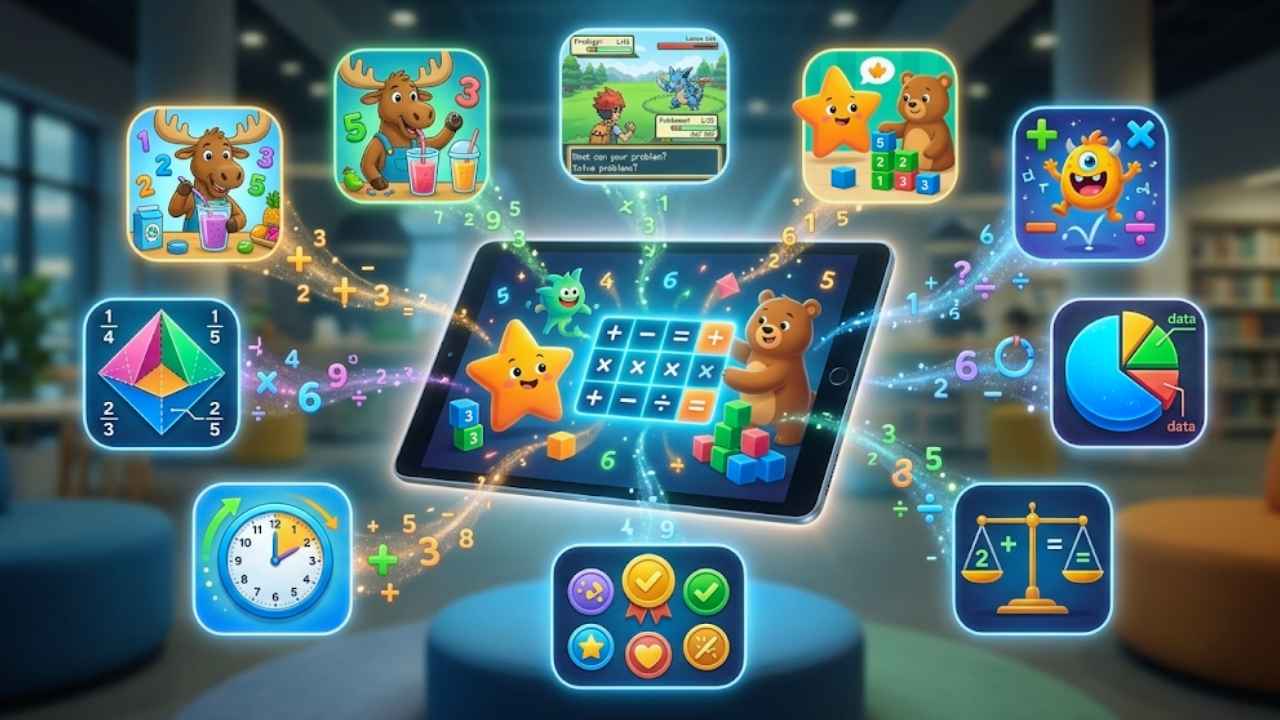
A child can complete dozens of math levels without understanding why an answer is correct. That is the main problem with many kids’ math apps. They reward fast tapping, place routine worksheets inside elaborate games, or advertise huge content libraries that children barely explore. Parents then end up judging progress by stars, streaks, and screen time rather than clearer reasoning.
The best math apps kids can use should address a specific gap. A preschooler may need to connect number symbols with real quantities. A primary-school child may need stronger multiplication or fraction skills. An older learner may need to see how an algebra graph changes or identify the first wrong step in a calculation.
While discovering the math apps for kids, I saw many are available on both platforms, so the sections should not be treated as exclusive lists. The division reflects current store presence, device fit, and practical value. Families comparing math with reading, science, coding, and other subjects can also use Best Educational Apps for Kids by Age.
Based on my research and testing with my kids, I have made a list of 20 best math apps for kids in 2026.
Best Math Apps Kids Can Use: My Selection Criteria
A large collection of questions was not enough to earn a place. So, I took the following criteria to select the best math apps for kids.
- Connect numbers with quantities and patterns
- Understand operations instead of memorising isolated answers
- Visualise fractions, geometry, equations, or graphs
- Practise a specific weak skill at an appropriate level
- Predict, test, and revise a solution
- Explain the method away from the screen
- Access useful content before payment
- Avoid excessive advertising and purchase pressure
- Work within a relevant US, UK, or Indian school context
- Transfer learning to paper, objects, games, or everyday tasks
Published age ranges remain approximate. A confident seven-year-old may be ready for multiplication, while another child of the same age may still need work on place value and number bonds.
10 Best Math Apps for Kids on iOS
1. 123 Magic Number Fun: Math Kid
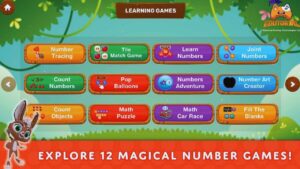
123 Magic Number Fun is a practical iPhone and iPad choice for children who need more variety than a basic tracing app. Its 12 mini-games move from number recognition and tracing to counting, sequencing, matching, and simple arithmetic. The developer targets ages 2 to 8, though preschool and early primary learners are the best fit; toddlers will need guidance. A bunny guide and jungle setting connect the activities without distracting from the mathematics. The iOS edition requires iOS or iPadOS 15 and supports English only.
A simple weekly routine:
- Monday: Trace five numbers and say them aloud.
- Wednesday: Complete one counting or matching game.
- Friday: Practice sequencing or one simple equation.
- Keep sessions to about 10 minutes.
The app contains advertising, and several activities require purchases or a full-version unlock. Apple lists no declared accessibility features, while too few reviews are available for a reliable ratings picture. It deserves its ranking as a focused practice tool for families prepared to supervise purchases and choose activities deliberately.
2. Todo Math
Todo Math is the strongest broad iOS choice for children working from Pre-K through grade 2. It contains more than 2,000 activities covering counting, number writing, place value, operations, shapes, measurement, patterns, and early word problems. Its sequence follows US Common Core standards, so families elsewhere may need to choose activities by skill rather than grade label.
- Includes spoken support, left-handed play and a dyslexia-friendly font.
- Offers introductory access before the wider program requires payment.
- Works best for children who need guided practice across several early skills.
- Less useful when the child has one narrow gap that could be addressed with a simpler app.
Use the trial period to watch how the child responds to mistakes. Progress through a map or reward system matters less than whether the child adjusts their strategy.
3. Kahoot! Numbers by DragonBox
Kahoot! Numbers by DragonBox teaches children how quantities can be built, split, and compared. Its Noom characters give numbers a visible size, making relationships such as 7 = 5 + 2 easier to understand before formal written arithmetic dominates. It is aimed mainly at children around ages four to eight.
- Strong for number bonds, quantity comparison and mental flexibility.
- Full access is tied to Kahoot! Kids or an eligible family subscription.
- Better value when the household will use several included Kahoot! learning apps.
- Too basic for children already comfortable with number composition.
This ranks highly because later arithmetic becomes much easier when a child sees numbers as flexible quantities rather than fixed symbols.
4. Numberblocks World
Numberblocks World suits young children who already recognize the characters from the television series. It combines episodes, songs, quizzes and number games, with the main material designed for roughly ages four to six. Familiar characters can make number composition easier to discuss.
- Includes both video and interactive content.
- Requires a subscription after the trial.
- Useful when the child already connects strongly with Numberblocks.
- Less suitable for families seeking mostly active problem-solving.
Watching several episodes is not the same as practicing math. Rebuild the numbers afterward with blocks, bottle caps, buttons, or toy bricks.
5. Teach Your Monster Number Skills
Teach Your Monster Number Skills combines an adventure with 15 mini-games and 150 levels. Its early curriculum covers counting, subitizing, number bonds, place value, addition, subtraction, arrays, and early multiplication ideas. It is most relevant from preschool or reception through kindergarten or year 1.
- Browser access is free for everyone.
- Home users can try the mobile version before subscribing.
- Verified schools can unlock the mobile app under its school-access model.
- Best for young children who respond well to an ongoing game world.
The free browser version should be the first stop. A mobile subscription is difficult to justify before the family knows whether the child will use the programme consistently.
6. Moose Math
Moose Math is an easy free recommendation for children around ages three to seven. Its five multi-level activities cover counting, addition, subtraction, sorting, and basic geometry through a juice shop, pet shop, and lost-and-found setting.
- Free without advertisements or subscriptions.
- Narrower and easier to navigate than large learning platforms.
- Aligned mainly with kindergarten and grade 1 material.
- Visual style is older, but the mathematical tasks remain clear.
Pair it with real objects. Counting fruit, sorting buttons, or removing toy cars shows whether the idea has transferred beyond the screen.
7. Slice Fractions
Slice Fractions introduces fractions through more than 140 physics puzzles involving a mammoth, ice, lava, and movable objects. It teaches part-whole relationships, equivalent fractions, ordering, notation, and simple fraction operations without beginning with a page of symbols.
- Intended roughly for ages five to twelve.
- Uses little written language.
- One-time paid app with no advertisements or in-app purchases.
- Strongest when a child follows fraction rules but lacks visual understanding.
It should sit beside written work rather than replace it. The app explains what fractions represent; paper practice helps children use that understanding accurately.
8. MathTango
MathTango places addition, subtraction, multiplication, and division practice inside missions and world-building. Designed mainly for ages five to ten, it includes more than 500 games across over 40 learning levels.
- Downloaded material can be used offline.
- Part of the wider Piknik subscription package.
- Useful for arithmetic fluency after the method has been taught.
- Game rewards may become more memorable than the questions.
Check which operation was practiced and whether the same calculation can be completed without the monsters and rewards. Total play time is not a useful progress measure.
9. Math Makers
Math Makers uses more than 600 physics-based puzzle levels to develop arithmetic, place value, fractions, and flexible problem-solving. It is aimed mainly at children ages six to ten and asks them to predict, test, observe, and change their approach.
- Better for reasoning than rapid fact recall.
- Full access uses a subscription model.
- Trial should be judged using later puzzles, not only the opening levels.
- Not the most direct choice for memorising times tables.
This is a stronger fit for children who can calculate but struggle to apply ideas in unfamiliar situations.
10. Marble Math Junior
Marble Math Junior combines mental math with maze navigation. Children move a marble to collect the answer to spoken questions covering operations, shapes, sequencing, fractions, time, equations, and money.
- Aimed mainly at early elementary learners around ages five to eight.
- Spoken instructions reduce the reading burden.
- Custom problem sets can be created for different users.
- Fine-motor demands may interfere with math for some children.
Its money activities support several Western currencies, but Indian rupees are not currently listed. Indian families should not choose it mainly for currency practice.
10 Best Math Apps for Kids on Android
11. 123 Magic Number Fun: Math Kid
123 Magic Number Fun: Math Kid Android version stands out as an early-math collection rather than a single-skill worksheet app. Across 12 mini-games, children trace numbers 1 to 50, count objects, match numerals, follow sequences, connect numbered dots, and solve basic operations. That range suits preschool, kindergarten, and early primary practice, despite the stated age span of 2 to 8. The bunny guide and colorful jungle theme give the tasks a clear structure. Short activities work well for quick review at home or school.
Parents and teachers should:
- Choose one skill before opening the app.
- Pair tracing with pencil-and-paper practice.
- Ask children to explain counting answers.
- Reserve multiplication and division for ready learners.
- Stop after a focused 10-minute session.
The listing does not describe adaptive difficulty, detailed progress reports, or a structured curriculum path, so adults must decide what comes next. The Android edition contains ads and in-app purchases, and Google Play says it may collect device identifiers. It earns its place as an engaging supplement, not a complete mathematics program.
12. Khan Academy Kids
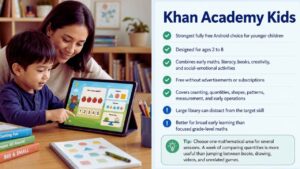
Khan Academy Kids is the strongest fully free Android choice for younger children. Designed for ages two to eight, it combines early math with literacy, books, creativity, and social-emotional activities.
- Free without advertisements or subscriptions.
- Covers counting, quantities, shapes, patterns, measurement, and early operations.
- A large library can distract from the target skill.
- Better for broad early learning than focused grade-level math.
Choose one mathematical area for several sessions. A week of comparing quantities is more useful than jumping between books, drawing, videos, and unrelated games.
13. Khan Academy
The main Khan Academy app is the strongest free Android option for older children who need an explanation. Its math material runs from elementary arithmetic and fractions through algebra, geometry, statistics, trigonometry, calculus, and other advanced topics.
- Free without a subscription.
- Combines videos, articles, exercises, and tests.
- Indian version includes NCERT and CBSE-aligned Class 1-12 content.
- UK students may need to search by topic rather than school-year label.
Give the child a specific lesson or unit. “Review multiplying fractions and retry the missed questions” is far more useful than “do some math.”
14. Prodigy Math
Prodigy Math places grades 1 to 8 practice inside a fantasy role-playing game. Children battle characters, complete quests, collect pets, and answer math questions to move forward.
- Core educational questions remain free.
- Curriculum settings include the USA, UK, India, and several other regions.
- Memberships add game rewards and selected family features.
- Best when motivation to practice is the main problem.
The game can easily overshadow the math. Review skills and errors rather than judging progress by levels, pets, or total time played.
15. SplashLearn
SplashLearn offers a structured pathway from preschool through Grade 5. Its math content includes number sense, operations, fractions, decimals, geometry, measurement, and problem-solving.
- Home use follows a subscription model.
- Teachers can access classroom tools separately.
- Useful for children who need a clear grade-and-skill sequence.
- Advanced eleven-year-olds may outgrow its Grade 5 ceiling.
The sequence is closely associated with US grade labels. UK and Indian families should compare topics with current schoolwork before subscribing.
16. DoodleMaths
DoodleMaths is one of the stronger Android choices for UK curriculum support. Its UK version covers Reception through KS3 and creates a personalized program designed for short, regular sessions.
- Can be used offline on supported devices.
- Subscription has value only when the child uses it consistently.
- Regional versions differ in curriculum scope.
- Indian families may find the terminology and order unfamiliar.
This is a routine-building tool, not an emergency homework app. Opening it twice before a test will not provide the adaptive benefit being sold.
17. Smartick
Smartick provides a structured adaptive program for children ages four to fourteen. After initial assessment sessions, it generates a personalized 15-minute daily routine covering calculation, logic, and problem-solving.
- Seven-day trial available.
- Subscription cost varies by country, plan, and number of children.
- Strong fit for families seeking one consistent program.
- Poor value when used only occasionally.
The short daily format is clear, but it must fit around school, tutoring, sport, and family routines. Use the trial to judge whether the schedule is sustainable.
18. Photomath
Photomath scans printed or handwritten problems and shows a worked solution. It supports arithmetic, algebra, geometry, trigonometry, statistics, calculus, and related topics.
- Free basic access includes step-by-step explanations.
- Paid access adds visual aids and more detailed guidance.
- Useful for finding the first wrong step in written work.
- Very easy to misuse as a homework-answer tool.
The child should attempt the problem first, compare methods, close the app, and then solve a similar question independently. Copying the displayed steps hides the gap rather than fixing it.
19. GeoGebra Calculator Suite
GeoGebra Calculator Suite is the strongest specialist choice for older children working with equations, graphs, geometry, probability, statistics, and 3D objects. It combines graphing, CAS, geometry, table, probability, and three-dimensional tools.
- Free across Android, iOS, desktop, and web.
- Excellent for showing how one change affects a graph or construction.
- Requires prior understanding of coordinates, equations, and functions.
- Not suitable as an introductory primary school math app.
Ask the student to predict the result before moving a slider or changing a coefficient. Exploration becomes learning when the child can explain what changed and why.
20. Math Kids
Math Kids is a simple free option for toddlers, preschoolers, kindergarten pupils, and children beginning Grade 1. Its mini-games focus on number recognition, counting, comparison, addition, and subtraction.
- Free without in-app purchases or third-party advertisements.
- Easy to navigate.
- Much narrower than Khan Academy Kids or SplashLearn.
- Children will outgrow it once they need place value, multiplication, or word problems.
Use it briefly, then repeat the idea with fingers, counters, blocks, or household objects. The app is a starting point, not a long-term curriculum.
How to Choose by Age and Stage?
Age should narrow the options, but a child’s current skills, confidence, and learning goals should guide the final choice.
| Age or Learning Stage | Recommended Apps | Best Used For |
|---|---|---|
| Ages 3–5 | 123 Magic Number Fun: Math Kid, Numberblocks World, Moose Math, Math Kids | Number recognition, counting, tracing, shapes, matching, and early number sense |
| Ages 5–7 | Todo Math, DragonBox Numbers, Teach Your Monster | Early addition and subtraction, number relationships, problem-solving, and guided practice |
| Ages 7–9 | MathTango, SplashLearn, Monster Math 2 | Arithmetic fluency, multiplication foundations, curriculum practice, and maths-based challenges |
| Ages 8–11 | Slice Fractions, Math Makers, Prodigy Math | Fractions, geometry, multi-step problems, and game-based skill development |
| Ages 10–14 | Khan Academy, DoodleMaths, Smartick, GeoGebra | Structured lessons, personalised practice, algebra, geometry, and visual mathematical exploration |
| Older Learners | Photomath, GeoGebra | Checking calculations, reviewing solution steps, graphing, and visualising advanced concepts |
Do not move a child into advanced material simply because of a birthday. Weak number sense will continue to cause problems in fractions, measurement, algebra, and word problems. The broader Best Educational Apps for Kids by Age guide can help when math is only one part of the child’s learning plan.
Final Thoughts
The best math apps kids use successfully are chosen for one specific reason. Start with the skill causing difficulty. Use Todo Math or Khan Academy Kids for broad early practice. Choose DragonBox Numbers when number composition is weak. Try Slice Fractions when a child follows fraction procedures without understanding the quantities. Use Khan Academy when an older student needs a concept explained.
Do not begin with several subscriptions. Try the free material, check the renewal conditions, and watch how the child responds to difficulty. One well-chosen app is usually enough. Pair digital practice with paper, conversation, board games, cooking, shopping, measuring, building, and real objects. Keep the app when the child explains ideas more clearly, solves unfamiliar problems, and makes fewer repeated errors.
Remove it when the main result is faster guessing, another reward system, or an unused recurring payment. Families building a wider learning setup can use Best Educational Apps for Kids by Age to compare maths apps with tools for reading, science, coding, and creativity
Frequently Asked Questions (FAQs) About Best Math Apps for Kids
What Is the Best Completely Free Math App for Kids?
Khan Academy Kids is the strongest free all-round choice for children ages two to eight. It offers math alongside literacy and creative learning without advertisements or subscriptions. Moose Math and Math Kids are good narrower choices for early practice. Older children who need explanations should use the main Khan Academy platform.
Should Parents Buy an iPad or Android Tablet for Math Apps?
Choose the required apps before choosing the device. Both platforms have strong options, and many leading apps appear on both stores. Check regional availability, operating-system requirements, storage, parental controls, and subscription costs before buying hardware.
Are Subscription Math Apps Better Than Free Apps?
No. Payment does not guarantee clearer instruction or better learning. Subscriptions can make sense when they provide a structured sequence, adaptive practice, progress reports, and content the child uses regularly. Free apps may be better for occasional explanations, focused practice, or families who already receive school support.
How Can Parents Tell Whether an App Is Helping?
Look for evidence away from the device. The child should be able to explain a method, solve a similar unfamiliar problem, represent a fraction with paper or food, or identify why an answer is wrong. Stars, levels, streaks, and time spent are weak evidence on their own.























