AI image generation becomes much more useful when it can repeat a style on purpose. Creating one beautiful image is not the hard part anymore. Many AI image tools can do that with a decent prompt and a few tries. The real challenge starts when you need the same kind of character, illustration style, product look, fashion mood, or brand visual direction again and again. That is where LoRA models come in.
This LoRA models explained guide breaks down what LoRA is, how it works, why creators use it, and how LoRA training helps produce fine-tuned AI styles without fully retraining a large AI model. The simple version is this: a LoRA is a lightweight add-on that teaches an existing AI model a specific style, subject, character, product, or visual pattern.
It does not usually replace the base model. It guides it. That matters because full model fine-tuning can be expensive, slow, and difficult to manage. LoRA gives creators a more practical way to customize AI image generation while keeping the original model intact.
But LoRA is not magic. A good LoRA can make a visual style feel consistent and reusable. A bad LoRA can overfit, repeat the same image structure, distort faces, ignore prompts, or produce outputs that look too close to the training images.
So the goal is not just to train a LoRA. The goal is to use it clearly, responsibly, and with enough flexibility to support real creative work.
What Are LoRA Models?
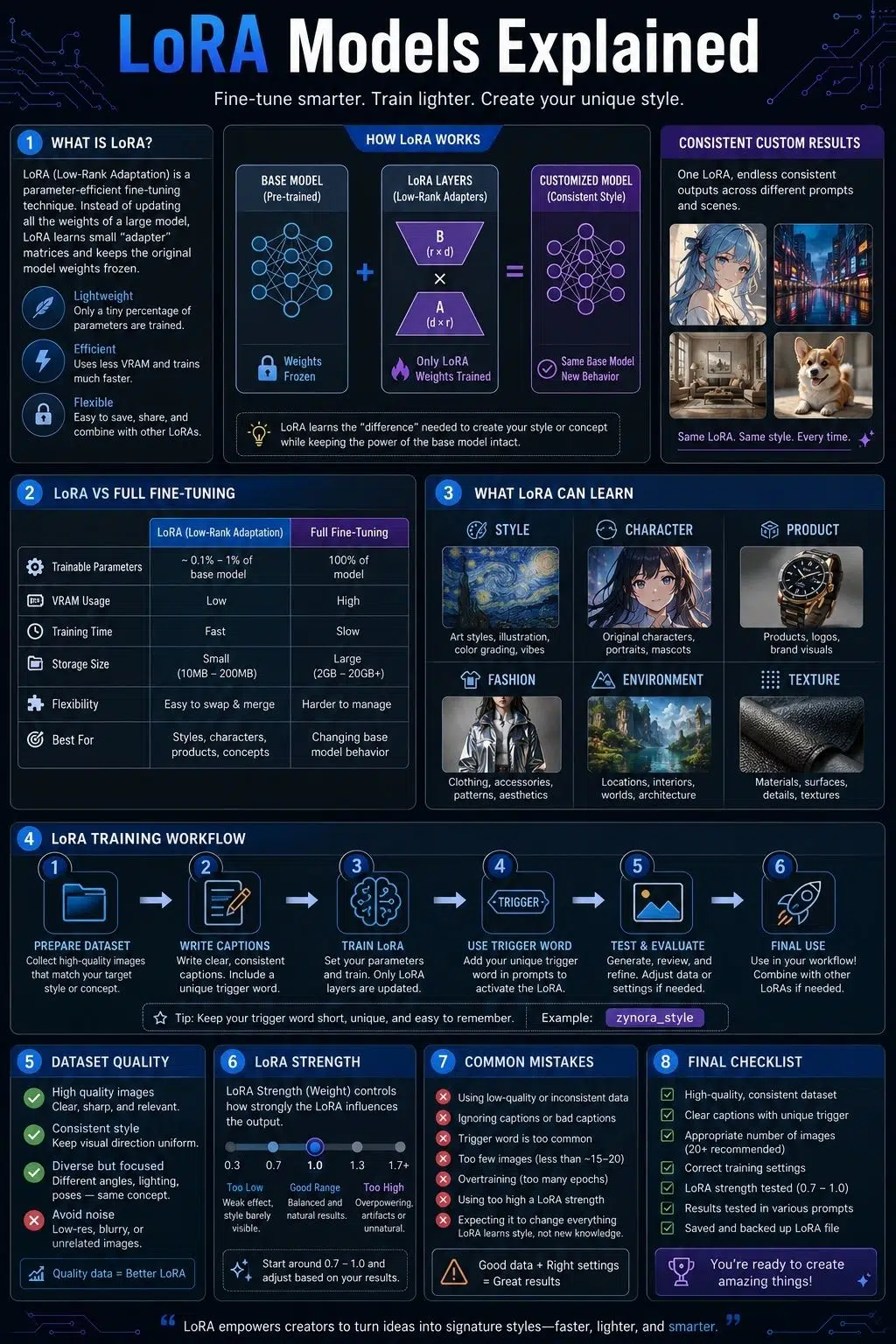
LoRA stands for Low-Rank Adaptation. In AI image generation, a LoRA model is a small trained file that changes how a larger base model behaves. Instead of updating the entire model, it adds a focused layer of learned adjustments.
Think of the base model as a large creative engine. It already knows how to generate portraits, landscapes, products, anime-style art, architecture, fantasy scenes, fashion images, and many other visuals. A LoRA acts like a focused creative instruction layer.
It can help the model learn:
- A specific illustration style
- A recurring character look
- A product type
- A clothing style
- A face style
- A lighting mood
- A brand-like visual direction
- A material texture
- A genre aesthetic
For example, a LoRA might help an AI model generate watercolor children’s book illustrations, cyberpunk street portraits, flat vector icons, vintage poster art, realistic jewelry photos, or a consistent original character.
The important point is that a LoRA usually works with a base model. It is not normally a complete AI image model by itself.
LoRA Models Explained in Plain Language
Imagine you have a skilled artist who can draw almost anything, but you want them to learn one specific style.
You do not need to teach that artist how to draw from zero. They already understand anatomy, light, color, objects, perspective, and composition. You only need to show them enough examples so they understand the specific visual direction you want.
That is roughly how LoRA works. The base model already knows a lot. The LoRA teaches it a smaller, narrower pattern.
For example, you could prompt: “A cozy coffee shop interior, warm lighting, rainy window, quiet atmosphere.”
Without a LoRA, the model may create a nice but generic coffee shop. With a LoRA trained on a specific illustration style, the output can keep the coffee shop idea while adopting the custom visual style.
That is why LoRA models are popular among AI artists, designers, publishers, and creators. They help make visual results repeatable without needing to build a full custom AI model from scratch.
Why LoRA Became Important for AI Images
Early AI image workflows were heavily prompt-based. You wrote a detailed prompt, adjusted settings, generated many versions, and hoped one result matched your idea.
That worked for exploration. It was weaker for production.
If you only need one image, you probably do not need a LoRA. A strong prompt may be enough. But if you are building a visual series, a repeatable character, a brand image style, a product campaign, or a consistent illustration system, LoRA becomes much more useful. That is where it moves from a fun AI trick to a real production tool.
LoRA helps creators build repeatable visual identity across multiple outputs.
This matters for:
- Character design
- Comic-style projects
- Game concept art
- Brand visuals
- Editorial illustrations
- Product mockups
- Social media image series
- Fashion concepts
- Book covers
- Marketing campaigns
- Custom illustration systems
Instead of reinventing the style in every prompt, the LoRA carries part of that visual memory.
That is the practical appeal.
LoRA vs Full Fine-Tuning
Full fine-tuning changes many or all of the weights in a model. That can be powerful, but it is heavier, slower, and more expensive.
LoRA is more efficient because it trains a smaller set of additional parameters while leaving the original model mostly unchanged.
| Method | What It Does | Best For |
| Prompting | Describes what you want in text | Quick creative generation |
| Textual inversion | Learns a concept as an embedding or token | Simple concepts or lightweight styles |
| LoRA | Adds lightweight trained adaptation layers | Styles, characters, subjects, repeatable visual concepts |
| Full fine-tuning | Updates much more of the model | Deep custom behavior or large-scale model adaptation |
| DreamBooth-style training | Fine-tunes model behavior around a subject | Specific subjects or identities, depending on workflow |
LoRA sits in a useful middle area.
It gives more control than prompting alone, but it is lighter than full fine-tuning. That is why many creators use LoRA for fine-tuned AI styles instead of training a whole model.
LoRA vs Custom AI Models
People often use the phrase custom AI models loosely. Sometimes they mean a fully fine-tuned model. Sometimes they mean a LoRA. Sometimes they mean a saved prompt workflow, a style preset, a character embedding, or a model checkpoint.
These are not all the same. A LoRA is usually a custom adaptation, not a full standalone model. It depends on the base model it was trained for or works best with.
A full custom model is usually heavier and more self-contained. A LoRA is lighter, easier to swap, and more flexible for everyday creative work.
For example, one creator might keep the same base model and use different LoRAs for different needs:
- One LoRA for editorial flat illustration
- One LoRA for cinematic portraits
- One LoRA for an original character
- One LoRA for a product photography look
- One LoRA for fantasy painting
- One LoRA for a brand campaign aesthetic
That flexibility is one of LoRA’s biggest advantages.
How LoRA Training Works
LoRA training teaches a model to associate a trigger word or concept with a specific visual pattern.
A simplified LoRA training workflow looks like this:
- Collect a training dataset.
- Clean and prepare the images.
- Add captions or tags.
- Choose a base model.
- Set training parameters.
- Train the LoRA.
- Test outputs with prompts.
- Adjust the dataset or settings if needed.
- Save and use the final LoRA.
The dataset is the most important part. A LoRA trained on messy, inconsistent, low-quality images will usually produce messy, inconsistent results. A LoRA trained on clean, well-captioned, visually focused examples has a much better chance of working.
Training settings matter, but many LoRA problems begin before training even starts. They begin with poor source material.
What Can a LoRA Learn?
A LoRA can learn different kinds of visual patterns.
The most common use is style. A style LoRA can teach the model a soft watercolor look, comic ink treatment, dark fantasy painting style, editorial vector style, pixel art mood, retro anime look, cinematic still effect, minimalist brand illustration style, or pastel children’s book aesthetic.
A LoRA can also learn a character. This is useful when creators need the same fictional character to appear across different scenes, poses, outfits, or camera angles. It may learn face shape, hair color, hairstyle, accessories, signature colors, and overall identity markers.
For product and object workflows, a LoRA can learn a specific type of object, packaging style, furniture design, shoe shape, jewelry look, gadget concept, toy design, or material finish. This can help with product concepts and campaign visuals, but it needs careful review because AI can change details that matter.
Fashion LoRAs can learn clothing cuts, fabrics, silhouettes, styling directions, historical costume aesthetics, techwear, streetwear, formalwear, or editorial fashion moods. These often work best when paired with pose control or composition tools.
LoRAs can also learn environments and textures: cozy fantasy taverns, neon city streets, minimalist offices, spaceship corridors, paper cutout art, clay render texture, ink wash treatment, worn leather, metallic armor, glass sculpture, or embroidered fabric.
The main point is simple. LoRA is useful when you want a visual idea to become repeatable.
What LoRA Cannot Do Perfectly
LoRA gives more control, but it does not solve every AI image problem.
It may still struggle with:
- Hands
- Small text
- Exact product logos
- Complex object interactions
- Multi-character consistency
- Extreme poses
- Precise perspective
- Accurate anatomy
- Complex clothing layers
- Matching every detail from a reference
- Legal or ethical image-use concerns
It is also possible for a LoRA to become too strong.
If it dominates every prompt, the output may ignore new instructions. A character LoRA may keep forcing the same outfit. A style LoRA may overpower lighting, composition, or subject detail. A product LoRA may make every image look too similar.
A good LoRA should guide the model, not trap it.
Good LoRA vs Bad LoRA
Not all LoRAs are equal. A good LoRA feels flexible. It responds to prompts while still adding the intended style, subject, or identity. It does not force the same image repeatedly.
A bad LoRA feels brittle. It may only work with one prompt structure, repeat training images too closely, distort anatomy, or produce strange artifacts.
| Good LoRA | Bad LoRA |
| Flexible across prompts | Breaks outside narrow prompts |
| Captures style without copying too closely | Repeats training images |
| Works at moderate strength | Needs extreme settings |
| Preserves anatomy and composition | Distorts faces, hands, or objects |
| Enhances the base model | Fights the base model |
| Has clear trigger behavior | Activates unpredictably |
| Supports variation | Produces same-looking outputs |
The difference usually comes down to dataset quality, captioning, training settings, and testing.
LoRA Training Dataset: What Makes It Work?
The dataset teaches the LoRA what to learn.
For style LoRAs, you need enough examples of the style across varied subjects. If every image has the same subject, the LoRA may learn the subject instead of the style.
For character LoRAs, you need variety in pose, angle, lighting, expression, and framing. If all images show the character facing forward in the same outfit, the LoRA may become rigid.
For product LoRAs, you need clear images from multiple angles, but you also need strong quality control. Product images should not teach the model to invent inaccurate details.
A strong dataset usually has:
- Clear images
- Consistent quality
- Relevant variety
- Minimal duplicates
- Good captions
- No watermarks
- No random artifacts
- Correct subject labeling
- Enough visual range
- Legal permission to use the images
Dataset quality matters more than dataset size alone. A smaller clean dataset can outperform a larger messy one.
How Many Images Do You Need for LoRA Training?
There is no perfect number. The right number depends on what you are training.
| LoRA Type | Practical Starting Range |
| Simple character | 15-40 strong images |
| Style LoRA | 30-100+ varied images |
| Object or product LoRA | 20-80 images |
| Clothing style | 30-100 images |
| Environment style | 40-150 images |
| Complex visual identity | 100+ curated images |
More images are not automatically better. A clean set of 30 useful images may train better than 200 noisy images with watermarks, random crops, poor captions, and inconsistent quality.
The better question is:
Does the dataset show the concept clearly and flexibly?
Captioning and Trigger Words
Captions help the training process understand what is in each image.
For LoRA training, captions can help separate what the model should learn from what it should ignore.
For example, if you are training a custom illustration style, captions should describe the subject matter so the LoRA does not confuse the subject with the style.
If every image shows a woman in a red dress and the captions are weak, the LoRA may learn “red dress woman” instead of the intended art style.
A trigger word is a specific token or phrase used to activate the LoRA later.
Examples:
- “in sketchaura style”
- “charactername person”
- “brandstyle illustration”
A good trigger word should be unique enough that it does not conflict with common words. It should also be easy to remember and use in prompts. Good trigger words make the LoRA more predictable.
Important LoRA Training Settings
Training settings can look intimidating at first, but beginners do not need to master every value immediately. What matters most is understanding what the settings are trying to control.
- Rank affects how much capacity the LoRA has to learn. Higher rank can capture more detail, but it may increase file size and overfitting risk. Lower rank is lighter and may generalize better, but it may miss complex style details.
- Alpha affects how strongly the LoRA’s learned changes are scaled. It works together with rank and can influence how forceful the LoRA feels.
- Learning rate controls how quickly the LoRA learns from the dataset. Too high, and the training may become unstable. Too low, and the LoRA may not learn enough.
- Training steps or epochs control how long the LoRA trains. More training is not always better. Undertraining makes the LoRA weak. Overtraining can make it repetitive and rigid.
- Resolution affects what level of detail the LoRA sees during training. If images are too small, fine details may be lost. If resolution is too high for your setup, training may become slow or unstable.
The practical advice is simple: start conservative, test often, and do not assume bigger numbers always mean better results.
LoRA Strength: How Much Should You Use?
When generating images, LoRA strength controls how strongly the LoRA influences the output.
A common mistake is setting strength too high.
At lower strength, the LoRA may add subtle style or subject influence. At medium strength, it may guide the image clearly. At high strength, it may overpower the base model and cause artifacts.
| LoRA Strength | Typical Result |
| Low | Subtle influence |
| Medium | Balanced style or subject control |
| High | Strong identity, but more artifact risk |
| Too high | Rigid, distorted, repetitive, or overcooked |
There is no universal best number because LoRAs behave differently. Always test. If a LoRA only works at very high strength, it may be poorly trained, poorly matched to the base model, or dependent on very narrow prompt wording.
How to Use LoRA Models in Prompts
Using a LoRA well is not just about turning it on. You still need a prompt that supports the concept. For a style LoRA, the prompt should describe the subject clearly:
“A quiet bookstore on a rainy evening, warm window light, shelves filled with books, cozy atmosphere, in [trigger] style.”
For a character LoRA, the prompt should describe the situation:
“[trigger character], standing on a rooftop at sunset, wind moving the coat, cinematic lighting, serious expression.”
For a product LoRA, the prompt should be precise:
“[trigger product], centered on a clean studio surface, softbox lighting, premium product photography, shallow depth of field.”
Avoid vague prompting if you need specific results. A LoRA helps with style or identity. It does not replace composition, lighting, and scene direction.
Combining Multiple LoRAs
You can combine multiple LoRAs, but it needs care.
Common combinations include:
- Character LoRA + style LoRA
- Product LoRA + photography lighting LoRA
- Clothing LoRA + pose workflow
- Environment LoRA + cinematic style LoRA
This can create powerful results, but LoRAs can also conflict. One LoRA may try to control the character’s face. Another may push the art style too hard. A third may change lighting or texture. The result can become messy.
When combining LoRAs:
- Start with one
- Add the second slowly
- Lower strengths
- Test multiple prompts
- Watch for artifacts
- Avoid stacking too many at once
If the output breaks, remove one LoRA and test again.
LoRA and ControlNet Together
LoRA and ControlNet solve different problems.
LoRA controls style, subject, or identity.
ControlNet controls pose, layout, depth, edges, or composition.
Together, they can create a strong workflow.
For example, if you want a consistent original character in a specific pose:
- Use a character LoRA for identity.
- Use ControlNet OpenPose for body pose.
- Use the prompt for scene, lighting, outfit, and mood.
- Use inpainting to fix hands or face details.
- Use upscaling to polish the final image.
This is stronger than asking the prompt to do everything.
For creators who also want better layout control, LoRA works especially well when paired with a ControlNet composition workflow. LoRA helps the image keep a consistent style or character identity, while ControlNet helps the image follow a specific structure.
That combination is often where controlled AI generation starts to feel more production-ready.
LoRA for Custom AI Styles
LoRA is especially useful for fine-tuned AI styles.
A creator may want images that feel like part of the same world. A publisher may want article visuals that share a consistent editorial look. A brand may want campaign images with a repeatable mood. A game team may want concept art that holds a specific aesthetic.
LoRA can help build that consistency.
Examples of custom AI style use include:
- Editorial illustration style for blog images
- Consistent character art for a story
- Product campaign mood
- Game environment style
- Children’s book illustration look
- Dark fantasy visual identity
- Minimalist SaaS illustration style
- Anime-inspired character treatment
- Luxury fashion editorial look
- Retro poster design style
The key is to train the style broadly enough that it can apply to different subjects.
If all training images are too similar, the LoRA may memorize scenes instead of learning style.
LoRA for Brand Visuals
Brands are increasingly interested in repeatable AI visuals, but this area needs caution. A LoRA can support brand consistency, but it should not be trained carelessly on copyrighted campaigns, competitor visuals, or images the brand does not own.
For brand use, safer training data may include:
- Original brand photography
- Owned illustrations
- Licensed design assets
- Approved campaign images
- Internal product renders
- Custom-created style samples
A brand LoRA should also be tested across real use cases:
- Website banners
- Blog images
- Product visuals
- Social posts
- Ads
- Presentations
- Email graphics
A brand LoRA should support a visual system. It should not randomly produce off-brand images that only look good in isolation.
LoRA for Characters and Storytelling
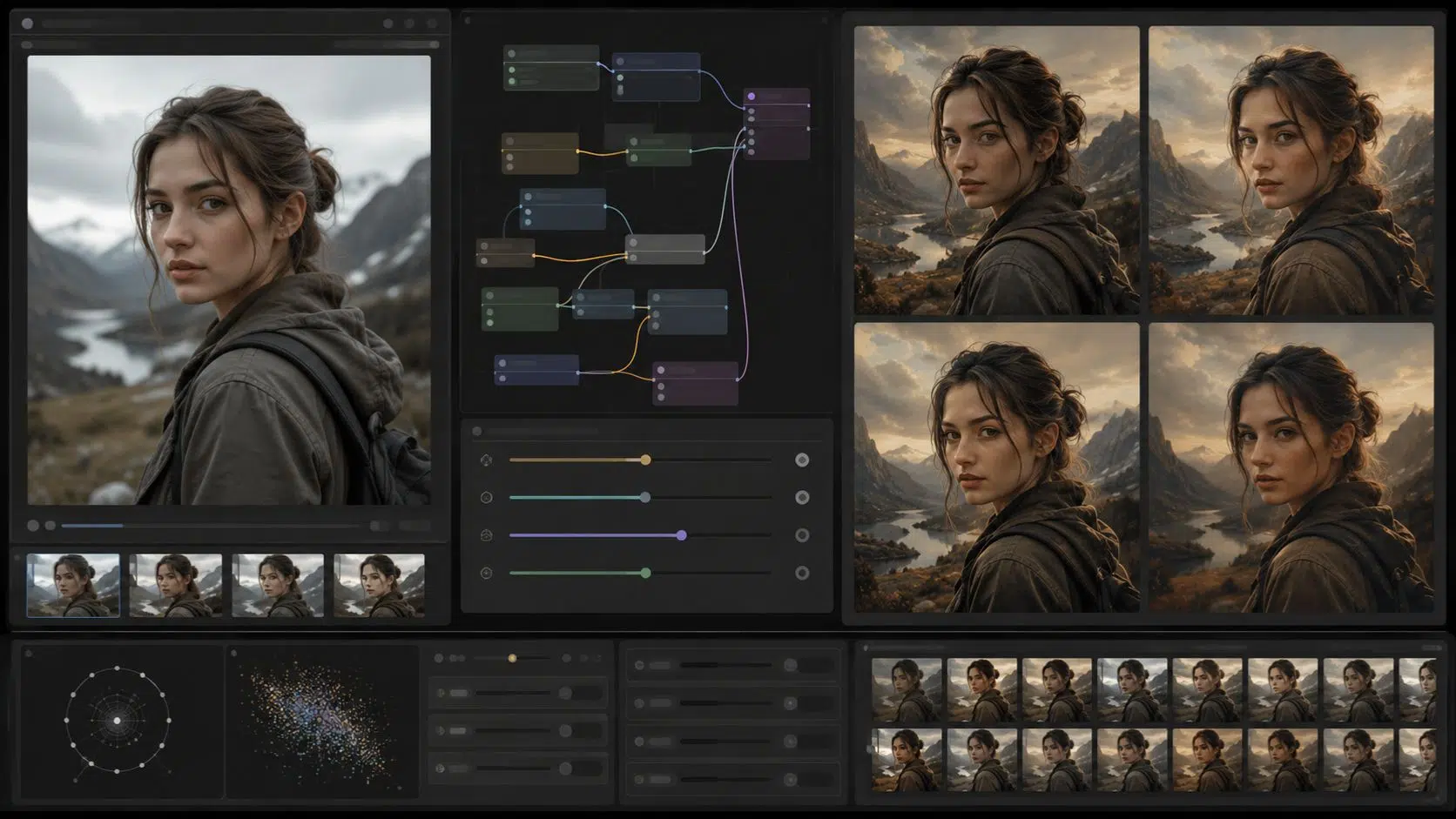
Character LoRAs are popular because consistency is hard in AI image generation. Without a LoRA, a character may change face, hairstyle, costume, age, or body shape from one image to the next. With a good character LoRA, the character becomes easier to reproduce across different scenes.
This is useful for:
- Comics
- Web novels
- Game characters
- Storyboards
- YouTube thumbnails
- Visual novels
- Mascots
- Fictional influencers
- Pitch decks
- Animated concept development
But character LoRAs need variation.
A good character dataset should include multiple angles, different expressions, different lighting, close-ups, full-body shots, different poses, and consistent identity markers.
If the training data is too repetitive, the character may become hard to pose or restyle.
LoRA for Anime and Illustration Styles
Anime and illustration workflows often benefit from LoRA because style consistency matters.
A LoRA can help preserve:
- Line quality
- Eye style
- Color palette
- Shading method
- Hair rendering
- Clothing detail
- Background treatment
- Character proportions
- Brush or ink texture
However, creators should be careful with copyrighted anime styles and character likenesses.
Training a LoRA on a protected character or a living artist’s work without permission can create ethical and legal concerns. It can also weaken originality.
A better approach is to train LoRAs on original artwork, licensed datasets, public-domain inspiration, or a deliberately mixed style dataset that does not simply imitate one artist.
Ethical and Copyright Issues With LoRA
LoRA training raises serious questions because it can learn from images very closely.
If you train a LoRA on copyrighted art, celebrity photos, anime screenshots, brand campaigns, or another artist’s portfolio without permission, the output may create legal and ethical problems.
This is especially sensitive when the LoRA is designed to imitate:
- A living artist
- A copyrighted character
- A celebrity
- A brand style
- A private person
- A paid client’s unreleased work
- A recognizable commercial campaign
Safe LoRA training should prioritize:
- Owned images
- Licensed images
- Public-domain materials
- Consent-based datasets
- Original sketches
- Synthetic assets you are allowed to use
- Commissioned training samples with clear rights
A LoRA may be lightweight technically, but its creative impact can be significant. Use it responsibly.
Common LoRA Mistakes
1. Training on Too Few Similar Images
If all training images look nearly the same, the LoRA may memorize that setup instead of learning the concept.
Add variation where appropriate.
2. Using Messy Captions
Weak captions can confuse the model. Captions should help separate the subject, style, background, clothing, lighting, and other features.
3. Overtraining
More training can make the LoRA worse. Overtrained LoRAs often produce repetitive, rigid, or distorted images.
4. Using Strength Too High
A LoRA pushed too strongly may overpower the prompt and base model.
Start moderate.
5. Ignoring the Base Model
A LoRA trained for one base model may not work well on another. Always test compatibility.
6. Expecting LoRA to Fix Composition
LoRA does not replace ControlNet, posing tools, sketch guidance, or composition planning. It helps with style or subject, not precise layout by itself.
7. Training Without Rights
Do not assume that images found online are safe for training. Rights matter.
8. Not Testing Enough Prompts
A LoRA should be tested across different subjects, angles, lighting, and use cases. One good sample image does not prove it is reliable.
How to Test a LoRA Properly
Testing is where you find out whether the LoRA is useful.
Try prompts that test:
- Close-up portrait
- Full-body image
- Different lighting
- Different background
- Different emotion
- Different camera angle
- Different outfit
- Different color palette
- Simple scene
- Complex scene
- Prompt without the trigger
- Prompt with weak LoRA strength
- Prompt with strong LoRA strength
For style LoRAs, test different subjects. For character LoRAs, test different poses. For product LoRAs, test different angles and lighting.
Look for consistency, flexibility, prompt responsiveness, artifact level, overfitting, identity preservation, style preservation, anatomy quality, and background behavior.
A strong LoRA should work beyond one perfect demo prompt.
Practical LoRA Workflow for Creators
A clean LoRA workflow starts with one decision: What exactly should this LoRA learn?
Do not train one LoRA to do too many unrelated things. A LoRA for a character, a product, a clothing style, and a background mood all at once will likely become confused. Start with a narrow goal. Then build the dataset around that goal.
Remove blurry images, duplicates, watermarks, wrong styles, low-quality files, confusing examples, and anything you do not have rights to use. Then caption carefully.
If training a style, describe the subjects so the model does not confuse subject with style. If training a character, identify the character consistently and caption clothing, pose, and background.
After training, test the LoRA in the actual types of images you need. Do not only test one dramatic sample prompt. Try normal use cases too. For teams, document how the LoRA should be used.
Include:
- Best base model
- Trigger word
- Recommended strength
- Prompt examples
- Known weaknesses
- Approved use cases
- Rights information
- Style notes
This turns the LoRA from an experiment into a usable creative asset.
When Should You Use a LoRA?
Use a LoRA when you need repeatable visual control.
Good reasons include:
- You need a consistent character
- You need a custom illustration style
- You need a repeatable brand look
- You need product-style consistency
- You need many images in the same mood
- You need a lightweight alternative to full fine-tuning
- You want to reuse a visual identity across projects
Do not use a LoRA when:
- One prompt already works
- You only need one image
- You do not have enough clean data
- You do not own or license the training images
- You need exact layout control
- You need factual product accuracy without review
- You are trying to copy a protected style or character
LoRA is useful when consistency matters. For one-off exploration, prompting may be eno
Final Takeaway: LoRA Turns AI Style Into a Reusable Asset
LoRA matters because it makes custom AI styles more practical. Instead of relying only on long prompts or training a full model, creators can use LoRA models to guide style, character identity, product look, or visual direction with much less weight and more flexibility.
This LoRA models explained guide comes down to one simple idea: A LoRA is not a replacement for creativity. It is a reusable control layer.
It helps creators make AI images feel more consistent, more intentional, and more connected across a project. But the best results still need good data, clear captions, careful testing, ethical sourcing, prompt skill, and human review.
When used well, LoRA does not just make images look interesting once. It helps make a visual style repeatable. That is what makes it valuable.
Frequently Asked Questions About LoRA Models
1. What are LoRA models in AI image generation?
LoRA models are lightweight trained add-ons that adapt a larger AI image model toward a specific style, subject, character, object, or visual pattern. They help create more consistent outputs without fully fine-tuning the entire base model.
2. Is LoRA a custom AI model?
A LoRA is usually a custom adaptation rather than a full standalone AI model. It works with a base model and modifies how that model behaves when the LoRA is activated.
3. What is LoRA training?
LoRA training is the process of teaching a LoRA file a specific visual concept using a curated dataset, captions, trigger words, and training settings. The goal is to create a reusable style or subject control layer for image generation.
4. How many images do you need to train a LoRA?
The number depends on the goal. A simple character LoRA may start with 15-40 strong images, while style LoRAs often need 30-100 or more varied examples. Dataset quality and variety matter more than image count alone.
5. What are fine-tuned AI styles?
Fine-tuned AI styles are customized visual looks learned by an AI model or add-on such as a LoRA. They help generate images with consistent linework, color, lighting, texture, mood, or overall aesthetic.
6. Can I train a LoRA on any images I find online?
No. You should only train LoRA models on images you own, have licensed, or have clear permission to use. Training on copyrighted art, brand images, celebrity photos, or another artist’s work without permission can create legal and ethical issues.