AI image generation becomes much more useful when you can control where things go. A prompt can describe mood, style, lighting, clothing, setting, camera angle, and character details. But if you have worked with AI image tools for more than ten minutes, you already know the problem.
The model may understand the general idea but still place the subject in the wrong pose, shift the camera angle, ignore the layout, crop the scene badly, or turn a simple composition into visual chaos.
You ask for a person standing beside a window. The model gives you a person floating near something that might be a window. You ask for a product centered on a table. The product looks nice, but the angle is wrong. You ask for a character holding a sword in a specific pose. The image looks dramatic, but the pose has changed completely.
That is where ControlNet becomes important.
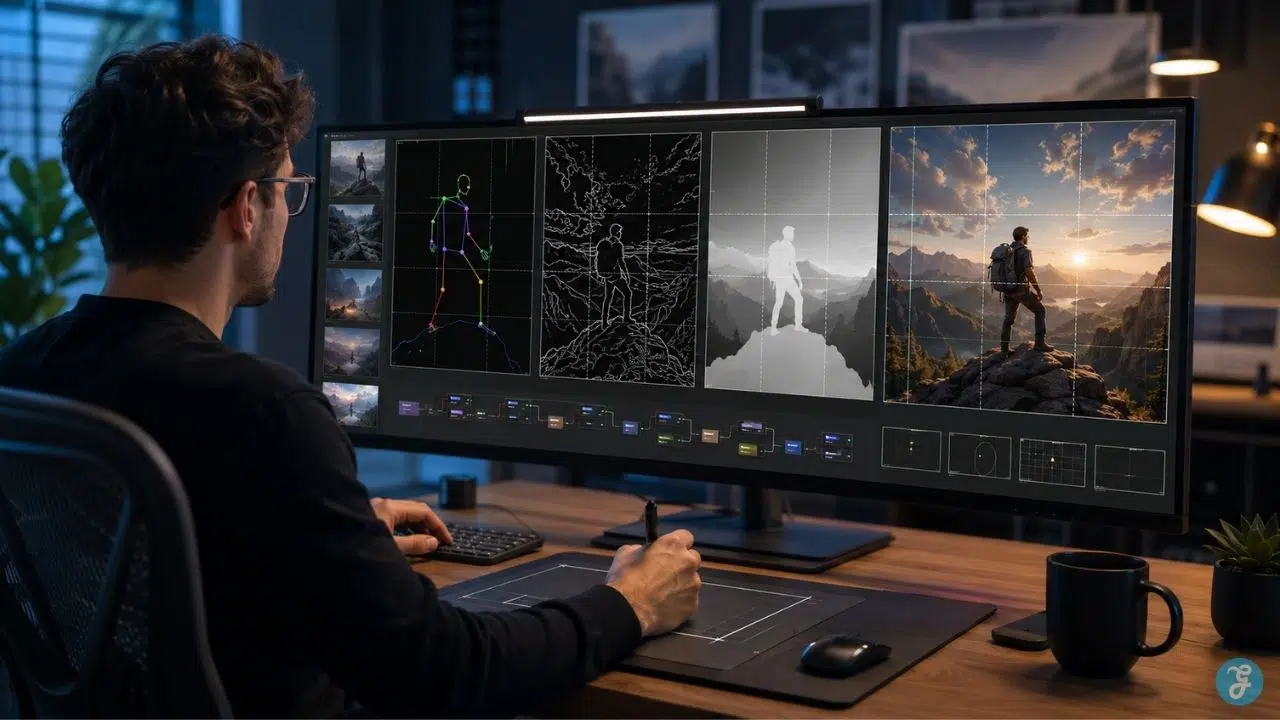
This ControlNet composition guide explains how ControlNet helps creators guide AI image composition with more precision. Instead of relying only on text prompts, ControlNet lets you use structure: edges, sketches, poses, depth maps, line art, segmentation maps, and other visual guides.
The simple version is this: prompts tell the model what to create. ControlNet helps tell it where and how to arrange it. That difference matters for designers, artists, marketers, publishers, game creators, product teams, concept artists, and anyone who needs controlled AI generation instead of endless random outputs.
What Is ControlNet?
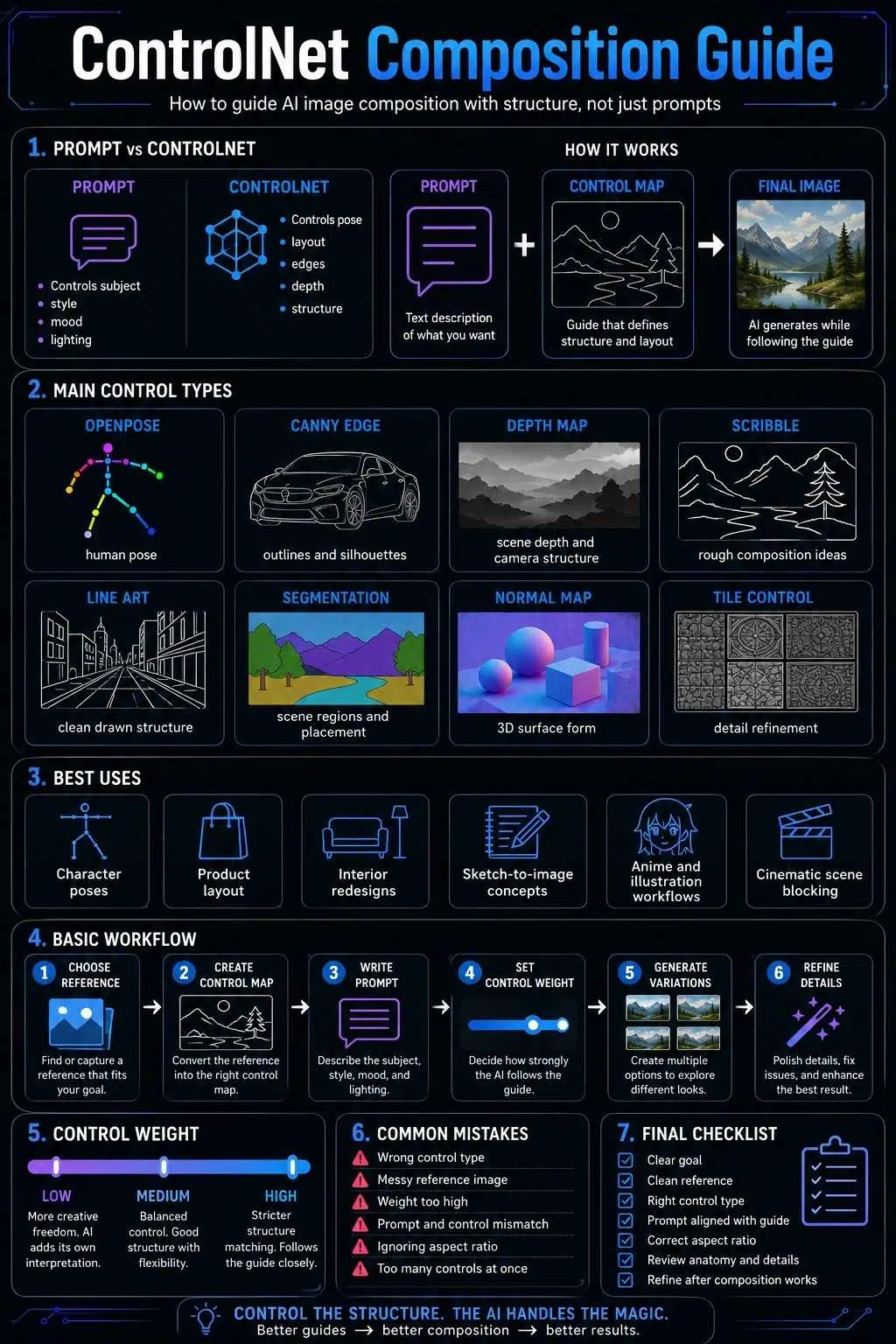
ControlNet is a system that gives diffusion-based AI image models extra visual guidance. A normal text-to-image model uses a prompt to generate an image. You describe what you want, and the model tries to interpret it. That works well for broad creative exploration, but it can be weak when you need a specific layout, pose, angle, or structure. ControlNet adds another layer of control.
It lets the model follow an additional input, such as:
- A pose skeleton
- A sketch
- A Canny edge map
- A depth map
- A line drawing
- A segmentation map
- A normal map
- A reference layout
- A rough composition guide
So instead of saying only: “A woman sitting on a chair in a cinematic room.”
You can provide a pose or sketch that tells the model exactly how the body should sit, where the chair should be, and how the overall shape should read. That is the heart of ControlNet.
It does not replace the prompt. It works with the prompt. The prompt gives meaning and style. The ControlNet input gives structure and composition.
ControlNet Explained in Plain Language
Think of ControlNet like a director standing beside the AI model. The prompt says: “Create a dramatic cyberpunk portrait.” The AI model understands the genre, mood, lighting, and style. But it may still invent the pose, background, framing, and object placement on its own.
ControlNet steps in and says:
“Use this pose.”
“Follow these edges.”
“Keep this depth structure.”
“Respect this layout.”
“Place the person here.”
That makes the output less random.
A good way to understand it:
| Element | What It Controls |
| Text prompt | Subject, style, mood, lighting, details |
| ControlNet input | Pose, layout, edges, structure, depth, placement |
| Model checkpoint | Overall visual style and generation behavior |
| Control weight | How strongly the AI follows the ControlNet guide |
| Denoising/settings | How much freedom the model has to change the image |
ControlNet is not magic. It will not make every result perfect. But it gives you a stronger starting point than prompt-only generation. For serious image work, that control is often the difference between “interesting accident” and “usable creative asset.”
Why Composition Control Matters in AI Images
AI image composition is about how visual elements are arranged inside the frame.
That includes:
- Subject placement
- Pose
- Framing
- Camera angle
- Background structure
- Foreground and background balance
- Leading lines
- Depth
- Negative space
- Object scale
- Character interaction
- Visual hierarchy
Without composition control, AI image generation can feel like gambling. You may get a beautiful image, but not the image you needed.
This is especially frustrating when the use case is practical.
- A game artist may need a character in a specific combat stance.
- A marketer may need a product shown from a consistent angle.
- A publisher may need a featured image with space for layout.
- A comic creator may need character placement to match a storyboard.
- A fashion brand may need a model pose to remain consistent across variations.
- An architect may want the same room layout with different interior styles.
Prompting alone can help, but it often struggles with precise spatial instructions. ControlNet helps because it gives the model visual structure before the image is generated.
Prompt Control vs Composition Control
Many creators try to fix composition problems by writing longer prompts. Sometimes that works. Often it does not. A long prompt can describe the composition, but the model may still interpret it loosely. Text is not always enough to communicate exact spatial relationships.
For example, this prompt may still produce inconsistent results:
“A full-body fashion editorial photo of a model standing with one hand on the hip, facing slightly left, one leg forward, centered in frame, clean background, studio lighting.”
The model may understand the idea, but the pose can change from one generation to the next. With ControlNet, you can use a pose input. Now the model has visual guidance for the body structure. Your prompt still controls the fashion style, lighting, outfit, camera mood, and scene, but the pose becomes more stable.
That is the practical difference. Prompting is descriptive. ControlNet is structural. You still need both.
How ControlNet Works in a Typical AI Image Workflow
A typical ControlNet workflow looks like this:
- Choose or create a reference image.
- Convert that image into a control map using a preprocessor.
- Add a text prompt describing the desired final image.
- Choose the right ControlNet model or control type.
- Set control strength or weight.
- Generate the image.
- Review whether the output follows the structure.
- Adjust prompt, weight, preprocessor, or seed.
- Refine with inpainting, upscaling, or another generation pass.
The important part is the control map.
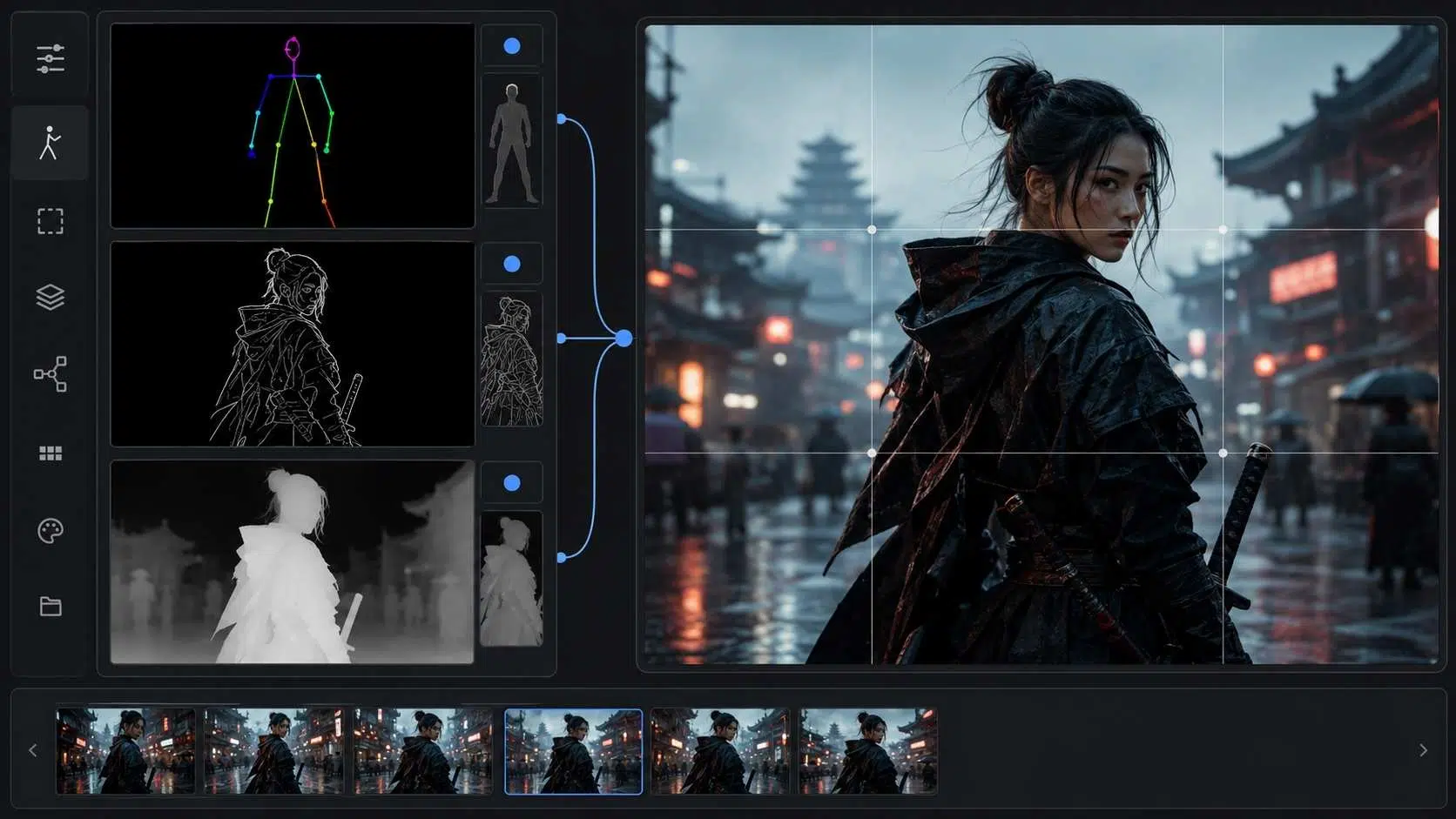
A control map is not usually the final image. It is a simplified guide. For example, a Canny edge map captures outlines. A pose map captures body keypoints. A depth map captures distance relationships. A segmentation map separates object regions.
ControlNet reads that structure and uses it to guide the new image.
The Main Types of ControlNet Inputs
Different ControlNet modes solve different composition problems. Choosing the wrong one can lead to weak results, so it helps to understand what each type is best for.
1. Canny Edge Control
Canny control uses edge detection to capture strong outlines from an image. It is useful when you want the AI to follow the visible shape of a reference image. It can preserve object outlines, building shapes, character silhouettes, and product contours.
Canny works well for:
- Product composition
- Architecture outlines
- Character silhouettes
- Object placement
- Poster-style layouts
- Recreating the structure of a reference image
But Canny can also be too rigid. If the edge map is messy, the generated image may inherit that mess. If the control weight is too high, the image may look stiff or over-constrained.
Best use: When the outline and shape matter more than depth or pose.
2. Depth Map Control
Depth control uses depth information to guide the model. It helps preserve the spatial relationship between foreground, middle ground, and background.
This is useful when you care about camera distance, scene structure, room layout, or object placement in 3D space.
Depth control works well for:
- Interior design
- Architecture
- Cinematic scenes
- Landscape composition
- Product scenes
- Room redesigns
- Maintaining foreground-background separation
Depth maps are often better than Canny when you want the scene structure to remain natural without forcing every edge.
Best use: When spatial depth and camera structure matter.
3. OpenPose Control
OpenPose control is used for human poses. It detects body keypoints and uses them as a guide. This is one of the most popular ControlNet workflows because human poses are hard to control with prompts alone.
OpenPose works well for:
- Character art
- Fashion images
- Action poses
- Dance poses
- Editorial portraits
- Game character concepts
- Full-body compositions
- Multi-character blocking
However, it does not solve everything. The model may still struggle with hands, overlapping limbs, extreme poses, or unusual camera angles.
Best use: When body pose matters more than background structure.
4. Scribble Control
Scribble control lets you use rough sketches as composition guidance. You do not need a polished drawing. A simple sketch can be enough to tell the model where major elements should go.
Scribble works well for:
- Early concept art
- Thumbnail sketches
- Moodboards
- Rough scene blocking
- Fast ideation
- Layout exploration
- Creative direction
It gives more freedom than Canny because the guide is looser. That can be a strength or a weakness. If the sketch is too vague, results may drift. If it is clear enough, it can be very flexible.
Best use: When you want composition control without locking every detail.
5. Line Art Control
Line art control uses clean lines, often from drawings or extracted outlines. It is useful for anime-style images, illustrations, comics, character design, and stylized artwork.
Line art works well for:
- Anime art
- Manga-style images
- Coloring sketches
- Character redraws
- Comic panels
- Stylized posters
- Illustration workflows
Compared with Canny, line art often feels cleaner and more intentional. It is better for drawn references, while Canny is often better for photo-derived edges.
Best use: When working with sketches, drawings, anime-style art, or illustration outlines.
6. Segmentation Control
Segmentation maps divide an image into regions, such as person, sky, road, building, tree, ground, clothing, or furniture. This is useful when you want to preserve the broad layout of a scene while changing the style or details.
Segmentation works well for:
- Scene layout
- Landscape redesign
- Urban scenes
- Interior composition
- Fashion styling
- Background control
- Object-category placement
It is less about exact edges and more about “what goes where.”
For example, you can keep the sky at the top, buildings in the middle, road at the bottom, and person in the foreground while changing the entire visual style.
Best use: When scene regions and object categories matter.
7. Normal Map Control
Normal maps describe surface direction and shape. They help preserve form, lighting, structure, and 3D surface behavior. This can be useful for objects, characters, environments, and certain 3D-to-AI workflows.
Normal maps work well for:
- 3D renders
- Product form control
- Character models
- Sculptural shapes
- Environment art
- Lighting-aware structure
It is more technical than Canny or OpenPose, but it can be powerful when the source is a 3D model or structured asset.
Best use: When surface form and 3D shape matter.
8. Tile Control
Tile control is often used for detail enhancement, texture preservation, and upscaling-style workflows. It can help maintain detail while generating larger or more refined outputs.
Tile workflows are useful for:
- Upscaling
- Texture refinement
- Detail preservation
- Large images
- Background enhancement
- Pattern consistency
Tile control is less about initial composition and more about preserving or enhancing structure during refinement.
Best use: When improving detail without completely changing the image.
Choosing the Right ControlNet Mode
The best ControlNet mode depends on what you need to control.
| Goal | Best Control Type |
| Keep human pose | OpenPose |
| Preserve outlines | Canny or Line Art |
| Maintain room or scene depth | Depth |
| Follow rough sketch | Scribble |
| Preserve broad object regions | Segmentation |
| Maintain 3D form | Normal Map |
| Improve details during refinement | Tile |
| Control anime or comic-style linework | Line Art |
| Keep product silhouette | Canny |
| Keep cinematic scene structure | Depth |
The mistake many beginners make is using one mode for everything.
ControlNet is stronger when you choose the control type based on the visual problem. If the pose is wrong, use OpenPose. If the scene depth is wrong, use Depth. If the outlines keep drifting, use Canny or Line Art. If the overall layout keeps changing, use Segmentation.
ControlNet Composition Guide for Beginners
If you are new to ControlNet, start with simple workflows. Do not begin with multiple ControlNets, extreme settings, complex prompts, and heavy style models at the same time. That makes it hard to know what caused the result.
A beginner-friendly workflow:
- Start with one clear reference image.
- Choose one control type.
- Use a simple prompt.
- Generate several variations.
- Adjust control weight.
- Compare how closely the image follows the guide.
- Change only one setting at a time.
For your first tests, try these:
- OpenPose for a standing person
- Canny for a product outline
- Depth for an interior room
- Line Art for an anime-style sketch
- Scribble for a rough concept thumbnail
This helps you learn what each control type actually does.
How to Use ControlNet for Better AI Image Composition
Good ControlNet results start before you press generate.
The reference image matters. A messy input creates messy control. A clear input creates cleaner guidance.
Use these rules.
Start With a Clear Composition
Your reference should have a readable structure.
Avoid references where:
- The subject is too small
- The pose is unclear
- The background is too chaotic
- The lighting hides important shapes
- Objects overlap confusingly
- The camera angle is inconsistent
- The image has too much clutter
ControlNet is not only reading your intention. It is reading the structure you give it.
If the structure is confusing, the output will likely be confusing too.
Use the Prompt to Describe the Final Image
ControlNet gives structure, but the prompt still matters.
A strong prompt should describe:
- Subject
- Setting
- Style
- Lighting
- Mood
- Camera angle
- Color palette
- Key details
- Quality level
- Avoided elements, if needed
For example:
Reference/control: OpenPose standing figure
Prompt: “cinematic full-body portrait of a futuristic detective in a rain-soaked city alley, dark blue lighting, reflective pavement, dramatic shadows, realistic style”
The pose comes from ControlNet. The final look comes from the prompt.
Keep Prompt and ControlNet Input Aligned
If your control image shows a seated figure, but your prompt asks for a running person, the model receives mixed instructions.
Sometimes this can create interesting results. Usually, it causes errors.
Try to align:
- Pose with action
- Camera angle with prompt
- Scene layout with setting
- Object shape with subject
- Depth map with environment
- Sketch with final composition
ControlNet works best when the structural guide and text prompt support each other.
Adjust Control Weight Carefully
Control weight decides how strongly the model follows the ControlNet input.
A higher weight usually means the output follows the structure more closely. A lower weight gives the model more freedom.
But higher is not always better.
If the weight is too high:
- The image may look stiff
- Details may feel forced
- Style may weaken
- Artifacts may appear
- The result may copy the structure too rigidly
If the weight is too low:
- The composition may drift
- Pose may change
- Object placement may move
- The guide may be ignored
A practical rule:
- Use higher control for exact poses, product shape, or layout-critical work.
- Use lower control for creative exploration, moodboards, and loose inspiration.
Use Control Start and Control End
Some tools let you control when ControlNet influences the generation process.
This is often called control start and control end.
A full control range means ControlNet guides the image throughout the generation. A partial range lets the model follow the structure early and then become freer later.
This can be useful when you want the AI to keep the broad layout but not become too rigid.
For example:
- Strong early control can preserve composition.
- Reduced later control can allow style and texture to develop more naturally.
Not every beginner needs to adjust this immediately, but it becomes useful as you get more advanced.
Use Multiple ControlNets Only When Needed
Some workflows use more than one ControlNet at the same time.
For example:
- OpenPose + Depth for a human figure in a clear scene
- Canny + Depth for product composition
- Line Art + Color control for illustration
- Segmentation + Depth for complex environments
- OpenPose + Canny for character pose and silhouette
Multiple controls can improve accuracy, but they can also conflict.
If one ControlNet says the subject is here and another suggests a different structure, the model may produce strange results.
Use multiple ControlNets only when each one has a clear job.
Practical ControlNet Workflows
ControlNet becomes easier when you connect each mode to a real creative use case.
Workflow 1: Character Pose Control
Use this when you need a character in a specific pose.
Best control type: OpenPose
Best for: Character art, fashion, game design, editorial images, action poses
Workflow:
- Choose a pose reference.
- Extract OpenPose keypoints.
- Write a prompt describing the character.
- Set a moderate-to-high control weight.
- Generate several variations.
- Fix hands, face, or clothing with inpainting if needed.
Example prompt idea:
“Full-body fantasy warrior standing in a defensive pose, moonlit battlefield, detailed armor, cinematic lighting, dramatic atmosphere.”
The pose guide controls the stance. The prompt controls the character identity and world.
Workflow 2: Product Layout Control
Use this when a product must stay in a specific position or silhouette.
Best control type: Canny or Depth
Best for: Product ads, e-commerce visuals, packaging mockups, hero images
Workflow:
- Use a clean product reference or layout mockup.
- Generate a Canny edge map or depth map.
- Prompt for the desired lighting, background, and style.
- Keep control weight fairly strong.
- Review product shape carefully.
- Avoid changes that misrepresent the product.
This workflow is useful, but be careful. If the AI changes product details, labels, shape, or texture, the image may become misleading.
Workflow 3: Interior Design Variation
Use this when you want to keep a room layout but change design style.
Best control type: Depth or Segmentation
Best for: Interior concepts, architecture, real estate, moodboards
Workflow:
- Start with a room photo or 3D layout.
- Use Depth to preserve space or Segmentation to preserve areas.
- Prompt the new style.
- Generate multiple design directions.
- Compare whether furniture placement and room structure remain stable.
Example prompt idea:
“Modern Japandi living room, warm wood tones, soft natural light, minimal furniture, neutral palette, calm atmosphere.”
Depth helps keep the room structure while the prompt changes the style.
Workflow 4: Sketch to Finished Concept
Use this when you have a rough idea and want AI to develop it visually.
Best control type: Scribble or Line Art
Best for: Concept art, posters, character design, storyboards, thumbnails
Workflow:
- Draw a rough sketch.
- Use Scribble for loose control or Line Art for stronger shape control.
- Prompt the final style and subject.
- Generate variations.
- Choose the strongest composition.
- Refine details with another pass.
This is one of the most creative ControlNet workflows because it lets you turn rough visual thinking into polished image drafts.
Workflow 5: Anime and Illustration Composition
Use this when you want stylized character or scene control.
Best control type: Line Art, OpenPose, Canny
Best for: Anime-style images, manga panels, character portraits, fan-art-like composition planning
Workflow:
- Use a sketch, line drawing, or pose guide.
- Choose Line Art for drawn structure or OpenPose for body position.
- Prompt the anime or illustration style.
- Keep control weight moderate.
- Generate several versions.
- Check hands, eyes, hair, clothing, and line consistency.
This workflow is strong because anime composition often depends on clear silhouettes, expressive poses, and clean line direction.
Workflow 6: Cinematic Scene Blocking
Use this when you want a scene to feel composed like a film shot.
Best control type: Depth, Canny, or Segmentation
Best for: Storyboards, film concepts, editorial visuals, campaign art
Workflow:
- Start with a rough scene layout or reference frame.
- Use Depth to preserve camera structure.
- Use Canny if outlines are important.
- Prompt lighting, lens style, atmosphere, and mood.
- Generate variations with consistent framing.
- Select the version with the strongest visual hierarchy.
This is useful when you need AI images that feel directed rather than randomly generated.
ControlNet Settings That Matter
Different tools expose different settings, but most ControlNet workflows include a few common controls.
Control Weight
This controls how strongly the ControlNet input affects the output.
Use:
- Lower weight for creative freedom
- Medium weight for balanced control
- Higher weight for strict layout or pose matching
Avoid pushing weight too high unless exact structure matters.
Preprocessor
The preprocessor converts your reference image into a control map.
For example:
- Canny preprocessor creates an edge map.
- OpenPose preprocessor creates a pose skeleton.
- Depth preprocessor creates a depth map.
- Line Art preprocessor creates line structure.
- Segmentation preprocessor creates region maps.
The preprocessor quality matters. A bad preprocessor output can ruin the generation.
Model or Control Type
The ControlNet model should match the preprocessor.
If you use a depth map, use a depth ControlNet. If you use OpenPose, use an OpenPose ControlNet. Mismatching controls can produce poor results.
Resize Mode
Resize mode determines how the control image fits the generation canvas.
This matters because stretching or cropping the control input can distort composition.
Be careful with:
- Cropping important parts of the reference
- Stretching body proportions
- Changing aspect ratio
- Losing edge details
- Misaligning the composition
For accurate composition, match the aspect ratio early.
Denoising Strength
Denoising affects how much the image can change, especially in image-to-image workflows.
Higher denoising gives more freedom but may lose structure. Lower denoising preserves more of the source but may not change enough.
For composition control, moderate values usually work better than extreme values.
Seed
The seed affects variation. Keeping the same seed while changing one setting can help you understand how that setting changes the result.
This is useful for testing ControlNet weight, prompt edits, or model changes.
Common ControlNet Mistakes
ControlNet gives more control, but it also gives people more ways to make mistakes.
Mistake 1: Using the Wrong Control Type
If your problem is pose, do not start with Canny. Use OpenPose. If your problem is room depth, do not rely only on Line Art. Use Depth. If your problem is broad layout, consider Segmentation.
Control type should match the problem.
Mistake 2: Using a Messy Reference Image
A cluttered reference creates cluttered control. Clean references usually produce cleaner outputs.
Mistake 3: Setting Control Weight Too High
High control can make the image stiff, awkward, or overly tied to the reference. Use enough control to guide composition, not so much that the image cannot breathe.
Mistake 4: Fighting the Prompt Against the Control Image
If your prompt and control input disagree, the model has to compromise. That often causes broken anatomy, strange objects, or confused composition.
Mistake 5: Expecting Perfect Hands and Faces
ControlNet can guide pose and structure, but it does not guarantee perfect details. Hands, eyes, faces, and small accessories may still need inpainting or manual correction.
Mistake 6: Ignoring Aspect Ratio
If the control input is vertical and your output is horizontal, the model may crop, stretch, or distort the composition. Match aspect ratio before generating when possible.
Mistake 7: Using Copyrighted References Carelessly
ControlNet can follow the structure of a reference image. That does not mean every reference is safe to use commercially.
Avoid copying distinctive copyrighted compositions, character poses, branded imagery, or private client work unless you have permission or a clear editorial reason.
Controlled AI generation still needs ethical and legal judgment.
Mistake 8: Adding Too Many Controls Too Early
Multiple ControlNets can be powerful, but beginners should start with one. Too many controls can conflict and make troubleshooting harder.
How ControlNet Helps Different Creators
ControlNet is useful because it solves practical creative problems across different workflows.
For Designers
Designers can use ControlNet to keep layouts stable while changing style, lighting, background, or visual treatment.
Useful for:
- Web hero images
- Editorial graphics
- Campaign concepts
- Social visuals
- Presentation images
- Product mockups
For Artists
Artists can use ControlNet as a bridge between sketching and rendering.
Useful for:
- Sketch-to-image workflows
- Character pose development
- Concept art
- Environment design
- Visual exploration
- Style testing
For Marketers
Marketers often need repeatable visual formats. ControlNet can help maintain consistent composition across campaign variations.
Useful for:
- Ad concepts
- Product placement
- Lifestyle scenes
- Brand moodboards
- Social campaigns
- Thumbnail testing
For Game Developers
Game teams can use ControlNet for early-stage visual development, especially when they need pose, silhouette, or environment structure.
Useful for:
- Character concepts
- NPC pose sheets
- Environment thumbnails
- Prop design
- Storyboard frames
- Promotional art drafts
For Publishers
Publishers can use ControlNet to create more controlled editorial images.
Useful for:
- Article illustrations
- Explainer visuals
- Featured images
- Character-style layouts
- Thematic graphics
- Consistent image series
The key for publishers is consistency. ControlNet helps a publication avoid random-looking visuals across related articles.
ControlNet vs Image Prompting vs Inpainting
ControlNet is not the only way to control AI images. It is part of a larger toolkit.
| Method | Best For | Main Limitation |
| Text prompting | Describing subject, style, mood | Weak at exact composition |
| Image prompting | Using an image as visual inspiration | Can be less precise structurally |
| ControlNet | Guiding pose, edges, depth, layout | Needs clean control input |
| Inpainting | Fixing or replacing specific areas | Not ideal for full composition planning |
| Outpainting | Expanding a scene beyond the frame | May drift from original structure |
| LoRA/style models | Consistent style or character influence | Does not guarantee layout |
| Manual editing | Final corrections and polish | Takes skill and time |
The strongest workflows often combine these methods.
For example, you might use ControlNet to set the pose, prompting to set the scene, inpainting to fix hands, and upscaling to polish the final image.
A Practical ControlNet Composition Workflow
Here is a clean workflow for controlled AI generation.
Step 1: Define the Image Goal
Before opening the tool, decide what matters most.
Ask:
- Do I need a specific pose?
- Do I need the same room layout?
- Do I need product placement?
- Do I need a character centered?
- Do I need a cinematic angle?
- Do I need clear negative space?
- Do I need a consistent visual series?
If you cannot define the control goal, you may choose the wrong ControlNet mode.
Step 2: Choose or Create a Reference
Use a reference that clearly shows the structure you want.
This could be:
- A sketch
- A pose photo
- A 3D render
- A product mockup
- A room image
- A layout draft
- A storyboard frame
- A previous AI image
Make sure the reference is legal and appropriate to use.
Step 3: Select the Right Control Type
Match the tool to the job.
- Human pose: OpenPose
- Hard outlines: Canny
- Scene space: Depth
- Rough idea: Scribble
- Clean drawing: Line Art
- Object regions: Segmentation
- 3D form: Normal Map
- Detail refinement: Tile
Step 4: Write a Clean Prompt
Your prompt should not fight the control input.
A good prompt includes:
- Subject
- Style
- Setting
- Lighting
- Mood
- Camera framing
- Important details
- Output quality
Keep it clear. Do not overload it with conflicting instructions.
Step 5: Generate Small Test Batches
Do not judge ControlNet from one image.
Generate several versions. Look for patterns:
- Is the pose staying stable?
- Is the layout correct?
- Is the model ignoring the guide?
- Is the image too rigid?
- Are hands or faces breaking?
- Is the background composition useful?
Then adjust.
Step 6: Refine One Setting at a Time
Change only one major setting at a time.
For example:
- Increase control weight
- Lower control weight
- Change prompt
- Change preprocessor threshold
- Change denoising
- Change seed
- Change model
This helps you learn what actually improves the result.
Step 7: Fix Details After Composition Works
Do not obsess over small details before the composition works.
First get:
- Pose
- Framing
- Layout
- Subject placement
- Background structure
- Visual hierarchy
Then fix:
- Hands
- Face
- Eyes
- Textures
- Clothing
- Small props
- Lighting issues
Composition comes first. Polish comes later.
How to Use ControlNet for Better Prompts
ControlNet does not make prompting irrelevant. It makes prompting more focused.
Without ControlNet, people often overload prompts with spatial instructions:
“A person standing on the left side, facing right, arm raised, one leg forward, city background, camera from low angle, dramatic perspective…”
With ControlNet, you can let the pose or layout guide handle much of that. Then the prompt can focus on creative direction.
Better prompt structure:
Subject: futuristic detective
Scene: rain-soaked city alley
Mood: tense, cinematic, noir
Lighting: blue neon, strong shadows
Style: realistic editorial concept art
ControlNet: OpenPose for stance, Depth for alley structure
That creates a cleaner workflow.
The prompt tells the model what the image should feel like. ControlNet tells it how the image should be arranged.
ControlNet for AI Image Composition: Examples
Example 1: Fashion Editorial
Goal: Keep the model’s pose consistent across different outfits.
Use:
- OpenPose for body position
- Prompt for outfit, lighting, background
- Moderate control weight
This helps create a consistent fashion series without relying on random pose generation.
Example 2: Product Advertisement
Goal: Keep a bottle centered on a table while changing background style.
Use:
- Canny for bottle outline
- Depth for table structure, if needed
- Prompt for lighting and scene mood
- Careful review for product accuracy
This helps maintain product placement while exploring creative backgrounds.
Example 3: Interior Redesign
Goal: Keep the room layout but change decor style.
Use:
- Depth for room structure
- Segmentation for areas
- Prompt for interior style
- Multiple variations
This is useful for moodboards and concept exploration.
Example 4: Character Concept Art
Goal: Generate a character in a specific action pose.
Use:
- OpenPose for stance
- Prompt for character design
- Inpainting for hands and face
- Upscaling for final polish
This is a strong workflow for game art and illustration.
Example 5: Blog Featured Image
Goal: Create a controlled layout with a subject on one side and clean negative space.
Use:
- Scribble or Canny for rough composition
- Prompt for editorial style
- Lower-to-medium control weight
- Final crop for publishing
This helps publishers create images that work with website layouts, thumbnails, and text overlays.
Ethical and Copyright Considerations
ControlNet is powerful because it can follow structure from reference images. That power needs care.
A reference image may be copyrighted. A pose may be generic, but a distinctive composition, character design, movie still, album cover, or branded product scene may not be safe to copy closely.
Use caution with:
- Anime screenshots
- Movie stills
- Celebrity photos
- Commercial photography
- Brand campaigns
- Private client work
- Artwork from living artists
- Distinctive copyrighted compositions
Safer references include:
- Your own sketches
- Licensed stock images
- Public domain references
- Client-approved assets
- 3D mockups you created
- Original photography
- Simple pose references with permission
- Rough composition thumbnails
ControlNet should help you control your own creative direction, not quietly duplicate someone else’s work.
Is ControlNet Only for Stable Diffusion?
ControlNet became closely associated with Stable Diffusion workflows, but the broader idea of controlled generation is now part of many AI image systems.
Some tools expose ControlNet directly. Others use similar ideas under different names, such as pose control, structure reference, edge control, sketch guidance, depth control, or composition reference.
The vocabulary changes, but the creative goal is the same:
Give the image model more than text so it can follow structure.
For creators, the exact tool matters less than understanding the workflow. Once you understand pose, depth, edges, sketches, and segmentation, you can use composition control across many AI image platforms.
When Not to Use ControlNet
ControlNet is useful, but it is not needed for every image.
You may not need it when:
- You want loose creative exploration
- Composition does not matter much
- You are generating abstract art
- You only need mood or style ideas
- The prompt already gives good results
- The reference structure would restrict creativity too much
Sometimes the best image comes from letting the model explore.
ControlNet is for direction, not every creative moment.
Final Takeaway: ControlNet Turns AI Images From Random to Directed
ControlNet matters because it gives creators more control over AI image composition. Prompt-only generation is useful, but it often leaves too much to chance. ControlNet helps guide pose, layout, depth, edges, sketches, and visual structure so the final image is closer to what you intended.
This ControlNet composition guide comes down to one practical lesson:
Use prompts for meaning and style. Use ControlNet for structure and placement. Use human review for quality and judgment.
That combination is what makes controlled AI generation useful. Not because every output becomes perfect. Because the creative process becomes less random.
Frequently Asked Questions ControlNet composition guide
1. What is ControlNet in AI image generation?
ControlNet is a system that adds extra visual guidance to diffusion-based AI image models. It can use inputs such as edges, poses, sketches, depth maps, line art, and segmentation maps to help control the structure of the generated image.
2. How does ControlNet improve AI image composition?
ControlNet improves AI image composition by giving the model a structural guide. Instead of relying only on text prompts, creators can guide pose, layout, depth, outlines, and object placement more directly.
3. What is the best ControlNet mode for human poses?
OpenPose is usually the best ControlNet mode for human poses. It uses body keypoints to guide the character’s stance, gesture, and position in the frame.
4. Is ControlNet explained simply as image guidance?
Yes. In simple terms, ControlNet is image guidance for AI generation. The prompt describes what the image should be, while ControlNet helps guide how the image should be arranged.
5. Can ControlNet follow a sketch?
Yes. Scribble and Line Art ControlNet modes can follow sketches. Scribble works well for rough composition ideas, while Line Art works better for cleaner drawings and illustration workflows.
6. Does ControlNet make AI images copyright-free?
No. ControlNet does not change copyright or usage rights. If you use a copyrighted reference image, generated results may still raise legal or ethical issues, especially if the output closely copies a distinctive composition or character design.