Introducing Google Vids: The Latest Productivity Powerhouse for Workspace

Introducing Google Vids Workspace Productivity App

Before, if you had inquired about Google’s video editor app, I would have mentioned “YouTube Studio.”

However, Google Workspace has recently introduced a new productivity app called “Google Vids.” Typically, video editing is seen as a secondary feature in most productivity suites. However, Google seems to view Vids as a significant component of Workspace.

They describe Vids as a “all-in-one video creation app for work” that will be on par with Docs, Sheets, and Slides. So, is this an editor that can handle documents, spreadsheets, presentations, and videos?

Google’s demonstration of the new video editor highlights its versatility beyond YouTube videos or films. It positions the product as a powerful tool for creating engaging corporate presentations, such as training materials or product demos.

Indeed, this “video editor” seems to have a striking resemblance to Google Slides. The interface is remarkably similar, with the only notable difference being the presence of a video timeline instead of a slideshow timeline.

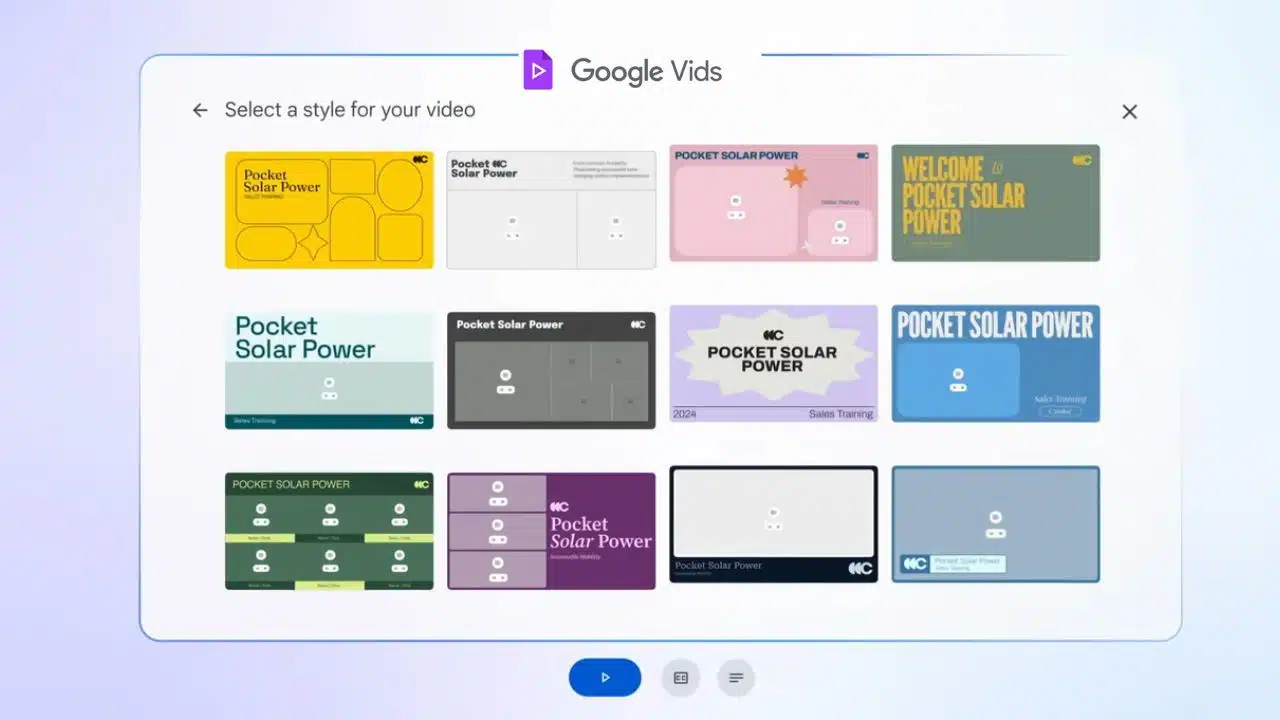
Google’s example video demonstrates a “sales training video” that begins with a Slides presentation as the fundamental framework. At the beginning, you have an outline editor that allows you to organize each page of the slideshow into its own distinct section. Google offers a variety of video “styles” to choose from. These styles have a Powerpoint-like feel, with a prominent title, subheading, and a designated space for the video content.

Google then requires you to compose a script and either deliver it personally or utilize a text-to-speech voice to present the script. A “stock media” library allows you to enhance your video content by incorporating generic corporate imagery such as a video of a sunset, selecting background music, and utilizing a few pictures.

You can also use your webcam to record something, similar to a pre-recorded Zoom meeting. Following that, you’ll find the typical features of Google productivity apps: the ability to collaborate on real-time editing with visible mouse cursors from each participant, along with a stream of comments.

Similar to other Google products in the era of OpenAI, Google presents Vids as a video editor that harnesses the power of AI. However, during the presentation, there weren’t many notable generative AI features showcased. The videos, images, and music were pre-existing media, not AI-generated creations (Slides can generate images, but that feature wasn’t demonstrated here).

This doesn’t have anything similar to OpenAI’s “Sora,” which has the ability to generate new videos based on its training data. There might be a feature called “help me write” powered by Gemini for the script, and according to Google, the initial outline is described as being “generated” from your starting Slides presentation, but it appears to be the extent of it.

According to Google, Vids will be available for testing in June through “Workspace Labs,” allowing users to opt in and try it out.



Subscribe to Our Newsletter

Related Articles

Top Trending

Chinese AI vs American AI
Chinese AI vs American AI: Who Will Lead the Next Era of Artificial Intelligence?
Why Medical-Record Cybersecurity Matters in Injury Cases
Medical-Record Cybersecurity: Protecting Injury Case Evidence
Smart Contract Audits
Smart Contract Audits: 10 Security Checks Developers Should Perform
Bangladesh garment wage protests
Bangladesh’s Garment Wage Crisis Is a Global Pricing Problem [Part: 02]
CBDCs vs Stablecoins
CBDCs vs Stablecoins: 8 Important Differences

Technology & AI

Chinese AI vs American AI
Chinese AI vs American AI: Who Will Lead the Next Era of Artificial Intelligence?
Smart Contract Audits
Smart Contract Audits: 10 Security Checks Developers Should Perform
AI productivity
AI Should Give People Time Back, Not Simply Help Them Produce More
apps that identify fonts colours products
8 Apps That Identify Fonts, Colours, Songs, and Products
Drone Accident Liability
8 Common Drone Accidents and Their Liability Questions

GAMING

10 Common Gaming and Esports Injuries Players Should Know
Ergonomic Gaming Setup 8 Upgrades for Better Comfort
8 Ergonomic Upgrades for a Healthier Gaming Setup
Gaming Accessibility Technology
10 Accessibility Technologies Making Gaming More Inclusive
Discord Bots for Gaming Communities
10 Best Discord Bots for Gaming Communities
Video Games and Mental Health Benefits, Limits and Risks
Can Video Games Support Mental Health and Emotional Well-Being?

Business & Marketing

Best AI Landing Page Builders for Small Businesses
7 Best AI Landing Page Builders for Small Businesses in 2026: What You Can Actually Publish for Free
Review Management Software for Local Business
10 Best Review Management Software for Local Businesses
How to Start and Scale a Profitable Meal Prep Delivery Business
What Is an Industrial Metal 3D Printer
What Is an Industrial Metal 3D Printer: How Wire Arc Additive Manufacturing Scales Metal Production?
Best Vendor Management Software for SMBs
10 Best Vendor Management Software for SMBs

EdTech & E-Learning

generative AI in vocational skill assessment
20 Ways Generative AI Is Reshaping Vocational and Technical Skill Assessments
math games for early learners
The Mystery of Numbers: Gamified Math Adventures for Early Learners
Online Learning Career Skills
7 Ways Online Learning Helps Adults Develop Career Skills
Formative Assessment in Learning Apps
What Is Formative Assessment in Learning Apps? A Practical Guide
Learning streaks
How Learning Streaks Motivate And When They Backfire

Software & Apps

apps that identify fonts colours products
8 Apps That Identify Fonts, Colours, Songs, and Products
multi-model AI generation pipeline
How to Build a Scalable Multi-Model AI Generation Pipeline for Production SaaS
One-Time-Purchase Apps
12 One-Time-Purchase Apps That Can Replace Monthly Subscriptions
Apps for Splitting Bills and Shared Expenses
10 Best Apps for Splitting Bills and Shared Expenses
Best Tenant Screening Services for Landlords
10 Best Tenant Screening Services for Landlords