
Struggling to choose between a web app vs mobile app choice for your next product? I get it. I have seen teams lose months by building native too early, and I have also seen browser-based products hit a wall when they really needed deeper phone features.
The good news is that the trade-offs are much clearer now.
I am going to walk through this the same way I would in a planning meeting with developers, programmers, and app users. You will see where a web app, native app, hybrid app, or progressive web app makes sense, and where each option starts to work against you.
Understanding Web Apps Vs Mobile Apps
When I say web app, I mean application software that runs in a web browser and pulls data from a server. This is the model I use for dashboards, portals, booking tools, ecommerce flows, and internal business systems that need to work across desktop and mobile without separate installs.
Accessing Web Apps Through Browsers
I open a URL, the browser loads the interface, and the session starts right away. That simple path is why I often start with a web application when the product depends on sharing, search traffic, or low-friction first use.
Google Search Central makes an important point here: JavaScript-powered web apps can be discovered in Google Search, but server-side rendering or pre-rendering still helps because it is faster for users and crawlers. If SEO is part of the growth plan, I do not rely on a thin app shell and hope the crawler sorts it out later.
- Best for first-touch traffic: users can land on a feature page from search, email, or ads.
- Best for fast validation: I can publish changes on the server without waiting for app store approval.
- Best for sharing: one link works on a laptop, tablet, or smartphone.
Cross-Platform Compatibility
The main win is a shared codebase. HTML, CSS, and JavaScript let me support Windows, macOS, Linux, Android, and iOS from the same core product.
That works especially well for tools people use in mixed environments, like an admin panel on a desktop computer and a quick approval flow on a mobile device. If the job is mostly forms, content, account management, search, or payments, a web app usually gives me the widest reach for the least engineering overhead.
There is one catch. Cross-platform does not mean identical experience. Keyboard-heavy desktop flows, file uploads, and drag-and-drop often feel great in a browser, while gesture-heavy interactions usually feel better in a native mobile app.
Why Web Apps Do Not Require Installation
Web apps run inside the browser runtime, so the user does not need a traditional install to get started. I update the code on the server, users refresh, and everyone gets the latest version at once.
A progressive web app, or PWA, pushes that model further by adding install prompts, caching, and background features through browser standards like service workers. Apple Developer documentation says Home Screen web apps on iOS 16.4 and later can receive web push notifications, which closes part of the old gap between progressive web apps and native mobile apps.
If I need instant access, search visibility, and fast release cycles, a web app or progressive web app is still my default starting point.
Understanding Mobile Apps
When I build a mobile app, I am packaging the product for iOS, Android, or both. That gives me tighter control over storage, background behavior, notifications, and mobile device features like camera, GPS, and biometrics.
Installing Mobile Apps on Devices
Installation adds a step, but it also gives the product a stronger presence. The icon sits on the home screen, the app can earn ratings and reviews, and users tend to treat it as a more permanent tool.
Store release is real work, though. Apple says 90% of submissions are reviewed in less than 24 hours on average, while Google Play requires new apps to publish with the Android App Bundle format. That means a mobile application launch is part engineering and part store operations.
- Store listing assets matter: screenshots, copy, category, and keywords shape discoverability.
- Permissions need context: camera, location, microphone, and push prompts need a clear user benefit.
- Release planning matters: staged rollout, crash monitoring, and rollback plans are more important because fixes are not as instant as server-side web updates.
- Policy review affects timing: the code may be finished before the store process is finished.
Offline Functionality
Mobile apps shine when work has to continue without reliable internet access. I can store drafts locally, queue writes, cache media, and sync later when the connection comes back.
SQLite is still one of the most useful building blocks here because it gives me a real on-device database instead of a loose set of cached files. That matters for field teams, delivery workflows, inspection checklists, and any task where losing a draft costs time or revenue.
Progressive web apps can cache content and support background work through service workers, but MDN points out that offline freshness still depends on what was cached the last time the app connected. If stale data or failed writes would break the experience, I lean native.
Access to Device Hardware
This is where the difference between web apps and mobile apps becomes hard to ignore. A native app can reach GPS, Bluetooth, biometrics, camera controls, background location, and richer notification behavior with fewer workarounds.
If I am building barcode scanning, live navigation, augmented reality, or heavy media capture, I want operating system APIs, not browser-level compromise. Hybrid apps can bridge part of that gap, but the more your product depends on hardware access, the stronger the case for native.
- Choose native first for continuous GPS, Bluetooth accessories, advanced camera flows, AR, or high-frame animations.
- Choose hybrid carefully when you need moderate hardware access but still want shared code.
- Choose web when the hardware needs are light and browser APIs are enough.
Web Apps Vs Mobile Apps: Key Differences
When I compare a web app and a mobile app, I am really comparing release speed, reach, performance, device access, and how much ongoing complexity the team can afford to carry.
Development Cost and Time
Cost usually follows complexity. A browser-based web app gives me one release path, one core codebase, and fewer QA branches. Separate iOS and Android builds create more testing, more tooling, and more coordination.
If I want a middle ground, the first names I look at are React Native, Flutter, and Ionic with Capacitor. React Native renders with native code, Flutter can target mobile, web, and desktop from a single codebase, and Ionic with Capacitor keeps a web stack while adding a store-friendly shell.
| Approach | Codebase | Release Path | Best Fit |
|---|---|---|---|
| Web App or PWA | Usually one web codebase | Deploy to server, no store review | SEO, portals, booking tools, dashboards, fast validation |
| Hybrid or Cross-Platform App | Shared app code with platform bridges | App stores plus device testing | Startups that need store presence and moderate hardware access |
| Native App | Platform-specific code or heavier platform modules | Full store workflow per platform | Performance-critical products and deep device integration |
I choose native only when the extra build cost buys a meaningfully better product, not just because having an app icon sounds good in a pitch.
User Experience and Interface
User experience is where native often earns its keep. Native controls match iOS and Android patterns, so scrolling, gestures, haptics, and transitions feel familiar right away.
Web apps can still feel excellent, especially for content, checkout, support portals, and internal tools. The catch is that a polished responsive layout is not the same thing as a truly native interaction model.
If the product needs to feel like part of the phone, I do not force it into a browser just to save money.
In developer discussions around shared-code approaches, keyboard focus, drag-and-drop, and gesture consistency come up again and again as pain points. That is one reason I split a desktop-heavy web interface from a touch-heavy mobile app when the product starts to sprawl.
Performance and Speed
Web apps run inside a browser engine. Native apps run closer to the operating system. That changes animation smoothness, startup time, background behavior, and access to GPU-heavy or sensor-heavy tasks.
WebAssembly helps with compute-heavy pieces, and service workers improve repeat visits, but browser limits still exist. A 2023 study comparing Android apps with similar web counterparts found that performance and energy results varied by workload, which is why I benchmark the critical user path instead of arguing from theory.
- Web app is usually enough for forms, dashboards, content, account management, and standard ecommerce flows.
- Native app is safer for real-time video, advanced graphics, heavy background syncing, or complex device integrations.
- Hybrid apps fit the middle when speed matters, but the feature set is still close enough to share code.
Distribution and Discovery
Web and mobile applications are discovered in very different ways. Web apps benefit from links, sharing, and search, while mobile apps gain shelf space inside app stores.
Google Search documentation explicitly covers JavaScript SEO, which is a major advantage if your acquisition model depends on search intent. On the mobile side, Apple says the App Store can distribute one build across 175 storefronts and 50 languages, which is hard to ignore if store discovery is central to your growth plan.
There is also a U.S.-specific wrinkle now. As of July 22, 2026, Google Play says developers serving U.S. users may have app listings shared with third-party U.S. Android app stores unless they opt out, so Android distribution is becoming less centralized than it used to be.
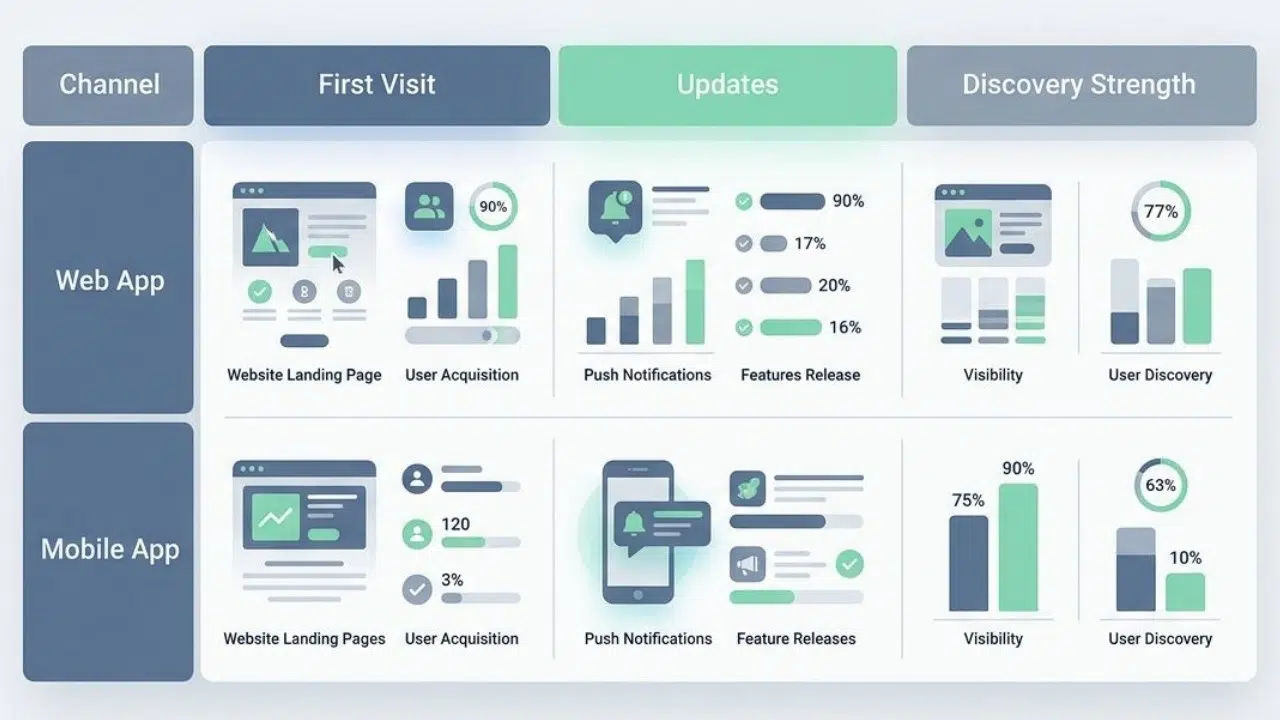
| Channel | Web App | Mobile App |
|---|---|---|
| First Visit | Open a link or search result | Find listing, install, then open |
| Updates | Immediate after deploy | Store review plus user update cycle |
| Discovery Strength | SEO, referrals, shared URLs | App store search, rankings, featured placement |
| Best Fit | Low-friction access and fast experiments | Habit products and stronger device presence |
How to Choose Between Web Apps and Mobile Apps
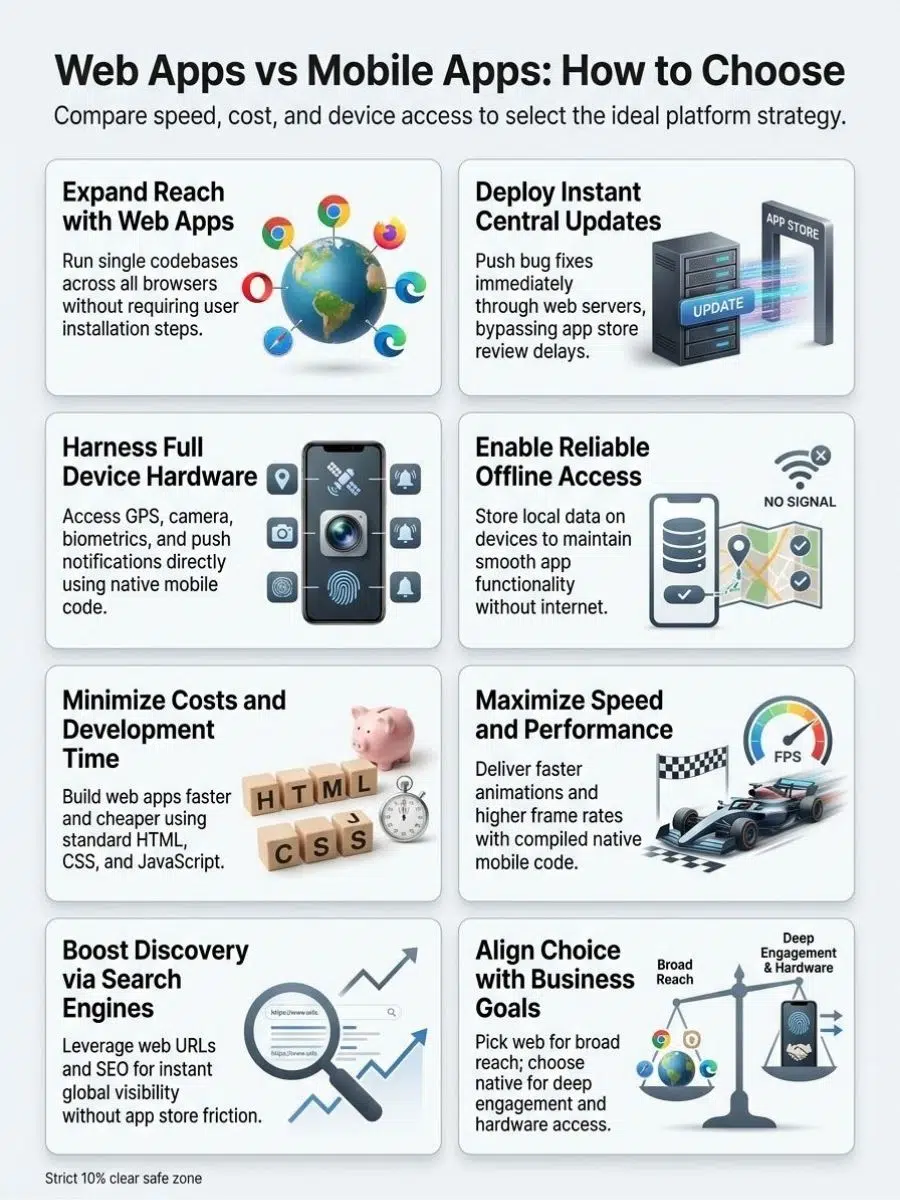
When I am choosing between a web app and a mobile app, I stop thinking about technology first and think about failure first. What breaks if I pick the lighter option?
That question usually reveals the answer faster than any feature checklist.
Business Goals
If the goal is reach, validation, and speed, I start with web. If the goal is daily retention, richer permissions, or turning the product into part of a user’s routine, I move closer to native.
| Business Goal | Best Fit | Why I Lean That Way |
|---|---|---|
| Search-driven acquisition | Web App | URLs, SEO, and instant access reduce friction |
| Daily repeat usage | Mobile App | Push, saved sessions, and home-screen presence improve retention |
| Store presence with shared code | Hybrid App | You get app distribution without building two fully separate stacks |
| Internal operations across desktop and mobile | Web App or PWA | One platform is easier to roll out across mixed devices |
I also look at usage frequency. A web browser experience is fine for occasional tasks. Repeated daily actions are where a native mobile app usually starts to feel worth the install.
Target Audience Needs
Audience behavior can swing the whole decision. A 2026 Pew fact sheet says 16% of U.S. adults are smartphone-only internet users, which tells me I cannot assume every user will finish onboarding on a laptop.
For developers building public-facing products, that means mobile web performance, tap targets, and login recovery deserve as much care as desktop polish. For app users in low-bandwidth situations, offline support and resumable actions often matter more than flashy visuals.
Accessibility belongs here too. W3C guidance applies WCAG principles across web pages, web apps, native apps, and hybrid apps, so I scope accessibility work from the start instead of treating it like a post-launch patch.
- Occasional users: I favor a web app or mobile web flow first.
- Frequent users: I favor a mobile app if push, saved login, and home-screen presence improve retention.
- Mixed audiences: I often pair a web app for discovery with a native app for power users.
Budget and Development Sequence
Budget changes the order of operations more than the end state. I might still want a native app later, but I do not always need to build it first.
- Web app first: best for proof of concept, SEO, and fast release.
- Progressive web app next: adds installability, caching, and better re-engagement without a full native rewrite.
- Hybrid app after validation: use React Native, Flutter, or Ionic with Capacitor when you need store presence and more device access.
- Full native last: reserve it for the moment performance, hardware depth, or platform polish starts limiting growth.
This sequencing saves money because I pay for native complexity after I know the product deserves it.
Technical Requirements
Technical requirements are where I make the final call. I use a short checklist, and I do not skip any of it.
- Offline model: decide whether cached reads are enough or whether you need queued writes, conflict handling, and true offline transactions.
- Device access: list every required sensor, permission, and background task before choosing web, hybrid, or native.
- Security: I use OWASP ASVS for web application controls and OWASP MASVS for mobile application controls so the security review matches the platform.
- Testing: Selenium is useful for browser regression, and Playwright adds Chromium, WebKit, Firefox, and mobile emulation, but I still test critical flows on real devices.
- Accessibility: confirm screen reader behavior, focus order, target sizes, contrast, and form errors early.
- Release cadence: if you need same-day fixes, web wins. If app store presence is part of the strategy, plan for review cycles and staged rollouts.
If three or more of those checks push hard toward hardware access, background execution, or flawless touch performance, I stop forcing a browser solution and build the mobile app.
Making the Right Web Apps Vs Mobile Apps Decision
For me, the web app vs mobile app decision comes down to where the product creates value.
Choose a web app when reach, speed, search visibility, and lower cost matter most. Choose a mobile app when offline reliability, device features, and richer user experience matter more than install friction.
Hybrid apps and progressive web apps sit in the middle, and that middle is stronger than it used to be.
If I match the platform to the job instead of the hype, both developers and app users win.
Frequently Asked Questions(FAQs) About Web Apps Vs Mobile Apps
1. What Is the Difference Between a Web App and a Mobile App?
A web app runs inside a Website and looks like a page. A mobile app is installed Application software on a Telephone and sits on the home screen, ready to open fast for the User (computing).
2. When Should I Choose a Web App or Mobile App?
Pick a web app for broad reach and fast updates, when you want to avoid downloads. Pick mobile when you need speed, offline work, or device features, so you should use mobile apps in that case of mobile heavy use.
3. Are Hybrid Apps a Good Middle Ground?
Yes, hybrid apps mix web code and native parts, think Hybrid (biology), a crossbreed that can be flexible. They can speed development, help with Navigation, and an app can also reuse the same code on many devices.
4. Which Is Better for My Users, a Web App or Mobile App?
It depends on the need. For deep use on a Telephone, a mobile app is better for speed and offline access. For one-off visits or wide access, a Website based app, as Application software, often fits most User (computing) needs.