


The performance report opens on the same screen for everyone: a blue line, four metric cards, and the last three months of clicks. That view is a status update. It tells you the site is up or down. It does not tell you which page is one title rewrite away from a better click-through rate or which country is quietly sending impressions you never planned for.
Almost everything useful in Search Console sits one filter deeper. The hidden GSC filters for more SEO opportunities are not secret features—they are the ones sitting in the same + Add Filter menu that most people click past on their way to the export button.
Below are the seven I keep coming back to, in the order I trust them, along with the places each one will mislead you if you take the numbers at face value.
1. Query Regex for Question-Shaped Searches
This is the one I run first, and it earns more of my time than the other six combined.
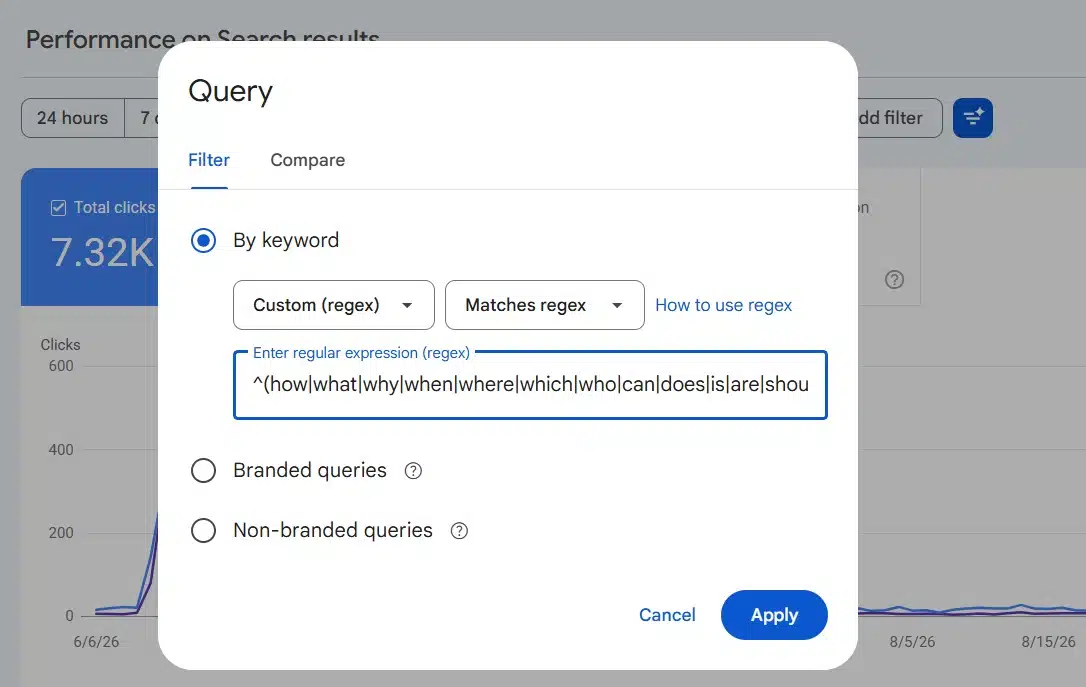
Add a filter, choose Queries, pick Custom (regex), and drop in something like:
^(how|what|why|when|where|which|who|can|does|is|are|should)\b
That returns every query that starts as a question. On a site with any informational content at all, the list is longer than expected, and a good chunk of it points at pages that never set out to answer a question. Those are the cheapest wins available: a page already gets impressions for “how long does X take”, the page buries the answer in paragraph nine, and a 40-word direct answer near the top changes what the snippet can pull.
A second pattern I use on the same dimension finds queries of six words or more:
^(\w+\s){5,}\w+$
Long queries behave differently. They convert differently, they cluster around problems rather than topics, and they are the raw material for the conversational phrasing that AI-generated answers tend to reward.
Two things to know before you trust the output. Search Console uses RE2, so lookaheads and backreferences do not exist—when you want a negative, switch the dropdown to “Doesn’t match regex” instead of trying to write one. And matching is partial by default: your pattern matches anywhere in the string unless you anchor it with ^ or $. A broken pattern returns an empty table with no error message, exactly like a valid pattern with no matches, so when a filter comes back blank, suspect your syntax before you conclude you have no data. I have walked through the syntax in more depth in our guide to regex filters in GSC.
2. The Branded and Non-Branded Query Filter
Google added this one in March 2025 and I still meet SEOs who have not touched it. It splits your Performance data by whether the search included your brand name, which is the fastest honest answer to “is our SEO working, or are we just being remembered?”
Non-branded is where the growth story lives. Filter to it, sort by impressions, and you get a list of topics where Google is already testing you against strangers.
Three limits are worth holding onto:
- The filter does not appear on sites with a low number of impressions.
- Its history starts from when the feature launched, so you get up to 16 months of data measured from March 2025 forward, not from your property’s beginning.
- The classification is imperfect. Google says so plainly. Misspellings of your brand, product names that double as generic terms, and any brand made of common words will land on the wrong side of the line often enough to matter.
If your brand name is a normal English word, skip the built-in filter and write your own exclusion with Doesn’t match regex, listing your brand plus its common misspellings separated by pipes. You will get a cleaner split than the automatic one.
3. Page Regex, One Cluster at a Time
Search Console has no way to filter by metric. You cannot ask it for pages between position 8 and 20, or pages under 100 clicks. That gap is why the page regex filter matters more than it looks.
Filter Pages to a single folder or content cluster:
Then switch the table to the Queries dimension and turn on Average position. What you are left with is a small enough list to read line by line, which is the only way striking-distance work actually gets done. Doing this per cluster instead of site-wide also stops the biggest pages from crowding out the ones with room to move.
Note that the case-sensitivity flag mostly matters here rather than on queries—query data comes back lowercased anyway, but URLs do not, and a site with mixed-case paths will fool a careless pattern.
4. Search Appearance, the Filter I Forget and Then Regret
Under Search appearance you will only see result types your site has actually earned impressions for, which makes the dropdown itself a diagnostic. If Videos is listed and you have never optimized a video, something is being surfaced without your involvement. If Discussion forums appears, your community pages are competing in a lane you probably are not measuring. Translated results is the one that surprises people most: it means Google is showing your pages to searchers in another language.
Each of those is a content decision waiting to happen, and none of them show up in the default view.
Two caveats keep this from being clean. Filtering or grouping by search appearance switches the table to page-level aggregation while the chart stays at property level, so the two will not reconcile. And clicks are assigned to a URL, not to a URL plus a feature — so a filtered click count tells you the user saw that feature alongside that URL, not that they clicked the feature itself.
5. Country
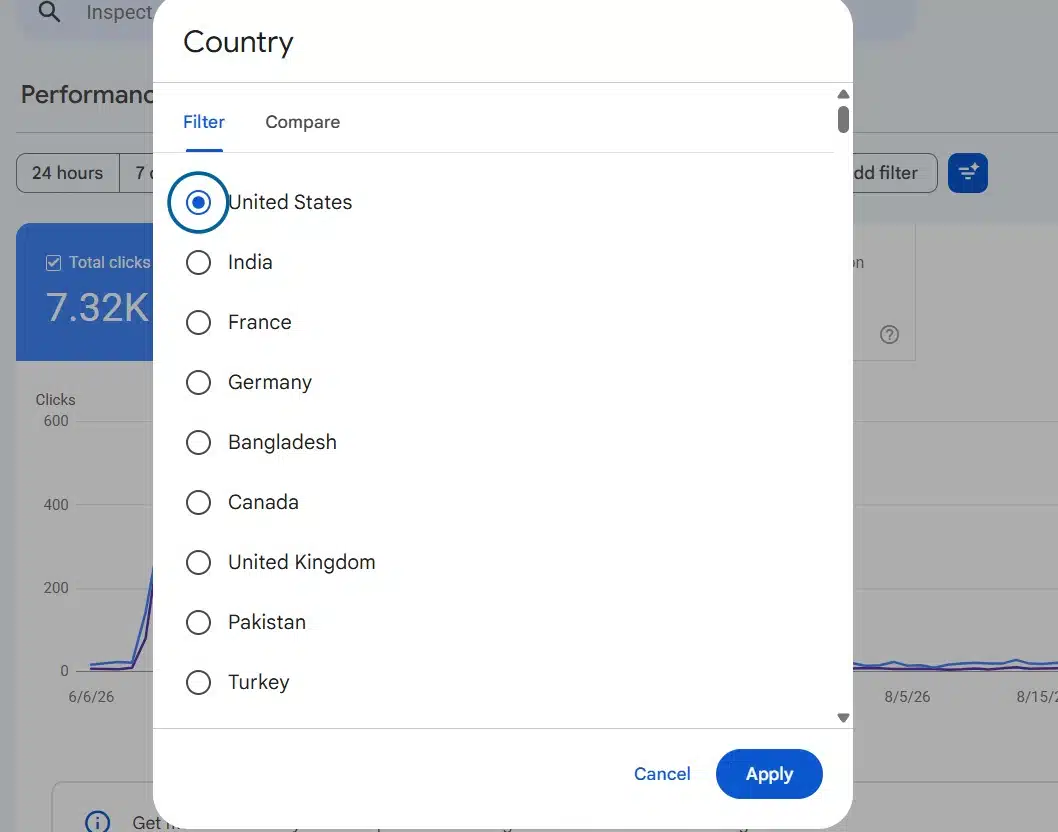
A short one, but it pays for itself. Set the country filter to a market you have never targeted and see what comes back. Sites that publish in English pick up traffic from countries where the search language matches but the intent, pricing, and product availability do not. Sometimes that means a localized page. More often it means a paragraph acknowledging that the advice differs outside the US, which is enough to stop a bounce.
You can only compare two countries at a time, so treat this as a series of small checks rather than one big report.
6. Device, in Comparison Mode
Do not filter device. Compare it.
Open the device filter, choose Compare, and set mobile against desktop. The table gains a Difference column, and the rows worth reading are the ones where CTR splits hard between the two. A large mobile CTR gap on a page that ranks well usually means the title is being truncated, the result is sitting under a stack of features on a small screen, or the page above the fold asks for something before it gives anything.
Search Console allows one comparison at a time, so adding another replaces this one. And if a value is very rare in one group, its row shows “~” rather than a number—filter to that value directly and the data usually appears.
7. Date Granularity and Period-over-Period
The date filter is not just a range. Set granularity to Weekly or Monthly and daily noise flattens out, which matters most when you are comparing two periods and do not want a Monday measured against a Saturday. Content decay is close to invisible on a daily chart and obvious on a monthly one.
Two details that catch people out: everything is in Pacific Time except the 24-hour view, which uses your browser’s local time zone, and the newest data is preliminary and drawn as a dotted line. That dotted section will change. Do not report on it, and do not panic about it.
Where These Hidden GSC Filters for More SEO Opportunities Stop Working
The moment you apply a query filter, anonymized queries drop out of the data. Google removes queries that were not issued by more than a few dozen users over a two-to-three month period, and those queries are included in your chart totals but never listed in the table. Filter by query and they vanish from the totals too.
The practical effect: your filtered numbers will not add up to your unfiltered numbers, and the gap is often large. There is also row truncation on top of that — Search Console stores the most important rows, not all of them, and the fullest picture comes from the bulk data export to BigQuery rather than the interface.
None of this makes the filters wrong. It makes them directional. Treat filtered query data as a list of things to investigate, and page-level data as the thing you actually report. We have written more on the GSC data quirks that cause this if you want the full picture.
The Order I Run These in
On a normal week: branded versus non-branded first, because it frames everything else. Then question regex, because it produces work I can hand to a writer the same day. Then one page cluster in detail. Search appearance and country are monthly rather than weekly. Device comparison comes out when a specific page underperforms and I need a reason.
If the aggregation differences between property-level and page-level data still feel slippery — and they should, because CTR and average position both change depending on which one you are looking at — that is worth studying properly rather than working around. Some of the best online courses to learn advanced SEO metrics spend real time on exactly this.
Final Thoughts
None of these hidden GSC filters for more SEO opportunities require a paid tool, an API key, or a spreadsheet. They require deciding what question you are asking before you open the report, because the default view answers no question at all.
Start with one. Run the question regex on your top folder this week and see how many queries you are already receiving that no page on the site was written to answer. That list alone is usually enough to fill a content calendar for a month.






















