
A 20-minute weekly review is a focused reset that gathers scattered commitments, clarifies unfinished tasks, and prepares you for the week ahead. By Friday, work rarely sits in one tidy list: a follow-up hides in meeting notes, overdue tasks still say “today,” and next Tuesday’s presentation has no preparation step.
The review brings those loose ends into one trusted place, so Monday starts with clear priorities, not a hunt for promises you have already made. To finish in 20 minutes, review, decide, and schedule—but do not execute. Note the email that needs a reply; write it after the review.
What the Review Should Achieve
The official Getting Things Done process is broader. Its checklist covers loose material, inboxes, calendar entries, delegated work, active projects, and future ideas. Completing that full review in 20 minutes is unrealistic when the system has been neglected.
A 20-minute weekly review should leave you with an accurate view of open commitments, a decision about overdue work, and two or three outcomes worth protecting. It will not clear every inbox or untangle a troubled project. Give larger problems their own appointments.
Set Up the Review
Before a 20-minute weekly review, open four things: your calendar, main task list, recent meeting notes, and a blank planning page. Then set the timer. A paper planner works as well as an app if it contains commitments you trust.
Tasks may also be hiding in email, Slack, Microsoft Teams, or WhatsApp. Check only messages you flagged or saved; scanning every conversation will consume the session. If the first review runs long because nothing is captured consistently, choose one place for new tasks before trying again.
David Allen’s published guidance recommends early Friday afternoon, partly because people may still be available for follow-up. Friday is sensible, not sacred. Monday morning may suit work that changes over the weekend. Choose the quiet slot you can protect.
Your 20-Minute Weekly Review Schedule
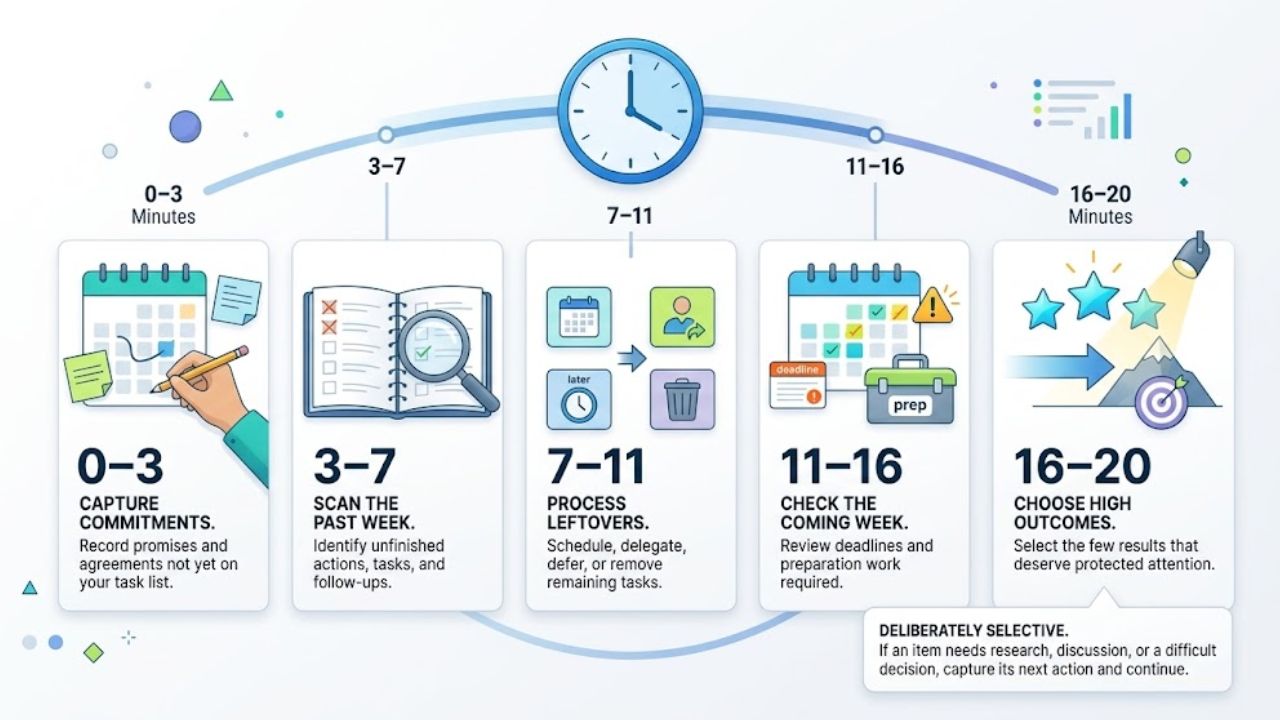
Use the same order each week:
- Minutes 0–3: Capture commitments that never reached your task list.
- Minutes 3–7: Scan the past week for unfinished actions and follow-ups.
- Minutes 7–11: Schedule, delegate, defer, or remove the leftovers.
- Minutes 11–16: Check the coming week for deadlines and preparation work.
- Minutes 16–20: Choose the few outcomes that deserve protected attention.
This 20-minute weekly review is deliberately selective. If an item needs research, discussion, or a difficult decision, capture its next action and continue.
Minutes 0–3: Capture Loose Commitments
Start with what is missing. Check recent meeting notes, paper beside the keyboard, and flagged messages. A browser tab counts only when it represents a commitment; an article you may read someday belongs in bookmarks.
Write actions, not labels. “Client launch” gives no direction. “Confirm the launch date with the client” does.
Minutes 3–7: Close the Past Week
Scan the previous seven days in your calendar before opening the overdue list. Meetings often create informal work: send revised figures, introduce two colleagues, approve a draft, or follow up after a sales call.
Mark completed items, identify anyone waiting on you, and note work blocking someone else. Keep reflection brief. “Four afternoon meetings displaced planned writing time” is enough to suggest a scheduling change.
Minutes 7–11: Decide What Happens to Leftovers
In a 20-minute weekly review, unfinished tasks need decisions rather than another optimistic date. Use four routes:
- Schedule it: Assign a realistic day or work block.
- Delegate it: Name the owner and record when you will follow up.
- Defer it: Move it to a later list without pretending it will happen next week.
- Delete it: Remove work that no longer supports a current commitment.
Check anything moved more than once. It may be vague, oversized, blocked, or no longer useful. “Work on website” might need to become “Approve the homepage copy.” Remove tasks that have lost their value instead of rescheduling them out of guilt.
Minutes 11–16: Check the Week Ahead
Review the next seven days, then look farther ahead for events requiring travel, approval, or material from someone else. A deadline ten days away may still create work next week.
Start with meetings, classes, appointments, client deliveries, and personal responsibilities. Add the preparation they require: a Thursday presentation may need a Tuesday draft and Wednesday feedback.
Plan against the hours that remain. Five hours of meetings and five hours of focused writing will not fit into one normal workday. Leave space for administration and unexpected requests.
Minutes 16–20: Choose Three Outcomes
Choose no more than three results that should remain visible when smaller requests arrive. Three is a practical ceiling, not a rule. One major deadline may be enough for a difficult week.
Make each result concrete. Replace “Finish proposal” with “Send the revised client proposal by Thursday,” then give it a first action and a suitable day.
Protect important work on the calendar, but do not copy every minor task into it. When the timer ends, stop.
Keep One Reusable Review Page
Keep one reusable page with six fields:
- Completed or closed
- Open commitments
- Waiting for
- Next week’s fixed events
- Three priority outcomes
- One practical adjustment
Make the final adjustment specific: request source material earlier, protect Tuesday morning, or move administrative work to a lower-energy period. “Be more productive” is not an action.
Where the 20 Minutes Disappear
A 20-minute weekly review usually becomes an hour when reviewing turns into replying, filing, editing, and reorganizing. Record the next action and keep moving.
Give the closest attention to overdue commitments, approaching deadlines, blocked work, and promises affecting other people. A low-value idea can stay on a later list.
Avoid artificial due dates. Once the calendar fills with dates you ignore, it stops showing real urgency. Use dates for genuine deadlines or deliberate work commitments.
Complex work also needs a boundary. A product launch, hiring decision, research paper, or cash-flow problem may require its own project review. Schedule one; do not conduct it inside this session.
Adapt the Review to Your Work
Keep your 20-minute weekly review small, but spend its attention where mistakes carry the most cost:
- Managers should check delegated work, approvals, and blocked team members.
- Freelancers should review proposals, client deliverables, invoices, and promised follow-ups.
- Students should compare assignments with class schedules and examination dates.
- Entrepreneurs may need a quick check of sales commitments, payments, and operational deadlines.
- Remote workers should look for time-zone conflicts and decisions buried in asynchronous messages.
Add a checklist item only when it repeatedly affects your week. More coverage is not automatically better; an exhaustive review that you avoid is less useful than a short one you maintain.
Final Thoughts
A consistent 20-minute weekly review shows what remains open, what is approaching, and what deserves protection. It cannot repair an excessive workload, and a better-formatted list should not be mistaken for more capacity.
Start by placing one recurring 20-minute appointment on the calendar and copying the six-field review page. Run the process once before changing it. If you finish with honest priorities and a clear first action for each, you have enough direction to begin the week without rebuilding the plan on Monday morning.
Frequently Asked Questions (FAQs)
Can a 20-Minute Weekly Review Really Be Enough?
Yes, when your task system is reasonably current and the review stays narrow. If you spend most of the session discovering where tasks are stored, the problem is not the timer. Consolidate your capture points or schedule a one-time cleanup. Strategic project decisions also need separate time.
What Should I Do If I Miss a Week?
Resume at the next available slot. Do not reconstruct every detail of the missed week. Check the current task list, scan past calendar entries for overlooked follow-ups, and focus on commitments that remain active.
Should Work and Personal Tasks Be Reviewed Together?
Use one review when work and personal commitments compete for the same hours. Separate them when confidential systems or workplace policies prevent mixing the two. Either way, check both calendars before committing your time; an evening obligation still changes how much demanding work fits into that day.