
Incomplete client requests need a place to wait, an owner, and a clear next question. They do not usually need a second ticket. When a client sends the missing attachment or clarifies the deadline, that information should update the request already in progress.
The trouble often starts with a helpful instruction: “Please complete this form so we can assist.” If the form always creates a ticket, the client’s answer becomes a new case. An email reply, a forwarded message, and an automation retry can then produce more records for the same work.
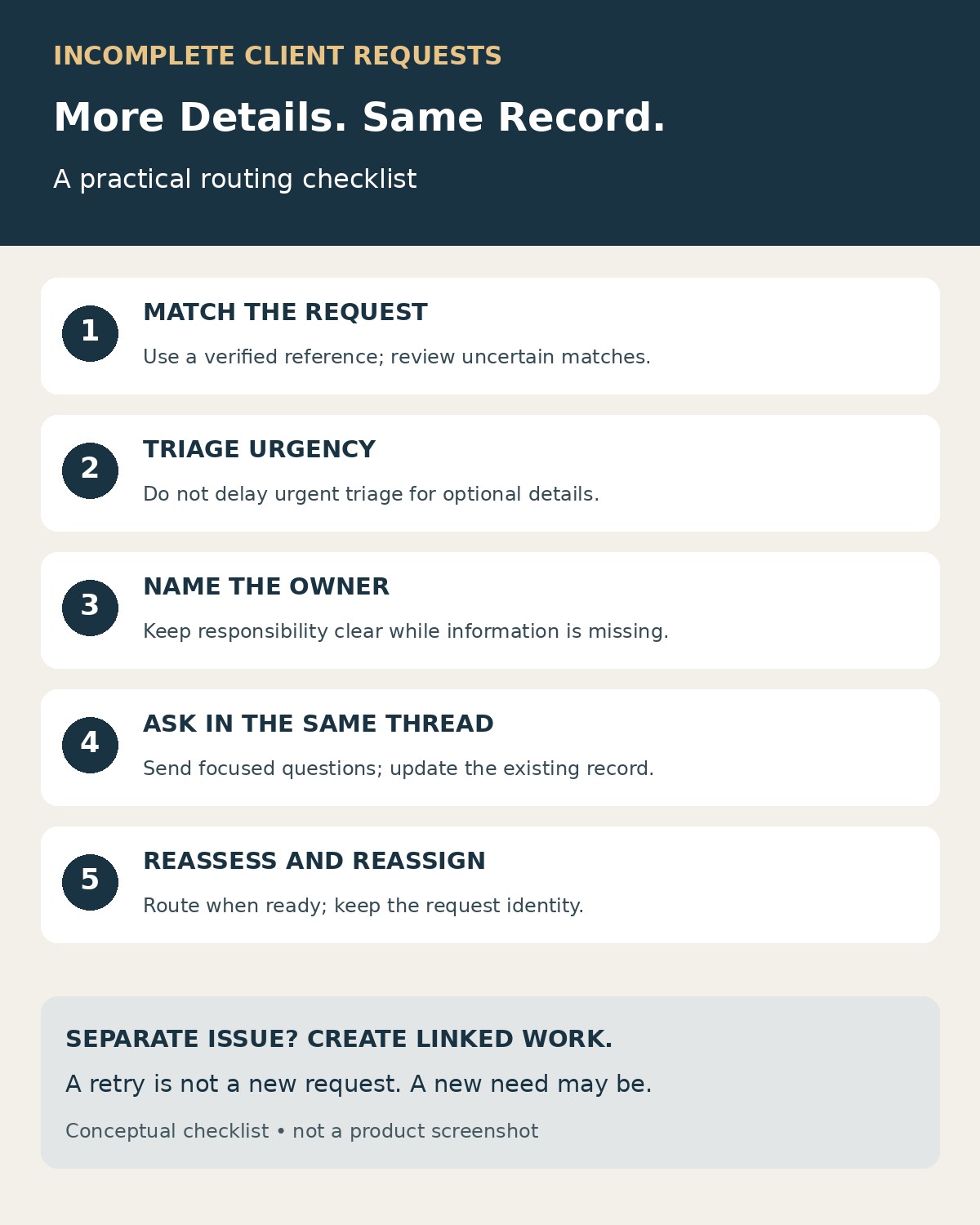
The practical fix is to separate receiving a request from deciding that it is ready for work. Give the request a stable identity, collect missing information against that record, and change its status or owner when it becomes ready. Create a separate ticket only when there is a genuinely separate issue or a platform constraint that requires a linked follow-up.
Research-Based Review Overview
Official support documentation points to three distinct concerns: ticket status, conversation matching, and safe handling of repeated operations. None substitutes for the others. A waiting status will not repair broken email threading, and retry protection will not recognize two independently submitted descriptions of the same problem.
Zendesk documents a pending state for requests awaiting the requester’s response, along with mechanisms for matching incoming email to existing tickets. Atlassian documents a different intake hazard: requiring extra fields on an email request type can prevent Jira Service Management Cloud from creating requests at all. These are product-specific behaviors, not universal settings.
The workflow below is an editorial synthesis of those principles and practical intake design. Documentation was reviewed on November 19, 2026. No client account, production help desk, or customer records were tested; the worked example and acceptance checks are illustrative.
Give Incomplete Client Requests One Continuing Record
Use one authoritative record for one continuing request. Its identifier should remain the same when the client adds context, an agent asks a question, or another team takes ownership.
If your help desk already creates a ticket on receipt, use that ticket as the record. Do not create a second “intake ticket” just to gather missing details. If you operate a separate intake system, keep its submission identifier and map it to the eventual help-desk ticket. The record can cross systems without losing the connection.
Be explicit about what “one request” means. A client asking for two independent website changes may need two linked work items. A client supplying the URL for the change already requested normally needs an update to the existing item. The same sender and subject line are not enough to decide.
Keep a small set of useful fields:
| Field | Why it matters |
|---|---|
| Request ID | Connects clarification, routing, and client communication |
| Client or account | Establishes whose request this is and who may access it |
| Requested outcome | Helps distinguish an update from separate work |
| Missing information | Shows what prevents the next useful action |
| Current owner | Identifies who must follow up or make the routing decision |
| Next action and review date | Keeps the waiting record from disappearing |
| Related ticket or submission IDs | Preserves continuity across channels and systems |
Avoid filling unknown fields with guesses simply to make the record look complete. “Deadline not provided” is more useful than an invented date that later drives prioritization.
Separate Intake, Triage, and Readiness to Start
A request can be incomplete and still require immediate attention. “The checkout page is failing” may be enough to begin incident triage even if the client has not supplied a screenshot. Conversely, a routine design request might reasonably wait for an approved copy.
Define the minimum information needed for the next action, rather than demanding everything needed for the whole job. For example:
| Request type | Information to seek first | What should happen meanwhile |
|---|---|---|
| Website change | Affected page and intended change | Keep with intake until scope is clear |
| Billing question | Relevant account and invoice reference, where available | Route to billing for identification or clarification |
| Access problem | Affected service and user identifier through an approved channel | Triage access and identity requirements; never request passwords |
| Possible service outage | Affected service, observed behavior, and known impact | Escalate for triage while collecting more detail |
These are starting points to adapt to your service, not mandatory universal fields. Record urgency independently from completeness. Do not make an urgent request wait merely because an optional field is blank, and do not treat the word “urgent” as a complete priority assessment.
Channel design matters too. Atlassian’s guidance describes an email-ingestion error caused by making fields beyond subject and body required for the email request type. The lesson is to test each intake route independently. A required field that works on a portal form may not work for messages arriving by email.
Route by the Next Action, Not by Creating Another Ticket
Choose a small number of operational states and define who acts in each. The names below are proposed workflow labels; map them to your platform’s supported statuses or fields.
| State | Meaning | Responsible party |
|---|---|---|
| Needs triage | Scope, urgency, or ownership needs review | Intake owner |
| Waiting for client | A specific question has been sent | Named agent remains accountable for follow-up |
| Ready for work | Enough information exists for the next work step | Receiving team or assigned agent |
| In progress | Work has started | Delivery owner |
| Waiting internally | A colleague or internal decision is needed | Current owner coordinates the dependency |
Changing between these states should update the existing record. A move from intake to billing is a reassignment, not a reason to recreate the conversation. If a specialist needs a separate internal task, link it to the client-facing ticket and keep one person responsible for the client response.
Do not assume a status pauses every service-level clock. Check how your platform and agreement measure response time, waiting time, and resolution time. Keep the original received timestamp so a reassignment or a request for clarification does not erase the request’s age.
For a handoff, require an accountable receiving queue or an explicit acceptance step. Until the transfer is recorded, the existing owner should know they still own the follow-up. “Sent to the team” is too vague to use as a final action.
Ask for Missing Information in the Existing Conversation
Send one focused clarification message that explains what is missing and where to answer. Make it easy for the client to continue rather than start over.
Example wording:
“Thanks—we’ve recorded your request as R-1042. To route the website change, please reply here with the page URL and the text or behavior you want changed. If there is a deadline, include the date and time zone. You can continue in this conversation; there is no need to submit a new request.”
The identifier is illustrative. Use your actual ticket reference and supported reply channel. Do not promise that replies will attach correctly until you have tested the route.
If clarification requires a form, make it an update form for that request. Its submission should add the answers to the existing record, not invoke the general new-ticket action. Use appropriate authentication or a protected request-specific link; possession of a guessed ticket number should not grant access to a client’s information.
Ask for the details that unblock routing first. A long questionnaire can wait if the next useful action only requires a page URL. For sensitive material, direct the client to the approved secure channel instead of asking them to paste it into an ordinary email.
Match Replies Carefully Across Channels
Use the strongest supported reference available: an authenticated portal request, a validated ticket reference, or the platform’s conversation identifiers. Zendesk, for example, documents email matching through message-header references and encoded ticket identifiers. A matching subject line alone is not its documented threading mechanism.
Do not strip thread information when forwarding messages through an intermediary service. Test real reply paths from the email clients your customers use. A workflow that works through the portal may behave differently when a customer forwards the message or starts a fresh email.
When a client submits the same issue through chat and a form, those may have different message identifiers. Delivery-level duplicate protection will not recognize their shared meaning. Compare account, affected item, requested outcome, and timing, then have a person review uncertain matches.
| Incoming item | Recommended handling |
|---|---|
| Verified reply to an existing request | Append and reassess the missing fields |
| Repeated delivery of an already processed event | Avoid repeating its effects |
| New message that appears to describe an open issue | Flag as a possible duplicate for review |
| Different outcome requested by the same client | Create separate linked work if appropriate |
| Uncertain identity or conflicting references | Hold in controlled triage; do not expose another record |
Matching a record is not the same as authorizing access to it. Check participants and permissions before combining messages or sharing the existing conversation.
Make Automation Retries Safe
There are two different identifiers to preserve: the request ID describes the client’s ongoing case; an event or operation ID describes a particular submission, update, or create attempt. A genuine new clarification is a new event on the same request. A retry of that clarification should reuse its original operation identity.
For ticket creation, use the destination’s documented idempotency support where available. Save the resulting ticket ID. A retry should recover that result rather than create a replacement. AWS’s Builders’ Library explains why a caller-provided request identifier is preferable to assuming identical parameters always express the same intent.
A “search, then create” sequence is not a concurrency guarantee: two workers can both search before either creates. Protect the creation boundary with supported atomic uniqueness or destination idempotency. A local lock alone cannot resolve every timeout after an external service may already have created the ticket; uncertain outcomes need reconciliation before another unprotected create.
Keep retries separate from content changes. Do not resend an old create operation with a revised description and assume the receiver will treat it as an update. Use the existing ticket’s update operation for new information, and confirm the tool’s behavior when a repeated operation identifier arrives with changed input.
For broader setup guidance, Editorialge’s article on automating repetitive work tasks explains how to map and test a process before expanding it.
A Worked Example: One Website Change, Several Messages
Consider a fictional agency request: “Please update the offer on our site before Friday.” The message does not identify the page, replacement copy, or time zone.
Intake records R-1042, assigns an owner, and asks for the missing details in the same conversation. The request remains visible under “Waiting for client.” The client replies with the URL but no copy. That reply updates R-1042; the missing-information field now lists only the remaining questions.
An account manager then forwards the original message to the design team. The team checks the request reference and adds an internal note to R-1042 rather than opening a second client-facing case. Once the approved copy and deadline arrive, the owner reassigns the existing ticket to design and records the handoff.
If the client’s next reply asks for a separate invoice correction, intake treats that as a different outcome. It may deserve its own linked billing ticket, even though it arrived in the same email thread.
This example illustrates the decision rule; it is not a reported client case or measured result. The aim is continuity for the same work, not forcing every conversation into one oversized ticket.
Use Reminders Without Restarting Intake
A reminder should reference the existing request, repeat only the unanswered questions, and provide the same reply route. It should not ask the client to complete the new-request form again.
Make reminder eligibility explicit: the request is still waiting for client information, no qualifying reply has arrived since the question, and the reminder has not already been sent for that waiting period. Recheck eligibility before sending so an older scheduled action does not ignore a recent answer.
Treat a new waiting period separately. After the client answers one question, a later follow-up might be legitimate, but it should have its own record. Preserve the history of what was asked and answered.
Set a documented review and closure policy that fits the service. Do not mark unresolved work solved merely to remove it from the queue. Also plan for late replies: Zendesk distinguishes replies to solved tickets from replies to closed tickets, with the latter producing follow-up tickets. Where the platform requires a new record, preserve the relationship and explain the continuation instead of claiming one ID can last indefinitely.
Merge Existing Duplicates With Care
Before merging, confirm that both tickets describe the same work and that their participants can appropriately see the combined information. Decide which record remains authoritative, preserve unique details, and check what happens to attachments, fields, timestamps, and notifications.
Zendesk states that ticket merges are permanent and that fields from the closed ticket are not carried over. Other systems may behave differently. Read the current merge behavior before using it as routine cleanup.
When the relationship is uncertain, linking records for review is safer than an automatic merge based on similar wording. Multiple clients reporting the same outage, for instance, may need separate private conversations linked to an internal incident.
Test the Awkward Cases Before Relying on the Workflow
Use a test environment and fictional client data. These are proposed acceptance checks, not tests performed for this article.
| Test | Expected result |
|---|---|
| Submit an incomplete request, then answer its clarification | Existing ticket updated; remaining gaps recalculated |
| Deliver the same event twice | No second ticket or repeated side effect |
| Send two create attempts concurrently for the same operation | One authoritative result, or a controlled exception requiring reconciliation |
| Lose the response after the destination creates a ticket | Existing result recovered or creation paused for reconciliation |
| Send only part of the requested information | Same record remains waiting with a shorter question list |
| Reply while a reminder is queued | Reminder eligibility checked against current state |
| Submit similar wording for a different issue | Separate work preserved; no automatic false merge |
| Submit an urgent but incomplete report | Triage begins without waiting for optional details |
| Reply after final closure | Platform-specific linked continuation handled explicitly |
Track confirmed duplicates, mistaken matches, unanswered clarification requests, and waiting records without an owner. Review individual failures before interpreting a falling ticket count as improvement: a workflow that silently drops valid requests can make the queue look cleaner while making service worse.
Keep the Request Alive While the Details Catch Up
Incomplete client requests should move through clarification, triage, and assignment without losing their identity. Give each one an owner, ask a specific question, and attach the answer to the existing record.
Stable identifiers and safe retry handling protect the automation. Clear matching rules and human review protect the meaning of the request. Together, they let missing information arrive gradually without turning every new message into another ticket.