


A new SaaS user is usually not looking for a tour. They are trying to get something done.
They may need to send a campaign, connect a data source, invite a client, resolve a ticket, create a report, automate a workflow, or prove to a manager that the product is worth keeping. If the first experience is slow, confusing, or too focused on explaining the interface, the user may never reach the point where the product feels useful.
That is the real work of user onboarding SaaS teams need to care about. Onboarding is not just a welcome modal, a product tour, or a checklist. It is the path between signup and the first moment of value.
For some products, that moment comes quickly. A solo creator may feel value after publishing a page or generating a usable draft. A sales team may need imported contacts, CRM sync, role permissions, and a working pipeline before the product becomes real. An enterprise customer may not feel onboarded until security, admin setup, training, and internal adoption are all moving.
Good onboarding respects those differences. It helps users make progress without forcing them to learn the whole product at once.
What SaaS onboarding actually has to do
Many SaaS teams treat onboarding as product education. That is understandable. The product has features, and users need to learn them.
But new users rarely need the full lesson on day one. They need enough direction to complete the next useful action.
A useful onboarding experience answers a few practical questions quickly:
- What should I do first?
- Why does this step matter?
- How much effort will it take?
- What will I get after completing it?
A product tour may show where the menu is. A checklist may show what to click. Neither automatically explains why the user should care.
This is where onboarding often breaks inside SaaS companies. Marketing promises one result. Sales frames another. Customer success tracks implementation milestones. Product measures setup completion. Support hears the same confused questions after launch.
The user does not see those internal teams. They see one product. If the journey feels disconnected, trust starts to weaken early.
The starting point should be simple: define what a successfully onboarded user has actually done.
- Not what they watched.
- Not what they dismissed.
- Not what they clicked through.
- What they completed.
Start with activation, not screens
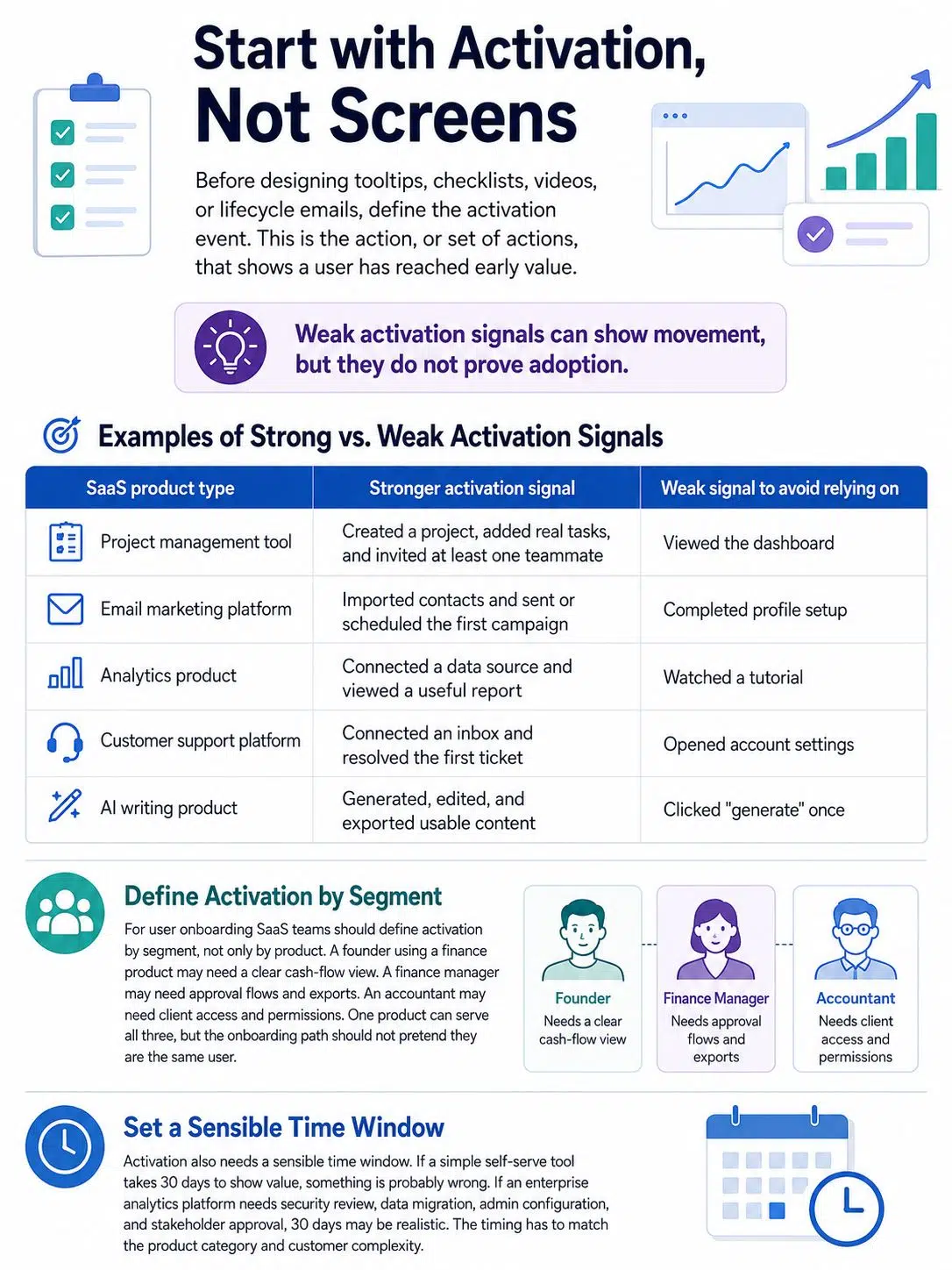
Before designing tooltips, checklists, videos, or lifecycle emails, define the activation event. This is the action, or set of actions, that shows a user has reached early value.
“Logged in twice” is not a strong activation signal. It may show interest, but it does not prove value. “Created and shared the first client report” is stronger. “Imported contacts and scheduled the first campaign” is stronger. “Connected a support inbox and resolved the first ticket” is stronger.
| SaaS product type | Stronger activation signal | Weak signal to avoid relying on |
|---|---|---|
| Project management tool | Created a project, added real tasks, and invited at least one teammate | Viewed the dashboard |
| Email marketing platform | Imported contacts and sent or scheduled the first campaign | Completed profile setup |
| Analytics product | Connected a data source and viewed a useful report | Watched a tutorial |
| Customer support platform | Connected an inbox and resolved the first ticket | Opened account settings |
| AI writing product | Generated, edited, and exported usable content | Clicked “generate” once |
The weak signals are not useless. They can show movement. The problem starts when teams treat shallow activity as proof of adoption.
For user onboarding SaaS teams should define activation by segment, not only by product. A founder using a finance product may need a clear cash-flow view. A finance manager may need approval flows and exports. An accountant may need client access and permissions. One product can serve all three, but the onboarding path should not pretend they are the same user.
Activation also needs a sensible time window. If a simple self-serve tool takes 30 days to show value, something is probably wrong. If an enterprise analytics platform needs security review, data migration, admin configuration, and stakeholder approval, 30 days may be realistic. The timing has to match the product category and customer complexity.
Look closely at the first 10 minutes
The first session is where many onboarding problems hide.
A new user may need to verify an email address, create a workspace, choose a template, connect an integration, import data, invite teammates, approve permissions, and understand unfamiliar language before seeing anything useful. Each step may look reasonable inside the product roadmap. Together, they can feel like unpaid setup work.
A serious onboarding review should walk through the first 10 to 15 minutes after signup with a fresh account. Use a realistic role. Avoid admin shortcuts. Do not rely on internal knowledge.
Watch for moments where the product asks for effort before explaining the payoff. Common examples include:
- Asking users to invite teammates before they know what the workspace will show
- Asking for a data import without showing a sample result
- Displaying a blank dashboard with no helpful empty state
- Using internal product terms instead of customer language
- Forcing a tour before the user can do anything
- Hiding setup requirements until the user is already stuck
- Asking several preference questions and then showing the same onboarding path anyway
Empty states deserve more attention than they usually get. A weak empty state says, “No reports yet.” A better one shows what a useful report will look like, explains what data is needed, and gives the user one clear action.
That difference matters. A blank screen makes the product feel unfinished. A useful empty state makes the product feel ready, even before the user has added real data.
Build onboarding around roles, not just accounts
Personalized onboarding does not need to mean a long signup survey. It means the product should respond to what the user is trying to do.
An admin, contributor, executive viewer, agency user, and technical operator may all enter the same SaaS product with different expectations. The admin wants control. The contributor wants a simple workflow. The executive wants visibility. The technical operator wants configuration, logs, integrations, or API details.
A short question can help when it changes the experience:
“What are you here to do first?”
Possible answers might include:
- Manage my own work
- Collaborate with a team
- Set this up for my company
- Track performance or reporting
- Build an automated workflow
The answer should affect templates, setup steps, sample data, product copy, help content, or follow-up emails. If the user answers a role-based question and receives the same generic checklist anyway, the question only adds friction.
This is especially important in B2B SaaS. The buyer may sign the contract. An admin may configure the product. Managers may monitor adoption. Frontline users may do the daily work. A customer can be “onboarded” at the account level while daily users still do not understand how to work inside the product.
That gap often appears later as low usage, weak expansion, or renewal risk.
Keep product tours short and tied to real tasks
Product tours are easy to add and easy to overuse. They are visible, so teams feel like onboarding exists. The user may feel something else: interruption.
A long first-login tour often teaches the interface before the user has a reason to care. “This is your dashboard. This is your menu. This is where reports live.” Those details may be true, but they are not always useful yet.
Short, task-based guidance usually works better. Show help when the user reaches the relevant screen. Explain the next decision close to where the decision happens. Keep deeper help available, but do not force everyone through it.
A few rules are worth keeping:
- Make onboarding skippable. Confident users should not be trapped in a tour.
- Make help recoverable. If a user skips guidance and needs it later, they should be able to find it again.
- Do not explain obvious interface patterns. A tooltip that says “Click Settings to change settings” wastes attention.
- Save guidance for moments where a user might misunderstand a workflow, permission, integration, report, or consequence.
Progressive disclosure is useful for complex SaaS products. Show the most important options first. Keep advanced controls available for users who need them later. This is especially important in products with automation rules, analytics filters, security settings, API access, billing controls, or admin permissions.
The stronger editorial rule is this: do not use a product tour to compensate for unclear product design. If users need a tooltip to understand every basic screen, the screen probably needs work.
Make checklists about progress, not company priorities
A checklist can help users feel oriented. It can also become a list of internal goals disguised as user progress.
A weak checklist looks like this:
- Complete your profile
- Invite your team
- Watch the demo
- Connect integrations
- Visit the help center
Some of those steps may be necessary, but the list does not create a clear path to value.
A stronger checklist is tied to the user’s outcome:
- Create your first workspace
- Add one real project
- Assign the first task
- Invite the teammate who needs visibility
- Review your first progress view
The second version teaches through use. It also gives the user a reason to continue.
For complex SaaS products, checklists should change as the customer matures. Day-one onboarding should not include every feature the company eventually wants adopted. Advanced automation, custom reporting, permissions, API access, and billing controls may belong later, after the user has completed the core workflow once.
There is another practical warning here: do not keep a checklist item just because it is easy to measure. If users skip a step and still retain well, that step may not belong in early onboarding. If users complete every step and still churn, the checklist is probably measuring activity rather than value.
Use email to bring users back to unfinished value
In-app onboarding helps during the active session. Email helps when the user leaves, gets distracted, needs approval, or has to involve someone else.
The mistake is sending the same sequence to everyone.
A user who connected a data source should not receive the same “finish setup” email as someone who never started. A user who invited three teammates does not need the same nudge as a solo trial user. A new admin does not need the same message as a frontline contributor.
Good onboarding emails are behavior-based and specific. They usually do one job at a time.
A useful sequence may include:
- A welcome email with one clear next action
- A reminder when the activation step is incomplete
- A practical example after the first key action
- A team-invite prompt after the workspace has something worth showing
- A customer success check-in for high-value or high-friction accounts
The best onboarding email feels less like promotion and more like product assistance. It helps the user return to a task. It does not try to sell every feature again.
For self-serve SaaS, automation can handle much of this. For larger B2B accounts, email should support the onboarding plan, not replace human guidance.
Know when self-serve onboarding is not enough
Some SaaS teams try to automate onboarding before they understand the customer’s real setup work. Self-serve onboarding is valuable, but it cannot solve every implementation problem.
Human-led onboarding still matters when the product requires data migration, technical configuration, security approval, workflow redesign, or change management across a team. If the customer needs IT, legal, finance, operations, or department heads involved, a few tooltips will not carry the rollout.
For higher-value B2B SaaS accounts, onboarding usually needs clearer structure:
- A kickoff call tied to business goals
- Named owners on the customer side and vendor side
- A setup plan with dates, dependencies, and risks
- Admin training before wider rollout
- Role-specific enablement for daily users
- A first value milestone that both sides recognize
- A clean handoff from implementation to customer success
This does not mean every customer needs white-glove support. A small self-serve account may only need a clear product path, good documentation, and a few timely emails. A large enterprise account may need workshops, migration support, stakeholder alignment, and adoption reporting.
The onboarding model should match customer complexity. A low-cost individual subscription and a 500-seat rollout should not be pushed through the same experience.
User onboarding SaaS metrics worth tracking
Onboarding measurement should connect early behavior to retention. Completion alone is not enough.
A user can finish every onboarding step and never return. Another user can skip the tour, complete one important action, and become a long-term customer. The second user matters more, even if the first one makes the onboarding dashboard look cleaner.
Track metrics that reveal progress toward value.
| Metric | What it helps you see | What can go wrong |
|---|---|---|
| Activation rate | How many users reach the first meaningful outcome | The activation event is too shallow |
| Time to first value | How long it takes users to experience useful progress | The timing is compared across very different segments |
| Setup completion | Whether required configuration blocks value | Setup is treated as success by itself |
| Week-one or first-cycle retention | Whether users return after the first experience | The product’s natural usage frequency is ignored |
| Key feature adoption | Whether users adopt features tied to retention | Too many features are pushed too early |
| Onboarding-related support tickets | Where users get stuck | Support volume is blamed instead of product friction |
| Team invitation or collaboration | Whether the account is spreading beyond one user | Invites are requested before the product shows value |
Benchmarks can provide context, but they should not become targets without interpretation. Pendo’s 2025 user retention benchmark reported average software user retention of 39% after one month and about 30% after three months across the products it analyzed. That figure is useful as a warning: many products lose users early. It is not a universal standard every SaaS product should copy.
A daily communication product, a monthly payroll tool, a seasonal tax product, and a complex enterprise analytics platform should not judge retention in the same way. Your own cohort data matters more than any external benchmark.
The quiet mistakes that weaken retention
Some onboarding problems create visible complaints. Others simply lead to silence. The user leaves, the account never expands, or the champion likes the product but cannot get the team to adopt it.
The quiet mistakes are often the most expensive.
Teaching too much too early. New users do not need a full product education. They need guided progress. Advanced features should appear after the core workflow is understood.
Treating customer onboarding and user onboarding as the same thing. An account can complete implementation while individual users still do not know how to work inside the product.
Making setup feel like homework. Integrations, imports, and permissions may be necessary, but each step should explain the payoff.
Designing only for the buyer. The buyer may care about business outcomes. Daily users care about whether the product makes their work easier.
Using one onboarding flow for every segment. A founder, admin, analyst, and contributor may all need different first steps.
Adding more messages instead of fixing friction. If users keep asking the same question, another tooltip may help for a while. A clearer screen, better default, or simpler workflow may solve the real problem.
Ignoring users who fail to activate. The abandoned path is often more useful than the completed path. It shows where the product asks too much, explains too little, or fails to show value.
A practical 30-day improvement plan
A SaaS team does not need to redesign onboarding from scratch to improve it. A focused month can reveal enough to make better decisions.
During the first week, define the activation event for each major segment. Compare retained users with users who disappeared. Look for the behaviors that separate them. If the team cannot agree on the activation event, fix that before changing the UI.
In the second week, review the first-session journey. Read support tickets. Watch consented session recordings if your privacy policy and tooling allow it. Ask sales and customer success where customers become confused after signup. Rewrite weak empty states. Remove unnecessary early steps.
In the third week, adjust the onboarding path. Shorten the tour. Improve the checklist. Add role-based branching where the current flow treats everyone the same. Replace a generic email sequence with one or two behavior-based messages.
In the fourth week, measure early signals. Activation rate, setup completion, time to first value, and onboarding ticket themes should move sooner than long-term retention. Retention takes longer to judge, but early indicators can show whether the path is healthier.
This plan is intentionally modest. Many teams do not need a larger onboarding system first. They need a clearer first milestone, less first-session friction, and better measurement.
What to fix first if onboarding is underperforming
If users are signing up but not staying, resist the urge to add more onboarding content immediately. More content can make the journey heavier.
Start with the highest-friction point closest to value.
If users drop before connecting data, show a sample outcome and explain what the connection enables. If users create workspaces but do not invite teammates, wait until the workspace contains something worth sharing. If admins complete setup but daily users do not return, build role-specific guidance for the people doing the daily work.
Some onboarding advice is too simplistic. “Reduce steps” sounds good, but not every step is bad. A required security setting, permission choice, or integration step may be necessary. The better question is whether the user understands why the step matters and whether the product gives value as soon as reasonably possible.
The best first fix is usually not dramatic. It is often a clearer activation milestone, a better empty state, a shorter tour, a more useful checklist, or an email that responds to what the user actually did.
Final Thoughts
User onboarding SaaS teams build should be judged by what users accomplish, not by how many tips they see. A polished tour means little if users never reach value. A simple checklist can be powerful if it guides the right action at the right time.
The strongest onboarding systems define activation clearly, reduce first-session friction, adapt to user roles, combine in-app and email guidance, and bring in human support when the customer’s setup is too complex for self-serve alone.
A practical next step is to review the first user journey and ask one hard question: where does the product ask for effort before showing enough value?
Fix that gap first. Retention improves when users understand the path, trust the product, and experience progress early enough to keep going.






















