
A URL is not the most exciting part of SEO. Nobody opens a website and says, “Wow, what a beautiful slug.” But URLs matter more than many content teams admit. A clean URL helps readers understand where they are. It helps search engines interpret the page. It makes internal linking cleaner. It reduces confusion during content updates, site migrations, canonical checks, and analytics reviews. That is why URL structure SEO still deserves attention in 2026.
Search has changed. Users now discover content through classic search results, AI Overviews, snippets, image results, social search, newsletters, and AI-assisted tools. But before any of those systems can use a page properly, the page needs a clean technical foundation. URLs are part of that foundation.
Bad URLs rarely destroy a good page by themselves. But messy URL systems create long-term problems. They make a site harder to crawl, harder to audit, harder to update, and harder to trust.
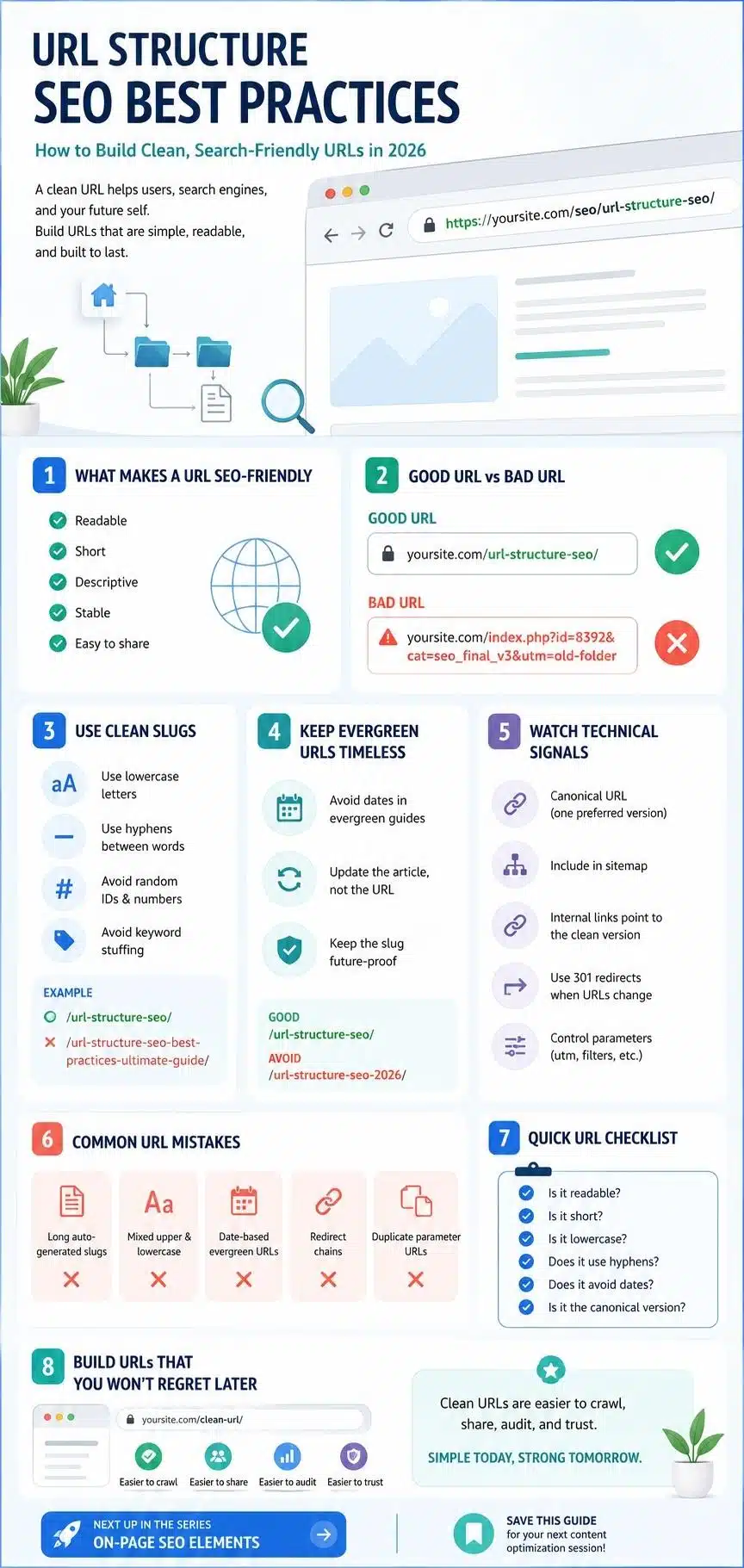
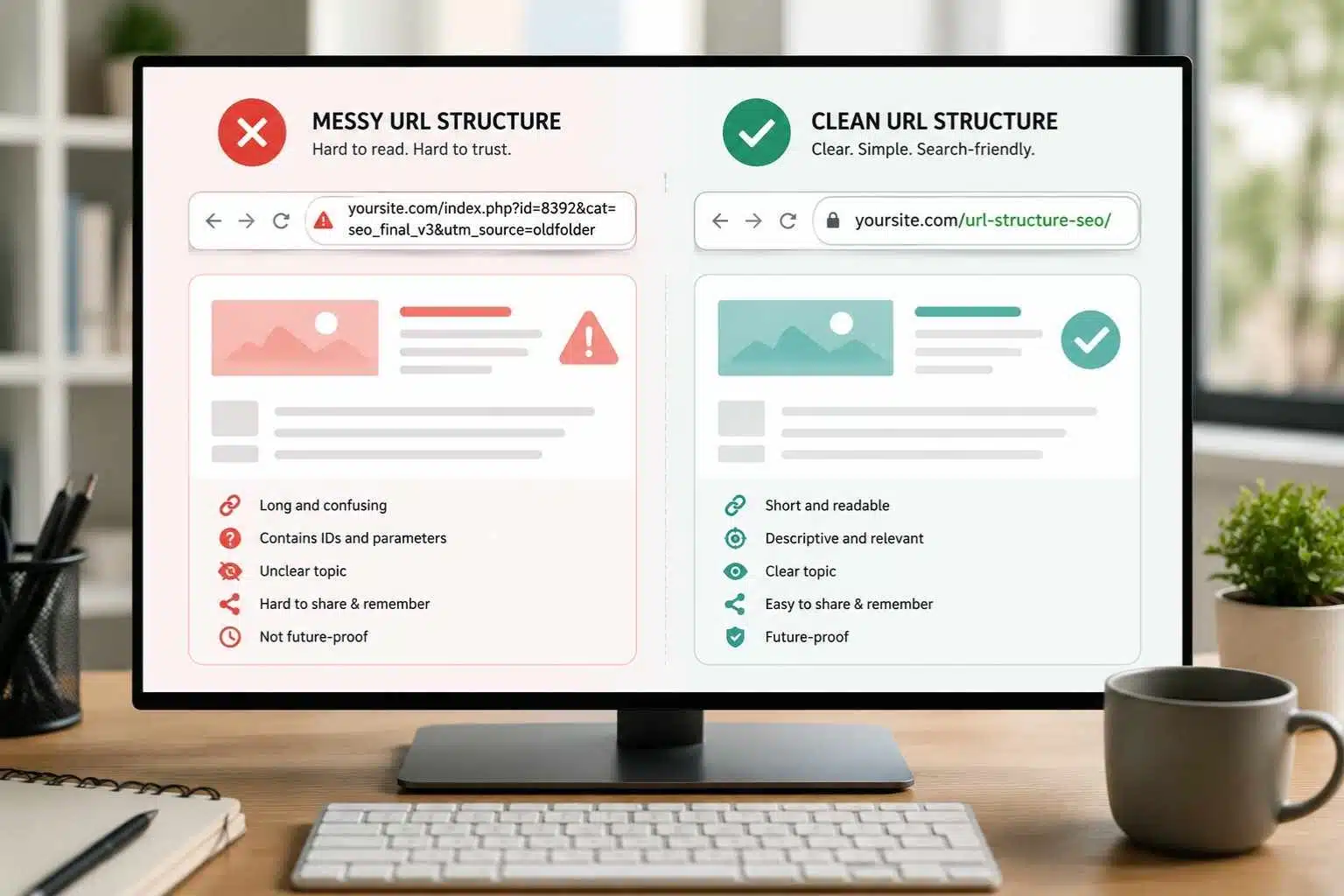
A URL like this is easy to understand:
/url-structure-seo/
A URL like this is not:
/index.php?id=8392&cat=seo_final_v3&utm=old-folder
One looks intentional. The other looks like the CMS gave up. This guide explains how to build SEO friendly URLs, when to keep URLs short, when to include keywords, when not to change old URLs, and how URL optimization fits into a modern SEO strategy.
What Is URL Structure in SEO?
URL structure is the way a website organizes and formats page addresses. It includes the domain, folders, slugs, parameters, trailing slashes, language folders, category paths, and canonical versions.
A simple URL might look like this:
https://example.com/url-structure-seo/
A more layered URL might look like this:
https://example.com/seo/technical-seo/url-structure-seo/
Both can work. The question is not whether a URL has folders. The question is whether the structure is logical, readable, consistent, and useful.
For SEO, a URL should help answer a few basic questions:
- What is this page about?
- Where does this page sit on the site?
- Is this the preferred version of the page?
- Can users and search engines understand it easily?
- Will this URL still make sense after future updates?
That last question is important. A URL is not like a headline. You can rewrite a headline easily. Changing URLs later is more serious because it can affect internal links, backlinks, redirects, reporting, and user bookmarks. So URL decisions should be boring in the best way: stable, clear, and hard to regret.
Why URL Structure SEO Still Matters in 2026
URL structure matters because it supports clarity. A clean URL gives readers and search systems a quick clue about the page. It is not a magic ranking trick. It will not make thin content rank. It will not rescue a page with poor intent or weak internal links.
But it helps the whole page make more sense. Think about a cluster article under a modern SEO content hub. If the article title is “URL Structure Best Practices for SEO,” the slug /url-structure-seo/ is clear. It matches the topic. It is easy to share. It is easy to remember. It fits the cluster naturally.
Now imagine the slug is /2026/06/05/post-8493-final-url-guide/.
That may still work technically, but it adds noise. The date may become outdated. The post ID means nothing to the reader. The word “final” looks like an internal draft label that accidentally escaped into the public. Good URLs do not need to be clever. They need to be clean.
In 2026, that still matters because search systems depend on technical clarity. AI search experiences do not make messy site architecture cleaner. If anything, they make a clean structure more valuable.
The Parts of a URL You Should Understand
A reader does not need to be a developer to understand URL structure. Only the publishing-related parts matter for most SEO work.
Here is a basic example:
https://example.com/seo/url-structure-seo/
| Part | Example | What It Means |
| Protocol | https:// | Secure connection |
| Domain | example.com | Main website address |
| Subfolder | /seo/ | Section or category path |
| Slug | /url-structure-seo/ | Specific page address |
| Parameter | ?utm_source=linkedin | Tracking or dynamic value |
| Fragment | #checklist | Jump link to a section |
For most content teams, the slug is the part they control most often. That is where SEO friendly URLs usually begin.
The slug should describe the page clearly. It should not be packed with every keyword variation. It should not include random numbers, dates, draft labels, or filler words unless there is a real reason. A good slug is like a good file name. The topic should be clear before the page is opened.
What Makes a URL SEO Friendly?
An SEO friendly URL is readable, relevant, stable, and simple.
It usually has:
- Descriptive words
- Lowercase letters
- Hyphens between words
- A natural keyword if it fits
- No unnecessary numbers
- No random IDs when avoidable
- No keyword stuffing
- No temporary labels
- No excessive folder depth
- No confusing parameters for indexable content
- A structure that matches the site architecture
For a page about this topic, the suggested URL is:
/url-structure-seo/
It includes the focus keyword. It is short. It is readable. It can stay evergreen.
A weaker version would be:
/url-structure-seo-best-practices-for-seo-friendly-urls-and-permalink-seo-in-2026/
That includes more keywords, but it is too long. It looks forced. It is not better just because it contains more words.
Another weak version:
/blog/post?id=58923
This is short, but not descriptive. The sweet spot is usually short and meaningful.
Use Descriptive Words Instead of Random IDs
Readable words help people and search engines understand the topic of a page. A descriptive URL gives context before the click. It also makes sharing and internal linking cleaner.
Better:
/keyword-research-fundamentals/
Weak:
/article?id=74219
Better:
/meta-description-guide/
Weak:
/content/post-final-v2/
This does not mean every URL with an ID is automatically bad. Some large sites, ecommerce platforms, and applications use IDs for technical reasons. That can be fine when implemented well.
But for editorial content, blogs, guides, and SEO clusters, readable slugs are usually better. If the CMS allows custom slugs, choose clarity.
Use Hyphens Between Words
Use hyphens to separate words in URLs.
Good:
/title-tag-optimization/
Weak:
/title_tag_optimization/
Weak:
/titletagoptimization/
Hyphens make words easier to identify. They are also the normal standard for SEO-friendly slugs. Underscores are common in programming contexts, but they are not the best choice for page URLs. Joined words are worse because they make the URL harder to scan.
This is a small detail, but SEO is full of small details that make future maintenance easier. If a site already uses underscores and has a strong history, do not rush to change every URL just for style. But for new content, use hyphens.
Keep URLs Short, But Not Empty
Short URLs are easier to read, copy, share, and manage. But short does not mean vague. A URL like /seo/ is short. It may work for a broad SEO category or pillar page. But it would be too broad for a cluster article about URL structure.
A URL like /url-structure-seo/ is short and specific.
A URL like /complete-detailed-url-structure-seo-best-practices-guide-for-2026/ is too much.
Remove filler words when they do not add meaning.
Usually safe to remove:
- a
- an
- the
- and
- guide
- complete
- ultimate
- best
- how-to if the rest is clear
But do not remove so much that the slug becomes unclear.
Example:
Title: URL Structure Best Practices for SEO
Good slug: /url-structure-seo/
Title: How Search Engines Crawl and Index Pages
Good slug: /how-search-engines-crawl/
Title: Meta Description Guide
Good slug: /meta-description-guide/
The slug should be concise, not cryptic.
Use the Focus Keyword Naturally
A URL can include the main keyword when it fits naturally. For this topic, URL structure SEO fits well in the slug:
/url-structure-seo/
That is clean. It does not feel forced. But do not turn the URL into a keyword dump.
Bad:
/url-structure-seo-seo-friendly-urls-url-optimization-permalink-seo/
That looks spammy and difficult to trust. A good URL gives the page a clear address. It does not need to carry every secondary keyword.
Use the primary keyword if it is short, accurate, and natural. Use the title tag, headings, body copy, and internal links to cover the broader topic. The URL should support the page. It should not try to do the whole SEO job alone.
Avoid Dates in Evergreen URLs
Dates can make sense for news, yearly reports, event pages, and time-sensitive updates. But for evergreen guides, dates often create problems.
A URL like this:
/url-structure-seo-2026/
may look fresh today. But what happens in 2027 when the guide is updated? The site either keeps an outdated URL, creates a new URL and redirects the old one, or publishes a near-duplicate page for the new year. None of those is ideal unless the content truly needs a separate annual version.
A better evergreen slug:
/url-structure-seo/
The year can still appear in the title, H1, introduction, and content. The URL can remain timeless. This is especially important for evergreen SEO clusters. These pages can be updated every year without changing the slug. Evergreen URLs protect future work.
Do Not Change Old URLs Without a Strong Reason
This is one of the most important permalink SEO rules. Do not change URLs just because a slightly cleaner version is available. If a page already has rankings, backlinks, internal links, social shares, bookmarks, or referral traffic, changing the URL can create unnecessary risk.
Sometimes URL changes are needed. Examples include:
- Site migration
- Bad duplicate URL patterns
- HTTP to HTTPS consolidation
- Removing outdated date folders
- Fixing broken architecture
- Rebranding
- Merging duplicate pages
- Correcting serious slug errors
But if the only reason is “this slug could be nicer,” think carefully. When a URL does change, use a proper 301 redirect from the old URL to the new one. Update internal links too. Do not rely only on redirects forever. Redirects are useful. Clean internal links are better.
Folders vs Flat URLs: Which Is Better?
A common SEO question is whether URLs should be flat or folder-based.
Flat:
/url-structure-seo/
Folder-based:
/seo/url-structure-seo/
Deeper folder-based:
/seo/technical-seo/url-structure-seo/
All can work. The best option depends on the site architecture. Flat URLs are simple and flexible. They work well for blogs, media sites, and evergreen content hubs where categories may change over time.
Folder-based URLs can help show structure. They work well when the site has stable categories, products, locations, languages, or documentation sections.
The risk with folder-based URLs is future change if a topic moves from /seo/ to /digital-marketing/, the URL may no longer match the site structure unless it is redirected. For editorial websites, simple evergreen slugs are often safer unless the folder provides real value.
A clean SEO content hub could work like this:
- /modern-seo-fundamentals/
- /how-search-engines-crawl/
- /keyword-research-fundamentals/
- /title-tag-optimization/
- /meta-description-guide/
- /header-tags-hierarchy/
- /url-structure-seo/
This structure is clean, stable, and easy to manage.
Category Names in URLs: Helpful or Risky?
Including categories in URLs can be useful, but only when the categories are stable.
Example:
/seo/url-structure-seo/
This tells users the page belongs to the SEO section.
But if categories change often, category-based URLs become a maintenance problem. A post that starts under SEO might later move to Content Marketing, Technical SEO, or Digital Strategy.
Then there are three choices: keep the old category in the URL, change the URL and redirect, or create inconsistent paths.
For WordPress sites, this is common. Some publishers use category URLs for years, then regret it during redesigns.
A safer option for evergreen editorial content is to keep the slug clean and let breadcrumbs, internal links, tags, and category pages explain the site structure.
The URL does not need to carry the whole taxonomy.
Trailing Slash or No Trailing Slash?
A trailing slash is the slash at the end of a URL.
With slash:
/url-structure-seo/
Without slash:
/url-structure-seo
Either can work. The important thing is consistency. A site should choose one format and use it consistently. The non-preferred version should redirect to the preferred version. Internal links should point directly to the preferred version.
Do not let both versions load separately with the same content. That can create duplicate URL signals and make reporting messy. For WordPress, trailing slash URLs are common. That is fine. Just keep the pattern consistent.
Use Lowercase URLs
Lowercase URLs are safer and cleaner.
Good:
/url-structure-seo/
Risky:
/URL-Structure-SEO/
Some servers treat uppercase and lowercase URLs differently. That can create duplicate pages or broken links. Even when the server handles them properly, mixed-case URLs look messy and are easier to mistype. Use lowercase for slugs, folders, and internal links. This is one of those boring rules that prevents future headaches.
Avoid Stop Words Only When It Still Sounds Clear
Some SEO advice says to remove all stop words from URLs. That is too mechanical. Stop words are small words like “a,” “the,” “and,” “for,” “to,” and “of.”
In many cases, removing them makes the URL shorter:
Title: How to Write Meta Descriptions
Slug: /write-meta-descriptions/
But sometimes stop words help the meaning.
Title: State of SEO in 2026
Slug: /state-of-seo/
Removing “of” would make it awkward:
/state-seo/
That looks unnatural. So do not follow stop-word rules blindly. Remove words that add no value. Keep words that make the slug clear. Clarity beats minimalism.
Be Careful With URL Parameters
Parameters are the parts after a question mark.
Example:
/url-structure-seo/?utm_source=linkedin
Parameters are often used for tracking, filtering, sorting, pagination, search results, and dynamic pages.
They are not automatically bad. Tracking parameters are common. E-commerce filters often need parameters. Applications rely on them.
The problem starts when parameters create many versions of similar pages.
For example:
/shoes?color=black
/shoes?size=10
/shoes?sort=price-low
/shoes?color=black&size=10&sort=price-low
For e-commerce sites, this can create thousands of crawlable URL combinations. Some may be useful. Many may be thin or duplicate.
For editorial SEO, tracking parameters should usually not become indexable versions of pages. The canonical should point back to the clean URL.
A clean URL should be the main version:
/url-structure-seo/
Tracking versions should not become separate indexable pages.
Canonical URLs and Duplicate Versions
Canonical tags help search engines understand the preferred version of a duplicate or very similar page. This matters when the same content can be reached through different URLs.
Examples:
https://example.com/url-structure-seo/
https://www.example.com/url-structure-seo/
http://example.com/url-structure-seo/
https://example.com/url-structure-seo/?utm_source=linkedin
Search engines may see these as separate URLs unless the site consolidates signals properly. A canonical tag can tell search engines which version is preferred. But canonical tags work best when signals agree.
That means:
- Internal links point to the canonical URL.
- The sitemap includes the canonical URL.
- Redirects support the preferred version.
- The canonical tag points to the correct page.
- The page content matches the canonical choice.
Canonical tags are not a cleanup button for messy architecture. They are a signal. Use them carefully.
Redirects: Useful, But Do Not Abuse Them
Redirects are necessary when URLs change. A 301 redirect tells browsers and search engines that a page has permanently moved. This is important when slugs are updated, articles are merged, domains are migrated, or old URL patterns are removed.
But redirects should not become the main internal linking system. If old URL A redirects to URL B, and URL B redirects to URL C, there is a redirect chain. That slows things down and makes crawling less clean.
A good URL migration should do two things:
- Redirect old URLs to the best new equivalent.
- Update internal links to point directly to the new URLs.
Do not leave a site linking to outdated URLs for years. Redirects are safety nets. They should not be on the road.
Permalink SEO for WordPress Sites
For WordPress site owners, permalink settings are one of the first URL decisions. The default post ID structure is usually not ideal for SEO content because it is not descriptive.
Better permalink patterns include:
/%postname%/
or sometimes:
/%category%/%postname%/
For evergreen editorial content, /%postname%/ is often the safest and cleanest option.
It creates URLs like:
- /meta-description-guide/
- /header-tags-hierarchy/
- /url-structure-seo/
That structure is easy to understand and easy to maintain.
If a site already uses date-based URLs and has years of content, do not change everything without a migration plan. But for a new SEO cluster, clean post-name URLs are usually better.
Before changing WordPress permalink settings, make sure redirects, internal links, sitemap updates, and possible traffic impact are understood. This is not a setting to click casually on an established site.
Multilingual and Regional URL Structure
For multilingual or regional websites, URL structure needs more planning.
Common options include:
- Country-code domains: example.de
- Subdirectories: example.com/de/
- Subdomains: de.example.com
Each has trade-offs. Subdirectories are often easier to manage for many publishers because they keep authority and technical management under one domain. But large brands may use country-code domains for strong regional targeting.
For language-based content, the URL should use the audience’s language where possible.
Example:
- English: /url-structure-seo/
- German: /url-struktur-seo/
- Bangla: /seo-friendly-url-structure/ or a properly encoded Bangla slug, depending on the site strategy
The important thing is consistency. Also, make sure hreflang, canonicals, sitemaps, and internal links support the language structure. Multilingual SEO fails quickly when URL structure and language signals disagree.
URL Structure for Topic Clusters
URL structure should support topic clusters without making them harder to manage.
A Modern SEO Fundamentals content hub can use clean, evergreen slugs such as:
| Page Type | Suggested URL |
| Pillar page | /modern-seo-fundamentals/ |
| Crawling and indexing guide | /how-search-engines-crawl/ |
| Keyword research guide | /keyword-research-fundamentals/ |
| Title tag guide | /title-tag-optimization/ |
| Meta description guide | /meta-description-guide/ |
| Header tags guide | /header-tags-hierarchy/ |
| URL structure guide | /url-structure-seo/ |
| On-page SEO guide | /on-page-seo-elements/ |
This keeps each article readable, stable, and future-proof. A heavier structure like this is usually unnecessary for editorial content:
/seo/modern-seo-fundamentals/technical-seo/url-structure-seo-best-practices/
That kind of URL may look organized at first, but it can become painful when categories change, topics move, or the content is updated later. Readers need clarity. Editors need maintainability. Search engines need clean signals. Simple wins again.
Common URL Optimization Mistakes
Most URL mistakes happen early and become annoying later.
1. Using Auto-Generated Slugs
CMS platforms often create slugs from the full title. That can make URLs too long.
Title: URL Structure Best Practices for SEO: How to Build Clean Search-Friendly URLs in 2026
Bad auto-slug: /url-structure-best-practices-for-seo-how-to-build-clean-search-friendly-urls-in-2026/
Better: /url-structure-seo/
Edit the slug before publishing.
2. Adding Dates to Evergreen Guides
Dates age quickly. Use them in the title or content, not the URL, unless the page is truly date-specific.
3. Changing URLs After Publishing
Changing URLs casually creates redirect work and can risk losing signals. Decide carefully before publishing.
4. Keyword Stuffing in Slugs
A slug should not contain every keyword variation. One clear focus is enough.
5. Using Mixed Case
Use lowercase. It prevents confusion.
6. Letting Parameters Get Indexed
Tracking and filter parameters can create duplicate URL versions. Canonicalize or control them properly.
7. Leaving Redirect Chains
Redirect chains waste time and make crawling less clean. Redirect old URLs directly to the final destination.
8. Ignoring Internal Links After URL Changes
If a URL changes but old internal links remain everywhere, the site creates unnecessary redirects inside its own architecture.
URL Structure and AI Search in 2026
AI search does not require a special URL format. There is no magic “AI-friendly URL slug.” Sites do not need to create URLs for every possible fan-out query. They do not need a separate AI-only version of a page. What still matters is technical clarity.
A crawlable, indexable, well-structured page is easier for search systems to process. A clean URL supports that. It tells the page story in a small way. But the URL is only one signal.
AI search systems still need useful content, clear structure, trustworthy information, good internal links, and technical access. A perfect URL will not make generic content worth choosing.
So keep URLs simple and human-readable, then spend most of the effort making the page genuinely useful. That is the right balance.
How to Audit URL Structure on an Existing Site
A URL audit helps reveal patterns before they become bigger problems. Start with a crawl of the site using an SEO tool. Then review indexed pages in Search Console. Look for messy patterns.
Check for:
- Long URLs
- Duplicate URL versions
- Mixed uppercase and lowercase
- Date-based evergreen URLs
- URLs with random IDs
- Parameter-heavy URLs
- Old category paths
- Redirect chains
- Broken redirected URLs
- Non-canonical URLs in sitemaps
- Noindex URLs in sitemaps
- Important pages with unclear slugs
- Multiple URLs serving the same content
Do not fix everything at once. Prioritize pages that matter. Important evergreen guides, product pages, service pages, category pages, and high-traffic articles deserve the first review.
For low-value old pages, sometimes the best move is noindex, merge, redirect, or remove. A URL audit should improve the site. It should not create chaos.
A Practical URL Structure SEO Checklist
Use this checklist before publishing a new page.
- Is the URL readable?
- Does it describe the page clearly?
- Does it include the focus keyword naturally if useful?
- Is it short enough to share easily?
- Does it use lowercase letters?
- Does it use hyphens between words?
- Does it avoid unnecessary dates?
- Does it avoid random numbers or draft labels?
- Does it avoid keyword stuffing?
- Does it match the page intent?
- Is it consistent with the site’s URL pattern?
- Is the canonical URL correct?
- Is it included properly in the sitemap?
- Do internal links point to the preferred URL?
- Will this URL still make sense next year?
That final question is underrated. If the answer is no, rewrite the slug before publishing.
How URL Structure Fits Into a Modern SEO Foundation
URL structure is one part of a larger SEO system. The title tag helps a search result make sense. The meta description supports the click. Header tags organize the page after the reader arrives. The URL gives the page a clean, stable address. That sequence matters.
A complete modern SEO foundation usually includes:
- Crawlable and indexable pages
- Clear keyword targeting
- Strong title tags
- Useful meta descriptions
- Logical heading structure
- Clean URL structure
- Helpful internal links
- Content that answers real search intent
A clean URL will not make weak content strong. But it does make a strong page easier to manage, share, audit, and understand.
This is also where internal linking becomes easier. When each URL has a clear purpose, related pages can connect naturally. A URL structure article can link to crawling and indexing, keyword research, title tags, meta descriptions, and header hierarchy, where those topics help the reader move forward. That is how technical clarity supports content strategy.
Frequently Asked Questions About URL Structure SEO
1. What Is URL Structure SEO?
URL structure SEO is the practice of creating clean, readable, consistent URLs that help users and search engines understand a page. It includes slug writing, folder structure, canonical versions, redirects, parameters, and permalink strategy.
2. What Makes a URL SEO Friendly?
An SEO friendly URL is descriptive, short, readable, lowercase, and separated by hyphens. It should describe the page clearly without keyword stuffing or unnecessary numbers.
3. Should I Include Keywords in URLs?
Yes, include the primary keyword when it fits naturally. For example, /url-structure-seo/ works well for this topic. Do not force secondary keywords into the slug.
4. Are Short URLs Better for SEO?
Short URLs are easier to read and share, but they still need to be descriptive. A short, vague URL is not better than a slightly longer, clear URL.
5. Should I Use Dates in URLs?
Use dates for news, events, reports, or time-sensitive content. Avoid dates in evergreen guides because the page may be updated over time.
6. Should I Change Old URLs to Make Them Cleaner?
Not casually. If a URL already has rankings, links, and traffic, changing it may create risk. Only change old URLs when there is a strong strategic or technical reason, and use proper redirects.
7. Are Category URLs Good for SEO?
Category folders can be useful when categories are stable. If categories change often, they can create maintenance issues. For evergreen editorial content, clean post-name slugs are often safer.
8. What Is the Best WordPress Permalink Structure for SEO?
For many blogs and editorial sites, /%postname%/ is a clean and flexible permalink structure. Established sites should not change permalink settings without a proper migration plan.
Build URLs That You Will Not Regret Later
Good URLs do not need to impress anyone. They need to make sense. That is the real job of URL structure SEO. Give every important page a clean, stable, readable address. Use hyphens. Keep slugs short. Include the main keyword when it fits. Avoid dates in evergreen content. Watch parameters. Handle canonical versions properly. Redirect carefully when URLs change.
Most URL mistakes are not dramatic on day one. They become painful later, when the site grows, the category changes, the article needs updating, or a migration exposes every messy decision at once. So do the boring thing early.
Choose URLs that are simple enough for readers, clean enough for search engines, and stable enough for future editors. A clean URL will not make weak content strong. But a messy URL can make strong content harder to manage.
In 2026 SEO, the fundamentals still matter. URL structure is one of those fundamentals. Quiet, technical, easy to overlook, and very annoying when ignored. Build it clean from the start.