

Most cyber incidents do not originate from nation-state hacking groups or sci-fi exploits. They stem from simple, repeatable oversights: reusing a single password across three different websites, ignoring a software update prompt for six weeks, or leaving a remote desktop connection exposed to the internet.
Attackers usually look for the path of least resistance. Developing consistent cyber hygiene habits neutralizes the vast majority of automated scams, credential stuffing attacks, and malware infections before they ever touch your personal or professional data.
Here are ten practical daily and weekly habits that deliver the highest security returns with the least friction.
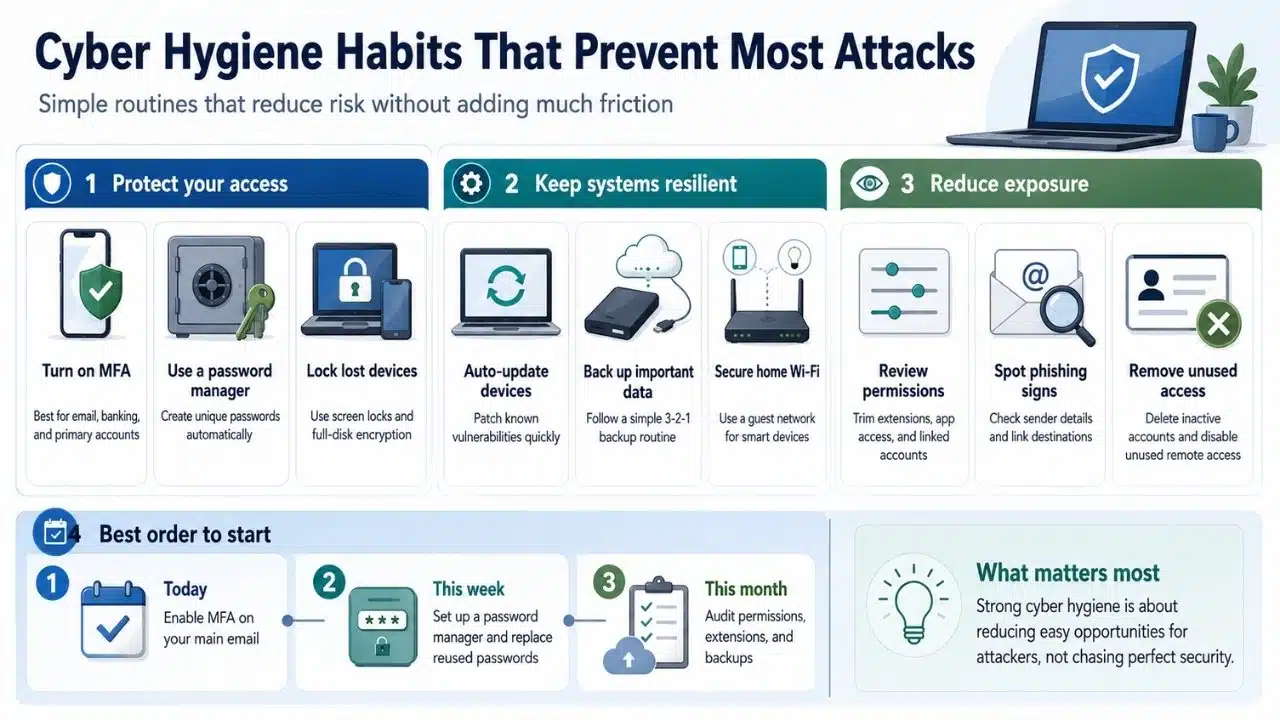
1. Enabling Multi-Factor Authentication Everywhere
If an attacker steals your password through a data breach, multi-factor authentication (MFA) is often the only barrier stopping them from taking over your account.
Passkeys and authenticator apps are significantly safer than SMS-based codes. Text messages are vulnerable to SIM swapping, where an attacker tricks a mobile carrier into transferring your phone number to a new device. Whenever possible, set up hardware keys or authenticator applications like Google Authenticator or 1Password for your email, financial accounts, and primary social platforms.
2. Replacing Password Memory with a Dedicated Password Manager
Human memory is terrible at generating and remembering unique 16-character strings for dozens of online services. As a result, most people reuse three or four variations of the same password.
When a low-tier retail site suffers a database leak, attackers take those exposed email-and-password combinations and run them through automated tools on banking, cloud storage, and email login pages. Using a reputable password manager lets you generate long, complex, unique passwords for every single site while only requiring you to memorize one master passphrase.
3. Automating Software and Firmware Updates
System updates are rarely about new cosmetic features. Most of the time, they contain patches for security vulnerabilities that attackers are actively trying to exploit.
Once a software vendor publishes a security patch, malicious actors immediately analyze the fix to figure out how to target unpatched devices. Delaying updates leaves your operating system, browser, and router exposed to known risks. Enabling automatic updates across all phones, laptops, smart home devices, and web browsers remains one of the most effective cyber hygiene habits you can adopt.
4. Auditing Account and Application Permissions
Smartphone apps and browser extensions frequently request access to your contacts, camera, location data, or browsing history. Over time, these permissions create unnecessary exposure.
A browser extension that was safe last year might be sold to a third party that injects tracking scripts or adware into your web traffic. Set a calendar reminder every few months to review:
-
Installed browser extensions and delete any you no longer use.
-
Smartphone app permissions and revoke location or microphone access for apps that do not need it.
-
Third-party app connections inside your Google, Apple, or Microsoft accounts.
5. Structuring a 3-2-1 Backup Strategy
Ransomware attacks and hardware failures share a common solution: reliable, isolated data backups.
A proper backup routine follows the 3-2-1 rule:
-
Keep 3 copies of your important data (the original plus two backups).
-
Store the copies on 2 different types of media (such as an external hard drive and a cloud server).
-
Keep 1 copy completely offline or off-site.
If your secondary drive is continuously connected to your computer during a ransomware infection, the malware can encrypt the backup drive right alongside your primary drive. Keeping at least one backup disconnected or air-gapped protects your data against network-wide compromises.
6. Segmenting Home and Office Wi-Fi Networks
Internet of Things (IoT) devices like smart TVs, connected security cameras, and smart bulbs rarely receive regular security patches. If an attacker compromises a cheap smart plug, they can use it to jump across your local network to target your work laptop.
Most modern Wi-Fi routers allow you to create a secondary guest network. Placing all smart appliances, gaming consoles, and guest devices on a isolated guest network keeps your primary phones, laptops, and network-attached storage isolated from potential IoT vulnerabilities.
7. Verifying Sender Headers and Link Destinations
Phishing emails have evolved beyond obvious typos and broken English. Modern social engineering relies on urgent phrasing, spoofed domain names, and realistic brand templates.
Before clicking a link in an email or message, develop the habit of hovering over the link destination or checking the full sender address. An email claiming to come from your bank that originates from a subtle typo domain or a generic webmail address is an immediate red flag. When in doubt, navigate to the service directly through your browser rather than clicking a link in a notification.
8. Securing or Disabling Unused Remote Access Ports
Remote Desktop Protocol (RDP) and SSH access allow you to control devices from afar, but exposed remote ports are constantly targeted by automated scanning bots trying to brute-force weak credentials.
If you do not explicitly need remote access turned on, disable it. If you require remote access to a home server or office machine, route the connection through an encrypted Virtual Private Network (VPN) or identity-aware proxy rather than exposing open ports directly to the public internet.
9. Pruning Inactive Accounts and Digital Footprints
Old accounts on sites you used once five years ago remain liability points. If those services suffer a breach, your personal details, old passwords, or security answers can end up in dark web databases.
Whenever you stop using a service, delete your account entirely rather than simply deleting the app from your phone. Minimizing your digital footprint reduces the amount of personal information available for attackers to assemble into convincing phishing attempts.
10. Enabling Full-Disk Encryption and Screen Locks
Physical security is a core pillar of digital defense. If a laptop or smartphone is lost or stolen, an unencrypted drive allows anyone with basic technical tools to extract photos, saved session cookies, and documents directly from the storage chip.
Ensure that full-disk encryption (such as BitLocker on Windows or FileVault on macOS) is turned on, and set short screen-lock timeouts on mobile devices. Biometrics or long passcodes prevent unauthorized physical access if your device is accidentally left behind in a cafe or taxi.
What Most Cybersecurity Lists Get Wrong
Many security guides bombard readers with long checklists that demand complete technical perfection on day one. This approach usually leads to security fatigue, where users give up because maintaining dozens of complex protocols feels overwhelming.
In reality, digital security is about lowering probability, not achieving absolute invulnerability. You do not need to implement all ten strategies overnight. Pick two foundational cyber hygiene habits first: setting up a password manager and enabling multi-factor authentication on your primary email address. Once those are routine, layer on additional protections over time.
What to Try First
If you want to upgrade your security posture step by step, focus on high-impact changes before tackling advanced configurations:
| Phase | Priority Action | Primary Security Benefit |
| Immediate (Day 1) | Enable MFA on email and primary financial accounts. | Blocks unauthorized access even if a password is exposed. |
| Short-Term (Week 1) | Install a password manager and replace reused passwords. | Prevents credential stuffing attacks across multiple sites. |
| Ongoing (Monthly) | Audit browser extensions and active account permissions. | Reduces background data tracking and attack surfaces. |
Final Thoughts on Cyber Hygiene Habits
Maintaining strong cyber hygiene habits is not about living in fear of tech or micro-managing every click. It is about establishing basic, repeatable standards that make your accounts an unattractive target for automated cybercrime. By automating software updates, securing your core credentials, and pruning unnecessary digital access, you create a resilient defense that lets you use technology with confidence.
Frequently Asked Questions (FAQs) About Cyber Hygiene Habits
Yes. While SMS codes are vulnerable to SIM swapping, using SMS MFA is still drastically safer than relying solely on a password. Treat SMS as a helpful minimum standard, but upgrade to an authenticator app or hardware key whenever a platform supports it.
How often should I change my passwords?
Periodic forced password resets (such as changing passwords every 90 days) are no longer recommended by major security organizations like NIST. Frequent forced changes often lead to predictable variations like adding a number at the end. Instead, create long, unique passwords with a password manager, and only change a password if you suspect a service has been breached.
Are free Wi-Fi networks in public places inherently dangerous?
Public Wi-Fi networks present risks if you send unencrypted traffic over them, but modern web standards (HTTPS) encrypt most browsing automatically. For complete protection on untrusted networks, connect to a reputable VPN to encrypt all traffic passing through the public access point.
























