

A website can look polished, load content, publish regularly, and still quietly sabotage itself. That is the unpleasant magic of technical SEO: the worst problems often happen where the editor, marketer, or business owner cannot see them.
Broken redirects, blocked pages, crawl waste, duplicate templates, JavaScript rendering issues, thin metadata, slow page templates, and indexation gaps can sit under the surface for months. The right technical SEO audit tools do not “do SEO” for you, but they help you find the invisible leaks before traffic starts disappearing and everyone suddenly becomes a detective.
Our Selection Criteria
We selected these tools based on how useful they are for real technical SEO audits, not just whether they produce a shiny health score.
| Criteria | What We Looked For |
|---|---|
| Crawl depth | Can the tool crawl pages, links, redirects, canonicals, metadata, status codes, and indexability signals? |
| Technical issue detection | Does it flag meaningful SEO problems rather than generic “optimize your page” advice? |
| Rendering and performance | Does it help with JavaScript, Core Web Vitals, speed, or page experience? |
| Search engine data | Does it connect audit findings to Google, Bing, crawl, index, or log data? |
| Reporting quality | Can teams explain findings clearly to developers, clients, or stakeholders? |
| Best-fit use case | We included beginner, agency, enterprise, and specialist options instead of ranking only expensive platforms. |
The 13 Best Technical SEO Audit Tools Worth Using in 2026
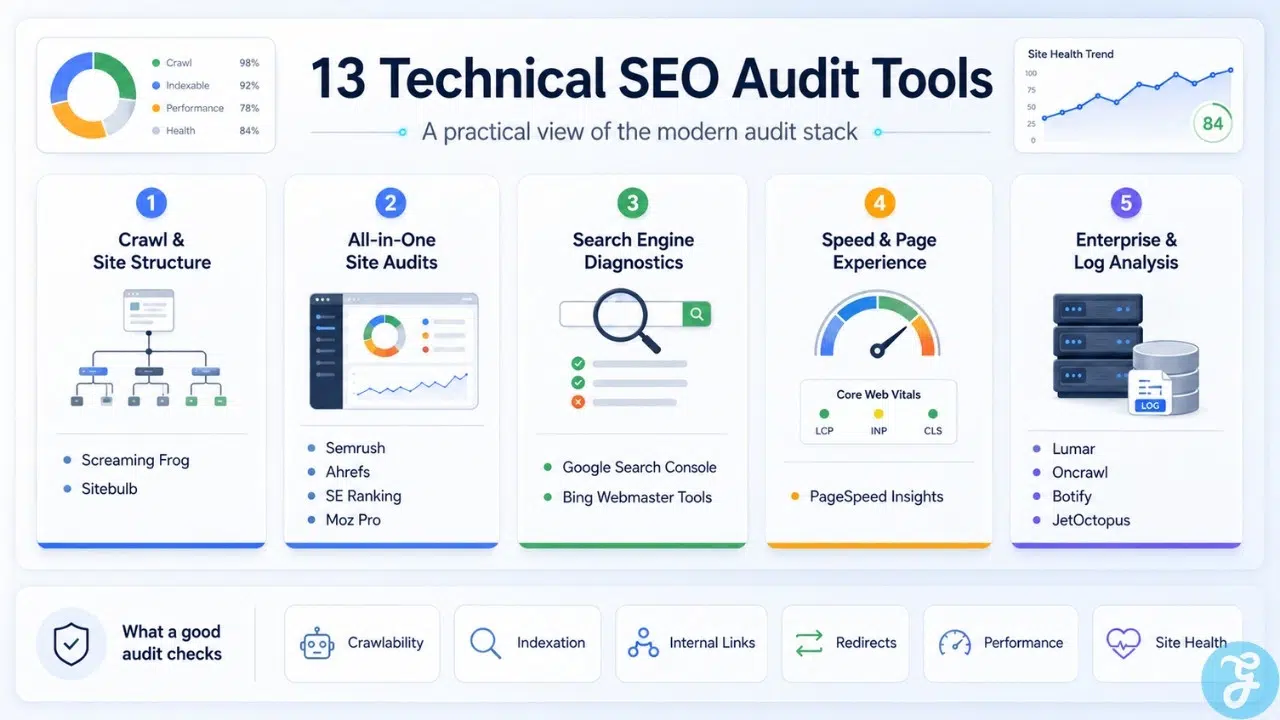
These technical SEO audit tools cover different needs: desktop crawling, cloud crawling, enterprise log analysis, all-in-one SEO suites, and free search engine diagnostics.
1. Screaming Frog SEO Spider
Screaming Frog SEO Spider is still one of the most reliable choices for hands-on technical SEO work. It crawls websites to uncover common SEO issues, and the official product page says it audits more than 300 issues while offering a free crawl limit of 500 URLs.
It is especially useful when you need raw crawl data, not just a simplified dashboard. Technical SEOs use it for broken links, redirect chains, canonicals, metadata, indexability checks, XML sitemaps, JavaScript rendering, and custom extraction.
Best Feature/For:
- Best for deep manual technical audits
- Great for agencies, consultants, and experienced SEOs
Why We Chose It:
- Gives granular crawl data instead of hiding everything behind a health score
- Works well for diagnosing redirects, metadata, internal linking, canonicals, and indexability
- Flexible enough for small sites, staging checks, migrations, and advanced audits
Things to consider:
- The interface can feel technical for beginners
- Very large sites may require careful crawl configuration
2. Sitebulb
Sitebulb is a strong choice for SEOs who want technical depth with clearer visual reporting. Its feature page says it provides visuals, prioritized recommendations, and checks across 300+ SEO issues, with crawl capacity up to 500,000 URLs per audit.
Where Screaming Frog feels like a powerful spreadsheet for technical SEOs, Sitebulb feels more like an audit explanation engine. It is useful when you need to communicate complex crawl issues to clients, executives, or non-technical teams.
Best Feature/For:
- Best for visual technical SEO reporting
- Great for agencies and in-house teams that need client-ready explanations
Why We Chose It:
- Strong audit prioritization
- Clear visualizations for architecture, links, and issue patterns
- Good balance between technical depth and readable reporting
Things to consider:
- It may be more than a tiny site owner needs
- Teams that love raw exports may still prefer pairing it with Screaming Frog
3. Semrush Site Audit
Semrush Site Audit is a practical option for marketers who want technical SEO auditing inside a broader SEO platform. Semrush says its Site Audit scans for more than 140 technical site health and SEO mistakes and groups findings by severity.
Its biggest advantage is convenience. If your team already uses Semrush for keyword research, competitor analysis, rank tracking, and content planning, the Site Audit tool keeps technical monitoring in the same workflow.
Best Feature/For:
- Best all-in-one SEO suite with technical auditing
- Good for marketing teams managing SEO beyond technical fixes
Why We Chose It:
- Combines technical audit data with wider SEO campaign data
- Helps prioritize errors, warnings, and notices
- Useful for recurring site health checks and client reporting
Things to consider:
- It is not as flexible as a specialist crawler for advanced custom audits
- Best value comes when you use Semrush beyond just Site Audit
4. Ahrefs Site Audit
Ahrefs Site Audit is a strong option for teams that already rely on Ahrefs for backlink, keyword, and competitor research. Ahrefs says its Site Audit scans websites for 170+ technical and on-page SEO issues.
The tool works well for identifying common site health problems while connecting those issues to Ahrefs’ broader SEO data. It is not only for technical specialists; content and growth teams can also use it to understand which technical problems may be holding back important pages.
Best Feature/For:
- Best for teams already using Ahrefs
- Useful for combining technical audits with backlink and competitive analysis
Why We Chose It:
- Clear issue reporting
- Strong fit for SEO teams that need both technical and competitive insight
- Good for recurring health monitoring across important site sections
Things to consider:
- Not the most specialized crawler for complex enterprise audits
- Works best as part of the wider Ahrefs platform
5. Google Search Console
Google Search Console is not optional. It is the closest thing SEOs get to direct Google-side diagnostic data, and Google says it helps site owners understand Search traffic, performance, crawl, indexing, and serving.
A crawler can tell you what it found. Search Console can tell you how Google is interpreting parts of your site. That makes it essential for checking indexing problems, Core Web Vitals groups, sitemap submissions, manual actions, page experience signals, and query-level performance.
Best Feature/For:
- Best free Google-side SEO diagnostic tool
- Essential for every website owner, SEO, publisher, and developer
Why We Chose It:
- Shows indexing and performance data directly from Google
- Useful for validating crawl findings from other tools
- Helps diagnose whether pages are discovered, indexed, excluded, or underperforming
Things to consider:
- It does not replace a crawler
- Some reports are sampled, delayed, or grouped in ways that require interpretation
6. Google PageSpeed Insights
PageSpeed Insights is one of the most useful free tools for diagnosing page performance and Core Web Vitals. Google describes PageSpeed Insights as a tool to make web pages fast on all devices, while its documentation explains that Core Web Vitals include INP, LCP, and CLS.
It is best used for template-level investigation. Run it on your homepage, article pages, category pages, product pages, landing pages, and other important templates to see what is slowing real users down.
Best Feature/For:
- Best free tool for page-speed and Core Web Vitals checks
- Great for developers, SEOs, publishers, and ecommerce teams
Why We Chose It:
- Combines performance diagnostics with practical improvement suggestions
- Helps identify slow templates, layout shift, script delays, and loading problems
- Useful when paired with Search Console’s Core Web Vitals report
Things to consider:
- It audits individual URLs, not your whole site at once
- Scores can vary, so focus on patterns and diagnostics rather than vanity numbers
7. Lumars
Lumar is built for large-scale technical SEO and website health monitoring. Its official site says it can audit millions of pages, uncover technical SEO, accessibility, site speed, and GEO/AEO insights, and provide 250+ built-in reports.
This is not a casual blogger’s first audit tool. It is more suitable for enterprise websites, large publishers, ecommerce platforms, SaaS sites, and teams that need scalable crawling, prioritization, and workflow management.
Best Feature/For:
- Best for enterprise-scale technical SEO audits
- Strong fit for large websites and complex teams
Why We Chose It:
- Built for crawling large sites at scale
- Combines technical SEO with accessibility and performance insights
- Useful for teams that need repeatable audit workflows, not one-off checks
Things to consider:
- Overkill for small websites
- Pricing and setup are typically more enterprise-oriented
8. Oncrawl
Oncrawl is a strong technical SEO platform for large and complex websites. Its crawler page says it collects and analyzes thousands of metrics with full JavaScript rendering at scale, while the platform page highlights crawl, log, and performance data without sampling.
The main appeal is data depth. Oncrawl is especially useful when you want to connect crawl behavior, technical structure, log files, ranking signals, and site performance into a more complete SEO diagnosis.
Best Feature/For:
- Best for data-driven technical SEO and log analysis
- Strong for large e-commerce, marketplace, and publishing sites
Why We Chose It:
- Useful for combining crawl and log data
- Handles complex technical SEO investigations
- Good for teams that need segmentation, scale, and deeper crawl intelligence
Things to consider:
- Requires technical SEO maturity to use well
- Smaller teams may not need this level of data complexity
9. Botify
Botify is positioned for enterprise SEO and AI search visibility. Its official site says the platform combines data, intelligence, and action across search, answer engines, AEO, GEO, and SEO.
For technical SEO audits, Botify is most relevant to large sites where crawlability, indexability, internal linking, and search visibility are tied to serious revenue. It is less about “find my missing meta descriptions,” and more about helping large organizations understand how search engines and answer engines access and value their content.
Best Feature/For:
- Best for enterprise SEO visibility and automation
- Useful for major e-commerce, travel, marketplace, and media websites
Why We Chose It:
- Built for scale and strategic SEO operations
- Useful when technical fixes need to connect to revenue and visibility
- Strong fit for organizations dealing with both classic search and AI search discovery
Things to consider:
- Not designed for casual or low-budget SEO users
- Needs process maturity to get full value
10. JetOctopus
JetOctopus is a cloud crawler and log analyzer built for larger websites. Its official site describes it as an SEO website crawler and auditor that provides on-page data for every URL, while also positioning itself around crawl, logs, GSC, and GA4 data in one platform.
Its strength is speed and crawl-log visibility. If your audit needs to answer questions like “What is Googlebot actually hitting?” or “Which pages are wasting crawl budget?” JetOctopus deserves attention.
Best Feature/For:
- Best for log analysis and large-site crawl visibility
- Strong for technical SEOs working with big websites
Why We Chose It:
- Combines crawler and log analysis
- Helpful for diagnosing crawl budget and bot behavior
- Strong fit for large websites with lots of URLs and technical patterns
Things to consider:
- Less necessary for small websites
- Works best when you know what questions to ask from crawl and log data
11. SE Ranking Website Audit
SE Ranking Website Audit is a strong mid-market option for agencies, freelancers, and growing businesses. SE Ranking says its website audit covers health score, page-by-page analysis, Core Web Vitals, technical SEO issues, website speed and security, crawlability and indexability, HTTP status codes, robots meta tags, JavaScript rendering, and more.
It is a good choice when you want a broad SEO platform without jumping straight into the most expensive enterprise stack. The audit tool is practical, readable, and useful for ongoing client or internal monitoring.
Best Feature/For:
- Best value-friendly all-in-one audit platform
- Good for agencies, freelancers, and small-to-mid-sized teams
Why We Chose It:
- Covers a wide range of technical SEO audit areas
- Includes Core Web Vitals, crawlability, redirects, speed, security, and JavaScript checks
- Easier to manage than heavier enterprise platforms
Things to consider:
- Advanced technical SEOs may still want a dedicated crawler
- Data depth may not match enterprise crawl-log platforms
12. Moz Pro Site Crawl
Moz Pro remains a familiar SEO suite for many teams, and recent reviews describe it as including site audits, keyword research, backlink analysis, rank tracking, and page optimization insights.
Its Site Crawl functionality is useful for teams that want technical issue discovery inside a broader SEO toolkit. It is not the most advanced technical audit tool on this list, but it can be a sensible choice for teams that value simplicity, Moz metrics, and a more approachable SEO workflow.
Best Feature/For:
- Best for Moz users who need accessible site audits
- Good for small businesses, marketers, and SEO generalists
Why We Chose It:
- Combines technical checks with familiar Moz SEO data
- Easier to approach than specialist crawlers
- Useful for ongoing site health monitoring
Things to consider:
- Not as deep as Screaming Frog, Sitebulb, Oncrawl, or Lumar for advanced audits
- Best for general SEO workflows rather than heavy technical investigations
13. Bing Webmaster Tools Site Scan
Bing Webmaster Tools Site Scan is an underrated free audit option. Microsoft describes Site Scan as an on-demand site audit tool that crawls your site and checks for common technical SEO issues.
It will not replace a full crawler or enterprise audit platform, but it is useful for cross-checking technical issues from another search engine’s perspective. It is especially worth using if you care about Bing visibility, Microsoft Copilot surfaces, or simply want one more free diagnostic layer.
Best Feature/For:
- Best free Bing-side technical SEO scan
- Useful for site owners, beginners, and technical SEO cross-checks
Why We Chose It:
- Free and directly connected to Bing Webmaster Tools
- Helps identify common technical SEO problems
- Useful as a second opinion alongside Google Search Console
Things to consider:
- Not a replacement for a professional crawler
- Best used as a supporting diagnostic tool
A Quick Overview
Overview Comparison
| Tool | Best For | Main Strength | Best Fit |
|---|---|---|---|
| Screaming Frog | Deep manual audits | Raw crawl control | Technical SEOs, agencies |
| Sitebulb | Visual audit reporting | Prioritized insights | Agencies, in-house teams |
| Semrush Site Audit | All-in-one SEO audits | Campaign-level SEO context | Marketing teams |
| Ahrefs Site Audit | SEO suites with backlink context | Technical + competitive analysis | Growth teams |
| Google Search Console | Google-side diagnostics | Indexing and performance data | Everyone |
| PageSpeed Insights | Speed and Core Web Vitals | URL-level performance diagnosis | SEOs, developers |
| Lumars | Enterprise audits | Massive-scale crawling | Large organizations |
| Oncrawl | Data-driven technical SEO | Crawl + log + performance analysis | Large sites |
| Botify | Enterprise search visibility | Automation and AI/search visibility | Enterprise SEO teams |
| JetOctopus | Log and crawl analysis | Bot behavior insights | Large technical sites |
| SE Ranking | Affordable broad audits | Site health and technical checks | Agencies, SMBs |
| Moz Pro | Accessible SEO audits | General SEO suite simplicity | SEO generalists |
| Bing Webmaster Tools | Free Bing diagnostics | On-demand site scan | Beginners, site owners |
How to Choose the Right Technical SEO Audit Tool
Do not choose a technical SEO audit tool just because a famous SEO uses it. Choose based on your site size, team skill, reporting needs, and how technical your problems actually are.
For small websites, start with Google Search Console, PageSpeed Insights, Bing Webmaster Tools, and either Screaming Frog or SE Ranking. For agencies, Screaming Frog plus Sitebulb or Semrush gives a strong mix of depth and reporting. For enterprise websites, Lumar, Oncrawl, Botify, or JetOctopus become more relevant because crawl scale, log analysis, and workflow management matter much more.
A sensible selection framework:
- Pick Google Search Console for Google indexing and performance truth.
- Pick Screaming Frog or Sitebulb for detailed crawl-based audits.
- Pick Semrush, Ahrefs, SE Ranking, or Moz Pro if you want technical auditing inside a broader SEO platform.
- Pick Lumar, Oncrawl, Botify, or JetOctopus if crawl scale, log files, and enterprise workflows are your real problem.
Final Checklist Before You Choose
Before paying for any technical SEO audit tool, ask:
- Does it crawl the number of URLs I actually need?
- Can it check crawlability, indexability, canonicals, redirects, metadata, sitemaps, and internal links?
- Does it help with JavaScript rendering or performance if my site needs that?
- Can I explain its reports to developers, clients, or executives?
- Will I use it every month, or am I buying an expensive dashboard for one panic audit?
The Right Tool Finds the Leak Before the Traffic Drops
The best technical SEO audit tools do not magically fix your website. They show you where the damage is hiding.
For most teams, the strongest setup is not one tool but a stack: Search Console for Google-side reality, PageSpeed Insights for performance, Screaming Frog or Sitebulb for crawl depth, and a suite like Semrush, Ahrefs, or SE Ranking for ongoing monitoring. Larger websites need more serious machinery: Lumar, Oncrawl, Botify, or JetOctopus.
The real mistake is not choosing the “wrong” tool. The real mistake is waiting until traffic falls before checking whether search engines can crawl, render, understand, and index your site properly.
Frequently Asked Questions (FAQs) on Technical SEO Audit Tools
What is the best technical SEO audit tool overall?
Screaming Frog is one of the best overall choices for technical SEO specialists because it gives deep crawl control and detailed page-level data. For teams that need easier reporting, Sitebulb may be the better fit.
Can I do a technical SEO audit for free?
Yes. You can start with Google Search Console, PageSpeed Insights, Bing Webmaster Tools Site Scan, and Screaming Frog’s free crawl limit. That is enough for a basic audit, though larger or more complex sites usually need paid tools.
Which tool is best for Core Web Vitals?
PageSpeed Insights is the easiest free tool for checking individual URLs, while Google Search Console helps identify affected URL groups. Larger teams may also use crawlers or platforms that integrate performance data into broader audits.
Which technical SEO audit tool is best for agencies?
Screaming Frog, Sitebulb, Semrush, Ahrefs, and SE Ranking are all strong agency options. Screaming Frog and Sitebulb are better for technical depth, while Semrush and SE Ranking are better for broader client reporting.
Do I need an enterprise SEO audit tool?
Only if your website is large, technically complex, or business-critical enough to justify it. Enterprise platforms like Lumar, Oncrawl, Botify, and JetOctopus make sense when crawl scale, log analysis, automation, and cross-team workflows matter.
























