


Is solid content failing to stop sudden traffic drops? A technical SEO audit checklist often uncovers the hidden reasons faster than endless edits. Today, success requires clean crawlability, strong indexation, and flawless rendering for both search engines and modern crawlers.
Beyond basic error fixes, a modern strategy demands healthy Core Web Vitals, precise structured data, and pages optimized for AI overviews. Instead of guessing why rankings stalled, systematically evaluating the site reveals exactly what matters most.
By following a clear, prioritized approach, it becomes easy to spot critical bottlenecks and resolve urgent issues first. Mastering these backend elements guarantees the website performs efficiently, ensuring that great content always reaches the intended audience without any hidden technical friction blocking the path.
Why Technical SEO Is Critical in 2026

Technical SEO matters because search visibility still depends on whether search engines can discover, render, understand, and index your pages. If that chain breaks at any step, rankings usually stall no matter how good the copy is.
Google’s current guidance for AI features makes this even clearer. AI Overviews and AI Mode do not require special markup or a separate AI file, but the page still needs to meet Google Search technical requirements, stay indexable, and remain eligible to show a snippet.
That is why a good website audit in 2026 does two jobs at once. It protects classic search performance, and it makes your site easier for AI systems to quote, summarize, and route traffic back to.
- Crawlability comes first: Google still discovers many URLs through internal links and sitemaps, so weak site architecture slows everything down.
- Indexation decides visibility: A page that is blocked, duplicated, or canonically confused will struggle to appear, even if it is useful.
- Core Web Vitals shape experience: Slow LCP and poor interaction to next paint (INP) make pages feel broken to users and harder to trust.
- Bot governance now matters: You need clear rules for Googlebot, Google-Extended, and AI crawlers without blocking resources your pages need to render.
One detail many competitor guides skip is the difference between search access and AI training controls. Google states that Google-Extended is a control token in robots.txt, not a separate crawler, and blocking it does not remove your pages from Google Search. That makes it a policy choice, not a ranking lever.
OpenAI’s help docs make a similar practical point for ChatGPT visibility: if you want inclusion in ChatGPT Search, OAI-SearchBot must be allowed in robots.txt, and your host or CDN must also allow its traffic. In other words, bot governance now reaches beyond a single search engine.
Crawlability and Indexing
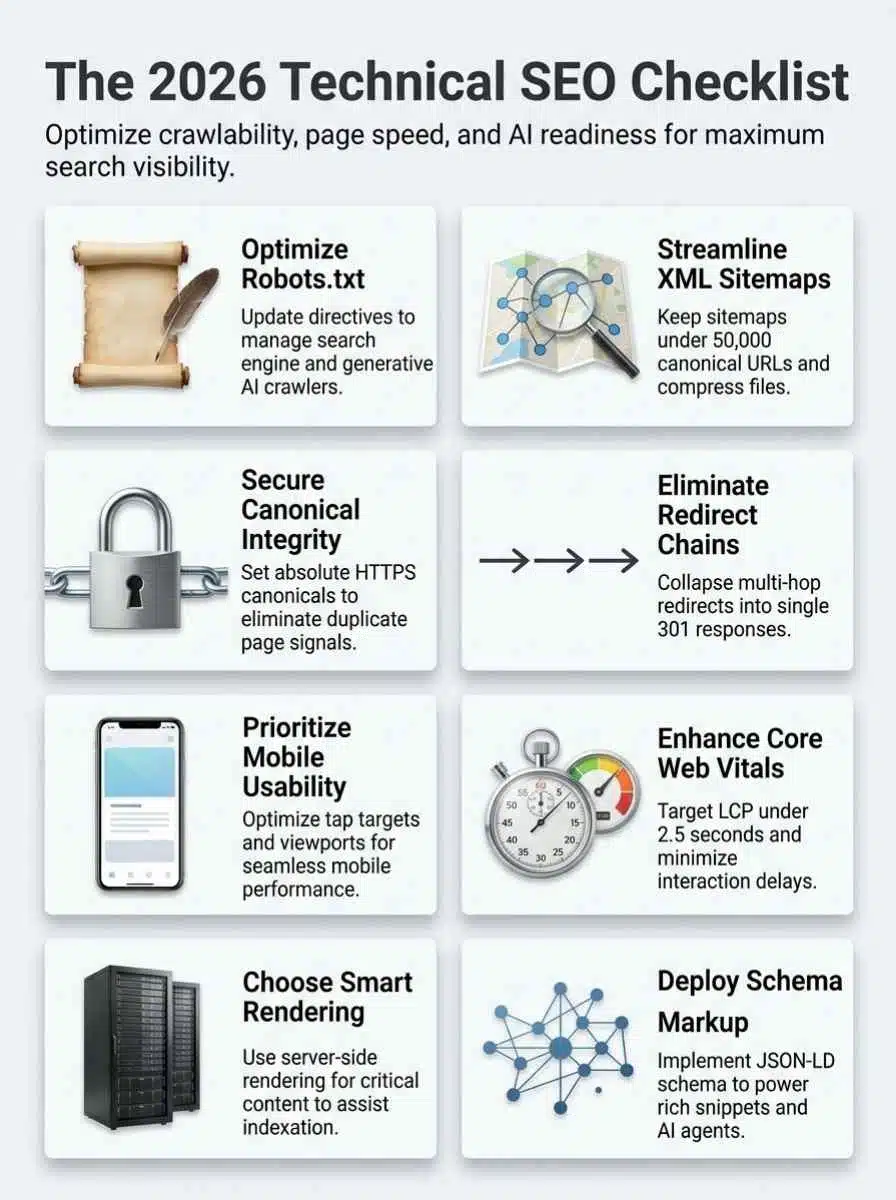
If I had to start a technical SEO audit in one place, I would start here. Crawlability and indexation problems waste time because they hide in plain sight, and they can make healthy pages look weak.
Use Google Search Console first, then confirm what a crawler sees. Search Console shows what Google indexed, while a crawl tool shows what your site is actually serving, linking, blocking, and canonicalizing.
Robots.txt Optimization
Your robots.txt file should be short, clear, and intentional. It is a crawl control file, not an index control file.
In Google’s current documentation, robots.txt is usually cached for up to 24 hours. That means a bad rule can linger for a full day, which is why even a tiny edit deserves a staging check before you publish it.
- Keep the file lean: Google enforces a 500 KiB size limit for robots.txt. If your file has become a dumping ground for years of old rules, clean it up before the important lines get buried.
- Do not block CSS or JavaScript that powers visible content: Google needs access to key resources to render pages properly, especially on JavaScript-heavy templates.
- Use robots.txt for crawling, not deindexing: If you need a page out of search, use a noindex directive and allow Googlebot to crawl the URL. Blocking it in robots.txt can still leave the URL visible in results without a useful snippet.
- List your XML sitemaps in the file: This is a fast discovery hint for important URLs and helps new templates get picked up more cleanly.
- Do not rely on crawl-delay for Google: Google does not support that directive, so server tuning and rate management need to happen elsewhere.
- Separate policy from fear: Blocking Google-Extended is about controlling some AI uses of content. It does not improve rankings, and it does not replace good crawl management.
A practical rule: if a robots.txt edit touches CSS, JavaScript, faceted URLs, or AI crawler access, test one live template in Search Console’s URL Inspection tool before you roll it sitewide.
XML Sitemaps Best Practices
XML sitemaps do not fix weak internal linking, but they do help search engines discover your best URLs faster. They are especially useful after migrations, large content launches, and template changes.
Google’s sitemap documentation still sets the same hard limits: one sitemap can contain up to 50,000 URLs or be 50 MB uncompressed. If you exceed either limit, split the file and use a sitemap index.
- Include canonical URLs only: Do not feed Google parameter pages, session URLs, search results, or duplicate variants.
- Use absolute URLs: Google recommends fully qualified URLs in sitemaps, which reduces ambiguity on multi-subdomain or mixed-protocol setups.
- Update lastmod only when the page truly changes: Fake freshness signals make sitemap data less trustworthy.
- Place sitemaps where they help the whole site: A sitemap at the root can cover the whole property more cleanly than one buried in a subfolder.
- Keep thin and private pages out: If a page is not meant to rank, it should not compete for crawl budget in your sitemap.
Google also notes that most sites do not need heavy crawl budget work. If your site is not very large and new pages are getting crawled the same day they go live, staying disciplined with sitemaps and index coverage is usually enough.
| Sitemap habit | Why it helps |
|---|---|
| Canonical URLs only | Reduces duplicate discovery and keeps crawl budget focused on rankable pages. |
| Real lastmod dates | Helps search engines prioritize pages that actually changed. |
| Split large files | Makes sitemap processing cleaner and easier to debug in Search Console. |
| Exclude noindex and private pages | Prevents mixed signals between indexation rules and submitted URLs. |
Managing Canonical Tags
Canonicals are one of the easiest places to create index confusion. They look simple, but a few wrong assumptions can split signals across duplicates, soft variants, and redirect targets.
- Use one clear canonical per page: Keep it absolute, HTTPS, and aligned with the preferred live URL.
- Reinforce the choice: Your internal links, sitemap entries, and canonicals should all point to the same preferred URL whenever possible.
- Use HTTP header canonicals for non-HTML files: Google supports canonical signals in response headers for assets like PDFs.
- Avoid conflicting hints: If a page points canonically to URL A but redirects to URL B, you are asking crawlers to solve a puzzle they did not need.
- Do not decorate canonicals with extra intent: Google says rel canonical annotations with hreflang, lang, media, or type attributes are ignored for canonicalization.
A quick pro tip: if a page is excluded in Search Console because of a duplicate or alternate canonical, compare four things in one pass, the internal links, the sitemap entry, the rendered canonical tag, and the final resolved URL after redirects. One mismatch is often the whole problem.
Site Architecture and Internal Linking
Clean site architecture helps both users and bots move through your content without friction. It also gives your most important pages a better chance to collect authority, stay discoverable, and rank consistently.
Structuring for Search and Users
Google explains that new pages are often discovered when a known page links to them. That is why category hubs, service hubs, and resource pages matter so much in technical SEO. They are not just navigation, they are discovery engines.
A flat, logical structure usually wins. Important pages should be reachable in a few clicks, grouped into plain-language categories, and supported by descriptive anchor text.
- Build strong hub pages: Category and service pages should link down to the pages you want crawled and ranked first.
- Use real crawlable links: Google can generally crawl links only when they are standard anchor elements with an href attribute. Menu items powered only by script events are still risky.
- Keep URLs sensible: Google recommends human-readable URL structure, and it does not generally support fragments to change page content.
- Add breadcrumbs with intent: Google’s breadcrumb guidance recommends a path that reflects how users actually navigate, not just how the URL is written.
This is where internal linking earns its keep. A smart internal linking pattern improves crawl efficiency, distributes authority, and makes orphaned pages much easier to spot during an SEO audit.
Fixing Redirect Chains and Loops
Redirect chains look harmless until you map them. Then you see how much crawl budget, latency, and canonical clarity they quietly waste.
Fix these early in any website audit, especially after a redesign, CMS migration, or large content prune.
- Export every redirect path: Use Screaming Frog SEO Spider or a similar crawler to see the full route, not just the first hop.
- Collapse chains into one 301: A single clean redirect is easier for users, browsers, and crawlers.
- Kill loops at the rule level: Most loops come from conflicting CMS, server, or plugin logic.
- Update internal links after redirect work: If your menus and breadcrumbs still point to old URLs, you are preserving the problem.
- Recheck canonicals and hreflang after cleanup: Redirect changes often create a second round of canonical errors if nobody reviews the templates.
One of the easiest wins here is to fix legacy HTTP to HTTPS hops that still appear inside templates, image references, or hardcoded internal links. Those extra requests add delay and send mixed signals about the preferred URL.
Mobile-First Optimization
Mobile-first optimization is no longer a side task. Google uses the mobile version of your content, crawled with its smartphone agent, for indexing and ranking.
If your mobile pages are thinner, slower, or more restricted than desktop pages, your organic traffic can slip even when the desktop experience looks fine.
Ensuring Mobile Usability
Google recommends responsive web design because it is usually the simplest setup to maintain. One URL and one HTML foundation removes a lot of SEO headaches before they start.
Start your mobile checks with usability, then move into rendering and speed.
- Check parity first: Keep the main content, headings, metadata, and structured data consistent across desktop and mobile.
- Fix tap targets and text sizing: Tiny buttons and cramped menus create friction that users feel immediately.
- Audit mobile resources: If the mobile version blocks images, CSS, or scripts that desktop allows, Google may misread the page.
- Test real devices: Lab tools are useful, but they do not replace a quick check on current iPhone and Android screens.
- Watch media handling: Keep alt text, image quality, and video placement consistent so mobile pages do not become weaker versions of desktop pages.
If your mobile page hides meaningful content behind a click, swipe, or other interaction, Google may not load it. That is one of the most common mobile-first indexing mistakes I still see.
Addressing Mobile-Only Indexing Issues
When a site serves different HTML on mobile, problems get more technical fast. Google warns that different robots meta tags on the mobile version, especially noindex or nofollow, can stop crawling and indexing when mobile-first indexing is active.
That makes parity checks non-negotiable on dynamic serving and separate mobile URLs.
- Compare rendered HTML: Use URL Inspection and browser dev tools to see what mobile crawlers actually receive.
- Match structured data: Breadcrumb, Product, and VideoObject markup should appear on both versions if the content exists on both.
- Keep the same primary content: A shorter mobile page can mean weaker understanding and weaker rankings.
- Review lazy loading: Content that appears only after user interaction is still a common indexation trap.
- Normalize metadata: Title tags, meta descriptions, canonicals, and robots directives should agree across versions.
A simple way to catch hidden problems is to take one high-value page, inspect it as live in Search Console, then compare the rendered mobile DOM with what your browser shows. If the important text, schema markup, or navigation links are missing there, your mobile-first optimization needs work.
Core Web Vitals and Page Experience
Core Web Vitals give you a direct read on how a page feels to real people. They are not the whole ranking story, but they are one of the clearest technical signals that your site is either helping users or getting in their way.
Google’s current thresholds are still the ones to aim for: largest contentful paint (LCP) in 2.5 seconds or less, interaction to next paint (INP) under 200 milliseconds, and CLS under 0.1.
Improving Interaction to Next Paint (INP)
INP measures responsiveness, which means how quickly the page reacts after a user clicks, taps, or types. If a page feels sticky or delayed, INP is usually where the evidence shows up.
PageSpeed Insights is especially useful here because it combines Lighthouse lab data with CrUX field data from the previous 28 days. That combination helps you tell whether the issue is a reproducible code problem, a real-user problem, or both.
- Break up long JavaScript tasks: Heavy main-thread work is still a top INP killer.
- Trim third-party scripts: Tag managers, chat widgets, review apps, and A/B tools often create the lag people notice first.
- Defer noncritical code: Let the page become interactive before loading extras that do not support the first task.
- Profile interactions, not just page load: The slowest click often matters more than the first paint.
- Check field data before celebrating: A page can look good in a lab run and still perform poorly for actual users on slower devices.
A good habit is to tie INP work to user journeys, not generic page speed goals. Measure search, add-to-cart, filter use, navigation open, form submit, and checkout steps. Those are the interactions your readers and customers actually care about.
Enhancing Largest Contentful Paint (LCP)
LCP is about how quickly the main visible content appears. On many business sites, that means the hero image, headline block, or featured product media.
- Prioritize the hero asset: Compress large images, use modern formats, and preload the one asset that truly defines the first view.
- Improve server response time: Slow hosting, bloated middleware, and cache misses often show up in LCP before they show up anywhere else.
- Reduce render-blocking CSS and scripts: Critical styling should arrive early, while nonessential code can wait.
- Watch template bloat: Sliders, video headers, and oversized banners often hurt LCP more than they help conversions.
- Recheck after each fix: Run Lighthouse, PageSpeed Insights, and Search Console together so lab gains also show up in field performance.
Google’s page experience documentation makes an important point here: strong Core Web Vitals are recommended and align with what its ranking systems try to reward, but great scores do not guarantee rankings on their own. That is why you should treat page experience as leverage, not magic.
Rendering and JavaScript SEO
JavaScript SEO is still where many technical audits get real. If content, links, or schema markup appear late, fail to render, or depend on user actions, crawlers may never process the page the way humans do.
Server-Side vs Client-Side Rendering
Google’s JavaScript SEO documentation describes a three-step flow: crawling, rendering, and indexing. The more work a page delays until the browser, the more chances you create for content to show up late or incompletely.
For content-heavy templates, server-side rendering or a hybrid setup usually gives you a safer baseline. For highly interactive apps, client-side rendering can still work, but you need tighter controls around crawlable links, initial HTML, and visible primary content.
| Aspect | Server-Side Rendering (SSR) | Client-Side Rendering (CSR) |
|---|---|---|
| What crawlers see first | Complete or near-complete HTML arrives early. | Initial HTML is often thin and depends on JavaScript execution. |
| Crawlability | Usually stronger for landing pages, articles, product pages, and service pages. | Can be fine, but only if key content and links render reliably. |
| Indexation risk | Lower risk of missing core text, schema markup, and canonicals. | Higher risk when content appears late or behind script failures. |
| Core Web Vitals | Often easier to improve LCP on content pages. | Often harder to protect INP and LCP on script-heavy pages. |
| Best use case | Marketing pages, ecommerce categories, product detail pages, and editorial content. | Dashboards, authenticated tools, and complex app experiences. |
If your content page still relies on CSR, make sure the main copy, heading structure, canonical tag, internal links, and JSON-LD are available in the rendered HTML without requiring clicks or timing luck.
Optimizing JavaScript for Search Engines
This is the checklist I would use on any JavaScript-heavy template before signing off on a technical SEO audit.
- Confirm the important content is text: Google advises keeping important content available in textual form so it can be processed reliably.
- Make links crawlable: Pagination, category links, and related-content modules should use standard anchor links, not button-only interactions.
- Pre-render or SSR critical routes: Marketing pages and revenue pages deserve the safest rendering path.
- Move structured data into the initial rendered output: Do not make schema markup depend on late client events.
- Reduce bundle weight: Code splitting and lazy loading help, but protect the content above the fold first.
- Use URL Inspection after releases: It is one of the fastest ways to compare what Google received against what your team expects.
Google also notes that it generally does not click buttons when crawling pagination or load-more interfaces. If the next page exists only behind a click handler, you are asking Googlebot to behave like a user, and that is still a risky bet.
Structured Data and Schema Markup
Structured data helps search engines understand your page with fewer guesses. Done well, it can support rich snippets, stronger trust signals, and cleaner eligibility for features across search surfaces.
What matters in 2026 is not adding every schema type you can find. It is choosing the types that match your page purpose and keeping the markup aligned with visible content.
Implementing Essential Schema Types
Google’s structured data documentation is very clear on the basics: add markup to the page it describes, keep it visible to users, and follow the feature-specific rules if you want rich result eligibility.
| Schema type | Best fit | Why it matters |
|---|---|---|
| Article | Blog posts, guides, news, resources | Helps Google understand authorship, dates, and content type. |
| Product | Product detail pages | Can surface price, availability, ratings, and other shopping details. |
| BreadcrumbList | Category and content hierarchies | Clarifies page position and supports cleaner navigation signals. |
| Organization | Company and brand pages | Helps search systems confirm core business information. |
| VideoObject | Pages with embedded video | Improves understanding of video content and supporting media data. |
For ecommerce, Google says the strongest setup is often both Product structured data on the page and a Merchant Center feed. That combination gives Google more ways to verify price, availability, and policy data.
One easy mistake to avoid: if you run a local business, do not expect self-hosted review stars on your own Organization or LocalBusiness pages to qualify automatically. Google’s review snippet guidelines say self-serving reviews on those pages are ineligible for the star review feature.
Preventing Schema Drift
Schema drift happens when templates change, copy changes, or product data updates, but the JSON-LD does not. It is common, and it quietly kills rich result eligibility.
- Audit markup after every template release: A redesign can break schema even when the page still looks fine.
- Match visible text exactly: Prices, availability, author names, dates, and FAQ answers should agree with what users see.
- Validate with purpose: Use Rich Results Test for feature eligibility and Schema Markup Validator for syntax and structure.
- Prioritize business-ready types: Most businesses will get more value from Product, Article, Breadcrumb, Organization, and VideoObject than from exotic schema experiments.
- Be realistic about FAQ markup: Google’s current FAQPage guidance limits rich result eligibility to well-known government and health sites, so most business sites should not treat FAQ schema as a traffic shortcut.
A useful benchmark from Google’s own structured data case studies: Rotten Tomatoes reported a 25 percent higher click-through rate on pages enhanced with structured data. That does not mean every site will see the same lift, but it is a good reminder that schema markup can affect business impact when the page type and markup are a strong match.
Tools for Technical SEO Audits

You do not need a giant stack to run a useful SEO audit. You need a small set of tools that answer different questions clearly.
Google Search Console and Screaming Frog
If you can use only two tools for a technical SEO audit, I would start here. Search Console tells you what Google is experiencing, and Screaming Frog shows what your site structure is creating.
| Tool | Best for | What to check first |
|---|---|---|
| Google Search Console | Indexation, crawl errors, performance, page experience, and structured data reports | Page Indexing, Core Web Vitals, URL Inspection, sitemap status, and performance trends |
| Screaming Frog SEO Spider | Full crawl diagnostics across links, canonicals, redirects, metadata, status codes, and rendered pages | Redirect chains, broken links, canonical mismatches, noindex pages, render checks, and orphaned URLs |
| How to use them together | Prioritize fixes by combining Google’s evidence with your crawl data | Match excluded pages in Search Console with the exact technical cause found in the crawl |
Google says Search Console will email you when it finds new issues, and it recommends checking in roughly once a month or after major site changes. That is a practical rhythm for most businesses, and it keeps small problems from turning into quarter-long traffic losses.
Screaming Frog’s own guide still makes the free version useful for smaller sites because it can crawl up to 500 URLs. That is often enough to audit a blog, a lean service site, or a new section before you pay for anything.
Other Recommended Tools
Once the basics are covered, add tools based on the job in front of you.
- PageSpeed Insights: Best for combining Lighthouse lab diagnostics with CrUX field data from the last 28 days.
- Ahrefs Site Audit: Useful for ongoing monitoring, internal linking suggestions, and issue prioritization. Ahrefs says its audit checks more than 170 issues and its free access tier covers up to 5,000 pages per month.
- Rich Results Test: Ideal for checking whether your structured data is eligible for Google-supported rich results.
- Schema Markup Validator: Good for raw schema structure when you need a second opinion beyond feature eligibility.
- Playwright or Puppeteer: Helpful when you need to reproduce rendering bugs, script failures, or device-specific JavaScript issues.
- Log analysis tools: Best for larger sites where crawl budget, bot behavior, and wasted server requests are real business problems.
A simple tool rule I like is this: use Search Console to find the page, a crawler to find the pattern, and a speed or render tool to find the cause. That sequence keeps your audit focused and saves a lot of wandering.
Final Thoughts
You do not need to fix every technical SEO issue today. You do need to fix the ones that block crawlability, indexation, rendering, and Core Web Vitals on your most valuable pages.
Start with one page type, a product page, service page, or top blog post. Check robots.txt, XML sitemaps, canonicals, internal linking, mobile-first optimization, structured data, and page speed in the same session.
That one focused website audit can uncover the problems holding back rankings, search visibility, and organic traffic. Run the checklist, document the fixes, and let your technical SEO work compound from there.
Frequently Asked Questions (FAQs) About the Technical SEO Audit Checklist
1. What is The Complete Technical SEO Audit Checklist for 2026?
It is a step-by-step list to check a site’s technical SEO health in 2026. It covers crawlability, indexing, site speed, mobile-first setup, core web vitals, and structured data. Think of it like a health check for your site.
2. What key areas should I check during a technical SEO audit?
Start with crawlability and indexing, check the crawl file and the site map file, review canonical links and redirects. Test page speed and core web vitals, check mobile-first layout and server responses, and watch JS rendering. Also scan for duplicate content, broken links, internal linking, and structured data, leave no stone unturned.
3. How often should I run the technical SEO audit checklist?
Run it quarterly, and always after big site updates or platform changes.
4. Who should perform the audit and what tools help?
A mix of SEOs, software developers, and site owners works best, with human oversight to review findings. Use crawl tools, log file analysis, page speed tools, structured data testers, and index coverage reports to spot gaps.
























